Driver's supplemental air bag (P.1-10)Cruise control
set switch
(P.5-17)
Outside mirror remote control
(P.3-15) Headlight/dimmer/turn signal switch (P.2-17)
Front fog light switch (P.2-20)Meter/gauge (P.2-3)
Windshield
and rear
window wiper/
washer
switch
(P.2-16)Hazard warning flasher switch (P.2-21)
Center ventilator (P.4-2)
Heater/air conditioner control (P.4-3)Compass/outside air temperature display (P.2-6)
Passenger supplemental air bag (P.1-10)
Side ventilator (P.4-2)
Glove box (P.2-26)
Cigarette lighter (P.2-23)
Radio/CD player (P.4-19)/clock (P.4-15)
Glass hatch/outside mirror
defogger switch (P.2-17)
Ignition switch/steering lock (P.5-6)Heated seat switch (P.2-22)
Tilting steering wheel adjust lever (P.3-13)Hood release handle (P.3-9) Fuse box cover (P.8-22)/Tray (P.2-24)Security indicator light (P.2-14) Cruise control main switch (P.5-17)
Instrument brightness control (P.2-18)
SIC1327
See the page indicated in parentheses for operating details.
INSTRUMENT PANEL2-2
Instruments and controls
Z
00.1.17/R50-D/V5
X
again continues the SEEK function. Once the
highest broadcasting station is reached, the
radio continues in the SEEK mode at the
lowest broadcast station.
Push the SEEK/SCAN tuning buttonfor more than 1.5 seconds. SCAN illuminates
in the display window. SCAN tuning begins
from low to high frequencies and stops at each
broadcasting station for five seconds. Pushing
the button again during this five second period
stops SCAN tuning and the radio remains
tuned to that station.
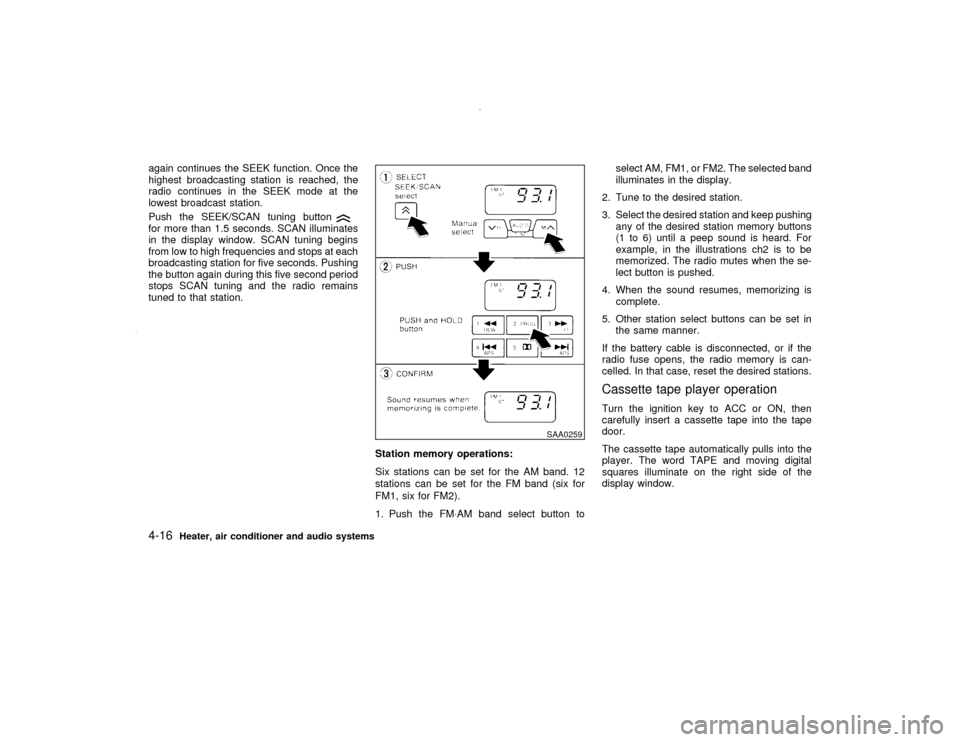
Station memory operations:
Six stations can be set for the AM band. 12
stations can be set for the FM band (six for
FM1, six for FM2).
1. Push the FM×AM band select button toselect AM, FM1, or FM2. The selected band
illuminates in the display.
2. Tune to the desired station.
3. Select the desired station and keep pushing
any of the desired station memory buttons
(1 to 6) until a peep sound is heard. For
example, in the illustrations ch2 is to be
memorized. The radio mutes when the se-
lect button is pushed.
4. When the sound resumes, memorizing is
complete.
5. Other station select buttons can be set in
the same manner.
If the battery cable is disconnected, or if the
radio fuse opens, the radio memory is can-
celled. In that case, reset the desired stations.
Cassette tape player operationTurn the ignition key to ACC or ON, then
carefully insert a cassette tape into the tape
door.
The cassette tape automatically pulls into the
player. The word TAPE and moving digital
squares illuminate on the right side of the
display window.
SAA0259
4-16
Heater, air conditioner and audio systems
Z
00.1.17/R50-D/V5
X
Station memory operations:
Twelve stations can be set for the FM band
(six for FM1, six for FM2).
Six stations can be set for the AM band.
1. Tune to the desired station using the
SEEK/SCAN or TUNE button.
2. Select the desired station and keep pushing
any of the desired station memory buttons
(1 to 6) until a peep sound is heard. (For
example, in the diagram ch2 is to be memo-
rized. The radio mutes when the select
button is pushed.)
3. The indicator ch2 will then come on and the
sound will resume. Memorizing is now com-
plete.
4. Other buttons can be set in the same
manner.
If the battery cable is disconnected, or if the
fuse blows, the radio memory will be can-
celled. In that case, reset the desired stations.Cassette tape player operationTurn the ignition key to ACC or ON, and then
lightly insert the cassette tape into the tape
door. The cassette tape will be automatically
pulled into the player.
The radio or CD will turn off (if it is on) and thecassette tape will begin to play.
CAUTION
Do not force the cassette tape into the
tape door. This could cause player dam-
age.
If the system is turned off by pushing the
ON×OFF/VOL control knob with the cassette
tape still in the player, the tape will resume
playing when the system is turned back on.
Precautions on cassette tape player
operation:
ITo maintain good quality sound,
NISSAN recommends that you use cas-
sette tapes of 60 minutes or shorter in
length.
ICassette tapes should be removed from
the player when not in use. Store cas-
settes in their protective cases and away
from direct sunlight, heat, dust, mois-
ture or magnetic sources.
Direct sunlight can cause the cassette to
become deformed. The use of deformed
cassettes may cause the cassette to jam
in the player.IDo not use cassettes that have peeling
or loose labels. If used, the label could
jam in the player.
IIf a cassette has loose tape, insert a
pencil through one of the cassette hubs
and rewind the tape firmly. Loose tape
may cause jamming and wavering
sound quality.
IOver a period of time, the playback
head, capstan and pinch roller may
gather a tape coating residue as the tape
passes over the head. This residue ac-
cumulation can cause a weak or waver-
ing sound and should be removed peri-
odically with a head cleaning tape.
If the residue is not removed periodi-
cally, the player may need to be disas-
sembled for cleaning.
PLAY:
IWhen the TAPE button is pushed with the
system turned off and a tape loaded, the
system will come on and the tape will play.
IWhen the TAPE button is pushed with
either the radio or compact disc turned on
and the tape loaded, the compact disc or
the radio will automatically be turned off
and the tape will play.
4-22
Heater, air conditioner and audio systems
Z
00.1.17/R50-D/V5
X