2000 NISSAN PATHFINDER headlights
[x] Cancel search: headlightsPage 67 of 265
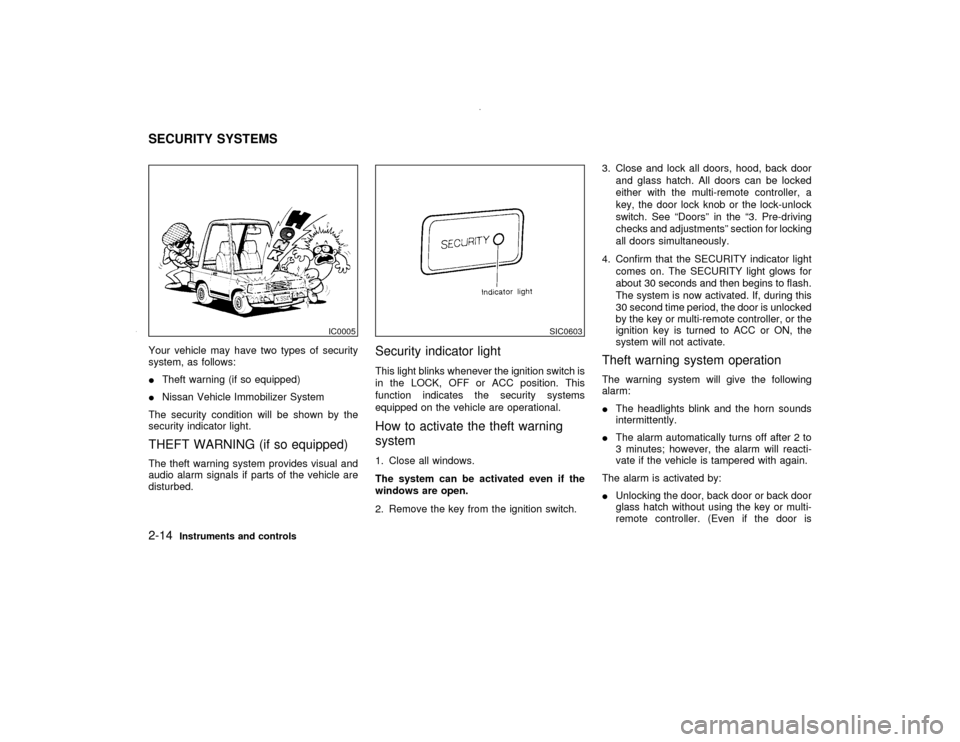
Your vehicle may have two types of security
system, as follows:
ITheft warning (if so equipped)
INissan Vehicle Immobilizer System
The security condition will be shown by the
security indicator light.THEFT WARNING (if so equipped)The theft warning system provides visual and
audio alarm signals if parts of the vehicle are
disturbed.
Security indicator lightThis light blinks whenever the ignition switch is
in the LOCK, OFF or ACC position. This
function indicates the security systems
equipped on the vehicle are operational.How to activate the theft warning
system1. Close all windows.
The system can be activated even if the
windows are open.
2. Remove the key from the ignition switch.3. Close and lock all doors, hood, back door
and glass hatch. All doors can be locked
either with the multi-remote controller, a
key, the door lock knob or the lock-unlock
switch. See ªDoorsº in the ª3. Pre-driving
checks and adjustmentsº section for locking
all doors simultaneously.
4. Confirm that the SECURITY indicator light
comes on. The SECURITY light glows for
about 30 seconds and then begins to flash.
The system is now activated. If, during this
30 second time period, the door is unlocked
by the key or multi-remote controller, or the
ignition key is turned to ACC or ON, the
system will not activate.
Theft warning system operationThe warning system will give the following
alarm:
IThe headlights blink and the horn sounds
intermittently.
IThe alarm automatically turns off after 2 to
3 minutes; however, the alarm will reacti-
vate if the vehicle is tampered with again.
The alarm is activated by:
IUnlocking the door, back door or back door
glass hatch without using the key or multi-
remote controller. (Even if the door is
IC0005
SIC0603
SECURITY SYSTEMS2-14
Instruments and controls
Z
00.1.17/R50-D/V5
X
Page 71 of 265

instrument lights will come on.
Turn the switch to the
position:
Headlights will come on and all the other lights
remain on.
Battery saver systemIWhen the headlight switch is in the
or
position while the ignition switch is in
the ON position, the lights (including the
front fog light) will automatically turn off 45
seconds after the ignition switch has been
turned to the OFF position.
IWhen you open either the driver's or front
passenger's door, the lights turn off within
the 45 seconds.
IWhen the headlight switch remains in theor
position after the lights auto-
matically turn off, the lights will turn on
when the ignition switch is turned to the ON
position from the OFF position.CAUTION
IWhen you turn on the headlight
switch after the lights automatically
turn off, the lights will not turn offautomatically. Be sure to turn the
light switch to the OFF position when
you leave the vehicle for extended
periods of time, otherwise the battery
will go dead.
INever leave the light switch on when
the engine is not running for ex-
tended periods of time.
Instrument brightness controlThe instrument brightness control operates
when the light switch is in the
or
position.
Turn the control to adjust the brightness of
instrument panel lights and power window
switch lights.
When the control is turned to the right until a
click sound is heard, the light intensity will be
at maximum. When the control is turned to the
left until a click sound is heard, the light will be
turned off.
SIC0052
2-18
Instruments and controls
Z
00.1.17/R50-D/V5
X
Page 72 of 265
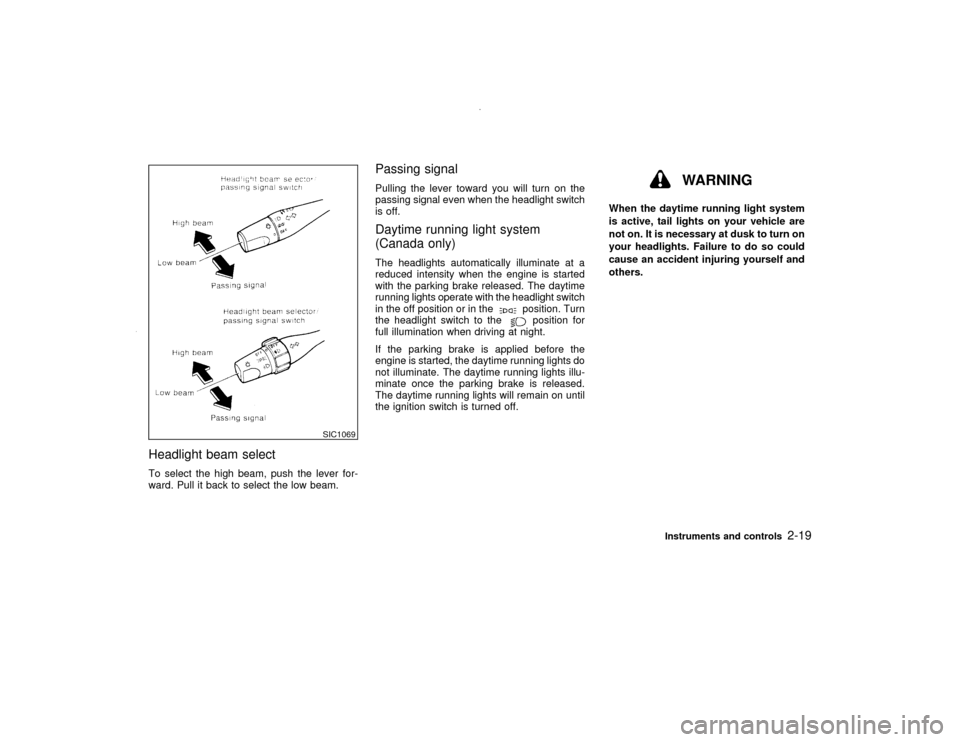
Headlight beam selectTo select the high beam, push the lever for-
ward. Pull it back to select the low beam.
Passing signalPulling the lever toward you will turn on the
passing signal even when the headlight switch
is off.Daytime running light system
(Canada only)The headlights automatically illuminate at a
reduced intensity when the engine is started
with the parking brake released. The daytime
running lights operate with the headlight switch
in the off position or in the
position. Turn
the headlight switch to theposition for
full illumination when driving at night.
If the parking brake is applied before the
engine is started, the daytime running lights do
not illuminate. The daytime running lights illu-
minate once the parking brake is released.
The daytime running lights will remain on until
the ignition switch is turned off.
WARNING
When the daytime running light system
is active, tail lights on your vehicle are
not on. It is necessary at dusk to turn on
your headlights. Failure to do so could
cause an accident injuring yourself and
others.
SIC1069
Instruments and controls
2-19
Z
00.1.17/R50-D/V5
X
Page 73 of 265
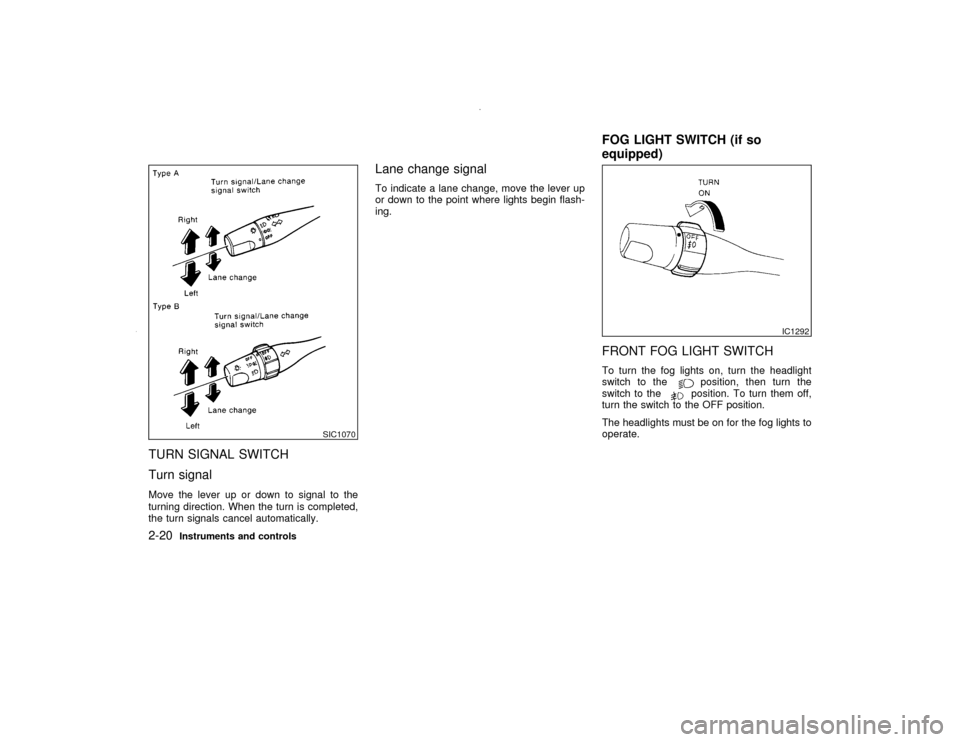
TURN SIGNAL SWITCH
Turn signalMove the lever up or down to signal to the
turning direction. When the turn is completed,
the turn signals cancel automatically.
Lane change signalTo indicate a lane change, move the lever up
or down to the point where lights begin flash-
ing.
FRONT FOG LIGHT SWITCHTo turn the fog lights on, turn the headlight
switch to the
position, then turn the
switch to theposition. To turn them off,
turn the switch to the OFF position.
The headlights must be on for the fog lights to
operate.
SIC1070
IC1292
FOG LIGHT SWITCH (if so
equipped)
2-20
Instruments and controls
Z
00.1.17/R50-D/V5
X
Page 76 of 265
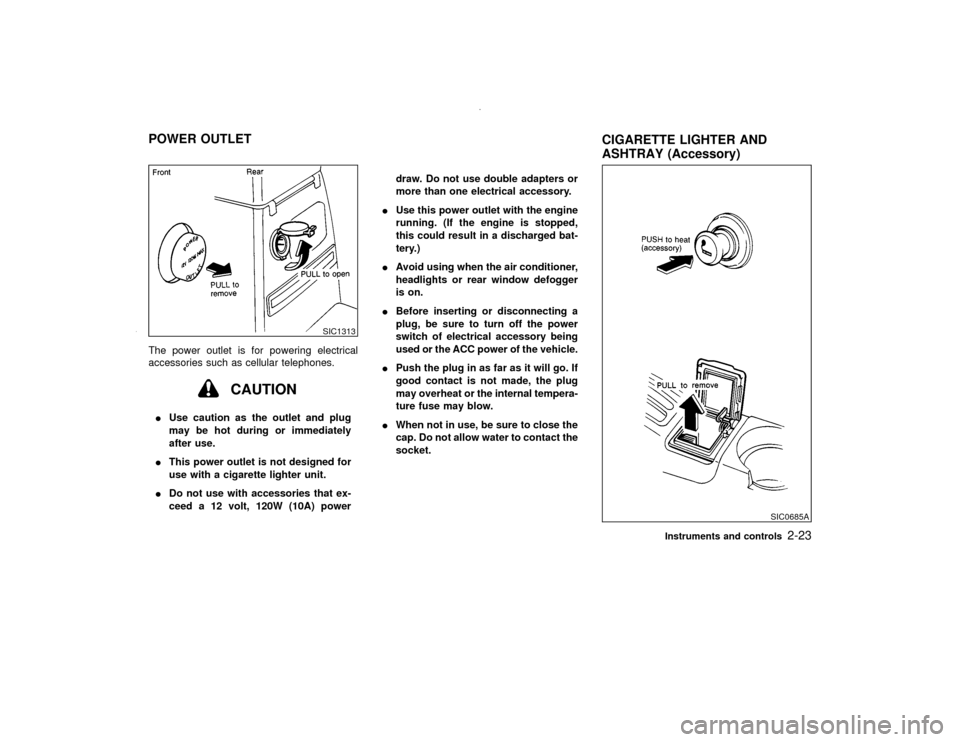
The power outlet is for powering electrical
accessories such as cellular telephones.
CAUTION
IUse caution as the outlet and plug
may be hot during or immediately
after use.
IThis power outlet is not designed for
use with a cigarette lighter unit.
IDo not use with accessories that ex-
ceed a 12 volt, 120W (10A) powerdraw. Do not use double adapters or
more than one electrical accessory.
IUse this power outlet with the engine
running. (If the engine is stopped,
this could result in a discharged bat-
tery.)
IAvoid using when the air conditioner,
headlights or rear window defogger
is on.
IBefore inserting or disconnecting a
plug, be sure to turn off the power
switch of electrical accessory being
used or the ACC power of the vehicle.
IPush the plug in as far as it will go. If
good contact is not made, the plug
may overheat or the internal tempera-
ture fuse may blow.
IWhen not in use, be sure to close the
cap. Do not allow water to contact the
socket.
SIC1313
SIC0685A
POWER OUTLET
CIGARETTE LIGHTER AND
ASHTRAY (Accessory)
Instruments and controls
2-23
Z
00.1.17/R50-D/V5
X
Page 100 of 265
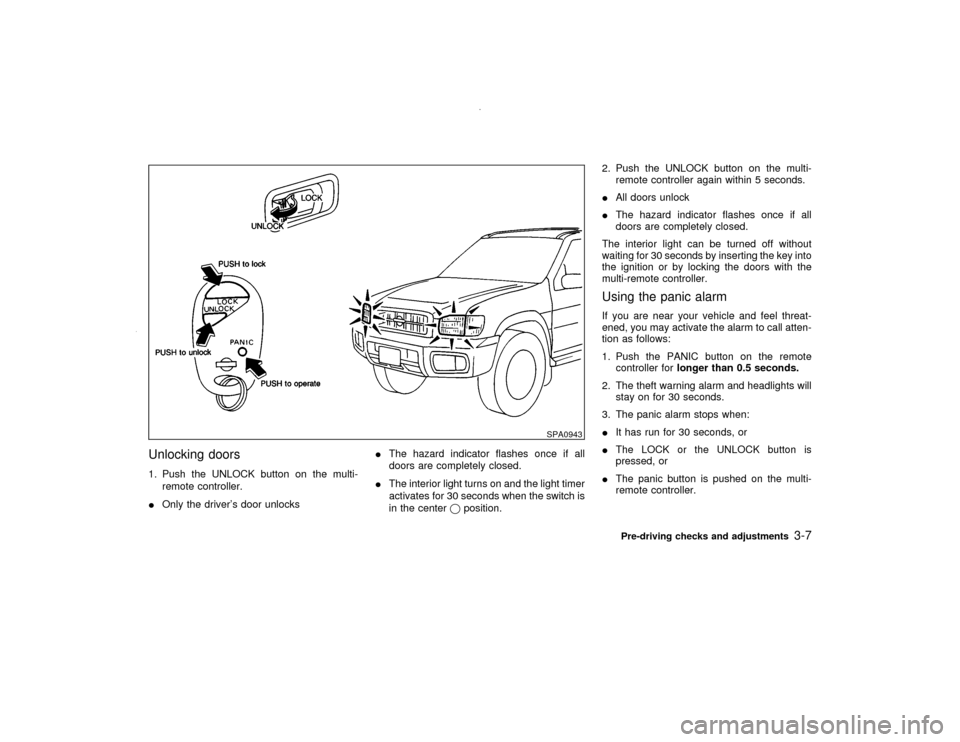
Unlocking doors1. Push the UNLOCK button on the multi-
remote controller.
IOnly the driver's door unlocksIThe hazard indicator flashes once if all
doors are completely closed.
IThe interior light turns on and the light timer
activates for 30 seconds when the switch is
in the centerqposition.2. Push the UNLOCK button on the multi-
remote controller again within 5 seconds.
IAll doors unlock
IThe hazard indicator flashes once if all
doors are completely closed.
The interior light can be turned off without
waiting for 30 seconds by inserting the key into
the ignition or by locking the doors with the
multi-remote controller.
Using the panic alarmIf you are near your vehicle and feel threat-
ened, you may activate the alarm to call atten-
tion as follows:
1. Push the PANIC button on the remote
controller forlonger than 0.5 seconds.
2. The theft warning alarm and headlights will
stay on for 30 seconds.
3. The panic alarm stops when:
IIt has run for 30 seconds, or
IThe LOCK or the UNLOCK button is
pressed, or
IThe panic button is pushed on the multi-
remote controller.
SPA0943
Pre-driving checks and adjustments
3-7
Z
00.1.17/R50-D/V5
X
Page 107 of 265
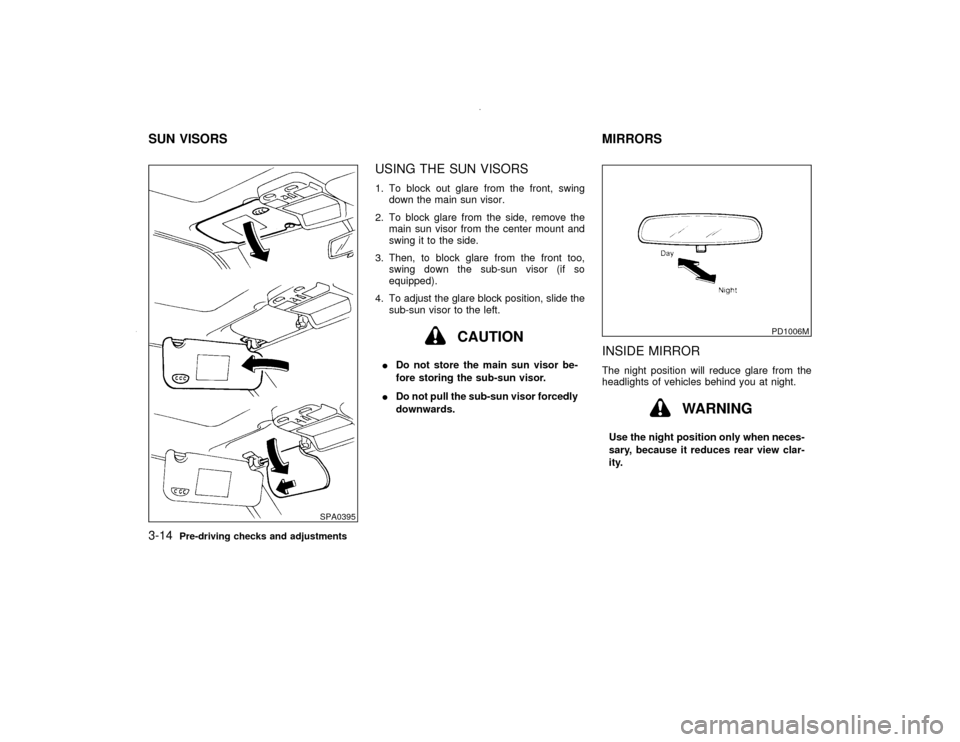
USING THE SUN VISORS1. To block out glare from the front, swing
down the main sun visor.
2. To block glare from the side, remove the
main sun visor from the center mount and
swing it to the side.
3. Then, to block glare from the front too,
swing down the sub-sun visor (if so
equipped).
4. To adjust the glare block position, slide the
sub-sun visor to the left.
CAUTION
IDo not store the main sun visor be-
fore storing the sub-sun visor.
IDo not pull the sub-sun visor forcedly
downwards.
INSIDE MIRRORThe night position will reduce glare from the
headlights of vehicles behind you at night.
WARNING
Use the night position only when neces-
sary, because it reduces rear view clar-
ity.
SPA0395
PD1006M
SUN VISORS MIRRORS3-14
Pre-driving checks and adjustments
Z
00.1.17/R50-D/V5
X
Page 188 of 265

8 Do-it-yourselfMaintenance precautions .......................................... 8-2
Engine compartment check locations ....................... 8-4
Engine cooling system .............................................. 8-5
Checking engine coolant level .................................. 8-5
Changing engine coolant .......................................... 8-6
Engine oil .................................................................. 8-7
Checking engine oil level .......................................... 8-7
Changing engine oil .................................................. 8-8
Changing engine oil filter .......................................... 8-9
Automatic transmission fluid ................................... 8-10
Temperature conditions for checking ...................... 8-10
Power steering fluid ................................................ 8-12
Brake and clutch fluid ............................................. 8-12
Brake fluid ............................................................... 8-12
Clutch fluid .............................................................. 8-13
Window washer fluid ............................................... 8-13
Window washer fluid reservoir ................................ 8-13
Battery ..................................................................... 8-14
Jump starting........................................................... 8-15
Drive belts ............................................................... 8-15
Spark plugs ............................................................. 8-16
Replacing spark plugs ............................................. 8-16Air cleaner ............................................................... 8-17
Windshield wiper blades ......................................... 8-18
Cleaning .................................................................. 8-18
Replacement ........................................................... 8-18
Parking brake and brake pedal ............................... 8-19
Checking parking brake .......................................... 8-19
Checking brake pedal ............................................. 8-19
Brake booster .......................................................... 8-20
Clutch pedal ............................................................ 8-21
Checking clutch pedal ............................................. 8-21
Fuses....................................................................... 8-21
Engine compartment ............................................... 8-21
Passenger compartment ......................................... 8-22
Multi-remote controller battery replacement ........... 8-22
Lights ....................................................................... 8-24
Headlights ............................................................... 8-25
Wheels and tires ..................................................... 8-28
Tire pressure ........................................................... 8-28
Types of tires .......................................................... 8-29
Tire chains............................................................... 8-30
Changing wheels and tires...................................... 8-30
Clutch housing drain ................................... 8-34
Z
00.1.17/R50-D/V5
X