2000 NISSAN PATHFINDER lock
[x] Cancel search: lockPage 107 of 265
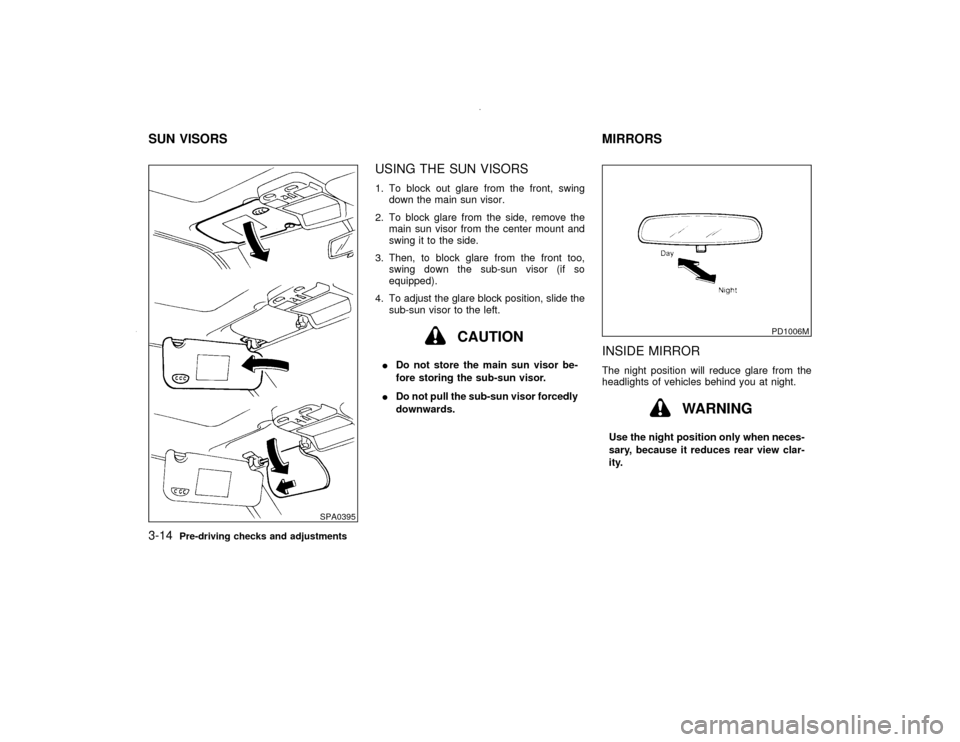
USING THE SUN VISORS1. To block out glare from the front, swing
down the main sun visor.
2. To block glare from the side, remove the
main sun visor from the center mount and
swing it to the side.
3. Then, to block glare from the front too,
swing down the sub-sun visor (if so
equipped).
4. To adjust the glare block position, slide the
sub-sun visor to the left.
CAUTION
IDo not store the main sun visor be-
fore storing the sub-sun visor.
IDo not pull the sub-sun visor forcedly
downwards.
INSIDE MIRRORThe night position will reduce glare from the
headlights of vehicles behind you at night.
WARNING
Use the night position only when neces-
sary, because it reduces rear view clar-
ity.
SPA0395
PD1006M
SUN VISORS MIRRORS3-14
Pre-driving checks and adjustments
Z
00.1.17/R50-D/V5
X
Page 122 of 265

from a station transmitter, the signals will tend
to fade and/or drift.
Static and flutter: During signal interference
from buildings, large hills or due to antenna
position, usually in conjunction with increased
distance from the station transmitter, static or
flutter can be heard. This can be reduced by
adjusting the treble control counterclockwise
to reduce treble response.
Multipath reception: Because of the reflective
characteristics of FM signals, direct and re-
flected signals reach the receiver at the same
time. The signals may cancel each other,
resulting in momentary flutter or loss of sound.AM RADIO RECEPTIONAM signals, because of their low frequency,
can bend around objects and skip along the
ground. In addition, the signals can be
bounced off the ionosphere and bent back to
earth. Because of these characteristics. AM
signals are also subject to interference as they
travel from transmitter to receiver.
Fading: Occurs while the vehicle is passing
through freeway underpasses or in areas with
many tall buildings. It can also occur for sev-
eral seconds during ionospheric turbulence
even in areas where no obstacles exist.
Static: Caused by thunderstorms, electricalpower lines, electric signs and even traffic
lights.
Heater, air conditioner and audio systems
4-13
Z
00.1.17/R50-D/V5
X
Page 124 of 265
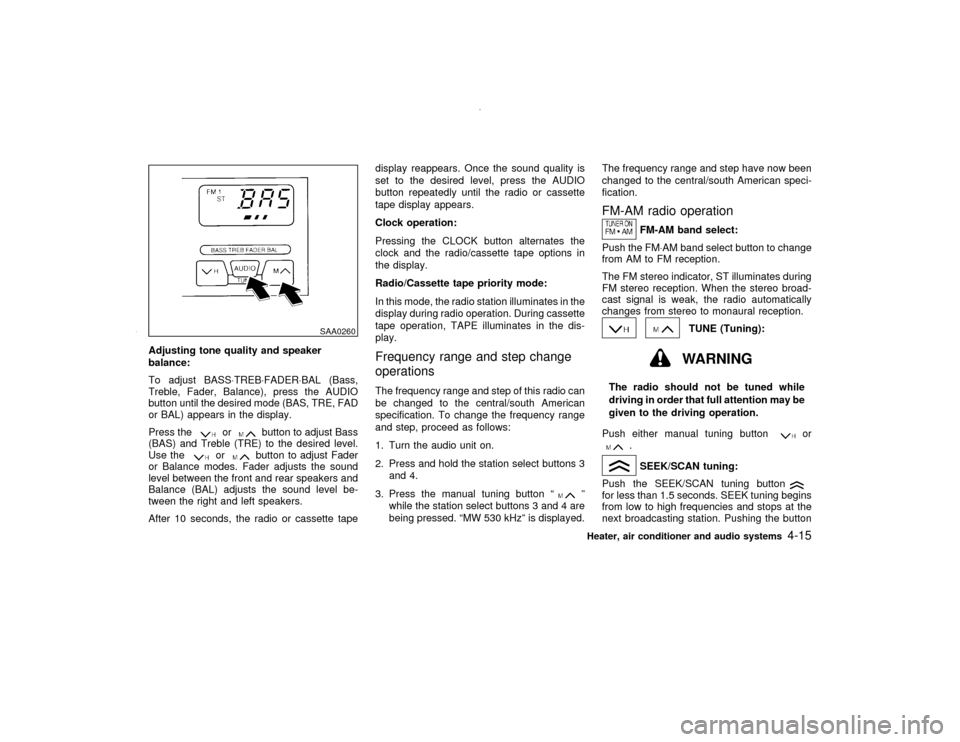
Adjusting tone quality and speaker
balance:
To adjust BASS×TREB×FADER×BAL (Bass,
Treble, Fader, Balance), press the AUDIO
button until the desired mode (BAS, TRE, FAD
or BAL) appears in the display.
Press the
or
button to adjust Bass
(BAS) and Treble (TRE) to the desired level.
Use the
or
button to adjust Fader
or Balance modes. Fader adjusts the sound
level between the front and rear speakers and
Balance (BAL) adjusts the sound level be-
tween the right and left speakers.
After 10 seconds, the radio or cassette tapedisplay reappears. Once the sound quality is
set to the desired level, press the AUDIO
button repeatedly until the radio or cassette
tape display appears.
Clock operation:
Pressing the CLOCK button alternates the
clock and the radio/cassette tape options in
the display.
Radio/Cassette tape priority mode:
In this mode, the radio station illuminates in the
display during radio operation. During cassette
tape operation, TAPE illuminates in the dis-
play.
Frequency range and step change
operationsThe frequency range and step of this radio can
be changed to the central/south American
specification. To change the frequency range
and step, proceed as follows:
1. Turn the audio unit on.
2. Press and hold the station select buttons 3
and 4.
3. Press the manual tuning button ª
º
while the station select buttons 3 and 4 are
being pressed. ªMW 530 kHzº is displayed.The frequency range and step have now been
changed to the central/south American speci-
fication.
FM-AM radio operation
FM-AM band select:
Push the FM×AM band select button to change
from AM to FM reception.
The FM stereo indicator, ST illuminates during
FM stereo reception. When the stereo broad-
cast signal is weak, the radio automatically
changes from stereo to monaural reception.
TUNE (Tuning):WARNING
The radio should not be tuned while
driving in order that full attention may be
given to the driving operation.
Push either manual tuning button
or
.SEEK/SCAN tuning:
Push the SEEK/SCAN tuning button
for less than 1.5 seconds. SEEK tuning begins
from low to high frequencies and stops at the
next broadcasting station. Pushing the button
SAA0260
Heater, air conditioner and audio systems
4-15
Z
00.1.17/R50-D/V5
X
Page 126 of 265
CAUTION
Do not force the cassette tape into the
tape door. This could cause player dam-
age.
The cassette tape automatically changes di-
rections to play the other side when the first
side is complete. At this time, the moving
digital squares illuminate on the left side of the
display window.
Precaution on cassette player operation:
ITo maintain good quality sound, NISSAN
recommends using cassette tapes of 60
minutes or shorter in length.
ICassette tapes should be removed from the
player when not in use. Store cassettes in
their protective cases and away from direct
sunlight, heat, moisture and magnetic
sources.
IDirect sunlight can cause the cassette to
become deformed. The use of deformed
cassettes may cause the cassette to jam in
the player.
IDo not use cassettes with labels which arepeeling and loose. If used, the label could
jam in the player.
IIf a cassette has loose tape, insert a pencil
through one of the cassette hubs and re-
wind the tape firmly around the hubs. Loose
tape may cause tape jamming and waver-
ing sound quality.
IOver a period of time, the playback head,
capstan and pinch roller may collect a tape
coating residue as the tape is played. This
residue accumulation can cause weak or
wavering sound, and should be removed
periodically with a head cleaning tape. If the
residue is not removed periodically, the
player may need to be disassembled for
cleaning.
PLAY/STOP:
Push the PLAY/STOP button while the cas-
sette tape is playing to stop the tape. Push the
button again to play the tape.
FF (Fast Forward), REW
(Rewind):
Push either the FF or REW button for the
desired direction.
The FF or REW symbol illuminates in the
display.
To stop the FF or REW function, press the
or
again, or the
button.
APS (Automatic
Program Search) FF,
APS REW:
Push either the APS FF or APS REW button
while the cassette tape is playing. The tape
runs quickly, stops, then plays the next selec-
tion. Either the FF or REW symbol flashes in
the display while searching for the selection.
This system searches at the blank intervals
between selections. If there is a blank interval
within one selection or there is no interval
between selections, the system may not stop
in the desired or expected location.
PROG (Program):
Push the PROG (program) select button. The
moving digital squares illuminate on either the
right or left side of the display window to
indicate the side of program play.Dolby NR (Noise Reduction):
Push the Dolby NR button for Dolby NR en-
coded tapes to reduce high frequency tape
noise. The
indicator light comes on.
If in the clock display is in priority mode when
the Dolby NR button is pressed,
and
TAPE illuminate in the display window for
about 10 seconds. The clock mode then re-
Heater, air conditioner and audio systems
4-17
Z
00.1.17/R50-D/V5
X
Page 129 of 265
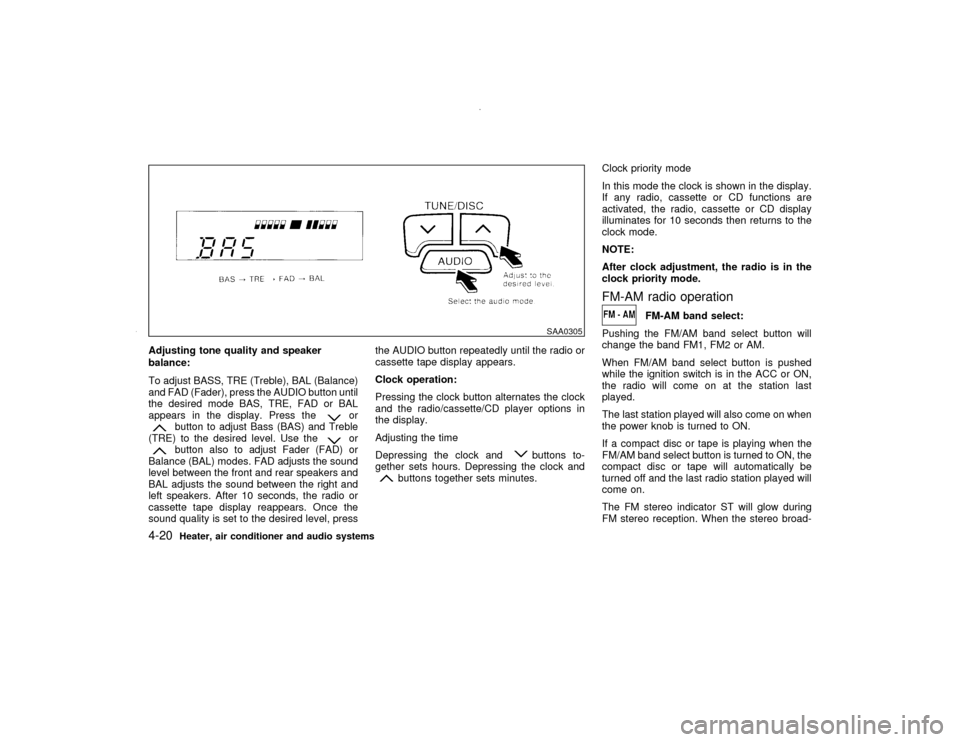
Adjusting tone quality and speaker
balance:
To adjust BASS, TRE (Treble), BAL (Balance)
and FAD (Fader), press the AUDIO button until
the desired mode BAS, TRE, FAD or BAL
appears in the display. Press the
or
button to adjust Bass (BAS) and Treble
(TRE) to the desired level. Use the
or
button also to adjust Fader (FAD) or
Balance (BAL) modes. FAD adjusts the sound
level between the front and rear speakers and
BAL adjusts the sound between the right and
left speakers. After 10 seconds, the radio or
cassette tape display reappears. Once the
sound quality is set to the desired level, pressthe AUDIO button repeatedly until the radio or
cassette tape display appears.
Clock operation:
Pressing the clock button alternates the clock
and the radio/cassette/CD player options in
the display.
Adjusting the time
Depressing the clock and
buttons to-
gether sets hours. Depressing the clock and
buttons together sets minutes.Clock priority mode
In this mode the clock is shown in the display.
If any radio, cassette or CD functions are
activated, the radio, cassette or CD display
illuminates for 10 seconds then returns to the
clock mode.
NOTE:
After clock adjustment, the radio is in the
clock priority mode.
FM-AM radio operation
FM-AM band select:
Pushing the FM/AM band select button will
change the band FM1, FM2 or AM.
When FM/AM band select button is pushed
while the ignition switch is in the ACC or ON,
the radio will come on at the station last
played.
The last station played will also come on when
the power knob is turned to ON.
If a compact disc or tape is playing when the
FM/AM band select button is turned to ON, the
compact disc or tape will automatically be
turned off and the last radio station played will
come on.
The FM stereo indicator ST will glow during
FM stereo reception. When the stereo broad-
SAA0305
4-20
Heater, air conditioner and audio systems
Z
00.1.17/R50-D/V5
X
Page 134 of 265
When this button is pushed while the compact
disc is being played, the compact disc will
come out and the system will turn off.
If the compact disc comes out and is not
removed, it will be pulled back into the slot
to protect it. (without 8 cm diameter com-
pact discs)
CD IN indicator:
CD IN indicator appears on the display when
the CD is loaded with the system on.
ANTENNA
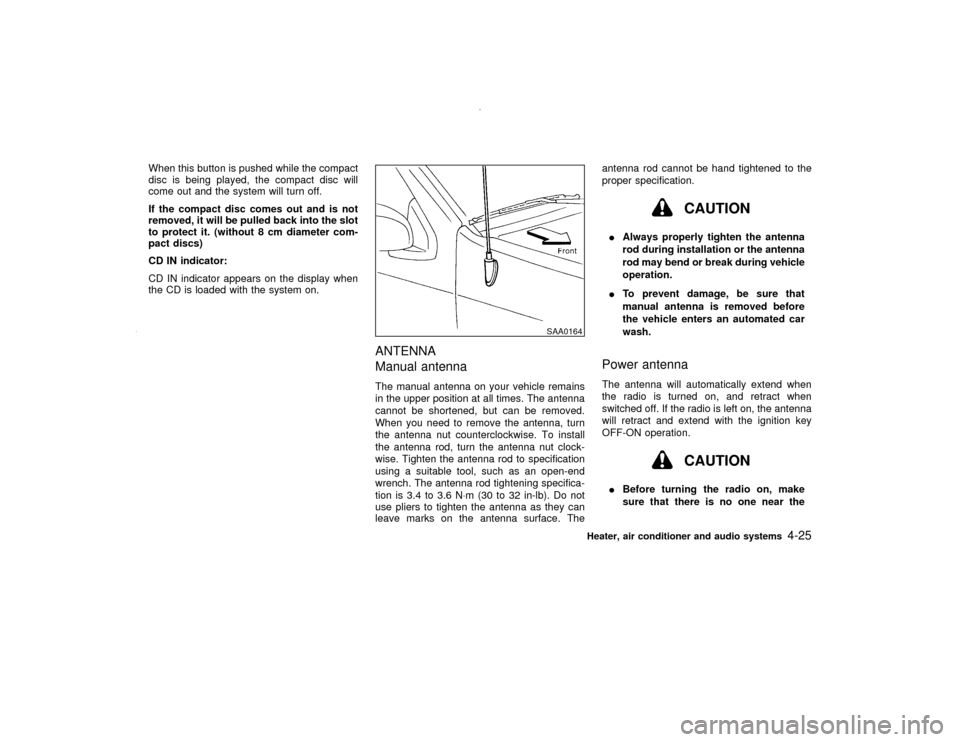
Manual antennaThe manual antenna on your vehicle remains
in the upper position at all times. The antenna
cannot be shortened, but can be removed.
When you need to remove the antenna, turn
the antenna nut counterclockwise. To install
the antenna rod, turn the antenna nut clock-
wise. Tighten the antenna rod to specification
using a suitable tool, such as an open-end
wrench. The antenna rod tightening specifica-
tion is 3.4 to 3.6 N×m (30 to 32 in-lb). Do not
use pliers to tighten the antenna as they can
leave marks on the antenna surface. Theantenna rod cannot be hand tightened to the
proper specification.
CAUTION
IAlways properly tighten the antenna
rod during installation or the antenna
rod may bend or break during vehicle
operation.
ITo prevent damage, be sure that
manual antenna is removed before
the vehicle enters an automated car
wash.Power antennaThe antenna will automatically extend when
the radio is turned on, and retract when
switched off. If the radio is left on, the antenna
will retract and extend with the ignition key
OFF-ON operation.
CAUTION
IBefore turning the radio on, make
sure that there is no one near the
SAA0164
Heater, air conditioner and audio systems
4-25
Z
00.1.17/R50-D/V5
X
Page 136 of 265

5 Starting and drivingPrecautions when starting and driving ...................... 5-2
Exhaust gas (Carbon monoxide) .............................. 5-2
Three way catalyst .................................................... 5-3
On-pavement and offroad driving precautions.......... 5-3
Avoiding collision and rollover................................... 5-4
Drinking alcohol/drugs and driving ............................ 5-4
Driving safety precautions ......................................... 5-4
Ignition switch............................................................ 5-6
Automatic transmission ............................................. 5-6
Manual transmission ................................................. 5-7
Key positions ............................................................. 5-8
Nissan vehicle immobilizer system ........................... 5-8
Before starting the engine ......................................... 5-9
Starting the engine .................................................... 5-9
Driving the vehicle ................................................... 5-10
Automatic transmission ........................................... 5-10
Manual transmission ............................................... 5-14
Parking brake .......................................................... 5-16
Cruise control (if so equipped) ................................ 5-17
Precautions on cruise control.................................. 5-17Cruise control operations ........................................ 5-18
Break-in schedule ................................................... 5-19
Increasing fuel economy ......................................... 5-20
Using four wheel drive (4WD) ................................. 5-20
Transfer case shifting procedures........................... 5-22
Parking/parking on hills ........................................... 5-24
Power steering ........................................................ 5-25
Brake system .......................................................... 5-26
Braking precautions ................................................ 5-26
Anti-lock brake system (ABS) ................................. 5-26
Cold weather driving ............................................... 5-28
Freeing a frozen door lock ...................................... 5-28
Anti-freeze ............................................................... 5-28
Battery ..................................................................... 5-28
Draining of coolant water ........................................ 5-28
Tire equipment ........................................................ 5-28
Special winter equipment ........................................ 5-29
Driving on snow or ice ............................................ 5-29
Engine block heater (if so equipped) ...................... 5-29
Z
00.1.17/R50-D/V5
X
Page 141 of 265

Accelerating quickly, sharp steering
maneuvers or sudden braking may
cause loss of control.
IIf at all possible, avoid sharp turning
maneuvers, particularly at high
speeds. Your NISSAN four wheel
drive vehicle has a higher center of
gravity than a two wheel drive ve-
hicle. The vehicle is not designed for
cornering at the same speeds as con-
ventional two wheel drive vehicles.
Failure to operate this vehicle cor-
rectly could result in loss of control
and/or a roll over accident.
IAlways use tires of the same type,
size, brand, construction (bias, bias-
belted or radial), and tread pattern on
all four wheels. Install tire chains on
the rear wheels when driving on slip-
pery roads and drive carefully.
IBe sure to check the brakes immedi-
ately after driving in mud or water.
See ªBrake systemº later in this sec-
tion for wet brakes.IAvoid parking your vehicle on steep
hills. If you get out of the vehicle and
it rolls forward, backward or side-
ways, you could be injured.
IWhenever you drive off-road through
sand, mud or water as deep as the
wheel hub, more frequent mainte-
nance may be required. See ªPeriodic
maintenanceº in the ª9. Mainte-
nanceº section of this manual.
AUTOMATIC TRANSMISSIONOn automatic transmission models, the igni-
tion lock is designed so that the key cannot be
turned to LOCK and removed until the selector
lever is moved to the P (Park) position.
When removing the key from the ignition,
make sure the selector lever is in the P (Park)
position.
If the selector lever is not returned to P (Park),
the key cannot be moved toward LOCK.
When the key cannot be turned toward the
LOCK position, proceed as follows to remove
the key:
SSD0083
IGNITION SWITCH
5-6
Starting and driving
Z
00.1.17/R50-D/V5
X