2000 NISSAN ALTIMA battery
[x] Cancel search: batteryPage 151 of 242
bolt, engine lift bracket, etc.) Ð not
to the battery.
c
Make sure the jumper cables do not
touch moving parts in the engine com-
partment and that the cable clamps do
not contact any other metal.
5. Start the engine of the booster vehicle
and let it run for a few minutes.
6. Keep the engine speed of the booster
vehicle at about 2,000 rpm, and start the
engine of the vehicle being jump started.
CAUTION
Do not keep starter motor engaged for
more than 10 seconds. If the engine
does not start right away, turn the key
off and wait 3 to 4 seconds before
trying again.
7. After starting the engine, carefully dis-
connect the negative cable and then the
positive cable.
8. Replace the vent caps (if so equipped).
Be sure to dispose of the cloth used to
cover the vent holes as it may be con-
taminated with corrosive acid.
CAUTION
cAutomatic transmission models can-
not be push started. This may cause
transmission damage.
cThree way catalyst equipped models
should not be started by pushing.
The three way catalyst may be dam-
aged.
cNever try to start the vehicle by tow-
ing it. When the engine starts, the
forward surge could cause the ve-
hicle to collide with the tow vehicle.If your vehicle is overheating (indicated by an
extremely high temperature gauge reading),
or if you feel a lack of engine power, detect
abnormal noise, etc., take the following steps.
WARNING
cDo not continue to drive if your ve-
hicle overheats. Doing so could
cause a vehicle fire.
cTo avoid the danger of being
scalded, never remove the radiator
cap while the engine is still hot.
When the radiator cap is removed,
pressurized hot water will spurt out,
possibly causing serious injury.
cDo not open the hood if steam is
coming out.
1. Move the vehicle safely off the road,
apply the parking brake and move the
shift lever to N (Neutral) (manual trans-
mission) or to P (Park) (automatic trans-
mission).
Do not stop the engine.
2. Turn off the air conditioner. Open all the
windows, move the heater or air condi-
tioner temperature control to maximum
hot and fan control to high speed.
PUSH STARTING IF YOUR VEHICLE
OVERHEATS
6-10In case of emergency
ZX
Page 163 of 242

8 Do-it-yourself
Maintenance precautions .......................................8-2
Engine compartment check locations ....................8-4
Engine cooling system ...........................................8-5
Checking engine coolant level ...............................8-5
Changing engine coolant .......................................8-6
Engine oil ...............................................................8-8
Checking engine oil level .......................................8-8
Changing engine oil ...............................................8-9
Changing engine oil filter .....................................8-10
Automatic transmission fluid ................................8-10
Temperature conditions for checking ...................8-11
Power steering fluid..............................................8-12
Brake fluid ............................................................8-12
Clutch fluid............................................................8-12
Window washer fluid ............................................8-13
Window washer fluid reservoir .............................8-13
Battery ..................................................................8-14
Jump starting ........................................................8-15
Drive belts ............................................................8-15
Spark plugs ..........................................................8-15
Replacing spark plugs ..........................................8-15
Air cleaner ............................................................8-16Windshield wiper blades ......................................8-18
Cleaning ...............................................................8-18
Replacing .............................................................8-18
Parking brake and brake pedal ............................8-19
Checking parking brake .......................................8-19
Checking brake pedal ..........................................8-19
Brake booster .......................................................8-20
Clutch pedal .........................................................8-21
Checking clutch pedal ..........................................8-21
Fuses ....................................................................8-21
Engine compartment ............................................8-21
Passenger compartment ......................................8-22
Multi-remote controller battery replacement ........8-23
Lights ....................................................................8-24
Headlights ............................................................8-24
Front turn signal lamp ..........................................8-27
Front parking and cornering lamp ........................8-27
Front sidemarker lamp .........................................8-28
Fog lights ..............................................................8-29
Exterior and interior lights ....................................8-30
Wheels and tires ..................................................8-34
Tire pressure ........................................................8-34
ZX
Page 165 of 242

When performing any inspection or mainte-
nance work on your vehicle, always take
care to prevent serious accidental injury to
yourself or damage to the vehicle. The
following are general precautions which
should be closely observed.
WARNING
cPark the vehicle on a level surface,
apply the parking brake securely and
block the wheels to prevent the ve-
hicle from moving. For manual trans-
mission models, move the shift lever
to (N) Neutral. For an automatic
transmission models, move the shift
selector lever to P (Park).
cBe sure the ignition key is in the OFF
or LOCK position when performing
any parts replacement or repairs.
cYour vehicle is equipped with an
automatic engine cooling fan. It may
come on at any time without warn-
ing, even if the ignition key is in the
OFF position and the engine is not
running. To avoid injury, always dis-
connect the negative battery cable
before working near the fan.c
If you must work with the engine run-
ning, keep your hands, clothing, hair
and tools away from moving fans,
belts and any other moving parts.
cIt is advisable to secure or remove
any loose clothing and remove any
jewelry, such as rings, watches, etc.
before working on your vehicle.
cAlways wear eye protection when-
ever you work on your vehicle.
cIf you must run the engine in an
enclosed space such as a garage, be
sure there is proper ventilation for
exhaust gases to escape.
cNever get under the vehicle while it
is supported only by a jack. If it is
necessary to work under the vehicle,
support it with safety stands.
c
Keep smoking materials, flame and
sparks away from the fuel tank and
battery.cOn gasoline engine models with the
multiport fuel injection (MFI) system,
the fuel filter or fuel lines should be
serviced by an authorized NISSAN
dealer because the fuel lines are un-
der high pressure even when the en-
gine is off.
CAUTION
cDo not work under the hood while
the engine is hot. Turn off the engine
and wait until it cools down.
cNever connect or disconnect the bat-
tery or any transistorized compo-
nent while the ignition is in the ON
position.
cNever leave the engine or automatic
transmission related component
harnesses disconnected while the
ignition is in the ON position.
c
Avoid contact with used engine oil.
Improperly disposed engine oil
and/or other vehicle fluids can dam-
age the environment. Always con-
form to local regulations for disposal
of vehicle fluid.
MAINTENANCE
PRECAUTIONS
8-2Do-it-yourself
ZX
Page 177 of 242
cKeep the battery surface clean and dry.
Any corrosion should be washed off with
a solution of baking soda and water.
cMake certain the terminal connections
are clean and securely tightened.
c
If the vehicle is not to be used for 30 days or
longer, disconnect the negative (Ð) battery
terminal cable to prevent discharge.
WARNING
cDo not expose the battery to flames
or electrical sparks. Hydrogen gas
generated by the battery is explo-
sive. Do not allow battery fluid to
contact your skin, eyes, fabrics, or
painted surfaces. After touching a
battery or battery cap, do not touch
or rub your eyes. Thoroughly wash
your hands. If the acid contacts your
eyes, skin or clothing, immediately
flush with water for at least 15 min-
utes and seek medical attention.
cWhen working on or near the battery,
always wear suitable eye protection
and remove all jewelry.cBattery posts, terminals and related
accessories contain lead and lead
compounds. Wash hands after han-
dling.
cKeep the battery out of the reach of
children.
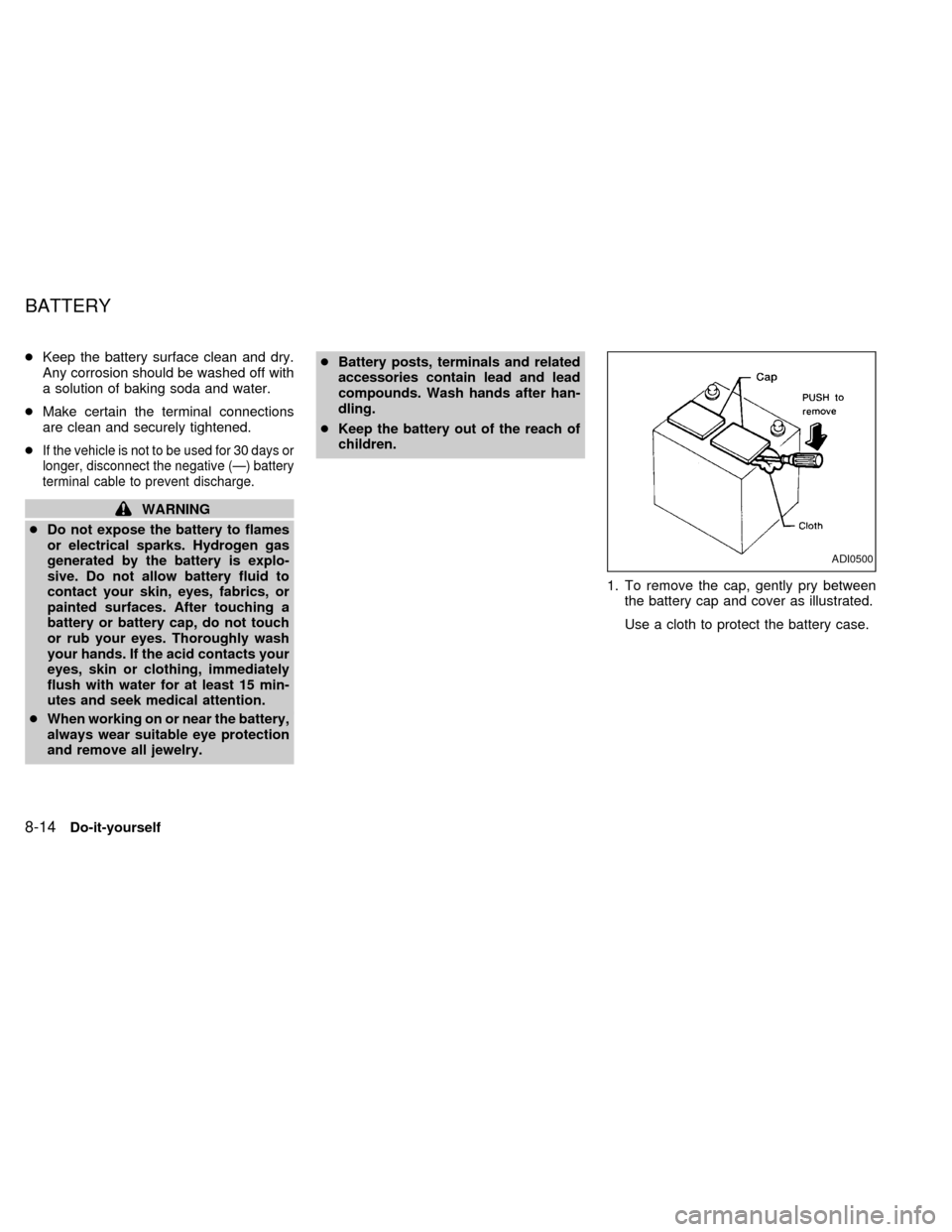
1. To remove the cap, gently pry between
the battery cap and cover as illustrated.
Use a cloth to protect the battery case.
ADI0500
BATTERY
8-14Do-it-yourself
ZX
Page 178 of 242
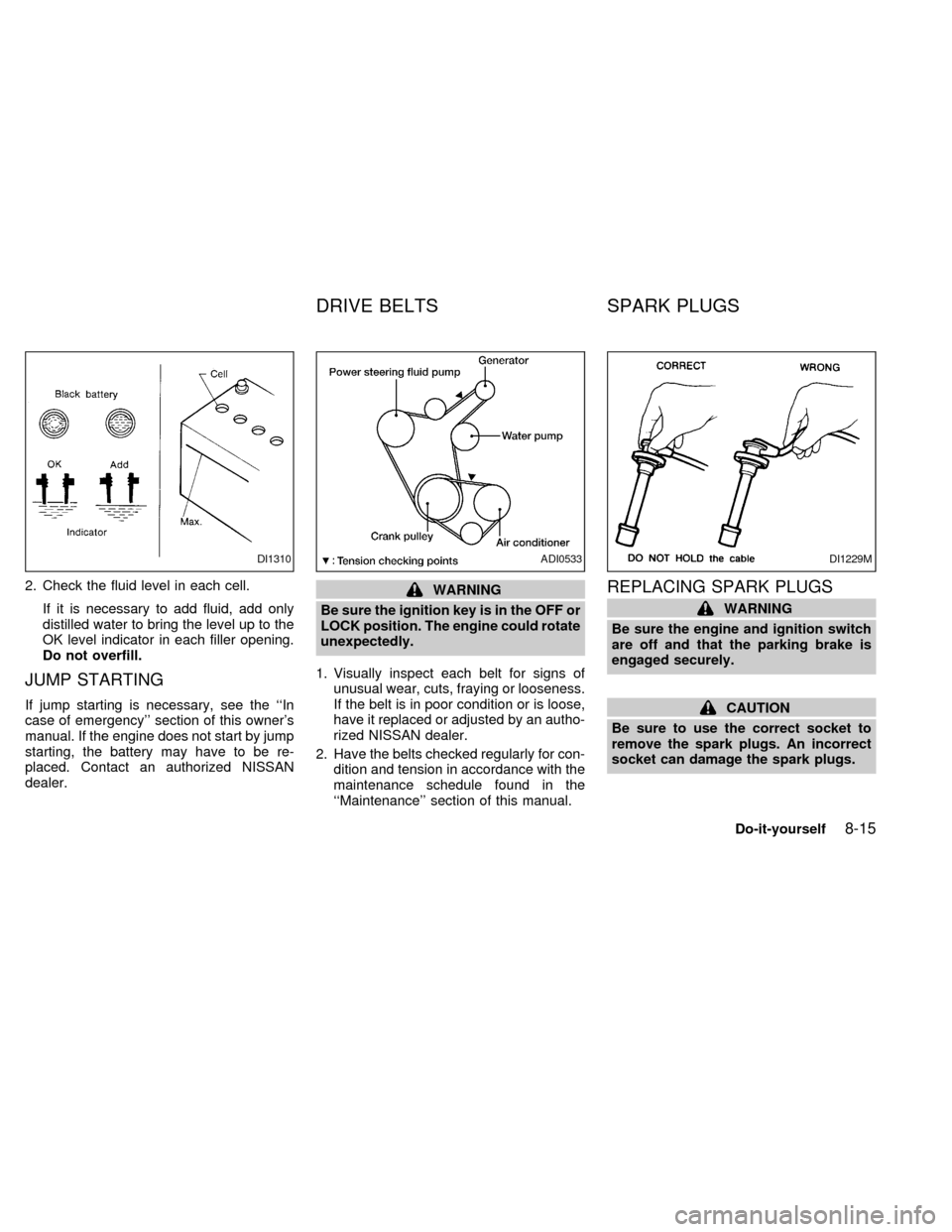
2. Check the fluid level in each cell.
If it is necessary to add fluid, add only
distilled water to bring the level up to the
OK level indicator in each filler opening.
Do not overfill.
JUMP STARTING
If jump starting is necessary, see the ``In
case of emergency'' section of this owner's
manual. If the engine does not start by jump
starting, the battery may have to be re-
placed. Contact an authorized NISSAN
dealer.
WARNING
Be sure the ignition key is in the OFF or
LOCK position. The engine could rotate
unexpectedly.
1. Visually inspect each belt for signs of
unusual wear, cuts, fraying or looseness.
If the belt is in poor condition or is loose,
have it replaced or adjusted by an autho-
rized NISSAN dealer.
2. Have the belts checked regularly for con-
dition and tension in accordance with the
maintenance schedule found in the
``Maintenance'' section of this manual.REPLACING SPARK PLUGS
WARNING
Be sure the engine and ignition switch
are off and that the parking brake is
engaged securely.
CAUTION
Be sure to use the correct socket to
remove the spark plugs. An incorrect
socket can damage the spark plugs.
DI1310ADI0533DI1229M
DRIVE BELTS SPARK PLUGS
Do-it-yourself8-15
ZX
Page 186 of 242

Replace the battery in the multi-remote con-
troller as follows:
1. Open the lid using a coin.
2. Replace the battery with a new one.Recommended battery: Sanyo CR2025 or
equivalent.
3. Close the lid securely.
4. Press the
button, then thebutton
two or three times to check the multi-remotecontroller operation.
Each time the
button is pressed, the
hazard lights flash once.
If the battery is removed for any reason
other than replacement, perform step 4.
cAn improperly disposed battery can
hurt the environment. Always confirm
local regulations for battery disposal.
cThe multi-remote controller is water-
resistant; however, if it does get wet,
immediately wipe completely dry.
cThe operational range of the multi-
remote controller extends to approxi-
mately 33 ft (10 m) from the vehicle.
This range may vary with conditions.
FCC Notice:
Changes or modifications not expressly
approved by the manufacturer for com-
pliance could void the user's authority to
operate the equipment.
This device complies with part 15 of the
FCC Rules and RSS-210 of Industry
Canada.
APD1026
MULTI-REMOTE CONTROLLER
BATTERY REPLACEMENT
Do-it-yourself8-23
ZX
Page 187 of 242
HEADLIGHTS
The headlamp is a semi-sealed beam type
which uses a replaceable halogen bulb.
Because the headlamp assembly must be
removed from the vehicle for bulb replace-
ment, it is recommended that your vehicle
be taken to an authorized NISSAN Dealer.
Replacing the headlight bulb
CAUTION
cDo not leave the headlamp assembly
open without a bulb installed for a
long period of time. Dust, moisture,
smoke, etc. entering the headlamp
body may affect bulb performance.
Remove the bulb from the headlamp
assembly just before a replacement
bulb is installed.
cOnly touch the plastic base when
handling the bulb. Never touch the
glass envelope. Touching the glass
could significantly affect bulb life
and/or headlamp performance.cHigh pressure halogen gas is sealed
inside the halogen bulb. The bulb
may break if the glass envelope is
scratched or the bulb is dropped.
cUse the same number and wattage
as originally installed:
Wattage 65/55
Bulb no. 9007(HB5)
cAiming is not necessary after replac-
ing the bulb. When aiming adjust-
ment is necessary, contact an autho-
rized NISSAN dealer.
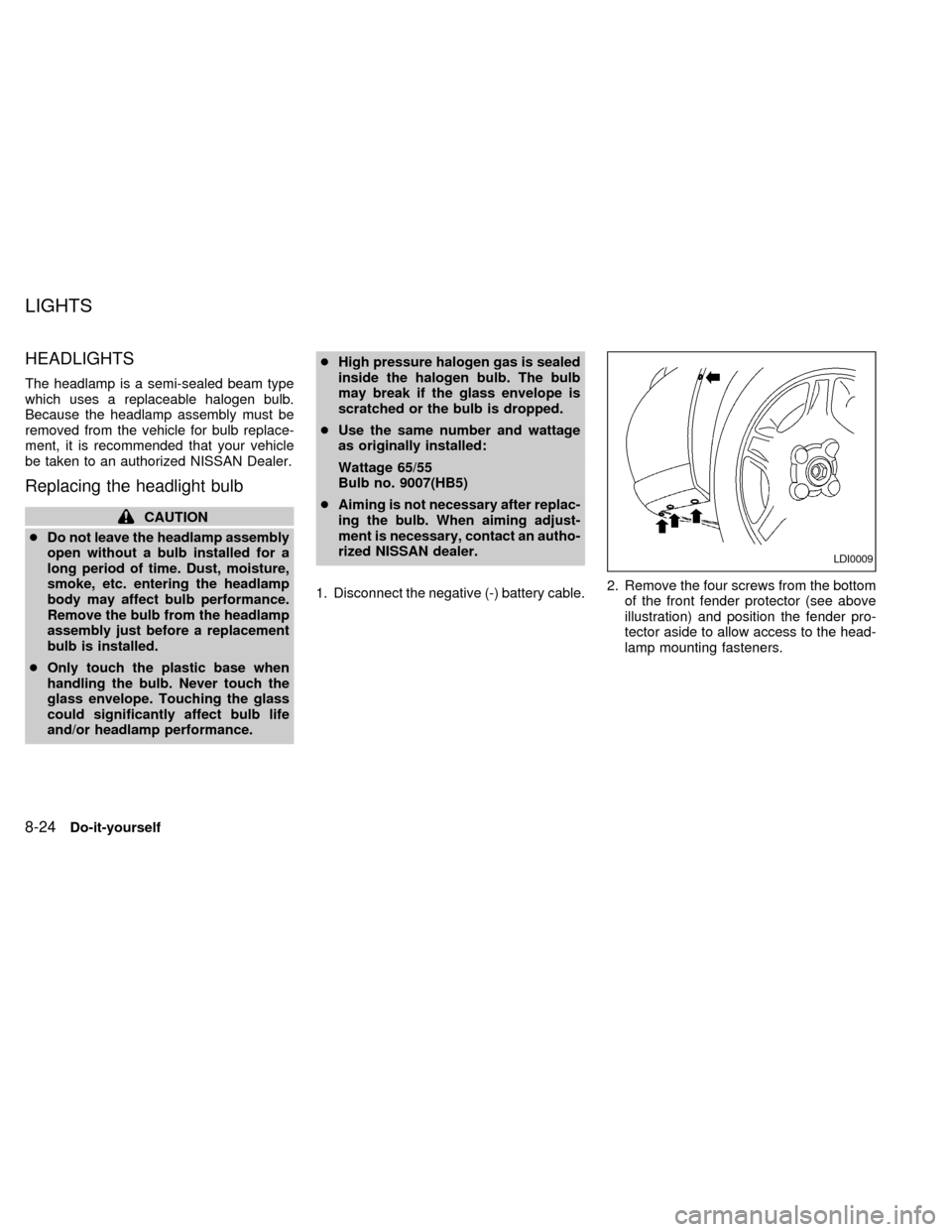
1. Disconnect the negative (-) battery cable.2. Remove the four screws from the bottom
of the front fender protector (see above
illustration) and position the fender pro-
tector aside to allow access to the head-
lamp mounting fasteners.
LDI0009
LIGHTS
8-24Do-it-yourself
ZX
Page 190 of 242

If the vehicle front body has been repaired
and/or the headlight assembly has been
replaced, check aiming. Use the aiming
chart shown in the illustration.
cBasic illuminating area should be within
the range shown. Adjust headlamps ac-
cordingly.
FRONT TURN SIGNAL LAMP
Replacing the front turn signal lamp
bulb
1. Disconnect the negative (-) battery cable.
2. Reach between the grille and radiator to
access the turn signal bulb socket.
3. Rotate the socket counter-clockwise and
pull it out of the headlamp assembly. Do
not shake the bulb socket when remov-
ing it.
4. Pull the bulb out of the socket.
5. Follow the instructions in reverse order to
install new bulb.
FRONT PARKING AND CORNER-
ING LAMP
Replacing the front parking and cor-
nering lamp bulb
1. Disconnect the negative (-) battery cable.
2. Remove the four screws from the bottom
of the front fender protector (see above
illustration) and position the fender pro-
tector aside to allow access to the head-
lamp mounting fasteners.
LDI0009
Do-it-yourself8-27
ZX