Page 14 of 280

LOCKING AND UNLOCKING
2–2
F11A024a
KeysEF21A - Gb
Two keys are provided and they fit all locks.
Keep one in a safe place as a spare key.
To h e l p prevent theft, your keys feature a
unique, hard - to - duplicate design. Also, your
vehicle’s locks are designed to prevent
opening by any means other than using your
own key.Ta k e care not to lose your keys or lock them
inside your vehicle.
To prevent your key number becoming
known to others, it is stamped on removable
key number tag rather than on the key itself.
Keep your key number tag in a safe place,
separate from your keys.
NOTE
(1) Replacement keys for your vehicle can
be made only by an authorized MITSU-
BISHI dealer. Give the dealer your key
number in the event that the original
keys are lost.
(2) The engine is designed so that it will not
turn over if the ID code registered in the
immobilizer computer and the key’s ID
code do not match. Refer to the section
entitled “Electronic immobilizer” for de-
tails and key usage.
(3) Keys should never be placed in areas
which contain magnetic or metal objects
as this may interfere with the transpon-
der.
Electronic immobilizer
(Anti-theft starting system)
EF11C-Vd
The electronic immobilizer is designed to re-
duce significantly the possibility of vehicle
theft. The purpose of the system is to im-
mobilize the vehicule if an invalid start is at-
tempted. A valid start attempt can only be
achieved (subject to certain conditions),
using a key “registered” to the immobilizer
system.
Page 15 of 280

LOCKING AND UNLOCKING
2–3
F11C003g
NOTE
(1)In the following cases the vehicle may
not be able to receive the registered ID
code from the key. This means the en-
gine will not start even when the regis-
tered key is turned to the “START”
position.
�When the key contacts a key ring
or other metallic or magnetic object
(Type A)
�When the key grip contacts metal
of another key (Type B)
�When the key contacts another
immobilizing key, or some other
transponder (Type C)
In cases like these, remove the object
or additional key from the vehicle key
and turn the key back to the “ACC” or
“LOCK” position. Then try again to
start the engine.
If the engine does not start, consult an
authorized MITSUBISHI dealer.
(2) Be careful not to damage the key with a
cutter etc. since there is a transponder
inside the key.(3) Two keys are provided.
If you lose one of them, order a key from
your authorized MITSUBISHI dealer as
soon as possible.
To o b t a i n a key, take your vehicle and
any remaining keys to your authorized
MITSUBISHI dealer.
If you need an extra spare key, take
your vehicle and ALL the keys to your
authorized MITSUBISHI dealer. Be-
cause all the keys have to be re-regis-
tered in the immobilizer computer unit.
The immobilizer allows up to 8 different
ID codes to be registered; you can pos-
sess a maximum of 8 keys.
CAUTION
Don’t make any alterations or addi-
tions to the immobilizer system; any
alterations or additions could cause
failure of the immobilizer.
Page 16 of 280
LOCKING AND UNLOCKING
2–4
F12A016a
Doors
EF12A - Xe
Operation from outside the
vehicle
1-Insert or remove the key
2-Lock
3-Unlock
F12A163a
Operation from inside the vehicle
1-Lock
2-Unlock
Pull the inside door handle toward you to
open the door.
When the inside door handle of the front door
is pulled, the door can be opened even if the
door is locked.
F12A076a
To lock the front door without a
key
Press the inside lock button (1), and close
the door (2).
“Forgotten-key-prevention”
mechanism
If the lock button of the driver’s door is
pressed while the driver’s door is opened,
the lock will be automatically released.
To lock the rear doors
Press the inside lock button (1), and close
the door (2).
Page 17 of 280

LOCKING AND UNLOCKING
2–5
CAUTION
(1) Make sure the doors are closed:
driving with doors incompletely
closed is very dangerous.
(2) Never leave children in the ve-
hicle unattended.
(3) Be careful not to lock the doors
while the key is inside the vehicle.
F12D010a
Keyless entry system*EF11B - He
Press the remote control switch, and all
doors and the boot lid (or tailgate) will be
locked or unlocked as desired. Pressing the
LOCK switch (1) or UNLOCK switch (2) will
turn on the indicator lamp (3).
To lockPress the LOCK switch (1), and all doors and
the boot lid (or tailgate) will be locked. When
they are locked, the turn-signal lamps blink
twice.
To unlockPress the UNLOCK switch (2), and all doors
and the boot lid (or tailgate) will be unlocked.
When they are unlocked, the turn-signal
lamps will be turned on for a few seconds.NOTE
(1) The keyless entry system does not op-
erate if the key is left in the “ACC” or
“ON” position, or the door or boot lid (or
tailgate) is open.
(2) If the UNLOCK switch (2) is pressed
and no door is opened within approxi-
mately 30 seconds: relocking will auto-
matically occur.
(3) The remote control switch will operate
within about 4 m from the vehicle. How-
ever, the operating range of the remote
control switch may change if the vehicle
is located near a TV transmitting tower,
power station, or radio broadcasting sta-
tion.
(4) If the following conditions are observed
after pressing the remote control switch,
the battery inside the switch may need
to be replaced.
Replace the battery at your authorized
MITSUBISHI dealer.
�The doors or boot lid (or tailgate)
cannot be locked or unlocked.
�The indicator lamp glows dimly, or
does not light.
(5) If you lose your remote control switch or
you need another one, please order a
new one at your authorized MITSUBI-
SHI dealer.
Page 18 of 280

LOCKING AND UNLOCKING
2–6
(6) If you wish to add a remote control
switch, please contact your authorized
MITSUBISHI dealer. A maximum of 4
remote control switches are available
for your vehicle.
CAUTION
(1) Do not leave the remote control
switch where it may be exposed
to heat caused by the direct rays
of the sun.
(2) The remote control switch is a
precision electronic device.
Therefore, pay attention to the fol-
lowing.
�Avoid knocking the remote
control switch hard against
other objects or dropping it.
�Keep the remote control
switch dry.
�Do not disassemble the re-
mote control switch.
F12C041a
“Child-protection” rear doorsEF12C-Af
1-Lock
2-Free
Child protection helps to prevent doors from
being opened accidentally, especially when
small children are in the rear seat.
A lever is provided on each rear door.
If the lever is set to the locked position, the
rear doors cannot be opened using the in-
side handle.
To open the rear door while the child protec-
tion is in use, pull the outside door handle.
If the lever is set to the “Free” position, the
child protection mechanism does not func-
tion.
CAUTION
When driving with a child in the rear
seat, please use the child protection
to prevent accidental door opening
which may cause an accident.
Page 19 of 280
LOCKING AND UNLOCKING
2–7
Central door locksEF02BAM
Locking or unlocking driver’s door with the
key or operating the central door lock switch
makes all doors and the boot lid (or tailgate)
simultaneously locked or unlocked.
NOTE
Each of the rear doors can be locked or un-
locked independently by using the inside
lock button.
F12B069a
Driver’s door with key
1-Lock
2-Unlock
F12B125a
NOTE
If the boot lid (or tailgate) key cylinder re-
mains in the ”Always lock” position (A), the
boot lid (or tailgate) cannot be unlocked by
the central door lock operation.
Page 20 of 280
LOCKING AND UNLOCKING
2–8
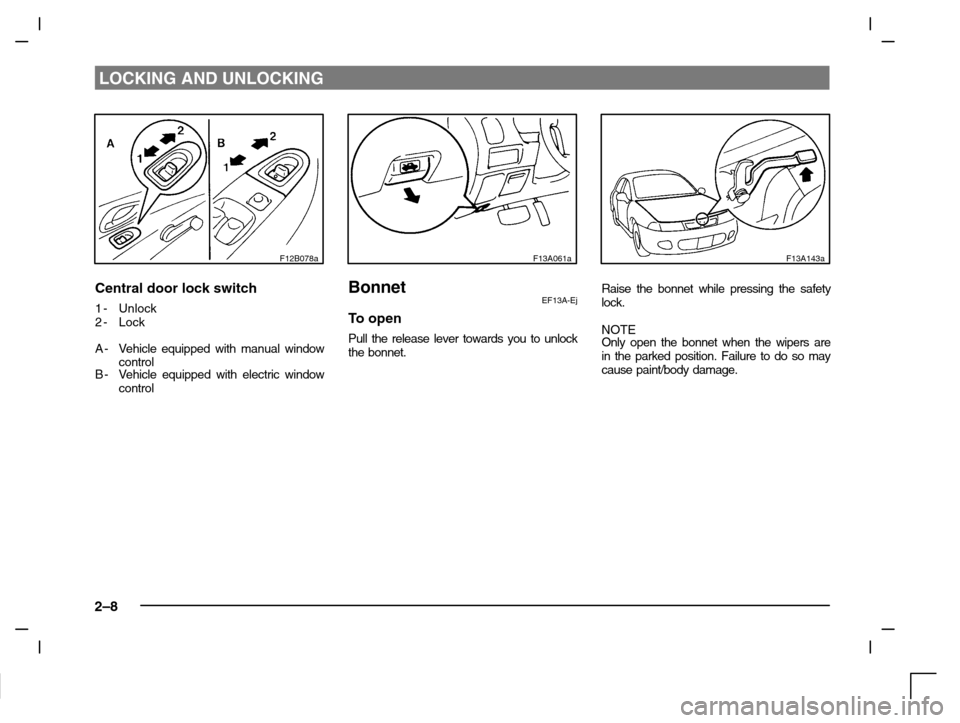
F12B078a
Central door lock switch
1-Unlock
2-Lock
A-Vehicle equipped with manual window
control
B-Vehicle equipped with electric window
control
F13A061a
BonnetEF13A-Ej
To open
Pull the release lever towards you to unlock
the bonnet.
F13A143a
Raise the bonnet while pressing the safety
lock.
NOTE
Only open the bonnet when the wipers are
in the parked position. Failure to do so may
cause paint/body damage.
Page 21 of 280
LOCKING AND UNLOCKING
2–9
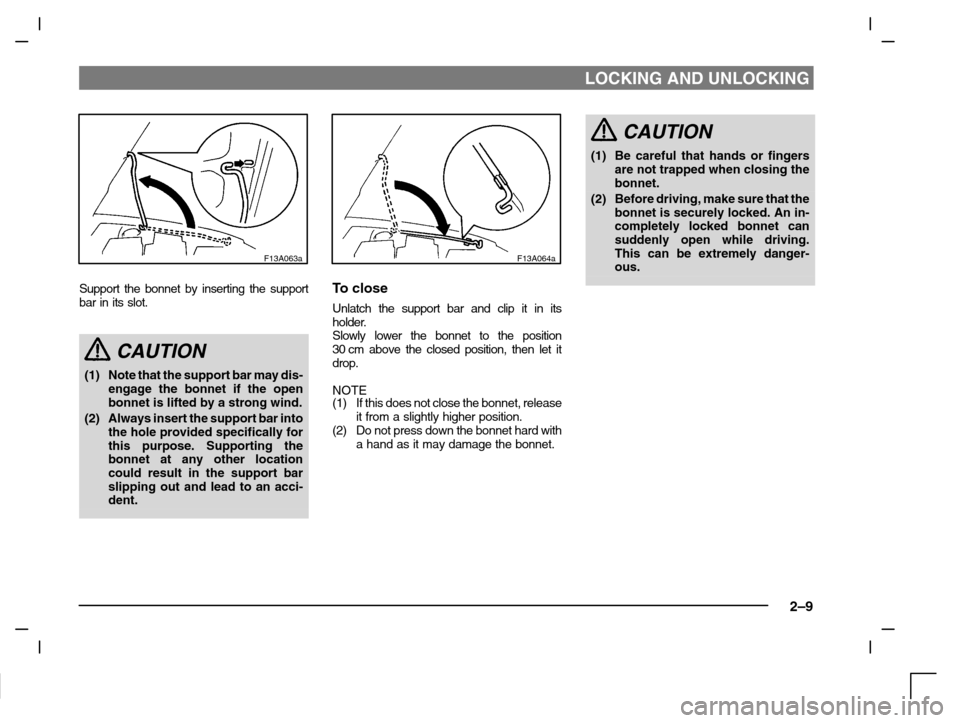
F13A063a
Support the bonnet by inserting the support
bar in its slot.
CAUTION
(1) Note that the support bar may dis-
engage the bonnet if the open
bonnet is lifted by a strong wind.
(2) Always insert the support bar into
the hole provided specifically for
this purpose. Supporting the
bonnet at any other location
could result in the support bar
slipping out and lead to an acci-
dent.
F13A064a
To close
Unlatch the support bar and clip it in its
holder.
Slowly lower the bonnet to the position
30 cm above the closed position, then let it
drop.
NOTE
(1) If this does not close the bonnet, release
it from a slightly higher position.
(2) Do not press down the bonnet hard with
a hand as it may damage the bonnet.
CAUTION
(1) Be careful that hands or fingers
are not trapped when closing the
bonnet.
(2) Before driving, make sure that the
bonnet is securely locked. An in-
completely locked bonnet can
suddenly open while driving.
This can be extremely danger-
ous.