Page 111 of 421
108 Rear view mirrors
Te ch n ica l
data Instruments
and controlsOperationDrivingInstrument
cluster displayPractical hints Car care Index
Parking position
The passenger-side exterior mirror can be adjusted and
programmed to assist the driver during parking
maneuvers (e.g. to observe the curb or other objects
close to the vehicle).
With the electronic key in starter switch position 2, and
the exterior rear view mirror switch in the passenger-
side position, the passenger-side mirror will be turned
downward when placing the gear selector lever in “R”
reverse.
The mirror position can now be adjusted as desired.
At speeds above approximately 6 mph (10 km / h), upon
shifting gear selector lever from “R” Reverse, or upon
pressing the driver’s side mirror button, the passenger-
side mirror will return to its previous position.To store passenger mirror parking position:
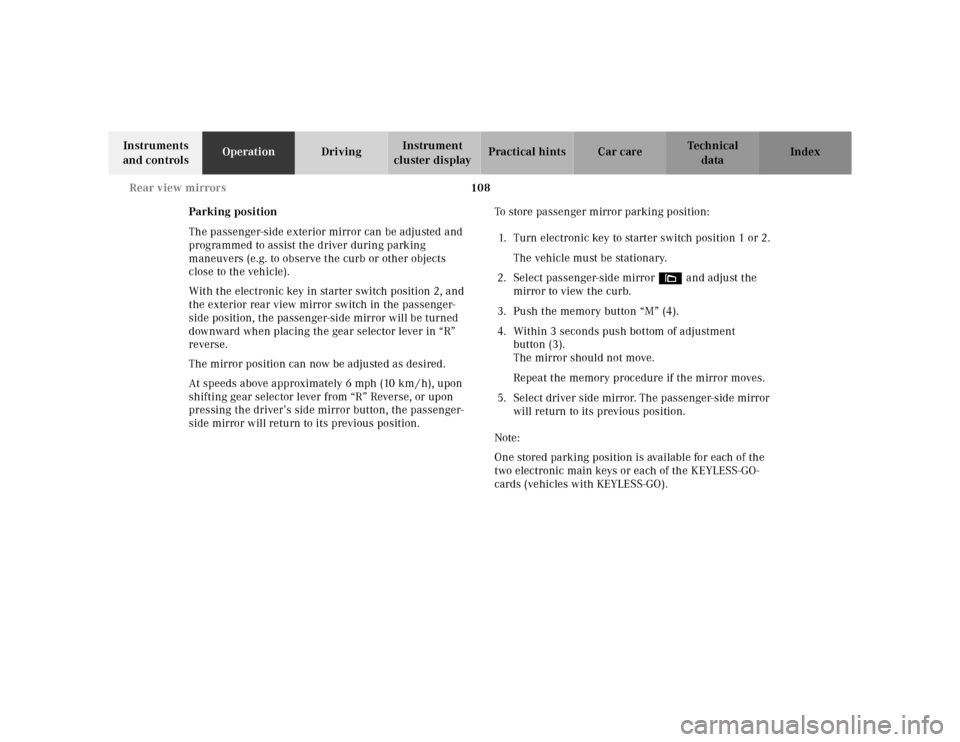
1. Turn electronic key to starter switch position 1 or 2.
The vehicle must be stationary.
2. Select passenger-side mirror& and adjust the
mirror to view the curb.
3. Push the memory button “M” (4).
4. Within 3 seconds push bottom of adjustment
button (3).
The mirror should not move.
Repeat the memory procedure if the mirror moves.
5. Select driver side mirror. The passenger-side mirror
will return to its previous position.
Note:
One stored parking position is available for each of the
two electronic main keys or each of the KEYLESS-GO-
cards (vehicles with KEYLESS-GO).
Page 114 of 421
111 Memory function
Te ch n ica l
data Instruments
and controlsOperationDrivingInstrument
cluster displayPractical hints Car care Index Memory function
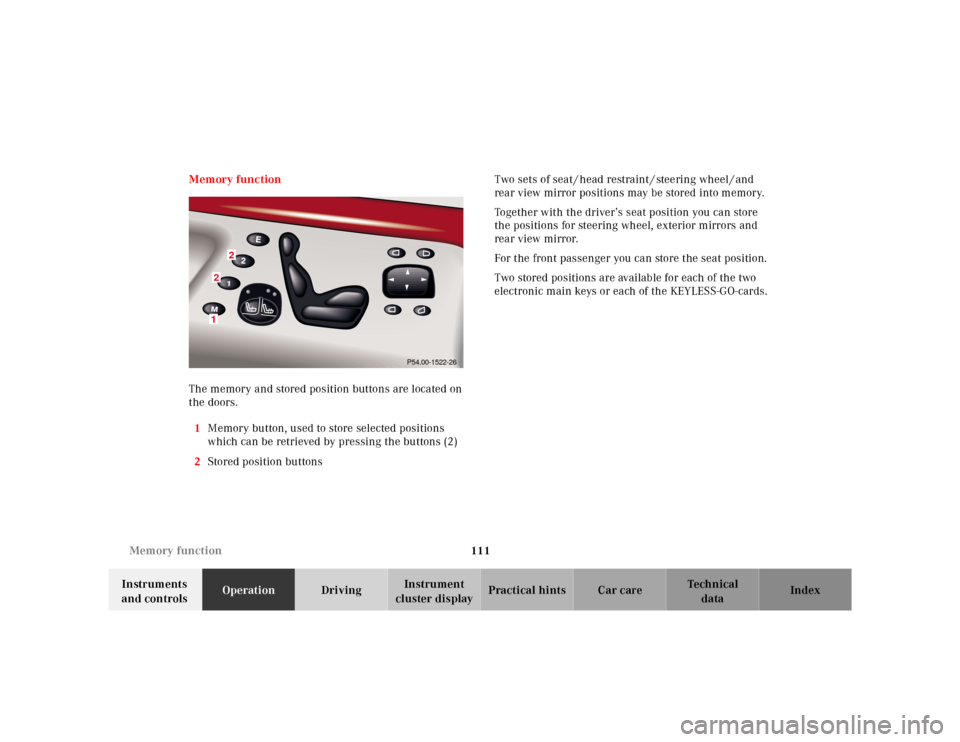
The memory and stored position buttons are located on
the doors.
1Memory button, used to store selected positions
which can be retrieved by pressing the buttons (2)
2Stored position buttonsTwo sets of seat / head restraint / steering wheel / and
rear view mirror positions may be stored into memory.
Together with the driver’s seat position you can store
the positions for steering wheel, exterior mirrors and
rear view mirror.
For the front passenger you can store the seat position.
Two stored positions are available for each of the two
electronic main keys or each of the KEYLESS-GO-cards.
2
21
P54.00-1522-26
Page 115 of 421
112 Memory function
Te ch n ica l
data Instruments
and controlsOperationDrivingInstrument
cluster displayPractical hints Car care Index
Storing positions into memory:
Driver’s seat: with the electronic key in starter switch
position 1 or 2 or with the driver’s door open and the
electronic key inserted in the starter switch.
Front passenger seat and rear seats: with electronic key
in starter switch position 1 or 2 or the relevant doors
open.
Adj ust t he seat a nd mul ticontou r back re st to t he d esired
position. You can also adjust the steering wheel, the
exterior mirrors electrically and the interior rear-view
mirror by hand for the driver’s seat. See page 107 for
exterior mirror adjustment and page 105 for steering
wheel adjustment.
Push memory button “M”, release and push a stored
position button “1”, or “2” within 3 seconds.Recalling positions from memory:
To recall a seat / head restraint / steering wheel and
exterior rear view mirror position, push and hold
button “1” or “2” until seat / head restraint / steering
wheel and exterior rear view mirror movement has
sto pp ed.
The seat / head restraint / steering wheel and exterior
rear view mirror movement stops when the button is
released.
Caution!
Do not operate the power seats using the memory
button if the seat backrest is in an excessively reclined
position. Doing so could cause damage to front or rear
seats.
First move backrest to an upright position.
Page 116 of 421
113 Memory function
Te ch n ica l
data Instruments
and controlsOperationDrivingInstrument
cluster displayPractical hints Car care Index Important!
Prior to operating the vehicle, the driver should check
and adjust if necessary the seat height, seat position
fore and aft, and backrest angle to insure adequate
control, reach and comfort. The head restraint should
also be adjusted for proper height. See also airbag
section for proper seat positioning.
In addition, also adjust the steering wheel to ensure
adequate control, reach, operation and comfort. Both the
inside and outside rear view mirrors should be adjusted
for adequate rearward vision.
Fasten seat belts. Infants and small children should be
seated in a properly secured restraint system that
complies with U.S. Federal Motor Vehicle Safety
Standard 213 and Canadian Motor Vehicle Safety
Standard 213.
All seat, head restraint, steering wheel, and rear view
mirror adjustments as well as fastening of seat belts
should be done before the vehicle is put into motion.
Wa r n i n g !
Children 12 years old and under must never ride in
the front seat, except in a Mercedes-Benz
authorized BabySmart
TM compatible child seat,
which operates with the BabySmart
TM system
installed in the vehicle to deactivate the passenger-
side front airbag when it is properly installed.
Otherwise they will be struck by the airbag when it
inflates in a crash. If this happens, serious or fatal
injury can result.
According to accident statistics, children are safer
when properly restrained in the rear seating
positions than in the front seating positions.
Infants and small children must ride in back seats
and be seated in an appropriate infant or child
restraint system, which is properly secured with
the vehicle’s seat belt, fully in accordance with the
child seat manufacturer’s instructions.A child’s risk of serious or fatal injuries is
significantly increased if the child restraints are
not properly secured in the vehicle and the child is
not properly secured in the child restraint.
Page 121 of 421
118 Instrument cluster
Te ch n ica l
data Instruments
and controlsOperationDrivingInstrument
cluster displayPractical hints Car care Index
Speedometer (9)
When the cruise control is activated, the segments on
the speedometer scale between the set speed to the top
of the scale are illuminated. Cruise control, see
page 253.
When the Distronic (DTR) is activated, one or two
segments around the speed stored in memory light up
in the speedometer dial. Distronic (DTR), see page 256.Note:
The speed display is set to read out for
•USA in mph
•Canada in km/h.
Page 124 of 421

121 Multifunction steering wheel, multifunction display
Te ch n ica l
data Instruments
and controlsOperationDrivingInstrument
cluster displayPractical hints Car care Index Depending on your vehicle’s equipment, you may use
the buttons on the multifunction steering wheel to call
up, control and set the following systems in the
multifunction display:
1Trip odometer and main odometer, see page 119 and
page 124
Flexible service system (FSS), see page 147
Tire inflation pressure monitor, see page 150
Engine oil level indicator, see page 154
2Audio systems, see page 125
Radio, see page 125
CD player, see page 126
Cassette player, see page 127
3Telephone, see page 1284Navigation system, see page 133
5Distronic (DTR), see page 256
6Trip computer, see page 135
After start
After reset
Fuel tank content
7Malfunction message memory, see page 136
8Individual settings, see page 138
Press the è or ÿ button repeatedly until the
required system is displayed.
The display advances by one system each time the
button is pressed.
You may call up additional displays within some of these
categories by pressing the j or k button.
Page 128 of 421
125 Multifunction steering wheel, multifunction display
Te ch n ica l
data Instruments
and controlsOperationDrivingInstrument
cluster displayPractical hints Car care Index Audio systems
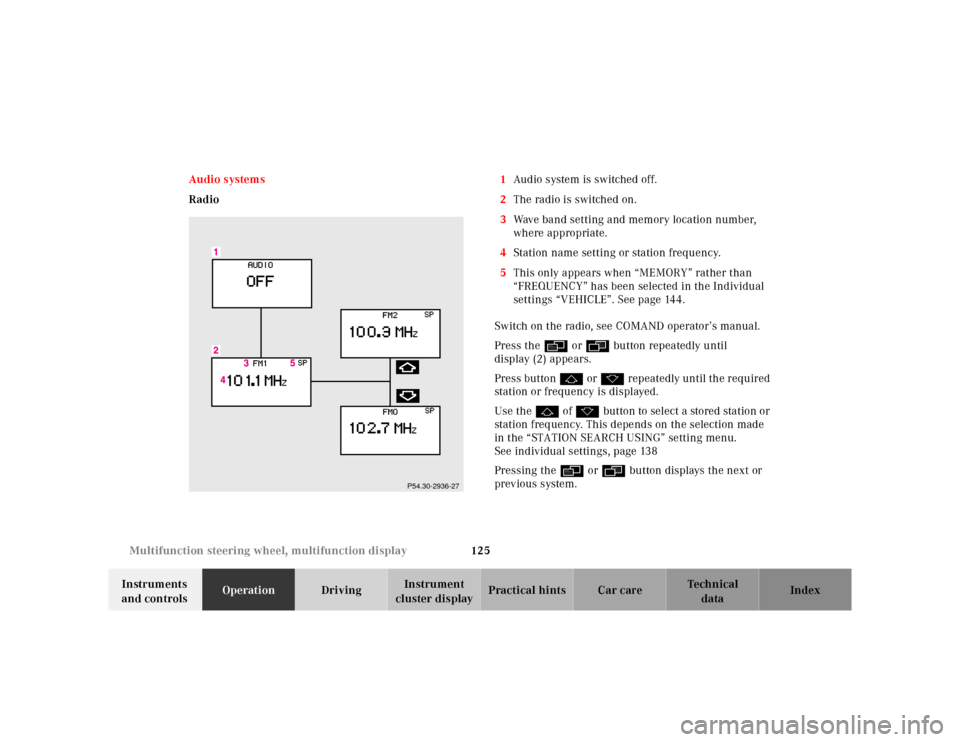
Radio1Audio system is switched off.
2The radio is switched on.
3Wave band setting and memory location number,
where appropriate.
4Station name setting or station frequency.
5This only appears when “MEMORY” rather than
“FREQUENCY” has been selected in the Individual
settings “VEHICLE”. See page 144.
Switch on the radio, see COMAND operator’s manual.
Press the è or ÿ button repeatedly until
display (2) appears.
Press button j or k repeatedly until the required
station or frequency is displayed.
Use the j of k button to select a stored station or
station frequency. This depends on the selection made
in the “STATION SEARCH USING” setting menu.
See individual settings, page 138
Pressing the è or ÿ button displays the next or
previous system.
P54.30-2936-27
Page 131 of 421
128 Multifunction steering wheel, multifunction display
Te ch n ica l
data Instruments
and controlsOperationDrivingInstrument
cluster displayPractical hints Car care Index
Te l e p ho n e
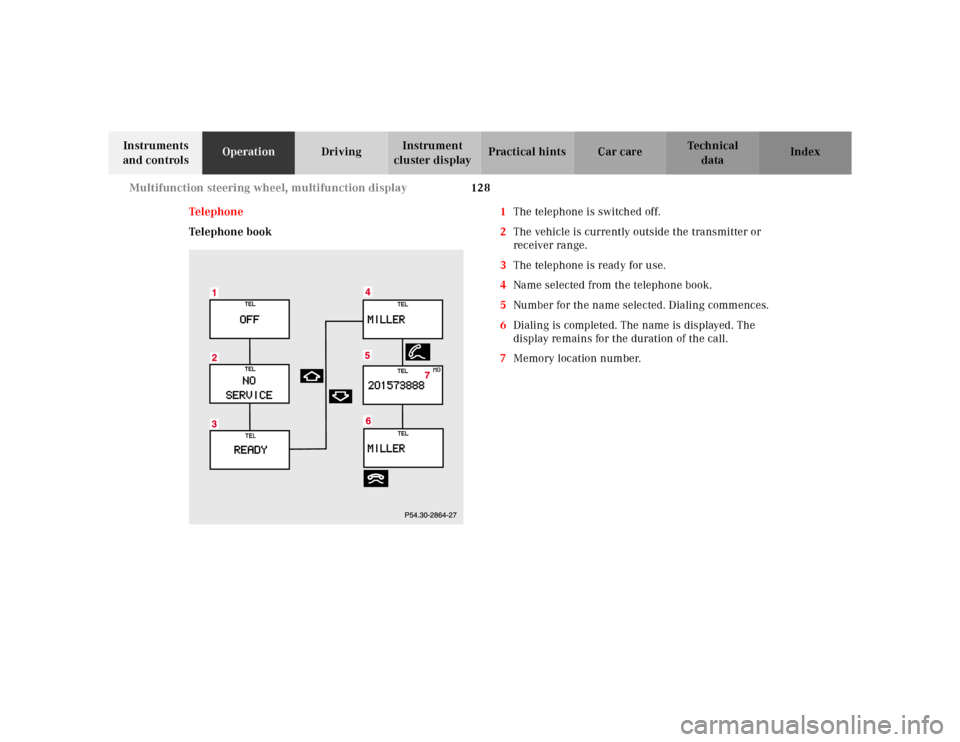
Telephone book1The telephone is switched off.
2The vehicle is currently outside the transmitter or
receiver range.
3The telephone is ready for use.
4Name selected from the telephone book.
5Number for the name selected. Dialing commences.
6Dialing is completed. The name is displayed. The
display remains for the duration of the call.
7Memory location number.