Page 263 of 421
260 Driving systems
Te ch n ica l
data Instruments
and controlsOperationDrivingInstrument
cluster displayPractical hints Car care Index
•For a more precise setting the speed can be
increased in increments of 1 mph (Canada: 1 km/h)
by briefly pulling the control lever in direction (4).
Caution!
If the driver’s foot is not fully removed from the
accelerator pedal, the Distronic control system will be
overridden and it will not regulate the preset vehicle
speed and following distance. The vehicle speed and
following distance will be determined only by the
accelerator pedal position.Invalid attempts to activate
The multifunction display will show “–––” during
invalid attempts to activate Distronic:
•below a speed of approximately 25 mph
(Canada: 30 km/h),
•while the electronic stability program (ESP) is
switched off – ESP warning lampv in
speedometer dial is illuminated, see page 114,
•by moving the distronic control lever in “RESUME”
direction (4) when no speed is stored in memory,
•during the initialization and self-test phase after the
engine is started – this can take up to 2 minutes,
•while depressing the service brake pedal,
•while the parking brake is set – check ;warning
lamp (Canada: !) in instrument cluster, see
page 114,
•with the gear selector lever in position “P”, “R”
or “N” – check gear range indicator display in
instrument cluster, see page 114.
Wa r n i n g !
Distronic brakes (up to 20% of vehicle braking
power) the vehicle to restore the preset distance or
to maintain the speed. The brake pedal is
automatically retracted as this happens.Keep driver’s foot area clear at all times, including
the area under the brake pedal. Objects stored in
this area may impair pedal movement which could
interfere with the braking ability of the Distronic
system.Do not place your foot under the brake pedal – your
foot could become caught.
Page 264 of 421
261 Driving systems
Te ch n ica l
data Instruments
and controlsOperationDrivingInstrument
cluster displayPractical hints Car care Index Deactivation of Distronic
Briefly move the distronic control lever in “OFF”
direction (3) – the stored speed remains in the memory
until the electronic key in the starter switch is turned to
position 1 or 0.
Distronic is also deactivated if:
•the service brake pedal is depressed,
•the parking brake is activated,
•the vehicle decelerates to less than approximately
25 mph (Canada: 30 km/h), e.g. while maintaining
the distance to the vehicle ahead,•the gear selector lever is moved to position “N”,
•the electronic stability program (ESP) is active,
•the electronic stability program (ESP) is switched off
manually,
•Model S 55 AMG only:
the vehicle speed exceeds approximately 160 mph
(260 km/h).
Note:
A signal sounds and the message “DTR OFF” appears
for 5 seconds in the multifunction display everytime
Distronic is deactivated.
Wa r n i n g !
The Distronic switches off and releases the brakes
when the vehicle decelerates below the minimum
speed of 25 mph (Canada: 30 km/h) by operation of
the system. At that time, the driver must apply the
brakes in order to reduce vehicle speed further or
bring it to a stop.
Page 271 of 421
268 Driving systems
Te ch n ica l
data Instruments
and controlsOperationDrivingInstrument
cluster displayPractical hints Car care Index
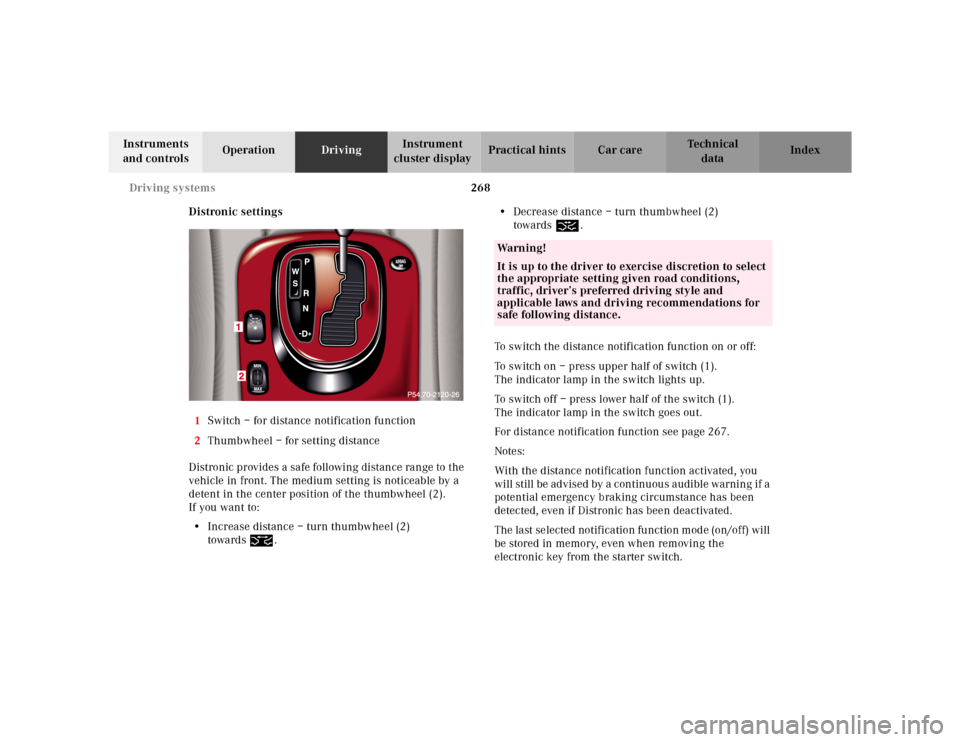
Distronic settings
1Switch – for distance notification function
2Thumbwheel – for setting distance
Distronic provides a safe following distance range to the
vehicle in front. The medium setting is noticeable by a
detent in the center position of the thumbwheel (2).
If you want to:
•Increase distance – turn thumbwheel (2)
towards¯.•Decrease distance – turn thumbwheel (2)
towards®.
To switch the distance notification function on or off:
To switch on – press upper half of switch (1).
The indicator lamp in the switch lights up.
To switch off – press lower half of the switch (1).
The indicator lamp in the switch goes out.
For distance notification function see page 267.
Notes:
With the distance notification function activated, you
will still be advised by a continuous audible warning if a
potential emergency braking circumstance has been
detected, even if Distronic has been deactivated.
The last selected notification function mode (on/off) will
be stored in memory, even when removing the
electronic key from the starter switch.
Wa r n i n g !
It is up to the driver to exercise discretion to select
the appropriate setting given road conditions,
traffic, driver’s preferred driving style and
applicable laws and driving recommendations for
safe following distance.
Page 273 of 421
270 Driving systems
Te ch n ica l
data Instruments
and controlsOperationDrivingInstrument
cluster displayPractical hints Car care Index
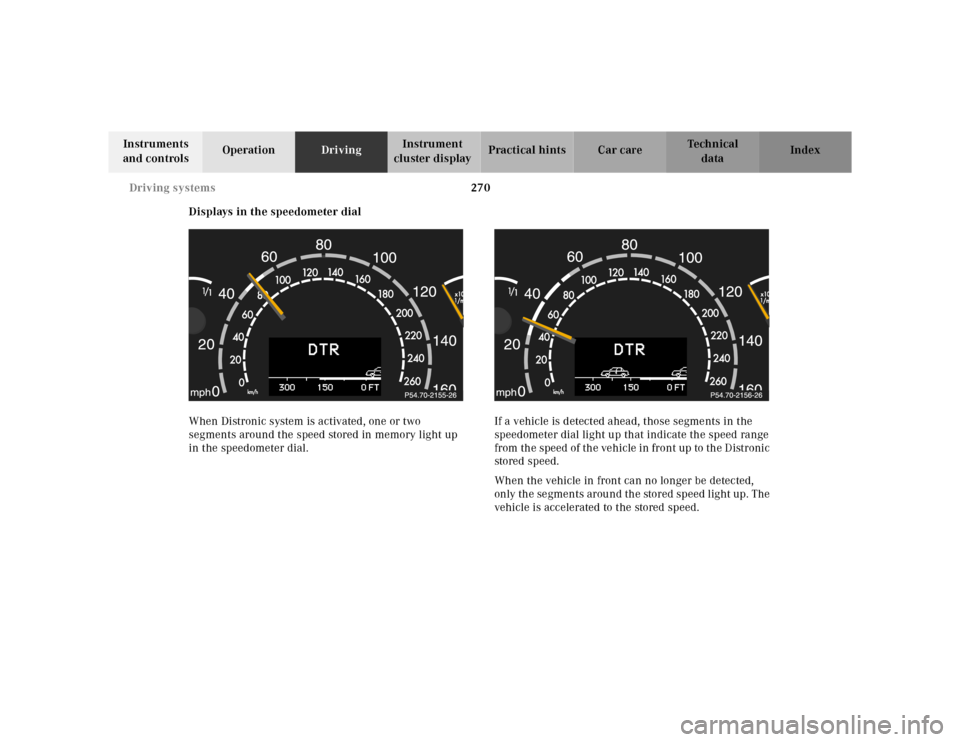
Displays in the speedometer dial
When Distronic system is activated, one or two
segments around the speed stored in memory light up
in the speedometer dial.If a vehicle is detected ahead, those segments in the
speedometer dial light up that indicate the speed range
from the speed of the vehicle in front up to the Distronic
stored speed.
When the vehicle in front can no longer be detected,
only the segments around the stored speed light up. The
vehicle is accelerated to the stored speed.
Page 281 of 421
278 Driving systems
Te ch n ica l
data Instruments
and controlsOperationDrivingInstrument
cluster displayPractical hints Car care Index
Active body control (ABC)
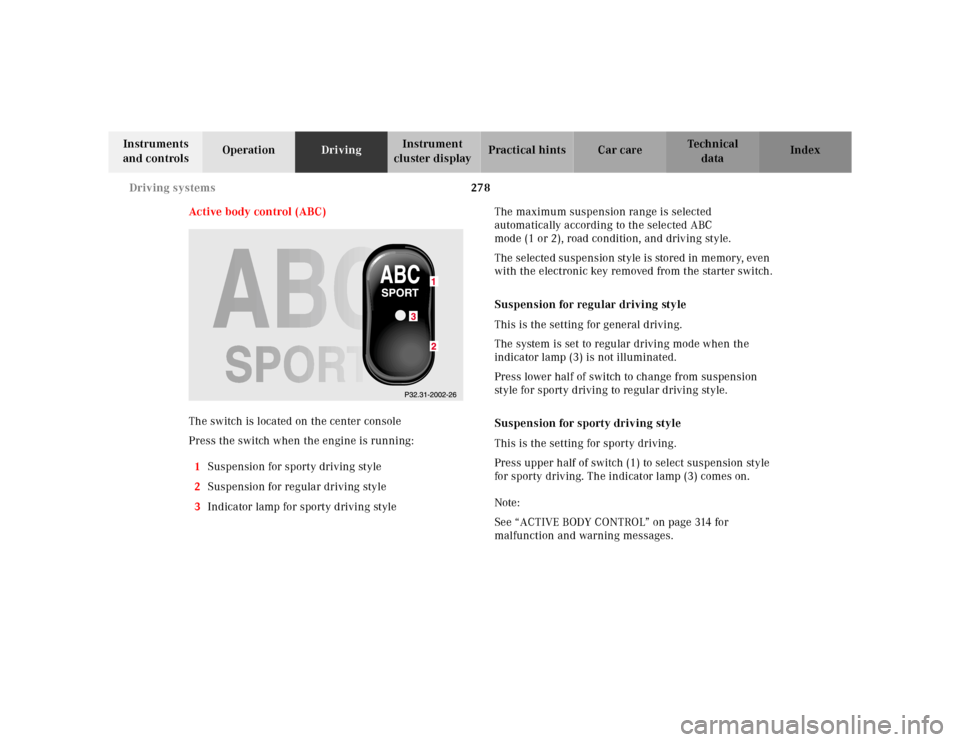
The switch is located on the center console
Press the switch when the engine is running:
1Suspension for sporty driving style
2Suspension for regular driving style
3Indicator lamp for sporty driving styleThe maximum suspension range is selected
automatically according to the selected ABC
mode (1 or 2), road condition, and driving style.
The selected suspension style is stored in memory, even
with the electronic key removed from the starter switch.
Suspension for regular driving style
This is the setting for general driving.
The system is set to regular driving mode when the
indicator lamp (3) is not illuminated.
Press lower half of switch to change from suspension
style for sporty driving to regular driving style.
Suspension for sporty driving style
This is the setting for sporty driving.
Press upper half of switch (1) to select suspension style
for sporty driving. The indicator lamp (3) comes on.
Note:
See “ACTIVE BODY CONTROL” on page 314 for
malfunction and warning messages.
Page 283 of 421
280 Driving systems
Te ch n ica l
data Instruments
and controlsOperationDrivingInstrument
cluster displayPractical hints Car care Index
The message “AIR SPRING – VEHICLE RISING” appears
in the multifunction display. The display switches off
when the vehicle is raised.
Notes:
The raised level setting switches off at speeds exceeding
approximately 75 mph (120 km / h), or if vehicle speed
is operated between 50 mph (80 km / h) and 75 mph
(120 km / h) for approximately 5 minutes. The message
“AIR SPRING – LEVEL CANCELLED” appears in the
display.
The raised level setting will be stored in memory after
the electronic key is removed from the starter switch if
you did not drive at the aforementioned speeds.
See “AIR SPRING” on page 325 for malfunction and
warning messages.Level control system for vehicles with
Active Body Control (ABC)
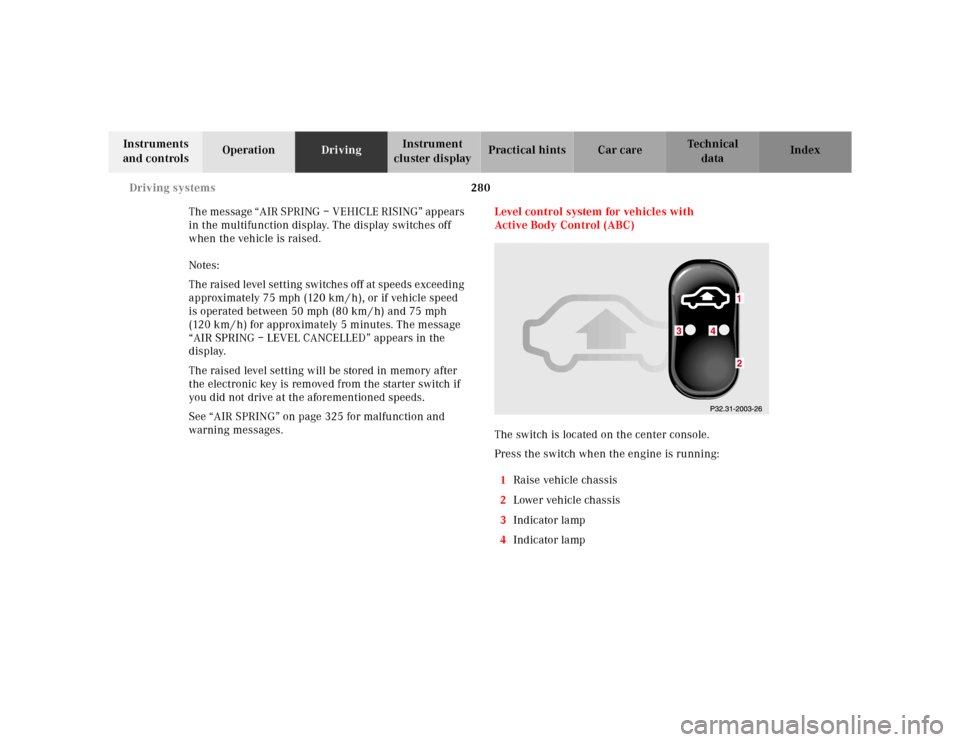
The switch is located on the center console.
Press the switch when the engine is running:
1Raise vehicle chassis
2Lower vehicle chassis
3Indicator lamp
4Indicator lamp
Page 284 of 421
281 Driving systems
Te ch n ica l
data Instruments
and controlsOperationDrivingInstrument
cluster displayPractical hints Car care Index The vehicle chassis ride height is raised or lowered
automatically according to the selected setting and to
the vehicle speed. This helps to increase vehicle
handling safety and lowers fuel consumption.
The selected setting is stored in memory, even with the
electronic key removed from the starter switch.
Note:
See “ACTIVE BODY CONTROL” on page 314 for
malfunction and warning messages.Level control switch positions
Normal level – indicator lamps (3, 4) are not
illuminated. To change from raised level options I or II,
press lower half of switch (2) once respectively twice.
Raise level, option I – indicator lamp (3) is illuminated.
To change from normal level, press upper half (1) of
switch.
To change from raised level, option II, press lower
half (2) of switch.
Raised level, option 2 – indicator lamps (3, 4) are
illuminated.
To change from normal level or raised level, option I,
press upper half (1) of switch once respectively twice.
Normal level
Used for normal operation of the vehicle.
Speed dependent lowering of vehicle chassis
(approximate values):
•between 0 mph (0 km / h) and 35 mph (60 km / h) –
none
•between 35 mph (60 km/h) and 85 mph (140 km/h)
– lowered progressively by approximately
7/16inch
(11 mm)
Wa r n i n g !
To help avoid personal injury, keep hands and feet
away from wheel housi ng area , an d stay away from
under the vehicle when lowering the vehicle
chassis.
Page 286 of 421
283 Driving systems
Te ch n ica l
data Instruments
and controlsOperationDrivingInstrument
cluster displayPractical hints Car care Index Adaptive damping system (ADS)
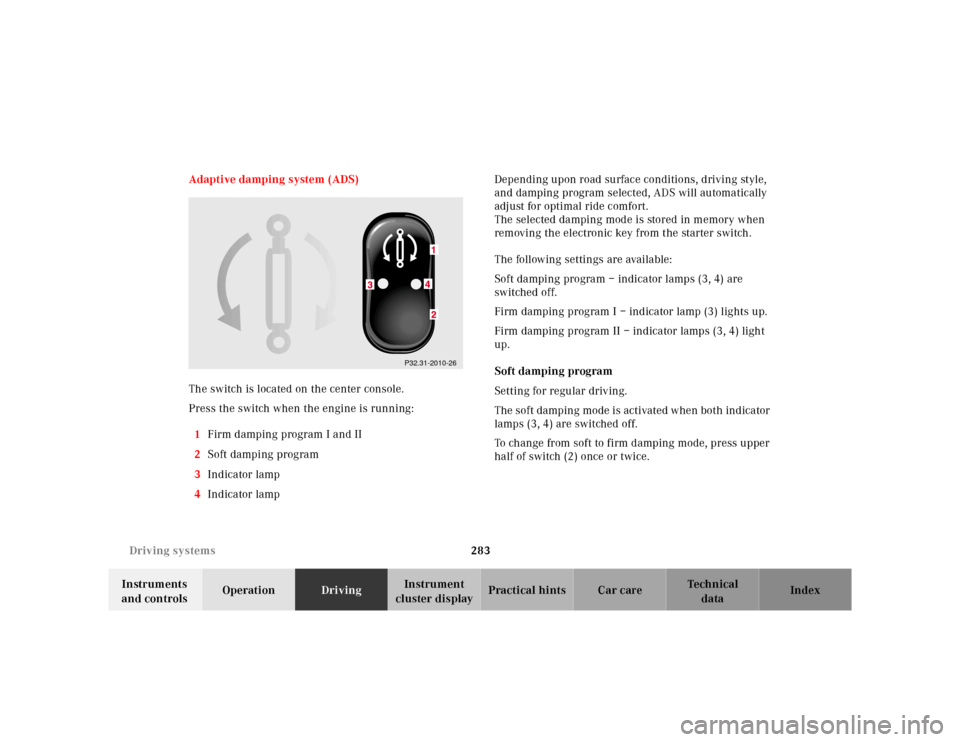
The switch is located on the center console.
Press the switch when the engine is running:
1Firm damping program I and II
2Soft damping program
3Indicator lamp
4Indicator lamp Depending upon road surface conditions, driving style,
and damping program selected, ADS will automatically
adjust for optimal ride comfort.
The selected damping mode is stored in memory when
removing the electronic key from the starter switch.
The following settings are available:
Soft damping program – indicator lamps (3, 4) are
switched off.
Firm damping program I – indicator lamp (3) lights up.
Firm damping program II – indicator lamps (3, 4) light
up.
Soft damping program
Setting for regular driving.
The soft damping mode is activated when both indicator
lamps (3, 4) are switched off.
To change from soft to firm damping mode, press upper
half of switch (2) once or twice.
P32.31-2010-26