Page 86 of 273
The interior light has a three
position switch. In the
0 FF position,
the light does not come on. In the
center position, the interior light
comes on when you open either door.
In the
ON position, the interior light
stays on continuously. In
addition, when the three position
switch is in the center position with
both doors closed, the two bulbs
in
the interior light can be turned on
separately by the pushbutton
switches next to them.
Push the
switch to turn the light on or off.
If the three-position switch is in the
center position,
the interior light will
come on when you remove the key
from the ignition switch.
Interior Lights
Instruments and Controls 83
Page 88 of 273

Comfort and Convenience Features
The heating and air conditioning
systems
in your Honda provide a
comfortable driving environment
in
all weather conditions.
The standard audio system has
many features. This section de
scribes those features and how to
use them.
(If you selected an
optional audio system, refer to the
operating instructions that came
with it.) Heating
and Cooling ........................ 86
What Each Control Does ............
86
How to Use the System ............... 88
To Turn Everything Off ............. 93
Audio System
AM/FM/CD Audio System ....... 94
Operating the Radio .................... 95
Adjusting the Sound .................... 99
Audio System Lighting ............. 100
Radio Frequencies ..................... 100
Radio Reception ......................... 101
Operating the CD Player .......... 102
Operating the CD Changer ...... 107
Protecting Compact Discs ........ 108
CD Player Error Indications ..... 110
CD Changer Error
Indications ..............................
111
Remote Audio Controls ............ 112
Theft Protection ........................ 113
Comfort and Convenience Features 85
Page 89 of 273
Heating and Cooling
Proper use of the Heating and
Cooling system can make the
interior dry and comfortable, and
keep the windows clear for best
visibility.
What Each Control Does
Fan Control Lever
Pushing this lever up and down
increases and decreases
the fan
speed.
The indicators next to the
lever show you the speed selected.
Temperature Control Dial
Turning this dial clockwise increases
the temperature of the air
flow.
Air Conditioning (A/C) Button
This button turns the air condi
tioning
ON and OFF. The indicator
in the button lights when theA/Cis
on.
86 Comfort and Convenience Features
Recirculation Button
This button controls the source of
the air going into the system. When
the indicator
in this button is lit, air
from the car's interior is sent
through the system again (Recircula
tion mode). When the indicator is off,
air
is brought in from outside the car
(Fresh Air mode).
Page 93 of 273

Heating and Cooling
To Cool with A/C
1. Turn on the AI C by pressing the
button.
The light in the button
should come on when a fan speed
is selected.
2. Make sure the temperature
control dial is
all the way to the left.
3. Select ;,; .
4. If the outside air is humid, select
Recirculation mode.
If the outside
air is dry, select Fresh Air mode.
Set
the fan to the desired speed.
If the interior is very warm from
being parked
in the sun, you can cool
it down more rapidly by setting up
the controls this way:
1. Start the engine.
2. Turn on the A/C by pressing the
button. Make sure the tempera
ture control dial is
all the way to
the left.
3. Set the fan to maximum speed.
4. Open the windows partially. Select
;,; and Recirculation mode.
90 Comfort and Convenience Features
When the interior has cooled down
to a more comfortable temperature,
close the windows and set the
controls as described for normal
cooling. Air
conditioning places an extra load
on the engine. Watch the engine
coolant temperature gauge (see page
47) when driving in stop-and-go
traffic or climbing a long, steep hill.
If it moves near the red mark, turn
off the
A/ C until the reading returns
to normal.
Page 96 of 273
These settings direct all the air flow
to the defroster vents at the base of
the windshield and the side window
defroster vents.
The air flow will get
warmer and clear the windows faster
as the engine warms up. You can
close the side vents with the dial
beside each vent.
This will send
more warm air to the windshield
defroster vents.
For safety, make sure you have a
clear view through all the windows
before driving away.
To Tum Everything Off
To shut off the system temporarily,
turn off the fan (no lights
illuminated).
You should shut the system
completely off only for the first few
minutes of driving in cold weather,
until the engine coolant warms up
enough to operate the heater. Keep
the fan on at
all other times so stale
air does not build up
in the interior.
Heating and Cooling
Comfort and Convenience Features 93
Page 102 of 273
Adjusting the Sound
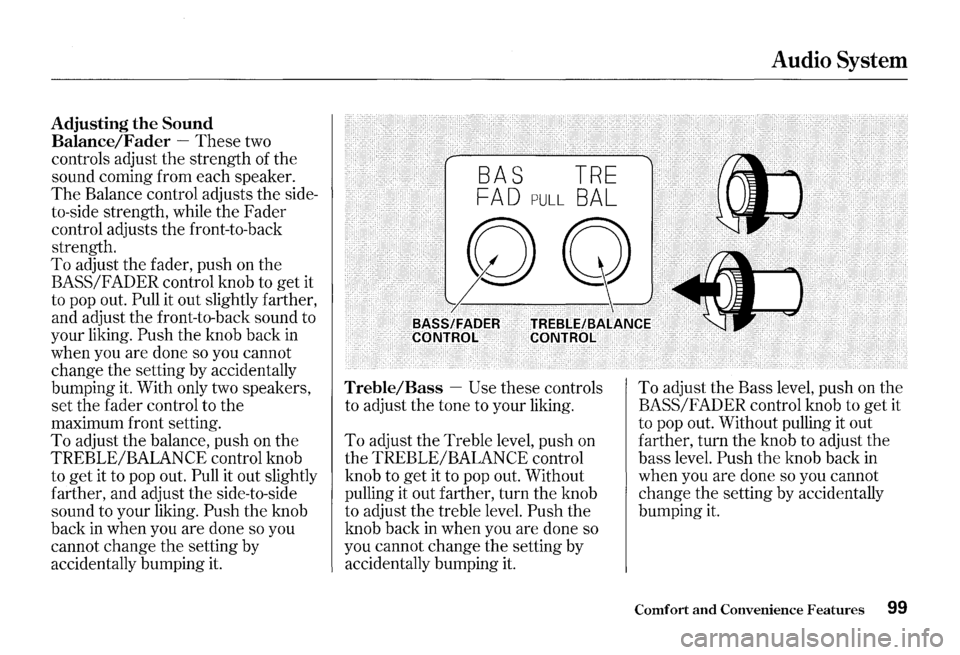
Balance/Fader
-These two
controls adjust the strength of the
sound coming from each speaker.
The Balance control adjusts the side
to-side strength, while the Fader
control adjusts the front-to-back
strength.
To adjust the fader, push on the
BASS/FADER control knob to get it
to pop out.
Pull it out slightly farther,
and adjust the front-to-back sound to
your liking.
Push the knob back in
when you are done so you cannot
change the setting by accidentally
bumping it. With only two speakers,
set the fader control to the
maximum front setting.
To adjust the balance, push on the
TREBLE/BALANCE control knob
to get it to pop out.
Pull it out slightly
farther, and adjust the side-to-side
sound to your liking.
Push the knob
back in when you are done so you
cannot change the setting by
accidentally bumping it.
BAS TRE
FAD PULL BAL
Audio System
BASS/FAPER CONTROL· TREBLE/BALANCE CONTROL
Treble/Bass -Use these controls
to adjust the tone to your liking.
To adjust the Treble level, push on
the TREBLE/BALANCE control
knob to
get it to pop out. Without
pulling it out farther, turn the knob
to adjust the treble level.
Push the
knob back
in when you are done so
you cannot change the setting by
accidentally bumping it.
To adjust the Bass level, push on the
BASS/FADER control knob to get it
to pop out. Without pulling it out
farther, turn the knob to adjust the
bass level.
Push the knob back in
when you are done so you cannot
change the setting by accidentally
bumping it.
Comfort and Convenience Features 99
Page 103 of 273
Audio System
Audio System Lighting
The audio system illuminates when
the parking lights are on, even
if the
radio is turned off.
1 00 Comfort and Convenience Features
Radio Frequencies
Your Honda's radio can receive the
complete AM and FM bands.
Those bands cover these frequen
cies:
AM band:
530 to 1,710 kilohertz
FMband:
87.7 to 107.9 megahertz
Radio stations on
the AM band are
assigned frequencies at least ten
kilohertz apart
(530, 540, 550).
Stations on the FM band are
assigned frequencies
at least 0.2
megahertz apart (87.9, 88.1, 88.3). Stations
must use these exact
frequencies.
It is fairly common for
stations to round-off the frequency
in
their advertising, so your radio could
display a frequency of
100.9 even
though the announcer may identify
the station as
"FM101."
Page 111 of 273
Audio System
Protecting Compact Discs
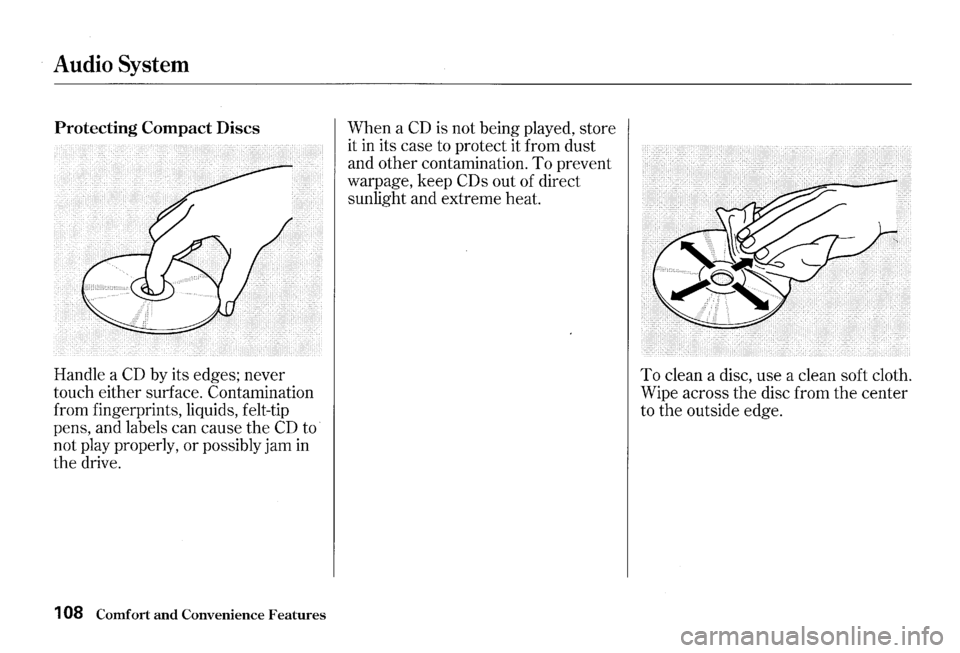
Handle a CD by its edges; never
touch either surface. Contamination
from fingerprints, liquids, felt-tip
pens, and labels can cause the
CD to
not play properly, or possibly jam
in
the drive.
1 08 Comfort and Convenience Features
When a CD is not being played, store
it
in its case to protect it from dust
and other contamination.
To prevent
warpage, keep
COs out of direct
sunlight and extreme heat.
To clean a disc, use a clean soft cloth.
Wipe across
the disc from the center
to the outside edge.