2000 HONDA PASSPORT lock
[x] Cancel search: lockPage 150 of 267
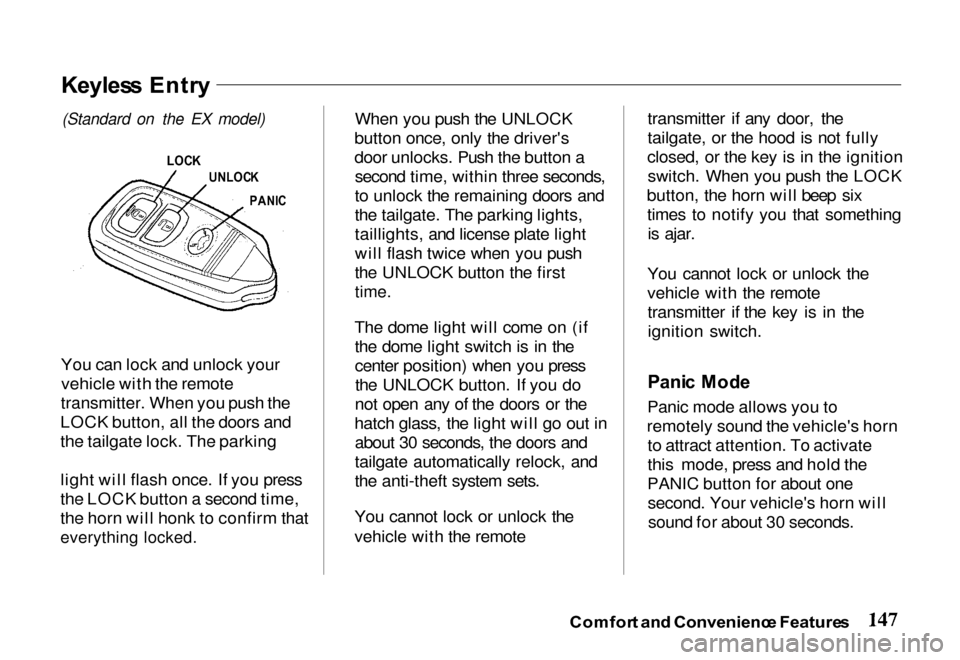
You can lock and unlock your
vehicle with the remote
transmitter. When you push the
LOCK button, all the doors and
the tailgate lock. The parking
light will flash once. If you press
the LOCK button a second time,
the horn will honk to confirm that
everything locked.
When you push the UNLOCK
button once, only the driver's
door unlocks. Push the button a second time, within three seconds,
to unlock the remaining doors and
the tailgate. The parking lights,
taillights, and license plate light
will flash twice when you push
the UNLOCK button the first
time.
The dome light will come on (if the dome light switch is in the
center position) when you pressthe UNLOCK button. If you do
not open any of the doors or the
hatch glass, the light will go out in about 30 seconds, the doors and
tailgate automatically relock, and
the anti-theft system sets.
You cannot lock or unlock the
vehicle with the remote transmitter if any door, the
tailgate, or the hood is not fully
closed, or the key is in the ignition switch. When you push the LOCK
button, the horn will beep six times to notify you that somethingis ajar.
You cannot lock or unlock the
vehicle with the remote transmitter if the key is in the
ignition switch.
Pani c Mod e
Panic mode allows you to
remotely sound the vehicle's horn to attract attention. To activate
this mode, press and hold the
PANIC button for about one second. Your vehicle's horn willsound for about 30 seconds.
Comfor t an d Convenienc e Feature s
Keyles s Entr y
(Standard on
the EX model)
LOC K
UNLOC K
PANI C
Page 151 of 267
To cancel panic mode before 30
seconds, press any button on the
remote transmitter. You can also turn the ignition switch to
ACCESSORY.
Anti-Thef
t Syste m
The anti-theft system is designed
to protect your vehicle and its contents from theft. Any attempt
to forcibly open any door, the
tailgate, or the hood without using
the key or the remote transmitterwill cause the system to alarm.
The horn sounds and the headlights flash for approximately
three minutes. The starter motor
circuit is disabled so the engine
cannot be started. After threeminutes, the system resets. Activatin
g th e Syste m
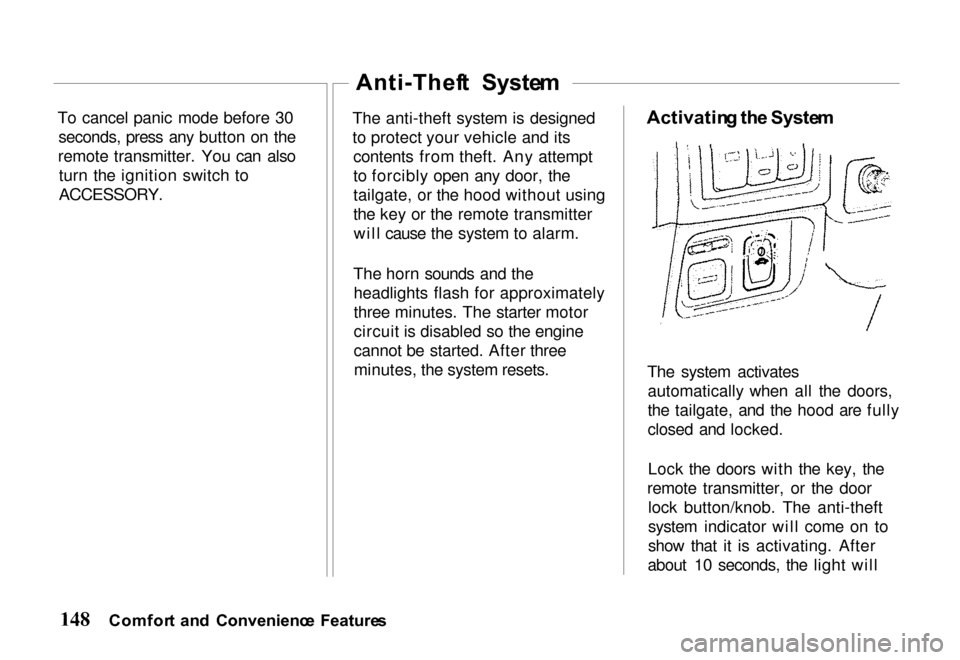
The system activates automatically when all the doors,
the tailgate, and the hood are fully
closed and locked.
Lock the doors with the key, the
remote transmitter, or the door lock button/knob. The anti-theft
system indicator will come on to
show that it is activating. After
about 10 seconds, the light will
Comfor t an d Convenienc e Feature s
Page 152 of 267
begin blinking rapidly to indicate
the system is active.
Deactivatin g th e Syste m
Unlocking the doors or the
tailgate with the key or the remote
transmitter turns off the system.
You can also turn the ignition
switch to the ACCESSORY
position.
Doing any of the above will also
reset an alarming system before
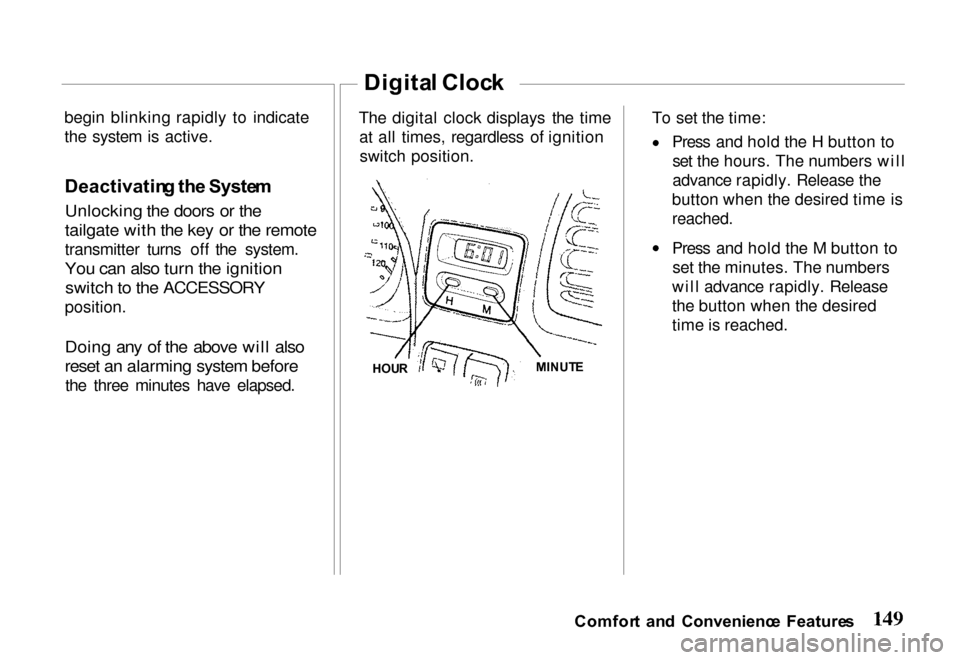
the three minutes have elapsed. The digital clock displays the time
at all times, regardless of ignitionswitch position. To set the time: Press and hold the H button to
set the hours. The numbers will
advance rapidly. Release the
button when the desired time is
reached.
Press and hold the M button to set the minutes. The numbers
will advance rapidly. Release
the button when the desired
time is reached.
Comfor t an d Convenienc e Feature s
Digita l Cloc k
HOU R MINUT
E
Page 155 of 267
Befor
e Drivin g
Drivin g Guideline s
Your Honda has higher ground
clearance than a passenger car
designed for use only on
pavement. Higher ground clearance has many advantages
for off-road driving. It allows you
to travel over bumps, obstacles,
and rough terrain. It also provides
good visibility so you can
anticipate problems earlier.
These advantages come at some
cost. Because your vehicle is
taller and rides higher off the
ground, it has a high center of
gravity. This means that your
vehicle can tip or roll over if you make abrupt turns. Utility
vehicles have a significantly
higher rollover rate than other types of vehicles. To prevent rollover or loss of
control:
Take corners at slower speeds
than you would with a
passenger car. Avoid sharp turns and abrupt
maneuvers whenever possible.
Do not modify your vehicle in
any way that would raise the
center of gravity (see page 170). Do not carry heavy cargo on
the roof (see page 173).
For off-road driving guidelines, see the Off-Road Driving
Information booklet that came with your vehicle.
Befor e Enterin g th e Vehicl e
1. Check that the windows,
mirrors, lights and reflectors
are clean and unobstructed.
2. Check the tires to see if they
are low or flat. You will need
a pressure gauge to tell if tires
are properly inflated.
3. Check that all lights work.
4. Check for fluid leaks.
5. Be sure everything is properly
stowed.
6. Check the area behind the vehicle if you are about to
back up.
Befor e Drivin g th e Vehicl e
1. Lock all doors.
2. Adjust the seat and any movable head restraints.
3. Adjust the inside and outside mirrors.
4. Check that all the indicator lights work when the key
Drivin g Tip s
Page 157 of 267

Ne
w Vehicl e Break-I n
You may drive your new vehicle
from its very first mile/kilometer without following a formal
"break-in" schedule. However,
there are things you can do during
the first few hundred miles/
kilometers of driving that will add
to the future performance and
economy of your vehicle.
It is recommended that your speed
during the first 500 miles (800
kilometers) be limited to a
maximum of 55 mph (90 km/h) and that you do not drive for long
periods at any one constant speed, either fast or slow. During this
period, avoid full-throttle starts and, if possible, avoid hard stops;
especially during the first 200
miles (320 kilometers) of driving.
Always drive at moderate speed
until the engine has completely warmed up.
Parkin
g
When leaving your vehicle
unattended:
Set the parking brake.
Place the shift lever in "P" (Park) position for automatic
transmission.
When parking a vehicle equipped
with a manual transmission on an
upward slope, or on a level surface, place the shift lever in
the "1st" position.
When parking a vehicle
equipped with a manual
transmission on a downward slope, place the shift lever in
the "R" (Reverse) position. Turn the key to the "LOCK"
position.
Remove the key. The beeper
will remind you. Close all windows and lock all
doors.
Check to make certain the
lights are turned off. The
beeper will remind you. If your vehicle is equipped with
a transfer case (4WD), make
sure the shift lever is in 4H or
4L.
Parkin g Tip s
Never drive the vehicle with
the parking brake set. This can
overheat the rear brakes,
reducing their effectiveness and
causing excessive wear or
damage.
Always apply the parking brake
whenever you leave the vehicle,
whether it is equipped with a
manual or automatic transmission.
Drivin g Tip s
Page 158 of 267
If your vehicle is equipped with
an automatic transmission, set
the parking brake before you
leave the driver's seat. If the
vehicle is parked on a grade and the transmission shift leveris placed in "P" (Park) position
before you set the parking
brake, the weight of the vehicle may exert so much force on the
transmission that you may have
difficulty moving the shift
lever out of "P" (Park)
position. To prevent this, apply the parking brake BEFORE
moving the shift lever to "P" (Park). When you want to drive
away, move the shift lever out
of the "P" (Park) position
BEFORE releasing the parking
brake. It is good driving
practice to set the parking
brake first, then place the
transmission in "PARK"
position, even on level
surfaces.
If the parking brake does not
seem to hold the vehicle as
well as before, have the vehicle
serviced by your Honda dealer.
Do not park your vehicle over
high grass, dry leaves or other
combustible materials. The
catalytic converter gets very
hot and could set fire to these
materials.
Anti-Loc
k Brake s
Your vehicle has an Anti-lock
Brake System (ABS) as standard
equipment. ABS helps to prevent
the wheels from locking up and skidding during hard braking,
allowing you to retain steering
control.
When the front tires skid, you lose steering control; the vehicle
continues straight ahead even
though you turn the steering
wheel. The ABS helps to prevent
lock-up and retain steering control
by pumping the brakes rapidly;
much faster than a person can do it.
Yo u shoul d neve r pum p th e
brak e pedal , this defeats the
purpose of the ABS. Let the ABS work for you by always keeping
firm, steady pressure on the brake
pedal as you steer away from the
Driving Tip s
Brake
s
Page 159 of 267

hazard. This is sometimes referred
to as "stomp and steer."
You will feel a pulsation in the
brake pedal when the ABS activates, and you may hear some
noise. This is normal, it is theABS rapidly pumping the brakes.
Activation varies with the amount
of traction your tires have. On dry
pavement, you will need to press on the brake pedal very hard
before you activate the ABS. However, you may feel the ABSactivate immediately if you are
trying to stop on snow or ice.
Important Safety Reminders AB S doe s no t reduc e th e tim e
o r distanc e it take s t o sto p th e
vehicle , it only helps with steering
control during braking. You
should always maintain a safe following distance from other
vehicles.
AB
S wil l no t preven t a ski d tha t
result s fro m changin g directio n
abruptly , such as trying to take a
corner too fast or making a sudden lane change. Always drive
at a safe, prudent speed for the
road and weather conditions.
AB S canno t preven t a los s o f
stability . Always steer moderately
when you are braking hard. Severe or sharp steering wheel
movement can still cause your
vehicle to veer into oncoming traffic or off the road.
A vehicl e wit h AB S ma y requir e
a longe r distanc e t o sto p o n
loose or uneven surfaces, such as
gravel or snow, than a vehicle
without anti-lock. Slow down and allow a greater distance between
vehicles under those conditions.
AB S Indicato r
The ABS is self-checking. You may feel a slight movement of the
brake pedal just after you start the engine. This is the ABS performing
a check. It also checks itself
whenever you use the brakes.
Drivin g Tip s
Page 160 of 267
If anything goes wrong, the ABS
indicator on the instrument panel
comes on (see page 65). This
means th
e anti-lock function of
the braking system has shut down.
The brakes still work like a conventional system without
anti-lock, providing normal stopping ability. You should have
the dealer inspect your vehicle as soon as possible if this light stays
on after you start the engine, or
comes on while driving. Drivin
g Wit h We t Brake s
Driving through deep water may get the brakes wet and reduce
their effectiveness. As a result, the
vehicle may not slow down
normally or may pull in one direction or the other.
If you drive through deep water,apply the brakes lightly to see if
the water has affected them. To
dry the brakes quickly, press
lightly on the brake pedal while
maintaining the same speed with the accelerator pedal. Continue
this until the brakes operate
normally.
Powe
r Brake s
The braking system uses engine vacuum to provide power assist. If
the power assist fails because of astalled engine or other reason, the
reserve vacuum in the system will usually allow you to apply the
brakes at least one time.
The reserve vacuum is partly used up each time the brake pedal isapplied and released. Do not
pump the brakes when the power assist has been lost, except when
needed to maintain steering
control on slippery surfaces.
You can still stop the vehicle
without the power assist by pushing
harder on the brake pedal.
However, the stopping distance
may be longer, even though the
brakes themselves remain fully
operational.
Driving Tip s