2000 HONDA PASSPORT ECO mode
[x] Cancel search: ECO modePage 79 of 267
3
(Third ) — When operating your
vehicle on slippery roads, on a
long descending slope, or on a
road with many sharp curves, you
will want to use engine braking. At this time, put the shift lever into this range.
2 (Second ) — You may choose this
position when traveling down a
moderate grade where you want to slow down a little without using
the brake itself. Change back to the
"D" position to return to normal
driving. With the shift lever in "2," the vehicle will start in first gear
and automatically shift to second
gear.
L (First ) — This position may be
selected for maximum braking
down severe grades. Return the
selector lever to the "D" position
to resume normal driving. It is
possible to move the lever into first gear at any speed. However,
the transmission will not actually
shift to first gear until vehicle
speed is below 35 mph (Power
Mode) or 25 mph (Normal Mode).
When starting out in "L," the transmission will not upshift.
Startin g — Start the engine with
the lever in the "P" or "N"
position. It will not start in any other position. If it does, have
your vehicle checked by your
Honda dealer.
Always apply the foot brake
before shifting into any driving
position. This prevents the vehicle from creeping.
Do not press the accelerator pedal
while shifting from "P" or "N" to
any driving position. Shif
t Loc k — As a safety measure
for vehicles with an automatic
transmission, you cannot shift
from "P" (Park) position into any
other position unless the brake
pedal is depressed when the key switch is in the "ON" position or
the engine is running.
The shift lever may not move if
the pushbutton on the shift lever is
pressed before the brake pedal is
depressed. In this case, release the pushbutton, press the brake
pedal and try again.
If the shift lever won't move from
the "P" position even when theseinstructions are followed, perform
the following steps:
Instrument s an d Control s
Page 81 of 267
Transfe
r Contro l
4WD Models
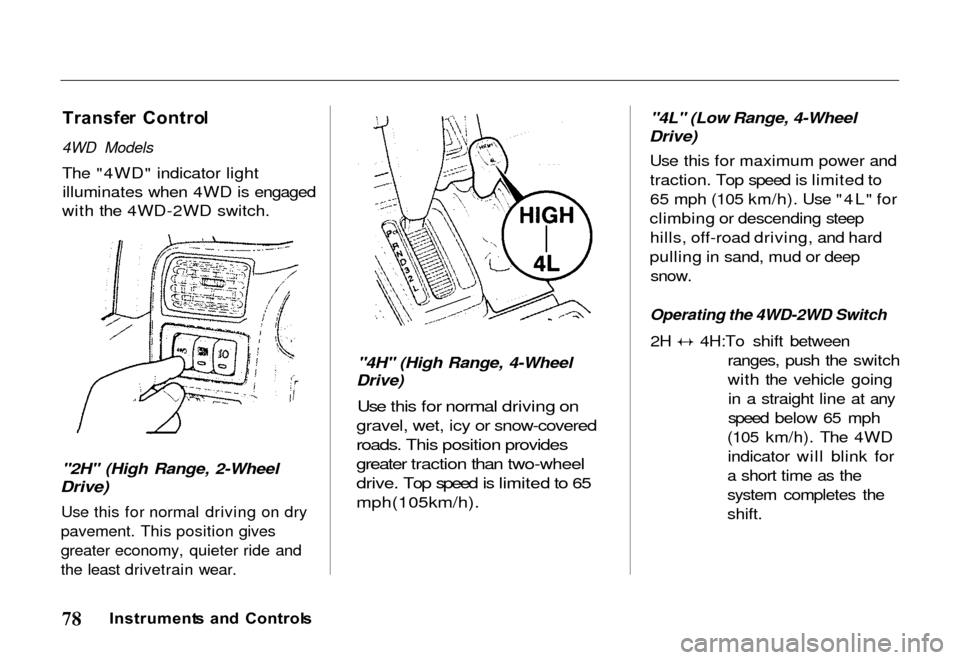
The "4WD" indicator light illuminates when 4WD is engaged
with the 4WD-2WD switch.
"2H" (High Range, 2-Wheel
Drive)
Use this for normal driving on dry
pavement. This position gives
greater economy, quieter ride and
the least drivetrain wear.
"4H" (High Range, 4-Wheel
Drive)
Use this for normal driving on
gravel, wet, icy or snow-covered
roads. This position provides
greater traction than two-wheel
drive. Top speed is limited to 65
mph(105km/h).
"4L" (Low Range, 4-Wheel
Drive)
Use this for maximum power andtraction. Top speed is limited to
65 mph (105 km/h). Use "4L" for
climbing or descending steep hills, off-road driving, and hard
pulling in sand, mud or deep
snow.
Operating the 4WD-2WD Switch
2H 4H:To shift between
ranges, push the switch
with the vehicle goingin a straight line at any
speed below 65 mph
(105 km/h). The 4WD indicator will blink for
a short time as the
system completes the
shift.
Instrument s an d Control s
Page 85 of 267
Shif
t Spee d Char t
The lower gears of the transmission are used for normal
acceleration of the vehicle to the
desired cruising speed. The
highest gear of the transmission is used to maintain the desiredspeed. The fifth gear is
recommended for use in
maintaining highway cruising speeds. Use of the fifth gear in
city traffic is not recommended.
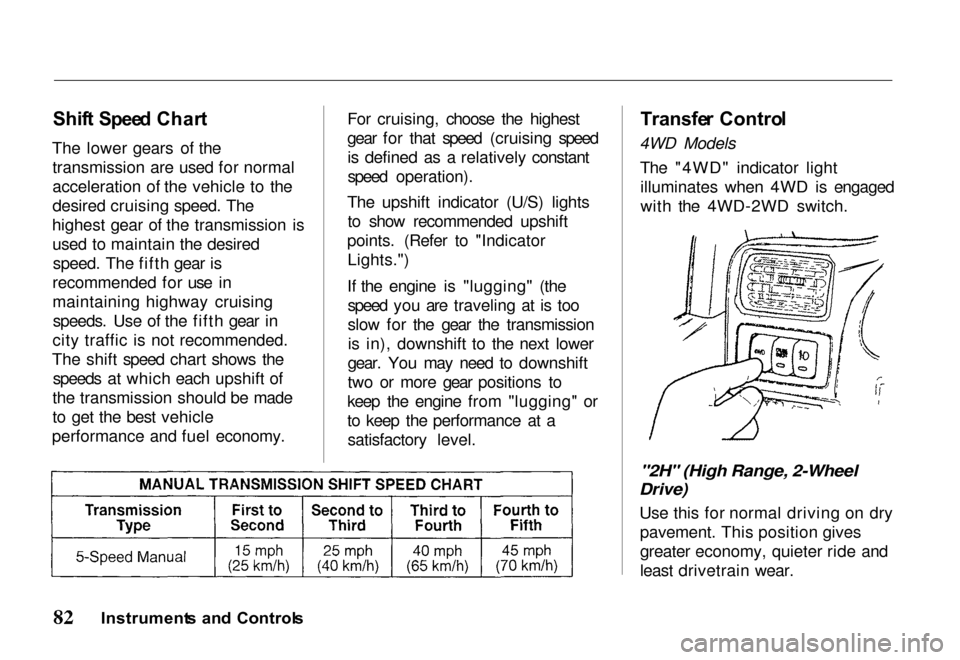
The shift speed chart shows the speeds at which each upshift of
the transmission should be made
to get the best vehicle
performance and fuel economy. For cruising, choose the highest
gear for that speed (cruising speed
is defined as a relatively constant
speed operation).
The upshift indicator (U/S) lights to show recommended upshift
points. (Refer to "Indicator Lights.")
If the engine is "lugging" (the speed you are traveling at is too
slow for the gear the transmissionis in), downshift to the next lower
gear. You may need to downshift
two or more gear positions to
keep the engine from "lugging" or
to keep the performance at a satisfactory level.
Transfe
r Contro l
4WD Models
The "4WD" indicator lightilluminates when 4WD is engaged
with the 4WD-2WD switch.
"2H" (High Range, 2-Wheel
Drive)
Use this for normal driving on drypavement. This position gives
greater economy, quieter ride and
least drivetrain wear.
Instrument s an d Control s
Page 100 of 267
Key
s an d Ignitio n
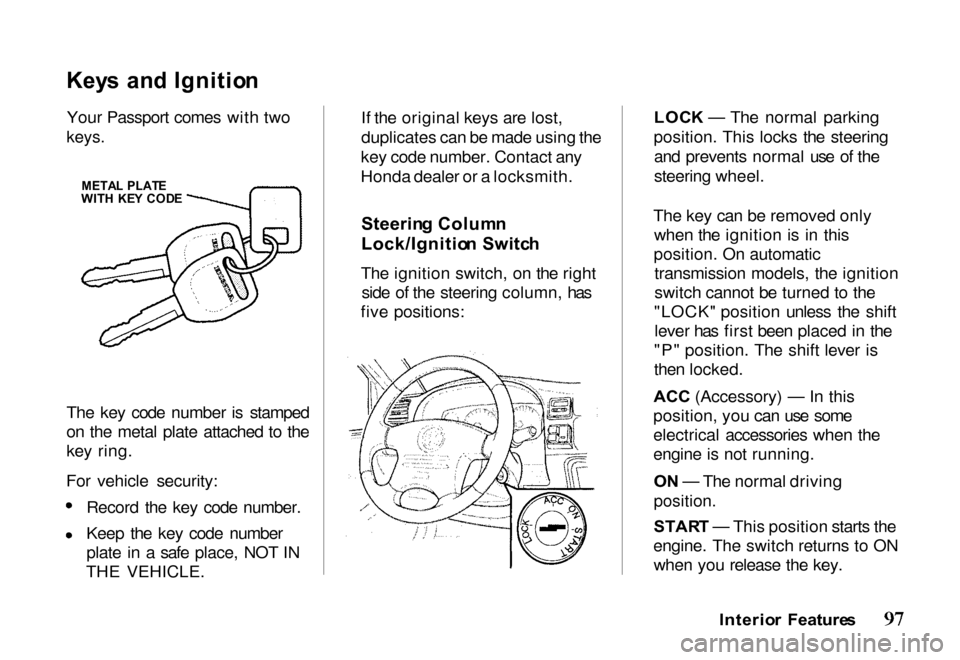
Your Passport comes with two
keys.
The key code number is stamped
on the metal plate attached to the
key ring.
For vehicle security: Record the key code number.
Keep the key code number
plate in a safe place, NOT IN
THE VEHICLE. If the original keys are lost,
duplicates can be made using the
key code number. Contact any
Honda dealer or a locksmith.
Steerin g Colum n
Lock/Ignitio n Switc h
The ignition switch, on the right side of the steering column, has
five positions: LOC
K — The normal parking
position. This locks the steering and prevents normal use of the
steering wheel.
The key can be removed only when the ignition is in this
position. On automatic transmission models, the ignition
switch cannot be turned to the
"LOCK" position unless the shift lever has first been placed in the
"P" position. The shift lever is
then locked.
ACC (Accessory) — In this
position, yo
u can use some
electrical accessories when the
engine is not running.
O N — The normal driving
position.
STAR T — This position starts the
engine. The switch returns to ON when you release the key.
Interior Feature s
META
L PLAT E
WIT H KE Y COD E
Page 121 of 267
Foot/Defros
t — Air
comes from the floor
outlets, windshield defroster
outlets and side window defroster
outlets. When you select
Foot/Defrost, the A/C turns on (if it is not already on), and outside
air is selected automatically.
Because of the automatic
operation, you will not see the
light in the A/C button. The system goes back to your formersettings when you move the knob
to any other position.
When the windshield glass and door glass are foggy or frosty, use
this Foot/Defrost mode to clear
off the glass while maintaining the
heating performance.
Defrost — Air is
conditioned and
delivered from the windshield
defroster outlets with a small amount delivered from the side
window defroster outlets. This
position is recommended for conditions of severe fogging andicing only. When you select
Defrost, the A/C turns on (if it is not already on), and outside air is
selected automatically. Because of
the automatic operation, you will
not see the light in the A/C button.
The system goes back to your former settings when you movethe knob to any other position.
Operatin g Tip s — Use the heater
with the air-source selector lever
at the outside air position. This
will minimize windshield
clouding while quickly warming
the interior of the vehicle. For
best results, engage the A/C
compressor to minimize windshield clouding.
Ventilatio
n
Your vehicle has a flow-through
ventilation system that provides
a supply of outside air into the
vehicle when it is moving and the
air-source selector lever is in the
outside air position. When the vehicle is not in motion, you can
get a steady flow of outside air
with the heater or air conditioning
blower running.
With the side windows closed and
the air-source selector lever in the
outside air position, the flow-
through ventilation system
provides outside air flow into the
front air inlet grilles, through the vehicle and out the rear air
exhaust outlet.
Comfor t an d Convenienc e Feature s
Page 126 of 267

Adjustin
g th e Soun d
Bass, Treble, Balance, and Fader
are each adjustable. You select
which of these you want to adjust
by pressing the MODE button several times. The selected mode,
BAS, TRE, FAD, or BAL is shown in the display.
Balance/Fade r — These two
modes adjust the strength of the
sound coming from each speaker.
BAL adjusts the side-to-side
strength, while FAD adjusts the
front-to-back strength.
Select BAL or FAD by pressing
the MODE button. Adjust the
Balance or Fader to your liking by pressing the or key by the
MODE button. The number in the
display (from R7 to L7 for BAL, from R7 to F7 for FAD) shows
you the current setting. Treble/Bas
s — Use these modes to
adjust the tone to your liking.
Select TRE or BAS by pressing
the MODE button. Adjust the desired mode by pressing the
or key. The displayed number
(from -5 to 5) shows you the
current setting. The system will automatically
return the display to normal mode about seven seconds after you stop
adjusting a mode with the keys.
Radi o Frequencie s an d
Receptio n
For information, see page 132.
Comfor t an d Convenienc e Feature s
MOD
E ADJUS T BUTTON S
DISPLA
Y
MOD
E
Page 127 of 267

Operatin
g th e Cassett e Playe r
The ignition switch must be in
ACCESSORY or ON. Make sure the tape opening on the cassette is
facing to the right, then insert the
cassette most of the way into the slot. The system will pull it in the
rest of the way, and begin to play.
The tape direction indicator will light to show you which side of the cassette is playing. The
indicates the side you inserted
facing upward is now playing. If
you want to play the other side, press the (preset 2) button.
If the cassette was recorded using
Dolby noise reduction, turn it on
by pressing the (preset 5)
button. You will see in the
display.
You can switch between the
cassette and the radio by pressing the FM/AM and TAPE buttons.
When you press the FM/AM
button with a cassette playing, the
radio begins to play and the cassette stops but does not eject.
To begin playing the cassette at the same point, press the TAPE
button.
When the system reaches the end
of the tape, it will automatically
reverse direction and play the
other side. If you want to remove
the cassette from the drive, press
the EJECT button.
When you turn off the ignitionswitch, the system stops the tape
but does not eject the cassette. It
will begin to play when you turn
the ignition switch back on. To
eject the tape, even with the ignition switch off, press the
EJECT button.
Tap
e Searc h Function s
With a cassette playing, you can use the FF, REW, or APS function
to find a desired program.
FF/RE W — Fast Forward and
Rewind move the tape rapidly. Press and release the button
(preset 1) to rewind, or the
button (preset 3) to fast forward.
You will see REW or FF in the display. Press the button to
return to PLAY mode. If the system reaches the end of the tape
while in fast forward or rewind, it
automatically stops that function,
reverses direction, and begins to
play.
Comfor t an d Convenienc e Feature s
Page 134 of 267
2. Use the TUNE, SEEK, or
SCAN function to find a
desired station.
3. Pick the Preset button you want for that station. Press the
button and hold it until you
hear a beep.
4. Repeat steps 1 to 3 to store a total of six stations on AM
and twelve on FM.
Once a station's frequency is stored, simply press and release
the proper preset button to tune to
it. The number of the preset
button you have selected is shown in the display.
Adjustin
g th e Soun d
Bass, Treble, Balance, and Fader
are each adjustable. You select
which you want to adjust by
pushing the Audio Control knob several times. The selected mode,
BAS, TRE, BAL, or FAD, is shown in the display.
Balance/Fade r — These two
modes adjust the strength of the
sound coming from each speaker.
BAL adjusts the side-to-side
strength, while FAD adjusts the
front-to-back strength.
Select BAL or FAD by pressing the Audio Control knob. Adjust
the Balance or Fader to your
liking by turning the knob (without pressing in on it). The
number in the display (from R7 to
L7 for BAL, from R7 to F7 for
FAD) shows you the current
setting.
Treble/Bas
s — Use these modes to
adjust the tone to your liking.
Select TRE or BAS by pressing
the Audio Control knob. Adjust
the displayed mode to your liking
by turning the knob (without
pressing in on it). The displayed
number (from -5 to 5) shows you the current setting.
The system automatically returns the display to normal mode aboutseven seconds after you stop
pressing or turning the Audio
Control knob.
Comfor t an d Convenienc e Feature s