Page 151 of 352
Climate Contro l Syste m
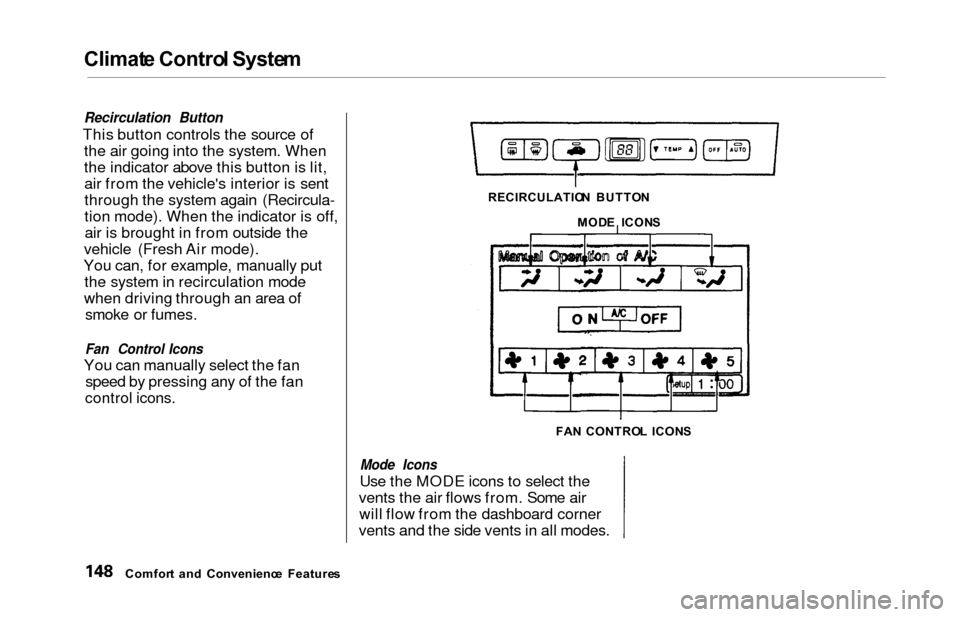
Recirculation Button
This button controls the source of
the air going into the system. When
the indicator above this button is lit,air from the vehicle's interior is sent
through the system again (Recircula-
tion mode). When the indicator is off,air is brought in from outside the
vehicle (Fresh Air mode).
You can, for example, manually put the system in recirculation mode
when driving through an area of smoke or fumes.
Fan Control Icons
You can manually select the fan speed by pressing any of the fan
control icons.
Mode Icons
Use the MODE icons to select the
vents the air flows from. Some air will flow from the dashboard corner
vents and the side vents in all modes.
Comfor t an d Convenienc e Feature s RECIRCULATIO
N BUTTO N
MOD E ICON S
FA N CONTRO L ICON S
Page 176 of 352
Audio Syste m
Audio Syste m Lightin g
You can use the instrument panel brightness control knob to adjust the
illumination of the audio system (see
page 67). The audio systemilluminates when the parking lights
are on, even if the radio is turned off.
Radi o Frequencie s
Your Honda's radio can receive the
complete AM and FM bands.
Those bands cover these frequen-
cies:
AM band:
530 to 1,710 kilohertz
FM band:
87.7 to 107.9 megahertz
Radio stations on the AM band are
assigned frequencies at least ten
kilohertz apart (530, 540, 550).Stations on the FM band are
assigned frequencies at least 0.2
megahertz apart (87.9, 88.1, 88.3).
Stations must use these exact
frequencies. It is fairly common for stations to round-off the frequency in
their advertising, so your radio could display a frequency of 100.9 even
though the announcer may identify
the station as "FM101."
Radi o Receptio n
How well your Honda's radio
receives stations is dependent on many factors, such as the distance
from the station's transmitter,
nearby large objects, and atmos-
pheric conditions.
A radio station's signal gets weaker as you get farther away from its
transmitter. If you are listening to an
AM station, you will notice the sound
volume becoming weaker, and the station drifting in and out. If you are
listening to an FM station, you will see the stereo indicator flickering off
and on as the signal weakens.
Eventually, the stereo indicator will go off and the sound will fade
completely as you get out of range of
the station's signal.
Driving very near the transmitter of
a station that is broadcasting on a
frequency close to the frequency of
the station you are listening to can also affect your radio's reception.
You may temporarily hear both stations, or hear only the station you
are close to.
Comfor t an d Convenienc e Feature s
CONTINUED
Page 177 of 352
Audio Syste m
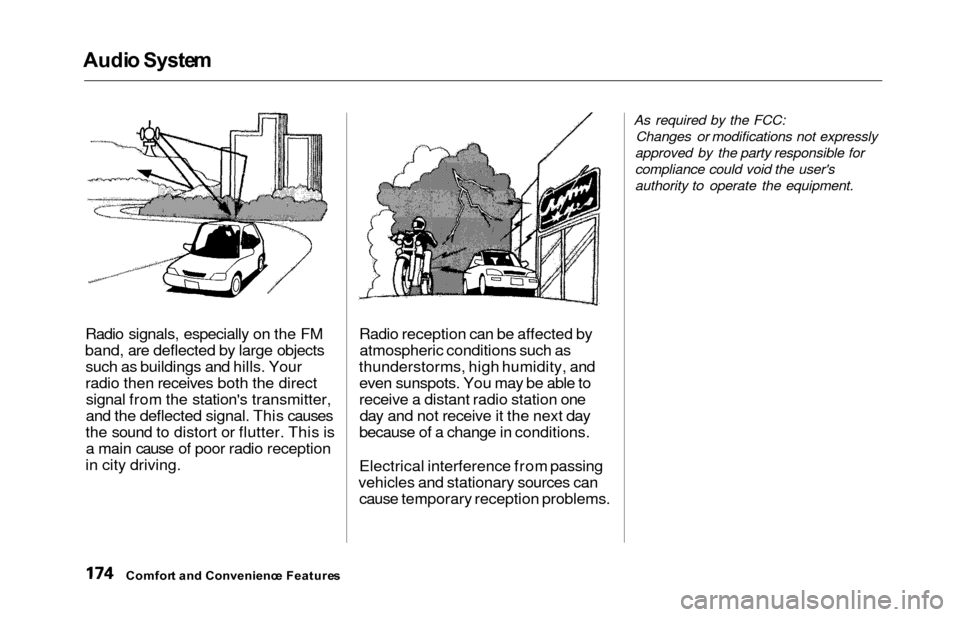
Radio signals, especially on the FM
band, are deflected by large objects such as buildings and hills. Your
radio then receives both the directsignal from the station's transmitter,
and the deflected signal. This causes
the sound to distort or flutter. This is a main cause of poor radio reception
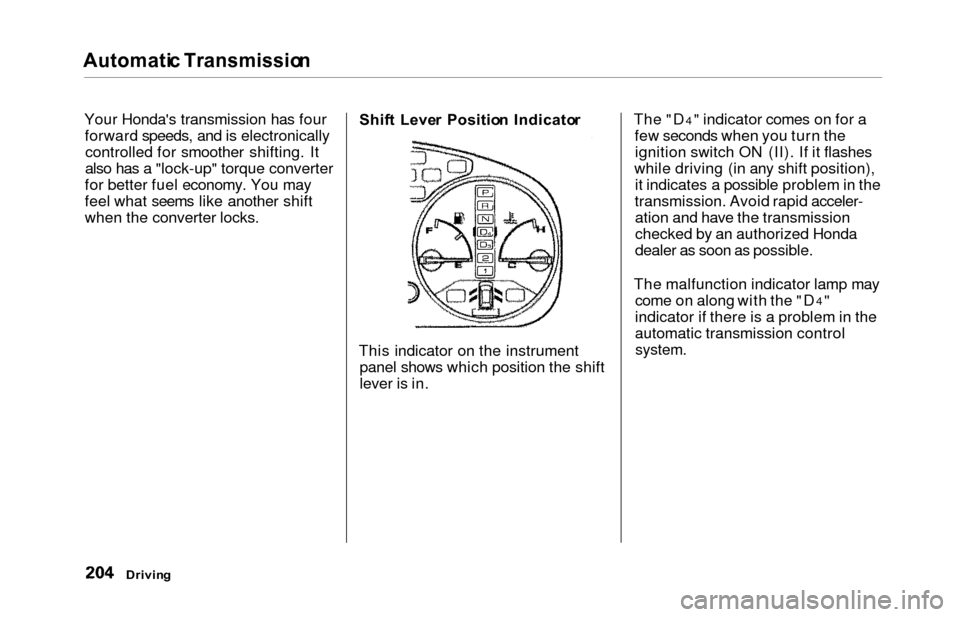
in city driving. Radio reception can be affected by
atmospheric conditions such as
thunderstorms, high humidity, and even sunspots. You may be able to
receive a distant radio station oneday and not receive it the next day
because of a change in conditions.
Electrical interference from passing
vehicles and stationary sources can cause temporary reception problems.
As required by the FCC:
Changes or modifications not expressly
approved by the party responsible for
compliance could void the user's
authority to operate the equipment.
Comfor t an d Convenienc e Feature s
Page 190 of 352
Befor
e Drivin g
Before you begin driving your Honda,
you should know what gasoline to use, and how to check the levels of
important fluids. You also need to
know how to properly store luggage or packages. The information in this
section will help you. If you plan to
add any accessories to your vehicle,
please read the information in this section first. Break-in Period.............................. 188
Gasoline.......................................... 188
Service Station Procedures .......... 189 Filling the Fuel Tank................. 189Opening the Hood..................... 190 Oil Check................................ 192
Engine Coolant Check.......... 193
Fuel Economy................................ 194 Vehicle Condition...................... 194
Driving Habits............................ 194
Accessories and Modifications.... 195 Carrying Cargo.............................. 197
Before Drivin g
Page 197 of 352
Fuel Econom y
The condition of your vehicle and
your driving habits are the two most important things that affect the fuelmileage you get.
Vehicl e Conditio n
Always maintain your vehicle accord- ing to the maintenance schedule.
This will keep it in top operating
condition.
An important part of that mainte- nance is the Owne r Maintenanc e
Check s (see page 237 ). For
example, an underinflated tire
causes more "rolling resistance,"
which uses fuel. It also wears out faster, so check the tire pressure atleast monthly.
In winter, the build-up of snow on
your vehicle's underside adds weight and rolling resistance. Frequent
cleaning helps your fuel mileage and
reduces the chance of corrosion. Drivin
g Habit s
You can improve fuel economy by driving moderately. Rapid acceler-ation, abrupt cornering, and hard
braking use more fuel.
Always drive in the highest gear that allows the engine to run and acceler-
ate smoothly.
Depending on traffic conditions, try
to maintain a constant speed. Every
time you slow down and speed up,
your vehicle uses extra fuel. Use the cruise control, when appropriate, toincrease fuel economy. A cold engine uses more fuel than a
warm engine. It is not necessary to"warm-up" a cold engine by letting itidle for a long time. You can drive
away in about a minute, no matter
how cold it is outside. The engine
will warm up faster, and you get better fuel economy. To cut down on
the number of "cold starts," try to
combine several short trips into one.
The air conditioning puts an extra load on the engine which makes ituse more fuel. Turn off the A/C to
cut down on air conditioning use. Use the flow-through ventilation
when the outside air temperature is
moderate.
Befor e Drivin g
Page 201 of 352
Carrying Carg o
Load Limi t
The maximum load for your vehicle
is 1,277 Ibs (580 kg).
This figure includes the total weight
of all occupants, cargo, accessories,
and the tongue weight if you are
towing a trailer.
To figure out how much cargo you
can carry:
Add up the weight of all occupants.
If you are towing a trailer, add the
tongue weight to the number
above.
Subtract the total from 1,277 Ibs
(580 kg).
The final number is the total weight
of cargo you can carry.
When you load luggage, the total
weight of the vehicle, all passengers, cargo, and trailer tongue load must
not exceed the Gross Vehicle
Weight Rating (GVWR). The load for the front and rear axles also must not exceed the Gross Axle Weight
Rating (GAWR). The GVWR andGAWR are printed on the tire
information label attached to the
driver's doorjamb (see page 322). Carryin
g Item s i n th e Passenge r
Compartmen t
Store or secure all items that could
be thrown around and hurt someone during a crash.
Be sure items placed on the floor
behind the front seats cannot roll
under the seats and interfere with the driver's ability to operate the
pedals, or with the properoperation of the seats.
Keep the glove box closed while
driving. If the lid is open, a
passenger could injure their knees during a crash or sudden stop.
Befor e Drivin g
Overloading or improper
loading can affect handling and
stability and cause a crash in
which you can be hurt or killed.
Follow all load limits and other
loading guidelines in this
manual.
Page 204 of 352
Drivin
g
This section gives you tips on starting the engine under various
conditions, and how to operate the
automatic transmission. It also
includes important information on
parking your vehicle, the braking system, the Traction Control System,
and facts you need if you are
planning to tow a trailer. Preparing to Drive......................... 202
Starting the Engine........................ 203
Starting in Cold Weatherat High Altitude..................... 203
Automatic Transmission............... 204 Shift Lever Position Indicator.. 204
Shift Lever Positions................. 205
Engine Speed Limiter............... 207
Shift Lock Release..................... 207
Parking............................................ 209
The Braking System...................... 210 Brake Wear Indicators.............. 210
Brake System Design................ 211
Anti-lock Brakes........................ 211
Important SafetyReminders.......................... 212
ABS Indicator......................... 212
Traction Control System............... 213 TCS ON/OFF Switch................ 214TCS Indicator............................. 215
Driving in Bad Weather................ 216
Towing a Trailer............................ 218
Driving
Page 207 of 352
Automatic Transmissio n
Your Honda's transmission has four
forward speeds, and is electronicallycontrolled for smoother shifting. It
also has a "lock-up" torque converter
for better fuel economy. You may
feel what seems like another shift
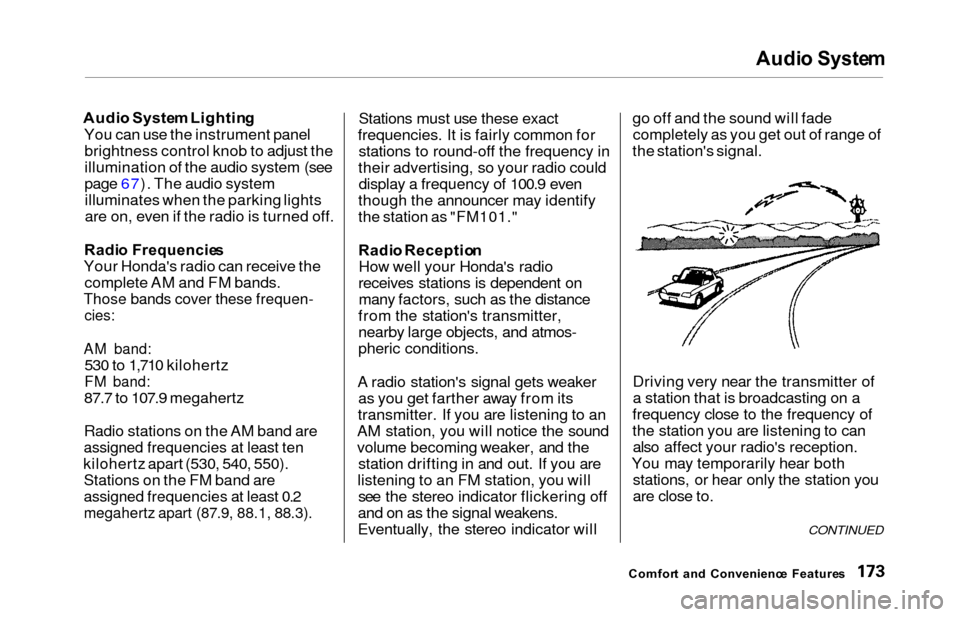
when the converter locks. Shif
t Leve r Positio n Indicato r
This indicator on the instrument panel shows which position the shift
lever is in. The "D4" indicator comes on for a
few seconds when you turn the ignition switch ON (II). If it flashes
while driving (in any shift position), it indicates a possible problem in the
transmission. Avoid rapid acceler- ation and have the transmission
checked by an authorized Honda
dealer as soon as possible.
The malfunction indicator lamp may come on along with the "D
4"
indicator if there is a problem in the
automatic transmission control
system.
Drivin g