2000 HONDA ODYSSEY door
[x] Cancel search: doorPage 58 of 352

Instrument
s an d Control s
This section gives information about
the controls and displays that
contribute to the daily operation of
your Honda. All the essential
controls are within easy reach.
Control Locations............................
56
Indicator Lights...............................
. 57
Gauges.............................................. 62
Controls Near the Steering
Wheel........................................ 65
Headlights.................................... 66
Automatic Lighting Off
Feature......................................
67
Daytime Runnin
g Lights.............
67
Instrument
Pane
l Brightness.....
67
Turn
Signals................................
.
68
Windshield
Wipers.....................
. 68
Windshield Washers................... 70
Rear Window Wiper and Washer...................................... 70
Hazard Warning........................ 70
Rear Windo
w Defogger.............. 71
Steering Wheel Adjustment....... 72
Steering Wheel Controls................ 73
Cruise Control.............................. 73
Remote Audio Controls .............. 76
Keys and Locks................................ 76
Keys............................................... 76
Immobilizer System..................... 77
Ignition Switch............................. 78
Power Door Locks....................... 79
Remote Transmitter.................... 81
Childproof Door Locks............... 85
Tailgate......................................... 85
Glove Box..................................... 87
Manual Sliding Doors...................... 88
Power Sliding Doors........................ 89
HomeLink Universal Transmitter.................................. 95
Seats.................................................. 99
Passenger Seating....................... 99
Seat Adjustments....................... 100
Driver's Seat Power
Adjustments........................... 102
Armrests..................................... 103
Head Restraints......................... 104
Third Seat Access...................... 105 Moving the Second Row Bucket Seat............................ 106
Removing the Bucket Seats in the Second Row................. 108
Folding the Third Seat.............. 109
Power Windows............................. 112
Mirrors............................................ 115
Parking Brake................................ 116
Digital Clock................................... 117 Center Table................................... 117
Beverage Holder............................ 118
Sunglasses Holder......................... 120
Sun Visor......................................... 121
Vanity Mirror................................. 121 Rear Compartment........................ 122
Center Pocket................................ 122Coin Holder.................................... 122
Storage Box.................................... 123
Coat Hook....................................... 123
Accessory Power Sockets............. 124 Interior Lights................................ 125
Instrument s an d Control s
Page 60 of 352
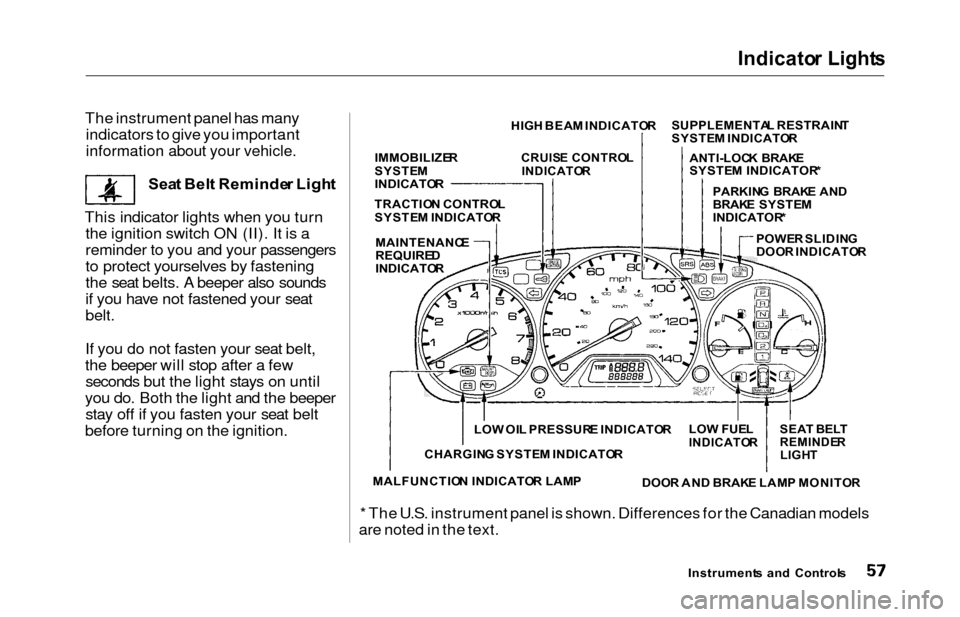
Indicator Light s
The instrument panel has many
indicators to give you important
information about your vehicle.
Sea t Bel t Reminde r Ligh t
This indicator lights when you turn the ignition switch ON (II). It is a
reminder to you and your passengers
to protect yourselves by fastening
the seat belts. A beeper also sounds
if you have not fastened your seat
belt.
If you do not fasten your seat belt,
the beeper will stop after a few seconds but the light stays on until
you do. Both the light and the beeper stay off if you fasten your seat belt
before turning on the ignition.
* The U.S. instrument panel is shown. Differences for the Canadian models
are noted in the text.
Instrument s an d Control s
HIG
H BEA M INDICATO RSUPPLEMENTA
L RESTRAIN T
SYSTE M INDICATO R
ANTI-LOC K BRAK E
SYSTE M INDICATOR *
POWE R SLIDIN G
DOO R INDICATO R
PARKIN
G BRAK E AN D
BRAK E SYSTE M
INDICATOR *
IMMOBILIZE
R
SYSTE M
INDICATO R
CRUISE CONTRO L
INDICATO R
TRACTION CONTRO L
SYSTE M INDICATO R
MAINTENANC E
REQUIREDINDICATO R
SEAT BEL T
REMINDE RLIGHT
LOW FUE LINDICATO R
DOOR AN D BRAK E LAM P MONITO R
LO
W OI L PRESSUR E INDICATO R
CHARGIN G SYSTE M INDICATO R
MALFUNCTIO N INDICATO R LAM P
Page 63 of 352

Indicator Light s
Power Slidin g Doo r
Indicato r
EX model only
This indicator comes on for a few
seconds when you turn the ignition
switch ON (II). If it comes on at anyother time, there is a problem in the
power sliding door system. With this
light on, move the main switch on
the dashboard to the OFF position, and have the system checked by
your Honda dealer as soon as possible. You can still open or closeeach sliding door manually. For
more information on the power
sliding doors, see page 90.
Tur n Signa l an d
Hazar d Warnin g
Indicator s
The left or right turn signal light blinks when you signal a lane change or turn. If the light does not blink or
blinks rapidly, it usually means one of the turn signal bulbs is burned out (see page 273). Replace the bulb as
soon as possible, since other drivers
cannot see that you are signalling.
When you turn on the Hazard
Warning switch, both turn signal lights blink. All turn signals on theoutside of the vehicle should flash. Doo
r an d Brak e Lam p Monito r
The appropriate light comes on in this display if the tailgate or any dooris not closed tightly. If a brake light
does not work, the BRAK E LAM P
indicator comes on when you push
the brake pedal with the ignition switch ON (II).
A burned out brake light is a hazard
when drivers behind you cannot tell
you are braking. Have your brake lights repaired right away.
All the lights in the monitor display come on when you turn the ignitionswitch ON (II). The lights go off
after the engine starts and the
tailgate and all doors are closed
tightly.
Instrument s an d Control s
SLIDINGDOOR
BRAKE LAMP
Page 68 of 352
Controls Nea r th e Steerin g Whee l
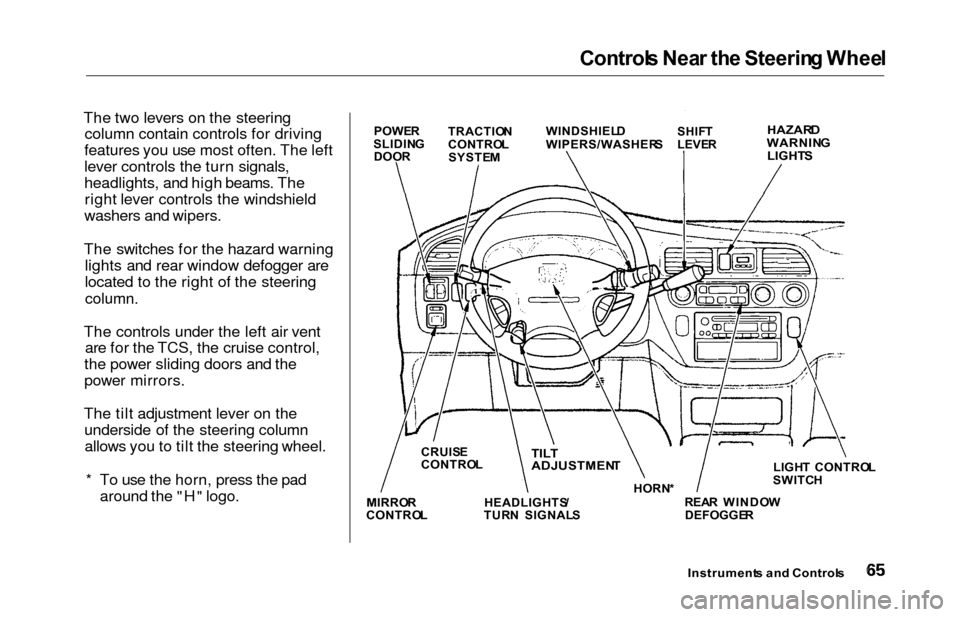
The two levers on the steering
column contain controls for driving
features you use most often. The left
lever controls the turn signals,
headlights, and high beams. The right lever controls the windshield
washers and wipers.
The switches for the hazard warning lights and rear window defogger are
located to the right of the steering
column.
The controls under the left air vent are for the TCS, the cruise control,
the power sliding doors and the
power mirrors.
The tilt adjustment lever on the underside of the steering columnallows you to tilt the steering wheel.
* To use the horn, press the pad around the "H" logo.
Instrument s an d Control s
POWER
SLIDIN G
DOO R TRACTIO
N
CONTRO L
SYSTE M WINDSHIEL
D
WIPERS/WASHER SSHIFT
LEVE RHAZAR DWARNIN G
LIGHT S
LIGHT CONTRO L
SWITC H
REA R WINDO W
DEFOGGE R
HORN
*TILT
ADJUSTMEN T
HEADLIGHTS /
TUR N SIGNAL S
CRUIS
E
CONTRO L
MIRRO R
CONTRO L
Page 69 of 352
Control
s Nea r th e Steerin g Whee l
Headlight s
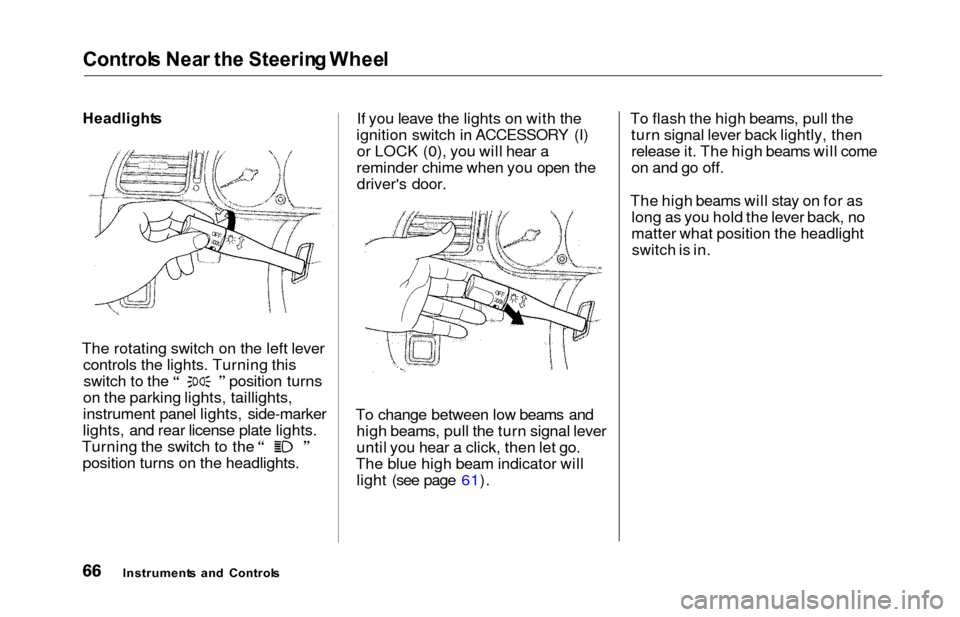
The rotating switch on the left lever controls the lights. Turning this switch to the position turns
on the parking lights, taillights,
instrument panel lights, side-marker
lights, and rear license plate lights. Turning the switch to the
position turns on the headlights. If you leave the lights on with the
ignition switch in ACCESSORY (I) or LOCK (0), you will hear a
reminder chime when you open the driver's door.
To change between low beams and high beams, pull the turn signal lever
until you hear a click, then let go.
The blue high beam indicator will light (see page 61). To flash the high beams, pull the
turn signal lever back lightly, thenrelease it. The high beams will come
on and go off.
The high beams will stay on for as long as you hold the lever back, no
matter what position the headlightswitch is in.
Instrument s an d Control s
Page 70 of 352
Control
s Nea r th e Steerin g Whee lAutomatic Lightin g Of f Featur e
On EX model
The Automatic Lighting Off feature
turns off the headlights, parking
lights, taillights, side marker lights,
license plate lights and instrument panel lights within 15 seconds of
removing the key from the ignition switch and closing the driver's door.
This feature activates if you leave
the headlight switch in the or
position, remove the key, open,
then close the driver's door. If you remove the key from the
ignition switch with the headlight switch on, but do not open the door
and get out, the lights will turn off
after 10 minutes. The lights will turn on again when
you unlock or open the driver's door.If you unlock the door, but do notopen it within 15 seconds, the lights
will go off. With the driver's door open, you will hear a lights-on
reminder chime.
Daytim e Runnin g Light s
(Canadia n Models )
With the headlight switch off, the
high beam headlights come on withreduced brightness when you turn
the ignition switch to ON (II) and
release the parking brake. They
remain on until you turn the ignitionoff, even if you set the parking brake.
The headlights revert to normal operation when you turn them on
with the switch. Instrumen
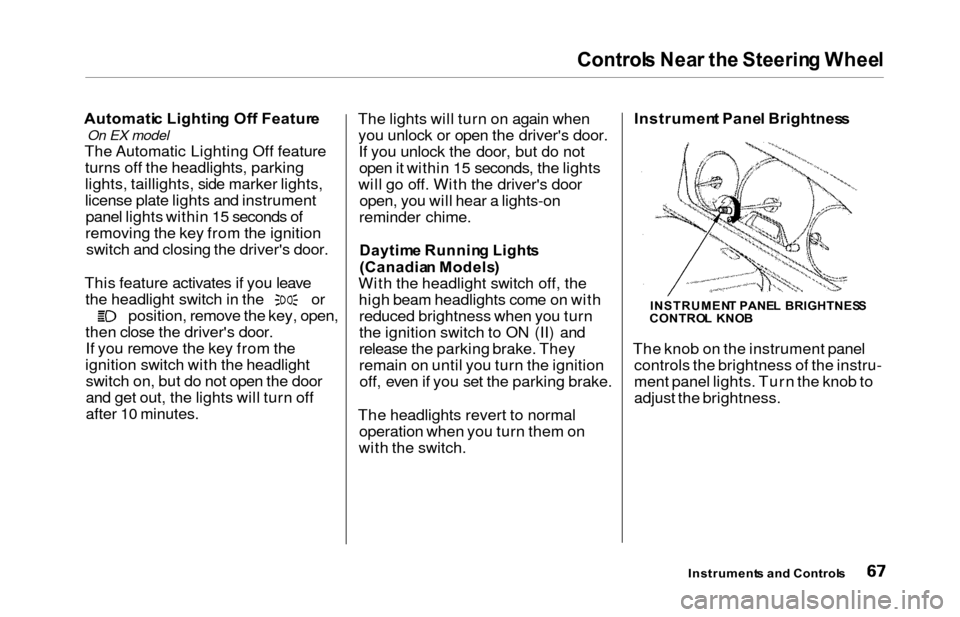
t Pane l Brightnes s
The knob on the instrument panel controls the brightness of the instru-
ment panel lights. Turn the knob to
adjust the brightness.
Instrument s an d Control s
INSTRUMEN T PANE L BRIGHTNES S
CONTRO L KNO B
Page 79 of 352
Steering Whee l Controls , Key s an d Lock s
Remot e Audi o Control s
On EX model
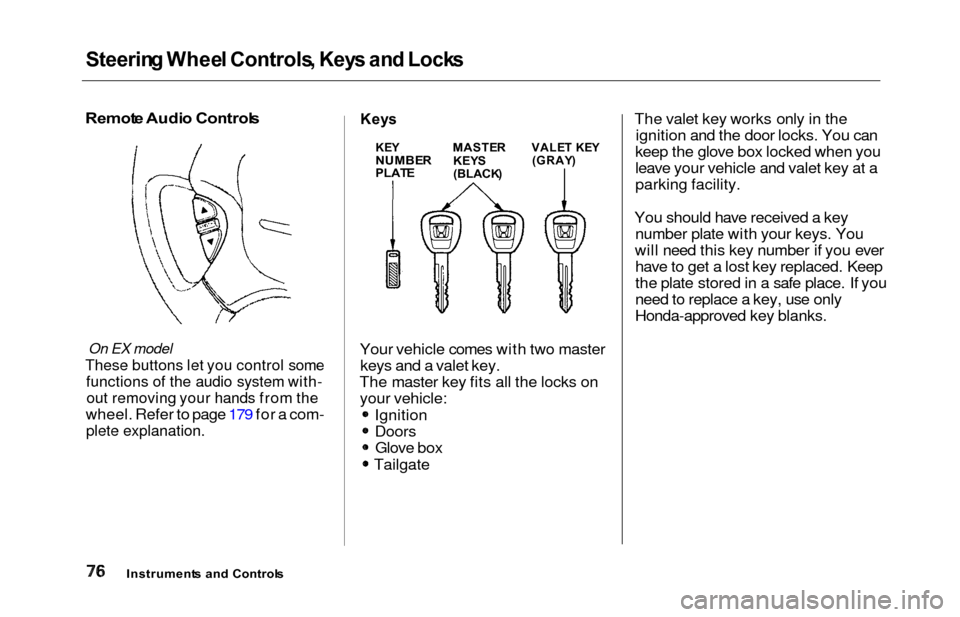
These buttons let you control some
functions of the audio system with-
out removing your hands from the
wheel. Refer to page 179 for a com-
plete explanation.
Keys
Your vehicle comes with two master
keys and a valet key.
The master key fits all the locks on your vehicle:
Ignition
DoorsGlove box
Tailgate The valet key works only in the
ignition and the door locks. You can
keep the glove box locked when you
leave your vehicle and valet key at a
parking facility.
You should have received a key number plate with your keys. You
will need this key number if you ever have to get a lost key replaced. Keep
the plate stored in a safe place. If you
need to replace a key, use only
Honda-approved key blanks.
Instrument s an d Control s
KEYNUMBE RPLATE
MASTE R
KEY S
(BLACK )
VALET KE Y(GRAY )
Page 82 of 352
Keys an d Lock s
ACCESSOR Y (I ) — In this position,
you can operate the audio system and the accessory power socket.
O N (II ) — This is the normal key
position when driving. All features and accessories on the vehicle are
usable. Several of the lights on the instrument panel come on as a test
when you turn the ignition switch from ACCESSORY to ON. STAR
T (III ) — Use this position
only to start the engine. The switch
returns to ON (II) when you let go of
the key.
The engine will not start if the Immobilizer System does not
recognize the key's coding (see page
77).
You will hear a reminder beeper if
you leave the key in the ignition
switch in the LOCK (0) or
ACCESSORY (I) position and open the driver's door. Remove the key toturn off the beeper. Powe
r Doo r Lock s
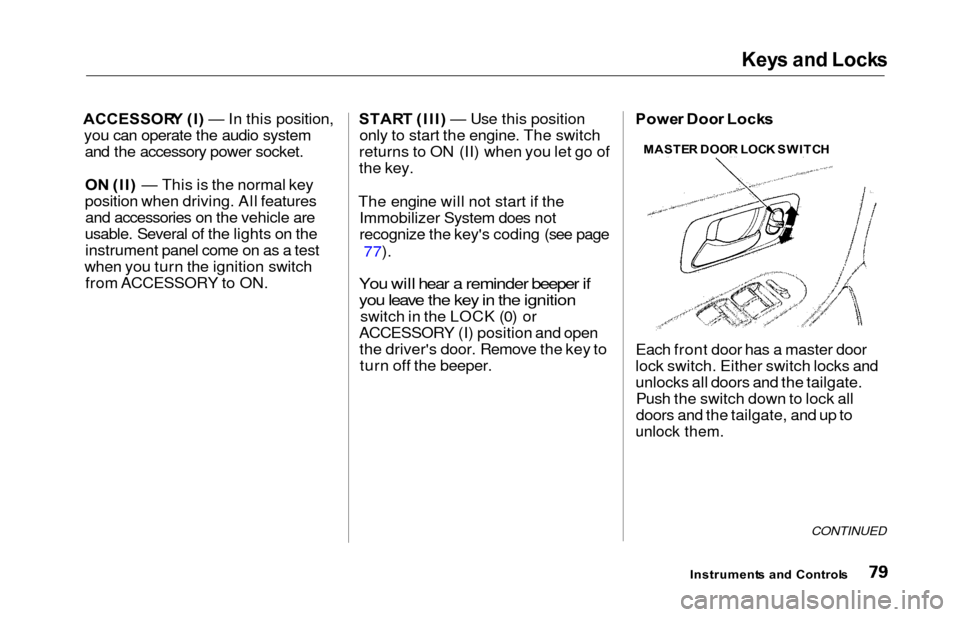
Each front door has a master door
lock switch. Either switch locks and
unlocks all doors and the tailgate. Push the switch down to lock all
doors and the tailgate, and up to
unlock them.
CONTINUED
Instrument s an d Control s
MASTE
R DOO R LOC K SWITC H