Page 4 of 429
Table of Contents
Keys and Door Locks
Keyless Entry System (Option)
Automatic Transaxle
Parking Brake
Windows
Tilt Wheel
Turn Signal/Multifunction Lever
Windshield Wipers
Cruise Control (Option)Interior and Exterior Lamps
Mirrors
Storage Compartments
Convenience Net (Option)
Accessory Power Outlets
OnStar® System (If Equipped)
Instrument Panel, Warning Lights and Gages
Driver Information Center (Option) Seats and Seat Controls
Safety BeltsAir Bag Systems
Child Restraints
Section
1
Section
2
Seats and Restraint Systems
Features and Controls
ii
Page 5 of 429
Table of Contents (cont'd)
Defensive Driving
Drunken Driving
Control of a Vehicle
Braking
SteeringDriving Tips for Various Road Conditions
Recreational Vehicle Towing
Loading Your Vehicle
Towing a Trailer Heating and Air Conditioning
Setting the Radio ClockRadio/Cassette Player/CD Player
Radio Theft-Deterrent Feature (If Equipped)
Hazard Warning Flashers
Jump Starting
Towing Your VehicleEngine Overheating
Changing a Flat Tire
If You're Stuck
Problems on the Road
Section
3
Section
4
Section
5
Your Driving and the Road Comfort Controls and Audio Systems
iii
Page 10 of 429
viii
Vehicle Damage Warnings
Also, in this book you will find these notices:
NOTICE:
These mean there is something that could
damage your vehicle.
In the notice area, we tell you about something that
can damage your vehicle. Many times, this damage
would not be covered by your warranty, and it could
be costly. But the notice will tell you what to do to help
avoid the damage.
When you read other manuals, you might see
CAUTION and NOTICE warnings in different colors
or in different words.
You'll also see warning labels on your vehicle. They use
the same words, CAUTION or NOTICE.
Page 11 of 429
ix
For example,
these symbols
are used on an
original battery:
CAUTION
POSSIBLE
INJURY
PROTECT
EYES BY
SHIELDING
CAUSTIC
BATTERY
ACID COULD
CAUSE
BURNS
AVOID
SPARKS OR
FLAMES
SPARK OR
FLAME
COULD
EXPLODE
BATTERY
These symbols
are important
for you and
your passengers
whenever your
vehicle is
driven:
DOOR LOCK
UNLOCK
FASTEN
SEAT
BELTS
POWER
WINDOW
AIR BAG
These symbols
have to do with
your lamps:
MASTER
LIGHTING
SWITCH
TURN
SIGNALS
PARKING
LAMPS
HAZARD
WARNING
FLASHER
DAYTIME
RUNNING
LAMPS
FOG LAMPS
These symbols
are on some of
your controls:
WINDSHIELD
WIPER
WINDSHIELD
WASHER
WINDSHIELD
DEFROSTER
REAR
WINDOW
DEFOGGER
VENTILATING
FAN
These symbols
are used on
warning and
indicator lights:
ENGINE
COOLANT
TEMP
BATTERY
CHARGING
SYSTEM
BRAKE
COOLANT
ENGINE OIL
PRESSURE
ANTI-LOCK
BRAKES
Here are some
other symbols
you may see:
FUSE
LIGHTER
HORN
SPEAKER
FUEL
Vehicle Symbols
These are some of the symbols you may find on your vehicle.
Page 75 of 429
1-63
CAUTION:
Using the vehicle's regular safety belts on a child
seated on the child restraint cushion can cause
serious injury to the child in a sudden stop or
crash. If a child is the proper size for the built
-in
child restraint, secure the child using the child
restraint's harness. But children who are too
large for the built
-in child restraint should sit on
the vehicle's regular seat and use the vehicle's
adult safety belts.
WARNING! FAILURE TO FOLLOW THE
MANUFACTURER'S INSTRUCTIONS ON THE
USE OF THIS CHILD RESTRAINT SYSTEM
CAN RESULT IN YOUR CHILD STRIKING THE
VEHICLE'S INTERIOR DURING A SUDDEN
STOP OR CRASH. SNUGLY ADJUST THE
BELTS PROVIDED WITH THIS CHILD
RESTRAINT AROUND YOUR CHILD.
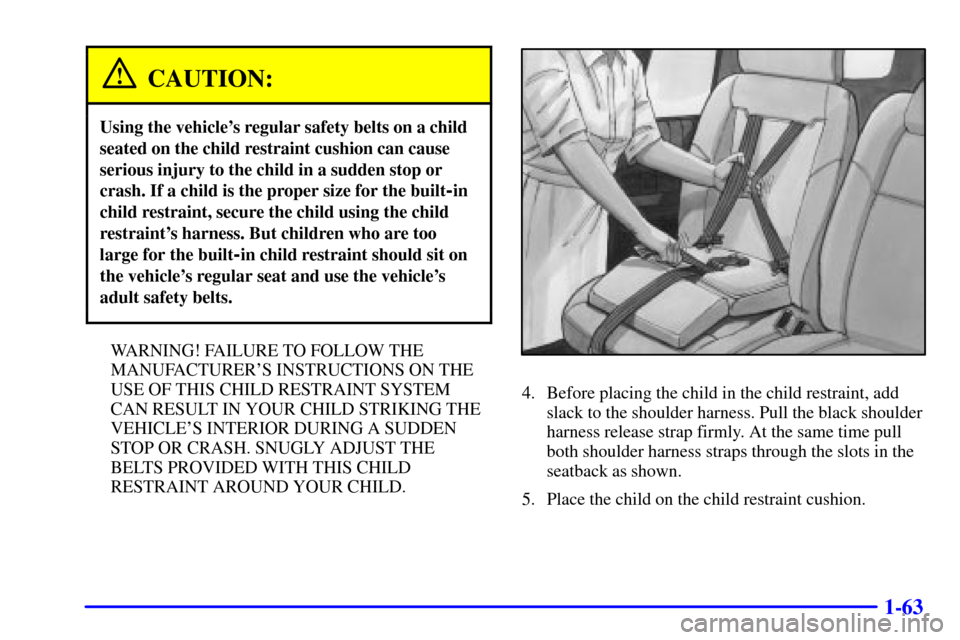
4. Before placing the child in the child restraint, add
slack to the shoulder harness. Pull the black shoulder
harness release strap firmly. At the same time pull
both shoulder harness straps through the slots in the
seatback as shown.
5. Place the child on the child restraint cushion.
Page 105 of 429
2-
2-1
Section 2 Features and Controls
Here you can learn about the many standard and optional features on your vehicle, and information on starting,
shifting and braking. Also explained are the instrument panel and the warning systems that tell you if everything is
working properly
-- and what to do if you have a problem.
2
-2 Keys
2
-4 Door Locks
2
-7 Keyless Entry System (Option)
2
-14 Multifunction Alarm Locks and
Lighting Choices
2
-24 Sliding Door
2
-26 Power Sliding Door (Option)
2
-32 Liftgate
2
-33 Theft
2
-34 Content Theft-Deterrent (Option)
2
-36 PASS-Key� III
2
-38 New Vehicle ªBreak-Inº
2
-38 Ignition Positions
2
-40 Starting Your Engine
2
-41 Engine Coolant Heater (If Equipped)
2
-42 Automatic Transaxle Operation
2
-47 Parking Brake
2
-48 Shifting Into PARK (P)2
-50 Shifting Out of PARK (P)
2
-51 Parking Over Things That Burn
2
-51 Engine Exhaust
2
-52 Running Your Engine While You're Parked
2
-53 Windows
2
-55 Turn Signal/Multifunction Lever
2
-62 Exterior Lamps
2
-63 Interior Lamps
2
-68 Storage Compartments
2
-79 Accessory Inflator System (Option)
2
-82 Accessory Power Outlets
2
-83 OnStar� System (If Equipped)
2
-84 The Instrument Panel -- Your
Information System
2
-88 Warning Lights, Gages, Messages
and Indicators
2
-96 Message Center
2
-102 Driver Information Center (DIC) (Option)
Page 132 of 429
2-28
If the power sliding door is open or in the process of
closing when you shift out of PARK (P), a buzzer will
sound. This is a warning that the sliding door is not
completely closed.
If the power sliding door is turned off, the buzzer will
not sound indicating the door is not completely closed.
CAUTION:
If you shift the transaxle out of PARK (P) and
accelerate before the power sliding door latches
closed, the door may reverse to the open position.
A child or others could fall out of the vehicle and
be injured. Always make sure the power sliding
door is closed and latched before you drive away.
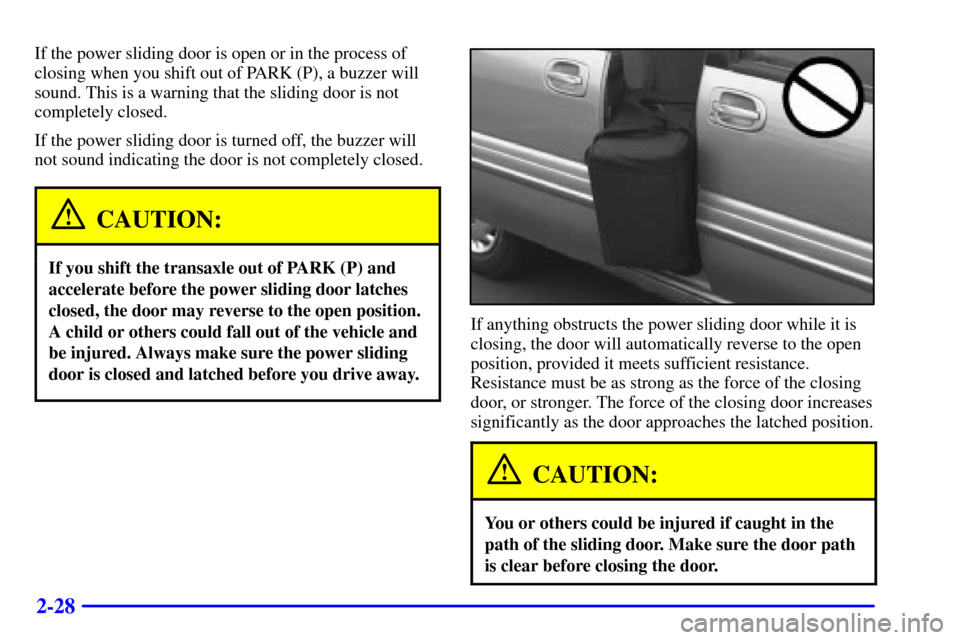
If anything obstructs the power sliding door while it is
closing, the door will automatically reverse to the open
position, provided it meets sufficient resistance.
Resistance must be as strong as the force of the closing
door, or stronger. The force of the closing door increases
significantly as the door approaches the latched position.
CAUTION:
You or others could be injured if caught in the
path of the sliding door. Make sure the door path
is clear before closing the door.
Page 143 of 429

2-39
NOTICE:
If your key seems stuck in LOCK and you can't
turn it, be sure you are using the correct key;
if so, is it all the way in? If it is, then turn the
steering wheel left and right while you turn the
key hard. But turn the key only with your hand.
Using a tool to force it could break the key or the
ignition switch. If none of this works, then your
vehicle needs service.
OFF (C): This position unlocks the steering wheel,
ignition and transaxle, but does not send electrical
power to any accessories. Use this position if your
vehicle must be pushed or towed, but never try to
push
-start your vehicle. A warning chime will sound if
you open the driver's door when the ignition is off and
the key is in the ignition.RUN (D): This is an on position to which the switch
returns after you start your engine and release the
switch. The switch stays in RUN when the engine is
running. But even when the engine is not running, you
can use RUN to operate your electrical power
accessories, and to display some instrument panel
warning lights.
START (E): This position starts the engine. When the
engine starts, release the key. The ignition switch will
return to RUN for normal driving.
If the engine is not running, ACCESSORY and RUN are
positions that allow you to operate your electrical
accessories, such as the radio.
Retained Accessory Power (RAP)
With RAP, the power windows (option), the power rear
quarter windows (if equipped), audio system and
electronic level control (ELC) will continue to work up
to 10 minutes after the ignition key is turned to OFF and
none of the doors are opened.