Page 4 of 361
Table of Contents
Keys and Door Locks
Remote Keyless Entry (RKE) System
Hatch/Trunk Lid Release
Automatic Transmission (If Equipped)
Manual Transmission (If Equipped)
Parking Brake
Windows
Tilt Wheel
Turn Signal/Multifunction Lever
Windshield WipersCruise Control
Interior and Exterior Lamps
Mirrors
Storage Compartments
Convenience Net
Accessory Power Outlet
Instrument Panel, Warning Lights and Gages
Head-Up Display
Driver Information Center
Memory Seats and Seat Controls
Safety BeltsAir Bag System
Child Restraints
Section
1
Section
2
Seats and Restraint Systems
Features and Controls
ii
Page 21 of 361
1-3 Power Seat (Option)
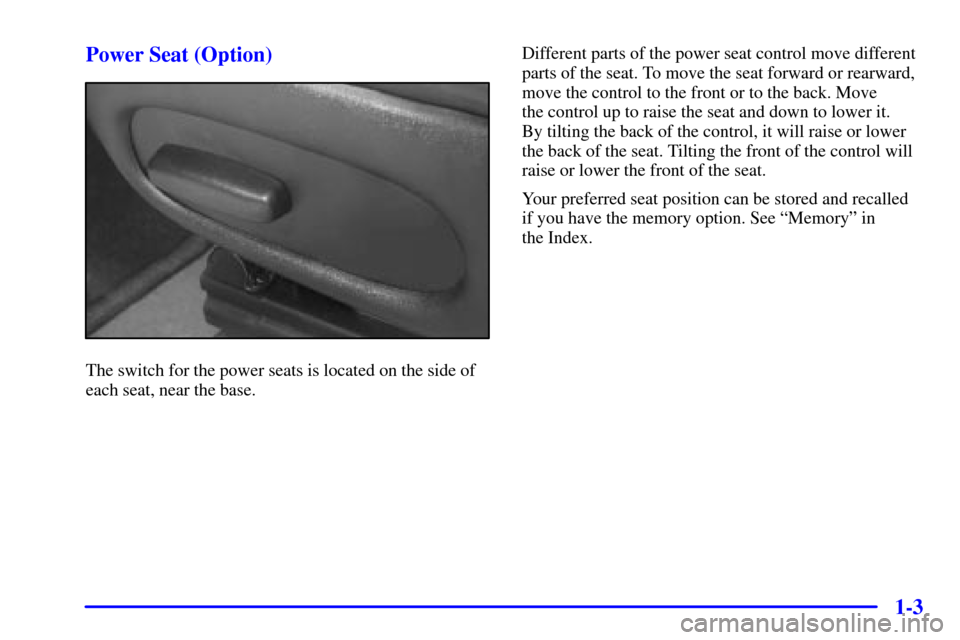
The switch for the power seats is located on the side of
each seat, near the base.Different parts of the power seat control move different
parts of the seat. To move the seat forward or rearward,
move the control to the front or to the back. Move
the control up to raise the seat and down to lower it.
By tilting the back of the control, it will raise or lower
the back of the seat. Tilting the front of the control will
raise or lower the front of the seat.
Your preferred seat position can be stored and recalled
if you have the memory option. See ªMemoryº in
the Index.
Page 63 of 361
2-5 Power Door Locks
Press the power door unlock/lock switch on either door
to unlock or lock both doors at once.
Inadvertent Lockout Protection
If you press the power door lock switch when a door is
open and a key is in the ignition, a chime will sound.
If the power door lock switch is pressed again within
five seconds, the doors will lock.
Leaving Your Vehicle
If you are leaving the vehicle, take your key, open your
door and set the locks from inside. Then get out and
close the door.
Memory (Option)
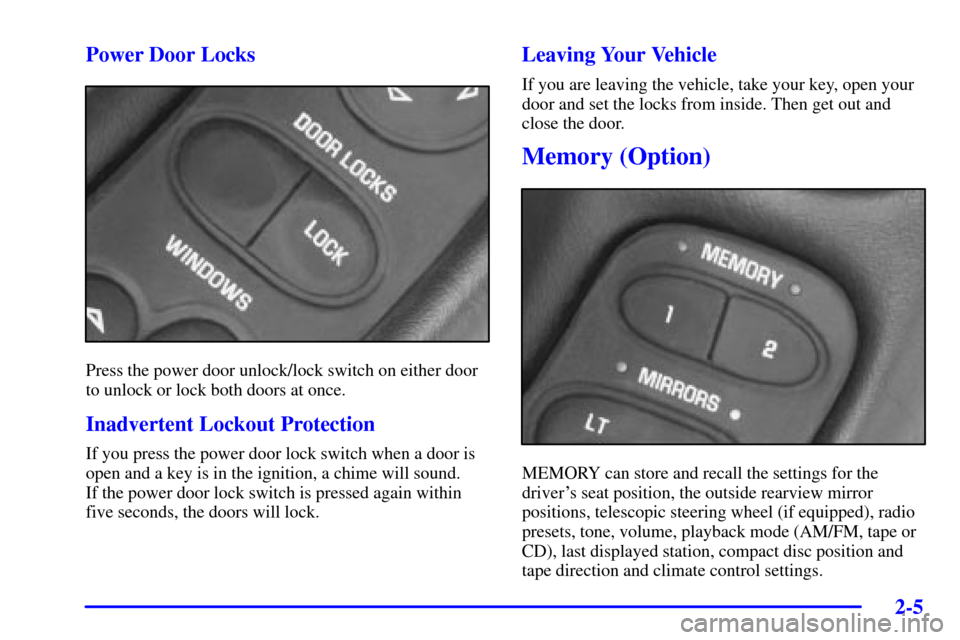
MEMORY can store and recall the settings for the
driver's seat position, the outside rearview mirror
positions, telescopic steering wheel (if equipped), radio
presets, tone, volume, playback mode (AM/FM, tape or
CD), last displayed station, compact disc position and
tape direction and climate control settings.
Page 64 of 361

2-6
The MEMORY buttons are located on the driver's side
door, above the power mirror controls. The MEMORY
buttons can store and recall settings for up to three
drivers. Use button ª1º to store the settings for the first
driver, button ª2º for a second driver or press buttons
1 and 2 at the same time for a third driver. To store your
memory settings:
1. Adjust your settings for the driver's seat position,
outside rearview mirror positions, and telescopic
steering wheel (if equipped).
2. Press and hold a MEMORY button. The light above
the MEMORY button will glow steady for one
second and then flash once when the settings are
complete. Then the light will go off.
3. Set the climate control temperature, fan speed and
mode settings, radio presets, tone, volume, playback
mode (AM/FM, tape or CD), tape direction and
compact disc position.
Your memory settings are now programmed. Any
changes that are made to the audio system and climate
controls while driving are automatically stored.When first entering your vehicle, after pressing the
UNLOCK button on your remote keyless entry
transmitter or a MEMORY button, a recall of your
settings will occur. As the memory settings are recalled,
the light above the button will flash until the correct
settings are achieved, then glow for five seconds
when complete.
A memory recall can be stopped by pressing any
memory seat, mirror or steering column position button.
Your memory settings can also be recalled when you
press the active door UNLOCK button on the remote
keyless transmitter. A memory recall can be stopped by
pressing any memory seat, mirror or steering column
position button.
When your remote keyless entry transmitter has been
programmed to driver 1, 2 or 3, and you insert the key
into the ignition, memory will also occur. Drivers 1, 2
and 3 correspond to the order in which your remote
keyless entry transmitters were programmed.
(See ªFob Trainingº in the Index.)
Memory recall will not work if the vehicle is moving.
Memory recall will be temporarily interrupted during
engine crank.
Page 154 of 361

2-96
If you choose AUTO LOCK ON, both doors will
automatically lock when the vehicle exceeds 10 mph
(16 km/h) in a manual transmission. In a vehicle with an
automatic transmission, both doors will automatically
lock when you move the shifter out of PARK (P).
Choose AUTO LOCK OFF to turn this option off.
Auto Unlock
The AUTO UNLOCK will be available only if AUTO
LOCK is set to ON which is described previously.
Press the OPTIONS button until AUTO UNLOCK
appears on the display, then use the RESET button to
page through the following choices:
�AUTO UNLOCK DRIVER
�AUTO UNLOCK BOTH
�AUTO UNLOCK OFF
If you choose AUTO UNLOCK DRIVER, the driver's
door will automatically unlock when you turn the
vehicle off and pull the key out of the ignition.
Choose AUTO UNLOCK BOTH, and both doors will
automatically unlock when you turn the vehicle off and
pull the key out of the ignition.
AUTO UNLOCK OFF turns off this option.Easy Entry
The easy entry feature will only be available if the
vehicle is equipped with the memory option.
Press the OPTIONS button until SEAT EASY ENTRY
appears on the display, then use the RESET button to
page through the following choices:
�SEAT EASY ENTRY ON
�SEAT EASY ENTRY OFF
If you choose SEAT EASY ENTRY ON, when you turn the
ignition off and remove the key, the seat will automatically
move back and the telescopic steering wheel (if equipped)
will return to its full
-forward position for an easy exit or an
easy entrance when returning to the vehicle.
SEAT EASY ENTRY OFF turns off this option.
Languages
You can select which language the DIC will display its
messages. Press the OPTIONS button until the word
LANGUAGES appears on the display, then use the
RESET button to page through the following choices:
�LANGUAGE ENGLISH
�LANGUAGE FRENCH
�LANGUAGE GERMAN
�LANGUAGE SPANISH