Page 4 of 361
Table of Contents
Keys and Door Locks
Remote Keyless Entry (RKE) System
Hatch/Trunk Lid Release
Automatic Transmission (If Equipped)
Manual Transmission (If Equipped)
Parking Brake
Windows
Tilt Wheel
Turn Signal/Multifunction Lever
Windshield WipersCruise Control
Interior and Exterior Lamps
Mirrors
Storage Compartments
Convenience Net
Accessory Power Outlet
Instrument Panel, Warning Lights and Gages
Head-Up Display
Driver Information Center
Memory Seats and Seat Controls
Safety BeltsAir Bag System
Child Restraints
Section
1
Section
2
Seats and Restraint Systems
Features and Controls
ii
Page 16 of 361
xiv
For example,
these symbols
are used on an
original battery:
CAUTION
POSSIBLE
INJURY
PROTECT
EYES BY
SHIELDING
CAUSTIC
BATTERY
ACID COULD
CAUSE
BURNS
AVOID
SPARKS OR
FLAMES
SPARK OR
FLAME
COULD
EXPLODE
BATTERY
These symbols
are important
for you and
your passengers
whenever your
vehicle is
driven:
DOOR LOCK
UNLOCK
FASTEN
SEAT
BELTS
POWER
WINDOW
AIR BAG
These symbols
have to do with
your lamps:
MASTER
LIGHTING
SWITCH
TURN
SIGNALS
PARKING
LAMPS
HAZARD
WARNING
FLASHER
DAYTIME
RUNNING
LAMPS
FOG LAMPS
These symbols
are on some of
your controls:
WINDSHIELD
WIPER
WINDSHIELD
WASHER
WINDSHIELD
DEFROSTER
REAR
WINDOW
DEFOGGER
VENTILATING
FAN
These symbols
are used on
warning and
indicator lights:
ENGINE
COOLANT
TEMP
BATTERY
CHARGING
SYSTEM
BRAKE
COOLANT
ENGINE OIL
PRESSURE
ANTI-LOCK
BRAKES
Here are some
other symbols
you may see:
FUSE
LIGHTER
HORN
SPEAKER
FUEL
Vehicle Symbols
These are some of the symbols you may find on your vehicle.
Page 30 of 361
1-12
Q:If I'm a good driver, and I never drive far from
home, why should I wear safety belts?
A:You may be an excellent driver, but if you're in an
accident
-- even one that isn't your fault -- you
and your passenger can be hurt. Being a good
driver doesn't protect you from things beyond
your control, such as bad drivers.
Most accidents occur within 25 miles (40 km)
of home. And the greatest number of serious
injuries and deaths occur at speeds of less than
40 mph (65 km/h).
Safety belts are for everyone.
How to Wear Safety Belts Properly
Adults
This part is only for people of adult size.
Be aware that there are special things to know about
safety belts and children. And there are different rules
for smaller children and babies. If a child will be riding
in your vehicle, see the part of this manual called
ªChildren.º Follow those rules for everyone's protection.
First, you'll want to know which restraint systems your
vehicle has.
We'll start with the driver position.
Driver Position
This part describes the driver's restraint system.
Lap-Shoulder Belt
The driver has a lap-shoulder belt. Here's how to wear
it properly.
1. Close and lock the door.
2. Adjust the seat (to see how, see ªSeatsº in the Index)
so you can sit up straight.
Page 59 of 361

2-
2-1
Section 2 Features and Controls
Here you can learn about the many standard and optional features on your vehicle, and information on starting,
shifting and braking. Also explained are the instrument panel and the warning systems that tell you if everything is
working properly
-- and what to do if you have a problem.
2
-4 Door Locks
2
-5 Memory (Option)
2
-7 Remote Keyless Entry System
2
-12 Hatch/Trunk Lid Release
2
-15 Theft-Deterrent System
2
-17 PASS-Key�
2-18 New Vehicle ªBreak-Inº
2
-18 Ignition Switch
2
-20 Starting Your Engine
2
-22 Engine Coolant Heater (If Equipped)
2
-24 Automatic Transmission Operation
2
-27 Manual Transmission Operation
2
-31 Parking Brake
2
-32 Shifting Into PARK (P)
(Automatic Transmission Only)
2
-34 Shifting Out of PARK (P)
(Automatic Transmission)
2
-34 Parking Your Vehicle (Manual Transmission)2
-35 Parking Over Things That Burn
2
-35 Engine Exhaust
2
-36 Running Your Engine While You're Parked
(Automatic Transmission)
2
-36 Limited-Slip Rear Axle
2
-37 Selective Real Time Damping (SRTD) (Option)
2
-38 Windows
2
-40 Turn Signal/Multifunction Lever
2
-47 Exterior Lamps
2
-49 Interior Lamps
2
-51 Mirrors
2
-52 Storage Compartments
2
-57 Roof Panel (Option)
2
-63 Convertible Top (Option)
2
-70 The Instrument Panel -- Your
Information System
2
-73 Warning Lights, Gages and Messages
2
-88 Driver Information Center (DIC)
Page 61 of 361

2-3
One key is used for the
ignition, the driver door
and all other locks.
When a new vehicle is delivered, the dealer gives the
first owner a key and a bar coded tag. Both the key and
the tag are attached to a key ring.
The heavy paper tag has a code on it that tells your
dealer or a qualified locksmith how to make an extra
key. Keep the bar
-coded tag in a safe place. If you lose
your key, you'll be able to have a new one made easily
using this tag. If your key doesn't have a tag and you
need a new ignition key, go to your Chevrolet dealer for
the correct key code.If you ever do get locked out of your vehicle,
call the Chevrolet Roadside Assistance Center at
1
-800-CHEV-USA� (1-800-243-8872).
(In Canada, call 1
-800-268-6800.)
NOTICE:
Your vehicle has a number of features that can
help prevent theft. But you can have a lot of
trouble getting into your vehicle if you ever lock
your key inside. You may even have to damage
your vehicle to get in. So be sure you have an
extra key.
Page 62 of 361
2-4
Door Locks
CAUTION:
Unlocked doors can be dangerous.
Passengers -- especially children -- can easily
open the doors and fall out. When a door is
locked, the inside handle won't open it.
Outsiders can easily enter through an unlocked
door when you slow down or stop your vehicle.
This may not be so obvious: You increase the
chance of being thrown out of the vehicle in a
crash if the doors aren't locked. Wear safety belts
properly, lock your doors, and you will be far
better off whenever you drive your vehicle.
There are several ways to lock and unlock your vehicle.
From the outside, use your door key or the remote
keyless entry transmitter.If your theft
-deterrent system is armed, unlock the
driver's door only with the key or by using the remote
keyless entry transmitter to open either door to avoid
setting off the alarm. See ªTheft
-Deterrent Systemº
in the Index.
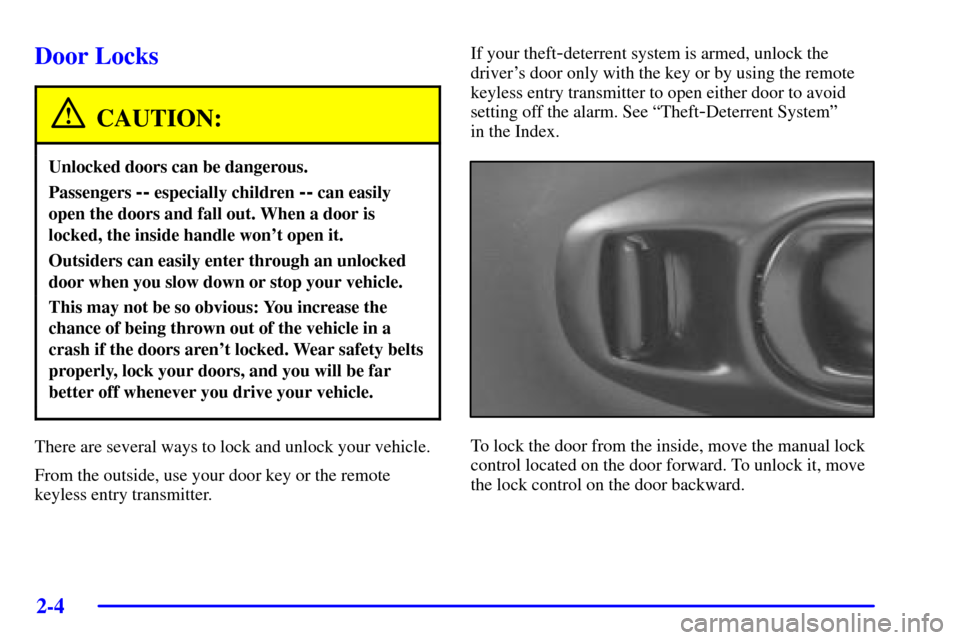
To lock the door from the inside, move the manual lock
control located on the door forward. To unlock it, move
the lock control on the door backward.
Page 63 of 361
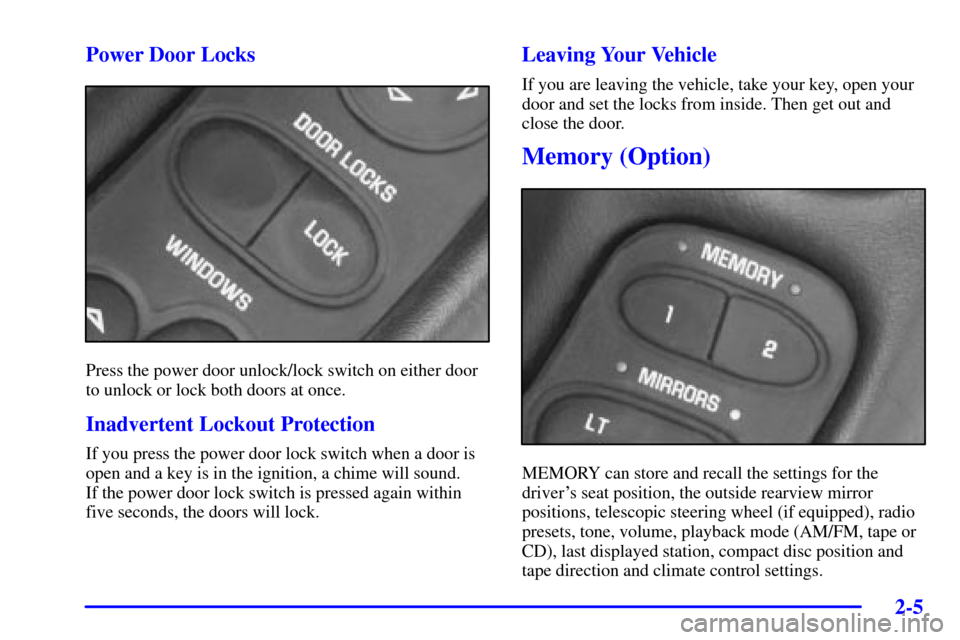
2-5 Power Door Locks
Press the power door unlock/lock switch on either door
to unlock or lock both doors at once.
Inadvertent Lockout Protection
If you press the power door lock switch when a door is
open and a key is in the ignition, a chime will sound.
If the power door lock switch is pressed again within
five seconds, the doors will lock.
Leaving Your Vehicle
If you are leaving the vehicle, take your key, open your
door and set the locks from inside. Then get out and
close the door.
Memory (Option)
MEMORY can store and recall the settings for the
driver's seat position, the outside rearview mirror
positions, telescopic steering wheel (if equipped), radio
presets, tone, volume, playback mode (AM/FM, tape or
CD), last displayed station, compact disc position and
tape direction and climate control settings.
Page 64 of 361

2-6
The MEMORY buttons are located on the driver's side
door, above the power mirror controls. The MEMORY
buttons can store and recall settings for up to three
drivers. Use button ª1º to store the settings for the first
driver, button ª2º for a second driver or press buttons
1 and 2 at the same time for a third driver. To store your
memory settings:
1. Adjust your settings for the driver's seat position,
outside rearview mirror positions, and telescopic
steering wheel (if equipped).
2. Press and hold a MEMORY button. The light above
the MEMORY button will glow steady for one
second and then flash once when the settings are
complete. Then the light will go off.
3. Set the climate control temperature, fan speed and
mode settings, radio presets, tone, volume, playback
mode (AM/FM, tape or CD), tape direction and
compact disc position.
Your memory settings are now programmed. Any
changes that are made to the audio system and climate
controls while driving are automatically stored.When first entering your vehicle, after pressing the
UNLOCK button on your remote keyless entry
transmitter or a MEMORY button, a recall of your
settings will occur. As the memory settings are recalled,
the light above the button will flash until the correct
settings are achieved, then glow for five seconds
when complete.
A memory recall can be stopped by pressing any
memory seat, mirror or steering column position button.
Your memory settings can also be recalled when you
press the active door UNLOCK button on the remote
keyless transmitter. A memory recall can be stopped by
pressing any memory seat, mirror or steering column
position button.
When your remote keyless entry transmitter has been
programmed to driver 1, 2 or 3, and you insert the key
into the ignition, memory will also occur. Drivers 1, 2
and 3 correspond to the order in which your remote
keyless entry transmitters were programmed.
(See ªFob Trainingº in the Index.)
Memory recall will not work if the vehicle is moving.
Memory recall will be temporarily interrupted during
engine crank.