Page 118 of 361
2-60
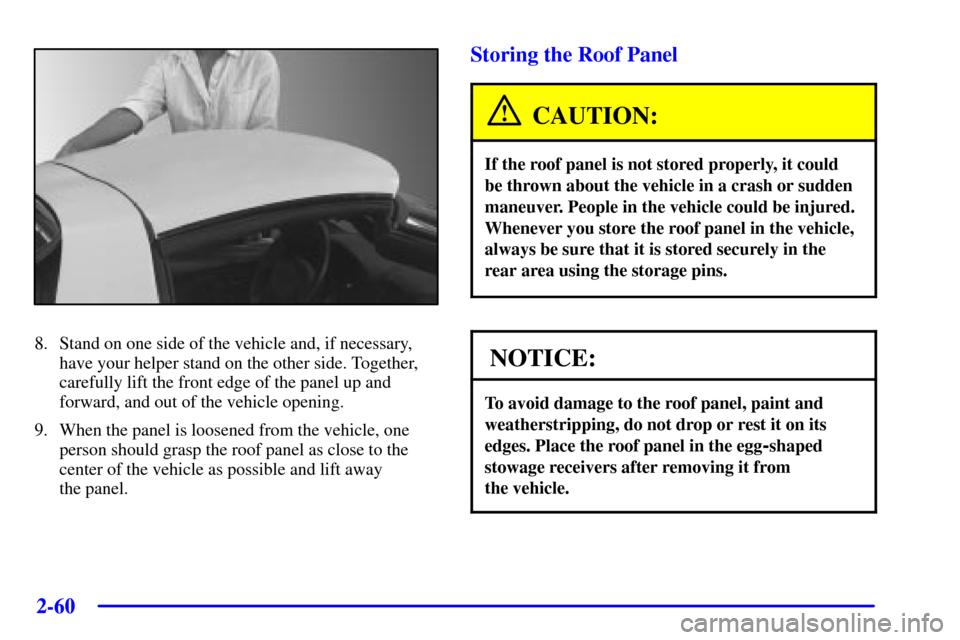
8. Stand on one side of the vehicle and, if necessary,
have your helper stand on the other side. Together,
carefully lift the front edge of the panel up and
forward, and out of the vehicle opening.
9. When the panel is loosened from the vehicle, one
person should grasp the roof panel as close to the
center of the vehicle as possible and lift away
the panel.
Storing the Roof Panel
CAUTION:
If the roof panel is not stored properly, it could
be thrown about the vehicle in a crash or sudden
maneuver. People in the vehicle could be injured.
Whenever you store the roof panel in the vehicle,
always be sure that it is stored securely in the
rear area using the storage pins.
NOTICE:
To avoid damage to the roof panel, paint and
weatherstripping, do not drop or rest it on its
edges. Place the roof panel in the egg
-shaped
stowage receivers after removing it from
the vehicle.
Page 121 of 361
2-63
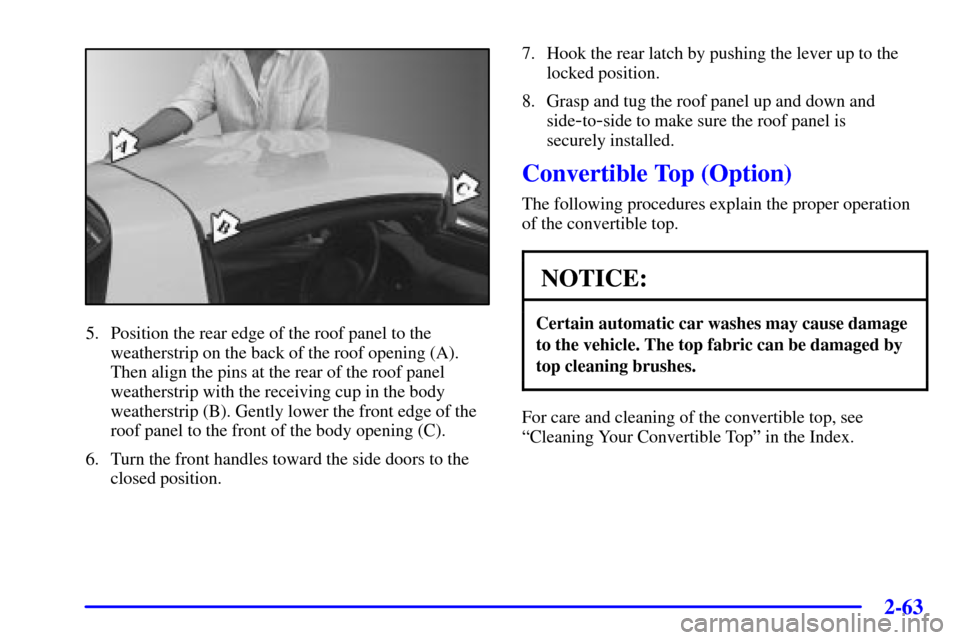
5. Position the rear edge of the roof panel to the
weatherstrip on the back of the roof opening (A).
Then align the pins at the rear of the roof panel
weatherstrip with the receiving cup in the body
weatherstrip (B). Gently lower the front edge of the
roof panel to the front of the body opening (C).
6. Turn the front handles toward the side doors to the
closed position.7. Hook the rear latch by pushing the lever up to the
locked position.
8. Grasp and tug the roof panel up and down and
side
-to-side to make sure the roof panel is
securely installed.
Convertible Top (Option)
The following procedures explain the proper operation
of the convertible top.
NOTICE:
Certain automatic car washes may cause damage
to the vehicle. The top fabric can be damaged by
top cleaning brushes.
For care and cleaning of the convertible top, see
ªCleaning Your Convertible Topº in the Index.
Page 127 of 361
2-69
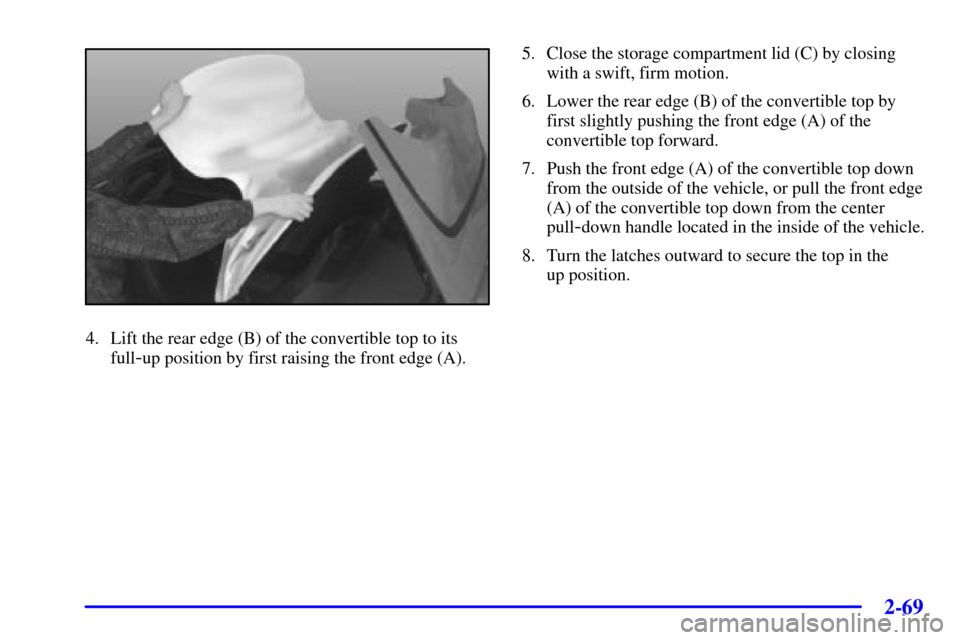
4. Lift the rear edge (B) of the convertible top to its
full
-up position by first raising the front edge (A).5. Close the storage compartment lid (C) by closing
with a swift, firm motion.
6. Lower the rear edge (B) of the convertible top by
first slightly pushing the front edge (A) of the
convertible top forward.
7. Push the front edge (A) of the convertible top down
from the outside of the vehicle, or pull the front edge
(A) of the convertible top down from the center
pull
-down handle located in the inside of the vehicle.
8. Turn the latches outward to secure the top in the
up position.
Page 141 of 361
2-83
CAUTION:
Don't keep driving if the oil pressure is low.
If you do, your engine can become so hot that it
catches fire. You or others could be burned.
Check your oil as soon as possible and have your
vehicle serviced.
NOTICE:
Damage to your engine from neglected oil
problems can be costly and is not covered by
your warranty.
Security Light
This light comes on to
remind you to arm your
theft
-deterrent system. If it
comes on and stays on when
your ignition is on, there
may be a problem with your
theft
-deterrent system.
See ªTheft
-Deterrent Systemº and ªPASS-Key Systemº
in the Index.
Check Gages Warning Light
This light will come on
briefly when you are
starting the engine. If the
light comes on and stays on
while you are driving, check
your gages to see if they are
in the warning areas.
This light can come on for the following reasons:
�Low Oil Pressure
�High Coolant Temperature
�High or Low Battery Voltage
�Low Fuel Level
Page 147 of 361

2-89
3 TRIP: Use this button to display your total and trip
miles, the elapsed time function, your average speed and
the engine oil life.
4 OPTIONS: This button allows you to choose personal
options that are available on your vehicle, depending on
the options your vehicle is equipped with, such as
security, door locks, easy entry seats and language.
5 E/M: Use this button to change the display between
English and metric units.
RESET: This button, used along with the other buttons,
will reset system functions and turn off or acknowledge
messages on the Driver Information Center (DIC).
At the top of the DIC control buttons is a light sensor.
Be sure not to block the sensor or your lighting
functions may be disrupted.
DIC Controls and Displays
Turn on the system by turning the ignition to ON. When
you turn on the ignition, the DIC will be in the mode last
displayed when the engine was turned off. Each DIC
button allows you to scroll through a menu. A blank
page ends each menu.
If a problem is detected, a diagnostic message will appear
on the display. Press RESET to acknowledge any current
warning or service messages. The following pages will
show the messages you can see on the Driver Information
Center (DIC) display by pressing the DIC buttons.
1 FUEL
The FUEL button displays average fuel economy and
instantaneous fuel economy calculated for your specific
driving conditions and range.
Press the FUEL button to display average fuel economy,
such as:
�AVERAGE 20.1 MPG or
�AVERAGE 5.3 L/100 km
Page 152 of 361

2-94
The following are the options listed under the
OPTIONS button:
Twilight
Press the OPTIONS button until TWILIGHT
- OFF
appears on the display, then use the RESET button to
page through the following selections:
�TWILIGHT
- ON
�TWILIGHT
- OFFIf you choose TWILIGHT
- ON, press the OPTIONS
button again to display DELAY TIME 1 2 in the DIC.
Use the OPTIONS button to switch between delay time
1 and 2. You can increase the delay time by pressing
button 1 (1 FUEL) or decrease the time by pressing
button 2 (2 GAGES). Each bar is equal to 12 seconds.
Lock and Arm
Press the OPTIONS button until LOCK & ARM
appears on the display, then use the RESET button to
page through the following selections:
�LOCK & ARM
- OFF
�LOCK & ARM
- HORN ONLY
�LOCK & ARM
- LIGHTS ONLY
�LOCK & ARM
- HORN & LIGHTS
If you choose LOCK & ARM
- OFF, you will receive
no security feedback when locking or unlocking
your vehicle.
If you choose LOCK & ARM
- HORN ONLY, only the
horn will chirp to let you know when your alarm system
has armed when locking your vehicle.
Page 192 of 361

3-26 Theft-Deterrent Feature
THEFTLOCK� is designed to discourage theft of your
radio. It works by using a secret code to disable all radio
functions whenever battery power is removed.
The THEFTLOCK feature for the radio may be used or
ignored. If ignored, the system plays normally and the
radio is not protected by the feature. If THEFTLOCK is
activated, your radio will not operate if stolen.
When THEFTLOCK is activated, the radio will display
LOC to indicate a locked condition anytime battery
power has been interrupted. If your battery loses power
for any reason, you must unlock the radio with the secret
code before it will operate.
Activating the Theft
-Deterrent Feature
The instructions which follow explain how to enter your
secret code to activate the THEFTLOCK system. It is
recommended that you read through all nine steps
before starting the procedure.
If you allow more than 15 seconds to elapse between
any steps, the radio automatically reverts to time and
you must start the procedure over at Step 4.1. Write down any three or four
-digit number from
000 to 1999 and keep it in a safe place separate from
the vehicle.
2. Turn the ignition to ACC or ON.
3. Turn the radio off.
4. Press the 1 and 4 buttons together. Hold them down
until
--- shows on the display. Next you will use the
secret code number which you have written down.
5. Press MN and 000 will appear on the display.
6. Press MN again to make the last two digits agree
with your code.
7. Press HR to make the first one or two digits agree
with your code.
8. Press AM
-FM after you have confirmed that the
code matches the secret code you have written down.
The display will show REP to let you know that you
need to repeat Steps 5 through 7 to confirm your
secret code.
9. Press AM
-FM and this time the display will show
SEC to let you know that your radio is secure.
The LED indicator by the volume control will begin
flashing when the ignition is turned off.
Page 193 of 361

3-27
Unlocking the Theft-Deterrent Feature After a
Power Loss
Enter your secret code as follows; pause no more than
15 seconds between steps:
1. Turn the ignition on. LOC will appear on the display.
2. Press MN and 000 will appear on the display.
3. Press MN again to make the last two digits agree
with your code.
4. Press HR to make the first one or two digits agree
with your code.
5. Press AM
-FM after you have confirmed that the
code matches the secret code you have written down.
The display will show SEC, indicating the radio is
now operable and secure.
If you enter the wrong code eight times, INOP will
appear on the display. You will have to wait an hour
with the ignition on before you can try again. When you
try again, you will only have three chances to enter the
correct code before INOP appears.
If you lose or forget your code, contact your dealer.Disabling the Theft
-Deterrent Feature
Enter your secret code as follows; pause no more than
15 seconds between steps:
1. Turn the ignition to ACC or ON.
2. Turn the radio off.
3. Press the 1 and 4 buttons together. Hold them down
until SEC shows on the display.
4. Press MN and 000 will appear on the display.
5. Press MN again to make the last two digits agree
with your code.
6. Press HR to make the first one or two digits agree
with your code.
7. Press AM
-FM after you have confirmed that the
code matches the secret code you have written down.
The display will show
---, indicating that the radio is
no longer secured.
If the code entered is incorrect, SEC will appear on the
display. The radio will remain secured until the correct
code is entered.
When battery power is removed and later applied to a
secured radio, the radio won't turn on and LOC will
appear on the display.
To unlock a secured radio, see ªUnlocking the
Theft
-Deterrent Feature After a Power Lossº earlier
in this section.