Page 16 of 361
xiv
For example,
these symbols
are used on an
original battery:
CAUTION
POSSIBLE
INJURY
PROTECT
EYES BY
SHIELDING
CAUSTIC
BATTERY
ACID COULD
CAUSE
BURNS
AVOID
SPARKS OR
FLAMES
SPARK OR
FLAME
COULD
EXPLODE
BATTERY
These symbols
are important
for you and
your passengers
whenever your
vehicle is
driven:
DOOR LOCK
UNLOCK
FASTEN
SEAT
BELTS
POWER
WINDOW
AIR BAG
These symbols
have to do with
your lamps:
MASTER
LIGHTING
SWITCH
TURN
SIGNALS
PARKING
LAMPS
HAZARD
WARNING
FLASHER
DAYTIME
RUNNING
LAMPS
FOG LAMPS
These symbols
are on some of
your controls:
WINDSHIELD
WIPER
WINDSHIELD
WASHER
WINDSHIELD
DEFROSTER
REAR
WINDOW
DEFOGGER
VENTILATING
FAN
These symbols
are used on
warning and
indicator lights:
ENGINE
COOLANT
TEMP
BATTERY
CHARGING
SYSTEM
BRAKE
COOLANT
ENGINE OIL
PRESSURE
ANTI-LOCK
BRAKES
Here are some
other symbols
you may see:
FUSE
LIGHTER
HORN
SPEAKER
FUEL
Vehicle Symbols
These are some of the symbols you may find on your vehicle.
Page 67 of 361

2-9
The system has a feature that makes it difficult for you
to lock your keys in your vehicle. If you leave your keys
in the ignition and attempt to lock the doors, the vehicle
will not lock and a chime will sound to remind you that
the keys are in the ignition. If the door lock is pressed
again, within five seconds, the doors will lock and the
keys can be locked in the vehicle. This system can't
guarantee that you will never be locked out of your
vehicle. Always remember to take your keys with you.
Panic Alarm Button
When you press the horn button on the remote keyless
entry transmitter, the horn will sound. This panic alarm
button will allow you to attract attention, if needed.
If the horn alarm sounds, there are three ways to
turn it off:
�Push the panic alarm button again on the remote
keyless entry transmitter.
�Wait 90 seconds, and the horn will turn off by itself.
�Turn the key to any position in the ignition,
except OFF.RKE Settings
You can adjust the settings on the system through the
Driver Information Center (DIC). You can change the
type of alarm used by the theft
-deterrent system.
See ªDriver Information Center Controls and Displaysº
in the Index for more information.
Matching Transmitter(s) To Your Vehicle
Each remote keyless entry transmitter is coded to
prevent another transmitter from unlocking your vehicle.
If a transmitter is lost or stolen, a replacement can be
purchased through your dealer. Remember to bring any
remaining transmitters with you when you go to your
dealer. When the dealer matches the replacement
transmitter to your vehicle, any remaining transmitters
must also be matched. Once your dealer has coded the
new transmitter, the lost transmitter will not unlock your
vehicle. Each vehicle can have only three transmitters
matched to it.
Page 69 of 361
2-11 Replacing the Battery in the Remote
Keyless Entry Transmitter
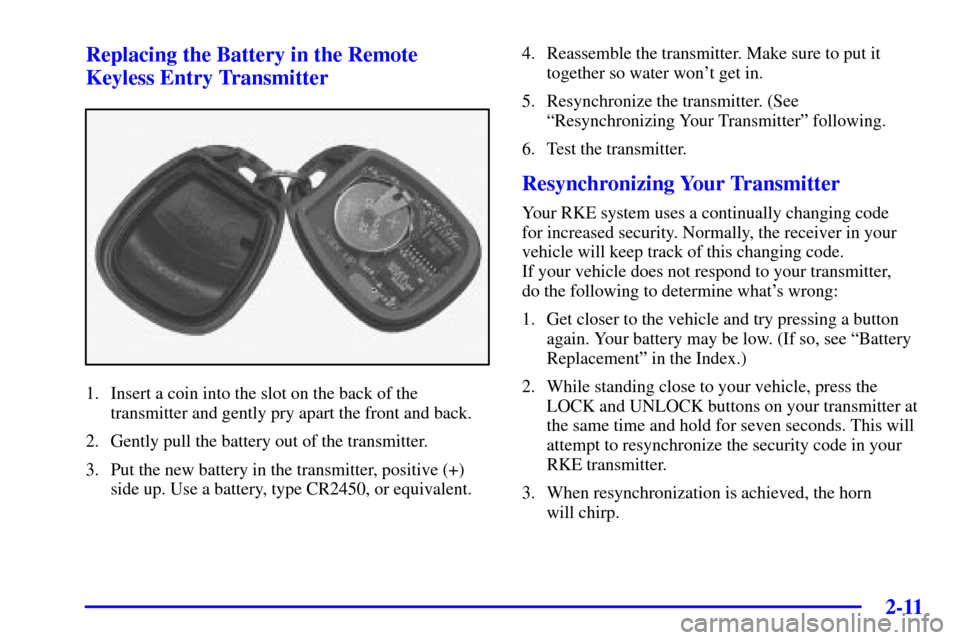
1. Insert a coin into the slot on the back of the
transmitter and gently pry apart the front and back.
2. Gently pull the battery out of the transmitter.
3. Put the new battery in the transmitter, positive (+)
side up. Use a battery, type CR2450, or equivalent.4. Reassemble the transmitter. Make sure to put it
together so water won't get in.
5. Resynchronize the transmitter. (See
ªResynchronizing Your Transmitterº following.
6. Test the transmitter.
Resynchronizing Your Transmitter
Your RKE system uses a continually changing code
for increased security. Normally, the receiver in your
vehicle will keep track of this changing code.
If your vehicle does not respond to your transmitter,
do the following to determine what's wrong:
1. Get closer to the vehicle and try pressing a button
again. Your battery may be low. (If so, see ªBattery
Replacementº in the Index.)
2. While standing close to your vehicle, press the
LOCK and UNLOCK buttons on your transmitter at
the same time and hold for seven seconds. This will
attempt to resynchronize the security code in your
RKE transmitter.
3. When resynchronization is achieved, the horn
will chirp.
Page 74 of 361

2-16
Arming the System
Use one of the two following items listed here to arm
the system:
�Press the LOCK button on the remote keyless
entry transmitter.
�Open the door. (The SECURITY light should flash.)
Lock the door with the power door lock switch.
The SECURITY light will stop flashing and stay on.
Close the door. The SECURITY light should go off.
Testing the Alarm
Use the following to test the system:
1. Make sure the hatch/trunk lid is latched.
2. Lower a window on the door.
3. Manually arm the system.
4. Close the doors and wait 15 seconds.
5. Reach through the open window and manually
unlock the driver's door.
6. Open the door. The alarm should sound.
7. Turn off the alarm.
If the alarm is inoperative, check to see if the horn
works. If not, check the horn fuse. See ªFuses and
Circuit Breakersº in the Index. If the horn works, but the
alarm doesn't go off, see your dealer.
Disarming the System
Always use your key or the remote keyless entry
transmitter to unlock a door. Unlocking a door any other
way will set off the alarm. If your alarm sounds,
listed below are the ways you can disarm it:
�Unlock the driver's door with your key.
�Put the key in the ignition.
�Press the UNLOCK button on the remote keyless
entry transmitter.
Now, if a door or the hatch/trunk lid is opened without
the key or the remote keyless entry transmitter, the
alarm will go off. Your horn will sound for two minutes,
then it will go off to save battery power. And, your
vehicle won't start.
The theft
-deterrent system won't arm if you lock the
driver's door with a key, the manual door lock, or if you
use the power door lock after the doors are closed.
If your passenger stays in the vehicle when you leave
with the keys, have the passenger lock the vehicle after
the doors are closed. This way the alarm won't arm,
and your passenger won't set it off.
Page 96 of 361
2-38
Windows
Power Windows
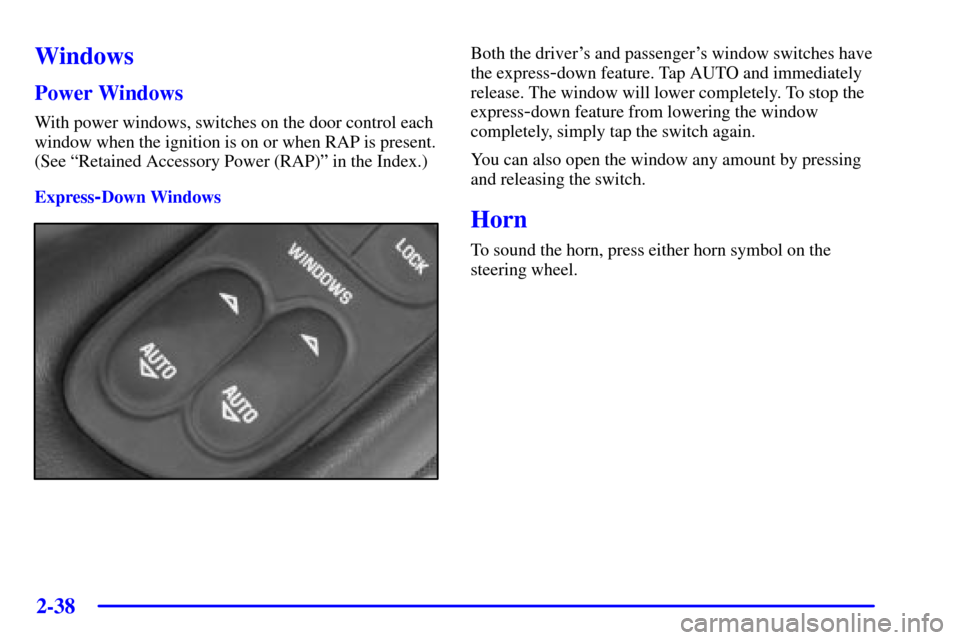
With power windows, switches on the door control each
window when the ignition is on or when RAP is present.
(See ªRetained Accessory Power (RAP)º in the Index.)
Express
-Down Windows
Both the driver's and passenger's window switches have
the express
-down feature. Tap AUTO and immediately
release. The window will lower completely. To stop the
express
-down feature from lowering the window
completely, simply tap the switch again.
You can also open the window any amount by pressing
and releasing the switch.
Horn
To sound the horn, press either horn symbol on the
steering wheel.
Page 129 of 361

2-71
The main components of your instrument panel are:
A. Instrument Panel Brightness Control
B. Head
-Up Display Controls (Option)
C. Turn Signal/Multifunction Lever
D. Driver Information Center (DIC)
(Located in the Instrument Cluster)
E. Instrument Panel Cluster
F. Windshield Wiper/Washer Lever
G. Driver Information Center (DIC) Buttons
H. Hazard Warning Flasher Button
I. Center Air Vents
J. Audio System
K. Comfort Controls
L. Fog Lamp Button (Option)
M. Remote Hatch Release Button (Coupe) or Remote
Trunk Release Button (Convertible/Hardtop)N. Horn
O. Ignition Switch
P. Shift Lever (Automatic Shown)
Q. Traction Control System (TCS) Switch/Active
Handling Switch (Option)
R. Accessory Power Outlet
(Located in the Center Console)
S. Selective Real Time Damping (SRTD) (Option)
T. Instrument Panel Cupholder
U. Remote Fuel Door Release Button
(Located in the Center Console)
V. Ashtray and Cigarette Lighter
W. Parking Brake
X. Glove Box
Y. Instrument Panel Fuse Block
(Located behind the Toe
-Board)
Page 152 of 361

2-94
The following are the options listed under the
OPTIONS button:
Twilight
Press the OPTIONS button until TWILIGHT
- OFF
appears on the display, then use the RESET button to
page through the following selections:
�TWILIGHT
- ON
�TWILIGHT
- OFFIf you choose TWILIGHT
- ON, press the OPTIONS
button again to display DELAY TIME 1 2 in the DIC.
Use the OPTIONS button to switch between delay time
1 and 2. You can increase the delay time by pressing
button 1 (1 FUEL) or decrease the time by pressing
button 2 (2 GAGES). Each bar is equal to 12 seconds.
Lock and Arm
Press the OPTIONS button until LOCK & ARM
appears on the display, then use the RESET button to
page through the following selections:
�LOCK & ARM
- OFF
�LOCK & ARM
- HORN ONLY
�LOCK & ARM
- LIGHTS ONLY
�LOCK & ARM
- HORN & LIGHTS
If you choose LOCK & ARM
- OFF, you will receive
no security feedback when locking or unlocking
your vehicle.
If you choose LOCK & ARM
- HORN ONLY, only the
horn will chirp to let you know when your alarm system
has armed when locking your vehicle.
Page 153 of 361

2-95
If you choose LOCK & ARM - LIGHTS ONLY,
only your exterior lamps will flash to let you know
when your alarm system has armed when locking
your vehicle.
If you choose LOCK & ARM
- HORN & LIGHTS,
the horn will chirp and the exterior lamps will flash
briefly to let you know the system has armed when
locking your vehicle.
Alarm
Press the OPTIONS button until ALARM appears on
the display, then use the RESET button to page through
the following selections:
�ALARM
-HORN
�ALARM HORN & LIGHTS
If you choose ALARM
-HORN, the horn will sound
during an alarm.
If you choose ALARM HORN & LIGHTS, the horn
will sound and the interior and exterior lamps will flash
during an alarm.Approach Lights
Press the OPTIONS button until APPROACH LIGHTS
appears on the display, then use the RESET button to
page through the following choices:
�APPROACH LIGHTS ON
�APPROACH LIGHTS OFF
If you choose APPROACH LIGHTS ON, the fog lamps,
front turn signal, rear back
-up and courtesy lamps will
come on for 30 seconds when you press UNLOCK on
the remote keyless entry transmitter. This will occur
only when it is dark outside.
APPROACH LIGHTS OFF turns off this option.
See ªRemote Keyless Entry Systemº in the Index for
more information.
Auto Lock
Press the OPTIONS button until AUTO LOCK appears
on the display, then use the RESET button to page
through the following choices:
�AUTO LOCK ON
�AUTO LOCK OFF