2000 AUDI ALLROAD service indicator
[x] Cancel search: service indicatorPage 6 of 306

----------------------------------------------TABLE OFCONT ENTS
I GENERAL ILLUSTRATION
General illustration 0 0 0. • • • 8
Warning and indicator lights 10
I SAFETY
FIRST
W elcome ... 0 0 0 •• •• 13
Safety first 0 0
• 0 • 0 0 0 0 • 0 •
13
Safety belts
• . . 0 0 0 • 0 0
14
Airbag system 0 ••••••• 0 0 • • • • • • • 25
Child safety ........ 0 • 0 0 0 0 0 0 0 0 0 44
I CONTROLS AND EQUIPMENT
Keys 0 0 0 0 0 0 0 0 0 0 0 •••• ••••• 0 0 • • 0
56
Power locks 0 0 0 0
Power windows
Mirrors 0 •• 0 0 0 •••
Head restraints
Front seats 0 0 0 •
0.- . 0 0 0 • • 59
69
• •• - •••• 0 ••• 0 72
75
•• 0 •• 0 76
Memory for front seats , .... 0 •• 0 81
Center armrest 0 0 0 0 0 0 0 0 0 •••••• 0 85 Rear
seats 0 0 •• 0 •• 0 • • • • • •
86
Luggage compartment , 0 0 88
Rear facing child seat bench 0 0 0 0 0 92
Ski sack 0 0 0 0 0 0 0 0 0 0 0 0 0 0 0 0.
96
Adjustable steering column
(tilt and telescopic) 0 0 0 0 • 0 0
98
Pedals 0 0 • 0 0 0 0 0 0 0 0 0 0 0 0 0 0 0 0 0 0 0 , 1 02
Parking brake lever 0 • 0 0 0 0 0 0 0 •• 0 1 03
5-speed automatic transmission
(Trptronic ®) 0 0 0 0 0 0 0 0 0 0 • 0 0 0 0 0. 0 • 104
Acoustic park assist
112
Ignition switch 0 0 0 0 0 0 0
1 13
Starting procedures . 0 • • 114
Stopping engine 0 0 0 0 0 0 • • • 115
Instrument cluster 0 0 0 0 0 0 116
Service Interval Display
121
Warning I Indic ator lights 0 0 0 0 0 0 • 122
On Board Diagnostic system 0 0 0 128
Driver information system 0 • 0 • • • 130
Menu display 0 0 0 0 0 0 0 0 0 0 0 0 0
0 131
Rear lid I door open indicator 0 0 0 137
Outside air temp erature 0 • 0 0 0 0 0 0 137 Radio
frequency display 13
8
Auto-Check system 0 0 0 o 0 138
Speed warning . 0 0 0 • 0 0 • • • • 0 • 0 0 144
Tr ip computer 0 0 0 0 0 0 •• 0
146
Switches 0 • 0 •• 0 0 0 0 • 0 0 0 0 148
Ride height adjustment
(4 Level Air Suspension) 0
153
Turn signals,
headlight dimmer switch lever 0 0 156
Cruise control 0 0 0 0 0 0 0 0 0 0 0 0 0 0 0 • • 158
Wiper and washer system 0 ••• 0 0 150
Climate controls 0 0 0 0 0 0 0 0 0 0 0 • 0 152
Power roof 0 0 0 0 0 0 0 • 0 0 0 0 0 • • • • • • 168
Int erior lights, reading lights 171
Luggage compartment light 0 0 0 0 172
Audi Homelink ®
Uni versal Transmitter . 0 0 • • • •
173
Sun visors 00 00 00 00 ... • .. •
177
Sun shade 0 0 0 0 0 0 0 0 •• , • • • ••• 0 0 177
Glo ve compartment
Coat hooks
Ashtray 178
179
180
5
Page 117 of 306

CONTROLS AND EQUIPMENT---------------------
Instrument cluster
Pos. see page
1 - Engine oil temperature gauge ... 117
2 - Tachometer ...... ........... .. 117
with digital clock and date display 117
3- Warning I ind icator lights ..... .. 122
4 - Engine coolant temperature gauge 118
5- Fuel gauge
119 Pos.
6 · Speedometer
with odometer,
trip odometer display ... .
7 - Vo ltmeter ............ .
8 - Set I check knob for see
page
119
12 0
12 0
Setting the clock . . . . . .
118
Auto -check system ............ 140
Clock and Odometer lighting .... 12 0
Service indicator . . . . . . . . . . . . . . 121 Pos.
see page
9 - Driver information system
Auto-C heck System display . . . . 138
Outside air temperature display .
137
Trip computer display . . . . . . . . 146
Selector lever position display . .
1 07
Radio frequency display ........ 138
Service interval display . . . . . . 121
1 0 -Reset knob for
Trip odometer ......•.. _ ..... .. 120
Service indicator . . . . . . . . . . . . 121
Page 121 of 306

CONTROLS AND
EQUIPMEN T--------------------
Odometer
The odometer indicates the distance driven.
USA models:
Miles
Canada models: Kilometres
On the trip odometer, the last digit indicates
1 /,0 of a mile or 1 00 meters.
Reset knob for trip odometer
To record a distance, reset the trip odome
ter by pressing the knob until the display re
turns to zero -see illustrat ion.
12 0 When
the ignition is off, the display can be
ill umin ated by pressing the test knob for the
Auto-Check System. See page 116, posi
tion 8. The display switches off automati
cally after about 15 seconds.
Also the display will remain illuminated for
abo �t 30 seconds after you open the driv
er's door.
Defect message
If there is a defect in the instrument cluster,
"dEF" will be displayed continuously in the
trip odometer display area. Have this prob
lem corrected as soon as possible by an au
thorized Audi Dealer.
7 - Vo ltmeter
The voltmeter indicates the voltage for the
vehicle's total electrical system, which
should normally be between 12 and
14 volts. If the display drops below 12 volts
when the engine is running, have the power
supply (battery and alternator) checked by
an authorized Audi Dealer. See also
pages 127 and 143.
The voltage may fall below 8 volts while the
engine is being started. 8
- Set I Check knob
Setting the clock ...• ... .
Auto-ch eck system
Odometer lighting .
Service indicator .. 118
14 0
12 0
121
9 - Driver information system
Auto-C heck System display . . . . . ... 138
Outside air temperature display .... 137
Tr ip computer display . . . . . . . . 146
Selector lever position display ....... 1 07
Radio frequency display . . . . . . 138
Service interval display . . . . . . . . . . .
121
10 -Reset knob
Reset knob for trip odometer . .... .. 12 0
Service indicator . . . . . .. . . . . . . 121
Page 131 of 306
CONTROLS AND
EQUIPMENT--------------------
Driver information system
Display
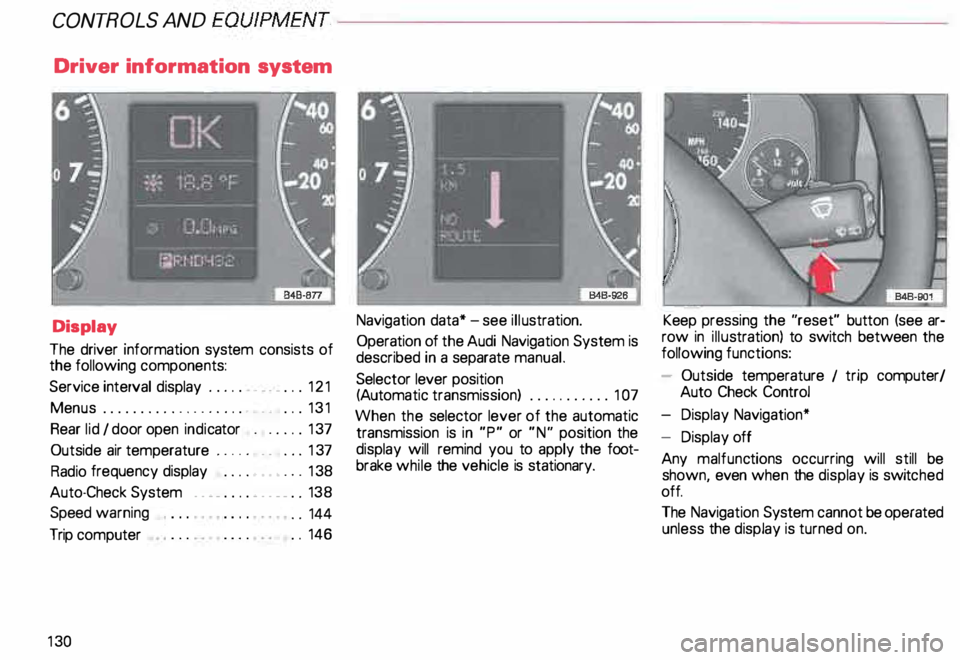
The driver information system consists of
the following components:
Service interval display . . . . . . _. _ ... 121
Menu s................... _ . ... 131
Rear lid I door open indicator _ _ .... 137
Outside air temperature __ . . . _ _ ... 137
Radio frequency display . . . . • .• ___ 138
Auto-Check System ____ .... ____ _ . _ 138
Speed warning
.. 144
Trip computer . .
146
13 0 Navigation
data* -see illustration.
Operation of the Audi Navigation System is
described in a separate manual.
Selector lever position
(Auto matic transmission) ........... 1 07
When the selector lever of the automatic
transmission is in "P" or "N" position the
display will remind you to apply the foot
brake while the vehicle is stationary. Keep
pressing the "reset" button (see ar
row in illus tration) to switch between the
following functions:
- Outside temperature 1 trip computer/
Auto Check Control
- Display Navigation*
- Display off
Any malfunc tions occurring will still be
shown, even when the display is switc hed
off.
The Navigation System cannot be operated
unless the display is turned on.
Page 255 of 306
VEHICLE
CARE----------------------------------------------------
Tire wear
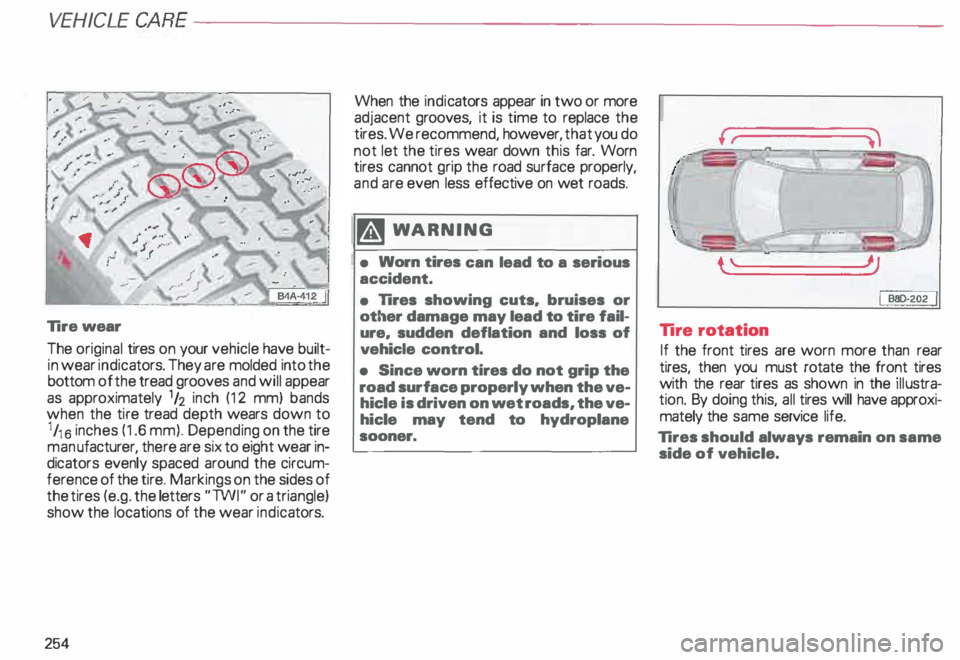
The original tires on your vehicle have built
in wear indicators. They are molded into the
bottom of the tread grooves and will appear
as approximately 1h inch (12 mm) bands
when the tire tread depth wears down to
1 /1 6 inches (1.6 mm). Depending on the tire
man ufacturer, there are six to eight wear in
dicators evenly spaced around the circum
ference of the tire. Markings on the sides of
the tires (e.g. the letters "TWI" or a triangle)
show the locations of the wear indicators.
254 When the
indicators appear in two or more
adjacent grooves, it is time to replace the
tires. We recommend, however, that you do
not let the tires wear down this far. Worn
tires cannot grip the road surface properly,
and are even less effective on wet roads.
�W ARNING
• Worn tires can lead to a serious
accident.
• lires showing cuts. bruises or
other damage may lead to tire fail
ure. sudden deflation and loss of
vehicle control.
• Since worn tires do not grip the
road surface properly when the ve
hicle is driven on wet roads, the ve
hicle may tend to hydroplane
sooner. I
BBD-2.02.
I
Tire rotation
If the front tires are worn more than rear
tires, then you must rotate the front tires
with the rear tires as shown in the illustra
tion. By doing this, all tires will have approxi
mately the same service life.
Tires should always remain on same
side of vehicle.
Page 269 of 306
DO-IT-Y
OURSELF SERVICE----------------------
Step 1 ·"7
r.-&
.--· t I . ... ,.. . . . --------� .... ... . . ...
-
' . .. . ...
.. - - . .
J
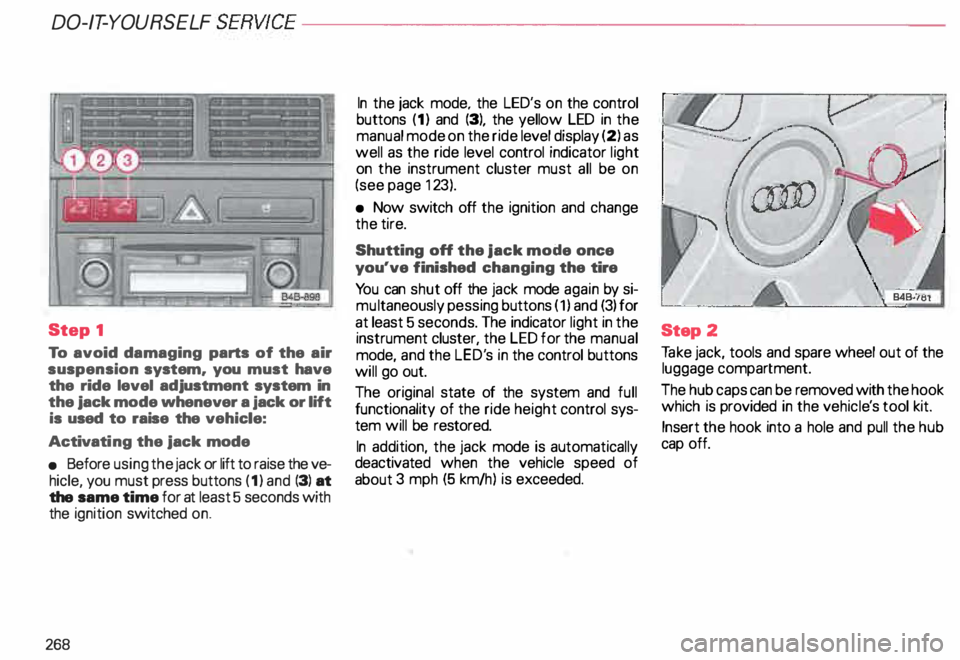
To avoid damaging parts of the air
suspension system. you must have
the ride level adjustment system in
the jack mode whenever a jack or lift
is used to raise the vehicle:
Activati ng the jack mode
• Before using the jack or lift to raise the ve
hicle, you must press buttons (1) and (3) at
the same time for at least 5 seconds with
the ignition switched on.
268 In
the jack mode. the LED's on the control
buttons (1) and (3), the yellow LED in the
manual mode on the ride level display (2) as
well as the ride level control indicator light
on the instrument cluster must all be on
(see page 123).
• Now switch off the ignition and change
the tire.
Shutting off the jack mode once
you've finished changing the tire
Yo u can shut off the jack mode again by si
mu ltaneously pessing buttons (1) and (3) for
at least 5 seconds. The indicator light in the
instrument cluster, the LED for the manual
mode, and the LED's in the control buttons
will go out.
The original state of the system and full
functionality of the ride height control sys
tem will be restored.
In addition, the jack mode is automatically
deactivated when the vehicle speed of
about 3 mph (5 km/h) is exceeded. Step
2
Ta ke jack, tools and spare wheel out of the
luggage compartment.
The hub caps can be removed with the hook
which is provided in the vehicl e's tool kit.
Insert the hook into a hole and pull the hub
cap off.
Page 276 of 306

Fuse
arrangement
No. 1 - Heated washer jets !
B45-087C I
A 11
- .. 5
2 - Turn signals . . . . . . . . .
. 10
3 - Headlight washer (relay)
illum ination for glove compartment,
climate control, Automatic
Tr ansmission, instrument cluster ... 5
4 - License plate light . . . 5
l) Amps No.
A1l
5 - Ins trument cluster, seat heating,
test connection for cruise control,
bulb monitor, Automatic
Tr ansmis sion display, switch lighting,
mirror switches and actuators,
airbag warning light, outside
temperature indicator, climate
control, solar roof, acoustic parking
assistance system, navigation
system, car telephone, 4 Level Air
Suspension ............ .. ...... 1 0
6 - Power locking system . . . . . . . . . 5
7 - Anti-lock brake system (ABS),
brake light switch . . . . . . . . . . . . 1 0
8 - Car telephone . . . . . . . . . . . . . . .
. 5
9 - Heated mirrors . . . . . . . . . . . . . . 1 0
1 0- Automatic headlight adjustment
. 5
11 -Cruise control
(Automatic Transmission) . . .
1 0
12- On Board Diagnostic system .... _ 10
13 -Brake lights . . . . . . 1 0 DO-IT-YOURSELF
SERVICE
No. 14 -Interior lights, reading lights,
anti-theft alarm system,
vanity mirror, seat memory ....... 10
15 -Instrument cluster, climate control,
mirror and seat mem ory, .
navigation system . . . . . . . . . . . . . . 1 0
16- Electronic Stability Programm ..... 5
17 -Navigation system, 4 Level Air
Suspension, automatic headlight
adjustment .............. ...... 10
18-Hig h-beam, right ......... ....... 10
19 -H igh-beam, left . . . . . . . . . . . . .. 1 0
20 � Low beam, right, headlight
adjustment . . . . . . . . . . . . . . . • . .
15
21 -Low beam, left, headlight
adjustment . . . . . . . . . . . . . . . .. 15
22 -Side marker and tail light, right . 5
23 -Side marker and tail light, left . . . . . 5
24 -Wiper and washer system . . 25
25 -Blower for heating (climate
control), solar roof 30
275