Page 68 of 336

yellowblue
2-10
4. Check the operation of the transmitter with your
vehicle. If the transmitter does not work, try
resynchronizing the transmitter with the receiver.
Resynchronization
Your remote lock control system is equipped with a
security system that prevents anyone from recording and
playing back your signal. The transmitter does not send
the same signal twice to the receiver. The receiver will
not respond to a signal that has been sent to it more
than once.
To resynchronize your transmitter and receiver, follow
these directions:
1. Stand close to your vehicle.
2. Press and hold the LOCK and UNLOCK buttons on
the transmitter at the same time.
3. Hold the buttons for five seconds. In this time, the
doors should lock and unlock once. This confirms
the resynchronization. If the doors do not lock and
unlock, see your dealer for service.
Trunk
To unlock the trunk from the outside, insert the key and turn
the trunk lock cylinder or use the remote lock lock control.
CAUTION:
It can be dangerous to drive with the trunk lid
open because carbon monoxide (CO) gas can
come into your vehicle. You can't see or smell
CO. It can cause unconsciousness and even death.
If you must drive with the trunk lid open or if
electrical wiring or other cable connections must
pass through the seal between the body and the
trunk lid:
�Make sure all other windows are shut.
�Turn the fan on your heating or cooling
system to its highest speed with the setting on
VENT. That will force outside air into your
vehicle. See ªComfort Controlsº in the Index.
�If you have air outlets on or under the
instrument panel, open them all the way.
See ªEngine Exhaustº in the Index.
Page 69 of 336
yellowblue
2-11 Remote Trunk Release
Press the remote release button, located on the lower left
side of the instrument panel, to release the trunk lid.
Make sure the lockout feature is not activated. Also, the
remote trunk release will only work when the gearshift
lever is in PARK (P) or NEUTRAL (N).
Remote Trunk Release Lockout
Your remote trunk release is equipped with a lockout
feature to help prevent unauthorized entry into the trunk
when leaving the vehicle unattended. The switch is
located on the inside of the trunk lid, mounted to the
trunk lid latch.
To turn the lockout on, slide the switch all the way to the
left. To turn the lockout off, slide the switch all the way
to the right.
When the lockout is on, the remote trunk release switch
on the instrument panel will not release the trunk lid.
However, the trunk lid can still be opened with the key,
but not with the remote lock control transmitter.
Page 73 of 336

yellowblue
2-15
ACC (Accessory) (B): This position unlocks the
transaxle. It also lets you use things like the radio and
windshield wipers when the engine is not running. To
use ACC, push in the key and turn it clockwise. Use this
position if your vehicle must be pushed or towed, but
never try to push
-start your vehicle.
ON (C): This position unlocks the ignition and
transaxle. This position is also where the key returns
after you start your engine and release the switch. The
switch stays in ON when the engine is running. But even
when the engine is not running, you can use ON to
operate your electrical power accessories, and to display
some instrument panel warning lights.START (D): This position starts the engine. When the
engine starts, release the key. The ignition switch will
return to ON for normal driving.NOTICE:
If your key seems stuck in OFF and you can't
turn it, be sure you are using the correct key; if
so, is it all the way in? Turn the key only with
your hand. Using a tool to force it could break
the key or the ignition switch. If none of this
works, then your vehicle needs service.
Page 89 of 336

yellowblue
2-31
Turn Signal/Multifunction Lever
The lever on the left side of the steering column
includes your:
�Turn Signal and Lane Change Indicator
�Headlamp High/Low
-Beam Changer
�Park Lamps and Headlamps
Turn and Lane Change Signals
The turn signal has two upward (for right) and two
downward (for left) positions. These positions allow you
to signal a turn or a lane change.
To signal a turn, move the lever all the way up or down.
When the turn is finished, the lever will return automatically.
An arrow on the instrument
panel will flash in the
direction of the turn or
lane change.
To signal a lane change, just raise or lower the lever
until the arrow starts to flash. Hold it there until you
complete your lane change. The lever will return by
itself when you release it.
A warning chime signal will come on if you have left
your turn signal on for more than 3/4 mile (1 km).
As you signal a turn or a lane change, if the arrow
flashes rapidly, a signal bulb may be burned out and
other drivers won't see your turn signal.
Page 90 of 336

yellowblue
2-32
If a bulb is burned out, replace it to help avoid an
accident. If the arrow doesn't go on at all when you
signal a turn, check for burned
-out bulbs and then check
the fuse (see ªFuses and Circuit Breakersº in the Index).
Headlamp High/Low Beam Changer
To change the headlamps
from low beam to high
beam, push forward on the
turn signal/multifunction
lever.
To change the headlamps from high beam to low beam,
pull the turn signal lever toward you. When the high
beams are on, a light on the instrument panel will also
be on.
Flash-to-Pass
This feature lets you use your high-beam headlamps to
signal a driver in front of you that you want to pass.
To use it, pull the turn signal/multifunction lever toward
you until the high
-beam headlamps come on, then
release the lever to turn them off.
Windshield Wipers
You control the windshield wipers by moving the stalk
with the wiper symbol on it up or down.
For a single wiper cycle, move the stalk down to MIST,
then release it. For more cycles, hold the stalk
down longer.
Page 96 of 336
yellowblue
2-38
Exterior Lamps
Turn the turn signal lever end cap up one position to
turn on:
�Parking Lamps
�Side Marker Lamps
�Taillamps
�License Plate Lamps
�Instrument Panel LightsTurn the turn signal lever end cap up two positions to
turn on:
�Headlamps
�Parking Lamps
�Sidemarker Lamps
�Taillamps
�License Plate Lamps
�Instrument Panel Lights
Turn the switch to OFF to turn all of the lamps off.
Lamps On Reminder
If you open the driver's door and turn off the ignition
while leaving the lamps on, you will hear a
warning chime.
Page 97 of 336

yellowblue
2-39 Daytime Running Lamps
Daytime Running Lamps (DRL) can make it easier for
others to see the front of your vehicle during the day.
DRL can be helpful in many different driving
conditions, but they can be especially helpful in the
short periods after dawn and before sunset.
The DRL system will make your low
-beam headlamps
come on at a reduced brightness when:
�the ignition is on,
�the headlamp switch is to OFF or you have turned on
your parking lamps,
�the light sensor detects daytime light,
�the parking brake is released and
�the shift lever is not in PARK (P).
When the DRL system is on, the taillamps, sidemarker,
park lamps and instrument panel lights will not
be illuminated.
The DRL system will remain off any time your vehicle
is in PARK (P) or the parking brake is engaged.
As with any vehicle, you should turn on the regular
headlamp system when you need it.
Automatic Light Control (ALC)
When it is dark enough outside, your Automatic Light
Control (ALC) will turn on your headlamps at the
normal brightness along with other lamps such as the
taillamps, sidemarker, park lamps and the instrument
panel lights. The radio lights will also be dim.
Your vehicle is equipped with a light sensor on the top
of the instrument panel under the defroster grill, so be
sure it is not covered which will cause the ALC system
to be on whenever the ignition is on.
The ALC system may also be on when driving through a
parking garage, heavy overcast weather, a tunnel. This
is normal.
There is a delay in the transition between the daytime
and nighttime operation of the DRL and the ALC
systems so that driving under bridges or bright overhead
street lights does not affect the system. The DRL and
ALC systems will only be affected when the light sensor
sees a change in lighting lasting longer than this delay.
To idle your vehicle with the ALC system off, set the
park brake while the ignition is off. Then start the
vehicle. The ALC system will stay off until you release
the park brake.
As with any vehicle, you should turn on the regular
headlamp system when you need it.
Page 98 of 336
yellowblue
2-40 Fog Lamps
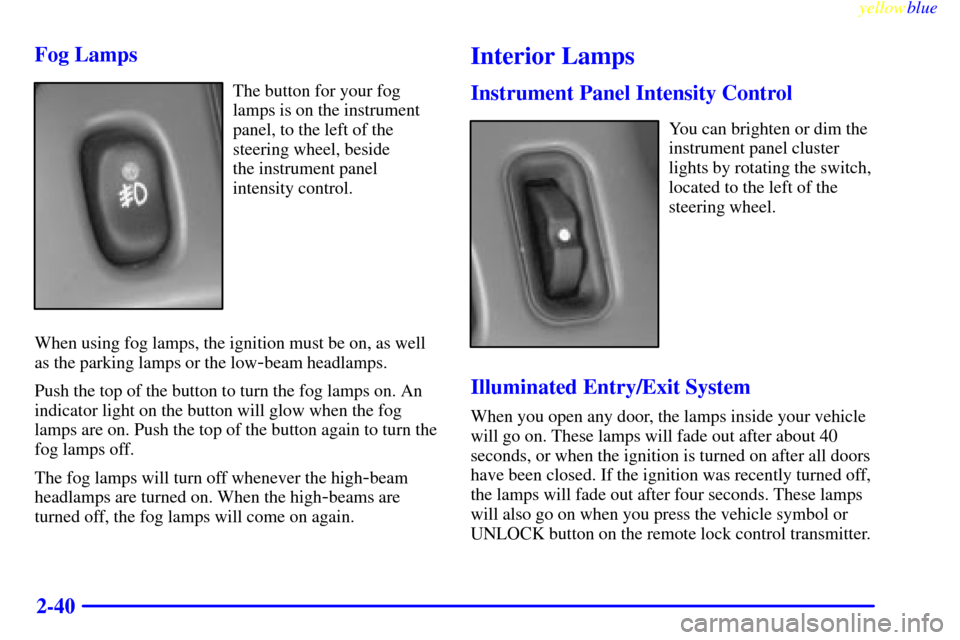
The button for your fog
lamps is on the instrument
panel, to the left of the
steering wheel, beside
the instrument panel
intensity control.
When using fog lamps, the ignition must be on, as well
as the parking lamps or the low
-beam headlamps.
Push the top of the button to turn the fog lamps on. An
indicator light on the button will glow when the fog
lamps are on. Push the top of the button again to turn the
fog lamps off.
The fog lamps will turn off whenever the high
-beam
headlamps are turned on. When the high
-beams are
turned off, the fog lamps will come on again.
Interior Lamps
Instrument Panel Intensity Control
You can brighten or dim the
instrument panel cluster
lights by rotating the switch,
located to the left of the
steering wheel.
Illuminated Entry/Exit System
When you open any door, the lamps inside your vehicle
will go on. These lamps will fade out after about 40
seconds, or when the ignition is turned on after all doors
have been closed. If the ignition was recently turned off,
the lamps will fade out after four seconds. These lamps
will also go on when you press the vehicle symbol or
UNLOCK button on the remote lock control transmitter.

