Page 102 of 336
yellowblue
2-44
Storage Compartments
Glove Box
Use the key to lock and unlock the glove box. To open,
pull the glove box handle toward you.
Center Console Storage Area
The center console has two separate storage areas. The
upper compartment, which is also the armrest, can be
used to store maps, gloves, etc. To open, pull up on the
driver's side of the lid.
The lower area can be used to store cassette tapes or
compact discs. To open the lower compartment, pull up
on the armrest.
Instrument Panel Cupholder
The instrument panel cupholder is located to the left of
the steering wheel. To use it, pull it out until the
rubber insert is revealed. The insert is removable for
easy cleaning.
Page 106 of 336
yellowblue
2-48
The Instrument Panel-Your Information System
Page 107 of 336
yellowblue
2-49
The main components of your instrument panel are:
A. Fog Lamp Switch
B. Instrument Panel Intensity Control
C. Turn Signal/Multifunction Lever
D. Cruise Control Switches (If Equipped)
E. Horn
F. Instrument Panel Cluster
G. Windshield Wiper/Washer Lever
H. Ignition Switch
I. Hazard Warning Flashers Switch
J. Fuse PanelsK. Climate Control System
L. Accessory Power Outlet
M. Cigarette Lighter
N. Gear Shift Lever
O. Audio System
P. Parking Brake
Q. Tilt Wheel
R. Hood Release Lever
S. Trunk Release Button
T. Instrument Panel Cupholder
Page 108 of 336
yellowblue
2-50
Instrument Panel Cluster
Your vehicle is equipped with this cluster, which includes indicator warning lights and gages that are explained on the
following pages. Be sure to read them.
Page 111 of 336

yellowblue
2-53
When one of the warning lights comes on and stays on
when you are driving, or when one of the gages shows
there may be a problem, check the section that tells you
what to do about it. Please follow this manual's advice.
Waiting to do repairs can be costly
-- and even
dangerous. So please get to know your warning lights
and gages. They're a big help.
Safety Belt Reminder Light
When the key is turned to ON or START, a chime will
come on for about eight seconds to remind people to
fasten their safety belts, unless the driver's safety belt is
already buckled.
The safety belt light will
also come on and stay on
for about 20 seconds, then it
will flash for about
55 seconds. If the driver's
belt is already buckled,
neither the chime nor the
light will come on.
Air Bag Readiness Light
There is an air bag readiness light on the instrument
panel, which shows the air bag symbol. The system
checks the air bag's electrical system for malfunctions.
The light tells you if there is an electrical problem. The
system check includes the air bag sensor, the air bag
modules, the wiring and the crash sensing and
diagnostic module. For more information on the air bag
system, see ªAir Bagº in the Index.
This light will come on
when you start your engine,
and it will flash for a few
seconds. Then the light
should go out. This means
the system is ready.
If the air bag readiness light stays on after you start the
engine or comes on when you are driving, your air bag
system may not work properly. Have your vehicle
serviced right away.
The air bag readiness light should flash for a few
seconds when you turn the ignition key to ON. If the
light doesn't come on then, have it fixed so it will be
ready to warn you if there is a problem.
Page 122 of 336

yellowblue
3-2
Comfort Controls
This section tells you how to make your air system work
for you. The climate control system with air
conditioning uses ozone
-friendly R-134a refrigerant.
With this system, you can control the ventilation and
heating in your vehicle. Your vehicle also has the
flow
-through ventilation system described later in
this section.
Climate Control System with
Air Conditioning
Fan Knob
The left knob selects the force of air you want.
Turn the knob clockwise to increase fan speed and
counterclockwise to decrease fan speed. To turn the fan
off (which will also turn the climate control system off),
turn the knob all the way counterclockwise. In any other
setting, the fan will run continuously. The fan must be
on to run the air conditioning compressor.
Temperature Knob
The center knob regulates the temperature of the air
coming through the system.
Mode Knob
The right control knob changes the functions of
the system.
VENT: In this position most of the air comes
through the instrument panel outlets. A small amount of
air comes through the floor outlets. Set the center
control knob to the temperature desired.
BI-LEVEL: In this position the air comes
through the instrument panel outlets and through the
floor outlets. Set the center control knob to the
temperature desired.
Page 125 of 336
yellowblue
3-5
If you select RECIRCULATION while in the VENT,
BI-LEVEL or FLOOR modes, humid air can recirculate
inside the vehicle and allow moisture to form on the
windows. If this happens, either press the A/C button to
on or select DEFROST or the DEFOG modes.
Your vehicle is equipped with side window defogger
outlets. The side window defogger outlets are located on
the outside of the side instrument panel outlets. To defrost
the side windows turn the temperature control knob all
the way in the red area. Use FLOOR and adjust the fan to
the highest speed. To control fogging of the windows turn
the temperature control knob all the way to the red area.
Use DEFOG and adjust the fan to the highest speed.
To defog the side windows while using air conditioning
use BI
-LEVEL and adjust the fan to the highest speed
and press the A/C button. For added airflow to the side
windows aim the side vents toward the windows and
close the center outlets.
RECIRCULATION will not work in DEFROST and
DEFOG. This is done to prevent recirculation of humid
inside air and allow the system to work properly.
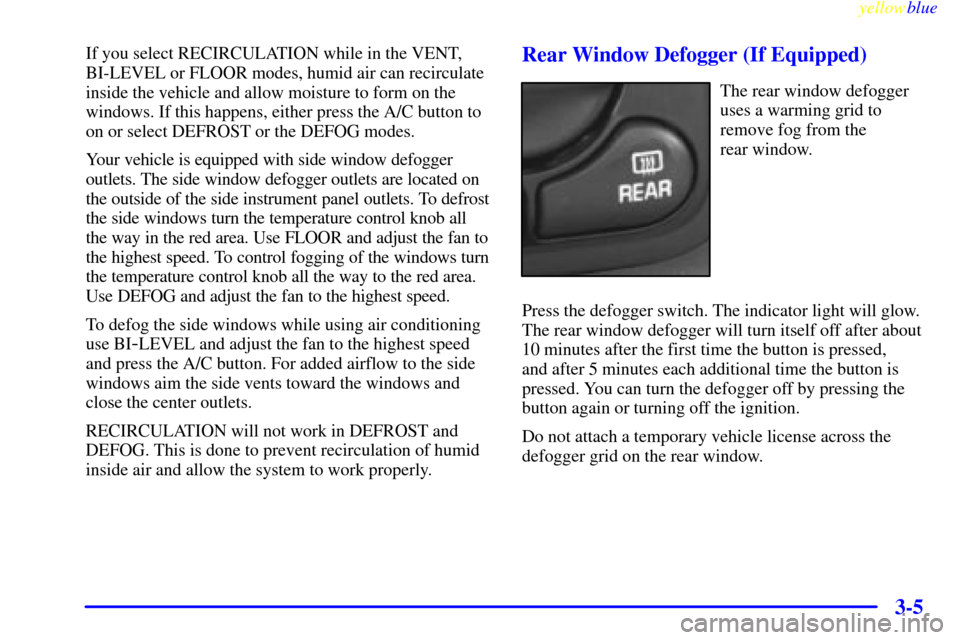
Rear Window Defogger (If Equipped)
The rear window defogger
uses a warming grid to
remove fog from the
rear window.
Press the defogger switch. The indicator light will glow.
The rear window defogger will turn itself off after about
10 minutes after the first time the button is pressed,
and after 5 minutes each additional time the button is
pressed. You can turn the defogger off by pressing the
button again or turning off the ignition.
Do not attach a temporary vehicle license across the
defogger grid on the rear window.
Page 173 of 336
yellowblue
4-29
To tow your vehicle with all four wheels on the ground,
follow these steps:
1. Position the vehicle to tow and then secure it.
2. Turn the ignition to OFF.
3. Set the parking brake.
4. Remove the following fuses from the left side of the
instrument panel fuse block: A) Radio, B) Wiper,
H) Powertrain Control Module, K) Body Function
Control Module, Cluster. This will prevent your battery
from draining while towing. See ªInstrument Panel Fuse
Block
- Leftº in Section 6 for the location of these fuses.5. Turn the ignition to ACC.
6. Shift your transaxle to NEUTRAL (N).
7. Release the parking brake.
Remember to replace the fuses once you reach your
destination. To replace a fuse:
1. Set the parking brake.
2. Remove the key from the ignition.
3. Replace the fuse.
NOTICE:
Make sure that the towing speed does not exceed
65 mph (105 km/h), or your vehicle could be
badly damaged.


