1999 DODGE RAM clock
[x] Cancel search: clockPage 194 of 1691
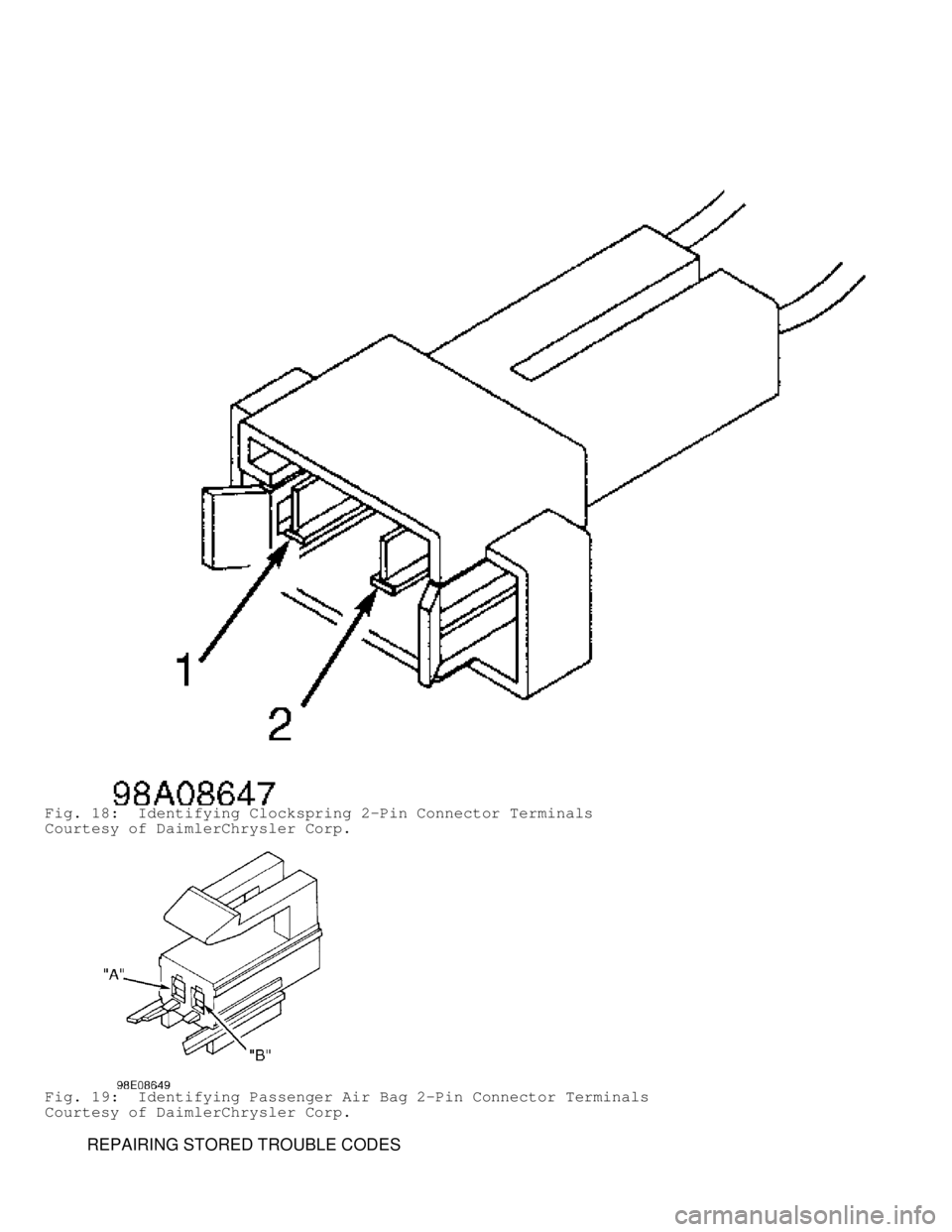
Fig. 18: Identifying Clockspring 2-Pin Connector Terminals
Courtesy of DaimlerChrysler Corp.
Fig. 19: Identifying Passenger Air Bag 2-Pin Connector Terminals
Courtesy of DaimlerChrysler Corp.
REPAIRING STORED TROUBLE CODES
Page 196 of 1691

it to ensure it is in good condition. Always focus on circuit
being tested. Dirt, water and corrosion, are most common
problems in connectors. Due to manufacturer changes in wire
colors, use terminal identification whenever possible.
1) Disconnect battery and wait 2 minutes before proceeding.
Disconnect driver-side air bag module squib connector. Connect a
jumper wire between driver-side air bag (squib) 2-pin connector
terminal No. 1 (Black/Light Blue wire) and terminal No. 2 (Dark
Green/Light Blue wire). Turn ignition on (engine off). Reconnect
battery. Using DRB, read active codes. If DRB displays DRIVER SQUIB
CIRCUIT SHORTED, replace driver-side air bag module. If not, go to
next step.
2) Disconnect clockspring 2-pin connector. Connect a jumper
wire between clockspring 2-pin connector terminals No. 1 (Black/Light
Blue wire) and No. 2 (Dark Green/Light Blue wire). Using DRB, read
active codes. If DRB displays DRIVER SQUIB CIRCUIT SHORTED, replace
clockspring. If not, go to next step.
3) Disconnect battery and wait 2 minutes before proceeding.
Remove jumper wires. Disconnect ACM connector. ACM is located under
instrument panel, on transmission tunnel. Using an ohmmeter, check
resistance between ACM connector terminal No. 6 (Dark Green/Light Blue
wire) and clockspring 2-pin connector terminal No. 2 (Dark Green/Light\
Blue wire). If resistance is less than 5 ohms, go to next step. If
resistance is more than 5 ohms, repair open or high resistance in Dark
Green/Light Blue wire.
4) Check resistance between ACM connector terminal No. 5
(Black/Light Blue wire) and clockspring 2-pin connector terminal No. 1\
(Black/Light Blue wire). If resistance is less than 5 ohms, go to next\
step. If resistance is more than 5 ohms, repair open or high
resistance in Black/Light Blue wire.
5) If there are no potential causes for this DTC remaining,
ACM is assumed to be defective. Replace ACM. See
AIR BAG CONTROL MODULE (ACM) under REMOVAL & INSTALLATION.
DRIVER SQUIB CIRCUIT SHORTED
NOTE: Perform AIR BAG VERIFICATION TEST after
all repairs. Each time a connector is disconnected, inspect
it to ensure it is in good condition. Always focus on circuit
being tested. Dirt, water and corrosion, are most common
problems in connectors. Due to manufacturer changes in wire
colors, use terminal identification whenever possible.
1) Disconnect battery and wait 2 minutes before proceeding.
Ensure driver-side air bag module connector is completely connected
before disconnecting it. If driver-side air bag module connector is
not completely connected, reconnect it. If driver-side air bag
connector is completely connected, go to next step.
2) Disconnect driver-side air bag module. Turn ignition on
(engine off). Reconnect battery. Using DRB, read active codes. If DRB
displays DRIVER SQUIB CIRCUIT OPEN, replace driver-side air bag
module. If not, go to next step.
3) Disconnect clockspring 2-pin connector. Using DRB, read
active codes. If DRB displays DRIVER SQUIB CIRCUIT OPEN, replace
clockspring. If not, go to next step.
4) Turn ignition off, disconnect battery and wait 2 minutes
before proceeding. Disconnect passenger-side air bag module connector.
Using an ohmmeter, check resistance between clockspring 2-pin
connector terminal No. 1 (Black/Light Blue wire) and passenger-side
air bag 2-pin connector terminal "A" (Black/Yellow wire). If
resistance is less than 5 ohms, repair short between Black/Light Blue
wire and Black/Yellow wire. If resistance is more than 5 ohms, go to
Page 197 of 1691
 Using an ohmmeter, check resistance between clockspring 2-
pin connector terminals No. 1 (Black/Light Blue wire) and No. 2 (Dark\
Green/Light Blue wire). If resistance is less")
next step.
5) Using an ohmmeter, check resistance between clockspring 2-
pin connector terminals No. 1 (Black/Light Blue wire) and No. 2 (Dark\
Green/Light Blue wire). If resistance is less than 5 ohms, repair
short between Dark Green/Light Blue wire and Black/Light Blue wire. If
resistance is more than 5 ohms, go to next step.
6) If there are no potential causes for this DTC remaining,
ACM is assumed to be defective. Replace ACM. See
AIR BAG CONTROL MODULE (ACM) under REMOVAL & INSTALLATION.
DRIVER SQUIB CIRCUIT SHORTED TO BATTERY
NOTE: Perform AIR BAG VERIFICATION TEST after
all repairs. Each time a connector is disconnected, inspect
it to ensure it is in good condition. Always focus on circuit
being tested. Dirt, water and corrosion, are most common
problems in connectors. Due to manufacturer changes in wire
colors, use terminal identification whenever possible.
1) Disconnect battery and wait 2 minutes before proceeding.
Disconnect driver-side air bag module. Turn ignition on and reconnect
battery. Using DRB, read active codes. If DRB does not display DRIVER
SQUIB CIRCUIT SHORTED TO VOLTAGE, replace driver-side air bag module.
If DRB displays DRIVER SQUIB CIRCUIT SHORTED TO VOLTAGE, go to next
step.
2) Disconnect clockspring 2-pin connector. Using DRB, read
active codes. If DRB does not display DRIVER SQUIB CIRCUIT SHORTED TO
VOLTAGE, replace clockspring. If DRB displays DRIVER SQUIB CIRCUIT
SHORTED TO VOLTAGE, go to next step.
3) Disconnect battery and wait 2 minutes before proceeding.
Disconnect ACM 23-pin connector. Using a voltmeter, check voltage
between ground and clockspring connector terminals No. 1 (Black/Light
Blue wire) and No. 2 (Dark Green/Light Blue wire). If voltage is more\
than 5 volts on either circuit, repair short to voltage in Dark
Green/Light Blue wire or Black/Light Blue wire. If voltage is less
than 5 volts on either circuit, go to next step.
4) If there are no potential causes for this DTC remaining,
ACM is assumed to be defective. Replace ACM. See
AIR BAG CONTROL MODULE (ACM) under REMOVAL & INSTALLATION.
DRIVER SQUIB CIRCUIT SHORTED TO GROUND
NOTE: Perform AIR BAG VERIFICATION TEST after
all repairs. Each time a connector is disconnected, inspect
it to ensure it is in good condition. Always focus on circuit
being tested. Dirt, water and corrosion, are most common
problems in connectors. Due to manufacturer changes in wire
colors, use terminal identification whenever possible.
1) Disconnect battery and wait 2 minutes before proceeding.
Disconnect driver-side air bag module. Turn ignition on (engine off)
and reconnect battery. Using DRB, read active codes. If DRB does not
display DRIVER SQUIB CIRCUIT SHORTED TO GROUND, replace driver-side
air bag module. If DRB displays DRIVER SQUIB CIRCUIT SHORTED TO
GROUND, go to next step.
2) Disconnect clockspring 2-pin connector. Using DRB, read
active codes. If DRB does not display DRIVER SQUIB CIRCUIT SHORTED TO
GROUND, replace clockspring. If DRB displays DRIVER SQUIB CIRCUIT
SHORTED TO GROUND, go to next step.
3) Disconnect battery and wait 2 minutes before proceeding.
Disconnect ACM 23-pin connector. Using an ohmmeter, check resistance
between ground and clockspring connector terminals No. 1 (Black/Light
Blue wire) and No. 2 (Dark Green/Light Blue wire). If resistance is
Page 201 of 1691
 and No. 3 (Black/Yellow wire). If resistance is more than 5 ohm\
s
on either circuit, replace PAD switch. If resistance is less than 5
ohms on either circuit, go to next step.
5) Using")
wire) and No. 3 (Black/Yellow wire). If resistance is more than 5 ohm\
s
on either circuit, replace PAD switch. If resistance is less than 5
ohms on either circuit, go to next step.
5) Using an ohmmeter, check resistance between ACM connector
terminal No. 7 (Brown/Yellow wire) and PAD switch 4-pin connector
(harness side) terminal No. 4 (Dark Green/Yellow wire). If resistanc\
e
is more than 5 ohms, repair open or high resistance in Brown/Yellow
wire. If resistance is less than 5 ohms, go to next step.
6) Using an ohmmeter, check resistance between ACM connector
terminal No. 8 (Violet/Yellow wire) and PAD switch 4-pin connector
(harness side) terminal No. 3 (Black/Yellow wire). If resistance is
more than 5 ohms, repair open or high resistance in Violet/Yellow
wire. If resistance is less than 5 ohms, go to next step.
7) If there are no potential causes for this DTC remaining,
ACM is assumed to be defective. Replace ACM. See
AIR BAG CONTROL MODULE (ACM) under REMOVAL & INSTALLATION.
PASSENGER SQUIB CIRCUIT SHORTED
NOTE: Perform AIR BAG VERIFICATION TEST after
all repairs. Each time a connector is disconnected, inspect
it to ensure it is in good condition. Always focus on circuit
being tested. Dirt, water and corrosion, are most common
problems in connectors. Due to manufacturer changes in wire
colors, use terminal identification whenever possible.
1) Turn ignition off. Turn PAD switch to the ON position.
Turn ignition on (engine off). Using DRB, read active codes. If DRB
displays PASSENGER SIDE SQUIB SHORTED DTC, go to next step. If DRB
does not display PASSENGER SIDE SQUIB SHORTED DTC, go to appropriate
diagnostic test.
2) Turn ignition off. Disconnect battery and wait 2 minutes
before proceeding. Disconnect passenger-side air bag module connector.
Disconnect clockspring connector. Go to next step.
3) Using an ohmmeter, check resistance between Passenger-side
air bag 2-pin connector terminal "B" (Dark Green/Yellow wire) and
clockspring 2-pin connector terminal No. 1 (Black/Light Blue wire). If\
resistance is less than 5 ohms, repair short between Dark Green/Yellow
wire and Black/Light Blue wire. If resistance is more than 5 ohms, go
to next step.
4) Using an ohmmeter, check resistance between passenger-side
air bag module 2-pin connector terminal "A" (Black/Yellow wire) and
clockspring 2-pin connector terminal No. 2 (Dark Green/Light Blue
wire). If resistance is less than 5 ohms, repair short between
Black/Yellow wire and Dark Green/Light Blue wire. If resistance is
more than 5 ohms, go to next step.
5) Using an ohmmeter, check resistance between passenger-side
air bag clockspring 2-pin connector terminals. If resistance is less
than 5 ohms, go to next step. If resistance is more than 5 ohms,
replace passenger-side air bag module.
6) Disconnect PAD switch 4-pin connector. Using an ohmmeter,
check resistance between passenger-side air bag module 4-pin connector
(harness side) terminals "A" (Black/Yellow wire) and "B" (Dark
Green/Yellow wire). If resistance is less than 5 ohms, repair short
between Dark Green/Yellow wire Black/Yellow wire. If resistance is
more than 5 ohms, go to next step.
7) Using an ohmmeter, check resistance between PAD switch 4-
pin connector (harness side) terminals No. 1 (Brown/Yellow wire) and\
No. 2 (Violet/Yellow wire). If resistance is less than 5 ohms in
either circuit, repair short between Brown/Yellow wire and
Violet/Yellow wire. If resistance is more than 5 ohms, go to next
step.
8) If there are no potential causes for this DTC remaining,
Page 372 of 1691
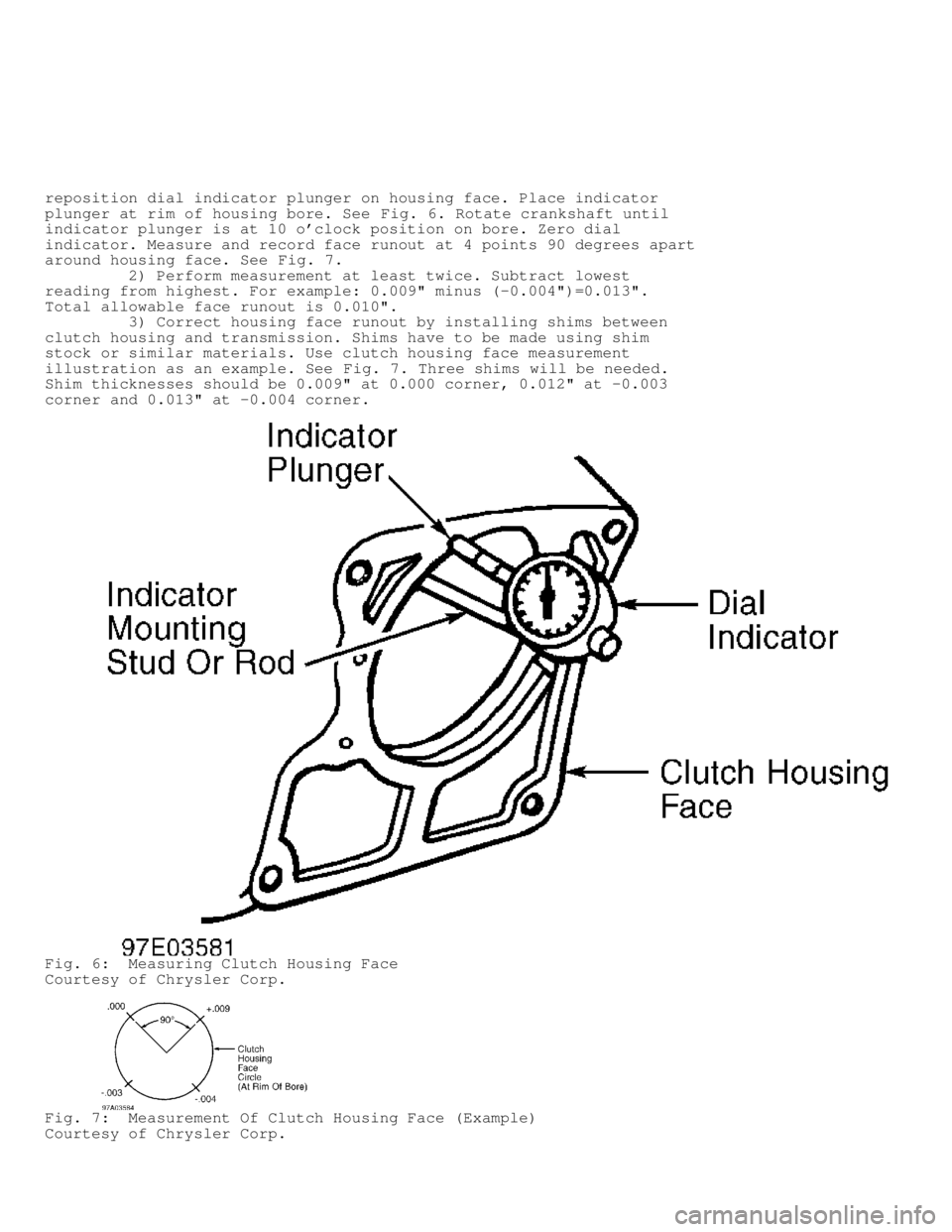
reposition dial indicator plunger on housing face. Place indicator
plunger at rim of housing bore. See Fig. 6. Rotate crankshaft until
indicator plunger is at 10 o'clock position on bore. Zero dial
indicator. Measure and record face runout at 4 points 90 degrees apart
around housing face. See Fig. 7.
2) Perform measurement at least twice. Subtract lowest
reading from highest. For example: 0.009" minus (-0.004")=0.013".
Total allowable face runout is 0.010".
3) Correct housing face runout by installing shims between
clutch housing and transmission. Shims have to be made using shim
stock or similar materials. Use clutch housing face measurement
illustration as an example. See Fig. 7. Three shims will be needed.
Shim thicknesses should be 0.009" at 0.000 corner, 0.012" at -0.003
corner and 0.013" at -0.004 corner.
Fig. 6: Measuring Clutch Housing Face
Courtesy of Chrysler Corp.
Fig. 7: Measurement Of Clutch Housing Face (Example)
Courtesy of Chrysler Corp.
Page 374 of 1691

Removal (AX15 & NV1500)
1) Shift gear selector into 1st or 3rd gear. Raise and
support vehicle. Disconnect necessary exhaust system components.
Remove "Y" pipe and position remaining pipes for working clearance.
Support transmission adjustable jackstand. Disconnect rear cushion and
mounting bracket from transmission or transfer case.
2) Remove rear crossmember. If transmission will be
disassembled for repair, drain transmission fluid. Disconnect
transmission shift linkage, speedometer cable, transfer case vacuum
lines and clutch hydraulic lines. Lower transmission/transfer case
assembly no more than 3" (76 mm). Reaching around transmission case,
unseat and lift shift lever dust boot. Press shift lever retainer
downward, turn retainer counterclockwise, and lift lever and retainer
out of shift tower.
3) Mark front and rear drive shaft and "U" joint for
reassembly reference. Disconnect and remove both drive shafts. Remove
crankshaft position sensor (AX15). Disconnect transmission/transfer
case assembly vent hoses. Remove slave cylinder from clutch housing.
Remove wire harness from clips on transmission case and transfer case.
4) Support transmission/transfer case assembly with
transmission jack. Secure assembly to jack with safety chains.
Reposition adjustable jackstand under engine. Remove clutch housing
brace rod. Remove clutch housing nuts and bolts. Remove
transmission/transfer case assembly.
Installation
To install, reverse removal procedure. Apply high-temperature
grease to release fork, lever, pivot ball stud and pilot bushing
located in end of crankshaft. Fill transmission with appropriate
fluid, if necessary. Tighten all nuts and bolts to specification. See
TORQUE SPECIFICATIONS table.
Removal (NV 3500)
1) Disconnect negative battery cable. Shift transmission to
Neutral. Open console lid and remove bolts attaching console to floor
pan. Lift cup holder bin and remove bolt attaching console to floor
pan. Lift rear of console and pull console rearward to separate from
shift bezel. Remove console from vehicle. Remove screws attaching
shift boot to floor pan and slide boot upward on lever extension.
2) Remove shift lever extension. Raise and support vehicle.
On 4WD models, remove skid plate, if equipped. Mark drive shaft and
axle yoke for alignment reference. Remove drive shaft. Remove exhaust
"Y" pipe. On 4WD models, disconnect and lower remaining exhaust pipes
for clearance as necessary. Disconnect speed sensor harness connector
and back-up light harness connector.
3) Support engine using adjustable jackstand. If transmission
is to be disassembled for repair, drain lubricant from transmission.
On 4WD models, disconnect transfer case shift linkage at transfer case
range lever and remove shift lever from transmission. Remove
bolts/nuts attaching transmission to rear mount.
4) Support transmission with a transmission jack. Secure
transmission with safety chains. Remove rear crossmember. On 4WD
models, support transfer case with transmission jack and secure
transfer case to jack with safety chains. Remove transfer case
attaching nuts and move transfer case rearward until input gear clears
transmission output shaft.
5) Lower transfer case assembly and remove it from under
vehicle. On 4WD models, remove clutch slave cylinder splash shield, if
equipped. Remove clutch slave cylinder and move aside for working
clearance. Remove starter. Remove transmission splash shield. Remove
transmission harness wires from clips on transmission shift cover.
6) Lower transmission slightly. Remove shift tower and lever
assembly. Remove transmission-to-engine attaching bolts. Slide
Page 378 of 1691
NOTE: Clutch release bearing is packed with grease. DO NOT use
cleaning solvent to clean release bearing.
Removal
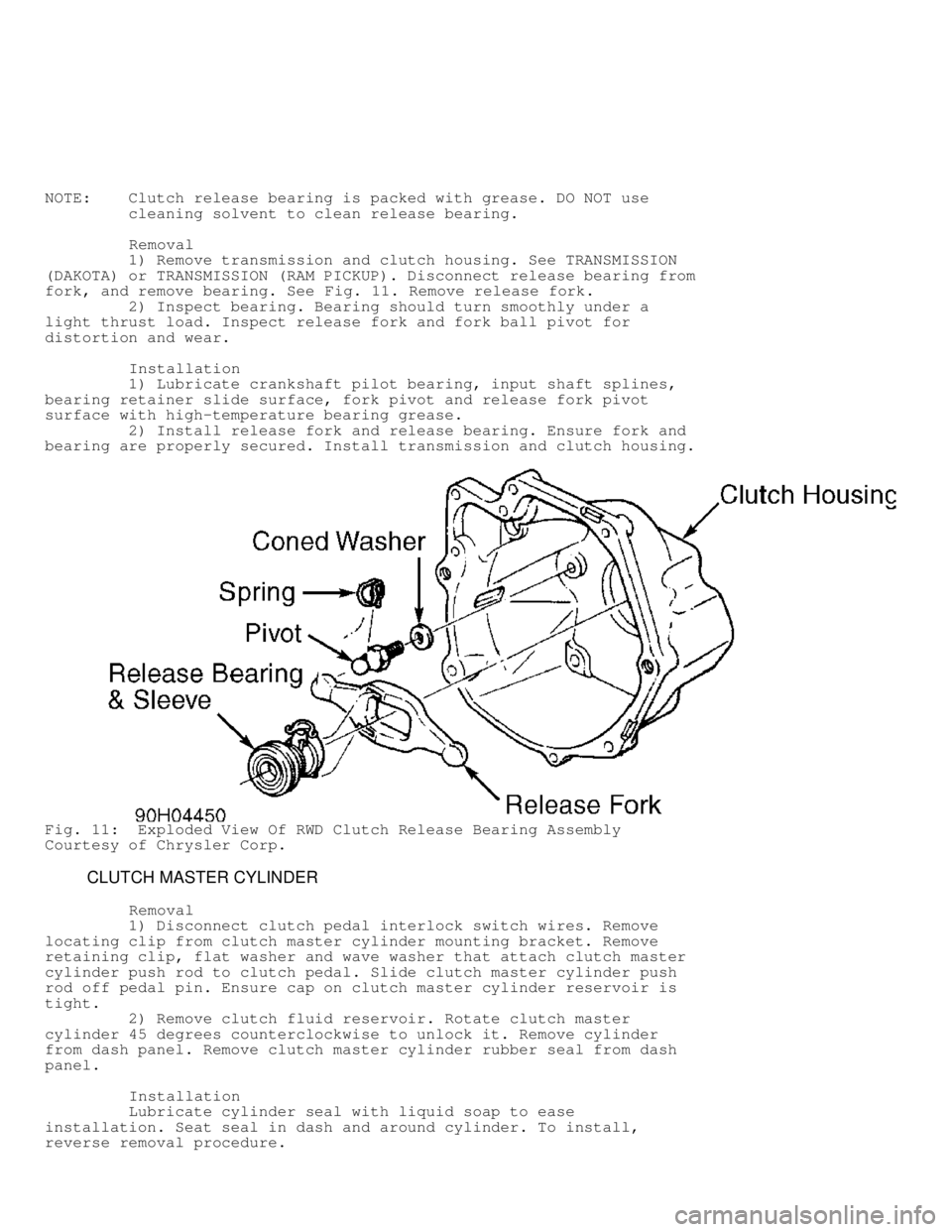
1) Remove transmission and clutch housing. See TRANSMISSION
(DAKOTA) or TRANSMISSION (RAM PICKUP). Disconnect release bearing fr\
om
fork, and remove bearing. See Fig. 11. Remove release fork.
2) Inspect bearing. Bearing should turn smoothly under a
light thrust load. Inspect release fork and fork ball pivot for
distortion and wear.
Installation
1) Lubricate crankshaft pilot bearing, input shaft splines,
bearing retainer slide surface, fork pivot and release fork pivot
surface with high-temperature bearing grease.
2) Install release fork and release bearing. Ensure fork and
bearing are properly secured. Install transmission and clutch housing.
Fig. 11: Exploded View Of RWD Clutch Release Bearing Assembly
Courtesy of Chrysler Corp.
CLUTCH MASTER CYLINDER
Removal
1) Disconnect clutch pedal interlock switch wires. Remove
locating clip from clutch master cylinder mounting bracket. Remove
retaining clip, flat washer and wave washer that attach clutch master
cylinder push rod to clutch pedal. Slide clutch master cylinder push
rod off pedal pin. Ensure cap on clutch master cylinder reservoir is
tight.
2) Remove clutch fluid reservoir. Rotate clutch master
cylinder 45 degrees counterclockwise to unlock it. Remove cylinder
from dash panel. Remove clutch master cylinder rubber seal from dash
panel.
Installation
Lubricate cylinder seal with liquid soap to ease
installation. Seat seal in dash and around cylinder. To install,
reverse removal procedure.
Page 392 of 1691

No. 1 (Tan/Red wire). If resistance is less than 5 ohms, repair short
to ground. Perform TEST VER-4A under VERIFICATION TESTS. If resistance
is 5 ohms or more, go to next step.
10) Using an ohmmeter, check resistance between ground and
S/C vent solenoid control circuit at S/C servo connector terminal No.
2 (Light Green/Red wire). If resistance is less than 5 ohms, repair
short to ground. Perform TEST VER-4A under VERIFICATION TESTS. If
resistance is 5 ohms or more, go to next step.
11) Using an ohmmeter, measure resistance of S/C vacuum
solenoid control circuit between S/C servo connector terminal No. 1
and PCM connector C3, terminal No. 4 (Tan/Red wire). If resistance is
5 ohms or more, repair open circuit. Perform TEST VER-4A under
VERIFICATION TESTS. If resistance is less than 5 ohms, go to next
step.
12) Using an ohmmeter, check resistance of S/C vent solenoid
control circuit between S/C servo connector terminal No. 2 and PCM
connector C3, terminal No. 5 (Light Green/Red wire). If resistance is
5 ohms or more, repair open circuit. Perform TEST VER-4A under
VERIFICATION TESTS. If resistance is less than 5 ohms, replace S/C
servo. Perform TEST VER-4A under VERIFICATION TESTS.
13) Using an ohmmeter, check resistance between ground and
brake switch output circuit at S/C servo connector terminal No. 3
(Dark Blue/Red wire). If resistance is less than 5 ohms, repair short
to ground. Perform TEST VER-4A under VERIFICATION TESTS. If resistance
is 5 ohms or more, go to next step.
14) Reconnect PCM. Disconnect brake switch connector. Turn
ignition on. Turn S/C on. Using a 12-volt test light, probe S/C power
supply circuit at brake switch connector terminal No. 3 (Yellow/Red
wire). If test light is illuminated and bright, go to next step. If
test light is not illuminated or dim, go to step 17).
15) Turn ignition off. Using an ohmmeter, check resistance of
S/C brake switch output circuit between S/C servo connector terminal
No. 3 and brake switch connector terminal No. 4 (Dark Blue/Red wire).
If resistance is 5 ohms or more, repair open circuit. Perform TEST
VER-4A under VERIFICATION TESTS. If resistance is less than 5 ohms, go
to next step.
16) Check brake switch adjustment. See BRAKE SWITCH under
REMOVAL & INSTALLATION. Adjust as necessary. Perform TEST VER- 4A
under VERIFICATION TESTS. If brake switch adjustment is okay, replace
brake switch. Perform TEST VER-4A under VERIFICATION TESTS.
17) Turn ignition off. Disconnect PCM. Inspect connectors.
Clean or repair as necessary. Using an ohmmeter, measure resistance of
S/C power supply circuit between PCM connector C3, terminal No. 11 and
brake switch connector terminal No. 3 (Yellow/Red wire). If resistance\
is 5 ohms or more, repair open circuit. Perform TEST VER-4A under
VERIFICATION TESTS. If resistance is less than 5 ohms, replace PCM.
Perform TEST VER-4A under VERIFICATION TESTS.
FTC P1596: SPEED CONTROL SWITCH ALWAYS HIGH
FTC P1596 will set if an open circuit is detected in Speed
Control (S/C) switch circuit when ignition is on.
Possible Causes:
* Defective clockspring.
* S/C switch ground circuit open.
* Defective ON/OFF switch.
* Defective PCM.
* S/C switch signal circuit open or shorted to voltage.
NOTE: For component locations, see COMPONENT LOCATIONS. For
connector terminal identification, see CONNECTOR