Page 137 of 350

4RUNNER (1998)
Lock release button
To prevent misshifting Parking, engine starting and key removal position Reverse position Neutral position Position for engine braking
With the brake pedal depressed, shift while holding the lock release button in. (The ignition switch must be in ºONºposition.) Shift while holding the lock release button in. Shifting normally Normal driving position Position for stronger engine braking than that in º2º posi- tion
Overdrive switch
For selecting either a three-speed or four-speed transmission
ºONº position(Shifting into overdrive pos-sible) ºOFFº position (Shifting into overdrive notpossible)ºO/D OFFº indicator light shows the over- drive switch is inOFF position
Driving pattern selector button For selecting a driving pattern suited to existing driving conditions
ºNORMº (Normal)mode for general driving conditioning ºPWRº (Power) mode for power- ful acceleration
ºPWRº mode indicator light on the instrument panel shows the driving pattern selector button isin the ºPWRº mode
Vehicles with cruise control ' When the cruise control is being used, even if you downshift the trans mission by turning
off the overdrive switch, engine braking will not be applied because the cruise control is not cancelled. For ways to
decrease the vehicle speed, see ºCruise controlº in this chapter. Automatic transmission
Two- wheel drive models
Page 142 of 350

4RUNNER (1998)
Lock release button
To prevent misshifting
Parking, engine starting and key removal position Reverse position Neutral position Normal driving position Position for engine braking Position for stronger engine braking than that in º2º posi- tion
With the brake pedal depressed, shift while holding the lock release button in. (The ignition switch must be in ºONºposition.) Shift while holding the lock release button in. Shifting normally Overdrive switch
For selecting either a three-speed or four-speed transmission
ºONº position(Shifting into overdrive pos-sible) ºOFFº position (Shifting into overdrive notpossible)ºO/D OFFº indicator light shows the over- drive switch is inOFF position
Driving pattern selector button For selecting a driving pattern suited to existing driving conditions
ºNORMº (Normal)mode for general driving conditioning ºPWRº (Power) mode for power- ful accelerationºPWRº mode indicator light on the instrument panel shows the driving pattern selector button isin the ºPWRº mode
Vehicles with cruise control ' When the cruise control is being used, even if you downshift the trans mission by turning
off the overdrive switch, engine braking will not be applied because the cruise control is not cancelled. For ways to
decrease the vehicle speed, see ºCruise controlº in this chapter. Automatic transmission
Four- wheel drive control
Page 158 of 350
4RUNNER (1998)
For easy unlocking, slightly turn the
steering wheel in either direction while
the vehicle is in motion.
When the differential lock is disen-
gaged, the indicator light will go out. The differential will also unlock if you
shift the front drive control lever out
of ºL4º. Never forget to turn off the
switch after using this feature.
To check the indicator bulb, turn the
ignition key to the ºONº position, but
do not start the engine.
CAUTION
Do not keep driving with the dif-
ferential lock switch on.
Parking brake
When parking, firmly apply the
parking brake to avoid inadvertent
creeping.
To set: Pull up the lever. For better
holding power, first depress the brake
pedal and hold it while setting the
brake.
To release: Pull up the lever slightly,
press the thumb button, and lower.To remind you that the parking brake
is set, the parking brake reminder
light in the instrument panel remains
on until you release the parking brake.
Page 167 of 350
4RUNNER (1998)
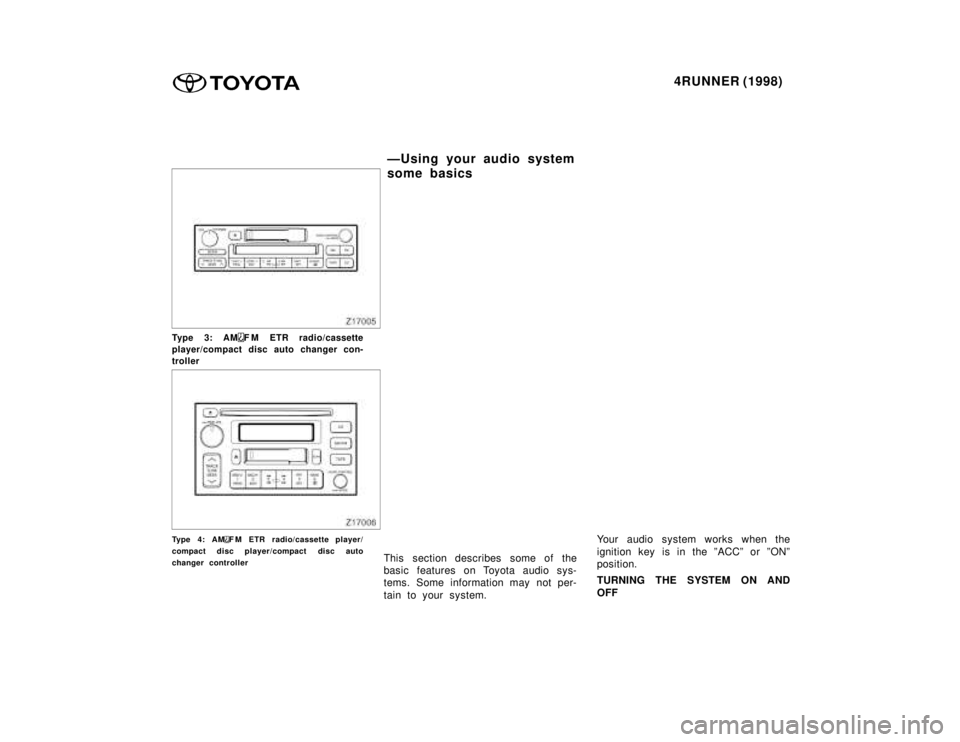
Type 3: AMF M ETR radio/cassette
player/compact disc auto changer con-
troller
Type 4: AMF M ETR radio/cassette player/
compact disc player/compact disc auto
changer controller This section describes some of the
basic features on Toyota audio sys-
tems. Some information may not per-
tain to your system. Your audio system works when the
ignition key is in the ºACCº or ºONº
position.
TURNING THE SYSTEM ON AND OFF
ÐUsing your audio system
some basics
Page 168 of 350

4RUNNER (1998)
Push ºPWR
V OLº, ºPWR/VOLº or
ºVOL/PWRº to turn the audio system
on and off.
Push ºAMº, ºFMº, ºAM
F Mº, ºTAPEº or
ºCDº to turn on that function without
pushing ºPWR
V OLº, ºPWR/VOLº or
ºVOL/PWRº.
You can turn on each player by insert-
ing a cassette tape or compact disc.
You can turn off each player by eject-
ing the cassette tape or compact disc.
If the audio system was previously
off, then the entire audio system will
be turned off when you eject the cas-
sette tape or compact disc. If the
another function was previously play-
ing, it will come on again.
SWITCHING BETWEEN FUNCTIONS
Push ºAMº, ºFMº, ºAM
F Mº , ºTAPEº
or ºCDº if the system is already on
but you want to switch from one func-
tion to another. TONE AND BALANCE
For details about your system's tone
and balance controls, see the descrip-
tion of your own system.
Tone
How good an audio program sounds
to you is largely determined by the
mix of the treble, midrange, and bass
levels. In fact, different kinds of music
and vocal programs usually sound bet-
ter with different mixes of treble, mi-
drange, and bass.
Balance
A good balance of the left and right
stereo channels and of the front and
rear sound levels is also important.
Keep in mind that if you are listening
to a stereo recording or broadcast,
changing the right/left balance will in-
crease the volume of one group of
sounds while decreasing the volume
of another.YOUR RADIO ANTENNA
To lower a power antenna, turn off the
audio system by pushing ºPWR
VOLº,
ºPWR/VOLº or ºVOL/PWRº, or turn the
ignition key to ºLOCKº.
On some models, the power antenna
automatically retracts when the radio
mode is switched off to turn on the
cassette tape player.
NOTICE
To prevent damage to the anten-
na, make sure it is retracted be-fore driving your Toyota throughan automatic car wash. On ve-
hicles with detachable antenna,remove the antenna before usingan automatic car wash.
Page 207 of 350
4RUNNER (1998)
The digital clock indicates the time.
The key must be in the ºACCº or
ºONº position.
To reset the hour: Push the ºHº but-
ton.
To reset the minutes: Push the ºMº
button.
If quick adjustment to a full hour is
desired, push the º:00º button.
For example, if the º:00º button is
depressed when the time is between
1:01'1:29, the time will change to
1:00. If the time is between
1:30 '1:59, the time will change to
2:00. Once the electrical power source has
been disconnected from the clock, the
time is automatically set to 1:00 (one
o'clock).
When the instrument panel lights are
turned on, the brightness of the time
indication will be reduced.
Cigarette lighter and ashtray
Page 208 of 350
4RUNNER (1998)
CIGARETTE LIGHTER
To use the cigarette lighter, press it
in. When it becomes heated, it auto-
matically pops out ready for use.
If the engine is not running, the key
must be in the ºACCº position.
Do not hold the cigarette lighter
pressed in.
Use a Toyota genuine cigarette lighter
or equivalent for replacement. ASHTRAY
To use the ashtray, pull it out.
When finished with your cigarette,
thoroughly extinguish it in the ashtray
to prevent other cigarette butts from
catching fire. After using the ashtray,
push it back in completely.
To remove the ashtray, press down on
the lock spring plate and pull out.
CAUTION
To reduce the chance of injury in
case of an accident or sudden
stop while driving, always push
the ashtray back in completely af-
ter using.
Power outlet
Page 209 of 350
4RUNNER (1998)
The power outlet is designed for
power supply for car accessories.
The key must be in the ºACCº or
ºONº position for the power outlet to
be used.
NOTICE
To prevent the fuse from being
blown, do not use the electricityover the total vehicle capacity of 12V/120W.
To prevent the battery from be-ing discharged, do not use the
power outlet longer than neces-
sary when the engine is notrunning.
Close the power outlet lid when
the power outlet is not in use.Inserting a foreign object otherthan the appropriate plug that
fits the outlet, or allowing anyliquid into the outlet may cause
electrical failure or short cir-
cuits.
Glovebox