1998 NISSAN QUEST battery
[x] Cancel search: batteryPage 11 of 260
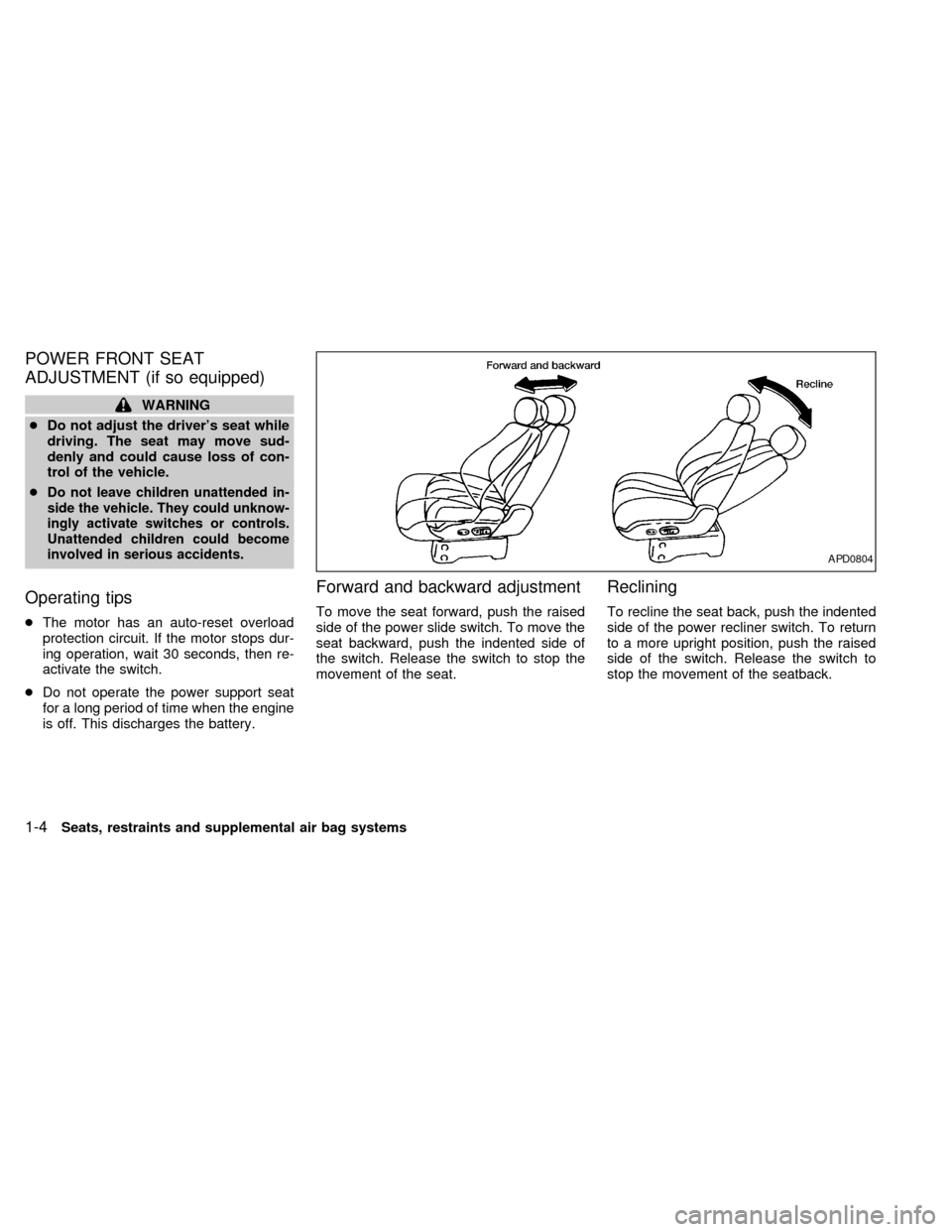
POWER FRONT SEAT
ADJUSTMENT (if so equipped)
WARNING
cDo not adjust the driver's seat while
driving. The seat may move sud-
denly and could cause loss of con-
trol of the vehicle.
c
Do not leave children unattended in-
side the vehicle. They could unknow-
ingly activate switches or controls.
Unattended children could become
involved in serious accidents.
Operating tips
cThe motor has an auto-reset overload
protection circuit. If the motor stops dur-
ing operation, wait 30 seconds, then re-
activate the switch.
cDo not operate the power support seat
for a long period of time when the engine
is off. This discharges the battery.
Forward and backward adjustment
To move the seat forward, push the raised
side of the power slide switch. To move the
seat backward, push the indented side of
the switch. Release the switch to stop the
movement of the seat.
Reclining
To recline the seat back, push the indented
side of the power recliner switch. To return
to a more upright position, push the raised
side of the switch. Release the switch to
stop the movement of the seatback.
APD0804
1-4Seats, restraints and supplemental air bag systems
ZX
Page 98 of 260
Push the lighter in all the way. When the
lighter is heated, it springs out.
Return the lighter to its original position after
use.
CAUTION
The cigarette lighter socket is a power
source for the cigarette lighter element
only. The use of the cigarette lighter
socket as a power source for any other
accessory is not recommended.
WARNING
The cigarette lighter should not be
used while driving in order that full
attention may be given to the driving
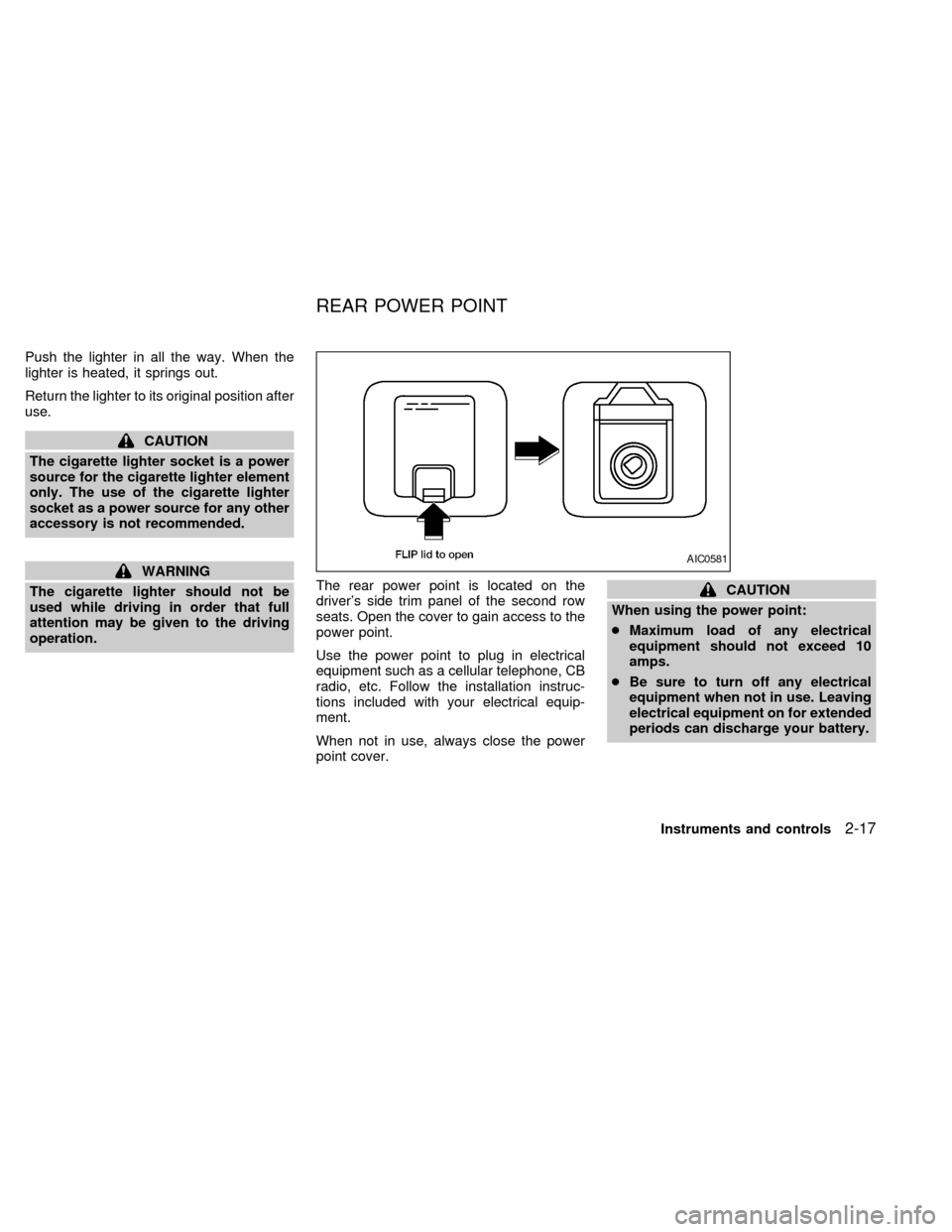
operation.The rear power point is located on the
driver's side trim panel of the second row
seats. Open the cover to gain access to the
power point.
Use the power point to plug in electrical
equipment such as a cellular telephone, CB
radio, etc. Follow the installation instruc-
tions included with your electrical equip-
ment.
When not in use, always close the power
point cover.
CAUTION
When using the power point:
cMaximum load of any electrical
equipment should not exceed 10
amps.
cBe sure to turn off any electrical
equipment when not in use. Leaving
electrical equipment on for extended
periods can discharge your battery.
AIC0581
REAR POWER POINT
Instruments and controls2-17
ZX
Page 105 of 260
approximately ten seconds before changing
back to the clock mode.
How to set the clock
1. Turn the radio on. (Time is displayed
while the radio is off.)
2. Push and hold the CLK button; then,
press the SEEK button either
orto adjust the hours, and press the
TUNE button eitherorto
adjust the minutes.
NOTE: The clock displays 12-hour time with
no A.M./P.M. indications.
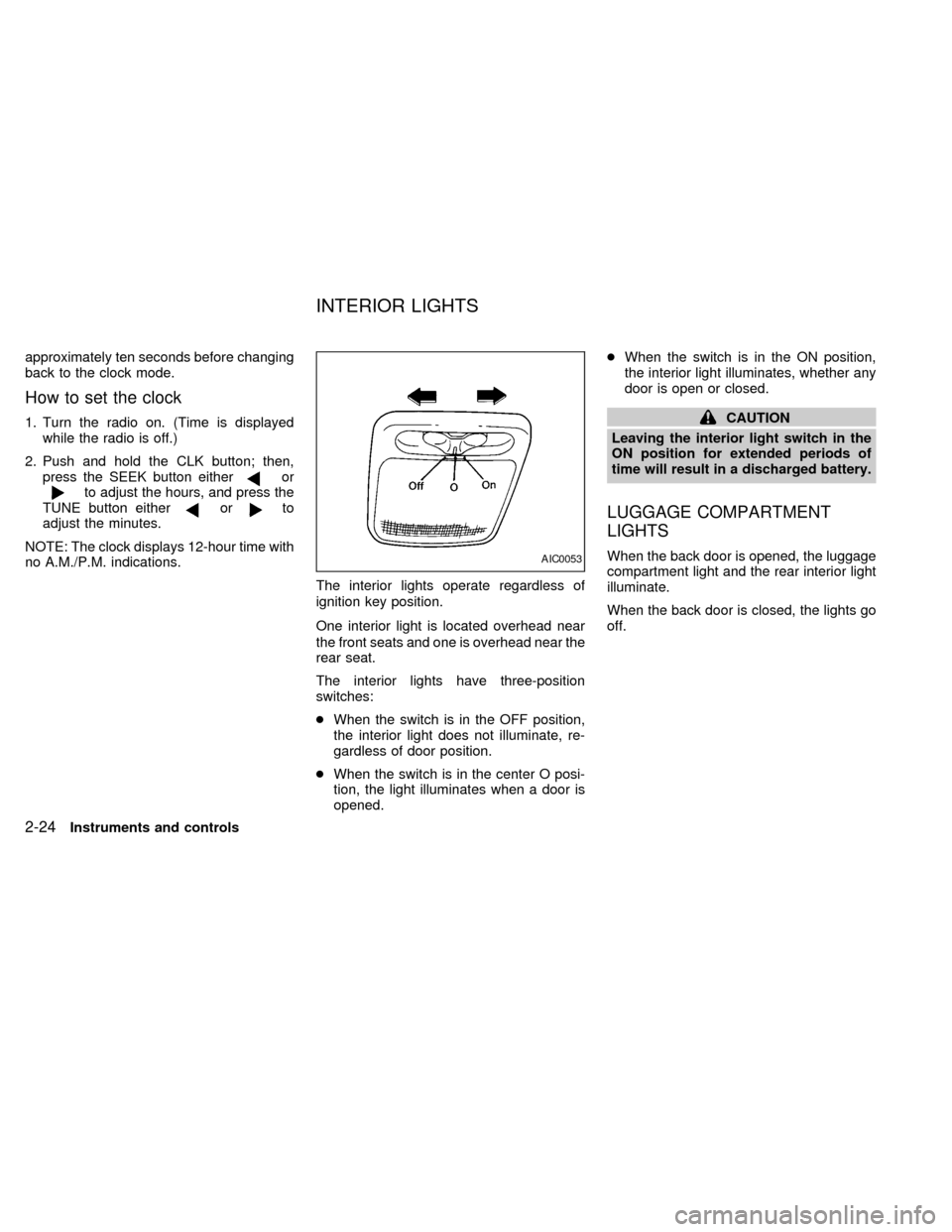
The interior lights operate regardless of
ignition key position.
One interior light is located overhead near
the front seats and one is overhead near the
rear seat.
The interior lights have three-position
switches:
cWhen the switch is in the OFF position,
the interior light does not illuminate, re-
gardless of door position.
cWhen the switch is in the center O posi-
tion, the light illuminates when a door is
opened.cWhen the switch is in the ON position,
the interior light illuminates, whether any
door is open or closed.
CAUTION
Leaving the interior light switch in the
ON position for extended periods of
time will result in a discharged battery.
LUGGAGE COMPARTMENT
LIGHTS
When the back door is opened, the luggage
compartment light and the rear interior light
illuminate.
When the back door is closed, the lights go
off.AIC0053
INTERIOR LIGHTS
2-24Instruments and controls
ZX
Page 108 of 260

3 Pre-driving checks and adjustments
Key .........................................................................3-2
Door locks ..............................................................3-2
Manual door lock ....................................................3-3
Child safety sliding door lock .................................3-5
Power door lock (if so equipped) ...........................3-6
Multi-remote control system (if so equipped).........3-8
Battery replacement ...............................................3-9
Illuminated entry system ......................................3-10
Hood release ........................................................3-11Rear door lock ......................................................3-12
Cargo net (if so equipped) ...................................3-14
Luggage rack (if so equipped) .............................3-15
Fuel filler lid and cap ............................................3-16
Tilting steering wheel ...........................................3-17
Outside mirror control...........................................3-17
Outside mirrors .....................................................3-18
Inside mirror .........................................................3-18
Vanity mirror .........................................................3-19
ZX
Page 116 of 260

Replace the two batteries as follows:
1. Remove the screw and open the lid.
2. Replace the batteries with new ones.
Insert the batteries as illustrated above.
Recommended batteries: Sanyo CR2016
or equivalent.
3. Close the lid securely and install the
screw.
4. Press the
button, then thebutton
two or three times to check the multi-
remote controller operation.If the batteries are removed for any rea-
son other than replacement, perform
step 4.
c
An improperly disposed battery can
hurt the environment. Always conform
to local regulations for battery disposal.
cThe multi-remote controller is water-
resistant; however, if it does get wet,
immediately wipe completely dry.
cThe operational range of the multi-
remote controller extends to approxi-
mately 49 ft (15 m) from the vehicle.
This range may vary with conditions.
FCC Notice:
Changes or modifications not expressly
approved by the manufacturer for com-
pliance could void the user's authority to
operate the equipment.
This device complies with part 15 of the
FCC Rules and RSS-210 of Industry
Canada.
Operation is subject to the following two
conditions: (1) This device may not
cause harmful interference, and (2) this
device must accept any interference re-
ceived, including interference that may
cause undesired operation of the device.
APD1031
BATTERY REPLACEMENT
Pre-driving checks and adjustments3-9
ZX
Page 117 of 260

The interior lights, the cargo light, the glove
box light, the stepwell lights near the sliding
door and on the front doors, and the footwell
lights near the driver's and front passen-
ger's feet illuminate when the front and
sliding doors are opened. These lights
gradually dim to off within 30 seconds or
turn off immediately when the key is turned
to ON.
Battery saver
If the vehicle doors are not fully closed and
the interior lights remain illuminated, they
eventually turn off automatically to prevent
the battery from becoming discharged.
Lights that illuminate when the front doors
and/or the sliding door are open turn off
after approximately 30 minutes. Lights that
illuminate when the back door is open turn
off after approximately 60 minutes.
If the personal reading lamp is left on when
the key is removed from the ignition, it turns
off automatically in 30 minutes.
ILLUMINATED ENTRY
SYSTEM
3-10Pre-driving checks and adjustments
ZX
Page 144 of 260

SEEK tuning
This feature on your radio allows you to
automatically select strong frequency sta-
tions up or down the frequency band. Press
SEEK
to select the next strong sta-
tion up the frequency band. Press SEEK
to select the next strong station down
the frequency band. To change frequencies
quickly, press and hold either side of the
SEEK button.
SCAN tuning
Push SCAN to enter the scan tuning mode.
The radio searches up the frequency band,
stopping and playing each strong frequency
station for five seconds. This continues until
the SCAN button is pushed a second time
or a different tuning function is selected.
The AM or FM1 or FM2 symbol in the
display window flashes while each station is
being played.
AM/FM
Press the AM/FM button to select the de-
sired band: AM, FM1, or FM2. The stereo
indicator shows in the display window dur-
ing FM stereo reception. When the stereo
broadcast signal is weak, the radio auto-matically changes from stereo to monaural
reception.
Station memory operations
Your radio comes equipped with six
memory buttons, which are used to preset
up to six AM stations and 12 FM stations.
NOTE: If the vehicle's battery is discon-
nected, the memory buttons need to be
reset.
To set the memory buttons:
1. Select the desired band (AM, FM1, or
FM2) by pressing the AM/FM button.
2. Tune to the desired frequency.
3. Press one of the memory buttons and
hold the button in. The sound mutes out
for about two seconds, then returns. That
station is now held in memory on that
button.
Repeat the three steps above for each
memory button you want to set.
The memory buttons also control the rear
audio controls. Push memory buttons three
and five simultaneously to turn the rear
audio controls on. Push them again to turn
the rear audio controls off. A headphonesymbol appears in the display window when
the rear controls are activated.
ADJUSTING TONE QUALITY
BASS
Bass control allows you to adjust the lower,
bass frequencies to your preference.
Push the BASS button either
or; BASS and the setting indicator bar
appear in the display window. Pressing the
BASS button either
orin-
creases or decreases the level of bass, as
indicated by the number of bar segments
showing in the display window.
Following bass adjustment, the display win-
dow shows the current setting for three
seconds, then returns to the display prior to
adjustment.
TREB
Treble control allows you to adjust the
higher, treble frequencies to your prefer-
ence.
Push the TREB button either
or; TREB and the setting indicator bar
appear in the display window. Pressing the
TREB button either
orin-
Heater, air conditioner and audio systems
4-17
ZX
Page 159 of 260

If the battery charge is low, the shift lever
can be moved if the ignition switch is in
the ACC position.
1. Keep the foot brake pedal depressed and
shift into a driving gear.
2. Release the parking brake and foot
brake, then gradually start the vehicle in
motion.
Shifting with automatic transmission
P (Park):
Use this selector position when the vehicle
is parked or when starting the engine. Al-
ways be sure the vehicle is at a complete
stop. For maximum safety, depress the
brake pedal, pull the lever toward you, and
move the lever to the P (Park) position.
Apply the parking brake. When parking on a
hill, apply the parking brake first, then shift
the lever into the P (Park) position.
Shifting from P (Park)
If the ignition switch is in the ON position
and the foot brake pedal is depressed, but
the shift lever still cannot be moved out of P
(Park), follow these instructions:
1. Shut the engine off and remove the key.
2. Apply the parking brake.
3. Reinsert the ignition key and turn it clock-
wise to the first position (ACC).
4. Depress the brake pedal, move the gear-
shift lever to N (Neutral).
5. Start the engine.
R (Reverse):
Use this position to back up. Always be sure
the vehicle is completely stopped. Depress
the brake pedal, then pull the shift lever
toward you and move it to the R (Reverse)
position.
ASD0552
5-6Starting and driving
ZX