Page 147 of 426

If so, your electrical system may be wet. The condition
will usually be cgrrected when the electrical system
dries out. A few driving trips should turn the light off.
Maw
you recently changed brands of fuel?
If so, be sure to he1 your vehicie with quality fuel (see
"Fuel" in the Index). Poor fuel quality will cause your
engine not to FJ~ as efficiently as designed. YQU may
notice this as stalling after start-up, stalling when you
pent the vehicle into gear, misfiring, hesitation on
acceleration or stumbling on acceleration. (These
conditions may
go away once the engine is warned up. j
This will be detected by the system and cause the light
to turn OR.
If you experience one or more of these conditions,
chmge the fuel
brand you use. It will n-ecpire at least one
full tank of the proper fuel to tuna the light off.
If none of the above steps hove lrirade the light turn off,
have your dealer or qualified service center check the
vehicle. Your dealer has the proper test equipment and
diagnostic tools to fix any nnechanicai or electnictrl
problems that
may have developed.
ProCarManuals.com
Page 149 of 426
'
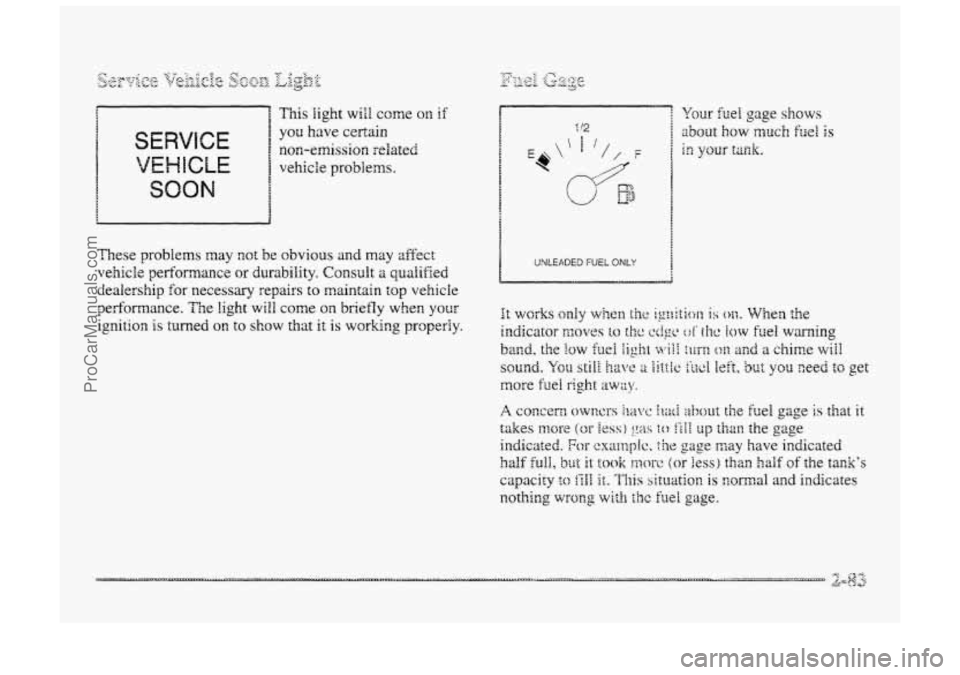
SERVICE
VEHICLE
non-emission related
vehicle
problems.
SOON
These problems may not be obvious and may affect
vehicle performance or durability. Consult a qualified
dealership for necessary repairs to maintain top vehicle
performance. The
light will come QIP briefly when your
ignition is turned on to S~OW that it is workmg properly.
1 UNLEADED FUEL ONLY I
ProCarManuals.com
Page 150 of 426
&~(-&jJ?-% _. _- &SD&$V 7- 0 7: \@+@--JQ) @ &-J~pp@.&) y-
_Y A dk A a
see things you need to see when it's dark outsside.
Be
sure to keep the HUD image dim and placed
EQW in YOUF field of view.
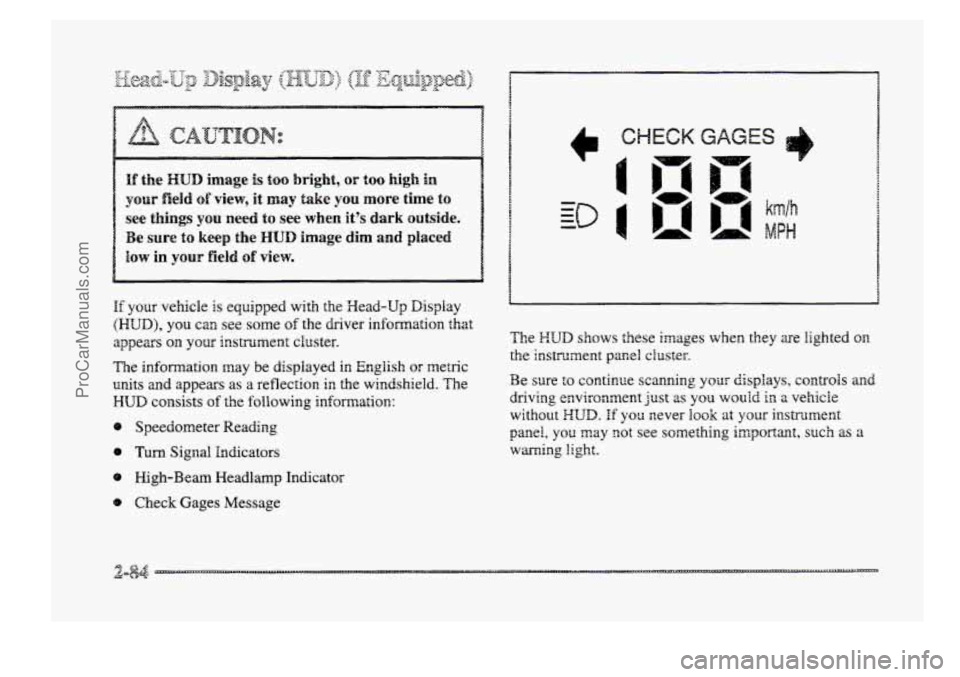
If your vehicle is equipped with the Wead-Up Display
(HUD), you can see some of the driver infomation that
appears
your irrstrumerat cluster.
The
infomation may be displayed in English or metric
units and appears as a reflection ir, the windshield. The
HLJD consists of the following information:
8 Speedometer Reading
0 Turn Signal Indicators
8 High-Beam Meadlamp Indicator
@ Check Gages Message The
Z-:UD shows these images when they are
lighted on
tke instrument pamS cluster.
Be sure to continue scanning your displays, controls and
driving environment
Just as you wouid in a vehicle
without XUD. If you sever hook at your instrt.merit
panel, you may got see something imgoI-aana, such as a
warning light.
ProCarManuals.com
Page 153 of 426
e mL INFO: Press this button to display fuel
infomation such
as, fuel used, fuel range and
fuel economy.
Q GAGE INFO: Use this button to display oil
pressure,
oil Me, coolant temperature, tire pressure
and battery infomation.
RESET: ”his button, used dong with other buttons,
will reset system functions.
@ ENGNET: Use this button to change the display
between English and metric
units.
p@r@-jn& Choice gJ1c DispEay
This feature allows two different drivers to store and
recall their
QWP~ preferred display mode. The personal
choice settings displayed
on the DIC are determined by
the transmitter used
t~ enter the vehicle. After the
UNLOCK button of a remote keyless entry transmitter
is pressed
and the ignition is in RUN, the DIC will
display
the identified driver. The settings can also be
changed
by briefly pressing one of the MEMORY
buttons located on the driver’s door.
The DIC can also be used to program the following
personal
choice features available with your vehicle:
e Memory Seats
Memory Door Locks
Security Feedback
Delayed Locking
e Perimeter Lighting
Parallel Park Assist Mirror
Window Lockout
See “Personal Choice Features”
in the Index and “DIC
Personal Choice Progran~ning’~ later in this part. The
DIC is used to program infomation €or DWIVEiR #1 and
DRIVER #2. The DIC will identify a person as
UNKNOWN DRIVER if they are neither DRIVER #I
nor DRIVER #2.
ProCarManuals.com
Page 160 of 426
If you choose ON for LOCK FEEDBACK YOU will also
wed to choose LIGHTS or LIGHTS + HORN.
You can select the following modes:
@ If you choose OW for LOCK FEEDBACK and OW
for UNLOCK FEEDBACK, you will receive no
security feedback when locking or unlocking
your vehicle.
@ Hf ptl choose OFF for LOCK FEEDBACK and
LIGHTS for UNLOCK FEEDBACK, you will
receive no security feedback when locking your
vehicle and the exterior lamps will flash when
unlocking your vehicle.
8
8
8
If YOU choose EIGHTS for LOCK FEEDBACK and
OFF for UNLOCK FEEDBACK, your exterior
lamps wiEl flash when Iochg your vehicle and you
will receive
no security feedback when unlocking
your vehicle.
Hf you choose LIGHTS for LOCK FEEDBACK and
LIGHTS for UNLOCK FEEDBACK, your exterior
lamps will flash when locking and when ur,Bocking
your vehicle.
If you choose LIGHTS + HOW for LOCK
FEEDBACK and OFF for UNLCCK FEEDBACK,
your exterior lamps will flash and the horn will chiq
when locking your vehicle and you will receive no
security feedback when unlocking your vehicle.
Hf you choose LIGHTS + HORN for LOCK
FEEDBACK and LIGHTS for UNLOCK
FEEDBACK, your exterior lamps will flash and the
horn will chirp when locking YQW vehicle and your
exterior
lamps will flash when unlocking
your vehicle.
For more infomation on this feature, see ''Security
Feedback"
in the Index.
ProCarManuals.com
Page 161 of 426
pep&Q_@ier- L&.$%gqg
When the UNLOCK button on the transmitter is
pressed, the
DRL lamps (high-beams at reduced
intensity), parking
lmps and back-up laps will turn on
if it is dark enough according to the twilight sentinel.
You can control activation of this feature by choosing
OFF QI- ON when the PERIMETER LIGHTS choice is
displayed
on the DIC. Make your choice by pressing the
ENG/M.ET button and record your choice by pressing
the
RESET button.
NOTE: If you want to choose PERIMETER LIGHTS
ON, you must also choose LIGMTS for UNLOCK
FEEDBACK while making the security
feedback choices.
For more information on this feature, see “Perimeter
Lighting”
in the Index.
ProCarManuals.com
Page 166 of 426
'Ms section tells you how to operate your comfort
ctrrtt.ro8s. Your comfort control system uses
trxone-friendIy
hi- B 348 refrigerant.
With these systems, you can control the heating, cooling
and ventilation in your vehicle. Your vehicle also has a
flow-through ventilation system described
Eater in
this section.
This feature allows two different drivers to store and
recall their own climate control settings for temperature,
air delivery node, fan and passenger climate COXI~FO~
fdom status. The Personal Choice settings recalled are
determined by the transmitter used to enter the vehicle.
After the UNLOCK button of a remote keyless entry
transmitter
is pressed, and the igrrition is in RUN, the
climate
control will adjust to the last settings of the
identified driver.
The settings can also be changed by
briefly pressing one
of the MEMORY seat switches
located on the
driver's door panel. When adjustments
are made, the new settings are automatically saved for
the
driver.
Your vehicle has the dual automatic cornfortemp climate
control system. The fdowing
infomation tells you how
1: works.
Yorr will hear a beep each time a button is pushed and a
small light orr the button will indicate which buttons lire
active.
The lights are QIP ali buttons except EMP, FAN
and AIR FLOW. The display will show fm speed,
comfort level setting
and airf'~ direction for a few
seconds whenever any button,
except for the rear defog,
is pushed, and then it will display the outside
temperature. The outside temperature reading
is most
accurate when the vehicle
is movi~g.
During stops, when drivkg slow, QF when the engine is
first sta-ted after a short trip, the outside temperature
reading can be affected by road or engine heat. In order
to enswe proper automatic climate control operation, the
outside temperature
display may not update BS quickly
as expected.
ProCarManuals.com
Page 176 of 426

BASS: Press this knob lightly so it extends. Tun the
knob to increase
or decrease bass.
TREB: Press this knob lightly so it extends. Turn the
knob to increase or decrease treble. If a station is weak
or noisy, you may want to decrease the treble.
Push these hobs back into their stored positions when
you're
not using them.
BAL: Turn the control behind the upper knob to move
the
somi to the left or right speakers. The middle
position balances the sound between
the speakers.
FADE: Turn the control behind the lower knob to move
the
sound to thc front or rear speakers. The middle
position
balmces the sound between the speakers.
7-. . L.. (..,I &F$i 7:.
The longer side with the tape visible should face to the
right.
If the ignition and the radio are on, the tape can be
inserted
and will begin playing. If you hear nothing or
hear
a garbled sound, the tape may not be in squarely.
Press
EJECT to remove the tape and start over.
&Lag 2 *." ::,4~y&~~$~ - ''-.:.:%.A V' L+&
Mile the tape is playing, use the VOLUME, FADE,
BAL, BASS and TBZEB controls just as you do for the
radio. Other controk may have different functions when
a tape
is inserted. The display will show an mow to
show which side of the tape is playing.
If you want to insert a tape when the ignition or radio is
off, first press EJECT or RECALL. Note that the
cassette tape adapter
kits for portable compact disc
players will work in your cassette tape player.
Your tape bias is set automatical2y.
If E and a number appear on the radio display, the tape
won't play because
of an error.
e EdO: The tape is tight and the player can't turn the
tape
hubs. Remove the tape. Hold the tape with the
open end down
and try to turn the right hub to the
left with a pencil. Turn the tape over and repeat. If
the hubs do not turn easily, your tape may be
damaged
and shoutct not be used in the player.
Try a new tape to make sure your player is
working properly.
Ell: The tape is broken. Try a new tape.
ProCarManuals.com