1997 TOYOTA RAV4 lock
[x] Cancel search: lockPage 84 of 198

82
To lock the center differential:
1. Press the brake pedal and stop thewheel spinning.
2. Put the front wheels in as straight- ahead position as possible.
3. Push the center differential lock switch
and check that the indicator light in the
instrument panel comes on.To unlock the center differential:
1. Put the front wheels in as straight- ahead a position as possible.
2. Push the center differential lock switch
once again and check that the indica-
tor light in the instrument panel goes
out and that the indicator buzzer stops sounding.
The indicator buzzer will sound while the
center differential is being unlocked. It
stops sounding when unlocking is com- pleted.
Sometimes complete unlocking of the
center differential may take longer. If unlocking of the center differential is notcompleted, check
the area around you for
safety, then accelerate or decelerate, or move the vehicle backward.
NOTICE
While the indicator buzzer is sounding, do not make turns, and
do not put the vehicle into a garage.This may damage the locking mechanism and the drive system.
Page 94 of 198

93
1 2 3 4 5 6 (Press buttons)
These buttons are used to preset and tune in radio stations.
To preset a station to a button: Tune in the
desired station (see TUNEº). Push and
hold down the button until you hear a
beep-this
will set the station to the button.
The button number will appear on the dis-
play.
To tune in to a preset station: Push the
button for the station you want. The button
number and station frequency will appear
on the display.
These systems can store one AM and one
FM station for each button. The preset
station memory will be canceled out if the
power source is interrupted (battery dis-
connected or fuse blown).
(Eject Button)
Push this button to eject a cassette.
After you turn the ignition to LOCKº, you
will be able to eject a cassette but you will
not be able to reinsert it. AM V FM
Push AM V FMº to switch between the AM
and FM bands. AMº or FMº will appear
on the display. If the audio system is off, you can turn onthe radio by pushing AM
V FMº. Also,
push the AM V FMº button to switch from
cassette operation to radio operation. BAL (Balance)
This knob lets you adjust the balance be- tween the right and left speakers.
Pull out PWR/VOL/BALº. Turn the knob
to adjust the balance. Push the knob backinto its normal position. BASS This knob lets you adjust the bass level. Push BASS/TREBº so that it pops out of
its retracted position. Turn the knob to ad-
just the bass. Push the knob back into its
retracted position. Dolby )
NR*
If you are listening to a tape that was re-
corded with Dolby )
Noise Reduction,
push the button marked with the
double-D symbol. The double-D symbol
will appear on the display. Push the button
again to turn off Dolby )
NR.
The Dolby NR mode reduces tape noise
by about 10 dB. For best sound reproduc- tion, play your tapes with this button on or off according to the mode used for record-
ing the tape.
*: Dolby noise reduction manufactured under license from Dolby Lab-
oratories Licensing Corporation. DOLBYº and the double D symbol
are trademarks of Dolby Laboratories Licensing Corporation.
FADE
Move the FADEº ring around PWR/
VOLº to adjust the front/rear balance. MTL (Metal) display
If a metal or chrome equivalent cassette
tape is put in the cassette player, the play-
er will automatically adapt to it and MTLº
will appear on the display. PROG (Program)
Push PROGº to select the other side of
a cassette tape. The display indicates
which side is currently selected ( ~º indi-
cates top side, !º indicates bottom side).
Auto-reverse featureÐAfter the cassette
player reaches the end of a tape side, it automatically reverses and begins to play
the other side. This is true whether the
cassette was playing or fast forwarding.
Page 96 of 198

95
Seeking
In the seek mode, the radio finds and plays the next station up or down the sta- tion band.
To seek a station, push and hold the
~º or
! º side of TUNEº until you hear a beep.
Do this again to find another station.
To ensure the correct audio system
operation:
Be careful not to spill beveragesover the audio system.
Do not put anything other than acassette tape into the slot.
NOTICE
ILLUMINATION CONTROL LOGIC
On some audio-units, when the instru-
ment panel lights are on, the letters on op-
erable buttons of the mode in current use
light up together with the mode selection and eject buttons. RADIO RECEPTION
Usually, a problem with radio reception
does not mean there is a problem with
your radio-it is just the normal result of
conditions outside the vehicle.
For example, nearby buildings and terrain
can interfere with FM reception. Power
lines or telephone wires can interfere with
AM signals. And of course, radio signals
have a limited range, and the farther youare from a station, the weaker its signal
will be. In addition, reception conditions
change constantly as your vehicle moves. Here are some common reception prob- lems
that probably do not indicate a prob-
lem with your radio: FM
Fading and drifing stationsÐGenerally,
the effective range of FM is about 40 km
(25 miles). Once outside this range, you
may notice fading and drifting, which in- crease with the distance from the radio
transmitter. They are often accompanied by distortion.
Multi-pathÐFM signals are reflective,
making it possible for two signals to reach
your antenna at the same time. If this hap-pens, the signals will cancel each other
out, causing a momentary flutter or loss of
reception.
Static and flutteringÐThese occur when
signals are blocked by buildings, trees, or other large objects. Increasing the bass
level may reduce static and fluttering.
Station swappingÐIf the FM signal you are listening to is interrupted or weak-
ened, and there is another strong station
nearby on the FM band, your radio may
tune in the second station until the original
signal can be picked up again.
ÐCar audio system operating hints
Page 101 of 198

1: For air conditioning
100
To cool off your Toyota after it has been
parked in the hot sun, drive with the
windows open for a few minutes. This
vents the hot air, allowing the air condi-
tioning to cool the interior more quickly.
Make sure the air intake g rilles in front
of the windshield are not blocked (by
leaves or snow, for example).
On humid days, do not blow cold air on
the windshield. The windshield could
fog up because of the difference in airtemperature on the inside and outside
of the windshield.
Keep the area under the front seats
clear to allow air to circulate through-out the vehicle.
On cold days, move the fan speed to
HIº for a minute to help clear the in-
take ducts of snow or moisture. This
can reduce the amount of fogging onthe windows.ÐOperating tips
ÐAir flow selector settings
Page 104 of 198

Part 1Clock
103
OPERATION OF INSTRUMENTS ANDCONTROLSÐ
Chapter 1-8 Other equipment
Clock
Cigarette lighter and ashtray
Glovebox
Auxiliary box
Floor mat
The digital clock indicates the time.
The key must be in the ACCº or ONº position.
To reset the hour: Push the ºHº button.
To reset the minutes: Push the Mº button.
If quick adjustment to a full hour is de- sired, push the :00º button.
For example, if the :00º button is de-
pressed when the time is between
1:01Ð1:29, the time will change to 1:00.
If the time is between 1:30Ð1:59, the time
will change to 2:00.
Once the electrical power source has
been disconnected from the clock, the
time is automatically set to 1:00 (oneo'clock). When the instrument panel lights are turned on, the brightness of the time indi-cation will be reduced.
Page 105 of 198
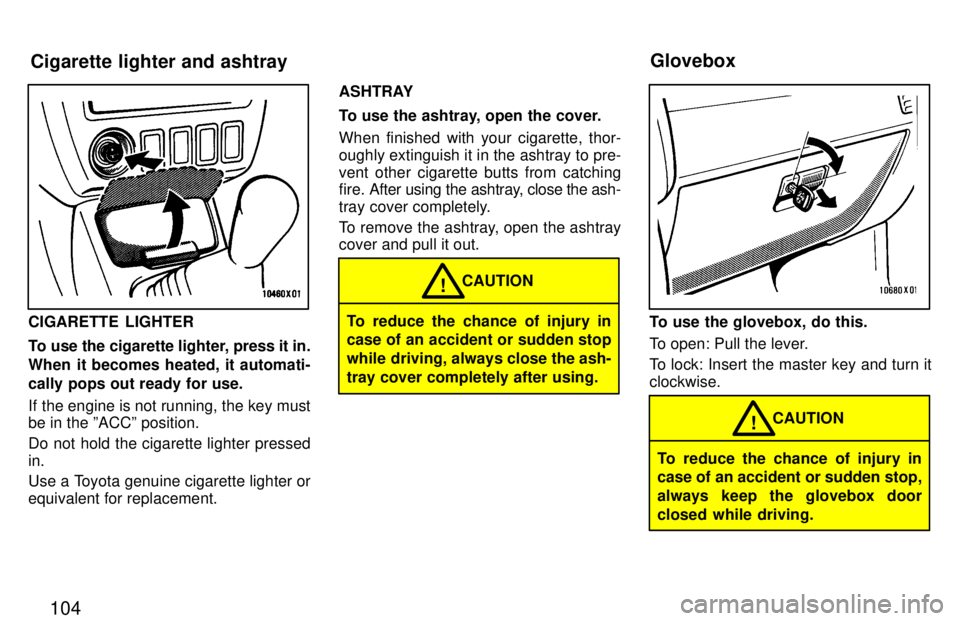
104
CIGARETTE LIGHTER
To use the cigarette lighter, press it in.
When it becomes heated, it automati-
cally pops out ready for use.
If the engine is not running, the key must be in the ºACCº position.
Do not hold the cigarette lighter pressed in.
Use a Toyota genuine cigarette lighter or equivalent for replacement.ASHTRAY
To use the ashtray, open the cover. When finished with your cigarette, thor-
oughly extinguish it in the ashtray to pre-
vent other cigarette butts from catching
fire. After using the
ashtray, close the ash-
tray cover completely.
To remove the ashtray, open the ashtray cover and pull it out.To reduce the chance of injury in
case of an accident or sudden stop
while driving, always close the ash-
tray cover completely after using. CAUTION
!
To use the glovebox, do this.
To open: Pull the lever.
To lock: Insert the master key and turn it clockwise.
To reduce the chance of injury in
case of an accident or sudden stop,
always keep the glovebox door
closed while driving.CAUTION
!
Cigarette lighter and ashtray
Glovebox
Page 106 of 198

105
2-door models (left side)
2-door models (right side) and 4-door modelsTo open the box, turn the knob.
Use a floor mat of the correct size.
If the floor mat has a hole, then it is de-
signed for use with a locking clip. Fix thefloor mat and locking clip into the hole in the floor carpet.
Auxiliary box
Floor mat
Page 114 of 198

11 3
TANDEM MASTER CYLINDER BRAKE SYSTEM
The tandem master cylinder brake sys-
tem is a hydraulic system with two sepa-
rate sub-systems. If either sub-system
should fa
il, the other will still work. Howev-
er, the pedal will be harder to press, and
your stopping distance will be longer.
Also, the brake system warning light may come on.
CAUTION!
Do not drive your vehicle with only a single brake system. Have your
brakes fixed immediately.
BRAKE BOOSTER
The brake booster uses engine vacuum to
power-assist the brakes. If the engine
should quit while you are driving, you can
bring the vehicle to a stop with normal
pedal pressure. There is enough reserve vacuum for one or two stopsÐbut nomore!
CAUTION!
Do not pump the brake pedal if the
engine stalls. Each push on the
pedal uses up your vacuum re- serve.
Even if the power assist is com-
pletely lost, the brakes will still
work. But you will have to push
the pedal hardÐmuch harder
than normal. And your braking
distance will be longer.
ANTI-LOCK BRAKE SYSTEM (with ABSº warning light)
The anti-lock brake system is designed to
automatically help prevent lock-up of the
wheels during sudden braking or braking on slippery road surfaces. This assists in
providing directional stability and steeringperformance of the vehicle under these circumstances.
The anti-lock brake system becomes op- erative after the vehicle has accelerated
to a speed in excess of approximately 10
km/h (6 mph). It stops operating when the
vehicle decelerates to a speed below
approximately 5 km/h (3 mph). You may hear a sound in the engine
compartment for a
few seconds when the
engine is started or just after the vehicle is started. This means that the anti-lock
brake system is in the self check mode,
and does not indicate a malfunction.
Effective way to press the ABSº brake
pedal: When the anti-lock brake system
function is in action, you may feel the brake pedal pulsating and hear a noise.
In this situation, to let the anti-lock brake
system work for you, just hold the brake
pedal down more firmly. Do not pumpthe brake. This will result in reduced
braking performance.
The brake pedal pulsation caused by the
anti-lock brake system may indicate haz- ardous road surface conditions. Althoughthe anti-lock brake system assists in pro-
viding vehicle control, it is still important to
drive with all due care, because the anti-
lock brake system cannot overcome the
laws of physics that act on your vehicle: Braking capab ility is dependent on tire
friction with the road surface.
Brake system