Page 57 of 315

52can set to any desired frequency. These four
methods are described below.q
Using the ªTUNEº function
You can change the frequency up or down one
increment at a time by pressing and releasing either
the left
bor right
aside of the ªTUNEº button.
To change frequencies quickly, press and hold down
either the right or left side of the button.
Manual tuning adjusts your radio to any allowable
broadcast frequency, whether or not a station is
present on that frequency. (SeeAll About Radio
Frequenciesin this section.)
q
Using the ªSEEKº function
Press the right (
a) side of the ªSEEKº button to
select the next listenable station up the frequency
band. Press the left (
b) side of the button to select
the next listenable station down the frequency
band. By pressing and holding the button, listenablestations can be passed over to reach the desired
station.
q
Using the ªSCANº function
Pressing the ªSCANº or ªSCNº button will begin
the scan mode up the frequency band, stopping on
each listenable station for approximately five
seconds.
To stop the scan mode on the presently sampled
station, press the ªSCANº or ªSCNº button again.
q
Setting the station MEMORY PRESET buttons
Your radio is equipped with 6 station memory
buttons. These buttons can be used to select up
to 6 preset AM stations and 12 FM stations (6
in FM1 and 6 in FM2)
File:04fnas8.ex
Update:Wed Jun 19 10:43:44 1996
Page 58 of 315

53
Follow the easy steps below to set these buttons to
the desired frequencies:
1. Select a band, then select a frequency.
2. Press one of the memory preset buttons and
hold the button until the sound returns. That
station is now held in memory on that button.
3. Follow the two steps above for each station
memory preset button you want to set.q
Using the AUTOSET feature
With AUTOSET, you can continually set strong
stations into your memory buttons without
losing your originally set stations.
Press the ªAUTOSETº button once. Your radio
will set the first six strong stations of the band
you are in (AM, FM1, or FM2) into the
memory buttons. The display will show
ªAUTOº, then run through the frequencies
setting the memory buttons.NOTE:If there are fewer than five strong
stations in the frequency band, the remaining
unfilled buttons will store the last strong station
detected on the band.
When all stations are filled, the radio will begin
playing the station stored in memory button 1.
To deactivate the Auto Memory Store mode and
return to manually-set memory button stations,
press the ªAUTOSETº button. Display will show
ªAUTOº then ªOFFº.
Adjusting the tone balance of your radioq
Increasing or decreasing bass response
Press the top
cof the ªBASSº button to increase
bass; press the bottom
dof the ªBASSº button to
decrease bass.
File:04fnas8.ex
Update:Wed Jun 19 10:43:44 1996
Page 127 of 315

122Arming, disarming and resetting your
anti-theft system from the keyless entry
padThe Keyless Entry system will arm the anti-theft
system when you use the 7/8 and 9/0 keys to lock
the doors, and will disarm or reset a triggered
anti-theft alarm when you enter in the five digit
code to unlock the driver's door.Remote Entry SystemWith the remote entry system, you can lock and
unlock the vehicle doors and open the trunk
without using a key. The buttons for the system are
located on the two hand held transmitters that
came with your vehicle. The remote also has a
personal alarm feature.
The system will work with up to four remotes.
Your vehicle came with two remotes. Additional
remotes can be ordered from your dealer.When unlocking a vehicle with the Programmable
Memory Seat/Outside Rear View Mirrors feature,
the seat, the outside mirrors and steering column
will adjust to position that is set for the transmitter
being used.
The remote entry features only operate with the
ignition in the OFF position.
Remote entry transmitter
File:05fncf8.ex
Update:Thu Jun 27 10:02:20 1996
Page 128 of 315

123
Unlocking the doors and opening the
trunkTo unlock the driver's door, press the UNLOCK
control.
To unlock the passenger's door, press the UNLOCK
control a second time within five (5) seconds of
unlocking the driver's door.
To open the trunk, press the TRUNK button twice
within five (5) seconds.Locking the doorsTo lock all the doors, press the LOCK control. This
will also arm the anti-theft system (if equipped).
To signal that the doors are locked the horn will
chirp if the horn chirp feature is turned ON in the
driver settings menu in the message center.
Activating the remote personal alarmIf you wish to activate the remote personal alarm,
press the PANIC control. This will honk the horn
and flash the parking lamps and tail lamps for
approximately two minutes and forty-five seconds.
You can turn it OFF by pressing the PANIC control
again or by turning the ignition key to the RUN
position.Arming and Disarming the Alarm
SystemYour vehicle is equipped with the factory installed
anti-theft system. The remote entry system will
automatically arm it when the doors are locked
with the remote entry LOCK button. The remote
entry UNLOCK button will disarm or reset a
triggered anti-theft alarm.
The remote entry system is designed to work with
the factory installed anti-theft system. It may not
work with other anti-theft systems.
File:05fncf8.ex
Update:Thu Jun 27 10:02:20 1996
Page 172 of 315

167
Whenever you start your vehicle, release the key as
soon as the engine starts. Excessive cranking could
damage the starter.
After you start the engine, let it idle for a few
seconds. Keep your foot on the brake pedal and put
the gearshift lever in gear. Release the parking
brake. Slowly release the brake pedal and drive
away in the normal manner.
NOTE:Your vehicle has an interlock that prevents
you from shifting out of P (Park) unless your foot is
on the brake pedal.
If the engine does not start after two attempts:
1. Turn the ignition key to the OFF position.
2. Press the accelerator all the way to the floor
and hold it.
3. Turn the ignition key to the START position.4. Release the ignition key when the engine starts.
5. Release the accelerator gradually as the engine
speeds up.
If the engine still does not start, the fuel pump
shut-off switch may have been activated. For
directions on how to reset the switch seeFuel
Pump Shut-Off Switchin the index.
A computer system controls the engine's idle speed.
When you start your vehicle, the engine's idle
speed normally runs higher than when it is warmed
up. These faster engine speeds will make your
vehicle move slightly faster than its normal idle
speed. It should, however, slow down after a short
time. If it does not, have the idle speed checked.
If the engine idle speed does not slow down
automatically, do not allow your vehicle to idle for
more than 10 minutes. Have the vehicle checked.
File:08fnto8.ex
Update:Wed Jun 19 15:04:46 1996
Page 194 of 315
189
Roadside EmergenciesHazard FlashersThe flashers work whether your vehicle is running
or not. The flashers work for up to two hours
when the battery is fully charged and in good
condition without draining the battery excessively. If
the flashers run for longer than two hours or if the
battery is not fully charged, the battery can be
drained.
If the Engine Cranks but Does
Not Start or Does Not Start After
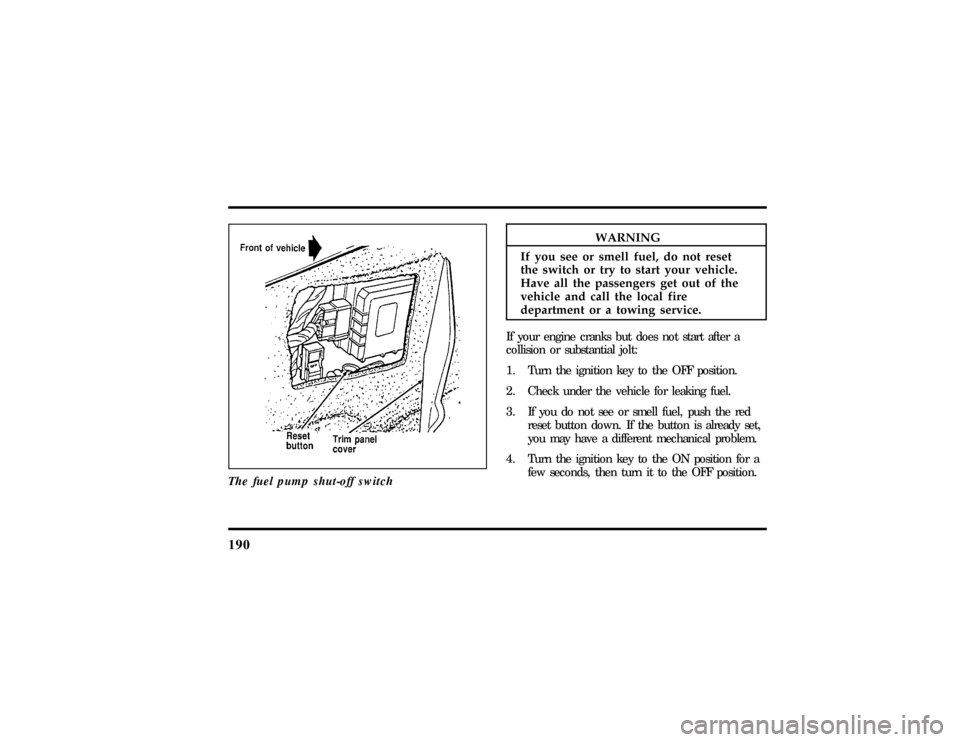
a CollisionFuel Pump Shut-off SwitchIf the engine cranks but does not start even after a
small collision, the fuel pump shut-off switch may
have been actuated. The shut-off switch is a device
intended to stop the fuel pump when your vehicle
has been involved in a substantial jolt.
Once the shut-off switch is actuated, you must reset
the switch by hand before you can start your
vehicle. The switch is on the left side of the trunk.
File:10fner8.ex
Update:Thu Jun 20 14:27:22 1996
Page 195 of 315
190
Thefue lpum pshut-of fswitch
WARNING
If yo useeor smel lfuel ,do no treset
Page 258 of 315

253
How to Prepare Your Vehicle for
Inspection/Maintenance (I/M) TestingIn some localities it may become a legal
requirement to pass an Inspection/Maintenance
(I/M) test of the On-Board Diagnostic (OBD) II
system. If the vehicle's powertrain system or its
battery has just been serviced, the OBD II system is
reset to a not ready for I/M testing condition. To
prepare for I/M testing, the law specifies that
additional mixed city and highway driving is
required to complete the check of the OBD II
system.
The driving modes required to reach the ready
condition consist of a minimum of 30 minutes of
city and highway driving as described below:q
At least twenty minutes driving in stop and go,
city type traffic with at least four idle periods.
q
At least ten minutes of driving on an
expressway or highway.Before completing the above driving modes, the
engine must be warmed up and at operating
temperature. Once started, the vehicle must not be
turned off during these driving modes.
Lights and Bulb ReplacementIt is a good idea to check the operation of the
following lights frequently:q
headlamps
q
high-mount brakelamp
q
tail lamps
q
brakelamps
q
hazard flasher
q
turn signals
q
license plate lamps
File:11fnmc8.ex
Update:Thu Jun 20 14:28:32 1996