Page 64 of 321
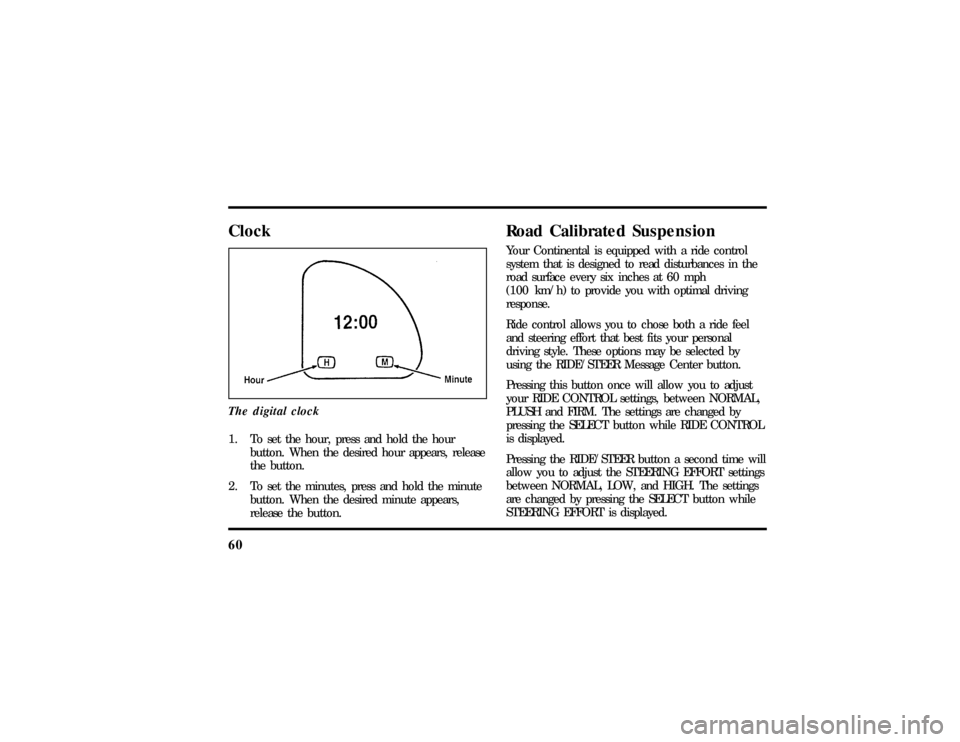
60ClockThe digital clock1. To set the hour, press and hold the hour
button. When the desired hour appears, release
the button.
2. To set the minutes, press and hold the minute
button. When the desired minute appears,
release the button.
Road Calibrated SuspensionYour Continental is equipped with a ride control
system that is designed to read disturbances in the
road surface every six inches at 60 mph
(100 km/h) to provide you with optimal driving
response.
Ride control allows you to chose both a ride feel
and steering effort that best fits your personal
driving style. These options may be selected by
using the RIDE/STEER Message Center button.
Pressing this button once will allow you to adjust
your RIDE CONTROL settings, between NORMAL,
PLUSH and FIRM. The settings are changed by
pressing the SELECT button while RIDE CONTROL
is displayed.
Pressing the RIDE/STEER button a second time will
allow you to adjust the STEERING EFFORT settings
between NORMAL, LOW, and HIGH. The settings
are changed by pressing the SELECT button while
STEERING EFFORT is displayed.
File:05fncfc.ex
Update:Fri Sep 6 14:53:57 1996
Page 66 of 321

62NOTE:The combination of FIRM RIDE CONTROL
and LOW STEERING EFFORT is undesirable and
cannot be selected.IgnitionUnderstanding the Positions of the
IgnitionThe positions of the key in the ignitionACC allows some of your vehicle's electrical
accessories such as the radio and the windshield
wipers to operate while the engine is not running.NOTE:Your vehicle is also equipped with an
accessory timer. This allows some of your
accessories to remain on for up to 10 minutes after
the ignition is turned to the OFF position. The
accessory timer is cancelled if any door is opened,
the dimmer switch is used, or the ignition is turned
to the ON position.
The automatic transaxle gearshift must be in P
(Park) to move the key to the LOCK position.
LOCK locks the steering wheel. It also locks the
gearshift lever.
LOCK is the only position that allows you to
remove the key. The LOCK feature helps to protect
your vehicle from theft.
OFF allows you to shut off the engine and all
accessories without locking the steering wheel, or
the gearshift lever.
File:05fncfc.ex
Update:Fri Sep 6 14:53:57 1996
Page 75 of 321

71
To change the position of the steering wheel, pull
the release lever on the column toward you. Tip
the steering wheel to the desired position. Release
the lever to lock the steering wheel in place.Speed ControlThe speed of the vehicle cannot be automatically
controlled until the vehicle speed is at or above 30
mph (48 km/h).
Use of radio transmitting equipment that is not
Federal Communications Commission (FCC) or in
Canada the Canadian Radio and
Telecommunications Commission (CRTC) approved
may cause the speed control to malfunction.Therefore, use only properly installed FCC (CRTC in
Canada) approved radio transmitting equipment in
your vehicle.
NOTE:Since your vehicle has an Automatic
Overdrive Transaxle, you may want to drive in D
(Drive) when driving in hilly terrain, at higher
altitudes, or when pulling a trailer. This will
improve speed control performance.
NOTE:Do not shift to N (Neutral) when using the
speed control. This will cause the engine to
overspeed.
File:05fncfc.ex
Update:Fri Sep 6 14:53:57 1996
Page 80 of 321

76q
The vehicle's cellular handset is locked-out, the
phone is automatically placed in ªhand freeº
mode and voice communication is established
with the operator through the ªhands freeº
microphone.
q
Typically, voice communication with an operator
is established within one minute after an
assistance button is pressed.
q
The operator verbally obtains details of your
situation and, if necessary, ties your vehicle into
a three-way phone call with the United States
Auto Club or local 911 or other emergency
services to dispatch the appropriate assistance to
your location.
q
Once the situation has been appropriately
handled, the operator will terminate the call,
the system warning light will stop flashing and
the system will be reset. In most situations,
ONLY the response center can terminate an
assistance request.
General DescriptionLincoln's Remote Emergency Satellite Cellular Unit
(RESCU) is designed to expedite roadside or
emergency assistance to distressed motorists who
are uncertain of their location and/or are uncertain
of who to contact for assistance.
The Lincoln RESCU System utilizes Global
Positioning System (GPS) technology and the
nation's cellular phone network to track vehicle
location and, at the touch of a button, put you in
voice contact with the Lincoln Security Response
Center.
Two buttons in the overhead console will activate
the system. A tow truck icon for roadside assistance
and an ambulance icon for emergency assistance
identify the buttons.
File:05fncfc.ex
Update:Fri Sep 6 14:53:57 1996
Page 84 of 321

80vehicle by the Lincoln Security Response Center.
(SeeAutomatic Rediallater in this chapter for
exceptions.) Operation will continue even if the
vehicle is turned off during an activation (although
visual feedback via the Message Center will not be
available in this situation).Cellular Phone InterfaceDuring an activation, Lincoln RESCU takes control
of the vehicle's cellular phone. If the phone is in
use, THE CALL WILL BE TERMINATED and the
Lincoln Security Response Center will automatically
be dialed. The cellular handset becomes inoperative
and all voice communication with the operator is
accomplished via the cellular phone's ªhands-freeº
microphone.
NOTE:When an activation is terminated, your
phone is left unlocked, in the ªONº state and may
not return to its previous call restriction or system
selection setting. It can be reprogrammed to your
previous setting as desired.
Message Center InterfaceDuring an activation, Lincoln RESCU communicates
with the vehicle's Message Center. Status messages
describing the sequence of steps being executed are
displayed, allowing you to visually follow the
activation process. The following messages are
typical of those displayed during an assistance
request. They are shown in the order in which they
would appear:q
ROADSIDE REQUEST or EMERGNCY
REQUEST
q
CALL IN PROGRESS
q
RINGING RESPONSE CENTER
q
SENDING LOCATION DATA
q
DATA RECEIVED
q
WAITING FOR OPERATOR
File:05fncfc.ex
Update:Fri Sep 6 14:53:57 1996
Page 88 of 321

84Positioning capability temporarily
degraded after battery reconnectWhen your vehicle is started, the Lincoln RESCU
GPS receiver begins the process of determining
vehicle location. The receiver will search the sky
and attempt to acquire signals from all visible
satellites. A real-time clock and an almanac
containing detailed information about the satellite
constellation are stored in the on-board computer's
memory and are used to expedite the search. If the
vehicle's battery is disconnected, the clock memory
is erased and time and date are lost. Once the
battery is reconnected, it could take approximately
15 minutes to reacquire the clock and for
positioning capability to be restored. During this
time, the system will operate but the response
center will not be able to identify your location. In
this situation, the operator will depend on you to
provide verbal information regarding vehicle
location.
Inoperative if cellular signal marginal or
unavailableSince the Lincoln RESCU System utilizes the
vehicle's cellular phone, it can only be operated in
geographical areas with cellular coverage. Although
approximately 90 percent of the U.S. population
lives and works in cellular coverage areas, there are
various rural or mountainous areas where coverage
is marginal or does not exist. If an activation occurs
in this situation, the messages ªNO CELLULAR
SIGNALº and ªWAITING TO ACQUIREº will
alternately be displayed on the Message Center. If
after several attempts cellular service cannot be
acquired, the message ªUNABLE TO PLACE CALLº
will be displayed, the assistance request will be
terminated and the phone will return to its normal
operating mode.
File:05fncfc.ex
Update:Fri Sep 6 14:53:57 1996
Page 90 of 321

86customers, this list may not be complete. Contact
your dealer for assistance if you are unsure if a
particular cellular feature is compatible with your
Lincoln RESCU System.Potential limitations if activated outside
home cellular regionAt the time you receive your vehicle (or shortly
after), you will need to select a cellular carrier and
activate your phone. If desired, carrier selection can
be arranged through your dealer. This carrier is
usually local to your region and will handle call
processing and billing services for your cellular
telephone. In order to use your phone when
traveling outside your home cellular region, the
services of the carriers local to the new area will be
required. If your home carrier does not have an
agreement with the new local carrier, your phone
calls could be forwarded to an operator and youmay be required to provide a credit card number
before your call is processed. If an activation occurs
in this situation, the initial call will be terminated
and a second call which bypasses the response
center's computer will be placed. UNLIKE DURING
THE FIRST CALL ATTEMPT, YOUR CELLULAR
HANDSET WILL NOT BE LOCKED DURING THE
SECOND CALL, SO YOU WILL HAVE THE
OPTION OF TERMINATING THE ASSISTANCE
REQUEST AT ANY TIME BY PUSHING EITHER
THE ªPWRº OR THE ªENDº BUTTON ON THE
CELLULAR HANDSET. If the second call is not
terminated, it will be forwarded to a local cellular
carrier operator. In this situation, you can provide
the operator with the number you are dialing
(Lincoln Security Response Center at
1-800-334-1327) and your credit card number or
ask to be connected to the local 911 or other
emergency services.
File:05fncfc.ex
Update:Fri Sep 6 14:53:57 1996
Page 94 of 321
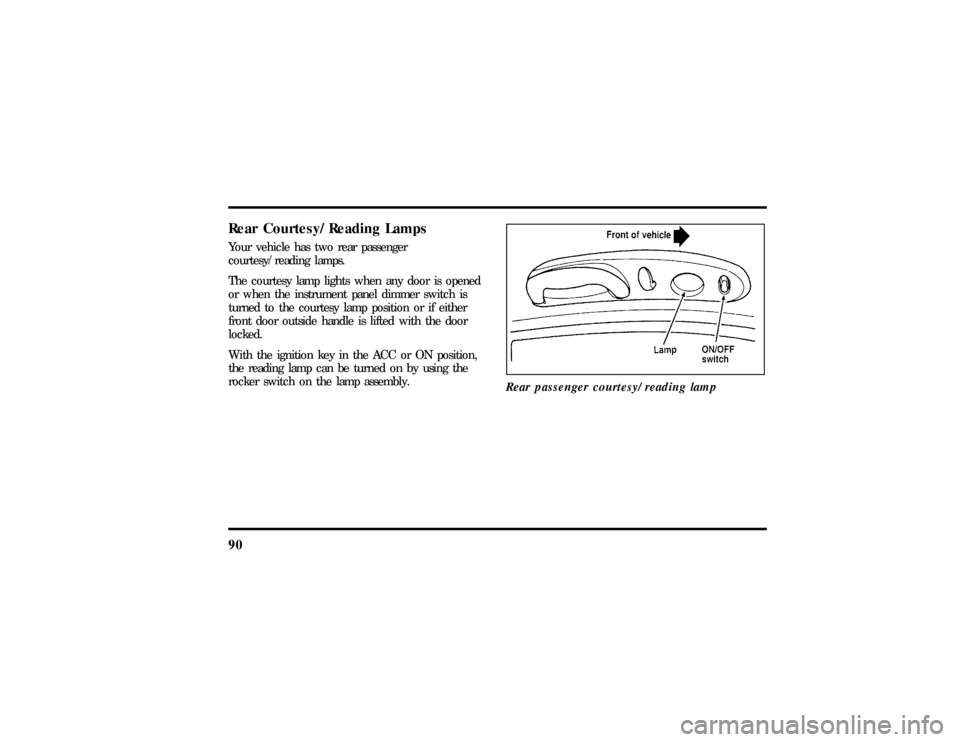
90Rear Courtesy/Reading LampsYour vehicle has two rear passenger
courtesy/reading lamps.
The courtesy lamp lights when any door is opened
or when the instrument panel dimmer switch is
turned to the courtesy lamp position or if either
front door outside handle is lifted with the door
locked.
With the ignition key in the ACC or ON position,
the reading lamp can be turned on by using the
rocker switch on the lamp assembly.
Rear passenger courtesy/reading lamp
File:05fncfc.ex
Update:Fri Sep 6 14:53:57 1996