Page 102 of 241
Audio System
Operating the Optional CD
Player/Changer
A Compact Disc changer is available through your dealer. It holds up to
six discs, providing several hours of
continuous entertainment. You operate the CD changer with the
same controls used for the radio.
Your dealer also has an accessory in- dash single CD player available that
is operated by the radio controls. To
operate this unit, use the instructions (except for those relating to multiple
discs) in this section.
Using the instructions that came
with the changer, load the desired CDs in the magazine, and load the
magazine in the changer.
To operate the CD changer, the ignition must be in ACCESSORY (I)
or ON (II) and the audio system
must be on. If you are listening to a
cassette, eject it.
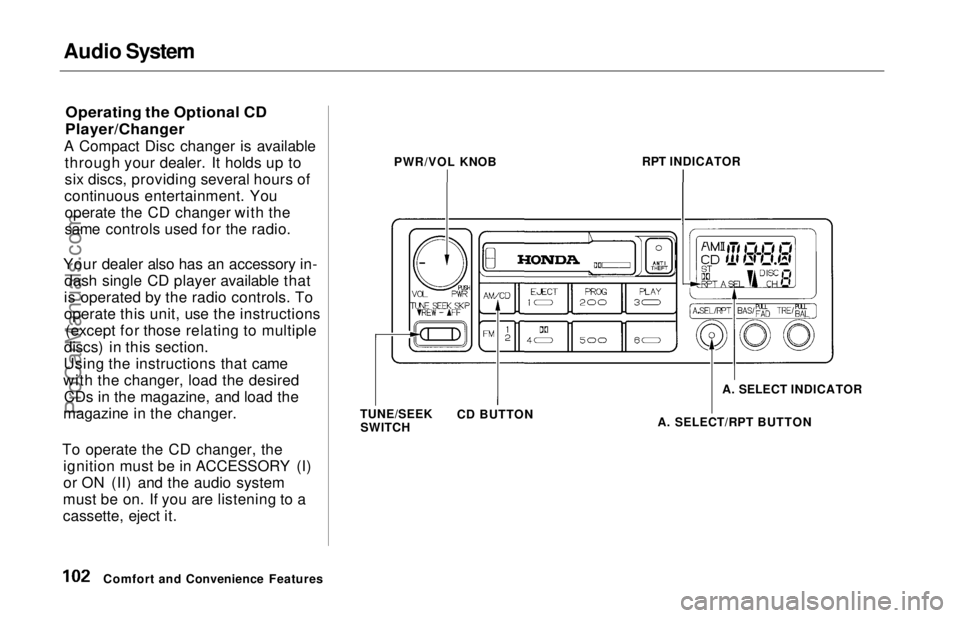
Comfort and Convenience Features PWR/VOL KNOB
RPT INDICATOR
TUNE/SEEK SWITCH CD BUTTON
A. SELECT/RPT BUTTONA. SELECT INDICATORProCarManuals.comMain Menu Table of Contents s t
Page 103 of 241

Audio System
Press the CD button until "CD"
appears in the display. The system
will start to play the first track of the
first disc in the magazine.
When that disc ends, the next disc in the magazine is loaded and played.
After the last disc finishes, the system returns to disc 1.
To select a different disc, press the appropriate preset button (1 — 6). If
you select an empty slot in the magazine, the changer will, after
finding that slot empty, try to load the CD in the next slot. This
continues until it finds a CD to load
and play.
You can use the TUNE/SEEK switch to select tracks within a disc.
If you push and release the TUNE/
SEEK switch, the system will move
to the beginning of a track. Push the switch up to move to the beginning
of the next track, and push the
switch down to move to the begin-
ning of the current track. If you push and hold the TUNE/
SEEK switch, you will hear a beep
and the system will continue to move
across tracks. Release the switch
when you think it has reached the desired place on the disc.
RPT —
When you activate the
Repeat feature by pressing the
A. SEL/RPT button, the system continuously replays the current
track. You will see RPT in the display as a reminder. Press the button
again to turn it off.
RANDOM PLAY —
This feature,
when activated, plays the tracks on a CD in random order, rather than in
the order they are recorded on the CD. To activate Random Play, press
the A. SEL/RPT button until you see
A. SEL in the display. The system will then select and play tracksrandomly on the current disc. When
all tracks on that disc have been
played, the next disc is loaded and played randomly. This continues
until you deactivate Random Play by
pressing A. SEL/RPT again.
If the system is in Repeat mode, you must turn it off by pressing A. SEL/RPT before you can select Random
Play. Then press the button again
until you see A. SEL displayed.
To take the system out of CD mode, press the AM or FM button, or inserta cassette in the player. When you
return to CD mode, play will contin-
ue at the same disc and track.
If you turn the system off while a CD
is playing, either with the PWR/VOL
knob or the ignition switch, play will continue at the same point when you
turn it back on.
Comfort and Convenience FeaturesProCarManuals.comMain Menu Table of Contents s t
Page 118 of 241
Preparing to Drive
You should do the following checks and adjustments every day before
you drive your car.
1. Make sure all windows, mirrors, and outside lights are clean and
unobstructed. Remove frost, snow,or ice.
2. Check that the hood and tailgate are fully closed.
3. Visually check the tires. If a tire looks low, use a gauge to check its
pressure.
4. Check that any items you may be carrying with you inside are stored
properly or fastened down securely. 5. Check the adjustment of the seat
(see page 54).
6. Check the adjustment of the inside and outside mirrors (see
page 64).
7. Check the adjustment of the steering wheel (see page 44).
8. Make sure the doors are securely
closed and locked.
9. Fasten your seat belt. Check that your passengers have fastenedtheir seat belts (see page 7). 10.Turn the ignition ON (II). Check
the indicator lights in the instru-
ment panel.
11. Start the engine (see page 119).
12. Check the gauges and indicator lights in the instrument panel (seepage 33).
DrivingProCarManuals.comMain Menu Table of Contents s t
Page 119 of 241

Starting the Engine
1. Apply the parking brake.
2. In cold weather, turn off all electrical accessories to reduce
the drain on the battery.
3. Make sure the shift lever is in Park. Press on the brake pedal.
4. Without touching the accelerator pedal, turn the ignition key to theSTART (III) position. If the engine
does not start right away, do not
hold the key in START (III) for
more than 15 seconds at a time.
Pause for at least 10 seconds
before trying again.
5. If the engine does not start within 15 seconds, or starts but stalls
right away, repeat step 4 with the accelerator pedal pressed half-way
down. If the engine starts, release
pressure on the accelerator pedal so the engine does not race. 6. If the engine still does not start,
press the accelerator pedal all the
way down and hold it there while starting in order to clear flooding.
As before, keep the ignition key in the START (III) position for no
more than 15 seconds. Return tostep 5 if the engine does not start.
If it starts, lift your foot off the
accelerator pedal so the engine does not race.
Starting in Cold Weather at High
Altitude (Above 8,000 feet/ 2,400 meters)
An engine is harder to start in cold weather. The thinner air found athigh altitude above 8,000 feet (2,400
meters) adds to the problem.Use the following procedure:
1. Turn off all electrical accessories to reduce the drain on the battery. 2. Push the accelerator pedal half-
way to the floor and hold it there
while starting the engine. Do not hold the ignition key in START (III) for more than 15 seconds.
When the engine starts, release the accelerator pedal gradually as
the engine speeds up and smooths
out.
3. If the engine fails to start in step 2, push the accelerator pedal to the
floor and hold it there while you try to start the engine for no more
than 15 seconds. If the engine does not start, return to step 2.
DrivingProCarManuals.comMain Menu Table of Contents s t
Page 120 of 241
Automatic Transmission
Your Honda's transmission has fourforward speeds, and is electronically controlled for smoother shifting. It
also has a "lock-up" torque converter
for better fuel economy. You may
feel what seems like another shift
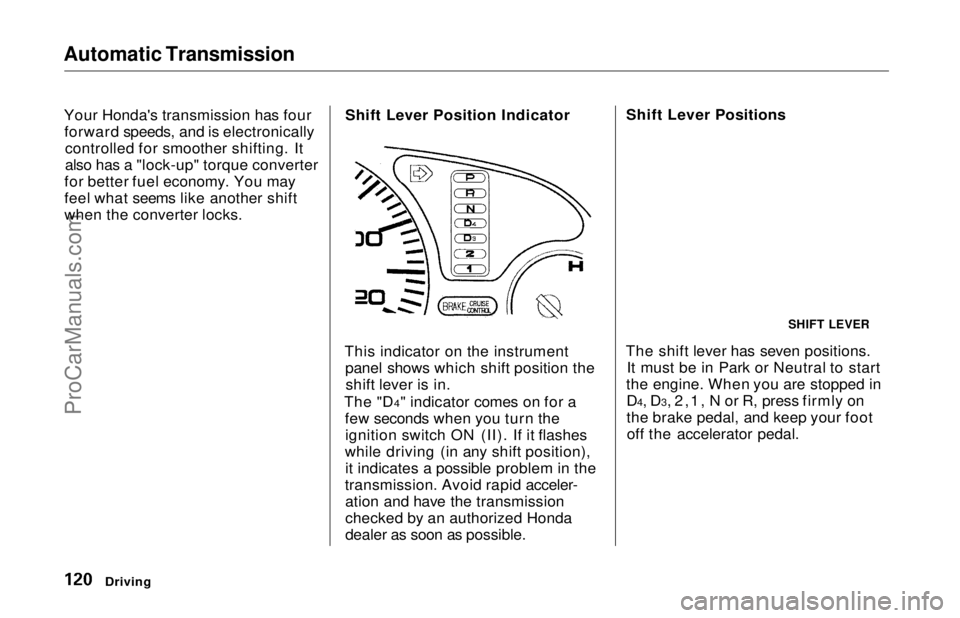
when the converter locks. Shift Lever Position Indicator
This indicator on the instrument panel shows which shift position theshift lever is in.
The "D4" indicator comes on for a few seconds when you turn theignition switch ON (II). If it flashes
while driving (in any shift position), it indicates a possible problem in the
transmission. Avoid rapid acceler- ation and have the transmission
checked by an authorized Honda
dealer as soon as possible. Shift Lever Positions
The shift lever has seven positions. It must be in Park or Neutral to start
the engine. When you are stopped in D4, D3, 2,1, N or R, press firmly on
the brake pedal, and keep your footoff the accelerator pedal.
Driving
SHIFT LEVERProCarManuals.comMain Menu Table of Contents s t
Page 121 of 241
Automatic Transmission
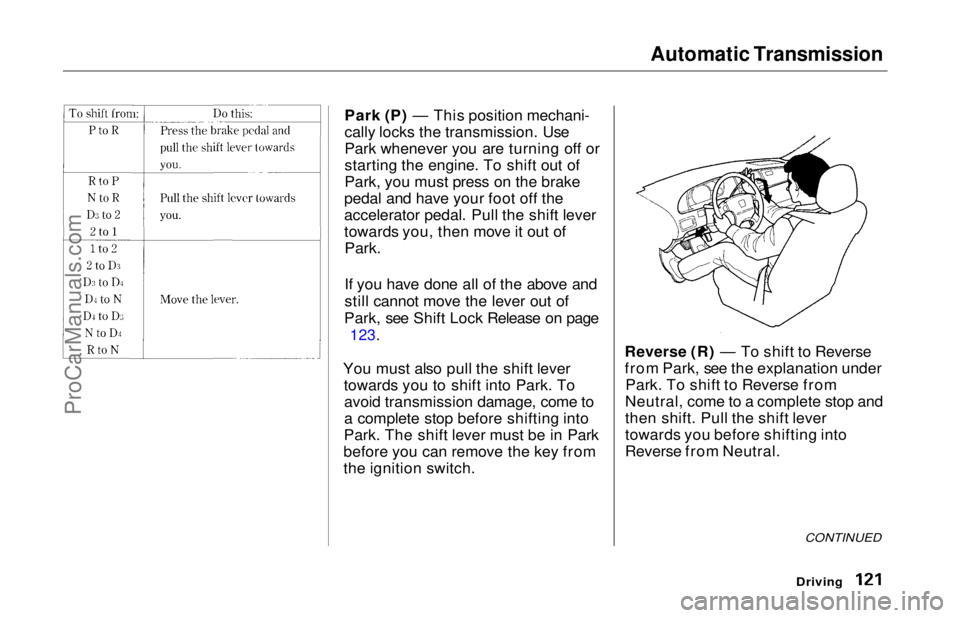
Park (P) — This position mechani-
cally locks the transmission. Use
Park whenever you are turning off or
starting the engine. To shift out of
Park, you must press on the brake
pedal and have your foot off the
accelerator pedal. Pull the shift lever
towards you, then move it out of
Park.
If you have done all of the above and
still cannot move the lever out of
Park, see Shift Lock Release on page
123.
You must also pull the shift lever towards you to shift into Park. Toavoid transmission damage, come to
a complete stop before shifting into
Park. The shift lever must be in Park
before you can remove the key from
the ignition switch. Reverse (R) — To shift to Reverse
from Park, see the explanation under
Park. To shift to Reverse from
Neutral, come to a complete stop and
then shift. Pull the shift lever
towards you before shifting into
Reverse from Neutral.
Driving
CONTINUEDProCarManuals.comMain Menu Table of Contents s t
Page 123 of 241
Automatic Transmission
Maximum Speeds
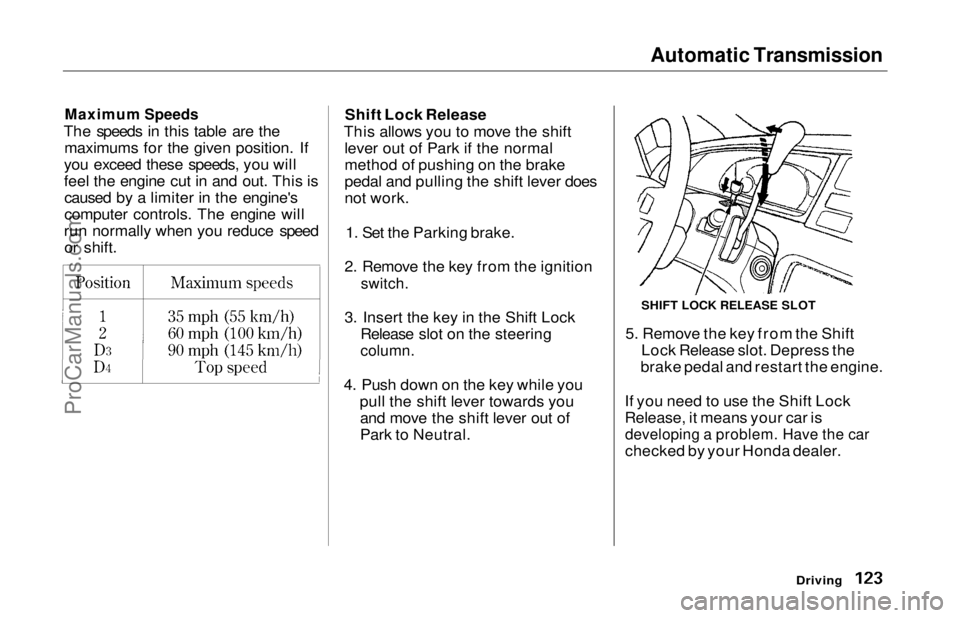
The speeds in this table are the maximums for the given position. If
you exceed these speeds, you will
feel the engine cut in and out. This is caused by a limiter in the engine's
computer controls. The engine will
run normally when you reduce speed or shift. Shift Lock Release
This allows you to move the shift lever out of Park if the normal
method of pushing on the brake
pedal and pulling the shift lever does
not work.
1. Set the Parking brake.
2. Remove the key from the ignition
switch.
3. Insert the key in the Shift Lock Release slot on the steering
column.
4. Push down on the key while you pull the shift lever towards youand move the shift lever out of
Park to Neutral. 5. Remove the key from the Shift
Lock Release slot. Depress the
brake pedal and restart the engine.
If you need to use the Shift Lock
Release, it means your car is
developing a problem. Have the car
checked by your Honda dealer.
Driving
SHIFT LOCK RELEASE SLOTProCarManuals.comMain Menu Table of Contents s t
Page 193 of 241
Changing a Flat Tire
If you have a flat tire while driving, stop in a safe place to change it.
Stopping in traffic or on the shoulder
of a busy road is dangerous. Drive
slowly along the shoulder until you
get to an exit or an area to stop that
is far away from the traffic lanes.
1. Park the car on firm, level groundaway from traffic. Turn on the
hazard warning lights and turn the ignition to LOCK (0).
2. Put the transmission in Park. Set the parking brake. Have all of thepassengers get out of the car while
you change the tire. 3. Open the tailgate. Fold down the
third seat's seat-back (see page60).
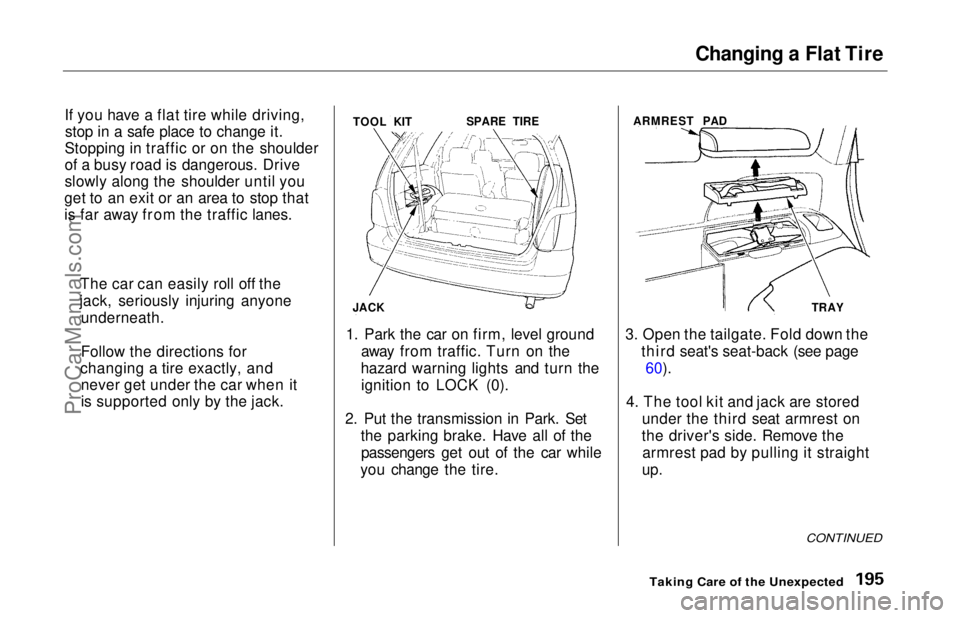
4. The tool kit and jack are stored under the third seat armrest on
the driver's side. Remove the armrest pad by pulling it straight
up.
CONTINUED
Taking Care of the Unexpected
The car can easily roll off the
jack, seriously injuring anyone underneath.
Follow the directions for
changing a tire exactly, and never get under the car when it
is supported only by the jack. TOOL KIT
JACK SPARE TIRE
ARMREST PAD
TRAYProCarManuals.comMain Menu Table of Contents s t