1997 CHEVROLET CAMARO key
[x] Cancel search: keyPage 58 of 404

Downloaded from www.Manualslib.com manuals search engine Operation Alarmanic Mode
The driver’s door will unlock automatically when
UNLOCK is pressed. If UNLOCK is pressed again
within five seconds, the passenger door will also unlock.
All doors will lock when LOCK is pressed.
The hatch will unlock when the button with the trunk
symbol is pressed twice within five seconds, as long as
the ignition is turned to the
OFF position. If the ignition
is on, the trunk button will only work if the transmission
is in PARK (P) for an automatic transmission, or if the
parking brake
is set on a manual transmission.
The system will turn on the interior lamps for about
40 seconds (or until the ignition switch is turned to the
RUN position), when you unlock
the doors or hatch.
The interior lamps will
go off when you lock the doors.
Operating the Remote Keyless Entry transmitter may
interact with the Vehicle and Content
Theft-DeterrenUAlarm System (if you have this option).
See “Vehicle and Content Theft-DeterrenVAlarm
System” in the Index. If
your vehicle is equipped with the Vehicle and Content
Theft-DeterrenVAlarm System, you will have a fourth
button
on your transmitter. This button is the panic
button. If you are involved in a panic situation, press
this button and your vehicle’s horn will sound and the
headlamps will flash. This will draw needed attention to
you and your vehicle. To turn this feature off, either
push the panic button again or turn the ignition
to the
RUN position. Note:
This feature will not work if your
ignition is on or if the transmitter is
30 feet (9 m) or
more away from your vehicle.
Wansmitter Range
The range of your Remote Keyless Entry system should
be about
3 feet (1 m) up to 30 feet (9 m). At times you
may notice a decrease in the range. This is normal for
the Remote Keyless Entry system. If the transmitter
does not work, or you have
to stand closer to your
vehicle for the transmitter to work:
You may have to replace the battery in your transmitter.
See the instructions for battery replacement.
0 You may be too far from your vehicle. Check your
distance. You may have
to stand closer to your
vehicle in rain or snow.
2-8
Page 59 of 404

Downloaded from www.Manualslib.com manuals search engine 0 Check the location. Other vehicles or objects may be
blocking the signal. Take a few steps to the right or left.
0 You may have to synchronize your transmitter to
the receiver in your vehicle. See the instructions
for synchronization.
You may have to match the transmitters to your
vehicle. See instructions.
If none of the above apply, see your Chevrolet dealer
or qualified technician for service.
Synchronization
Synchronization may be necessary due to the security
method used by the Remote Keyless Entry system. The
transmitter does not send the same signal twice to the
receiver. The receiver will not respond to a signal it has
been sent previously. This prevents anyone from recoding
and playing back the signal from the transmitter.
To
resynchronize the transmitter with the receiver:
0 While standing close to your vehicle, simultaneously
press and hold the LOCK and
UNLOCK buttons on
the transmitter for eight seconds. The door locks
should cycle and the parking lamps flash to confirm
synchronization. If this does not happen, you may
need to replace the battery in your transmitter
or
match the transmitter to your vehicle.
Transmitter Verification (If Equipped)
This feature provides feedback to the holder of the
Remote Keyless Entry transmitter that a command has
been received by the Remote Keyless Entry receiver.
The parking lamps will flash
on every lock and unlock
command and the horn will sound only if the
LOCK
button is pushed twice within five seconds. This allows
for silent operation of locking and unlocking, unless a
confirming horn chirp is desired. Other options may be
selected for this feature (see “Feature Customization” in
the Index).
Matching Transmitter(s) To Your Vehicle
Each remote keyless entry transmitter is coded to
prevent another transmitter from unlocking your vehicle.
If a transmitter is lost or stolen, a replacement can be
purchased through your dealer. Remember to bring any
remaining transmitters with you when you go to your
dealer. When the dealer matches the replacement
transmitter to your vehicle, any remaining transmitters
must also be matched. Once your dealer has coded the
new transmitter, the lost transmitter will not unlock your
vehicle. Each vehicle can have up to four transmitters
matched
to it.
2-9
Page 60 of 404

Downloaded from www.Manualslib.com manuals search engine Have each transmitter you intend to match ready for the
next steps.
To match transmitters to your vehicle:
1.
2.
3.
4.
5.
6.
7.
Turn the ignition to the RUN position, then to the
OFF position. This will disarm the Vehicle and
Content Theft-DeterrendAlarm System (if your
vehicle has this option).
Remove the RADIO fuse. This fuse is located in the
main fuse block, located on the left side
of your main
instrument panel. See “Fuses and Circuit Breakers”
in the Index.
Turn the ignition switch from the
OFF to the RUN
position three times quickly (within five seconds).
The vehicle will respond by locking the doors,
unlocking the driver’s doors and releasing the hatch.
Your transmitter is now ready
to match the vehicle.
Press and hold the LOCK and UNLOCK buttons
on
the first transmitter for 15 seconds. The vehicle will
respond as in step
3.
Repeat Step 4 for the remaining transmitters.
When you have finished matching all
of your
transmitters, replace the
RADIO fuse.
Check that all transmitters work by pressing
their buttons.
If the transmitters don’t work, or if you’d rather not match
the transmitters yourself, see your Chevrolet dealer.
Battery Replacement
Under normal use, the battery in your remote keyless
entry transmitter should last about two years.
You can tell the battery is weak if the transmitter won’t
work at the normal range in any location. If
you have to
get close
to your vehicle before the transmitter works,
it’s probably time to change the battery.
Use one battery, type CR2032, or a similar type.
2-10
Page 61 of 404

Downloaded from www.Manualslib.com manuals search engine NOTICE:
When replacing the battery, use care not to touch
any
of the circuitry. Static from your body
transferred to these surfaces may damage
the transmitter.
To replace the battery in the Remote Keyless
Entry transmitter:
1.
2.
3.
4.
5.
Carefully pry off the cover by inserting a dime (or
similar object) in a slot between the covers and twist.
Lift
off the back cover.
Remove and replace the battery. Use one battery,
type CR2032, or a similar type. Put the new battery
in, printed side down.
Replace the front cover. Make sure the cover is on
tightly
so water won’t get in.
Check the transmitter operation. If the transmitter
does not work after battery replacement, it may need
to be resynchronized
or matched to your vehicle. See
“Resychronization” in the Index.
N:
It can be dangerous to drive with the hatch open
because carbon monoxide (CO) gas can come into
your vehicle. You can’t see or smell CO.
It can
cause unconsciousness and even death.
If you must drive with the hatch open or if
electrical wiring or other cable connections
must pass through the seal between the body and
the hatch:
Make sure all windows are shut.
Thrn the fan on your heating or cooling
system to
its highest speed with the setting
on VENT. That will force outside
air into
your vehicle. See “Comfort Controls” in
the Index.
instrument panel, open them all the
way.
If you have air outlets on or under the
See “Engine Exhaust” in the Index.
2-11
Page 62 of 404
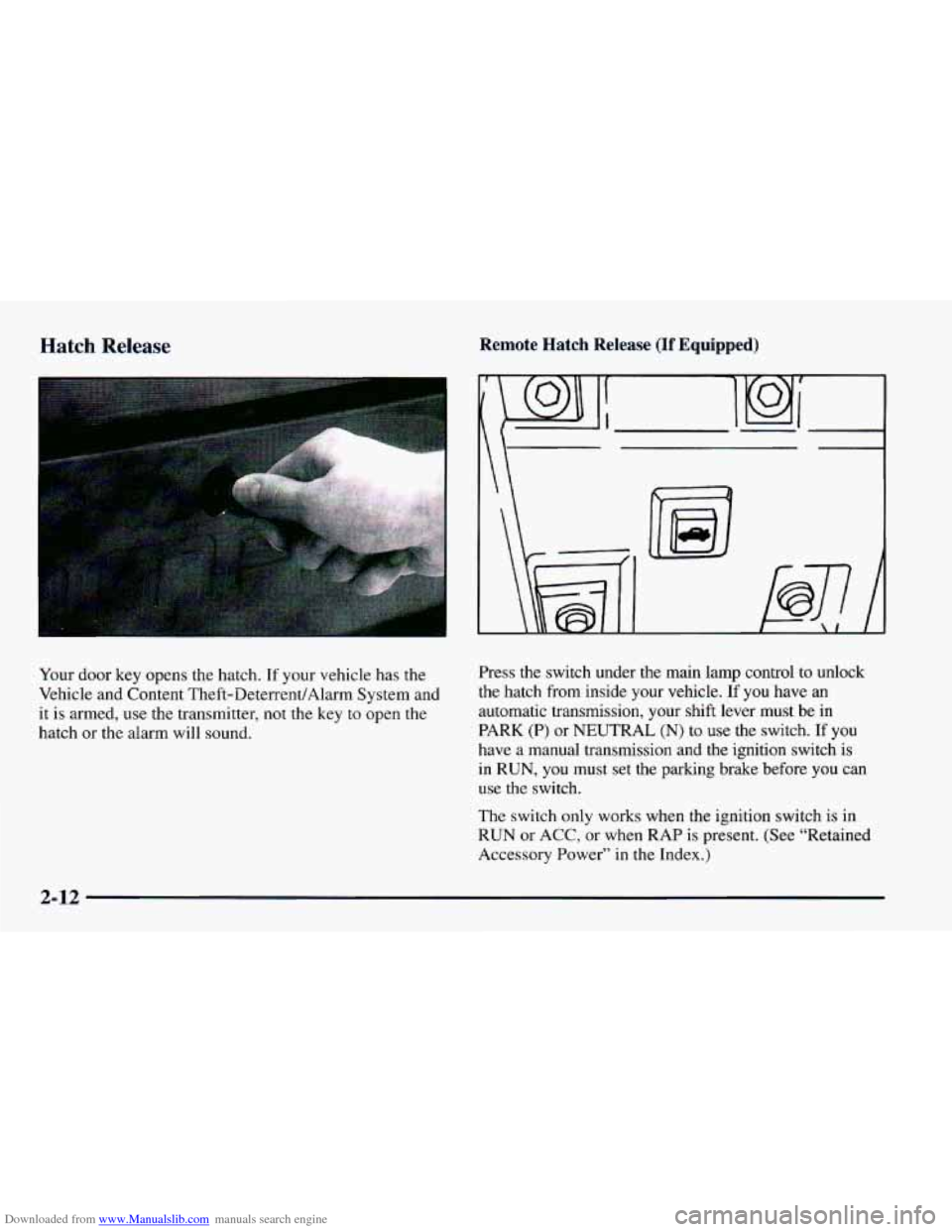
Downloaded from www.Manualslib.com manuals search engine Hatch Release
Your door key opens the hatch. If your vehicle has the
Vehicle and Content Theft-DeterrentlAlarm System and
it is armed, use the transmitter, not the key to open the
hatch or the alarm will sound.
Remote Hatch Release (If Equipped)
\ I
B
Press the switch under the main lamp control to unlock
the hatch from inside your vehicle.
If you have an
automatic transmission, your shift lever must be in
PARK (P) or NEUTRAL
(N) to use the switch. If you
have a manual transmission and the ignition switch is
in RUN, you must set the parking brake before you can
use
the switch.
The switch
only works when the ignition switch is in
RUN or
ACC, or when RAP is present. (See “Retained
Accessory Power”
in the Index.)
2-12
Page 63 of 404

Downloaded from www.Manualslib.com manuals search engine When you park your Chevrolet and open the driver’s
key from the ignition and take it with you. Always do
NOTICE: door, you’ll hear a chime reminding you to remove your
If you put things in the hatchback area, be sure
they won’t break the glass when you close it.
Never
slam the hatch down. You could break the
glass or damage the defogger grid (if equipped).
this. Your steering wheel will be locked, and so will
your ignition. If you have an automatic transmission,
taking your
key out also locks your transmission. And
remember
to lock the doors.
I I Parking at Night
On vehicles with the Vehicle and Content
Theft-DeterrenUAlarm System: The hatch switch will
not work while the system
is armed. See “Vehicle and
Content Theft-DeterrendAlarm System” in the Index.
Theft
Vehicle theft is big business, especially in some cities.
Although your Chevrolet
has a number of theft-deterrent
features, we know that nothing we put
on it can make it
impossible
to steal. However, there are ways you can help.
Key in the Ignition
If you leave your vehicle with the keys inside, it’s an
easy target for
joy riders or professional thieves -- so
don’t do it. Park
in a lighted spot, close all windows and lock your
vehicle. Remember to keep your valuables
out of sight.
Put them in a storage area, or take them with
you.
Parking Lots
If you park in a lot where someone will be watching
your vehicle, it’s best to lock
it up and take your keys.
But what if you have to leave your ignition key? What
if
you have to leave something valuable in your vehicle?
0 Put your valuables in a storage area, like your trunk
or glove box.
0 Lock the glove box.
@ Lock all the doors except the driver’s.
Then take the
door key with you.
2-13
Page 65 of 404

Downloaded from www.Manualslib.com manuals search engine Arming the System Remote Keyless Entry Transmitter Locking
Passive arming is also available, if you would like the
system to arm all by itself after the doors have been
closed for a short time. When the system is armed, a red
light will flash briefly once every two seconds. (Note:
If
you return to your vehicle and the red light is flashing
two brief flashes every two seconds, the system is armed
and the shock sensor had triggered a two minute alarm.
If the red light is flashing three times every two seconds,
the system is armed and there was an intrusion that
sounded the alarm). Horn chirps and parking lamp
flashes can be set to your choice.
If all the doors are closed, locking the vehicle with
the transmitter will immediately arm the system. The
horn will chirp twice and the parking lamps will flash,
confirming that the system is armed.
If any door is open
when the transmitter
LOCK button is pressed, the
system goes into an armed wait mode, waiting for the
doors to close. Once they are closed, the system will
arm, chirp the horn twice and flash the parking lamps.
If the hatch is open or ajar at the time the system is
arming, the horn will only chirp once.
Power Door Lock Switch Locking
If any door is open when the power door lock switch
is pressed, the system goes into an armed wait mode,
waiting for the doors to close. Once they are closed, the
system will arm and flash the parking lamps.
If all of the
doors are closed when the lock switch is pressed, the
system assumes
you are inside the vehicle, so it will not
arm. Note: Locking the doors by using the manual door
locks will not arm the system.
2-15
Page 66 of 404

Downloaded from www.Manualslib.com manuals search engine Passive Arming
If the ignition was just turned off and a door was
opened, the system will arm
six seconds after all doors
are closed, whether or not you lock them. In all other
cases, the
system will wait 30 seconds after all doors are
closed before arming, allowing you time to get into the
vehicle and put the key in the ignition. The parking
lamps will flash when the system arms. Passive arming
is not enabled from the factory.
Disarming the System
There are two ways to disarm the system:
1. Press the UNLOCK button on the key chain transmitter.
If the horn chirps two or three times when you unlock the
car, the alarm sounded in your absence. Two chirps
means that the shock sensor was set
off and three chirps
means that a door
or the hatch was opened.
2. Turn the ignition to the RUN position with the
proper key.
For more information on customizing the features
mentioned here, see “Feature Customization”
in the Index.
lhrning Off the Alarm
If you started the alarm by pressing the panic button on
the key chain transmitter, you must either push that button again or
turn the ignition switch to the ON
position
to stop the alarm.
If the alarm is sounding due
to the shock sensor or a
door or hatch opening, it can be turned off by either
turning the ignition switch with a proper key inserted or
by pressing any button
on the key chain transmitter. If
you use your key chain transmitter to silence the alarm,
additional things will happen depending upon which
button
you press.
0
0
0
0
Pressing the UNLOCK button will turn the alarm
off, unlock the driver’s door and disarm the system.
Pressing the
LOCK button will turn the alarm off,
keep the doors locked and keep the system armed.
Pressing the trunk symbol button twice within five
seconds will turn the alarm off and will unlock and
disarm the hatch only.
Pressing the panic button will turn the alarm off,
keep the doors locked and keep the system armed.
If the alarm is sounding because an incorrect ignition
key was used, press any button on the key chain
transmitter
to turn the alarm off.
The alarm will stop by itself after two minutes.
2-16