1997 CADILLAC ELDORADO lock
[x] Cancel search: lockPage 69 of 361

Downloaded from www.Manualslib.com manuals search engine A “yes” or “no” response must be made after each
prompt is displayed
in order to continue on to the next
prompt or personalization feature. Press the TRIP
SET
(TRIP RESET) button to choose yes, press the RESET
(INFO RESET) button to choose no or press the
INFORMATION
(INFO) button to “skip” to the next
personalization feature.
FEATURE
ON appears when a yes response is made
and FEATURE
OFF appears with a no response.
If a no response is made after the DOQRS LOCK IN
GEAR prompt is displayed, FEATURE OFF will appear.
The automatic door locking system has been disabled
and
no other door lock messages will be displayed.
REMOTE
FLASH LIGHTS, which is the next available
personalization
feature to display, will appear next.
See “Remote Confirmation”
in the Index for
more information.
If a yes response is made after the DQORS LOCK IN
GEAR prompt is displayed, %;EA’ ON appears.
The automatic door locking system is enabled and allows
the DOORS UNLOCK IN PARK prompt to zppear.
Choosing this prompt advances you to REMOTE FLASH
LIGHTS whereas a no response will display the DRIVR
UJYLOCK IN PARK prompt. A yes or no response
here automatically brings up the
REMOTE FLASH
LIGHTS feature.
Leaving your key in any igmtion position
with either door
open will disable
the use of the power door lock switches.
The anti-lockout feature is disabled when the ignition is
on.
If you close the doors, you can lock them using the
RKE system. It is always recommended that you remove
your ignition
key when lockmg your vehicle.
Note that the anti-lockout feature can be overridden by
holding the power door
lock switch for three seconds
or longer.
If you are leaving the vehicle, open the door, set the
locks from the inside, get out and close
the door.
Page 70 of 361

Downloaded from www.Manualslib.com manuals search engine e
With this feature, you
can lock and unlock the
doors, un%ock the trunk,
open the fuel door and turn
on your vehicle’s interior
lamps from about
10 feet
(3 m) away using the RlKE
transmitter supplied with
your vehicle.
Your
RKE system operates on a radio frequency subject
to Federal Communications Commission (FCC) Rules
and with Industry and Science Canada.
This device complies with Part 15 of the FCC Rules.
Operation is subject
to the following two conditions:
(1) this device may not cause hml interference, and
(2) this device must accept any interference received,
including interference that
may cause undesired operation
of the device.
Changes or modifications
to this system by other than
an authorized service facility could void authorization
to use this equipment.
This device complies with RSS-210 of Industry and
Science Canada. Operation is subject to the following
two conditions: (1) this device rnay not cause
interference, and
(2) this device must accept any
interference received, including interference that may
cause undesired operation
of the device.
The range of this system is about 10 feet (3 rn). At times
you may notice a decrease in range. This is
norrnal for
any remote keyless entry system. If the transmitter does
not work 81- if you have to stand closer to your vehicle
for
the transmitter to work, try this:
Check to determine if battery replacement is
necessary. See the instructions that follow.
Check the distance. You may be too far from your
vehicle. YOU may need to stand closer during rainy
or
snowy weather.
Check the location. Other vehicles
81- objects rnay
be blocking the signal.
Fdke a few steps to the left
or right, hold the transmitter higher, and try again.
If you’re still having trouble, see your Cadillac
dealer
QP a qualified technician for service.
Page 71 of 361
Downloaded from www.Manualslib.com manuals search engine When you press this symbol to unlock the
driver’s door, the parking lamps on your vehicle will
blink twice. (You can program your vehicle
so the
parking lamps will not flash. For more information,
see “Remote Confirmation” later
in this section.)
Pressing it again within five seconds will unlock the
other doors. Pressing this button will also disarm
the
optional theft-deterrent system and turn on the interior
lamps at night.
When you press
this symbol to lock the doors, the
parking
lamps will blink once. (You can program your
vehicle so the parking lamps will not flash. For more
information,
see “Remote Confirmation” later in this
section.)
This also arms the optional theft-deterrent system
when the ignition
is off.
Press this symbol to open the trunk.
Press ths button to open the fuel door.
The
pu(E transmitter can also be used to recall. the
memory settings for up
to two drivers. For more
information, see “Memory Seat
and Mirrors” in the Index.
Note that pressing the transmitter buttons numerous times (approximately
500 times) out of the vehicle‘s operating
range may cause the transmitter not
to work. Replacing
the battery and pressing the transmitter buttons 10 or
more times out
of range will also cause the transmitter
not to work. To reset the transmitter, you must be within
the vehicle’s operating range. Press and hold the trunk
button, and within one second, press and hold the lock
button. Continue
to hold both buttons for approximately
three seconds. See your Cadillac dealer for service if your
transmitter still doesn’t work properly.
This personalization feature allows the driver to program
the parlung lamps to blink or to remain off when the lock
or unlock buttons om the RISE transmitter are pressed.
Press the
SET (TIRIIP RESET) button to answer
“yes,” press the
WESET’ (INFO RESET) button to
indicate “no” or press the INFORMATION (INFO)
button to “skip” to the next personalization feature.
To begin programming, press the unlock button of the
RKE transmitter for the appropriate driver (1 or 2).
The ignition must be in the RUN position. Press and
hold the
INFORMATION (INFO) and RESET (INFO
RESET) buttons at the same time. The first message to
appear refers to
the programmable automatic door locks.
To skip this prompt, press the ‘I[NFQWMATION
(INFO) button.
Page 72 of 361

Downloaded from www.Manualslib.com manuals search engine When REMOTE FLASH LIGHTS appears on the DIC
display, press the yes button to program the parking
lamps to blink once when the lock button on the
RKE
transmitter is pressed and to blink twice when the
unlock button
is pressed. If you don’t want the parking
lamps to blink when using the RKE transmitter, press
the no button.
FEATURE ON will display if REMOTE FLASH
LIGHTS was selected and FEATURE OFF will show if
you answer no.
For a list of the other personalization features available,
see “Memory and Personalization Features” later in
this section.
This personalization feature enables the driver to
program the exterior lamps to
turn on for 20 seconds
or
to remain off when using the RKE transmitter to
unlock your vehicle.
If exterior lighting is selected, the parking lamps,
taillamps, sidemarker lamps, license plate lamps,
low-beam headlamps, etc. will turn on for about
20 seconds or until the ignition key is turned to RUN.
Check the back of the RKE transmitter to verify that the
correct driver is selected before you start programming.
To begin programming, press the INFORMATION
(INFO) and RESET (INFO RESET) buttons at the same
time for about two seconds. Exterior fighting is the third
feature to display. Press the WOWMATION (INFO)
button to “skip” past the first two features -- DOOR
LOCKS IN GEAR and REMOTE FLASH LIGHTS.
When EXT LIGHTS AT UNLOCK appears, a “yes” or
“no” response
is required. Press the TRIP SET (TRIP
RESET) button to answer yes or press the RESET
(INFO RESET) button to indicate a no response.
FEATURE ON displays when a yes response is made
and
FEATURE OFF shows after a no response.
For a list of the other personalization features available,
see
“Memory and Personalization Features” later in
this section.
Your vehicle
may have memory personalization. If it
does, REMOTE RECALL MEMORY will be the fourth
personalization feature to display on the
DIC system.
Memory settings that
have been previously programmed
(HVAC settings, radio preset settings, exterior lighting
choices, remote confirmation choices and programmable
automatic
door 1oc.k choices) can be recalled by using
either the
RICE transmitter or by placing the key in your
vehicle’s ignition.
Page 73 of 361

Downloaded from www.Manualslib.com manuals search engine To begin programming, check the back of the RKE
transmitter to verify that the correct driver is selected.
Press the
INFORMATION (INFO) and RESET (INFO
RESET) buttons at the same time for about two seconds.
As mentioned, memory recall is the fourth feature to
appear. To “skip” past the first three personalization
features, press the
INFORMATION (INFO) button.
When
REMOTE RECALL MEMORY appears, the
driver is able to recall memory settings when
the unlock
button on the
RKE transmitter is pressed with the
ignition in
LOCK. Press the TRIP SET (TRIP RESET)
button to select or press the RESET (INFO RESET)
button to answer no and to continue on to the next
prompt.
(FEATURE ON displays when a yes response
is made and FEATURE OFF shows when a no response
is made.)
If a no response was made, the KEY IN RECALL
MEMORY prompt will show next. This choice recalls
memory settings when the key is placed
in your
vehicle’s ignition.
A yes or no response is required.
For a list
of the other personalization features available,
see “Memory and Personalization Features” later
in
this section. Each
RKE transmitter is coded
to prevent another
transmitter from unlocking your vehicle. If
a transmitter
is lost or stolen,
a replacement can be purchased through
your dealer. Once your dealer has coded the new
transmitter, the lost transmitter will
not unlock your
vehicle. Each vehicle can have only two transmitters
matched to it.
Under
normal use, the battery in your RKE transmitter
should Bast about four years.
You can tell the battery is weak if the transmitter won’t
work at the normal range in any location.
If you have to
get close
to your vehicle before the transmitter works,
it’s probably time to change the battery.
When replacing the battery, use care not to touch
any of the circuitry. Static from your body
transferred to these surfaces may damage
Page 76 of 361
Downloaded from www.Manualslib.com manuals search engine ACCESS PANEL RETAINER
TRUNK
SPARE
SPARE
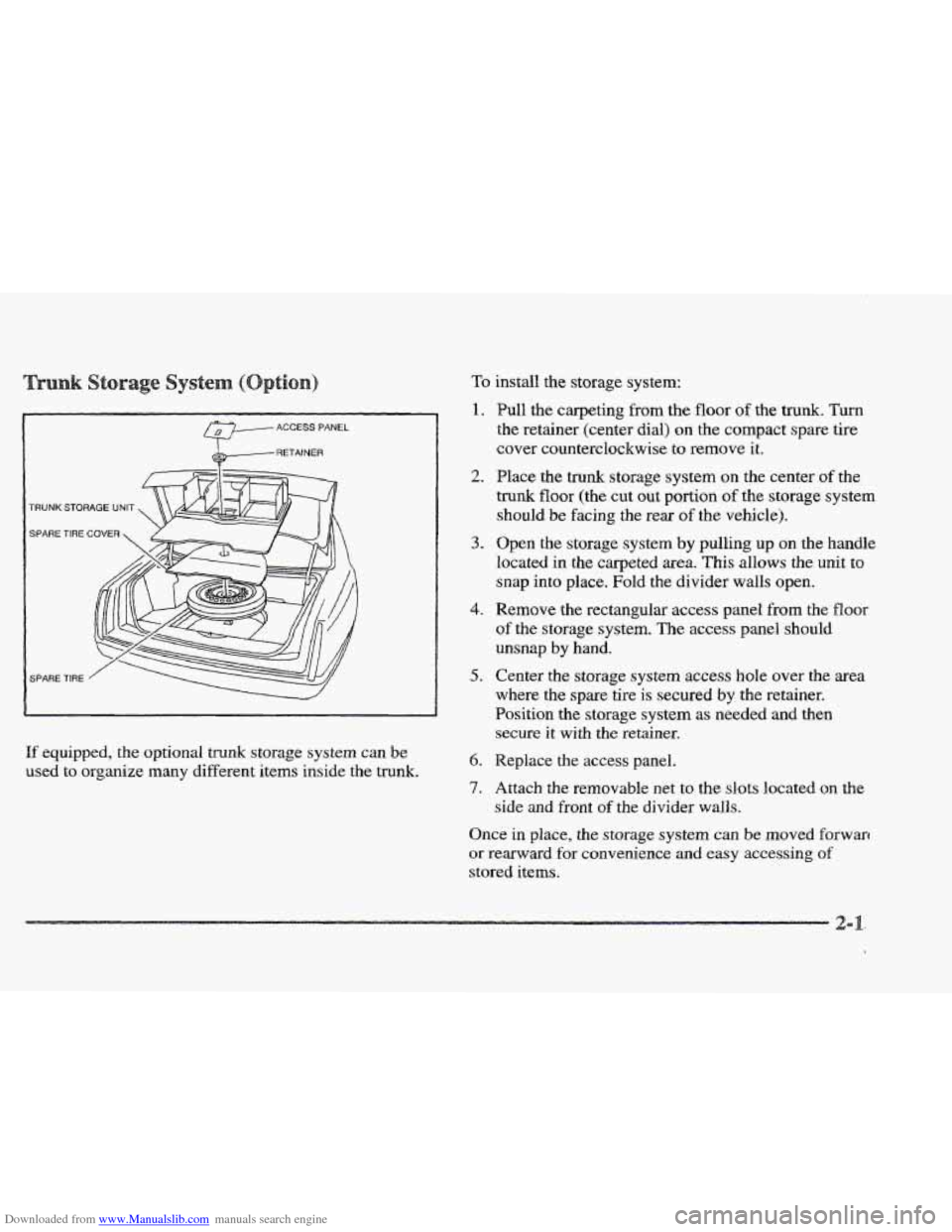
If equipped, the optional trunk storage system can De
used to organize many different items inside the trunk.
To install the storage system:
1.
2.
3.
4.
5.
6.
7.
Pull the carpeting from the floor of the trunk. Turn
the retainer (center dial) on the compact spare tire
cover counterclockwise to remove it.
Place the trunk storage system
on the center of the
trunk floor (the cut out portion of the storage system
should
be facing the rear of the vehicle).
Open the storage system
by pulling up on the handle
located in the carpeted area. This allows the
unit to
snap
into place. Fold the divider walls open.
Remove the rectangular access panel
from the floor
of the storage system. The access panel should
unsnap
by hand.
Center the storage
system access hole over the area
where the spare tire
is secured by the retainer.
Position the storage system
as needed and then
secure it with the retainer.
Replace the access panel.
Attach the removable net
to the slots located on the
side and front of the divider walls.
Once in place, the storage system can be moved forwarr
or rearward for convenience and easy accessing of
stored items.
Page 77 of 361
Downloaded from www.Manualslib.com manuals search engine The following steps explain how to remove the trunk
storage system for cleaning or in case you need to access
the spare tire. Follow all
of these steps if the storage
system
is in the closed position. Begin with Step 2 if
the system is already open.
1. Open the storage system by pulling up on the handle
located in the carpeted area. This allows
the unit to
snap into place. Fold the divider walls open.
2. Remove the rectangular access panel from the floor
of the storage system. The access panel should
unsnap
by hand.
3. Center the storage system access hole over the
area where the spare tire
is secured by the retainer.
Position the storage system
as needed and
then remove the retainer
(turn the retainer
counterclockwise to remove
it).
4. Replace the access panel and remove the storage system.
Your car may have an automatic pull-down
feature that helps close the trunk electronically.
Your fingers
can be trapped under the trunk lid
as it goes down. Your fingers could be injured,
and
you would need someone to help you free
them. Keep your fingers
away from the trunk lid
as you close it and as it is going down.
With the automatic pull-down feature, you never have to
slam
the trunk lid in order to close the trunk. Instead,
gently lower the trunk lid until it
is nearly shut -- the
automatic pull-down unit will take over and lock the
trunk firmly.
Page 78 of 361

Downloaded from www.Manualslib.com manuals search engine /
\. Trunk kid
B. Lever
If for some reason the trunk lid (A) will not close, it may
be because the trunk pull-down unit was accidentally
bumped. Even though the
trunk lid remains open, the
motor from the pull-down unit has already cycled down.
If this happens, press the lever (B) on the trunk lid. The
pull-down unit motor will reset itself allowing the
trunk
lid to close when lowered.
e
Vehicle theft is big business, especially in some cities.
Although your Cadillac has a number of theft-deterrent
features,
we know that nothing we put on it can make it
impossible to steal.
However, there are ways you can help.
If you leave your vehicle with the keys inside, it’s an eaq
target for joy riders or professional heves -- so don’t do it
When
YOU park your Cadillac and open the driver’s door,
you’ll hear a chime reminding you
to remove your key
from
the ignition and take it with you. Always do this.
Your steering wheel will be locked,
and so will your
ignition and transaxle.
And remember to lock the doors.
Park in a lighted spot, close all windows and lock your
vehicle. Remember
to keep your valuables out of sight.
Put
them in a storage area, or take them with you.
ots
If you park in a lot where someone will be watching
your vehicle, it’s best to
lock it up and take your keys.
But what
if you have to leave your ignition key? What
you have
to leave something valuable in your vehicle?
Put
your valuables in a storage area, like your trunk
or glove
box.
2-