1996 TOYOTA SUPRA reset
[x] Cancel search: resetPage 81 of 188

79
(c) Presetting a station
1. Push the AM
VFMº button repeatedly
until the desired selection, AMº, FM1º or
FM2º, appears on the display.
The radio has two FM selections, FM1º
and FM2º. You can preset any desired six
stations in each selection. W hen you pre-
set an FM station, check which selectionyou have used.
2. Tune in the desired station. (See (b)
Selecting a stationº.)
3. Push one of the station selector but-
tons and hold it until a beep is heard. This
sets the station to the button and the but-
ton number will appear on the display.
To change the preset station to a dif ferent
one, follow the same procedure.
The preset station will be cancelled when
the power source is severed (battery dis- connected, burnt fuse, etc.). (d) Adjusting the tone
To adjust the low-pitched tone, push the
BASS TREBº knob (if pushed in) and turn it.
To adjust the high-pitched tone, push the
BASS TREBº knob (if pushed in), pull it fully out and turn it. (e) Adjusting the sound balance
To balance the sound between the right
and left speakers, pull out the BALº knob
and turn it.
To balance the sound between the front
and rear speakers, turn the FADEº knob.
(f) Listening to the cassette tape
1. Put the cassette into the slot, with the
tape side to the right and lightly push it in.The tape player will grab the cassette and
slide it into place to play it. If the radio is
on when inserting the cassette, it will auto-
matically turn off.
If the cassette is already in the slot, push
the TAPEº button.
At This time, PLAYº will appear on the
display.
The tape player can also be turned on by
pushing the PWR VOLº knob if the tape
player was playing when the system was
turned off by pushing the knob. When a metal or chrome equivalent tape
is inserted, the player will automatically
adapt to it and MTLº will appear on the
display.
2. If using a tape recorded with Dolby
NR*, push the button marked with the
double-D symbol to select the Dolby B
NR or Dolby C NR mode. The display will indicate which Dolby noise reduction sys-
tem is operating.The Dolby B NR mode reduces tape noiseby about 10 dB. The Dolby C NR mode re- duces tape noise by another 10 dB, or
about 20 dB total. For best sound repro-
duction, select the same NR mode that was used to record the tape.
To play a tape recorded without Dolby NR*, push the button until the Dolby NR
indicator disappears.
*: Dolby noise reduction manufactured under license from Dolby Lab-
oratories Licensing Corporation. DOLBYº and the double-D symbol
are trademarks of Dolby Laboratories Licensing Corporation.
3. Turn the PWR VOLº knob to adjust the volume.
4. Select your program. (See (g) Select-
ing a programº.)
5. Adjust the tone and sound balance. (See (d) Adjusting the toneº and (e) Ad-
justing the sound balanceº.)
6. If desired, other functions may be used
for your convenience. (See (h) Other tape player functionsº.)
7. To eject the cassette, push the EJECT button. As this is done, the player will turn
off. If the radio was on when the cassette tape was inserted, it will automatically turn
on again.
8. To turn the player off, push the
PWR VOLº knob.
Page 83 of 188
81
R
VMº button (radio monitor system):
Use for automatic station reception. Push the R VMº button. R VMº appears on
the display. In this mode, if you push the
REW FF (TUNE)º button on either side
when listening to the tape, the system will change the radio mode and automatically
receive the last station which was set. At the time, the received station condition
appears on the display.
The system will be cancelled out when the
power source is severed (battery discon- nected, burnt fuse, etc.) (i) Anti-theft system
To deter theft of your radio unit, the sys-
tem is designed so that the radio unit be-
comes inoperable if the unit is stolen from the vehicle.
The system is not preset at factory. You
must input a three-digit identification
number decided by you.
NOTICE
If you pushed any wrong buttons on the anti-theft system, the following
messages will appear on the display.
ErrºÐYou have pushed wrongbuttons.
1-9ºÐIndicates the number of
errors you have made. You maymake up to nine errors, but nomore!
HELPºÐThe number of errors you
can make was exceeded. The audiosystem is completely i noperable.
Contact your Toyota dealer.
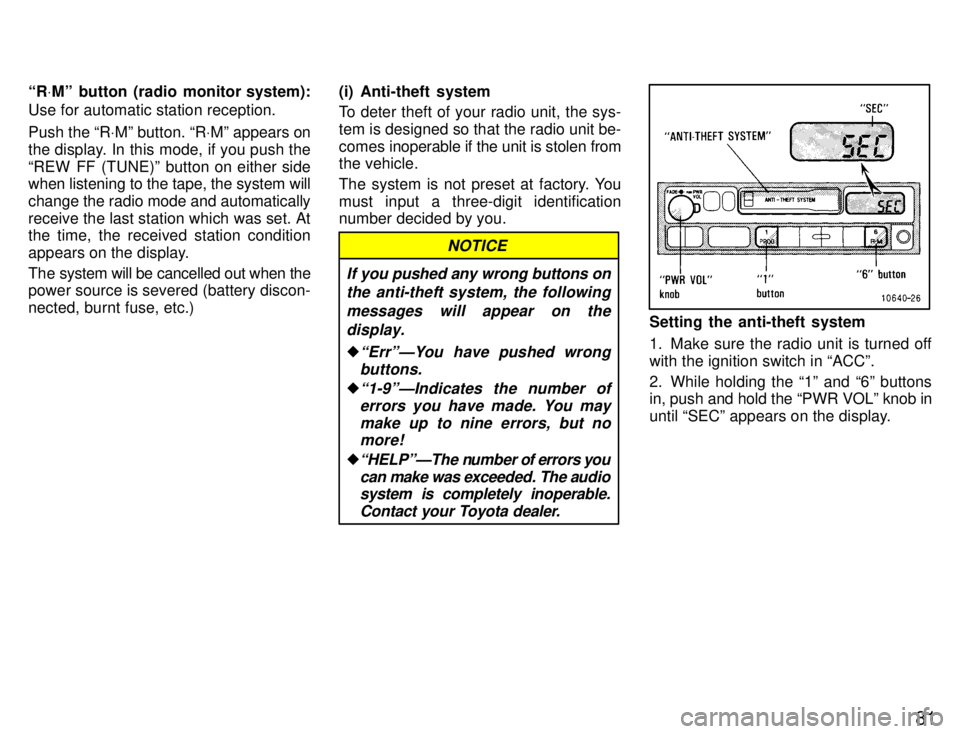
Setting the anti-theft system
1. Make sure the radio unit is turned off with the ignition switch in ACCº.
2. While holding the 1º and 6º buttons
in, push and hold the PWR VOLº knob in
until SECº appears on the display.
Page 86 of 188

84
If the anti-theft system is activated
The audio system made inoperable by the
activated anti-theft system will be oper-
able if you give it the correct identification
number.
1. Follow the steps 3 and 4 described in Setting the anti-theft systemº.
2. With your identification number ap-
pearing on the display, press the SCANºbutton and hold it in until SECº appears
on the display. SECº will go off to indicate
that the system is reset and the audio sys-
tem is operable. If invalid buttons have
been used, Errº will appear on the display
before SECº appears. Try again from the
beginning.See Cancelling the anti-theft systemº for notes on the figure with Errº.
Page 91 of 188

89
(a) Listening to the radio
1. Push the AM
VFMº button to turn the
radio on and select either an AM or FM broadcast.
AMº or FMº will appear on the display.
The radio can also be turned on by push-
ing the PWR VOLº knob if the radio was
on when the system was turned off.
2. Turn the PWR VOLº knob to adjust the volume.
3. Tune in the desired station. (See (b)
Selecting a stationº and (c) Presetting astationº.)
The radio will change automatically to ste-
reo reception when an FM stereo broad-
cast is being received. At the same time,
STº will appear on the display. When the
receiving signal gets weak, the channel
separation will automatically be reduced
for the lowest noise. If the signal becomes
extremely weak, the radio will switch over
to monaural reception.
4. Adjust the tone and sound balance. (See (d) Adjusting the toneº and (e) Ad-
justing the sound balanceº.)
5. To turn the radio off, push the
PWR VOLº knob. (b) Selecting a station
Tune in the desired station using one of
the following methods. The frequency will
appear on the display.
Preset tuning:
Use for tuning-in to a de-
sired preset station. (See (c) Presetting a stationº.)
1. Push the AM VFMº button repeatedly
until the desired selection appears on the
display.
2. Push the station selector button which has been preset to the desired station.
The radio will tune in to the station and the
button number will appear on the display.
Seek tuning: Use for automatic station
search and stop.
Push the TUNEº button on either side
and hold it until a beep is heard. The radiowill begin seeking up or down for a station
of the nearest frequency and will stop on reception. Each time you push the button,
stations will be sought out one after anoth-
er.
Scan tuning: Use for station-to-station
scanning. Scanning for all frequenciesÐPush the
SCANº button and hold it until a beep is heard.
With SCANº on the display, the ra-
dio will automatically seek out a station of
a higher frequency, hold it for 5 seconds
and scan to the next. To continue listening
to the broadcast of your choice, simply
push the SCANº button once again.
If the radio scans over all frequencies
without stop because the signals are too
weak or just because you leave it going,
the radio will begin scanning again with
sensitivity boosted for searching out weak
stations.
Scanning for preset stationsÐPush the
SCANº button within 2 seconds. With
SCANº on the display, the radio will auto-
matically seek out a preset station, hold it
for 5 seconds and scan to the next. To
continue listening to the station of your choice, simply push the SCANº button
once again. Manual tuning
Push the TUNEº button on either side for
less than 0.5 second. Each time you push the button, the radio will step up or down
to another frequency where stations couldexist. (c) Presetting a station
1. Push the AM VFMº button repeatedly
until the desired selection, AMº, FM1º or
FM2º, appears on the display.
Page 92 of 188

90The radio has two FM selections, FM1º
and FM2º. You can preset any desired six
stations in each selection. W
hen you pre-
set an FM station, check which selection you have used.
2. Tune in the desired station. (See (b)
Selecting a stationº.)
3. Push one of the station selector but-
tons and hold it until a beep is heard. This
sets the station to the button and the but-
ton number will appear on the display.
To change the preset station to a dif ferent
one, follow the same procedure.
The preset station will be cancelled when
the power source is severed (battery dis-connected, burnt fuse, etc.). (d) Adjusting the tone Automatic tone adjustment Push the EQº button repeatedly until the
desired frequency response pattern ap-
pears on the display. This function auto-matically controls the tone in accordance with the selected pattern.
To change the preset mode, adjust the manual tone control knobs as you like. (See the following Manual tone adjust- mentº.) To memorize the setting you have se-
lected, push the EQº button for 2 sec-
onds until a beep is heard. To cancel the
memory,
push the EQº button for 10 sec-
onds until the second beep is heard.
To cancel all the memory which you have
set, push the EQº button for 20 seconds until the third beep is heard. Manual tone adjustment
Before using the tone controls, push the
EQº button repeatedly until your desired
response pattern appears on the display.
To adjust a low-pitched tone, push the
BASSº knob (if pushed in) and turn it. At the time, the BASSº display will change.
To adjust a middle-pitched tone, push the
MID BALº knob (if pushed in) and turn it.
At the time, the MIDº display will change.
To adjust a high-pitched tone, push the
TREB FADEº knob (if pushed in), and
turn it. At the time, the TREBº display will
change. (e) Adjusting the sound balance
To balance the sound between the right
and left speakers, push the MID BALº knob (if pushed in), pull it fully out and turn it.
To balance the sound between the front
and rear speakers, push the TREB
FADEº knob (if pushed in), pull it fully outand turn it. (f) Listening to the cassette tape
1. Put the cassette into the slot, with the
tape side to the right and lightly push it in.The tape player will grab the cassette and
slide it into place to play it. If the radio or
Compact Disc
player is on when inserting
the cassette, it will automatically turn off.
If the cassette is already in the slot, push
the TAPEº button.
At this time, PLAYº will appear on the dis-
play.
The tape player can also be turned on by
pushing the PWR VOLº knob if the tape
player was playing when the system was
turned off by pushing the knob. When a metal or chrome equivalent tape
is inserted, the player will automatically
adapt to it and MTLº will appear on the
display.
2. If using a tape recorded with Dolby
NR*, push the button by the double-D
symbol to select the Dolby B NR or Dolby
C NR mode. The display will indicate
which Dolby noise reduction system is op-
erating. The Dolby B NR mode reduces tape noise by about 10 dB. The Dolby C NR mode re-duces tape noise by another 10 dB, or
about 20 dB total. For best sound repro-
duction, select the same NR mode that was used to record the tape.
Page 95 of 188

93
You can eject the Disc only once after the
system is turned off.
When ejecting a 8 cm (3.2 in.) Disc, do not
put a 12 cm (4.7 in.) Disc into the slot until
the DISCº light goes off. (j) Selecting a program
Automatic program selection:
Use for
direct access to a desired program.
Push the TRACK UP/DOWN button on ei-
ther side and hold it until the desired pro- gram track number appears on the dis-
play. As you release the button, the player
will start playing the selected program
from the beginning. Manual program selection:
Push either of the FAST FORWARD or
REVERSE buttons and hold it to fast for-
ward or reverse the Disc. Releasing thebutton starts the play from that position.
Scan program selection: Use for pro-
gram-to-program scanning. Push the SCANº button. With SCANº on
the display, each program will be played
for 10 seconds from the beginning and
scan to the next. To continue listening to
the program of your choice, simply push the SCANº button once again. (k) Other Compact Disc player func-
tions
RPTº button: Use for automatic repeat
of the program currently being listened to. Push the RPTº button while the program
is being played. As this is done, RPTº will
appear on the display. When the program
is finished, the Disc will automatically re- turn to the beginning of the program and
the program will be played again. To can-
cel it, push the button once again. RANDº button: Use for automatic ran-
dom selection of Disc programs.
If the RANDº button is pushed while lis- tening to Compact Disc, RANDº will ap-pear on the display and the player will en-
dlessly repeat the programs selected at
random. To continue listening to the pro-
gram of your choice, simply push the
RANDº button once again. (l) Anti-theft system
To deter theft of your radio unit, the sys-
tem is designed so that the radio unit be-
comes
inoperable if the unit is stolen from
the vehicle.
The system is not preset at factory. You
must input a three-digit identification
number decided by you.
NOTICE
If you pushed any wrong buttons on the anti-theft system, the follow-
ing messages will appear on thedisplay.
ErrºÐYou have pushed wrongbuttons.
1-9ºÐIndicates the number oferrors you have made. You maymake up to nine errors, but nomore!
HELPºÐThe number of errors
you can make was exceeded. Theaudio system is completely inoper-
able. Contact your Toyota dealer.
Page 98 of 188
96
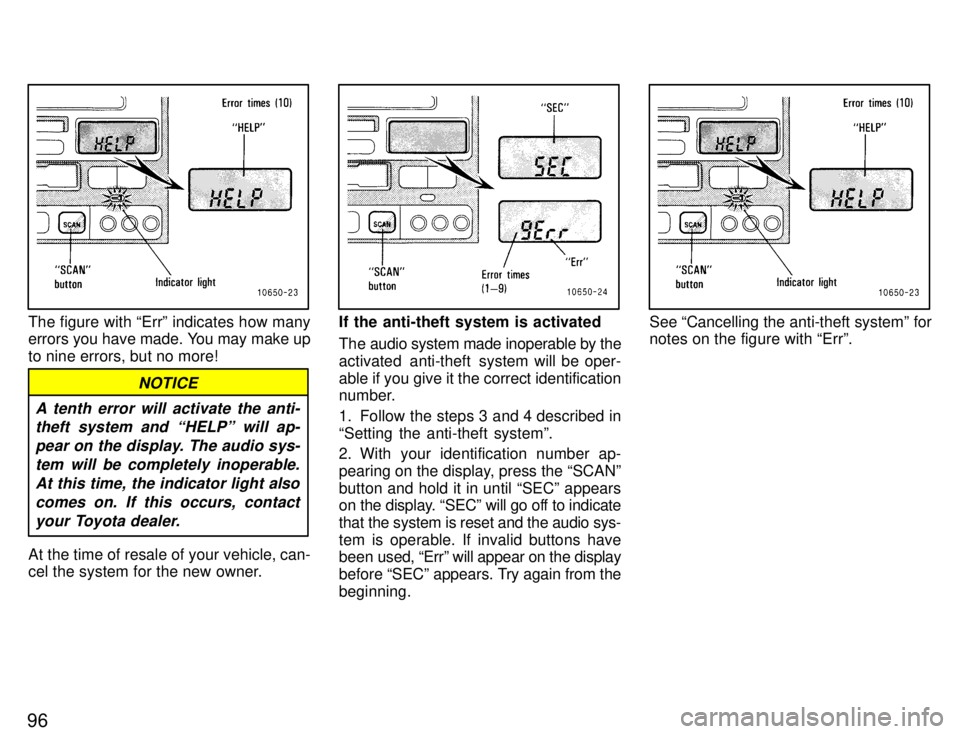
The figure with Errº indicates how many
errors you have made. You may make up
to nine errors, but no more!
A tenth error will activate the anti-theft system and HELPº will ap-
pear on the display. The audio sys-tem will be completely inoperable. At this time, the indicator light alsocomes on. If this occurs, contact your Toyota dealer.
NOTICE
At the time of resale of your vehicle, can-
cel the system for the new owner.
If the anti-theft system is activated
The audio system made inoperable by the
activated anti-theft system will be oper-
able if you give it the correct identification
number.
1. Follow the steps 3 and 4 described in Setting the anti-theft systemº.
2. With your identification number ap-
pearing on the display, press the SCANºbutton and hold it in until SECº appears
on the display. SECº will go off to indicate
that the system is reset and the audio sys-
tem is operable. If invalid buttons have
been used, Errº will appear on the display
before SECº appears. Try again from the
beginning.See Cancelling the anti-theft systemº for notes on the figure with Errº.
Page 105 of 188
Part 1Cigarette lighter and ashtray
Clock
103
OPERATION OF INSTRUMENTS AND CONTROLSÐ
Chapter 1-8 Other equipment
Clock
Cigarette lighter and ashtray
Glovebox
Luggage cover
Traction control system
Floor mat
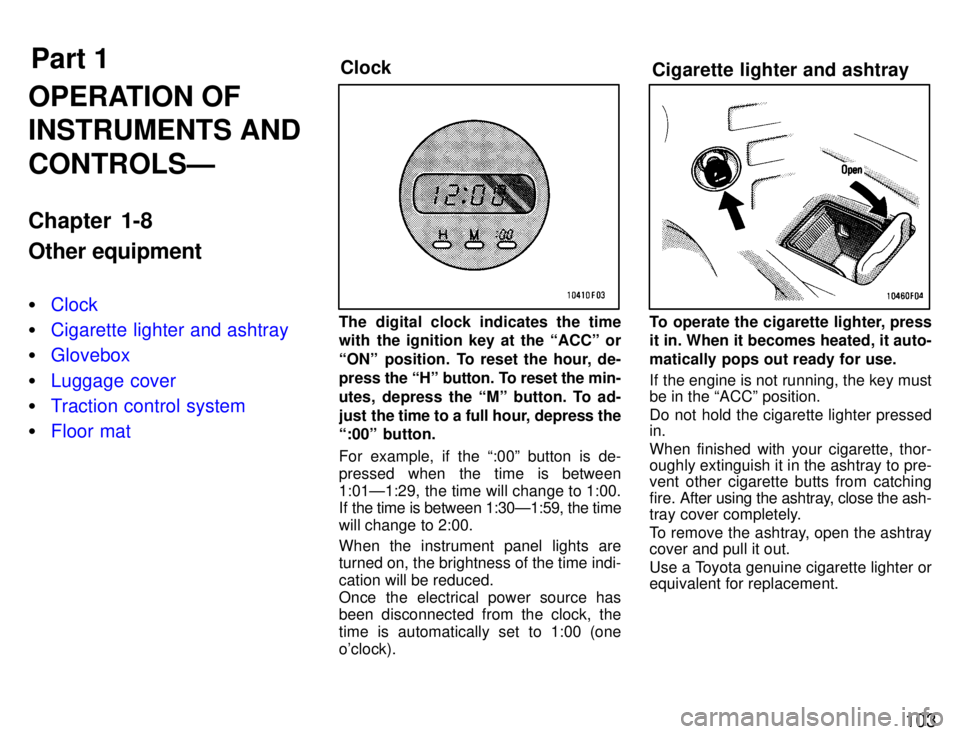
The digital clock indicates the time
with the ignition key at the ACCº or
ONº position. To reset the hour, de-
press the
Hº button. To reset the min-
utes, depress the Mº button. To ad-
just the time to a full hour, depress the
:00º button.
For example, if the :00º button is de-
pressed when the time is between
1:01Ð1:29, the time will change to 1:00.
If the time is between 1:30Ð1:59, the time
will change to 2:00. When the instrument panel lights are turned on, the brightness of the time indi- cation will be reduced.
Once the electrical power source has
been disconnected from the clock, the
time is automatically set to 1:00 (oneo'clock).To operate the cigarette lighter, press
it in. When it becomes heated, it auto-
matically pops out ready for use.
If the engine is not running, the key must be in the ACCº position.
Do not hold the cigarette lighter pressed in. When finished with your cigarette, thor-
oughly extinguish it in the ashtray to pre-
vent other cigarette butts from catching
fire. After using the ashtray, close the ash-
tray cover completely.
To remove the ashtray, open the ashtray cover and pull it out.
Use a Toyota genuine cigarette lighter or equivalent for replacement.