1996 NISSAN ALTIMA engine
[x] Cancel search: enginePage 16 of 183
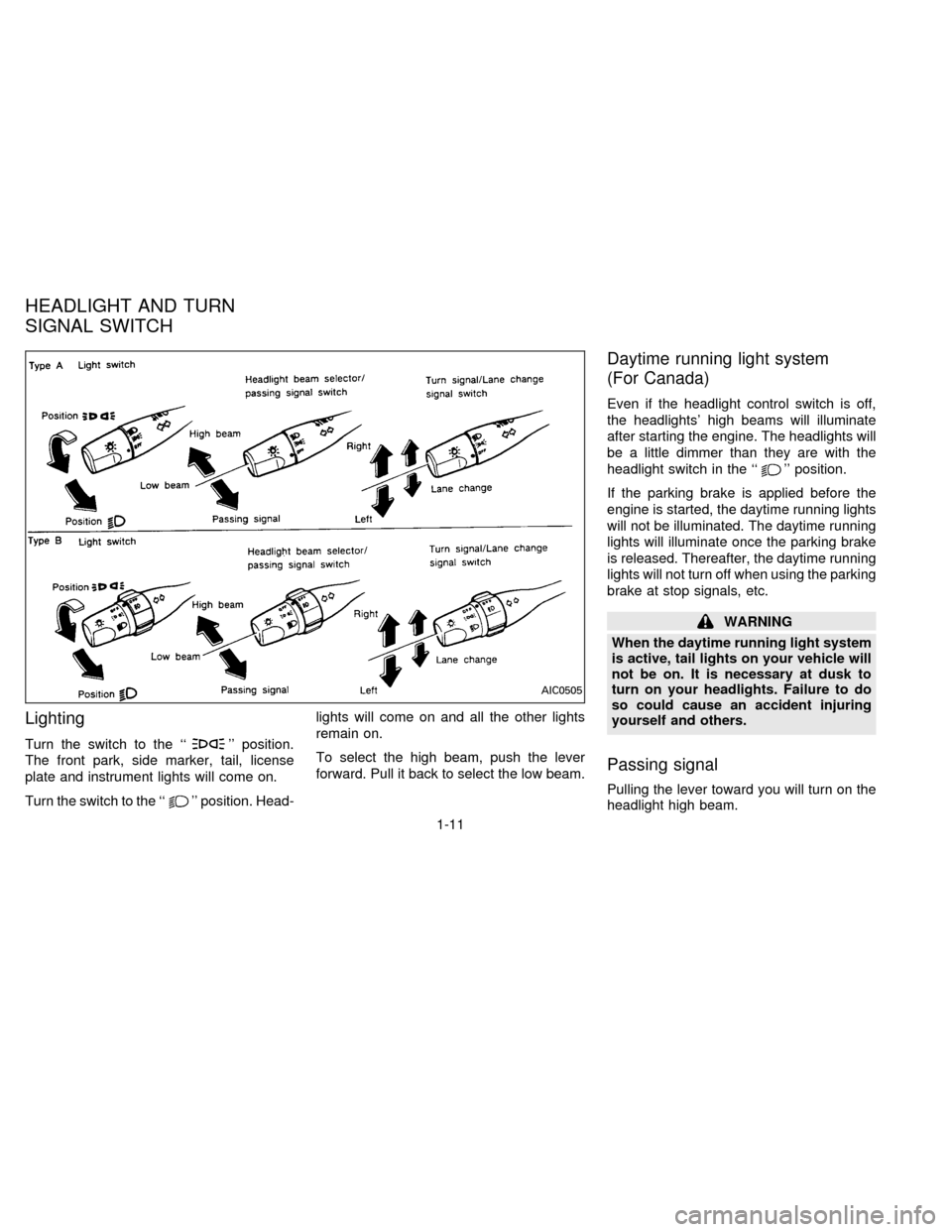
Lighting
Turn the switch to the ``'' position.
The front park, side marker, tail, license
plate and instrument lights will come on.
Turn the switch to the ``
'' position. Head-lights will come on and all the other lights
remain on.
To select the high beam, push the lever
forward. Pull it back to select the low beam.
Daytime running light system
(For Canada)
Even if the headlight control switch is off,
the headlights' high beams will illuminate
after starting the engine. The headlights will
be a little dimmer than they are with the
headlight switch in the ``
'' position.
If the parking brake is applied before the
engine is started, the daytime running lights
will not be illuminated. The daytime running
lights will illuminate once the parking brake
is released. Thereafter, the daytime running
lights will not turn off when using the parking
brake at stop signals, etc.
WARNING
When the daytime running light system
is active, tail lights on your vehicle will
not be on. It is necessary at dusk to
turn on your headlights. Failure to do
so could cause an accident injuring
yourself and others.
Passing signal
Pulling the lever toward you will turn on the
headlight high beam.
AIC0505
HEADLIGHT AND TURN
SIGNAL SWITCH
1-11
ZX
Page 33 of 183
FUEL FILLER CAP
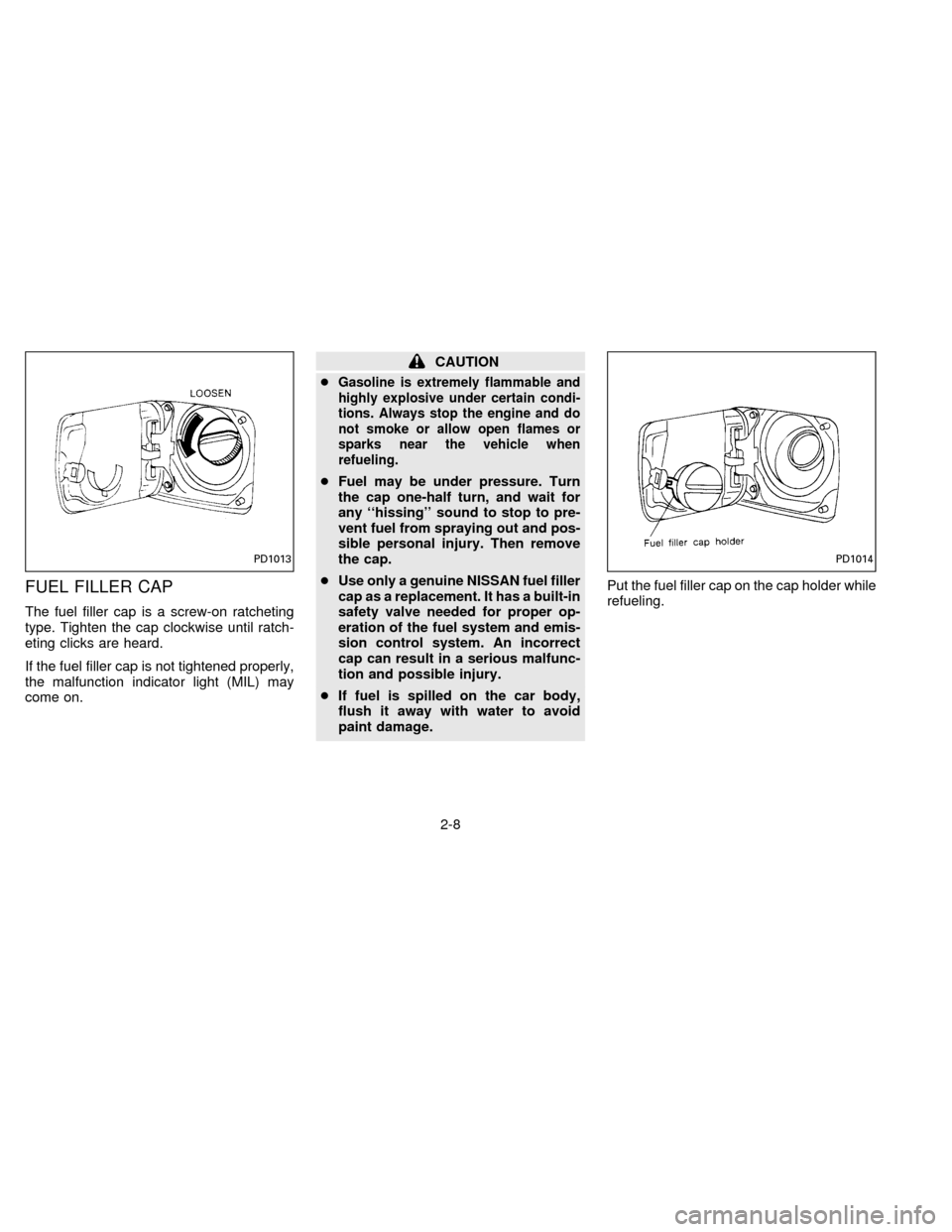
The fuel filler cap is a screw-on ratcheting
type. Tighten the cap clockwise until ratch-
eting clicks are heard.
If the fuel filler cap is not tightened properly,
the malfunction indicator light (MIL) may
come on.
CAUTION
c
Gasoline is extremely flammable and
highly explosive under certain condi-
tions. Always stop the engine and do
not smoke or allow open flames or
sparks near the vehicle when
refueling.
cFuel may be under pressure. Turn
the cap one-half turn, and wait for
any ``hissing'' sound to stop to pre-
vent fuel from spraying out and pos-
sible personal injury. Then remove
the cap.
cUse only a genuine NISSAN fuel filler
cap as a replacement. It has a built-in
safety valve needed for proper op-
eration of the fuel system and emis-
sion control system. An incorrect
cap can result in a serious malfunc-
tion and possible injury.
cIf fuel is spilled on the car body,
flush it away with water to avoid
paint damage.Put the fuel filler cap on the cap holder while
refueling.
PD1013PD1014
2-8
ZX
Page 60 of 183
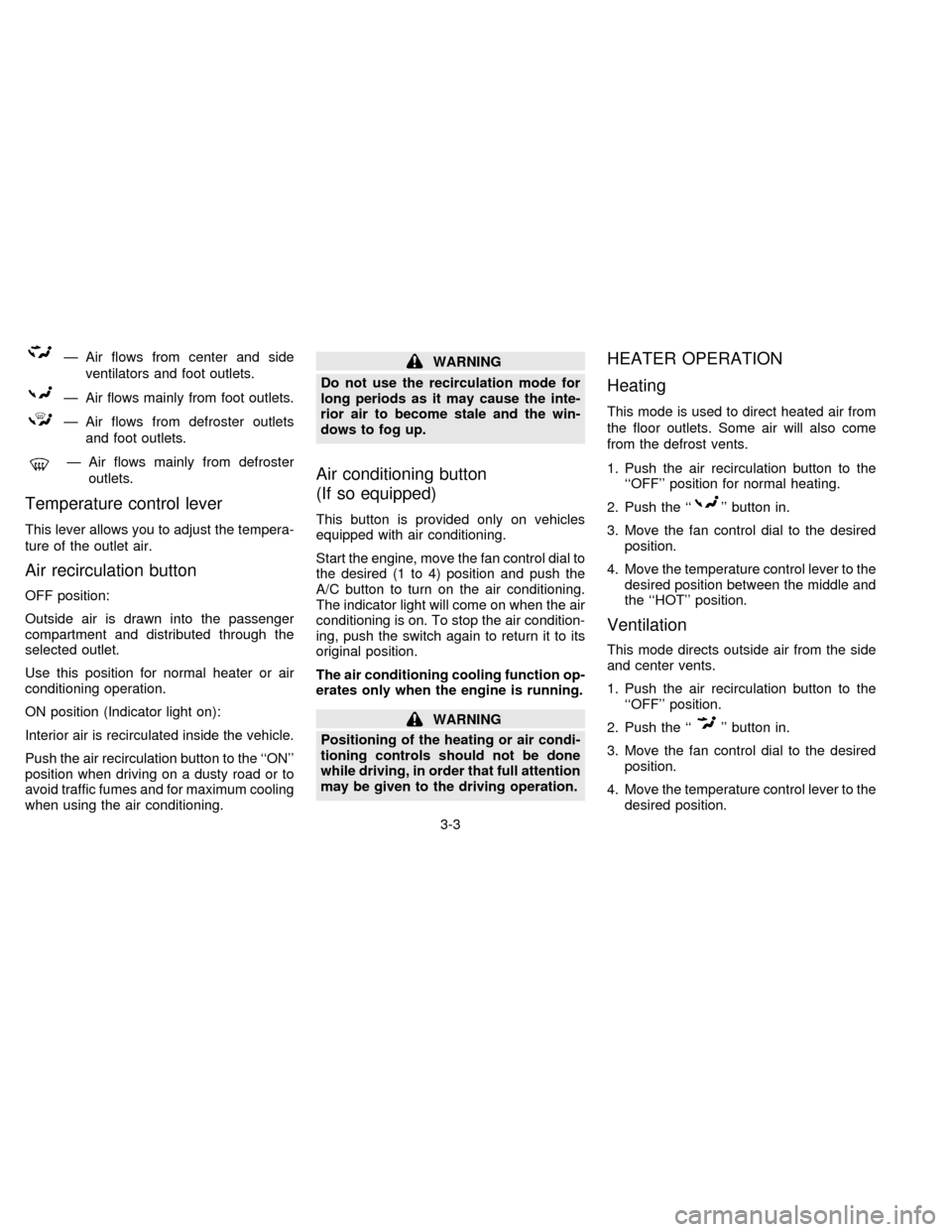
Ð Air flows from center and side
ventilators and foot outlets.
Ð Air flows mainly from foot outlets.
Ð Air flows from defroster outlets
and foot outlets.
Ð Air flows mainly from defroster
outlets.
Temperature control lever
This lever allows you to adjust the tempera-
ture of the outlet air.
Air recirculation button
OFF position:
Outside air is drawn into the passenger
compartment and distributed through the
selected outlet.
Use this position for normal heater or air
conditioning operation.
ON position (Indicator light on):
Interior air is recirculated inside the vehicle.
Push the air recirculation button to the ``ON''
position when driving on a dusty road or to
avoid traffic fumes and for maximum cooling
when using the air conditioning.
WARNING
Do not use the recirculation mode for
long periods as it may cause the inte-
rior air to become stale and the win-
dows to fog up.
Air conditioning button
(If so equipped)
This button is provided only on vehicles
equipped with air conditioning.
Start the engine, move the fan control dial to
the desired (1 to 4) position and push the
A/C button to turn on the air conditioning.
The indicator light will come on when the air
conditioning is on. To stop the air condition-
ing, push the switch again to return it to its
original position.
The air conditioning cooling function op-
erates only when the engine is running.
WARNING
Positioning of the heating or air condi-
tioning controls should not be done
while driving, in order that full attention
may be given to the driving operation.
HEATER OPERATION
Heating
This mode is used to direct heated air from
the floor outlets. Some air will also come
from the defrost vents.
1. Push the air recirculation button to the
``OFF'' position for normal heating.
2. Push the ``
'' button in.
3. Move the fan control dial to the desired
position.
4. Move the temperature control lever to the
desired position between the middle and
the ``HOT'' position.
Ventilation
This mode directs outside air from the side
and center vents.
1. Push the air recirculation button to the
``OFF'' position.
2. Push the ``
'' button in.
3. Move the fan control dial to the desired
position.
4. Move the temperature control lever to the
desired position.
3-3
ZX
Page 61 of 183
Defrosting or defogging
This mode is used to defrost/defog the
windows.
1. Push the air recirculation button to the
``OFF'' position.
2. Push the ``
'' button in.
3. Move the fan control dial to the desired
position.
4. Move the temperature control lever to the
desired position between the middle and
the ``HOT'' position.
cTo quickly remove ice or fog from the
windows, turn on the fan control dial to
``4'' and the temperature control lever to
the full ``HOT'' position.
cWhen the ``
'' switch is pushed, the
air conditioning will automatically be
turned on to defog the windshield, and
the air recirculation mode will automati-
cally be turned off.
Outside air is drawn into the passenger
compartment to improve the defogging
performance.
Bi-level heating
This mode directs cooler air from the side
and center vents and warmer air from the
floor outlets.
1. Push the air recirculation button to the
``OFF'' position.
2. Push the ``
'' button in.
3. Move the fan control dial to the desired
position.
4. Move the temperature control lever to the
desired position.
Heating and defogging
This mode heats the interior and defogs the
windshield.
1. Push the air recirculation button to the
``OFF'' position.
2. Push the ``
'' button in.
3. Move the fan control dial to the desired
position.
4. Move the temperature control lever to the
desired position between the middle and
the ``HOT'' position.
Operating tips
cClear snow and ice from the wiper
blades and air inlet in front of the
windshield. This will improve heater
operation.
cWhen the ``
'' or ``'' switch is
selected, the air recirculation mode will
automatically be turned off.
Outside air is drawn into the passenger
compartment to improve the defogging
performance.
AIR CONDITIONER OPERATION
Start the engine, move the fan control dial to
the desired (1 to 4) position and push in the
A/C button to activate the air conditioning.
When the air conditioning is on, cooling and
dehumidifying functions will be added to the
heater operation.
WARNING
The air conditioning cooling function
operates only when the engine is run-
ning.
3-4
ZX
Page 65 of 183
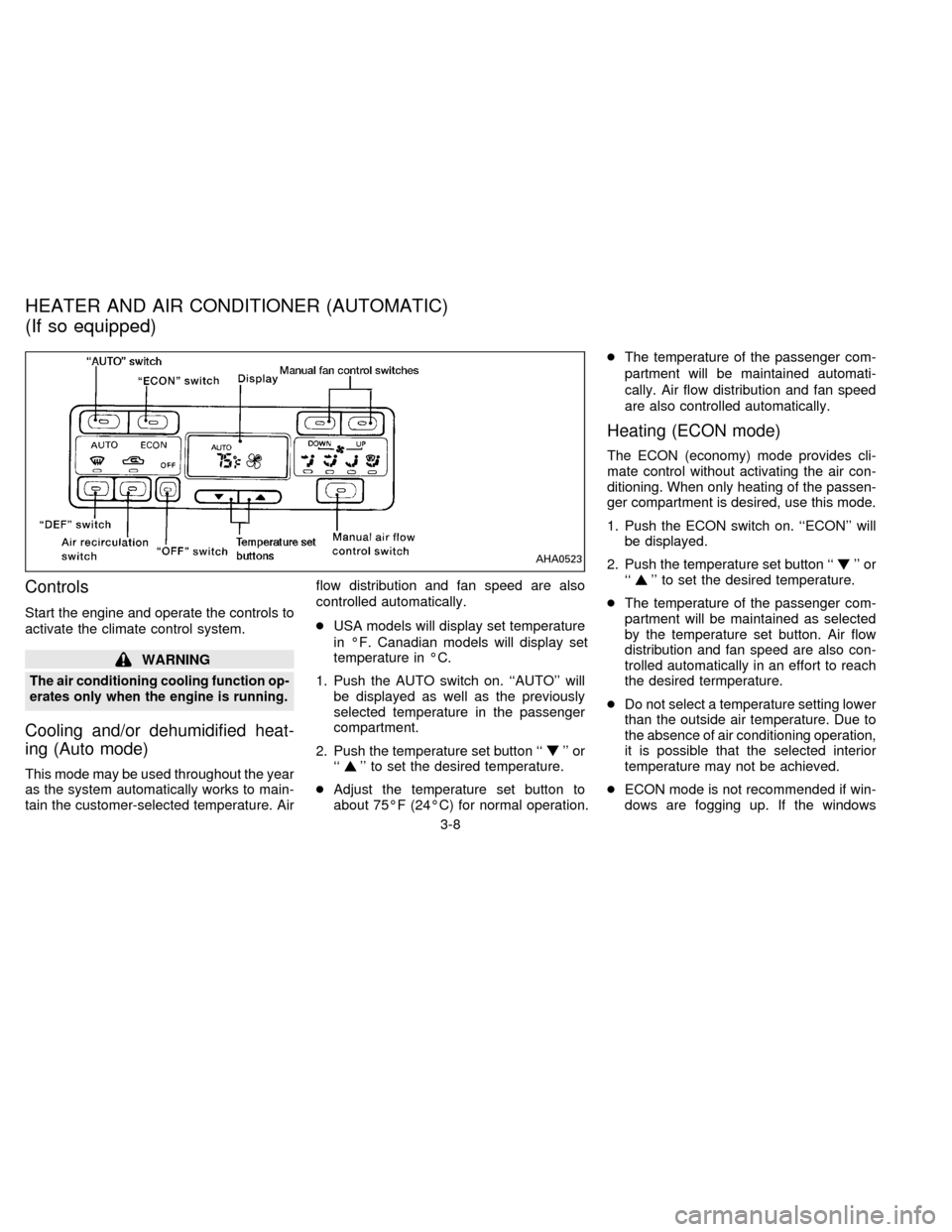
Controls
Start the engine and operate the controls to
activate the climate control system.
WARNING
The air conditioning cooling function op-
erates only when the engine is running.
Cooling and/or dehumidified heat-
ing (Auto mode)
This mode may be used throughout the year
as the system automatically works to main-
tain the customer-selected temperature. Airflow distribution and fan speed are also
controlled automatically.
cUSA models will display set temperature
in ÉF. Canadian models will display set
temperature in ÉC.
1. Push the AUTO switch on. ``AUTO'' will
be displayed as well as the previously
selected temperature in the passenger
compartment.
2. Push the temperature set button ``
'' or
``'' to set the desired temperature.
cAdjust the temperature set button to
about 75ÉF (24ÉC) for normal operation.cThe temperature of the passenger com-
partment will be maintained automati-
cally. Air flow distribution and fan speed
are also controlled automatically.
Heating (ECON mode)
The ECON (economy) mode provides cli-
mate control without activating the air con-
ditioning. When only heating of the passen-
ger compartment is desired, use this mode.
1. Push the ECON switch on. ``ECON'' will
be displayed.
2. Push the temperature set button ``
'' or
``'' to set the desired temperature.
cThe temperature of the passenger com-
partment will be maintained as selected
by the temperature set button. Air flow
distribution and fan speed are also con-
trolled automatically in an effort to reach
the desired termperature.
cDo not select a temperature setting lower
than the outside air temperature. Due to
the absence of air conditioning operation,
it is possible that the selected interior
temperature may not be achieved.
cECON mode is not recommended if win-
dows are fogging up. If the windows
AHA0523
HEATER AND AIR CONDITIONER (AUTOMATIC)
(If so equipped)
3-8
ZX
Page 66 of 183

begin to fog up while using the ECON
mode, use the procedures outlined in
Dehumified defogging.
Dehumidified defogging
1. Push the DEF switch on. The indicator
light will come on.
2. Push the temperature set button ``
'' or
``
'' to set the desired temperature.
cTo quickly remove ice or fog from the
outside of the windows, push the manual
fan control switch
and set to the
maximum position
.
cAs soon as possible after the windshield
is clean, push the AUTO switch to return
to the auto mode.
cWhen the DEF switch is pushed, the air
conditioning will automatically be turned
on at outside temperatures above 35ÉF
(2ÉC) to defog the windshield, and the air
recirculate mode will automatically be
turned off.
Outside air is drawn into the passenger
compartment to improve the defogging
performance.
Manual fan speed control
Push the fan control switchto manu-
ally control the fan speed. Each fan speed is
indicated by the shading of a fan blade on
the display. For example,
indicates
that the fan is operating at low speed and
indicates that the fan is operating at
medium-high speed.
cPush the AUTO switch to return to auto-
matic control of the fan speed.
Air recirculation switch
Push the air recirculation switch to recircu-
late interior air inside the vehicle. The indi-
cator light will come on.
Push it again to draw outside air into the
passenger compartment. The indicator will
go out.
cThe air recirculation mode will not be and
cannot be activated when the DEF mode
has been selected.
Manual air flow control
Pushing the manual air flow control switch
selects the air outlet.
Ð Air flows from center and side
ventilators.
Ð Air flows from center and side
ventilators and foot outlets.
Ð Air flows mainly from foot outlets.
Ð Air flows from defroster outlets
and foot outlets.
Ð Air flows mainly from defroster
outlets.
To turn the system off
Push the OFF switch.
Operating tips
cWhen the engine coolant temperature
and outside air temperature are low, the
air flow from the foot outlets may not
operate for a maximum of 150 seconds.
However, this is not a malfunction. After
the coolant temperature warms up, the
air flow from the foot outlets will operate
normally.
3-9
ZX
Page 67 of 183

The sensor on the instrument panel helps
maintain a constant temperature; do not put
anything on or around this sensor.
Servicing air conditioning
The air conditioning system in your NISSAN
vehicle is charged with a new refrigerant
designed with the environment in mind.
This new refrigerant will not harm the
earth's ozone layer.
Special charging equipment and lubricant is
required when servicing your NISSAN air
conditioner. Using improper refrigerants or
lubricants will cause severe damage to your
air conditioning system. See ``Air condition-
ing system refrigerant and lubricant recom-
mendations'' in the ``Technical and con-
sumer information'' section of this manual.
Your NISSAN dealer will be able to service
your environmentally conscious air condi-
tioning system.To turn the radio on, turn the ignition key to
``ACC'' or ``ON''. If you listen to the radio with
the engine not running, turn the key to the
``ACC'' position.
Radio reception is affected by station signal
strength, distance from radio transmitter,
buildings, bridges, mountains and other ex-
ternal influences. Intermittent changes in
reception quality normally are caused by
these external influences.
CLOCK-RADIO (If so equipped)
On vehicles equipped with an AM-FM radio
and cassette player, a clock is integrated
into the audio system. For further details,
refer to Clock Operation later in this section.AHA0501
RADIO
3-10
ZX
Page 79 of 183
Manual antenna
The manual antenna cannot be shortened
but can be removed. When you need to
remove the antenna, turn its base counter-
clockwise.When installing a CB, ham radio or a car
phone in your NISSAN, be sure to observe
the following cautions, otherwise the new
equipment may adversely affect the MFI
(Multiport Fuel Injection) system and other
electronic parts.
CAUTION
cKeep the antenna as far as possible
away from the Engine Control
Module.
cAlso keep the antenna wire more
than 8 inches (20 cm) away from the
MFI harness. Do not route the an-
tenna wire next to any harness.
cAdjust the antenna standing-wave
ratio as recommended by the
manufacturer.
cConnect the ground wire from the
CB radio chassis to the body.
cFor details, consult a NISSAN dealer.
CB RADIO OR CAR PHONE
3-22
ZX