Page 152 of 320

when appropriate, stay in direct phone contact
with you until emergency help arrives notify pre-designated family contacts or friends
of the emergency situation, if requested, or if no
response is received from the vehicle.
NOTE: If You are certain of your location, a direct
phone call to 911 or other emergency services may
provide a faster response.
Activation and Deactivation
When either of the two Lincoln RESCU buttons is
pressed, a warning light, located in the overhead
console, will begin to flash and status messages will
be displayed on the vehicle's message center,
confirming an assistance request has been made.
The warning light will continue to flash throughout
the activation.The RESCU Warning light
The system can be activated whenever your
ignition key is in the RUN/START Position and
for two Minutes after your vehicle is turned off.
In most situations, the assistance request can
ONLY be terminated and the system reset when
a special tone is sent to the vehicle by the
Lincoln Security Response Center. (See
Automatic Redial later in this chapter for
exceptions.) Operation will continue even if the
vehicle is turned off during an activation
(although visual feedback via the Message
Center will not be available in this situation).
149
Page 177 of 320
How to take care of and clean the CD Changer and
discs
To ensure the continued performance of your CD
Changer carefully read the following precautions: Always handle a disc by the edge. Never
touch the playing surface. Before playing, inspect all discs for any
contamination. If needed, clean discs with an
approved disc cleaner, such as the
DiscwasherÒ Compact Disc Cleaner or the
AllsopÒ 3 Compact Disc Cleaner, by wiping
from the center out to the edges. Do not use
a circular motion to clean. Do not clean discs with solvents such as
benzine, thinner, commercially available
cleaners or antistatic spray intended for analog
records. Do not expose the discs to direct sunlight or
heat sources for an extended period of time.
174 Do not insert more than one disc into
each disc slot of the disc magazine.
Doing so may damage the discs, disc
magazine or the disc changer. Do not insert anything other than discs
into the disc magazine./! WARNINGThe laser beam used in the compact discplayer is harmful to the eyes. Do notattempt to disassemble the case.CD Error Messages
Your system is equipped to diagnose
certain problems you may experience.
The error codes are:
-CD El - Mechanism error.
-CD E2 - Focus error.
-BAD CD - Disc unreadable.
Page 182 of 320
Driving Your ContinentalYour vehicle has an automatic overdrive
transaxle. You may be familiar with the term
"transmission." We use transaxle because it is a
more accurate term for vehicles that have front-
wheel drive.
Driving with an Automatic
Overdrive Transaxle
Your automatic overdrive transaxle provides
fully automatic operation in either (Overdrive) or D (Drive). Driving with the shift
selector in (Overdrive) gives the best fuel
economy for normal driving conditions. For
manual control, start in 1 (First) and then shift
manually.
Your vehicle is equipped with an Electronic
Powertrain Control Module that limits engine
and/or vehicle speeds with a cut-out mode to
promote durability.Putting Your Vehicle in Gear
Your vehicle's gearshift can be on the column
or on the console./! WARNINGHold the brake pedal down while youmove the gearshift lever from position toposition. If you do not hold the brakepedal down, your vehicle may moveunexpectedly and injure someone.179
Page 183 of 320

To operate:
1.Start the engine.
2.Depress and hold the brake pedal.
3.Depress the thumb button (console-mounted
gearshift only).
4.Move the gearshift lever out of P (Park).
Your vehicle is equipped with a Brake Shift
Interlock safety feature. This feature prevents
the gearshift from being moved from the P
(Park) position until the brake pedal is
depressed. This feature is active when the
ignition is in the ON position. If the gearshift
lever CANNOT be moved from P (Park) with
the brake pedal depressed:
1.Turn the engine off and remove the ignition
key.
2.Apply parking brake.
3.Reinsert the ignition key and turn clockwise
to the first position (OFF).
1804.Depress the brake pedal, depress the
thumb button (console-mounted gearshift
only), move the gearshift lever to N
(Neutral) and start the engine.
If you need to shift out of P (Park) by using
the alternate procedure described above, it is
possible that a fuse has blown and that your
brakelamps may also not be functional.
Please refer to the Servicing Your
Continental chapter for instructions on
checking and replacing fuses./! WARNINGDO NOT DRIVE YOUR VEHICLEUNTIL YOU VERIFY THAT THEBRAKELAMPS ARE WORKING.
Page 187 of 320

/!\ WARNINGAlways set the parking brake fully and makesure that the gearshift is securely latched in P(Park). Never leave your vehicle unattendedwhile it is running.You can tell a column-mounted gearshift is securely
latched in P (Park) if the lever is adjacent to the P
(Park) and you cannot move it without pulling it
toward you and rotating it downward.
You can tell a console-mounted gearshift is securely
latched in P (Park) if the lever is adjacent to the P
(Park) and you cannot move it without pushing in the
thumb button.
The gearshift will lock when you turn the key to the
LOCK position. When the gearshift is in any
position except P (Park), the ignition key cannot be
turned to the LOCK position or removed from the
steering column. To remove the key, the gearshift
lever must be in P (Park).
184Traction ControlÔ Ô (If equipped)
Your vehicle may be equipped with the
optional Traction ControlÔ, system. This
system helps prevent wheel spin in order to
improve tire traction and is an especially useful
feature when you drive in hilly areas or on
slippery, icy or snowy roads.
When the Traction Control system is
controlling wheelspin, an electric motor sound
may be heard from the engine compartment and
engine acceleration may seem slower. This is
normal.
Traction ControlÔ works automatically by
rapidly applying and releasing the brakes and
reducing engine torque to prevent one or both
of the front drive wheels from spinning during
acceleration.
During the Traction ControlÔ function, which
most often occurs during low speed
acceleration on slippery surfaces, a noise may
be heard coming from the engine compartment.
This is normal and may last for a few seconds
during the acceleration of the vehicle.
Page 190 of 320

Brakes
Applying the Brakes
Your vehicle has anti-lock disc brakes on all four
wheels. They adjust automatically as the brake pads
wear down.
When you press down hard on the brake pedal, the
wheels will not lock and slide. The Anti-lock Brake
System (ABS) automatically starts releasing and
reapplying the front brakes independently and the
rear brakes together whenever your wheels start to
lock. When this happens, you will feel the brake
pedal pulsate. This is an indication that the ABS
system is working correctly and is normal.
Each time you turn the ignition key to the ON
position, the anti-lock brake system will function
through one test cycle. When this happens, the ANTI-
LOCK light will come on for up to five seconds and a
clunk may be felt in the pedal. If the light stays on
longer than five seconds, shut off theengine and restart. If it remains on, it means the
anti-lock brake system is disabled and should be
serviced immediately to restore the benefits of
the anti-lock feature. Normal braking is not
affected unless the brake warning light is also lit.
The And-lock Brake System has self-check
capabilities. As described above, the system
turns on the ANTI-LOCK light each time you
start your engine. After the engine is started
and the ANTI-LOCK light turns off, the system
performs another test the first time the vehicle
reaches 14 m.p.h. (22 km/h). The system turns
on the ABS pump motor for approximately 1/2
second. At this time, a mechanical noise may
be heard. This is a normal part of the self-
check feature. If a malfunction is found during
this check the ANTI-LOCK light will come on.
Do not drive with your foot resting on the
brake pedal; you will wear out the linings and
increase your vehicle's stopping distance.
Brake rotor damage may also eventually occur.
187
Page 192 of 320
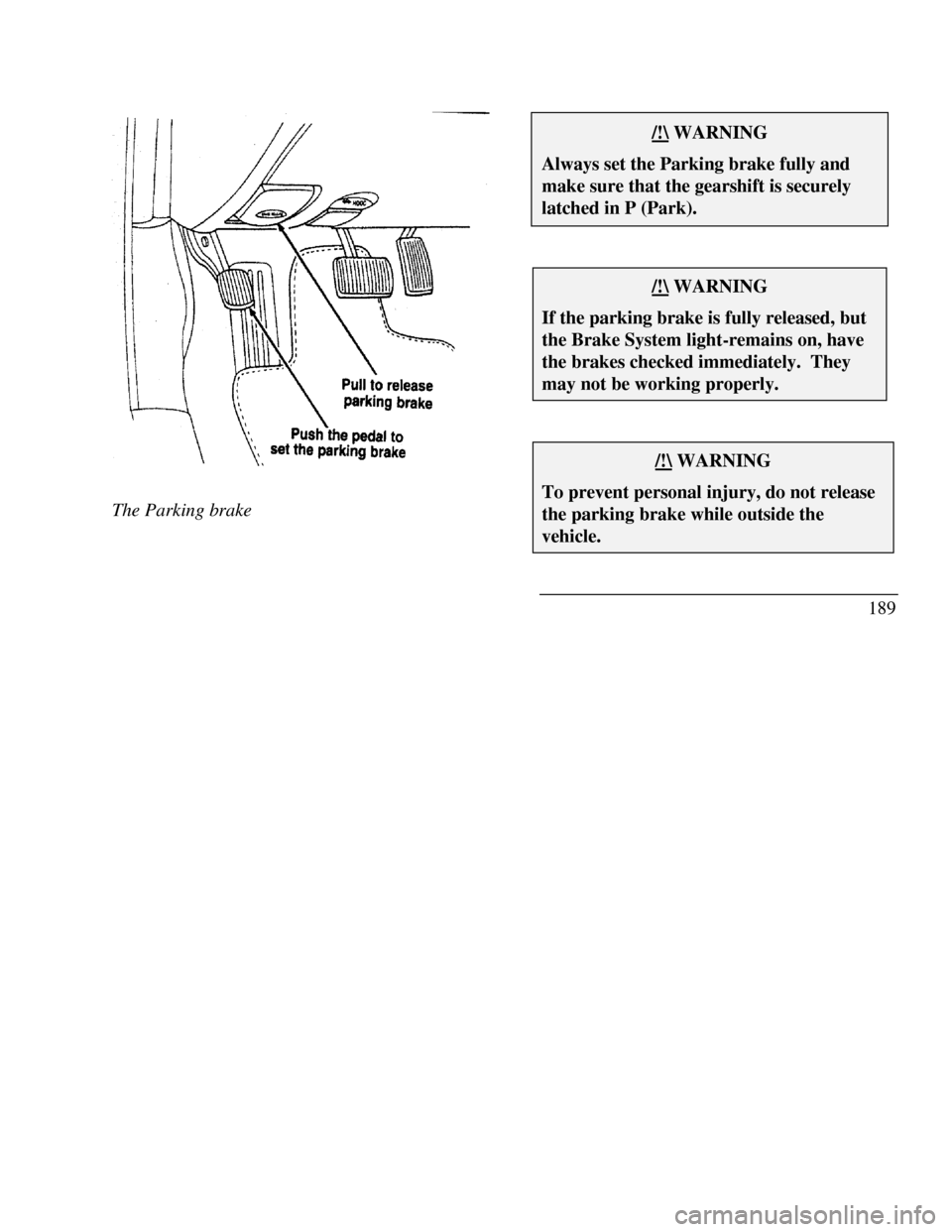
The Parking brake/!\ WARNINGAlways set the Parking brake fully andmake sure that the gearshift is securelylatched in P (Park)./!\ WARNINGIf the parking brake is fully released, butthe Brake System light-remains on, havethe brakes checked immediately. Theymay not be working properly./!\ WARNINGTo prevent personal injury, do not releasethe parking brake while outside thevehicle.189
Page 193 of 320

You have an automatic release for the parking brake.
The parking brake should automatically unlock when
you move the gearshift to any forward gear while the
engine is running. However, the automatic release
does not work when the gearshift is in reverse,
neutral or park.
To manually release the parking brake, pull the
BRAKE RELEASE handle located on the lower left
comer of the instrument panel. The Brake Warning
Light will illuminate if the parking brake is not fully
released when the engine is running.
The parking brake is not designed to stop a moving
vehicle, but you can use the parking brake to stop
your vehicle in an emergency if the normal brakes
fail. However, since the parking brake applies only
the rear brakes, the stopping distance will increase
greatly and the handling of your vehicle will be
adversely affected.
190Always check the Brake Warning light each
time you start your engine. Driving with the
parking brake on will cause the brakes to wear
out quickly and will reduce the fuel economy.
Driving Under Special Conditions
Tips for Safe Driving
As with any new vehicle, yours may drive and
handle differently from your previous vehicle.
Use care until you become accustomed to its
various features and driving characteristics.
Operate your vehicle within reasonable limits.
Sudden acceleration, deceleration, turning, or
combinations of these maneuvers can cause a
vehicle to behave differently than anticipated.