Page 124 of 320

keyless entry code or the Memory I or Memory 2
switches.
Keyless Entry
Up to three unique keyless entry codes can be
programmed by the customer. Two of the codes
can be assigned to recall Personality Memory I or
Memory 2. Each time the 5-digit code is entered on
the keypad, the driver's door will unlock and
Personality Memory 1 or Memory 2 will be
recalled.
NOTE: Please note that even though the driver's
Personality Memory may be recalled using remote
or keyless entry, the seats and mirrors will not
move to the driver's set positions until the driver's
door is opened.
Memory Switches
Pressing either the Memory I or Memory 2 switch
on the driver's door will also recall the Personality
Memory settings as selected, providing your
vehicle is in P (Park) or N (Neutral).Auto Save
Any change made by the driver to one of the
above Personality Memory settings will be
updated and saved automatically. The display,
SAVED TO DRIVER I or SAVED TO
DRIVER 2, will appear on the Message Center
for five (5) seconds as a confirmation of the
update to Personality Memory. If a radio preset
is changed the radio display will also show
SAVED.
If the driver does not use the remote entry
transmitter, or keyless entry keypad to unlock the
doors upon entering or does not press the
Memory I or Memory 2 switch, then any change
to one of the Personality Memory settings
(except radio presets) will not be automatically
saved. Instead the driver will be prompted by the
Message Center whether to save the settings to
Driver 1 or Driver 2.
121
Page 125 of 320
Pressing the SELECT switch will toggle between
1, 2 or no choice. If DRIVER I or DRIVER 2 is
selected, the display, SAVED TO DRIVER I or
SAVED TO DRIVER 2, will appear on the
Message Center to confirm the change has been
automatically saved with the Personality Memory.
If no choice is made by the driver, then the change
will not be automatically saved and there is no
effect on the Personality Memory.
Once this screen has been displayed, the driver will
not be asked again for the remainder of the drive.
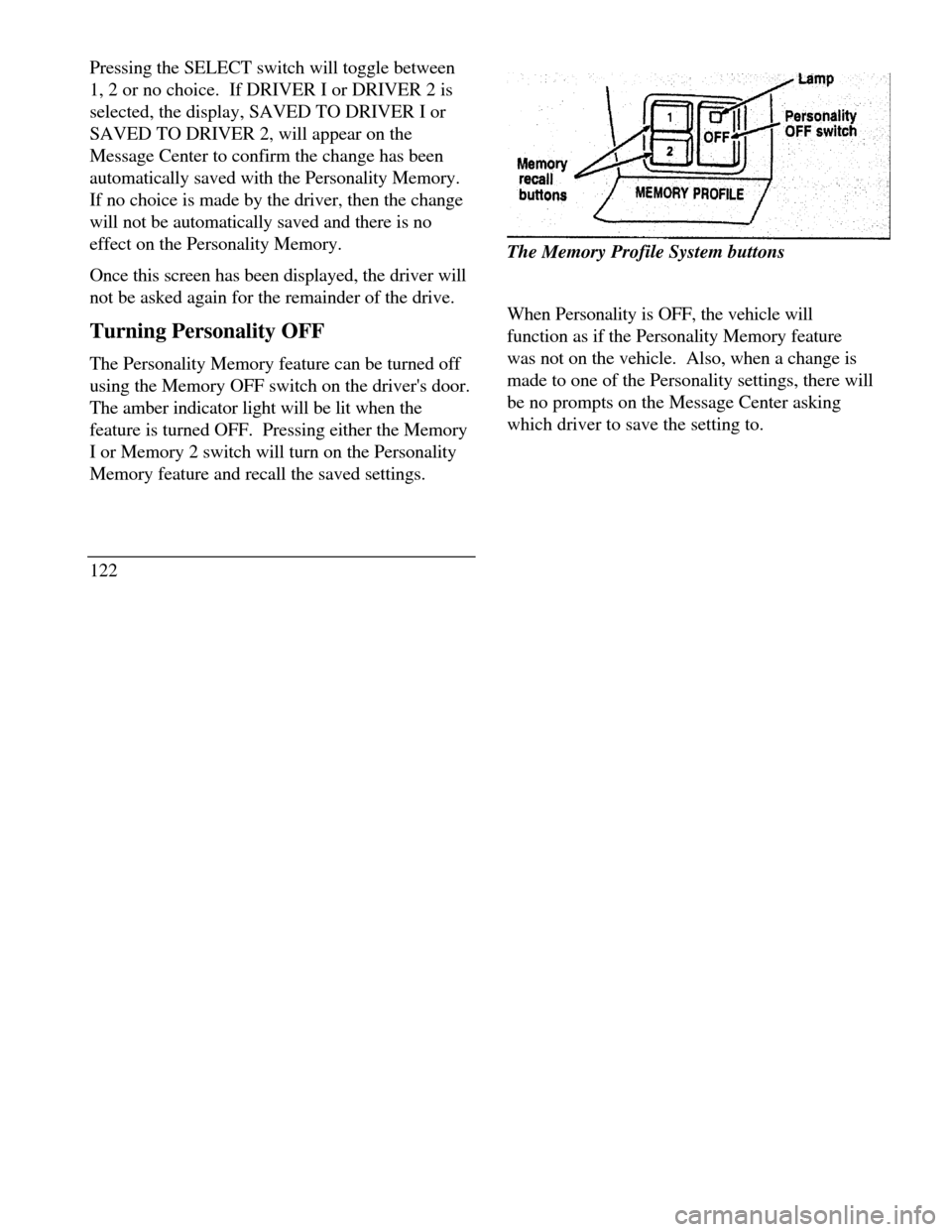
Turning Personality OFF
The Personality Memory feature can be turned off
using the Memory OFF switch on the driver's door.
The amber indicator light will be lit when the
feature is turned OFF. Pressing either the Memory
I or Memory 2 switch will turn on the Personality
Memory feature and recall the saved settings.
122Memory recall buttonsThe Memory Profile System buttons
When Personality is OFF, the vehicle will
function as if the Personality Memory feature
was not on the vehicle. Also, when a change is
made to one of the Personality settings, there will
be no prompts on the Message Center asking
which driver to save the setting to.
Page 126 of 320
Road Calibrated Suspension
Your Continental is equipped with a ride control
system that is designed to read disturbances in the
road surface every six inches at 60 mph (100 km/h)
to provide you with optimal driving response.
Ride control allows you to chose both a ride feel
and steering effort that best flts your personal
driving style. These options may be selected by
using the RIDE/STEER Message Center button.Pressing this button once will allow you to adjust
your RIDE CONTROL settings, between
NORMAL, PLUSH and FIRM. The settings are
changed by pressing the SELECT button while
RIDE CONTROL is displayed.
Pressing the RIDE/STEER button a second time
will allow you to adjust the STEERING
EFFORT settings between NORMAL, LOW,
and HIGH. The settings are changed by pressing
the SELECT button while STEERING EFFORT
is displayed.
123
Page 129 of 320

side mirrors are controlled by the setting on the
inside mirror.
There are two light sensors (photocells) in this
mirror. The sensor that detects rear glare is located
next to the switch. The second light sensor which
determines outside light level is located on the
backside of the mirror case.
One important safety feature is that the mirror
automatically returns to the normal position
whenever the vehicle is placed in R (Reverse) (when
the mirror is in the ON position). This feature
ensures a bright clear view in the mirror when
backing up.
Do not clean the housing or glass of any mirror with
harsh abrasives, fuel or other petroleum-based
cleaning products.
126Side View Mirrors
Your vehicle comes with electric side mirrors.
The side view mirror on the right is a convex
mirror. This mirror gives you a wider view of
the lanes on your right and behind you.
NOTE: When putting your vehicle in reverse,
both outside mirrors will tilt downward and
return to the adjusted position when taken out
of reverse. This feature can be disabled by
using the Menu Select button on the cluster. To
disable, press the menu button repeatedly until
"Reverse Mirrors" appears in the display, then
select OFF. To enable the reverse mirrors,
select ON./!\ WARNINGThe side view mirror on the right makesobjects appear smaller and farther awaythan they actually are.
Page 142 of 320
Removing the floor mat
Lift floor mat just forward of retention post and
rotate rearward to disengage from retention post.
The Electronic Compass
(If equipped)The electronic compassThe compass is mounted to the inside rear view
mirror. The display is in the upper right hand
comer of the mirror glass.
The display will show one of the following
directions: N, NE, E, SE, S, SW, W, and NW.
The brightness of the compass display is
controlled by the instrument panel dimming
switch.
Factors Affecting Compass Accuracy
Some things which can affect compass accuracy
are large buildings, bridges, power lines, and
powerful antennas. Keep radar detectors and
other magnetically mounted devices as far away
from the compass as possible. Sometimes after-
market and dealer-installed moon roofs can
affect the accuracy of the compass. Using
automatic car washes can cause minor
inaccuracies in the compass.
NOTE: Usually, when something affects the
compass readings, the compass will correct itself
after a few days of operating your vehicle in normal
conditions. If the compass is still giving inaccurate
139
Page 143 of 320
readings after a few days, perform a compass
adjustment.
Compass-Calibration
I .For optimum calibration, switch off all non-
essential electrical accessories (rear window
defrost, heater/air conditioning, map lamps,
wipers, etc.) and ensure all doors are shut.
2.Drive to an open, level area away from large
metallic objects or structures.
3.Insert an appropriate diameter rod (paper clip)
into the left switch access hole underneath the
compass module and press gently for 1-2
seconds until "CAL" and a direction appear on
the display.
1404. Release the button and drive in a circle
until "CAL" disappears from the display
(approx. 2-3 circles).
Compass-Zone Adjustment
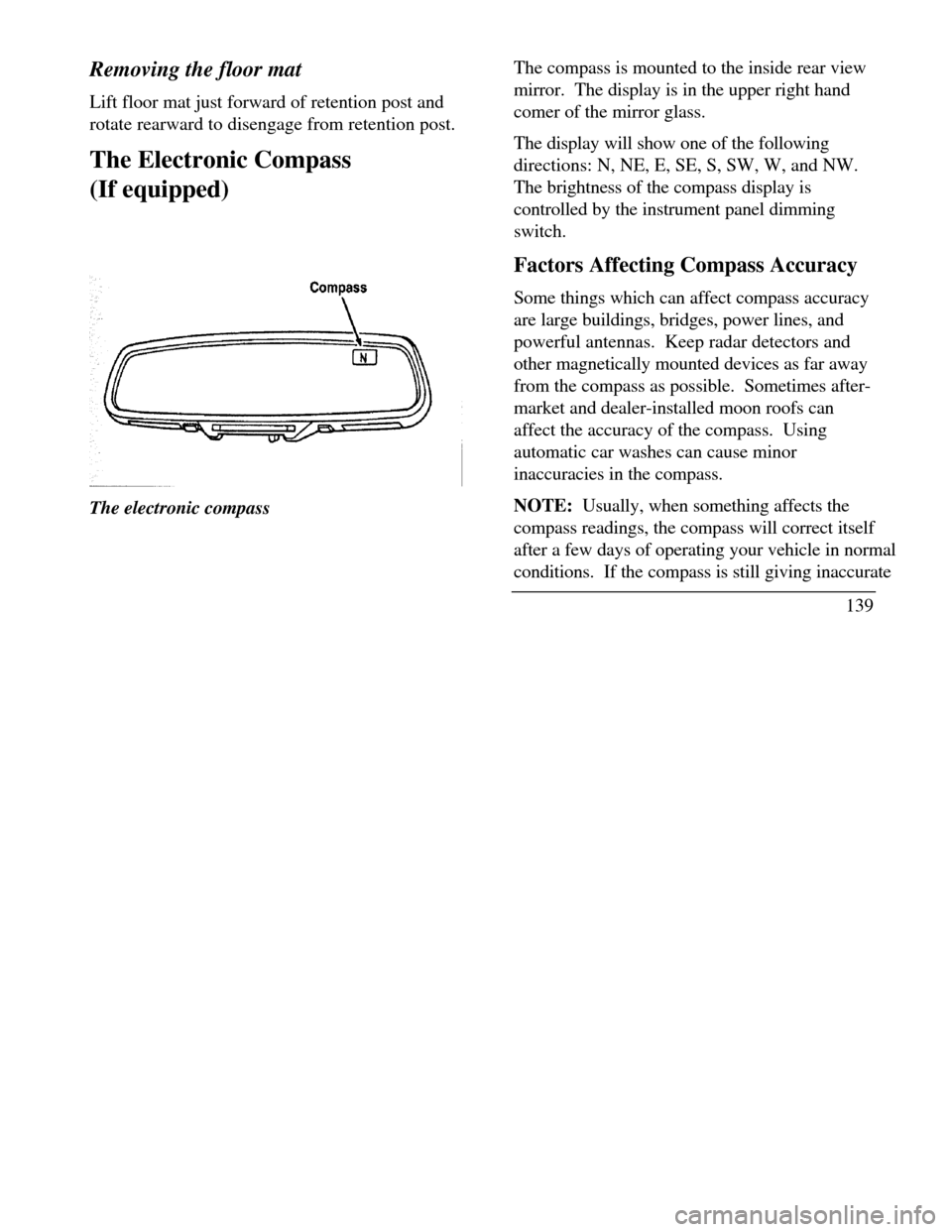
1.The zone setting is factory pre-set to Zone
8. Refer to the Zone Map in this manual to
verify the correct compass zone setting for
your geographical location.
Page 144 of 320
2.Insert an appropriate diameter rod (paper
clip) into the right switch access hole
underneath the compass module and gently
press the right button for 1-2 seconds until
"ZONE" and the current zone setting
appear in the display.
3.Release the right button.
4.Pressing the right button repeatedly will
cycle through all possible zone settings.
Stop cycling when the correct zone setting
for your location appears.
5.Releasing the button for 2 seconds will exit
the zone entry mode.
Securitire (If equipped)
Securitires are designed to allow you to
continue driving your Continental a limited
number of miles when one of your vehicle's tires
is at low or even zero air pressure.
141
Page 146 of 320

THIS DEVICE COMPLIES WITH FCC RULES,
PART 15. OPERATION IS SUBJECT TO THE
FOLLOWING TWO CONDITIONS: (1) THIS
DEVICE MAY NOT CAUSE HARMFUL
INTEREFERENCE AND (2) THIS DEVICE
MUST ACCEPT ANY INTEREFERENCE THAT
MAY BE RECEIVED, INCLUDING
INTEREFERENCE THAT MAY CAUSE
UNDESIRABLE OPERATION.
Maintenance Warning
The "Low Tire Pressure" warning will illuminate
and stay on when one of your vehicle's tires drops
below 18 psi (124 kps). The warning light will also
come on and stay lit if the Pressure Alert System has
malfunctioned.
If this warning appears, check the pressure in your
tires at the earliest possible convenience and adjust
any tire that is low to the recommended air pressure
level. This information can be found on the Service
Station Information page at the back of this manual
or on the driver's door placard.If the warning remains on after you have
adjusted the tires to recommended air pressure
levels, take your vehicle to an authorized
Lincoln/Mercury dealer for service.
Flat Tire Warning
If the sensors detect a tire pressure lower than I
0 psi (68 kps), the "Low Tire Pressure" warning
will flash repeatedly in the overhead console and
the message "Warning Low Tire Pressure" will
be displayed in the Message Center, indicating
an impending flat tire. If this condition occurs,
your Securitire requires service as soon as
possible. Refer to Servicing Your Secutitires.
NOTE: The Pressure Alert System will
activate only when the vehicle is moving faster
than 10 mph (15 km/h).
143