1996 HONDA ODYSSEY check engine
[x] Cancel search: check enginePage 120 of 240
Automatic Transmission
Your Honda's transmission has fourforward speeds, and is electronicallycontrolled for smoother shifting. It
also has a "lock-up" torque converter
for better fuel economy. You may
feel what seems like another shift
when the converter locks. Shift Lever Positions
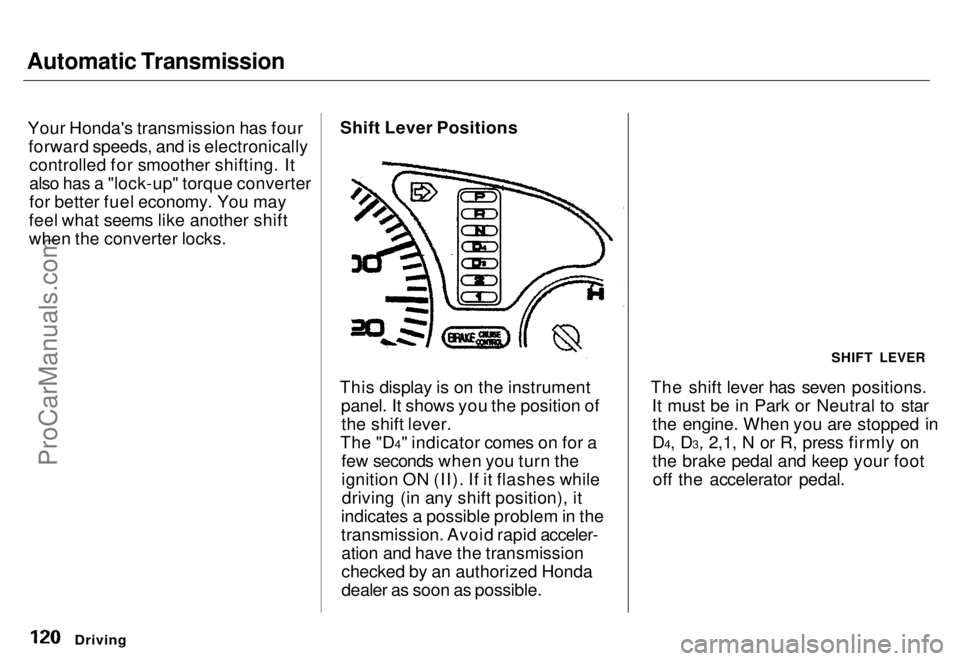
This display is on the instrument panel. It shows you the position ofthe shift lever.
The "D4" indicator comes on for a few seconds when you turn the
ignition ON (II). If it flashes whiledriving (in any shift position), it
indicates a possible problem in the
transmission. Avoid rapid acceler- ation and have the transmission
checked by an authorized Honda
dealer as soon as possible. The shift lever has seven positions.
It must be in Park or Neutral to starthe engine. When you are stopped in
D4, D3, 2,1, N or R, press firmly on
the brake pedal and keep your footoff the accelerator pedal.
Driving
SHIFT LEVERProCarManuals.comMain Menu s t Table of Contents
Page 123 of 240
Automatic Transmission
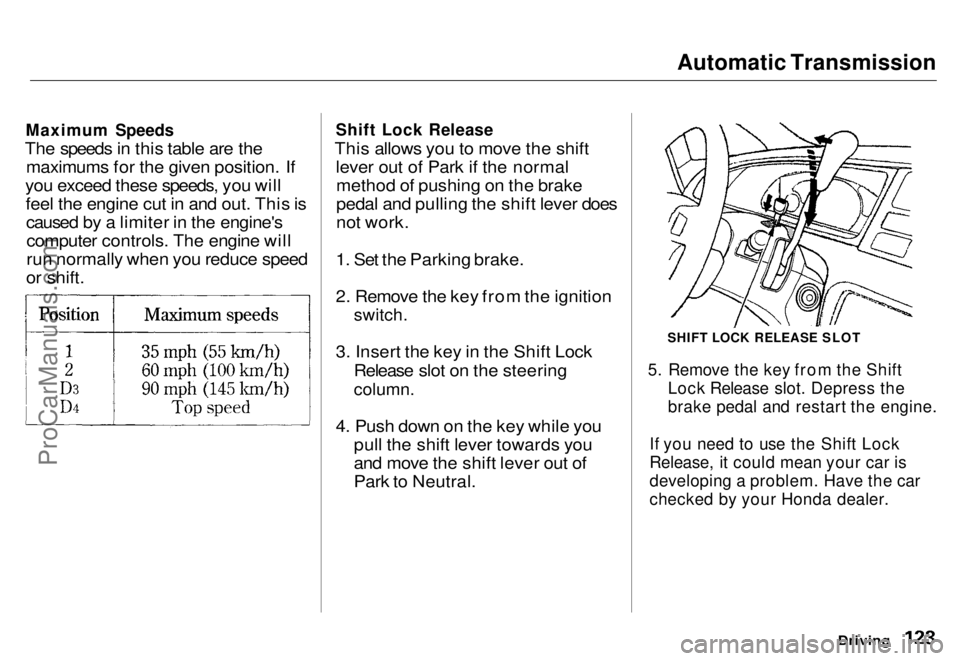
Maximum Speeds
The speeds in this table are the maximums for the given position. If
you exceed these speeds, you will feel the engine cut in and out. This iscaused by a limiter in the engine'scomputer controls. The engine will
run normally when you reduce speed
or shift.
Shift Lock Release
This allows you to move the shift lever out of Park if the normalmethod of pushing on the brake
pedal and pulling the shift lever does
not work.
1. Set the Parking brake.
2. Remove the key from the ignition
switch.
3. Insert the key in the Shift Lock Release slot on the steering
column.
4. Push down on the key while you pull the shift lever towards you
and move the shift lever out of
Park to Neutral.
SHIFT LOCK RELEASE SLOT
5. Remove the key from the Shift Lock Release slot. Depress the
brake pedal and restart the engine.
If you need to use the Shift Lock
Release, it could mean your car is
developing a problem. Have the car
checked by your Honda dealer.
DrivingProCarManuals.comMain Menu s t Table of Contents
Page 124 of 240

The Braking System
Your Honda is equipped with discbrakes at all four wheels. The
braking system is power-assisted to
reduce the effort needed on the
brake pedal.
Put your foot on the brake pedal only
when you intend to brake. Resting
your foot on the pedal keeps the brakes applied lightly, causing them
to build up heat. Heat build-up can
reduce how well your brakes work. It also keeps your brake lights on all
the time, confusing drivers behind
you.
Constant application of the brakes
when going down a long hill builds up heat and reduces their effective-
ness. Use the engine to assist the
brakes by downshifting to a lower
gear and taking your foot off the accelerator pedal. Check your brakes after driving
through deep water. Apply the
brakes moderately to see if they feel normal. If not, apply them gently and
frequently until they do. Since a
longer distance is needed to stop with wet brakes, be extra cautious and alert in your driving.
Brake Wear Indicators
All four brakes have audible brake wear indicators.
When the brake pads need replacing,you will hear a distinctive metallic "screeching" sound when you apply
the brakes. If you do not have the
brake pads replaced, they will begin screeching all the time.
Your brakes may sometimes squeal or squeak when you apply them
lightly. Do not confuse this with the
brake wear indicators. They make a
very audible "screeching". Brake System Design
The hydraulic system that operates the brakes has two separate circuits.Each circuit works diagonally across
the car (the left-front brake isconnected with the right-rear brake, etc.). If one circuit should develop a
problem, you will still have braking at two wheels.
Driving
FrontProCarManuals.comMain Menu s t Table of Contents
Page 125 of 240

The Braking System
If this happens, you will immediately notice that the brake pedal goes
down much farther and you need to
press on it much harder. A much
longer distance will be needed to stop the car.
Slow the car by downshifting to a
lower gear and removing your foot from the accelerator pedal. Pull to
the side of the road as soon as it issafe. Because of the longer stopping
distance needed, brake system
failure is very hazardous. It is best to have your car towed, but if you mustdrive the car in this condition, be
extremely cautious. Have your carrepaired as soon as possible.
Anti-lock Brakes
All U.S. models and the Canadian six- passenger model have an Anti-lock
Brake System (ABS) as standard
equipment. It is optional on the
Canadian seven-passenger model.
ABS helps you maintain steering control during braking. It does this
by helping you to prevent the wheels
from locking up and skidding.
The ABS is always "On". It requires no special effort or driving technique.
You will feel a pulsation in the brake pedal when the ABS activates.
Activation varies with the amount of traction your tires have. On dry
pavement, you will need to press on
the brake pedal very hard before you
feel the pedal pulsation that means the ABS has activated. However, you
may feel the ABS activate immedi- ately if you are trying to stop onsnow or ice. Under all conditions, the
ABS is helping to prevent the wheels from locking so you can retain steering control. You should con-
tinue to press on the brake pedal
with the same force.
You may feel a slight movement of
the brake pedal just after you start
the engine. This is the ABS working. ABS INDICATOR*
U.S. indicator shown
The ABS is self-checking. If anything goes wrong, the ABS indicator on
the instrument panel comes on (seepage 35). This means the Anti-lock
function of the braking system has shut down. The brakes still work like
a conventional system, providing
normal stopping ability. You should
have the dealer inspect your car as soon as possible.
Driving
CONTINUEDProCarManuals.comMain Menu s t Table of Contents
Page 134 of 240

Maintenance
This section explains why it is important to keep your car well
maintained and to follow basic
maintenance safety precautions.
This section also includes Maintenance Schedules for normaldriving and severe driving conditions,
a Maintenance Record, and instruc-
tions for simple maintenance tasks
you may want to take care of
yourself.
If you have the skills and tools
required to perform more complex
maintenance tasks on your Honda,
you may want to purchase the Service Manual. See page 233 for
information on how to obtain a copy,or see your Honda dealer.
Maintenance Safety....................... 136
Important Safety Precautions.. 137
Maintenance Schedule.................. 138
Maintenance Record..................... 142
Periodic Checks............................. 144
Fluid Locations............................... 145
Engine Oil....................................... 146
Checking Engine Oil................. 146
Adding Oil................................... 146 Recommended Oil..................... 147
Synthetic Oil............................... 148
Additives..................................... 148
Oil and Filter Changes.............. 148
Cooling System.............................. 150
Checking the Engine Coolant
Level........................................ 150
Adding Engine Coolant............. 151 Replacing Engine Coolant........ 152
Windshield Washers..................... 154
Automatic Transmission Fluid..... 155
Brake Fluid..................................... 156
Brake System............................. 156
Anti-lock Brake System............ 157
Power Steering............................... 157
Air Cleaner..................................... 158 Spark Plugs..................................... 160
Replacement............................... 160
Specifications............................. 161
Battery............................................ 162
Windshield Wipers........................ 165
Air Conditioning............................. 168 Drive Belts...................................... 169
Tires................................................ 169 Inflation....................................... 170
Inspection................................... 171
Maintenance............................... 171
Tire Rotation.............................. 172 Replacing Tires and Wheels .... 172
Wheels and Tires....................... 173
Winter Driving........................... 173 Snow Tires.............................. 174
Tire Chains............................. 174
Lights.............................................. 175 Headlight Aiming...................... 175Replacing Bulbs......................... 177
Storing Your Car............................ 182
MaintenanceProCarManuals.comMain Menu s t
Page 143 of 240
Periodic Checks
You should check the following items at the specified intervals. If
you are unsure of how to perform any check, turn to the page given. Engine oil level — Check every
time you fill the fuel tank. See
page 112.
Engine coolant level — Check the
radiator reserve tank every time
you fill the fuel tank. See page 113 .
Windshield washer fluid — Check the level in the reservoir monthly.If weather conditions cause you to
use the washers frequently, check
the reservoir each time you stop
for fuel. See page 154 .
Automatic transmission — Check the fluid level monthly. See page 155.
Brakes and power steering — Check the fluid level monthly. See
page 156. Tires — Check the tire pressure
monthly. Examine the tread for
wear and foreign objects. See page
169 .
Battery — Check its condition and
the terminals for corrosion monthly. See page 162 .
Air conditioning — Check its operation weekly. See page 168 .
Lights — Check the operation of
the headlights, parking lights,
taillights, high-mount brake light,
turn signals, brake lights, and
license plate lights monthly. See
page 175.
MaintenanceProCarManuals.comMain Menu s t Table of Contents
Page 145 of 240
Engine Oil
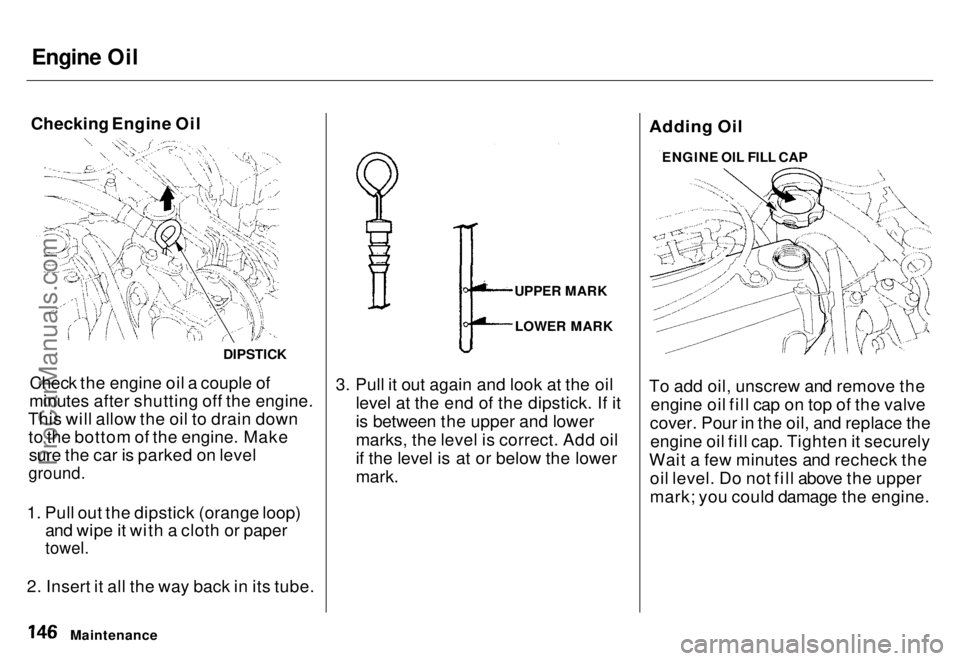
Checking Engine Oil
Check the engine oil a couple of
minutes after shutting off the engine.
This will allow the oil to drain down to the bottom of the engine. Makesure the car is parked on level
ground.
1. Pull out the dipstick (orange loop) and wipe it with a cloth or paper
towel.
2. Insert it all the way back in its tube. 3. Pull it out again and look at the oil
level at the end of the dipstick. If it
is between the upper and lower
marks, the level is correct. Add oil
if the level is at or below the lower
mark.
Adding Oil
To add oil, unscrew and remove the
engine oil fill cap on top of the valve
cover. Pour in the oil, and replace the engine oil fill cap. Tighten it securely
Wait a few minutes and recheck the oil level. Do not fill above the upper
mark; you could damage the engine.
Maintenance
DIPSTICK
UPPER MARK
LOWER MARK ENGINE OIL FILL CAPProCarManuals.comMain Menu s t Table of Contents
Page 148 of 240
Engine Oil
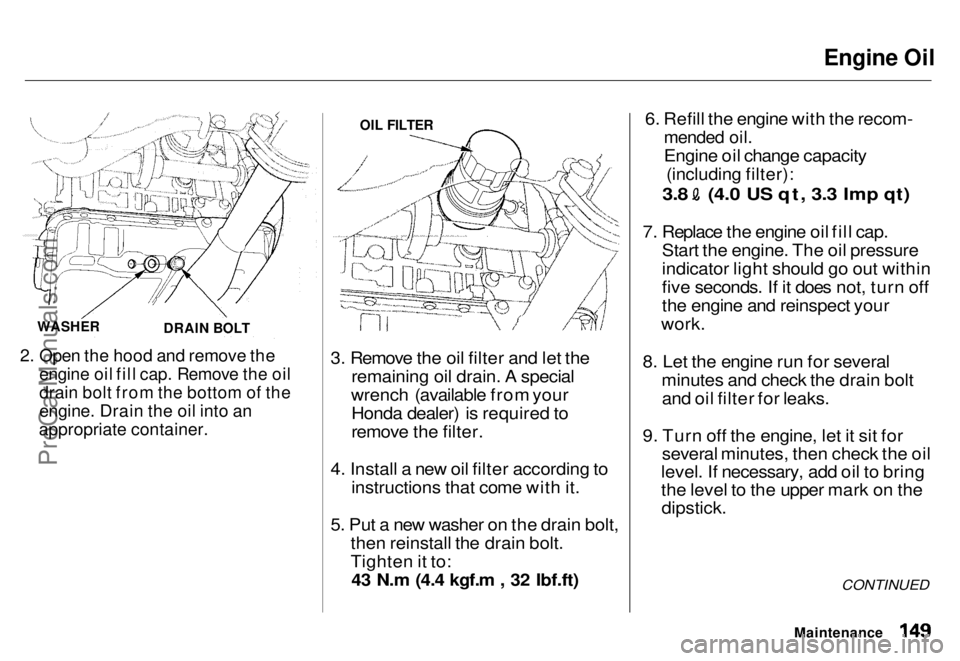
2. Open the hood and remove the
engine oil fill cap. Remove the oil
drain bolt from the bottom of the
engine. Drain the oil into an
appropriate container.
3. Remove the oil filter and let the
remaining oil drain. A special
wrench (available from your Honda dealer) is required to
remove the filter.
4. Install a new oil filter according to instructions that come with it.
5. Put a new washer on the drain bolt, then reinstall the drain bolt.
Tighten it to:43 N.m (4.4 kgf.m , 32 Ibf.ft) 6. Refill the engine with the recom-
mended oil.
Engine oil change capacity
(including filter):
3.8 (4.0 US qt, 3.3 Imp qt)
7. Replace the engine oil fill cap. Start the engine. The oil pressure
indicator light should go out within
five seconds. If it does not, turn off
the engine and reinspect your
work.
8. Let the engine run for several minutes and check the drain boltand oil filter for leaks.
9. Turn off the engine, let it sit for several minutes, then check the oil
level. If necessary, add oil to bring
the level to the upper mark on the
dipstick.
CONTINUED
Maintenance
WASHER
DRAIN BOLT OIL FILTER
ProCarManuals.comMain Menu s t Table of Contents