Page 169 of 353
![FORD AEROSTAR 1996 1.G Owners Manual 188 %
*
[DR06401(ALL)01/95]
R (Reverse)
*
[DR06501(ALL)02/95]
With the gearshift in the R (Reverse) position,
the vehicle will move backward. You should
always come to a complete stop before shifting](/manual-img/11/4751/w960_4751-168.png "FORD AEROSTAR 1996 1.G Owners Manual 188 %
*
[DR06401(ALL)01/95]
R (Reverse)
*
[DR06501(ALL)02/95]
With the gearshift in the R (Reverse) position,
the vehicle will move backward. You should
always come to a complete stop before shifting")
188 %
*
[DR06401(ALL)01/95]
R (Reverse)
*
[DR06501(ALL)02/95]
With the gearshift in the R (Reverse) position,
the vehicle will move backward. You should
always come to a complete stop before shifting
into or out of R (Reverse).
*
[DR06520(ALL)01/95]
N (Neutral)
[DR06550(ALL)08/95]
In N (Neutral), the wheels of the vehicle are not
locked. Your vehicle will roll freely, even on the
slightest incline, unless the parking brake or
brakes are on.
%*
[DR06601(ALL)01/95]
Driving
%*
[DR06700(ALL)04/95]
When to usej(Overdrive)
[DR06800(ALL)08/95]
This is the normal driving position. As the
vehicle picks up speed, automatic upshifts to
second, third and fourth gears will occur when
jOverdrive is chosen on the selector and the
transmission control switch has not been
pressed. The transmission will shift into the
correct gear when the right speed is achieved,
for the accelerator pedal position you have
chosen.
[DR06810(ALL)08/95]
When to use Drive
[DR06830(ALL)08/95]
You will note there is not a drive position on
your gearshift indicator. However, you will find
a transmission control switch labeled
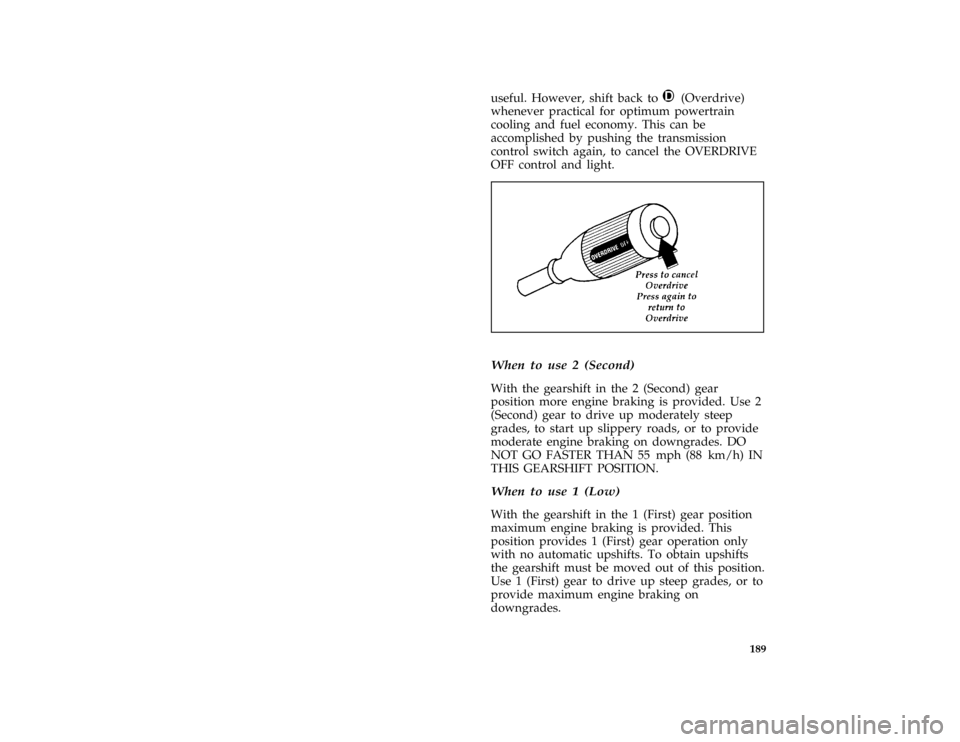
OVERDRIVE OFF located on the end of the
gearshift lever. Press this switch and the
indicator light (OFF) illuminates on the gearshift
lever. With overdrive cancelled and the word
OFF illuminated, the transmission will operate in
gears one through three. This is useful if you
experience frequent downshift/upshift
conditions, when operating with a heavy load or
in hilly terrain, or if additional engine braking is
File:10cpdra.ex
Update:Tue Aug 29 17:45:28 1995
Page 170 of 353
189
useful. However, shift back toj(Overdrive)
whenever practical for optimum powertrain
cooling and fuel economy. This can be
accomplished by pushing the transmission
control switch again, to cancel the OVERDRIVE
OFF control and light.
[DR06850(ALL)06/95]
one third page art:0095028-A*
[DR07100(ALL)01/95]
When to use 2 (Second)
[DR07200(ALL)06/92]
With the gearshift in the 2 (Second) gear
position more engine braking is provided. Use 2
(Second) gear to drive up moderately steep
grades, to start up slippery roads, or to provide
moderate engine braking on downgrades. DO
NOT GO FASTER THAN 55 mph (88 km/h) IN
THIS GEARSHIFT POSITION.
*
[DR07400(ALL)01/95]
When to use 1 (Low)
[DR07500(ALL)06/92]
With the gearshift in the 1 (First) gear position
maximum engine braking is provided. This
position provides 1 (First) gear operation only
with no automatic upshifts. To obtain upshifts
the gearshift must be moved out of this position.
Use 1 (First) gear to drive up steep grades, or to
provide maximum engine braking on
downgrades.
File:10cpdra.ex
Update:Tue Aug 29 17:45:28 1995
Page 171 of 353
![FORD AEROSTAR 1996 1.G Owners Manual 190
*
[DR07600(ALL)01/95]
P (Park)
[DR07700(ALL)06/92]
Always come to a complete stop before you shift
into P (Park). This position locks the
transmission and prevents the rear wheels from
turning.
[D](/manual-img/11/4751/w960_4751-170.png "FORD AEROSTAR 1996 1.G Owners Manual 190
*
[DR07600(ALL)01/95]
P (Park)
[DR07700(ALL)06/92]
Always come to a complete stop before you shift
into P (Park). This position locks the
transmission and prevents the rear wheels from
turning.
[D")
190
*
[DR07600(ALL)01/95]
P (Park)
[DR07700(ALL)06/92]
Always come to a complete stop before you shift
into P (Park). This position locks the
transmission and prevents the rear wheels from
turning.
[DR07800(ALL)06/92]
To securely latch the gearshift in the P (Park)
position, pull it toward you, push it completely
counterclockwise against the stop, and then push
it toward the instrument panel.
*
[DR08000(ALL)06/95]
RWARNING
Always set the parking brake fully and
make sure the gearshift is securely latched
in P (Park).
*
[DR08100(ALL)06/95]
RWARNING
Never leave your vehicle unattended
while it is running.
*
[DR08500(ALL)06/94]
Forced Downshifts
[DR08600(ALL)08/95]
To gain acceleration inj(Overdrive) or Drive
(jposition with Overdrive cancelled) when
passing another vehicle, push the accelerator to
the floor. The transmission will downshift to 2
(Second) gear or to 1 (First) gear at calibrated
speeds.
*
[DR11235(ALL)03/94]
Power Braking
*
[DR11275(ALL)03/94]
Increasing the engine speed above idle without
vehicle movement (such as holding the brake) in
a forward or reverse gear causes transmission
stall.
*
[DR11285(ALL)03/94]
NOTE: Continued operation in the stall
condition can result in transmission
overheat, malfunction or fluid
expulsion.
File:10cpdra.ex
Update:Tue Aug 29 17:45:28 1995
Page 172 of 353
![FORD AEROSTAR 1996 1.G Owners Manual 191
%*
[DR15915(ALL)01/95]
Steering Your Vehicle
%*
[DR15945(ALL)01/95]
Your vehicle comes with power steering. Power
steering uses energy from the engine to help
steer your vehicle.
%*
[DR15950(ALL)0](/manual-img/11/4751/w960_4751-171.png "FORD AEROSTAR 1996 1.G Owners Manual 191
%*
[DR15915(ALL)01/95]
Steering Your Vehicle
%*
[DR15945(ALL)01/95]
Your vehicle comes with power steering. Power
steering uses energy from the engine to help
steer your vehicle.
%*
[DR15950(ALL)0")
191
%*
[DR15915(ALL)01/95]
Steering Your Vehicle
%*
[DR15945(ALL)01/95]
Your vehicle comes with power steering. Power
steering uses energy from the engine to help
steer your vehicle.
%*
[DR15950(ALL)04/95]
If the amount of effort needed to steer your
vehicle changes at a constant vehicle speed, have
the power steering system checked. If the power
steering system breaks down (or if the engine is
turned off), you can steer the vehicle manually
but it takes more effort.
*
[DR15960(ALL)01/95]
Never hold the steering wheel to the extreme
right or left for more than five seconds if the
engine is running. This can damage the power
steering pump.
*
[DR15985(ALL)05/90]
NOTE: After any severe impact such as
striking large potholes, sliding into
curbs on icy roads, or a collision
involving the front end, observe the
steering wheel alignment. If the spokes
of the steering wheel seem to be in a
different position while going straight
down the road, have the front
suspension and steering checked for
possible damage.
[DR16005(ALL)06/95]Electronic 4-Wheel Drive (E-4WD)
(If equipped)
[DR16015(ALL)06/95]
If your vehicle is equipped with the E-4WD
option, power is provided to all four wheels
whenever you press the accelerator pedal. It
improves both handling and traction during
difficult driving conditions, adjusting
automatically to your driving needs. Because the
entire E-4WD system is controlled by a
microprocessor, your vehicle is not equipped
with the switch or shift lever used with most
traditional 4WD vehicles. The microprocessor
does all the adjusting for you.
File:10cpdra.ex
Update:Tue Aug 29 17:45:28 1995
Page 173 of 353
![FORD AEROSTAR 1996 1.G Owners Manual 192 [DR16025(ALL)05/94]How the Electronic 4-Wheel Drive (E-4WD)
System Works
[DR16036(ALL)03/90]
Under normal driving conditions, when the road
is firm, dry and level, the engine power is
distributed](/manual-img/11/4751/w960_4751-172.png "FORD AEROSTAR 1996 1.G Owners Manual 192 [DR16025(ALL)05/94]How the Electronic 4-Wheel Drive (E-4WD)
System Works
[DR16036(ALL)03/90]
Under normal driving conditions, when the road
is firm, dry and level, the engine power is
distributed")
192 [DR16025(ALL)05/94]How the Electronic 4-Wheel Drive (E-4WD)
System Works
[DR16036(ALL)03/90]
Under normal driving conditions, when the road
is firm, dry and level, the engine power is
distributed one-third to the front axle and
two-thirds to the rear axle. However, if a wheel
begins to slip, the microprocessor will sense this
condition and signal the system to transmit more
power to the axle with more traction. (You may
feel a momentary surge of power.)
[DR16046(ALL)06/95]
NOTE: The microprocessor is disabled when
the brakes are applied or when the
transmission selector is in the P (Park)
or N (Neutral) positions.
[DR16055(ALL)05/94]
Driving Your Electronic 4-Wheel Drive
(E-4WD) Vehicle
[DR16065(ALL)03/95]
Since your E-4WD vehicle is unique, follow these
steps to be safe:
[DR16075(ALL)03/95]
q
Avoid unnecessary turns or other maneuvers
that could cause loss of control and possible
injury.
[DR16076(ALL)06/95]
q
Use the same size and type of tire and wheel
as originally provided for your vehicle and
inflate the tires to the manufacturer's
recommended air pressure.
[DR16077(ALL)03/95]
q
Become familiar with your vehicle's operating
characteristics and study this Owner Guide
for specific operating instructions. Be sure all
occupants wear the safety belts provided.
Drive cautiously, defensively, and at speeds
safe for current road conditions.
File:10cpdra.ex
Update:Tue Aug 29 17:45:28 1995
Page 177 of 353
![FORD AEROSTAR 1996 1.G Owners Manual 196
*
[DR23400(ALL)11/89]
RWARNING
Modifications to the suspension spring
rates and/or vehicle ride height may
adversely affect vehicle stopping ability.
*
[DR23500(ALL)07/92]
If Brakes Pull
*
[DR2360](/manual-img/11/4751/w960_4751-176.png "FORD AEROSTAR 1996 1.G Owners Manual 196
*
[DR23400(ALL)11/89]
RWARNING
Modifications to the suspension spring
rates and/or vehicle ride height may
adversely affect vehicle stopping ability.
*
[DR23500(ALL)07/92]
If Brakes Pull
*
[DR2360")
196
*
[DR23400(ALL)11/89]
RWARNING
Modifications to the suspension spring
rates and/or vehicle ride height may
adversely affect vehicle stopping ability.
*
[DR23500(ALL)07/92]
If Brakes Pull
*
[DR23600(ALL)05/95]
q
Check tire pressure.
*
[DR23700(ALL)07/95]
q
Perform the self-adjustment procedure
described underIf Brakes Do Not Grip Well or
Pedal is ªLow.º
*
[DR23800(ALL)05/95]
If pull occurs during the first 500 miles
(800 km), make 10 moderately fast stops from
40 mph (65 km/h) and then perform the
self-adjustment procedure above. It may be
necessary to repeat this operation to properly
seat new brake linings and pads.
%*
[DR24000(ALL)01/93]
Stopping Distances
*
[DR24100(ALL)11/89]
Stopping distances vary with different loads and
driving conditions. Use caution when
encountering new conditions and acquaint
yourself with vehicle performance. Take full
advantage of engine braking power when
slowing down.
%*
[DR24200(ALL)01/95]
Applying the Brakes
*
[DR24300(ALL)05/95]
Apply the brake pedal gradually. Use the
ªsqueezeº technique Ð push on the brake pedal
with a steadily increasing force. This allows the
wheels to continue to roll while you are slowing
down, which lets you steer properly.
*
[DR24500(ALL)05/95]
NOTE: If you are driving down a long or
steep hill, shift to a lower gear and do
not apply your brakes continuously. If
you apply your brakes continuously,
they may overheat and become less
effective.
File:10cpdra.ex
Update:Tue Aug 29 17:45:28 1995
Page 181 of 353
![FORD AEROSTAR 1996 1.G Owners Manual 200
*
[DR26625(ALL)12/91]
Speed limiter
*
[DR26652(ALL)05/95]
All models are equipped with an Electronic
Engine Control (EEC) system which limits the
maximum engine speed and thus road speed in
top ge](/manual-img/11/4751/w960_4751-180.png "FORD AEROSTAR 1996 1.G Owners Manual 200
*
[DR26625(ALL)12/91]
Speed limiter
*
[DR26652(ALL)05/95]
All models are equipped with an Electronic
Engine Control (EEC) system which limits the
maximum engine speed and thus road speed in
top ge")
200
*
[DR26625(ALL)12/91]
Speed limiter
*
[DR26652(ALL)05/95]
All models are equipped with an Electronic
Engine Control (EEC) system which limits the
maximum engine speed and thus road speed in
top gear. Vehicle operation is normal since the
controlled maximum speed is above posted
highway speeds in North America.
%*
[DR26701(ALL)01/95]
Driving in Bad Weather
%*
[DR26750(ALL)01/95]
Slippery roads
*
[DR26801(ALL)03/95]
Drive cautiously on wet or snowy roads:
*
[DR26850(ALL)03/95]
q
Do not quickly move the steering wheel
unless necessary.
*
[DR26901(ALL)01/95]
q
Drive slower than you normally would.
*
[DR26951(ALL)01/95]
q
Give your vehicle more distance to stop.
[DR27025(ALL)08/95]
q
To stop on ice, shift to N (Neutral) below 10
mph (16 km/h) and gently pump brakes
(except with rear anti-lock brakes).
*
[DR27050(ALL)02/93]
q
Consider using one of the lower gears.
*
[DR27201(ALL)07/95]
RWARNING
To avoid skidding and losing control on
slippery roads, do not downshift into 1
(First) when you are moving faster than
20 mph (30 km/h).
*
[DR27401(ALL)01/93]
RWARNING
The Anti-Lock Brake System may not
prevent brake lock-up on extremely
slippery surfaces.
File:10cpdra.ex
Update:Tue Aug 29 17:45:28 1995
Page 183 of 353
![FORD AEROSTAR 1996 1.G Owners Manual 202
*
[DR27850(ALL)11/89]
Rocking the vehicle
*
[DR27950(ALL)05/95]
If your vehicle gets stuck (for example, in mud
or snow), you may rock it out of the spot. Shift
in a steady rhythm between forward](/manual-img/11/4751/w960_4751-182.png "FORD AEROSTAR 1996 1.G Owners Manual 202
*
[DR27850(ALL)11/89]
Rocking the vehicle
*
[DR27950(ALL)05/95]
If your vehicle gets stuck (for example, in mud
or snow), you may rock it out of the spot. Shift
in a steady rhythm between forward")
202
*
[DR27850(ALL)11/89]
Rocking the vehicle
*
[DR27950(ALL)05/95]
If your vehicle gets stuck (for example, in mud
or snow), you may rock it out of the spot. Shift
in a steady rhythm between forward and reverse
gears. Allow the transmission to fully engage,
then press lightly on the accelerator. Do not rock
the vehicle for more than a few minutes. This
may overheat the engine and transmission,
causing damage to both. In addition, other
vehicle systems and components may also be
damaged.
*
[DR27975(ALL)05/95]
RWARNING
Do not spin the wheels at over 35 mph
(55 km/h). The tires may fail and injure a
passenger or bystander.
%
*
[DR28050(ALL)03/95]
Driving With a Heavy Load
*
[DR28101(ALL)01/95]
There are limits to the amount of weight your
vehicle can carry or tow. The total weight of
your vehicle, plus the weight of the passengers
and cargo, should never be more than the Gross
Vehicle Weight Rating (GVWR). Also, the weight
that your vehicle carries over the front axle and
rear axle should never be more than the Gross
Axle Weight Rating (GAWR) for the respective
axle.
*
[DR28150(ALL)08/95]
The weight limits of your vehicle's tires affect
the GVWR or GAWR limitations. Usage of
replacement tires with higher weight limits than
originals does not increase GVWR or GAWR.
Usage of lower capacity replacement tires may
lower GVWR and GAWR limitations.
File:10cpdra.ex
Update:Tue Aug 29 17:45:28 1995