1996 CADILLAC ELDORADO radio controls
[x] Cancel search: radio controlsPage 70 of 354

Downloaded from www.Manualslib.com manuals search engine Trunk
It can be dangerous to drive with the trunk lid
open because carbon monoxide
(CO) gas can
come into your vehicle.
You can’t see or smell
CO. It can cause unconsciousness and even death.
If you must drive with the trunk lid open or if
electrical wiring or other cable connections must
pass through the seal between the body and the trunk lid:
Make sure all windows are shut.
lhrn the fan on your heating or cooling
system to its highest speed with the setting
on
AUTO or ECON and the temperature
between
65°F (18°C) and 85°F (29°C).
That will force outside air into your vehicle.
See “Comfort Controls” in the Index.
instrument panel, open them all the
way.
If you have air outlets on or under the
See “Engine Exhaust” in the Index.
Trunk Lock Release (Option)
To use this feature,
your vehicle must be in
PARK (P). Press the
TRUNK release button
located above the radio on
the Driver Information Center to open the trunk.
You can also press the trunk button on the Keyless Entry
transmitter to access the trunk compartment.
If you do
not have the full console, press the trunk button on the
Keyless Entry transmitter.
2-9
Page 163 of 354

Downloaded from www.Manualslib.com manuals search engine Playing a Cassette Tape
With the radio on, insert a cassette tape. The tape w.ill
begin playing as soon as it is inserted.
While the tape is playing, use the
VOL, FADE, BAL,
TREB and BASS controls just as you do for the radio.
Other controls may have different functions when a tape
is inserted, The display will show TAPE with an arrow
to indicate which side of the tape is playing. PLAY will
appear on the display when a tape is playing.
If an error occurs while trying
to play a cassette tape, it
could be that:
0 The cassette tape is tight and the cassette player
cannot turn
the hubs of the tape. (Hold the cassette
tape with the open end down and try turning the right
hub counterclockwise with a pencil. Flip the tape
over and repeat.
If the hubs do not turn easily, your
cassette tape may be damaged and should not be
used in the player. Try a new tape to be sure your
player is working properly.
The cassette tape is broken. (Check to see if your
tape is broken. Try
a new tape.)
Note that cassette tape adapter kits for portable compact
disc players will not work in your cassette player. These
adapters
will cause an error message to show on the
display, and the adapter cassette will be ejected.
TAPE: Press this button to switch from radio to cassette
tape play. Press
AM, FM1 or FM2 to switch to the radio.
SEEK: Press the forward arrow to search for the next
selection
on the tape, Press the backward arrow to
search for the previous selection on the tape (REP will
appear
on the display). Your tape must have at least
three seconds of silence between each selection for
SEEK to work. The sound will be muted while seeking.
REV Press this left arrow button to reverse the tape
rapidly. Press it again to return to playing speed. The
radio will play while the tape reverses and
REV will
appear on
the display. You may use your station
pushbuttons to tune to another radio station while in
REV mode.
3-16
Page 167 of 354

Downloaded from www.Manualslib.com manuals search engine LEVEL: Press the plus or minus symbol on this button
to adjust the amount of effect desired when in
DSP
mode. Some experimenting with this button will help
you determine the best sound.
Adjusting the Speakers
BAL: Press this button lightly so it extends. Turn the
BAL knob to move the sound to the left or right
speakers. The middle position is a detent and balances
the speakers. Turn the knob clockwise to adjust sound to
the right speakers and counterclockwise for left
speakers.
FADE: Press this button lightly so it extends. Turn the
FADE knob to move the sound to the front or rear
speakers. The middle position is a detent and balances
the speakers. Turn the knob clockwise to adjust the
sound to the front speakers and counterclockwise for
rear speakers.
Push the knobs back in when you’re not using them.
Playing a Cassette Tape
With the radio on, insert a cassette tape. The tape will
begin playing as soon as
it is inserted. While the tape
is playing, use the VOL, FADE, BAL,
TREB and BASS controls just as you do for the radio.
Other controls may have different functions when a tape
is inserted. The display will show TAPE with an arrow
to indicate which side of the tape is playing.
PLAY will
appear on the display when a tape is playing.
If an error occurs while trying
to play a cassette tape, it
could be that:
The cassette tape is tight and the cassette player
cannot turn the hubs of the tape. (Hold the cassette
tape with the open end down and try turning the right
hub counterclockwise with a pencil. Flip the tape
over and repeat. If the hubs do not turn easily, your
cassette tape may
be damaged and should not be
used
in the player. Try a new tape to be sure your
player is working properly.
0 The cassette tape is broken. (Check to see if your
tape
is broken. Try a new tape.)
Note that cassette tape adapter kits for portable compact
disc players will not work
in your cassette player. These
adapters
will cause an error message to show on the
display, and the adapter cassette
will be ejected.
3-20
Page 174 of 354
Downloaded from www.Manualslib.com manuals search engine 3. Press and hold one of the six numbered buttons until
you hear
a chime. A preset number will appear on
the display.
4. The sound will mute. When it returns, release the
button. Whenever you press that numbered button,
the station you set will return.
PSCAN: Press and hold SCAN for two to three
seconds until PSCAN (preset scan) appears on the
display to listen to each of your preset stations for
a few seconds (factory presets which have not been
reprogrammed with your stations will be ignored).
The radio will
go to the first preset station stored on
your pushbuttons, stop for a few seconds, then go
on to the next preset station. Press SCAN again to stop
scanning. If a preset station has weak reception, the
radio will not stop at the preset station.
r
BASS: Press this button lightly so it extends. Turn the
BASS knob clockwise to increase and counterclockwise
to decrease bass. The middle position is a detent.
TREB: Press this button lightly so it extends. Turn the
TREB knob clockwise to increase and counterclockwise
to decrease treble. The middle position is a detent.
Push the knobs back in when you
are not using them.
Adjusting the Speakers
BAL: Press this button lightly so it extends. Turn the
BAL knob to move the sound
to the left or right speakers.
The middle position is
a detent and balances the speakers.
Turn the knob clockwise to adjust sound to the right
speakers and counterclockwise for left speakers. Push the
button back it when you are not using it.
FADE: Press this button lightly so it extends. Turn the
FADE knob to move the sound to the front or rear
speakers. The middle position is a detent and balances
the speakers. Turn the knob clockwise to adjust the
sound to the front speakers and counterclockwise for
rear speakers. Push the button back
it when you are not
using it.
3ying a Cassette Tape
With the radio on, insert a cassette tape. The tape will
begin playing as soon as
it is inserted.
While the tape is playing, use the VOL, FADE, BAL,
TREB and BASS controls just as you do for the radio.
Other controls may have different functions when a tape
is inserted. The display will show TAPE with an arrow
to indicate which side of the tape is playing. PLAY will
appear on the display when a tape is playing.
3-27
1
Page 180 of 354
Downloaded from www.Manualslib.com manuals search engine CD CHANGER DOOR OPEN is displayed when the
CD changer door is left open. Completely close the
changer door to restore normal operation.
CD CHANGER
NO DISCS is displayed when an empty
magazine is inserted in the CD changer. Try the
magazine again with a disc loaded on one of the trays.
If any error occurs repeatedly or if an error cannot be
corrected, please contact your dealer. If your radio
displays an error number, write
it down and provide it to
your dealer when reporting the problem.
Theft-Deterrent Feature
Your Cadillac has a “built-in” theft-deterrent feature on
each radio that is automatic -- there is no programming
required. The radio in your Cadillac cannot be used in
any other vehicle besides another Cadillac
if it were to
be removed.
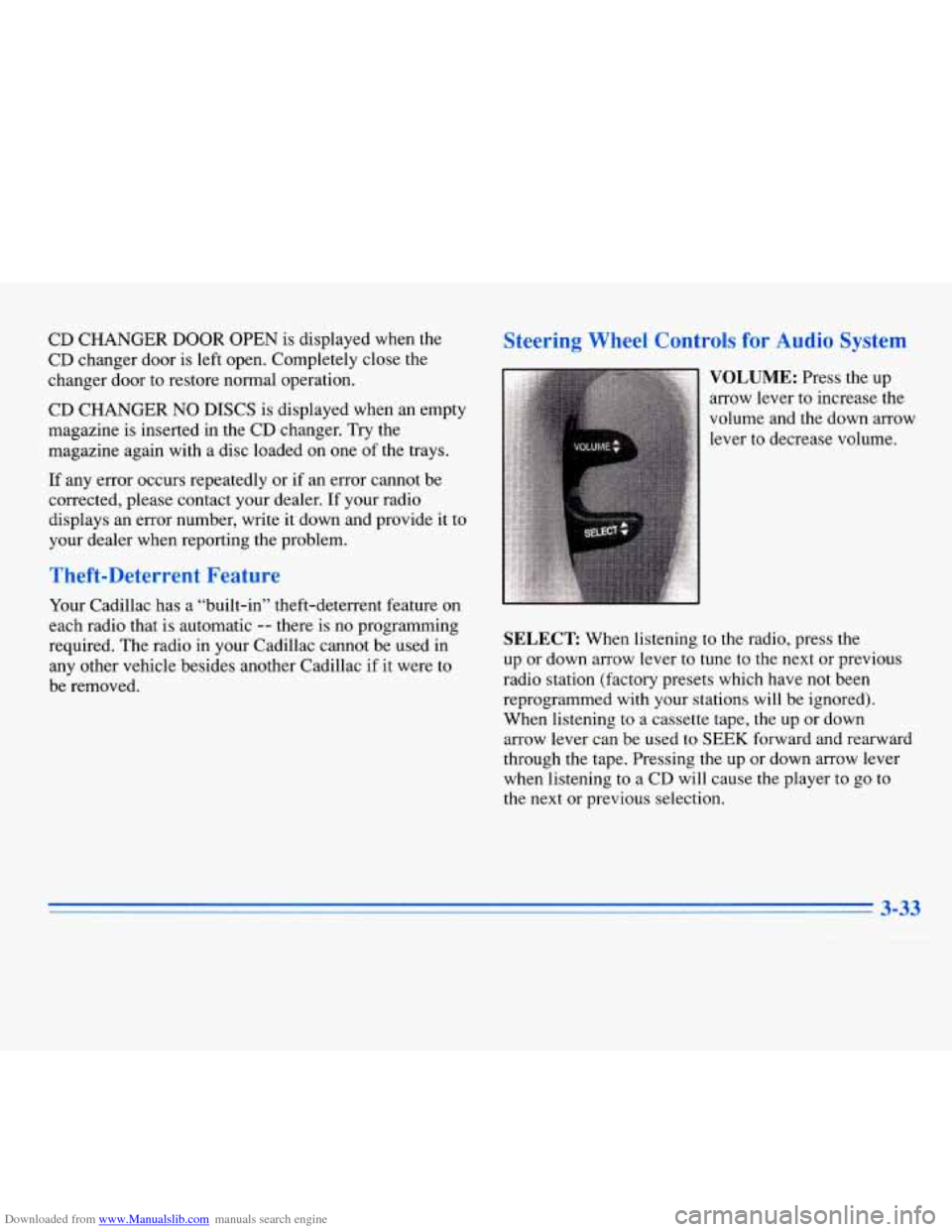
Steering Wheel Controls for Audio System
SELECT: When listening to the radio, press the
up or down arrow lever to tune to the next or previous
radio station (factory presets which have not been
reprogrammed with your stations will be ignored).
When listening to a cassette tape, the up
or down
arrow lever can be used to
SEEK forward and rearward
through the tape. Pressing the up or down arrow lever
when listening to
a CD will cause the player to go to
the next or previous selection.
3-33
Page 320 of 354

Downloaded from www.Manualslib.com manuals search engine Fuse
IGN 0- BODY
TURN CONSOLE
Usage
PRNDL, Heated Windshield (Optional), PZM, Cluster, Air
Control Module (ACM), Upper and Lower Zone Motor, HVAC
Solenoids, Climate Control Panel
(Optional), Rear Defog Relay,
ELC Relay
Cornering Lamp Switch, Right
and Left Cornering Lamps,
Electronic Flasher Module,
Turn/Hazard Switch, Right and Left Rear Turn Signal Lamps,
Right and Left Front
Turn Signal
Lamps, Repeater Lamps (Export)
Cellular Phone Portable Docking
Station, Washer Circuit Board,
Heated Seat Switch, Rear Zone
Blower, Right and Left Heated Seat Switches, Headlamp Wash Relay
Fuse
COMFORT
AMP
(Optional)
PZM
RADIO/ PHONE
CLUSTER
ACC
RR DEFOG
Usage
CD Player, Remote Function
Actuator (RFA), Controlled Power
Relay, Air Control Module (ACM), PZM
Right and Left Hand Bose Relay,
Right Front and Rear Speaker
(On Door), Left Front and Rear
Speaker (On Door)
PZM
Radio Receiver, Radio Interface Module (RIM)(Bose Only),
Phone, DAB Relay, Trunk Release
Relay, Fuel Door Release Relay,
High Beam Relay
Steering Wheel Controls, Cluster
PZM, Electrochromic Mirror, Rain
Sensor (Optional), Accessory Relay
Rear Defog
6-
-I
Page 342 of 354
Downloaded from www.Manualslib.com manuals search engine ........
Section 8 Index
. .
.
A/C Off For Engine Protection Message ............ 2-78
AirBag
....................................... 1-20
How Does it Restrain
.......................... 1-24
How it Works
................................ 1-22
Location
.................................... 1-22
Readiness Light
......................... 1.22. 2.64
Servicing
................................... 1-26
What Makes
it Inflate .......................... 1-24
What Will You See After it Inflates
............... 1-25
When Should it Inflate
......................... 1-24
Air Cleaner
.................................... 6- 13
Air Conditioning
................................ 3-9
Air Conditioning Refrigerants
................ 6.65. 6.66
Air Control. Climate Control System
............. 3.2. 3.6
Alarm. Theft-Deterrent
.......................... 2- 11
Alignment and Balance. Tire
...................... 6-42
Aluminum Wheels. Cleaning
...................... 6-50
Antenna. Power
................................ 3-36
Antifreeze
..................................... 6- 19
Anti-Lock
Brakes
...................................... 4-6
Brake System Warning Light
................ 2.67. 4.6
Anti-Lockout Feature
............................ 2-5
Anti.Theft. Radio
.............................. 3-33
Appearance Care
............................... 6-44
Appearance Care Materials Chart
.................. 6-52
Apply Brake to Shift Message
..................... 2-78 Arbitration Program
.............................. 7-8
Armrest. Storage ............................... 2-51
Ashtrays
...................................... 2-52
Assist Handles
................................. 2-54
Astroroof
..................................... 2-54
Audio Controls. Steering Wheel Touch Control
....... 3-33
Audio Equipment. Adding
........................ 3-34
Audio Systems
................................. 3-13
Automatic
DoorLocks
................................... 2-4
Overdrive
................................... 2-21
Pull-Down Feature
............................ 2-10
Shifting
..................................... 2-18
Transaxle Fluid
............................... 6-16
Transaxle Operation
........................... 2-18
Battery
...................................... 6-28
ChargeLight
................................ 2-65
Guard Storage
............................... 2-44
Inadvertent Power Saver
....................... 2-44
Jump Starting
................................. 5-3
Replacement. Keyless Entry
..................... 2-8
Volts High Message
........................... 2-79
Volts Low Message
........................... 2-79
Warnings
................................ 5-3. 5-5
No Charge Message ........................... 2-79
8-1
I
Page 348 of 354
Downloaded from www.Manualslib.com manuals search engine I ! ..
I t Net. Convenience .............................. 2-52
Neutral (N). Automatic Transaxle
.................. 2-20
New Vehicle Break-In
........................... 2-14
Night Vision
.................................... 4- 16
odometer
.................................... 2-62
Odometer. Trip
............................ 2.75. 2.78
Off-RoadRecovery
............................. 4-12
Oil. Engine ...................................... 6-9
Oil Life Indicator ............................... 2-85
Oil Pressure Light .............................. 2-72
Operation
...................................... 2-7
Overdrive
(@), Automatic Transaxle ................ 2-21
Overheating Engine
............................. 5-15
OwnerPublications
............................. 7-12
Overheated Engine Protection Operating Mode
....... 5-15
Paint Spotting. Chemical
........................ 6-51
Park
(P)
Automatic Transaxle .......................... 2- 19
ShiftingInto
................................. 2-24
Shifting Out of
............................... 2-27
AtNight
..................................... 2-11
Brake
...................................... 2-22
Brake Indicator Light
.......................... 2-66
Lots
....................................... 2-11
Over Things That
Burn ........................ 2-27
WithaTrailer
................................ 4-37
Parking Pass Key Not Programmed Message
................ 2-81
Passing
.. .................................... 4-13
Passenger Temperature Control
...................... 3.8
PASS-Key
11 .................................. 2-13
PCM Fault Message
............................. 2-81
Power
Antenna Mast Care
.... ! .................... .. .. 3-36
Door Locks
................................... 2-4
Option Fuses
................................ 6-54
Remote Control Mirror
......................... 2-49
Retained Accessory
........................... 2-15
Seatback Recliner
.............................. 1-5
Steering
.................................... 4-10
Steering Fluid ................................ 6-23
Windows
................................... 2-29 '
Powerseat ..................................... 1-1
Lumbar Controls .............................. 1-2
Memory Function
.............................. 1-3
Pregnancy. Use of Safety Belts
.................... 1-27
Problems on the Road
............................ 5-1
Publications. Service and Owner
................... 7-11
Pull-Down Feature. Automatic
.................... 2-10
Programmable Automatic Door Locks
............... 2-5
Radio Reception
.............................. 3-34
Radios
............................. 3.14.3.18. 3.26
Rain. DrivingIn
................................ 4-17
Rainsense Wipers
............................... 2-33
RAP ......................................... 2-15
ReadingLamps
................................ 2-43
8-7