Page 95 of 240
Audio System
Once that station's frequency is
stored, simply press and release the
proper preset button to tune to it. If
you want to change any preset button's selection, store another fre-
quency as described. The frequen-
cies you preset will be lost if your
car's battery goes dead or is discon-
nected.
The AUTO SELECT function allows
you to find stations easily when youare in an unfamiliar area. Press the
AUTO SELECT button. The system automatically scans both bands to
find six strong stations on AM and twelve on FM, and stores their
frequencies in the Preset buttons.
You can then use the Preset buttons in the normal manner to select thosestations. "A SEL" stays displayed
next to the frequency as a reminder.
If you are in a remote area, AUTO
SELECT may not find enough stations to fill all the available
presets. If this is the case, you will see a "0" displayed when you press
any Preset button that does not have
a station stored. You cannot manually store radio
station frequencies in the Preset
buttons when AUTO SELECT is ON. If you do not like the stations found
by AUTO SELECT, you can still use
the TUNE or SEEK function to findother stations.
AUTO SELECT does not erase the stations you have manually preset.
When you return to your normal reception area, turn off AUTO
SELECT by pressing the buttonagain. The light goes out and the
Preset buttons can then select thestations you originally set.
Comfort and Convenience FeaturesProCarManuals.comMain Menu Table of Contents s t
Page 103 of 240
Audio System
U.S. LX and Canadian EX models
You can use the TUNE/SEEK buttons while a disc is playing to select passages and change tracks.
To move rapidly forward within a track, push and hold the button.
Push and hold the button to
move rapidly backward within a
track. You will hear a beep a half second after you push the button.
Keep pushing the button until you
think the track has advanced or
returned to the desired position. The disc will start playing when you
release the button. If you push the button and
release it before you hear a beep, the system will skip forward to the
beginning of the next track on that
CD.
It will skip backward to the begin-
ning of the current track if you push the button and release it. If you push the RPT button on the
U.S. LX and Canadian EX models or
the A. SELECT/RPT button on the
U.S. EX model, the system will
continuously play the track you are
listening to. You will see RPT in the display. Push the switch again to
turn off the RPT (REPEAT) mode.
On U.S. EX model
You can get the CD player to randomly select tracks by pressing
A. SELECT/RPT until you see "A. SEL" in the display.
With this active, the system selects and plays the tracks randomly,
rather than sequentially, on each disc. When the system has played all
the tracks on that disc, it loads the
next disc and starts to play randomly.
The system continues to select and play tracks randomly on each of thesix discs until you press the
A. SELECT/RPT button again. To turn on random play mode while
the system is in the REPEAT mode,
turn off REPEAT mode first by
pressing the A. SELECT/RPT
button. Then, press the button againas explained above.
If you change modes to radio or
tape while a CD is playing, thenchange back to CD mode, thesame disc and track will play.
If you turn off the system while a CD is playing, either with the
PWR/VOL knob or by turning off
the ignition, the system will begin at the same disc and track when
you turn it back on.
If you try to select an empty slot in
the magazine, the system willselect and play the first track of
the next disc in the magazine.
To return to the radio function, press the CD button.
Comfort and Convenience FeaturesProCarManuals.comMain Menu Table of Contents s t
Page 104 of 240
Audio System
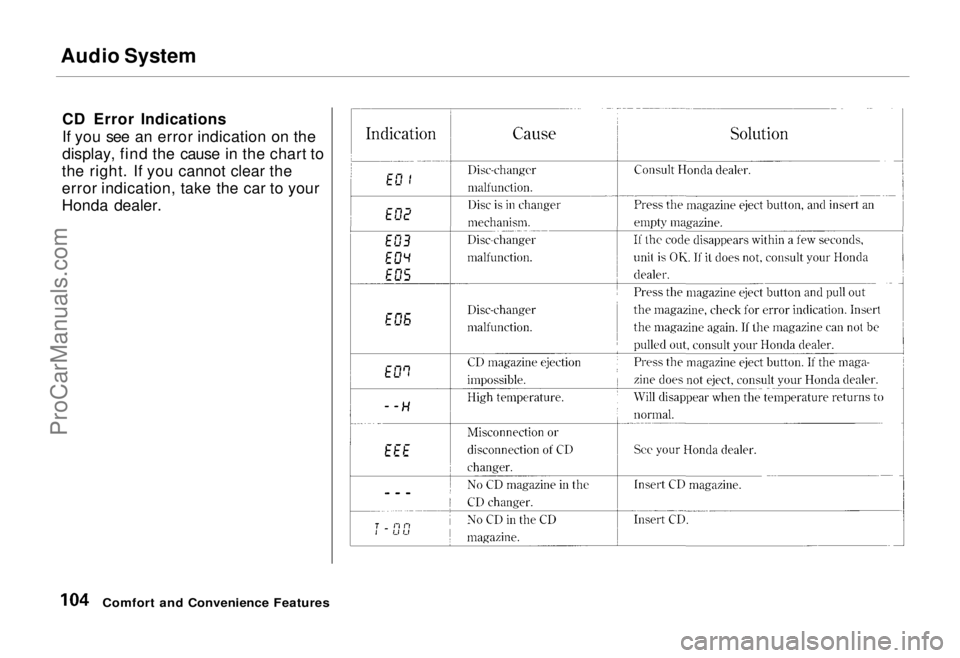
CD Error Indications
If you see an error indication on the
display, find the cause in the chart to
the right. If you cannot clear the
error indication, take the car to your
Honda dealer.
Comfort and Convenience FeaturesProCarManuals.comMain Menu Table of Contents s t
Page 106 of 240
Theft Protection
On U.S. EX model Your car's audio system will disableitself if it is disconnected from
electrical power for any reason. Tomake it work again, the user must
enter a specific five-digit code in the
Preset buttons. Because there are
hundreds of number combinations
possible from five digits, making the system work without knowing the
exact code is nearly impossible.
You should have received a card that lists your audio system's code
number and serial number. It is best
to store this card in a safe place at
home, or to keep it in your wallet or
purse. In addition, you should write
the audio system's serial number in
this Owner's Manual. If you should
happen to lose the card, you must obtain the code number from your
Honda dealer. To do this, you will
need the system's serial number. If your car's battery is disconnected
or goes dead, the audio system will
disable itself. If this happens, you
will see "Code" in the frequency display the next time you turn on the
system. Use the Preset buttons to
enter the five-digit code. If it is
entered correctly, the radio will start
playing.
If you make a mistake entering the
code, do not start over or try to
correct your mistake. Complete the
five-digit sequence, then enter the correct code. You have three tries to
enter the correct code. If you are
unsuccessful in three attempts, you must then leave the system on for
one hour before trying again. You will have to store your favorite
stations in the Preset buttons after
the system begins working. Your original settings were lost when
power was disconnected.
Comfort and Convenience FeaturesProCarManuals.comMain Menu Table of Contents s t
Page 126 of 240
The Braking System, Driving in Bad Weather
A car with ABS may require a longer
distance to stop on loose or uneven
surfaces than an equivalent car with-
out Anti-lock. The ABS cannot make
up for road conditions or bad judg-
ment. It is still your responsibility to
drive at reasonable speeds for
weather and traffic conditions, and to leave a margin of safety.
For a technical description of the
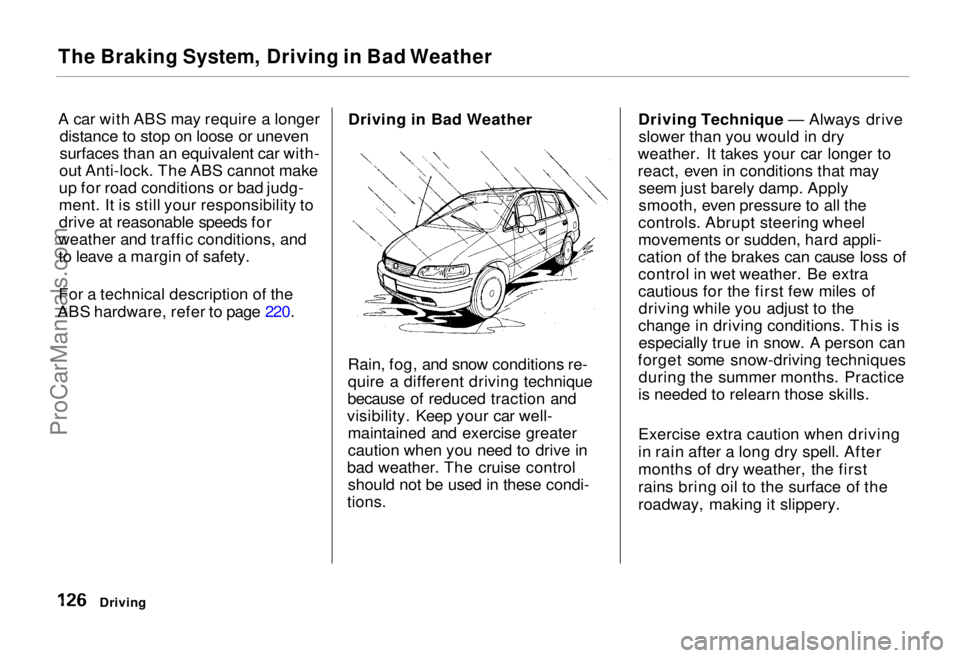
ABS hardware, refer to page 220. Driving in Bad Weather
Rain, fog, and snow conditions re-
quire a different driving technique
because of reduced traction and
visibility. Keep your car well- maintained and exercise greater
caution when you need to drive in
bad weather. The cruise control should not be used in these condi-
tions. Driving Technique — Always drive
slower than you would in dry
weather. It takes your car longer to
react, even in conditions that may seem just barely damp. Apply
smooth, even pressure to all the
controls. Abrupt steering wheel
movements or sudden, hard appli-
cation of the brakes can cause loss of
control in wet weather. Be extra
cautious for the first few miles of driving while you adjust to the
change in driving conditions. This is especially true in snow. A person can
forget some snow-driving techniques during the summer months. Practice
is needed to relearn those skills.
Exercise extra caution when driving
in rain after a long dry spell. After
months of dry weather, the first
rains bring oil to the surface of the
roadway, making it slippery.
DrivingProCarManuals.comMain Menu Table of Contents s t
Page 129 of 240
Towing a Trailer
The best way to confirm that your total towing package is within thesespecifications is to get it weighed.
Load the car and trailer as you
normally would while towing, and
take them to a public scale. Have
them check the total weight and the
weight at each axle, then compare
them to the specifications.
Trailer Hitches
Your Honda dealer, or the Honda Customer Relations Zone Office, can
give you advice on the proper hitch
for your car. Never use a hitch that mounts only to the rear bumper. The
bumper is not designed to handle
that type of load. The hitch shouldbolt to the underbody of the car anddistribute the load over a wide area.
Always have a trailer hitch installed by a qualified technician.
A trailer hitch that is not adequate for the size of the trailer, or a hitch that isimproperly installed, can cause damage
to the underside of your car.
Driving
NOTICE
Improperly loading your car and
trailer can seriously affect its
steering and braking performance, causing a crashin which you can be seriously
injured.
Check the loading of your car
and trailer carefully before starting to drive.ProCarManuals.comMain Menu Table of Contents s t
Page 133 of 240
Towing a Trailer
If you have to stop while going uphill, do not hold the car in place by
pressing on the accelerator. This can cause the automatic transmission to
overheat. Use the parking brake or
footbrake.
When parking your car and trailer, especially on a hill, be sure to follow
all the normal precautions. Turn
your front wheels into the curb, set the parking brake firmly, and put thetransmission in Park. In addition,
place wheel chocks at each of the
trailer's tires. Backing up with a trailer is difficult
and takes practice. Drive slowly,
make small movements with the
steering wheel, and have someone
stand outside to guide you. Grip the
steering wheel on the bottom (rather
than the usual position near the top). Move your hand to the left to get the
trailer to move to the left, and right
to move the trailer right.
DrivingProCarManuals.comMain Menu Table of Contents s t
Page 151 of 240
Cooling System
Do not add any rust inhibitors or other additives to your car's cooling
system. They may not be compatible
with the coolant or engine compo- nents.
Replacing Engine Coolant
The cooling system should be completely drained and refilled with
new coolant according to the time
and distance recommendations in
the maintenance schedule. Only use
recommended antifreeze.
Draining the coolant requires access
to the underside of the car. Unless
you have the tools and knowledge,
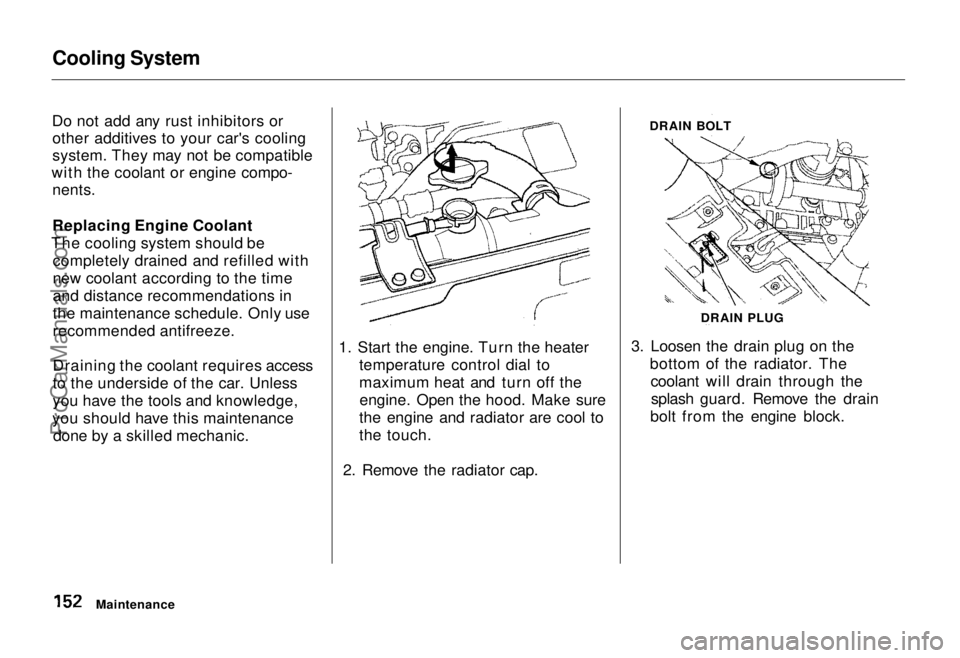
you should have this maintenance done by a skilled mechanic. 1. Start the engine. Turn the heater
temperature control dial to
maximum heat and turn off theengine. Open the hood. Make sure
the engine and radiator are cool to
the touch.
2. Remove the radiator cap. DRAIN BOLT
3. Loosen the drain plug on the bottom of the radiator. Thecoolant will drain through thesplash guard. Remove the drain
bolt from the engine block.
Maintenance DRAIN PLUGProCarManuals.comMain Menu Table of Contents s t