1995 CHEVROLET CAVALIER display
[x] Cancel search: displayPage 64 of 340
Downloaded from www.Manualslib.com manuals search engine Ignition Switch
E
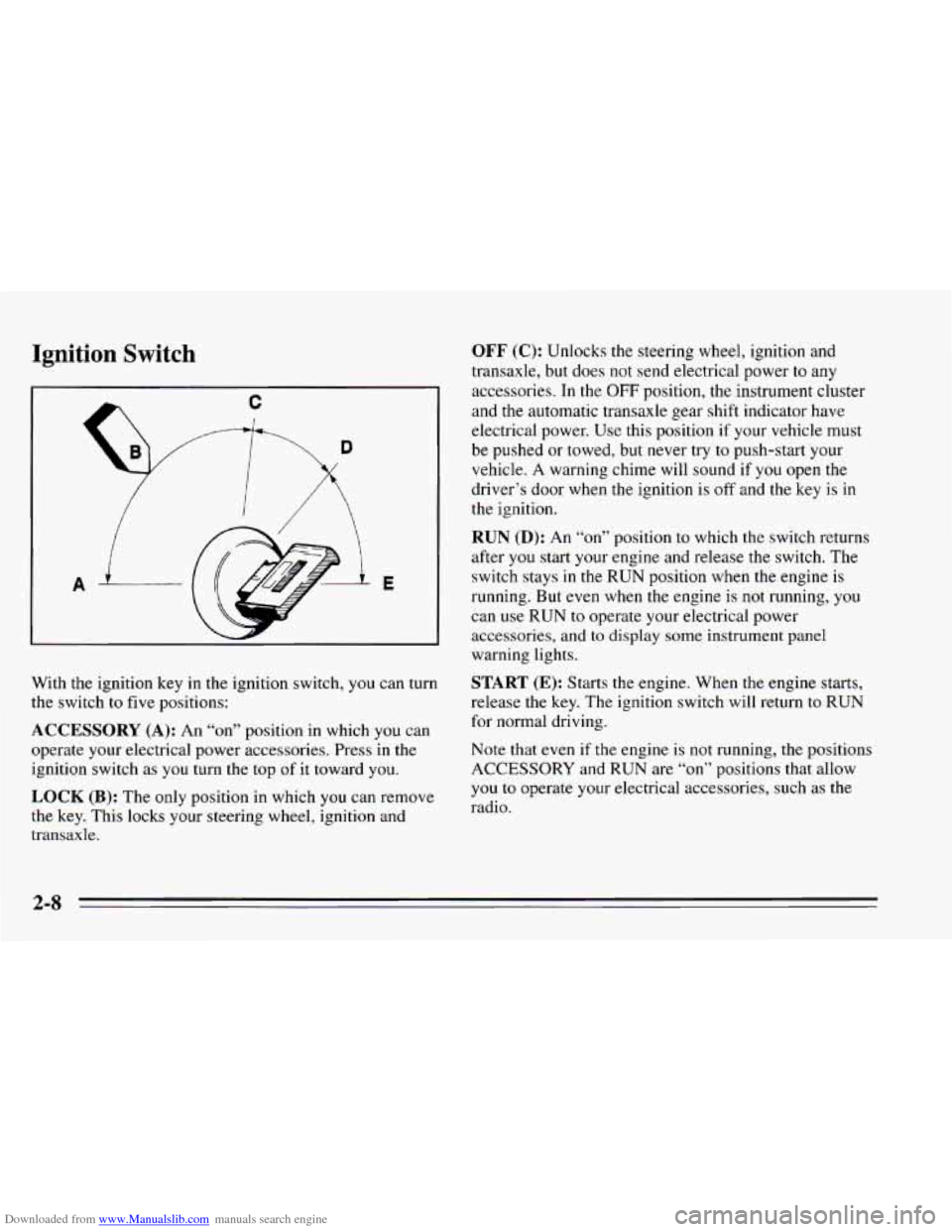
With the ignition key in the ignition switch, you can turn
the switch to five positions:
ACCESSORY (A): An “on” position in which you can
operate your electrical power accessories. Press in the
ignition switch as
you turn the top of it toward you.
LOCK (B): The only position in which you can remove
the key. This locks your steering wheel, ignition and
transaxle.
OFF (C): Unlocks the steering wheel, ignition and
transaxle, but does not send electrical power
to any
accessories. In the
OFF position, the instrument cluster
and the automatic transaxle gear shift indicator have
electrical power. Use this position if your vehicle must
be pushed or towed, but never try
to push-start your
vehicle. A warning chime will sound if
you open the
driver’s door when the ignition is
off and the key is in
the ignition.
RUN (D): An “on7’ position to which the switch returns
after
you start your engine and release the switch. The
switch stays
in the RUN position when the engine is
running. But
even when the engine is not running, you
can use
RUN to operate your electrical power
accessories,
and to display some instrument panel
warning lights.
START (E): Starts the engine. When the engine starts,
release the key. The ignition switch will return
to RUN
for normal driving.
Note that even if
the engine is not running, the positions
ACCESSORY and RUN are
“on” positions that allow
you
to operate your electrical accessories, such as the
radio.
Page 116 of 340
Downloaded from www.Manualslib.com manuals search engine You may wonder what happens if your vehicle needs a
new odometer installed.
If the new one can be set to the mileage total of the old
odometer, then it must be. But
if it can’t, then it’s set at
zero and
a label must be put on the driver’s door to show
the old mileage reading when the new odometer was
installed.
Trip Odometer (Option)
The trip odometer can tell you how far your vehicle has
been driven since
you last set the trip odometer to zero.
To set
the trip odometer to zero, press the knob to the
right
of it.
Tachometer (Option)
The tachometer displays the engine speed in revolutions
per minute (rpm).
I NOTICE:
I
Do not operate the engine with the tachometer in
the red area, or engine damage may
occur.
Warning Lights, Gages and
Indicators
This part describes the warning lights and gages that
may be
on your vehicle. The pictures will help you
locate them.
Warning lights and gages can signal that something is
wrong before
it becomes serious enough to cause an
expensive repair or replacement. Paying attention
to
your warning lights and gages could also save you or
others from injury.
Warning lights come
on when there may be or is a
problem with one of your vehicle’s functions.
As you
will
see in the details on the next few pages, some
warning lights come
on briefly when you start the
engine just to let you know they’re working. If you are
familiar with this section,
you should not be alarmed
when this happens.
Gages can indicate when there may be or is a problem
with one
of your vehicle’s functions. Often gages and
warning lights work together to let you know when
there’s a problem with your vehicle.
2-60
Page 132 of 340
Downloaded from www.Manualslib.com manuals search engine ! AWM Stereo Radio
TUNE BASS
LSCANJ ~ PAM - FM
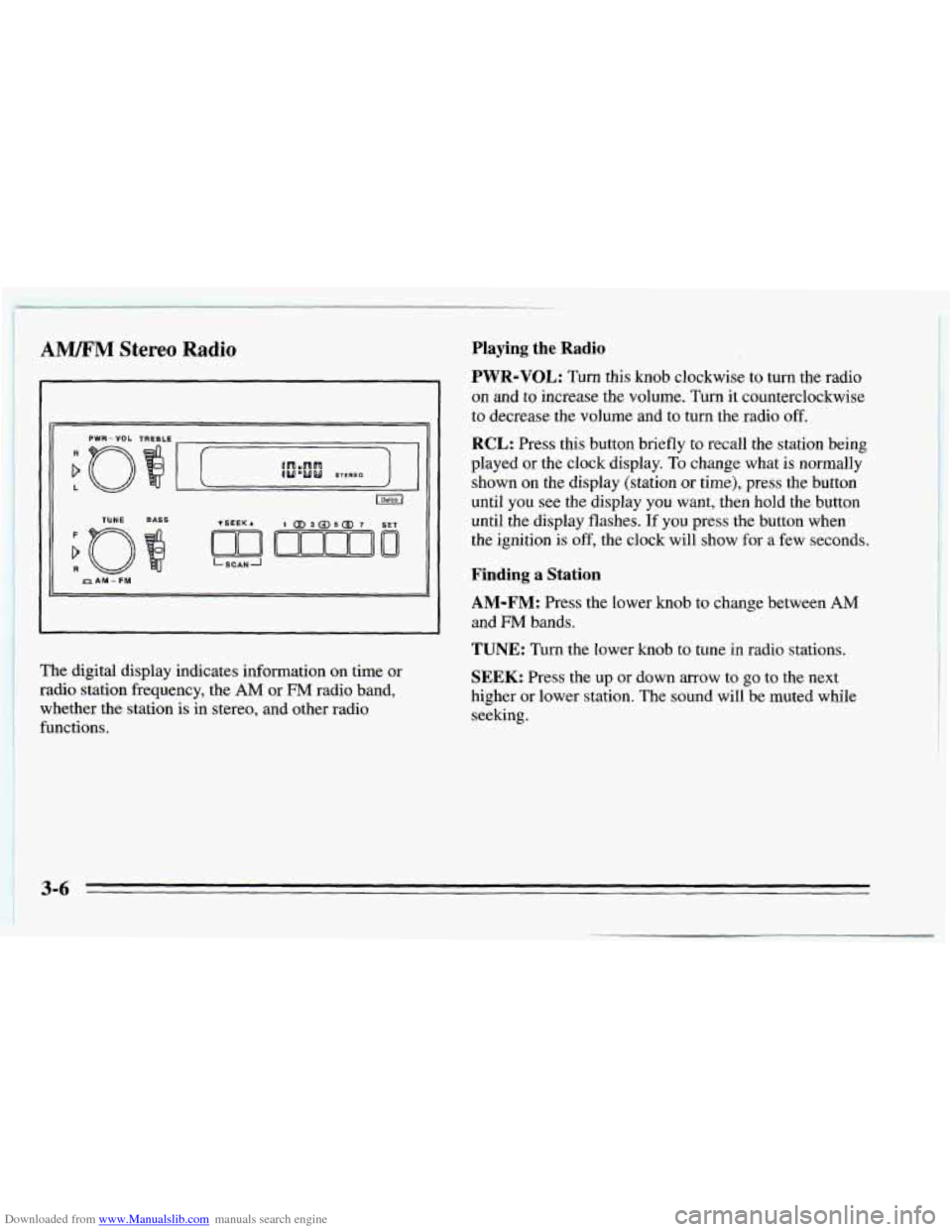
~ The digital display indicates information on time or ~ radio station frequency, the AM or FM radio band,
whether the station is in stereo, and other radio
functions.
Playing the Radio
PWR-VOL: Turn this knob clockwise to turn the radio
on and to increase the volume. Turn it counterclockwise
to decrease the volume and to turn the radio off.
RCL: Press this button briefly to recall the station being
played or the clock display.
To change what is normally
shown on the display (station
or time), press the button
until you see the display
you want, then hold the button
until the display flashes.
If you press the button when
the ignition
is off, the clock will show for a few seconds.
Finding a Station
AM-FM: Press the lower knob to change between AM
and FM bands.
TUNE: Turn the lower knob to tune in radio stations.
SEEK: Press the up or down arrow to go to the next
higher or lower station. The sound will be muted while
seeking.
3-6
Page 133 of 340
Downloaded from www.Manualslib.com manuals search engine SCAN: The scan function uses the same two buttons as
the seek function.
Press and hold the
SEEK up arrow and then the SEEK
down arrow to go to the next higher station, stop for a
few seconds, then go on to the next station.
Press and hold the
SEEK down arrow and then the SEEK
up arrow to go to the next lower station, stop for a few
seconds,
then go on to the next station.
If
you have a compact disc player, press SCAN to listen
to the next station
for a few seconds.
The radio will continue scanning until
it has scanned around
the band twice. Press PWR-VOL to stop scanning.
Presets: The four pushbuttons under the digital display
can be used to preset up to
14 radio stations (seven AM
and seven FM stations). The compact disc player has
five pushbuttons that can be used to set five AM and
five
FM stations.
1. Press AM-FM to select the band.
2. Find the station you want.
3. Press the SET button.
4. Within five seconds, press one of the numbered
buttons.
If your radio has four pushbuttons, you can press
two side-by-side pushbuttons at the same time
to preset an additional three stations.
5. Repeat Steps 1 through 3 to set additional stations.
Whenever you press that numbered button
or pair of
buttons, the station you set will return.
Setting the Tone
BASS: Slide this lever up to increase bass, or down to
decrease it. If you have a compact disc player, press the
up or down arrow on the BASS button
to adjust the
bass.
TREBLE: Slide this lever up to increase treble, or down
to decrease it. If a station is weak or noisy, reduce the
treble.
If you have a compact disc player, press the up or
down arrow on the TREB button to adjust
the treble.
Adjusting the Speakers
BALANCE: Turn the control ring behind the upper
knob
to move the sound to the left or right speakers. The
middle position is
a detent and balances the speakers.
FADE: Turn the control ring behind the lower knob to
move
the sound to the front or rear speakers. The middle
position
is a detent and balances the speakers.
3-7
Page 134 of 340
Downloaded from www.Manualslib.com manuals search engine AM/FM Stereo Radios with Cassette Tape
Player or Compact Disc Player
Your Chevrolet may have a radio with a cassette tape
player
or a compact disc player. To play the radio,
follow the instructions earlier in this manual under
“AM/FM Stereo Radio.” For other features, see
the
following instructions for the feature your radio has.
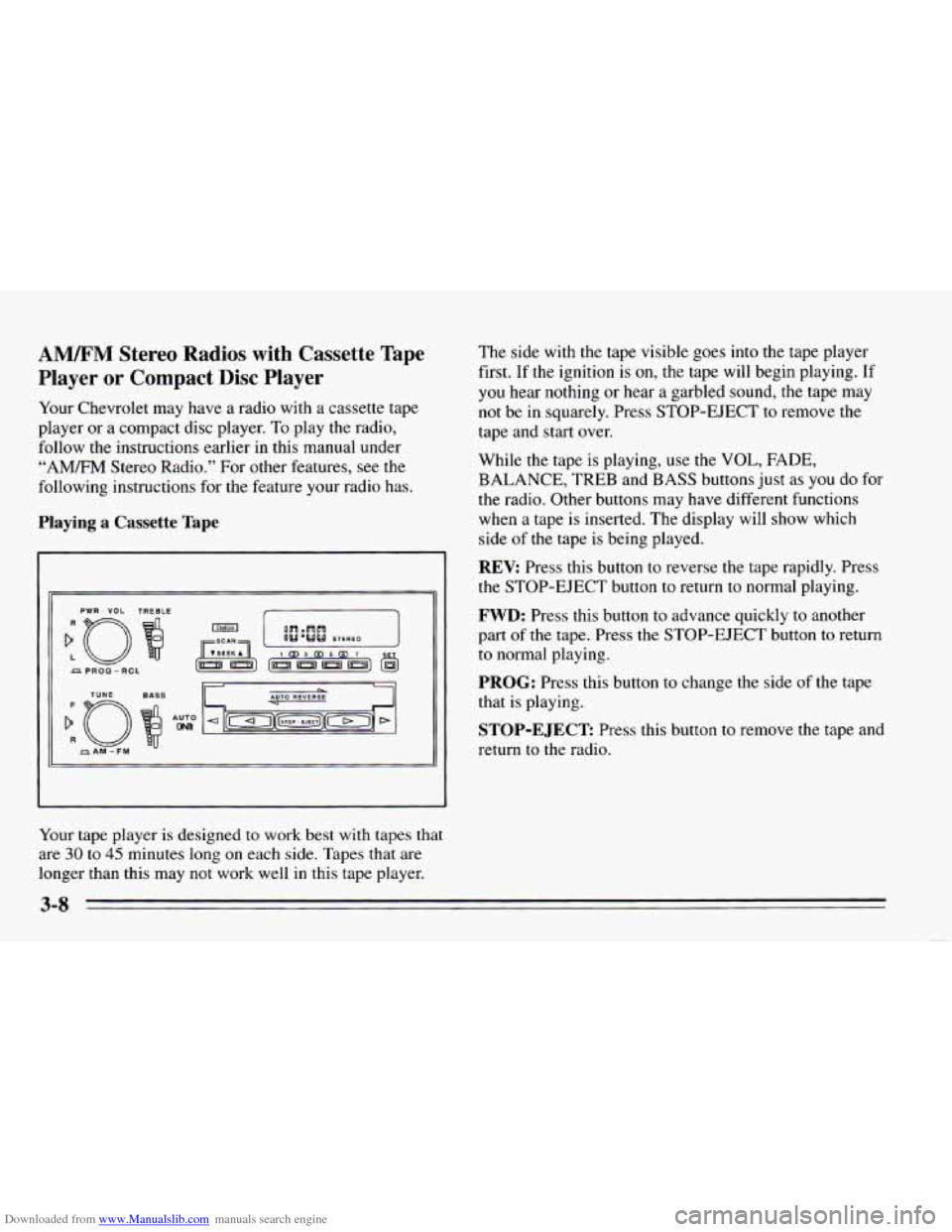
Playing a Cassette Tape
PWR - VOL TREBLE
Your tape player is designed to work best with tapes that
are 30 to 45 minutes long on each side. Tapes that are
longer than this may not work well in this tape player. The side
with the tape visible goes
into the tape player
first. If the ignition is
on, the tape will begin playing. If
you hear nothing or hear
a garbled sound, the tape may
not be in squarely. Press STOP-EJECT to remove the
tape and start over.
While the tape is playing, use the
VOL, FADE,
BALANCE, TREB and BASS buttons just as you do for
the radio. Other buttons may have different functions
when a tape is inserted. The display will show which
side
of the tape is being played.
REV: Press this button to reverse the tape rapidly. Press
the STOP-EJECT button to return to normal playing.
FWD: Press this button to advance quickly to another
part
of the tape. Press the STOP-EJECT button to return
to normal playing.
PROG: Press this button to change the side of the tape
that is playing.
STOP-EJECT Press this button to remove the tape and
return to the radio.
Page 135 of 340
Downloaded from www.Manualslib.com manuals search engine Playing the Compact Disc Player
:o
PWR - VOL
TUYE
f
R
AM-FM
Insert a disc partway into the slot, label side up. The
player will pull it in. If the ignition is on, but the radio is
off, the disc will begin playing. If you want to insert a
disc when the ignition is off, press
EJECT.
If you’re driving on a very rough road, the disc may not
play.
If “Err” appears on the display and the disc comes
back out, it could be that:
0 The disc is upside down.
It is dirty, scratched or wet.
It is very humid. If so, wait about an hour and try
It is very cold. Wait until the temperature inside the
Use only full-sized compact discs.
Do not use
mini-discs or “singles”. They won’t eject properly.
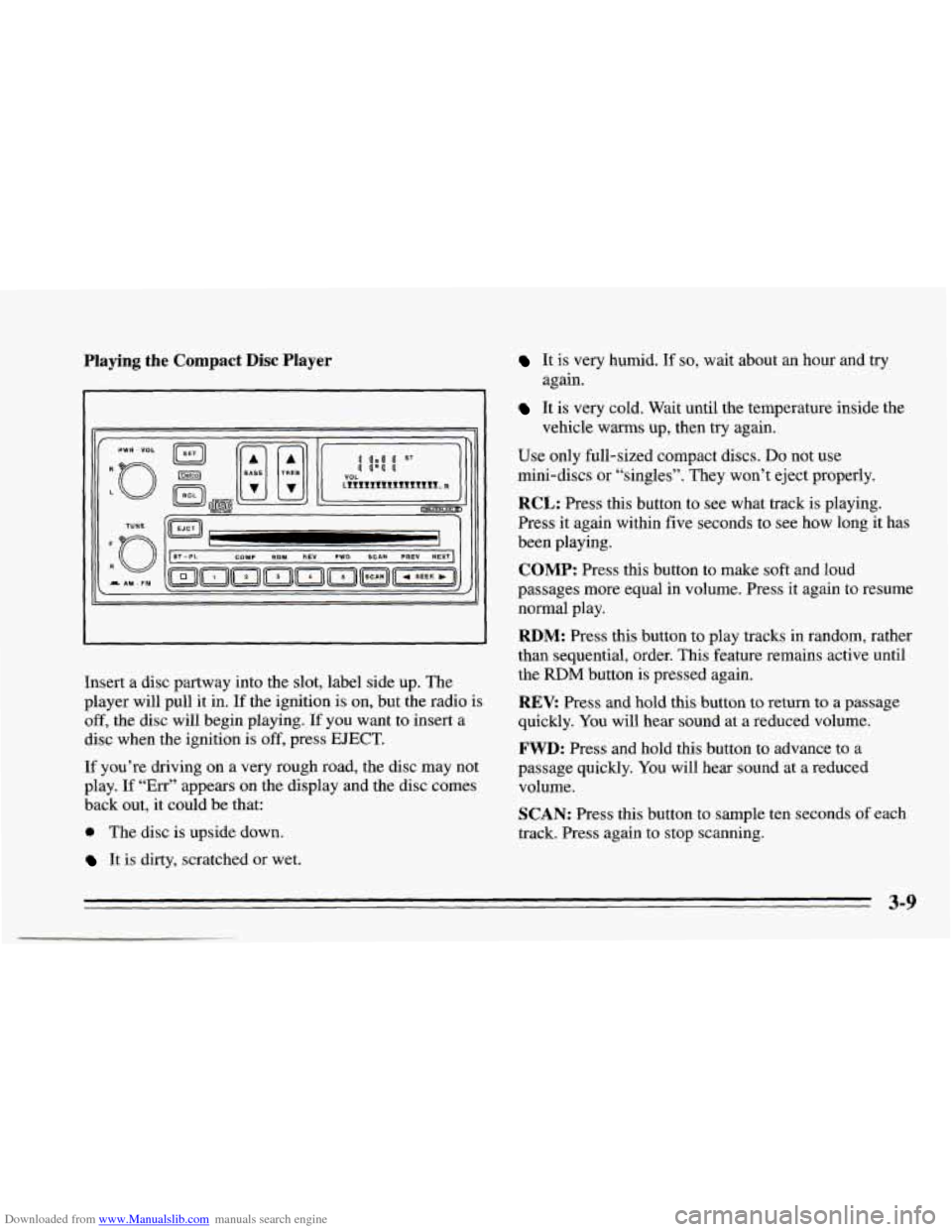
RCL: Press this button to see what track is playing.
Press it again within five seconds to see how long it has
been playing.
COMP: Press this button to make soft and loud
passages more equal in volume. Press it again to resume
normal play.
RDM: Press this button to play tracks in random, rather
than sequential, order. This feature remains active until
the
RDM button is pressed again.
REV: Press and hold this button to return to a passage
quickly. You will hear sound at a reduced volume.
FWD: Press and hold this button to advance to a
passage quickly. You will hear sound at a reduced
volume.
SCAN: Press this button to sample ten seconds of each
track. Press again to stop scanning.
again.
vehicle warms up, then try
again.
3-9
Page 136 of 340
Downloaded from www.Manualslib.com manuals search engine PREV Press to play a track again. If you keep pressing
the PREV button, the disc will keep backing up to
previous tracks.
NEXT: Press to advance to the next track. If you keep
pressing the NEXT button, the disc will keep advancing
to other tracks.
STPPL: Press this button to switch between the radio
and disc when a disc is
in the player.
EJECT Press this button to remove the disc. The radio
will play.
If
you turn off the ignition or radio with a disc in the
player, it will stay in the player. When
you turn on the
ignition or system, the disc will start playing where it
was stopped.
CD Player Anti-Theft Feature
Delco LOC II@ is a security feature that can be used or
ignored. If
you ignore it, the radio will play normally. If
you
use it, your radio cannot be turned on if it is stolen.
These instructions will
tell you how to enter a secret
code
into the radio. If battery power is lost for any
reason, the secret code must
be entered again before
your audio system can be turned on.
To Set the Anti-Theft System:
1. Write down any six-digit number and keep it in a
safe place. This is your secret code.
2. Turn the ignition on.
3. Rotate the PWR-VOL knob to turn the radio off.
4. Press station preset buttons 1 and 4 at the same time
and hold until
“---” shows on the display.
You now have only
I5 seconds between each of the
following steps.
5. Press SET and “000” will appear on the display.
6. Press SCAN until the first digit of your code
appears.
7. Press SEEK until the second and third digits of your
code appear.
8. Press the TUNE knob (“000” will appear on the
display).
9. Press SCAN until the fourth digit of your code
appears.
10. Press SEEK until the fifth and sixth digits of your
code appear.
3-10
Page 137 of 340
Downloaded from www.Manualslib.com manuals search engine 11. Press the TUNE knob (“rEP” will appear for five
12. Repeat steps
6 through 10. Then press the TUNE
seconds,
then
“000”).
knob again. SEC will appear, indicating that Delco
LOC
I1 is set, and your radio is secure. If “---”
appears, the steps were not successful and you must
repeat the entire procedure.
To Disable the Anti-Theft System
Enter your secret code by following these steps (you
will have only 15 seconds between each step).
1.
2.
3.
4.
5.
Turn the ignition on and the radio off, then press
station preset buttons 1 and
4. SEC will appear,
showing the radio is secure.
Press
SET and “000” will appear on the display.
Press SCAN until the first digit of your secret code
appears.
Press
SEEK until the second and third digits of your
code appear.
Press
the TUNE knob (“000” will appear on the
display). 6.
Press SCAN until the fourth digit of your code
appears.
7. Press SEEK until the fifth and sixth digits of your
code appear.
8. Press the TUNE knob. If the display shows “---,” the
radio is unsecured and will play again. If the display
shows SEC, the steps were not successful and the
numbers did not match the secret code.
If you lose or forget your code, see your dealer.
If you lose battery power, when the battery is
reconnected the radio will not turn on and
LOC will
appear. Follow Steps
1 through 8 for disabling your
system, and the time will appear if you are successful. If
SEC appears, the numbers did not match and your
unit
is still locked.
Understanding Radio Reception
FM Stereo
FM Stereo will give you the best sound, but FM signals
will reach only about
10 to 40 miles (16 to 65 km). Tall
buildings or hills can interfere with
FM signals, causing
the sound to come and go.
3-11