1994 OLDSMOBILE BRAVADA radio
[x] Cancel search: radioPage 105 of 248

2. Press SET. The SET indicator will
appear on the digital screen for five
seconds.
pushbuttons while the
SET indicator
is displayed. The station is now
preset. You can tune to it
immediately by pressing the same
numbered pushbutton.
4. Repeat these steps for up to five AM
and five FM stations.
To Play a Compact Disc:
Your compact disc player is designed
for full-size compact discs only.
Do not
use the mini-discs that are called
singles. They won’t eject.
1. Press PWR to turn the unit on.
2. Insert a disc partway into the slot,
3. Press one of the numbered
label side up. The player will pull it in.
In a few seconds, the disc should play.
If the disc comes back out without
playing:
The disc may be upside down.
The disc may be dirty, scratched or wet.
The road may be too rough.
There may be too much moisture in
the air. Wait about one hour and
try
again.
The player may be too hot. If so,
HOT will appear on the display.
When the compact disc player cools,
it should play again. Press
RCL to
remove
HOT from the display.
In addition
to the normal tone and
volume controls, you can use the
following controls while the compact
disc player is playing:
RCL (Recall): Press to see which
track is playing. Its number will be
displayed. Press again to see how long
it has been playing.
The track number will also be displayed
whenever you change the volume or a
new track begins to play.
EJCT (Eject): Press to eject the disc.
The radio will play.
ST-PL (Stop-Play): Press to stop the
compact disc player and play the radio.
Press again to stop the radio and play
the compact disc. It will begin playing
at the point where you stopped it.
COMP (Compression): Press to make
soft and loud passages more equal in
volume. Press again to resume normal
RDM (Random): Press to play a disc’s
tracks in random order. Press again to
play them in numbered sequence.
REV (Reverse): Press and hold to
rapidly back up within a track. Release
to play from that point.
FWD (Fast Forward): Press and hold
to rapidly move forward within a track.
Release to play from that point.
SCAN: Press to sample all tracks
briefly, one at a time. Press again to
continue the track that’s playing.
PREV (Previous): Press to back up to
the previous track. Pressing more than
once backs up more than one track.
Press and hold to scroll backward
through the tracks.
NEXT: Press to move up to the next
track. Pressing more than once moves
up more than one track. Press and hold
to scroll forward through the tracks.
Play-
99
ProCarManuals.com
Page 106 of 248
Comfort Controls &Audio Systems
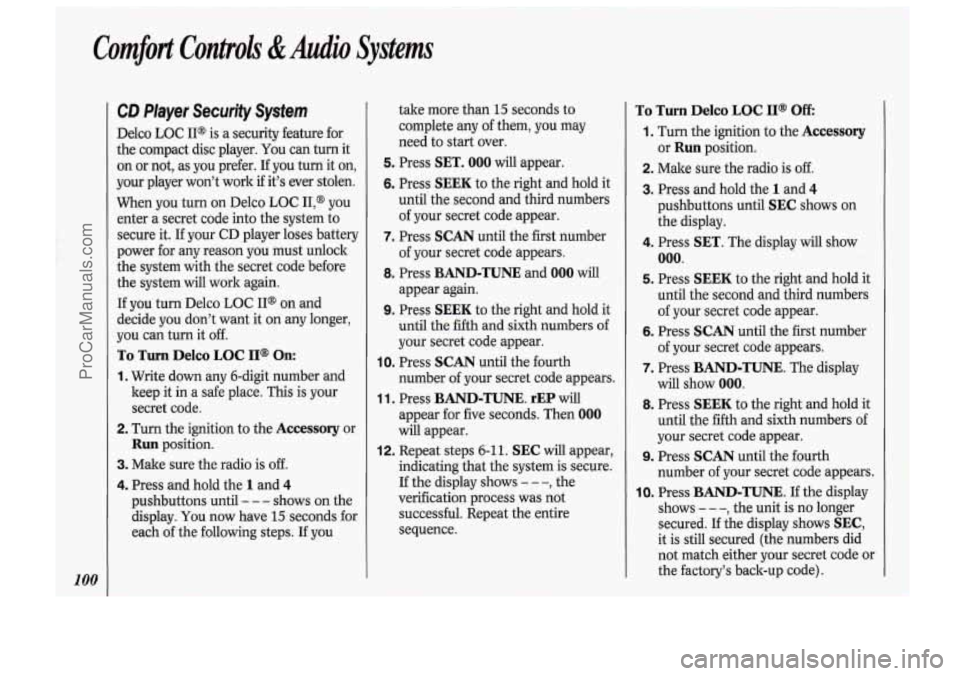
CD Player Security System
Delco LOC II@ is a security feature for
the compact disc player. You can turn it
on or not, as you prefer. If you turn it on,
your player won’t work
if it’s ever stolen.
When you turn on Delco LOC II,@
you
enter a secret code into the system to
secure it. If your CD player loses battery
power for any reason you must unlock
the system with the secret code before
the system will work again.
If you turn Delco LOC IP on and
decide you don’t want it on any longer,
you can turn it off.
To Turn Delco LOC II@ On:
1. Write down any 6-digit number and
keep it in a safe place. This is your
secret code.
2. Turn the ignition to the Accessory or
Run position.
3. Make sure the radio is off.
4. Press and hold the 1 and 4
pushbuttons until - - - shows on the
display.
You now have 15 seconds for
each of the following steps. If you take
more than 15 seconds to
complete any of them, you may
need to start over.
5. Press SET. 000 will appear.
6. Press SEEK to the right and hold it
until the second and third numbers
of your secret code appear.
7. Press SCAN until the first number
of your secret code appears.
8. Press BAND-TUNE and 000 will
appear again.
9. Press SEEK to the right and hold it
until the fifth and sixth numbers of
your secret code appear.
10. Press SCAN until the fourth
number of your secret code appears.
1 1. Press BAND-TUNE. rEP will
appear for five seconds. Then
000
will appear.
12. Repeat steps 6-11. SEC will appear,
indicating that the system is secure.
If the display shows
- - -, the
verification process was not
successful. Repeat the entire
sequence.
To Turn Delco LOC II@ Off
1. Turn the ignition to the Accessory
2. Make sure the radio is off.
3. Press and hold the 1 and 4
or Run position.
pushbuttons until
SEC shows on
the display.
4. Press SET. The display will show
000.
5. Press SEEK to the right and hold it
until the second and third numbers
of your secret code appear.
6. Press SCAN until the first number
of your secret code appears.
7. Press BAND-TUNE. The display
will show
000.
8. Press SEEK to the right and hold it
until the fifth and sixth numbers of
your secret code appear.
number of your secret code appears.
10. Press BAND-TUNE. If the display
shows
- - -, the unit is no longer
secured.
If the display shows SEC,
it is still secured (the numbers did
not match either your secret code or
the factory’s back-up code).
9. Press SCAN until the fourth
ProCarManuals.com
Page 107 of 248

To Unlock After a Power Loss:
When battery power is lost and then
resupplied to a secured unit,
LOC will
appear on the display. Follow these
steps to unlock the unit:
1. Turn the ignition to the Accessory or
2. Make sure the radio is off.
3. Press SET. The display will show
4. Press SEEK to the right and hold it
Run position.
000.
until the second and third numbers of
your secret code appear.
5. Press SCAN until the first number of
your secret code appears.
6. Press BAND-TUNE. The display will
show 000.
7. Press SEEK to the right and hold it
until the fifth and sixth numbers of
your secret code appear.
8. Press SCAN until the fourth number
of your secret code appears.
9. Press BAND-TUNE. If the display
shows the time of day, the unit is no
longer locked. If the display shows
LOC, it is still secured (the numbers
did not match either your secret code
or the factory’s back-up code).
Understanding Radio Reception
FM Stereo
FM Stereo will give you the best sound,
but FM signals will reach only about
10
to 40 miles (16 to 65 km). Tall buildings
or hills can interfere with FM signals,
causing the sound to come and go.
AM
The range for most AM stations is
greater than for FM, especially at night.
The longer range, however, can cause
stations to interfere with each other.
AM can also pick up noise from things
like storms and power lines. To lower
this noise, try reducing the treble level.
AM Stereo
Your Delco@ system may be able to
receive C-QuamB stereo broadcasts.
Many AM stations around the country
use C-Quam@ to produce stereo,
though some do not. C-Quam@
is a
registered trademark of Motorola, Inc.
If your Delco@ system can get C-
Quam@ signals, your stereo indicator
light will come
on when you are
receiving it.
ProCarManuals.com
Page 147 of 248

NOTICE:
~~
Ignoring these steps could result in
costly damage to your vehicle that
wouldn’t be covered by your
warranty. Trying to start your
Oldsmobile by pushing or pulling it
won’t work, and it could damage
your vehicle.
To Jump Start Your Oldsmobile:
1. Check the other vehicle. It must have
a 12-volt battery with a negative
ground system.
NOTICE:
If the other system isn’t a 12-volt
system with a negative ground,
both vehicles can be damaged.
2. Get the vehicles close enough so the
jumper cables can reach, but be sure
the vehicles aren’t touching each
other. If they are, it could cause a
ground connection you don’t want.
You wouldn’t be able to start your
Oldsmobile, and the bad grounding
could damage the electrical systems.
You could be injured if the vehicles roll.
Set the parking brake
firmly on each
vehicle. Put an automatic transmission
in P (Park) or a manual transmission in
N (Neutral).
3. Turn off the ignition on both
vehicles. Turn
off all lights that aren’t
needed, and radios. This will avoid
sparks and help save both batteries.
And it could save your radio!
NOTICE:
If you leave your radio on, it could
be badly damaged. The repairs
wouldn’t be covered by your
warranty.
4. Open the hoods and locate the
batteries. Find the positive
(+) and
negative
(-) terminals on each
battery.
II
141
ProCarManuals.com
Page 203 of 248

INST LPS PWR ACC
HORNIDM IGNIGAU BRAKE STOPIHAZ
h TAIL LPS TURNIBU HTR A/C RADIO
%se Usage
Position
INST LPS
PWR ACC
HORN/DM
IGN/GAU BRAKE
STOP/HAZ
TAIL LPS
TURNDU HTR A/C RADIO
ECM B
ECM I
PWR WDO
WIPER
CRANK
TRAILER*
Rating
(AMP.)
5
30
20
20
15
15
20
15
25
15
15
10
30
25
3
30
UNDERHOOD':' 4
CD PLAYER 10
"In-line fuse.
Circuitry
Instrument Panel Lights, Headlight Warning Buzzer, Heater
Light, Ashtray Light, Radio Illumination Light, Rear Wiper
Switch Light
Power Door Locks, Rear Defogger, Console Accessory
Receptacles, CD Player
Horn, Dome Lights, Glove
Box Light, Clock, Lighter, Lighted
Vanity Mirror, Outside Rearview Mirror, Courtesy Lights
Indicator Lights and Gages, Rear Defogger Relay, Cruise
Control, Rear Defogger Switch, Seat Belt Timer
Four Wheel Anti-lock Brake Module, Digital Ratio Adapter
Module (Speedometer)
Stop Lights, Hazard Warning Lights, Chime Module, Center
High Mounted Stop Light (CHMSL)
Light Switch, TaiVPark Lights, Electronic Cluster, License Light
Turn Signals
& Back-up Lights
Heating and Air Conditioning
Radio, Inside Rearview Mirror Map Lights, Rear Wiper, Rear
Washer, Compass
Electronic Control Module, Fuel Pump
Electronic Control Module
Power Windows
Windshield Wipers and Washer
Electronic Control Module
Trailer Wiring Harness
Underhood Light
CD Player (attached to fuse block)
197
ProCarManuals.com
Page 239 of 248

Index
ABS Warning Light ......................... 88
Accelerator Control System ............. 185
Accessory Belt Drive ........................ 184
Accessory Power Outlets
................... 71
Fluid
............................ 176. 199. 201
Adding
Automatic Transmission
Brake Fluid
............................. 178. 201
Electrical Equipment
......... 46. 95. 196
Engine Coolant
...... 174. 177. 199. 201
Engine Oil
...................... 168. 199. 201
Power Steering Fluid
............. 176. 201
Windshield Washer Fluid
...... 177. 201
Add-on Equipment
.......................... 184
Air Cleaner
................................ 171. 200
Air Conditioner
.......................... 92. 184
Alcohol. Driving Under the
Influence of
.................................... 106
Alcohol in Gasoline
.......................... 163
All-Wheel Drive
................................ 108
Aluminum Wheels. Cleaning
........... 194
Antenna
............................................ 103
Anti-Lock Brakes (ABS)
Antifreeze
......................... 174.
199. 201
Using ABS
...................................... 110
Warning Light
.................................. 88
Appearance Care .............................. 190
Ashtrays and Lighter
.......................... 73 Audio
Systems
.................................... 95
AM/FM Stereo Radio with
Cassette Player
& Equalizer ......... 96
AM/FM Stereo Radio with
Compact Disc Player
..................... 98
Care of Compact Discs .................. 102
Care of Cassette Player
.................. 102
Radio Reception. For the Best
....... 101
Setting the Clock
.............................. 95
Automatic Transmission Adding Fluid
.................................. 173
Checking Fluid
............................... 172
Shifting
............................................. 48
Battery
........................................... 180
Jump Starting
................................. 140
Light
........................................... 87. 90
Belt. Accessory Drive
....................... 184
Blizzard
............................................. 13 1
Block Heater. Engine ................. 47. 170
Blowout. Tire
.................................... 15 1
Brake
Adjustment
..................................... 179
Fluid
....................................... 178. 201
Master Cylinder
............................. 178
Parking
............................................. 51
Rear Drum ...................................... 179
Replacing Brake System Parts
....... 179
Warning Light
.................................. 88
Wear Indicators .............................. 179 Brake
System Warning Light
............. 88
Braking .............................................. 109
Braking in Emergencies
.................... 111
Break.1n. New Vehicle ............... 44. 132
Buckling Up (see
Safety Belts)
Bulb Replacement Brakes. Anti-Lock
............................ 110
Braking Technique
........................... 109
Fog Light
........................................ 182
Headlight ........................................ 181
Taillight .......................................... 182
Bulbs. Replacement
.......................... 202
Capacities
& Specscations .......... 199
Carbon Monoxide in
Exhaust
...................... 53. 54. 131. 135
Cargo Bed Liner .................................. 75
Cassette Tape Player
(see
Audio Systems )
CD Player (see Audio Systems)
Center Passenger Position
Certificatioflire Label
.................... 186
Chains. Tire ...................................... 190
Changing a Flat Tire
......................... 151
Checking
Brake Fluid
..................................... 178
Engine
Oil ...................................... 168
(see Safety Belts )
Engine Coolant .............................. 174
233
ProCarManuals.com
Page 243 of 248

Pressure Gage ............................ 84, 86
Quality
............................................ 169
Thickness
....................................... 169
When to Change
............................. 170
Operating Off-Road
.......................... 115
Operation of Lights ............................ 56
Outside Rearview Mirrors
.................. 70
Overhead Console
.............................. 64
Overheated Engine
Warnings
........ 145, 147, 148, 175, 176
Overheated Engine Coolant
Warning
......... 145, 147, 148, 175, 176
Owner Checks
& Services ............... 212
Outside
Temperature Display
............ 64
park. Shifting Into
.......................... 51
Parking
Over Things That Burn
.................... 53
With the Engine Running
.......... 52. 54
Parking Brake
..................................... 51
Passenger Belts (see Safety Belts )
Passing .............................................. 113
Payload .............................................. 184
Periodic Maintenance Inspections
... 215
Polishing and Waxing
Power Door Locks
.............................. 40
Power Mirrors ..................................... 70
(see
Appearance Care )
Power Outlets,
Accessory .................. 71
Power Seat, Driver’s ........................... 12 Power Steering
................................. 11
1
Power Steering Fluid ................ 176. 201
Power Windows .......................... 55. 198
Pregnancy. Use of Safety Belts
During
.............................................. 21
Problems on the Road ...................... 139
Publications (see
Service Publications )
Radiator Overheating
(see
Overheated En&e )
Radio (see Audio Systems)
Rain. Driving in the .......................... 125
Reading Lights
.............................. 67. 68
Rear Axle
.......................................... 174
Radiator
Pressure Cap
..... 146. 148. 176
Rear Seat. Folding
.............................. 14
Rear Window Defogger
...................... 94
Rear Window Wiper and Washer
....... 59
Rearview Mirror ................................. 69
Reclining Front Seatbacks
................. 13
Recommended Fluids
& Lubricants .......................... 201. 217
Remote Lock Control
......................... 40
Replacement Bulbs
........................... 202
Replacement Fuses
........................... 197
Replacement Parts ............................ 200
Replacing Bulbs
........................ 181. 182
Replacing Safety Belts
........................ 34
Replacing Tires
................................. 188
Replacing Wheels .............................. 189
Restraints. Child
................................. 26
Roads. Hill and Mountain
................ 129
Roadside Assistance Program
.......... 225
Rocking Your Vehicle
.............. 158. 159
Rotation. Tire 187
....................................
S afety Belts ...................................... 14
Center Passenger Position
............... 24
Adults
............................................... 18
Checking ........................................... 34
Children
...................................... 25. 32
Child Restraints
............................... 26
Child Restraints. How to Install
...... 26
Child Restraints. Where to Put
........ 27
Cleaning
......................................... 192
Driver Position
................................. 18
Extender ........................................... 34
How to Wear
.................................... 18
Lap-Shoulder Belt ............................ 18
Larger Children ................................ 32
Passenger Belts
................................ 21
Rear Safety Belts
.............................. 22
Pregnancy. Use
During
.................... 21
Questions
& Answers ..... 17. 19.20. 35
Rear Seat Passengers
....................... 22
Reminder Light
................................ 17
Replacement
..................................... 34
Right Front. Adult Passenger .......... 21
Smaller Children and Babies
........... 25
3
237
ProCarManuals.com