1994 OLDSMOBILE BRAVADA radio
[x] Cancel search: radioPage 79 of 248

Ashtrays and Lighter
The front ashtray is located below the
radio. To use the ashtray, pull it toward
you.
To remove the ashtray for cleaning,
press down on the front edge of the
ashtray and pull the entire ashtray out
of the instrument panel.
t
1
To use the lighter, push it in all the way
md let go. When it’s ready, it will pop
lack by itself.
NOTICE:
Don’t hold a cigarette lighter in
with your hand while it is heating.
If you do, it won’t be able to back
away
from the heating element
when it’s ready. That can make
it
overheat, damaging the lighter and
the heating element.
73
ProCarManuals.com
Page 93 of 248

The oil light could also flash on in three
other situations:
. When the ignition is on (in the Run
position) but the engine is not
running, the light will come on as a
test to show you it is working, but the
light will
go out when you turn the
ignition to
Start. If it doesn't come on
with the ignition on, you may have a
problem with the fuse. Have it fixed
right away.
Sometimes when the engine is idling
at a stop, the light may flash on and
off. This is normal.
If you make a hard stop, the light may
come on for a moment. This is normal.
0-
A \
Voltmeter (ELEcmoNIc CLUSTER)
Your charging system gage will show
the rate of charge when the engine is
running. When the engine
is not
running but the ignition is on (in the
Run position), the display measures the
voltage output
of your battery, and will
flash until you turn the ignition to
Start.
The reading will change as the rate of
charge changes (with engine speed,
etc.), but readings between the warning
zones indicate the normal operating
range. Readings in either warning zone
indicate a possible problem with your
charging system. Have your Oldsmobile
serviced immediately. You
also have a warning light.
A box
around the battery symbol will flash
when the charging system needs
service.
If it comes on while you are driving, you
may have a loose belt or other problem
with the electrical charging system.
Have it checked right away. Driving
while this light is on could drain your
battery.
If
you must drive a short distance with
the light on, be certain to turn off all
your accessories, such as the radio and
air conditioner.
U
87
ProCarManuals.com
Page 96 of 248

Features & Controls
90
CHECK
OAGES
Battery Light (STANDARD CLUSTER)
The battery light will come on briefly
when you turn on the ignition as a
check to show you it is working. It
should go out once the engine
is
running. If it stays on, or comes on
while you are driving, you may have a
loose belt or other problem with the
electrical charging system. Have it
checked right away. Driving while this
light is on could drain your battery.
If
you must drive a short distance with
the light
on, be certain to turn off all
your accessories, such as the radio and
air conditioner.
I
CHECK
GAGES
Check Gages Ljght
(STANDARD CLUSTER)
This light will come on briefly when you
are starting the engine. If the light
comes on and stays on while you are
driving, check your various gages to see
if they are in the warning zones.
ProCarManuals.com
Page 97 of 248

i 3.5K 10K
nn on AUTO REVERSE I
* x7 Ii3W
EJECT SEARCH TAPE FWD REV
In this part you’ll find out how to
operate the comfort control systems
and audio systems offered with your
Oldsmobile. Be sure to read about
the particular system supplied with
your vehicle.
Part 3
Comfort Controls &Audio Systems
Climate Control System ........................................................................\
.................... 92
Defogging and Defrosting ........................................................................\
................. 93
Rear Window Defogger ........................................................................\
..................... 94
Setting the Clock ........................................................................\
............................... 95
AM/FM Stereo with Cassette Player and Equalizer ................................................ 96
AM/FM Stereo Radio with Compact Disc Player .................................................... 98
Understanding Radio Reception.. ... . . . , , . . . . . . . . , . . . . . . . . . . . . . . . . . . . , . . . . . . . . . . . . . . . . . . . . . . . . . . . . . . . . . . . . . . 101
Care of Your Cassette Tape Player ........................................................................\
. 102
Care of Your Compact Discs ........................................................................\
.......... 102
Fixed Mast Antenna ........................................................................\
........................ 103
c
91
ProCarManuals.com
Page 101 of 248

This helps clear the intake ducts of
snow and moisture, and reduces the
chance
of fogging the inside of your
windows.
Keep the air path under the front
seats and console clear of objects.
This helps air to circulate throughout
your vehicle.
Audio Systems
The following pages describe the audio
systems available for your Oldsmobile,
and how to get the best performance
from them. Please read about the
system in your vehicle.
Hearing damage from loud noise is
almost undetectable until it is too late.
Your hearing can adapt to higher
volumes of sound. Sound that seems
normal can be loud and harmful to your
hearing. Take precautions by adjusting
the volume control on your radio to a
safe sound level before your hearing
adapts to it.
To help avoid hearing loss or damage:
1. Adjust the volume control to the
lowest setting.
2. Increase the volume slowly until you
hear comfortably and clearly.
NOTICE:
Before you add any sound
equipment to your vehicle
- like a
tape player, CB radio, mobile
telephone or two-way radio
- be
sure
you can add what you want. If
you can, it’s very important to do it
properly. Added sound equipment
may interfere with the operation
of
your vehicle’s engine, Delcom radio
or other systems, and even damage
them. And, your vehicle’s systems
may interfere with the operation of
sound equipment that has been
added improperly.
So, before
adding sound equipment, check
with your dealer and be sure to
check federal rules covering mobile
radio and telephone units.
1 3.5K 10K , I
;CAN SEEK
nn on AUTO REVERSE
’( EJECT SEARCH
Setting the Clock
Setting the clock is easy.
I. With the radio on or off and the
ignition
on, press SET. The SET
indicator will appear on the digital
screen for five seconds.
2. You must begin to set the clock to
the correct hour and minute during
those five seconds. Press
SCAN to
set the correct hour. Press
SEEK to
set the correct minute.
n
95
ProCarManuals.com
Page 102 of 248
Comfort Controls &Audio Systems
96
2 AM-FM
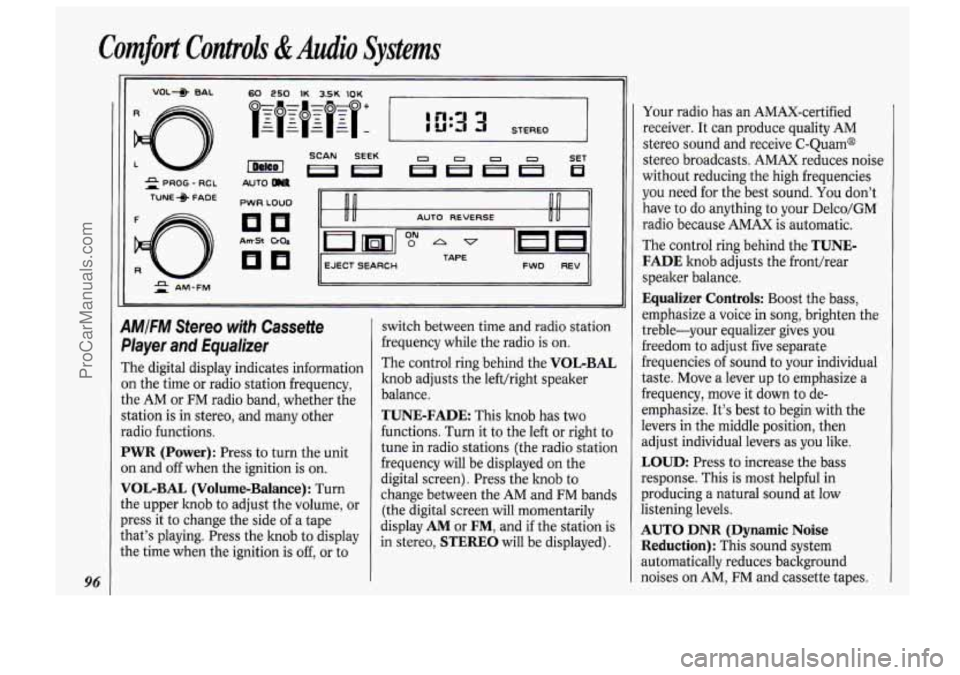
AMIFM Stereo with Cassette
Player and Equalizer
The digital display indicates information
on the time or radio station frequency,
the AM or FM radio band, whether the
station is in stereo, and many other
radio functions.
PWR (Power): Press to turn the unit
on and off when the ignition is on.
VOL-BAL (Volume-Balance): Turn
the upper knob to adjust the volume, or
press it to change the side of a tape
that’s playing. Press the knob to display
the time when the ignition
is off, or to switch
between time and radio station
frequency while the radio is on.
The control ring behind the
VOL-BAL
knob adjusts the left/right speaker
balance.
TUNE-FADE: This knob has two
functions. Turn it
to the left or right to
tune in radio stations (the radio station
frequency will be displayed on the
digital screen). Press the knob to
change between the AM and FM bands
(the digital screen will momentarily
display
AM or FM, and if the station is
in stereo,
STEREO will be displayed). Your
radio has an AMAX-certified
receiver. It can produce quality AM
stereo sound and receive C-Quam@
stereo broadcasts. AMAX reduces noise
without reducing the high frequencies
you need for the best sound. You don’t
have to
do anything to your Delco/GM
radio because AMAX
is automatic.
The control ring behind the
TUNE-
FADE
knob adjusts the front/rear
speaker balance.
Equalizer Controls: Boost the bass,
emphasize a voice in song, brighten the
treble-your equalizer gives
you
freedom to adjust five separate
frequencies of sound to your individual
taste. Move a lever up to emphasize a
frequency, move it down
to de-
emphasize. It’s best to begin with the
levers in the middle position, then
adjust individual levers as you like.
LOUD: Press to increase the bass
response. This is most helpful in
producing a natural sound at low
listening levels.
AUTO DNR (Dynamic Noise
Reduction):
This sound system
automatically reduces background
noises on AM,, FM and cassette tapes.
ProCarManuals.com
Page 103 of 248

AmSt: When you’re tuned to an AM
station that broadcasts
in stereo, the
STEREO light will come on. If the
signal is weak, press
AmSt to turn the
feature
off. You’ll get better reception.
Press
AmSt again to turn the feature
back on for strong signals.
SEEK Each time you press SEEK, you
will tune
in the next station on the AM
or FM radio band.
SCAN: Press to listen for a few seconds
to the next station on the AM or FM
band; the scan
will continue every few
seconds until you either press
SCAN
again or press the VOLBAL knob to
stop on a particular station.
To Preset Radio Stations:
The four pushbuttons can be used to
preset up to
14 radio stations (seven
AM and seven FM stations).
1. Turn the lower control knob (TUNE)
to the station you want.
2. Press SET. The SET indicator will
appear
on the digital screen for five
seconds.
3. While the SET indicator is displayed,
press one of the four pushbuttons.
The station is now preset. You can
tune to it immediately by pressing the
same button.
4. Repeat steps 1-3 for each of four AM
and four FM stations. ~. ,.I
Up to three additional stati6flS bn.each
band may be preset by “pairing”
pushbuttons:
1. Tune in the desired station.
2. Press SET, and within five seconds
press any two adjacent pushbuttons
at the same time.
3. The station can be tuned in when the
same
two pushbuttons are pressed at
the same time.
To Play a Cassette Tape:
Press PWR (Power) to turn the radio
on. Then push a cassette into the
cassette entry door (the tape side goes
in first). Using tapes that are longer
than
90 minutes (45 minutes on each
side) is not recommended.
FWD (Fast Forward): Press to advance
the tape rapidly; press again to play.
REV (Reverse): Press to reverse the
tape rapidly; press again to play tape.
SEARCH: Push this switch to the right
and the
FWD and REV buttons will
function as a “music search,” stopping
the tape at the next selection on the
tape. (There must be at least a 3-second
gap between selections
on the tape.)
The
ON light will indicate the music
search is selected.
Program: Press the VOL-BAL knob to
change the side of tape being played.
When the arrow pointing up is lighted,
the selections listed on the top side of
the tape are played. When the
arrow
pointing down is lighted, selections
listed on the bottom side of the tape are
played. The tape player automatically
begins playing the other side when
it
reaches the end of the tape.
Cr02: This button sets tape bias. When
playing high bias chrome or metal tapes,
press the button to turn the button light
on. When playing standard tapes, press
again to turn the light
off.
EJECT Press to have the cassette tape
ejected (the radio will then play). The
cassette tape
will be ejected automatically
when the radio is turned
off.
L
97
ProCarManuals.com
Page 104 of 248

Comfort Controls & Audio Systems
98
ST-PL COMP ROM REV FWD SCAN PREV NEXT
4MIFM Stereo Radio with
Compact Disc Player
The digital display indicates information
3n the time or radio station frequency,
the AM or FM radio band, whether the
station is in stereo, and many other
radio functions.
PWR (Power): Press to turn the unit
on when the ignition is on. Press again
to turn the unit off.
MUTE-VOL (Upper Knob): This
zontrol has three functions.
Turn the knob to adjust volume up
or down.
. Press the knob to silence the radio
temporarily. Press again to restore
original volume.
adjust lefthight speaker balance to
your taste.
BAND-TUNE (Lower Knob): This
control has three functions.
Turn the knob to tune the radio.
Press the knob to switch from the AM
band to the FM band. Press again to
switch from FM to AM.
Turn the ring behind the hob to
adjust the front-rear speaker balance
(also called “fade”) to your taste.
Turn the ring behind the knob to
RCL (Recall): Press to switch the
display from the time to radio station
frequency. Press again
to switch from
the radio frequency
to time.
BASS: Press the upper part to increase
bass. Press the lower part to decrease
bass.
TREB (Treble): Press the upper part to
increase treble. Press the lower part to
decrease treble.
SEEK: Press the left side to tune in the
next station lower in frequency. Press
the right side to tune in the next station
higher in frequency.
SCAN: Press to listen for a few seconds
to the next station on the AM or FM
band; the scan will continue every few
seconds until you press
SCAN again at
any time to stop on a particular station.
To Preset Radio Stations:
The five numbered pushbuttons are
used to immediately select any of ten
preset radio stations, five AM and five
FM. Four of the pushbuttons are also
used when you play a compact disc.
1. Tune the display to a station you
want to preset.
ProCarManuals.com