1994 CHEVROLET CORVETTE service
[x] Cancel search: servicePage 48 of 274

Downloaded from www.Manualslib.com manuals search engine Ke
ma
ha! the
ou1
!y Release Button: If you have a
lnual transmission, your ignition lock
; a key release button. You must press
: button before you can take your key
t of the ignition lock.
NOTICE:
If your key seems stuck in “Lock”
and you can’t turn it, be sure it is all
the way in. If it is, then turn the steer-
ing wheel left and right while you
turn the key hard. But turn the key
only with your hand. Using a tool to
force it could break the key or the
ignition switch. If none of this works,
then your vehicle needs service.
Delayed Accessory Bus (DAB)
With DAB your power windows and the
audio system will continue to work up to
15 minutes after the ignition key is turnec
to “Off’ and neither door is opened.
If a
door is opened, the audio system and
power windows will shut
off.
Starting Your Engine
Automatic Transmission: Move your
shift lever to
“P’ (Park) or “N” (Neutral).
Your engine won’t start in any other
position
- that’s a safety feature. To
restart when you’re already moving,
use
“N” (Neutral) only.
NOTICE:
Don’t try to shift to “P” (Park) if your
Corvette is moving. If you do, you
could damage the transmission. Shift
to
“P” (Park) only when your vehicle
is stopped.
ManuaI Transmission: The gear selector
should be
in neutral. Hold the clutch
pedal to the
floor and start the engine.
Your vehicle won’t start if the clutch
pedal is not all the way down
- that’s a
safety feature.
To start your 5.7 Liter LTl engine:
1. Without pushing the accelerator pedal
turn the ignition key to “Start.” When
the engine starts, let go of the key. Thl
idle speed will go down as your
engine gets warm.
NOTICE:
Holding your key in “Start” for
longer than 15 seconds at a time will
cause your battery to be drained
much sooner. And the excessive heat
can damage your starter motor.
47 ...
Page 50 of 274

Downloaded from www.Manualslib.com manuals search engine I NOTICE:
Your engine is designed to work with
the electronics in your vehicle. If you
add electrical parts or accessories,
you could change the way the fuel
injection system operates. Before
adding electrical equipment, check
with your dealer. If you don’t, your
engine might not perform properly.
If you ever have to have your vehicle
towed, see the part
of this manual
that tells how to do it without
damaging your vehicle. See “Towing
Your Vehicle” in the Index.
Engine Power Switch (ZR-I)
The LT5 engine in your ZR-1 has two sets
of intake runners and fuel injectors. The
primary set can be run alone for normal
engine power, or both sets can be used
for
full engine power.
Full power gives you extra power for
highway touring and off-road sports use
and reserve power for passing. With
normal power, you’ll notice less engine
and exhaust noise. To
change the power setting, put your
engine power key into the switch. Turn
the key to the setting you want and let
go
The key will return to the center position.
Your ZR-1 is able to run at full power
under the following conditions:
The engine coolant and oil
temperatures are greater than
68 OF
(20°C) but less than 302°F (150°C).
e System voltage is greater than ten
e The “SERVICE ENGINE SOON’
volts.
light is not on.
You can switch the setting at engine
speeds up to
4,000 rpm. When you
select the
“FULL” setting, a light near
[he switch will come on. It should go
>ut when you change back to the
“NORMAL” setting. When you turn the
ignition
off, the setting will go back to
normal power.
Off-Road Track Use
See your Warranty Book before using
your Corvette for off-road track use.
NOTICE:
If you use your Corvette for off-road
track use, your engine may use more
oil than it would with normal use.
Low oil levels can damage the
engine. Be sure to check the oil level
often during off-road track use.
You
may need to add additional oil. See
“Engine Oil” in the Index.
49 ...
Page 57 of 274

Downloaded from www.Manualslib.com manuals search engine Features and Controls
RIDE CONTROL
SPORT
To@F
fl
-
PS c
Selective Ride Control
(OPTION)
This knob is on the center console. Turn i
to select the ride control of your choice:
TOUR: Use for city and highway driving
Provides a smooth, soft ride.
SPORT: Use where road conditions or
personal preference demand more control
Provides more “feel,” or response to the
road conditions.
PERF: Use for performance driving.
Provides tight, firm ride and precise
response to road conditions. ‘TOUR” and “SPORT” will
provide a
imilar ride at low speeds around town,
md both settings will increase control
tnd firmness at higher speeds. “SPORT,”
lowever, will adjust more at ‘higher
;peeds than “TOUR” will.
,‘PERF” will provide much more
Zontrol and a firmer ride at all speeds.
You can select a setting at any time.
Based on your speed,
the system
wtomatically adjusts to provide the best
aide and handling. Select a new setting
whenever driving conditions change.
The “SERVICE
RIDE CONTROL” light
monitors the system. Refer to “Service
Ride Control Light” in the Index.
Limited-Slip Rear Axle
Your rear axle can give you additional
traction on snow, mud, ice, sand or gravel.
It works like a standard axle most
of the
time, but when one of the rear wheels
has no traction and the other does,
the
limited-slip feature will allow the wheel
with traction to move the vehicle.
Parking
Parking Brake
To set the parking brake: Hold the brak
pedal down. Pull the parking brake lever
up, then move it back down. This sets
your parking brake, even though the leve
is down. If the ignition is on, the parking
brake indicator light will come on.
... 56
Page 85 of 274

Downloaded from www.Manualslib.com manuals search engine Features and Controls
It takes more (or less) fuel to fill up
than the gauge reads. For example, the
gauge reads half full, but it took more
(or less) than half of the tank’s
capacity to fill it.
The gauge moves a little when you
turn, stop or speed up.
You can use the Trip Monitor to display
more detailed fuel information. Each time
you press “FUEL INFO,” one
of the
following will appear next to the fuel
gauge.
INST The fuel economy calculated
for your current driving conditions.
AVERAGE: The fuel economy
calculated for the current tank of fuel,
or since you last reset the display.
RANGE: The distance you can drive
before refueling.
Blank: The fuel gauge is displayed
alone.
You should reset the fuel information
display every time you refuel. Press
“RESET FUEL” on the Trip Monitor. :loser to the floor.
It may
take longer to
stop. If the light is still on, have the
vehicle towed for service. (See “Towing
Your Vehicle” in the Index.)
... 84
Brake System Warning Light
Your Corvette’s hydraulic brake system
is divided into two parts. If one part isn’t
working, the other part can still work and
stop you. For good braking, though, you
need both parts working well.
This light should come on as you start thc
vehicle. If it doesn’t come on then, have
it fixed
so it will be ready to warn you if
there’s a problem. If this warning light
stays on, there could be
a brake problem.
Have your brake system inspected right
away.
If the light comes on while you are
driving, pull
off the road and stop
carefully. You may notice that the pedal
is harder to push. Or, the pedal may go
Page 86 of 274

Downloaded from www.Manualslib.com manuals search engine I
1
E
E
1
S
t
r
r
’arking Brake Indicator Light
rhis light will come on when you set your
mking brake, and it will stay on if your
)arking brake doesn’t release fully.
rhis light should also come on as you
tart the.vehicle. If it doesn’t come on
hen, have it fixed
so it will be ready to
cmind you if the parking brake hasn’t
&eleased fully.
SERVICE
Anti-Lock Brake System Warning
Light
With anti-lock, this light will come on
when you start your engine and may stay
on for about two seconds. That’s normal.
If the light doesn’t come on, have it fixed
so it will be ready to warn you if there is i
problem.
If the light stays on, turn the ignition off.
Or, if the light comes on when you’re
driving, stop as soon as possible and turn
the ignition
off. Then start the engine
again to reset the system. If the light still
stays on, or comes on again while you’re
driving, your Corvette needs service. If
the regular brake system warning light
isn’t on, you still have brakes, but you
don’t have anti-lock brakes.
If the regular
brake system warning light is also on, you
don’t have anti-lock brakes and there’s a
problem with your regular brakes. See
“Brake System Warning Light” earlier in
this part.
85 ...
Page 87 of 274
Downloaded from www.Manualslib.com manuals search engine Features and Controls
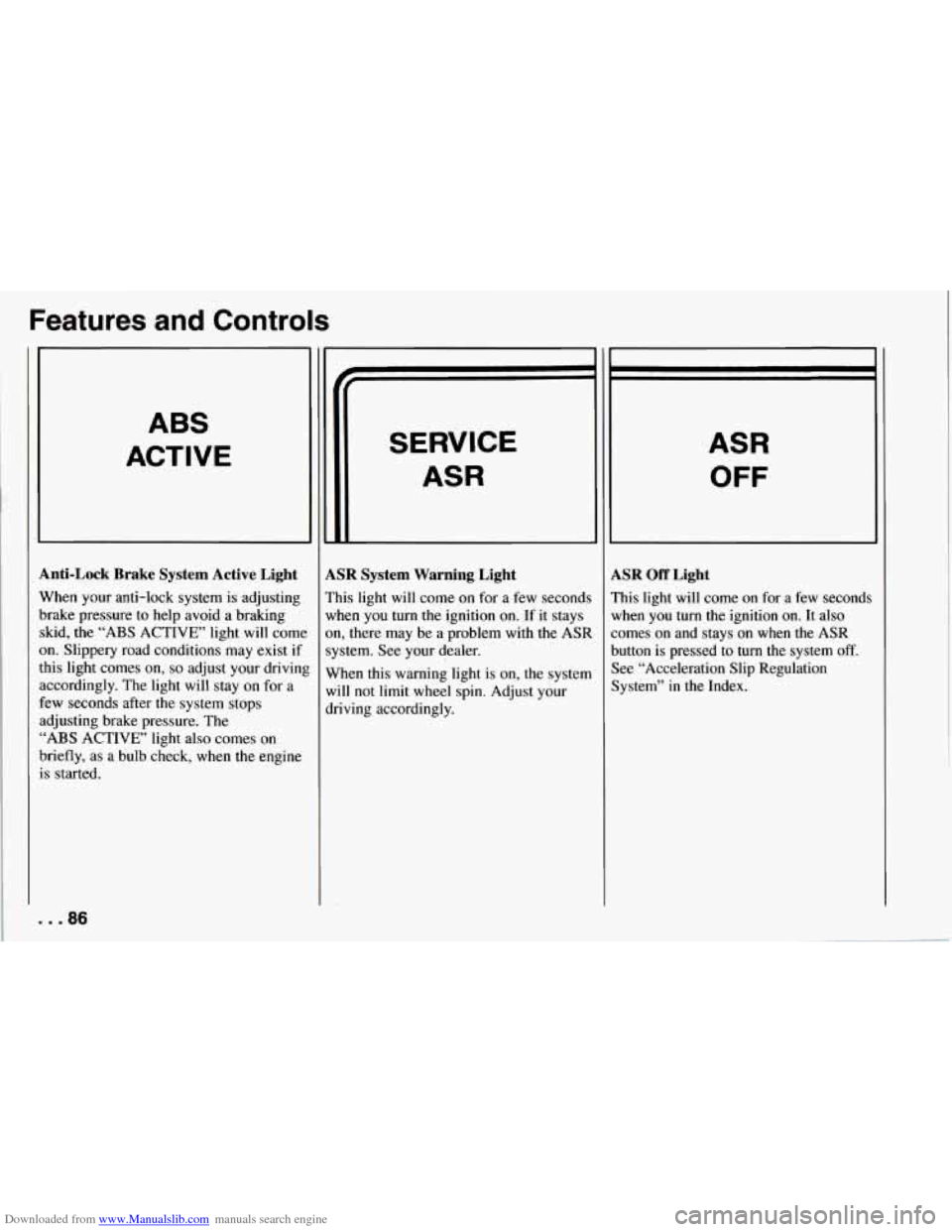
ABS
ACTIVE
Anti-Lock Brake System Active Light
When your anti-lock system is adjusting
brake pressure to help avoid a braking skid, the
“ABS ACTIVE’ light will come
on. Slippery road conditions may exist if
this light comes
on, so adjust your drivinl
accordingly. The light will stay on for a
few seconds after the system stops
adjusting brake pressure. The
“ABS ACTIVE’ light also comes on
briefly, as a bulb check, when the engine
is started.
. . .86
SERVICE
ASR
LSR System Warning Light
’his light will come on for a few seconds
vhen you turn the ignition on. If it stays
m, there may be a problem with
the ASR
ystem. See your dealer.
Vhen this warning light is on, the system
vi11 not limit
wheel spin. Adjust your
lriving accordingly.
ASR
OFF
LSR Off Light
’his light will come on for a few seconds
lrhen you turn the ignition
on. It also
omes on and stays on when the ASR
lutton is pressed to turn the system
off.
lee “Acceleration Slip Regulation
lystem” in the Index.
Page 88 of 274

Downloaded from www.Manualslib.com manuals search engine ASR
ACTIVE
ASR Active Light
When your ASR system is limiting wheel
spin, the “ASR ACTIVE’ light will come
on. Slippery road conditions may exist if
this light comes
on, so adjust your driving
accordingly. The light will stay on for a
few seconds after the ASR system stops
limiting wheel spin. The “ASR ACTIVE’
light also comes
on briefly, as a bulb
check, when the engine is started.
Low Tire Pressure Warning Light
(Option)
The LTPWS has a sensor on each road
wheel that transmits to a receiver
on the
instrument panel. The system operates on
a radio frequency subject to Federal
Communications Commission (FCC)
Rules.
This device complies with Part
15 of the
FCC Rules. Operation
is subject to the
following two conditions:
1. This device may not cause harmful
2. This device must accept any
interference,
and
interference received, including
interference that may cause undesired
operation.
Changes or modifications to this system
by other than an authorized service
facility could void authorization to use
this equipment.
LOWIFLAT
TIRE
..
The Low Tire Pressure Warning System
(LTPWS) monitors air pressure in each
road tire while you’re driving your
Corvette. The “LOW/FLAT TIRE” light
will come
on whenever tire pressure in
any road tire goes below
25 psi (175 kPa)
and it will stay
on until you turn off the
ignition. The light may come on if any
LTPWS parts aren’t working properly.
..
8
87 ...
Page 89 of 274

Downloaded from www.Manualslib.com manuals search engine Features and Controls
For LTPWS to work properly, you must
drive your Corvette faster than
25 mph
(40 km/h) and for more than
2 miles
(4 km). The system will not warn you
before
you begin to drive that a tire is flat.
When the “LOW/FLAT TIRE’ light
comes on, check
the tire pressure in all
four road tires as soon as you can. Adjust
the tire pressure as needed to those shown
on the Tire-Loading Information label on
the driver’s door. If the light stays on after
the tire pressure is adjusted, see your
dealer.
NOTICE:
Driving with a flat tire may damage
the tire,
the wheel or the tire pressure
sensor installed inside the tire on the
wheel rim. Using tire sealants may
also damage
the sensor.
If you have EMTs, see “Extended
Mobility Tires”
in the Index. The
LTPWS sensor is directly opposite
the valve stem on the tire. Take care when
servicing or having your tires serviced.
The sensors may not work properly if
damaged. To prevent damage to the
sensors, see the 1994 Corvette Service
Manual for correct tire mounting and
dismounting procedures.
The “LOWRLAT TIRE” light may come
on if your vehicle is close to another
vehicle that has LTPWS and has a tire
with low pressure.
LTPWS can
warn you about a low tire,
but it does not replace normal tire
maintenance. See “Tires” in the Index.
. . .88