Page 96 of 339
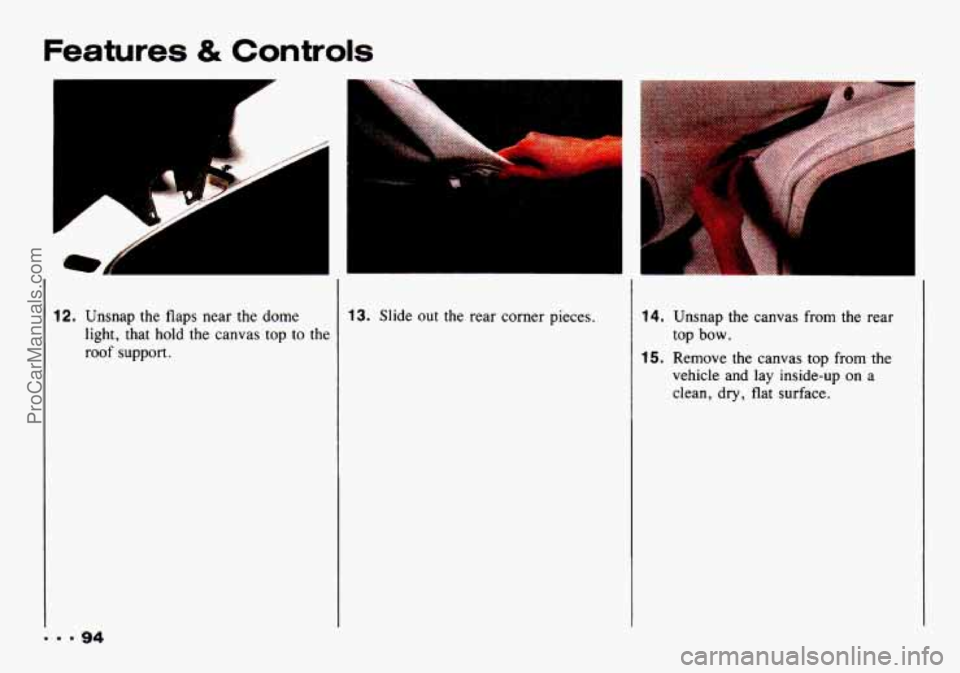
12. Unsnap the flaps near the dome
light, that hold the canvas top to
the
roof support.
... 94
13. Slide out the rear corner pieces. 14. Unsnap the canvas from the rear
15. Remove the canvas top from the
top bow.
vehicle and lay inside-up on a
clean,
dry, flat surface.
ProCarManuals.com
Page 106 of 339

Comfort Controls & Audio Systems
I
1. Slide the air intake lever to =.
2. Slide the airflow lever to Q to
direct air to the windshield vents.
3. Slide the temperature lever toward
4. Slide the fan lever to # .
When the windshield is clear, turn down
the fan speed.
To defog the side windows, slide the
airflow lever to
ZJ. For increased
airflow to the side vents, close the
center vents. the
right.
Air Conditioner Controls
The air conditioning system uses the
same controls as the heating system. The
function of each lever is explained under
“Heater Controls” in this part. The
incoming air is cooled and dehumidified
instead of being heated.
A/C: Push this button to change your
comfort control system from heating
to
air conditioning. A light will come on
when the air conditioning is on. The
A/C button can also control the
humidity in your vehicle.
Cooling
The air conditioner works best if you
keep your windows closed. On very hot
days, open the windows just long
enough for the hot air to escape.
1. Push the A/C button.
2. Move the air intake lever to
for normal cooling. For
faster
cooling move the lever tom.
3. Move the airflow lever to -$ .
4. Move the temperature control lever
5. Move the fan control lever to # .
toward the left.
... 104
ProCarManuals.com
Page 107 of 339

Dehumidifying
On days when it is raining or the
humidity is high, follow these
dehumidifying steps instead of the
cooling directions. It will help clean
windows that are cloudy with moisture.
1. Push the A/C button.
2. Move the air intake lever tom.
3. Move the airflow lever to .
4. Move the fan control lever toward
5. Adjust the temperature control lever
s-
to a comfortable setting.
Rear Window Defogger (OPTIO~V) I
Don’t use a razor blade
The
rear window defogger uses a
warming grid to remove fog from the
rear window.
Press the switch to turn on the defogger.
An indicator light will come on below
the switch to remind you that the
defogger is on. Press the switch again to
turn the defogger off. The rear window
defogger will also turn off if you turn
the ignition switch to
ACC or LOCK.
Do not attach anything like a temporary
vehicle license or a decal across the
defogger grid on the rear window. something
else sharp on the
inside
of the
rear window. If you do, yc
could cut or damage
the warming
grid, and the repairs would1 be
covered by your warranty.
ProCarManuals.com
Page 110 of 339
Comfort Controls & Audio Systems
AM/FM Stereo with Cassette Tape
Player
1. Press and hold RCL/PROG (TIME
SET). At the same time press and
hold
TUNE 4 (HR) until the correct
hour appears.
2. Press and hold RCL/PROG (TIME
SET). At the same time press and
hold
TUNE b (MIN) until the
correct minute appears.
AMW 1 2 3
4 5 6
s I tutu
A YFM Stereo
To Play the Radio
Turn the ON/VOL knob to turn the
system.on or
off.
Volume
Turn the ON/VOL knob to adjust the
volume.
AM-FM
Press AM-FM to get AM or FM. The
lighted display shows your selection.
Tune
Press TUNE, or TUNE4 to go to a
higher or lower station. Press either
button and hold
to continue tuning and
release when you find your station. The
display
will indicate the frequency of
each station tuned.
ProCarManuals.com
Page 112 of 339
Comfort Controls & Audio Systems
9M/FM Stereo with Cassette
Tape Player
To Play the Radio
hrn the ON/VOL knob to turn the
;ystem on or off.
Volume
Turn the ON/VOL knob to adjust the
volume.
AM-FM
Press AM-FM to get AM, FM 1 or
FM2. The lighted display shows your
selection.
Tune
Press TUNE, or TUNE4 to go to a
higher or lower station. Press either
button and hold
to continue tuning and
release when you find
your station. The
display will indicate the frequency
of
each station tuned.
Seek
Press SEEK, or SEEK4 and the radio
will tune
to the next higher or lower
station and stay there.
Pushbuttons
The six pushbuttons let you return to
your favorite stations. To set the
pushbuttons for up to
18 stations (6 AM,
6 FMl, and 6 FM2), just:
1. Tune in the station.
2. Press and hold one of the
pushbuttons for at least
two seconds.
The sound will go away for a second
and will return when the station
is
stored.
Repeat these steps for each pushbutton.
ProCarManuals.com
Page 114 of 339

The longer side with the tape visible
should face to
the right. If you hear
nothing or hear just a garbled sound, it
may not be
in squarely. Press A to
remove the tape and start over. Once the
tape
is playing, use the knobs for
volume and balance, just as you do for
the radio. The lighted arrows show
which side
of the tape is playing.
Your bias is set automatically. When a
metal or chrome tape is inserted,
“MTL” is shown on the display.
Fast Forward
Press FF to rapidly advance to another
part
of the tape. Press FF, RCL/PROG
or A (Stop/Eject) to return to
playing speed.
Rewind
Press REW to rapidly reverse the tape.
Press
REW, RCLlPROG or A
(Stop/Eject) to return to playing speed.
To Play the Next Selection
Press NEXT to go forward to the
beginning of the next selection.
For
NEXT to work properly, your tape
must have at least three or four seconds
of silence between each selection.
Previous
Press PREV to hear the last selection
over. Press PREV again or press
RCL/PROG or (Stop/Eject) to
cancel this function.
Program
Press RCL/PROG to switch from one
side
of the tape to the other.
Your cassette tape player can play
continuously because the player has an
auto-reverse feature.
Dolby DD@
Press 00 to remove noise from
Dolby DD@ NR-encoded tapes.
Dolby@’ Noise Reduction is
manufactured under license from Dolby
Laboratories Licensing Corporation.
Dolby and the double-D symbol are
trademarks of Dolby Laboratories
Licensing Corporation.
ProCarManuals.com
Page 117 of 339

2. Press the SEEK4 button and hold it
until the first digit of your code
appears.
3. Press the SEEK, button and hold it
until the second digit of your code
appears.
4. Press the TUNE4 button and hold it
until the third digit of your code
appears.
5. Press the TUNE, button and hold it
until the fourth digit of your code
appears.
checked that the code matches the
one you wrote down. Now
“SEC”
will appear in the display,
6. Press AM-F” after you have
Understanding Radio Reception
F” Stereo
FM stereo will give you the best sound,
but FM signals will reach only about 10 to
40 miles (16 to 65 km). And, tall
buildings or hills can interfere with
FM signals, causing the sound to come
and go.
AM
The range for most AM stations is
greater than for FM, especially at night.
The longer range, however, can cause
stations to interfere with each other.
AM can pick up noise from things like storms and power lines. Try reducing
the treble to reduce this noise if you
ever get it.
Care of Your Cassette Tape
Player
A tape player that is not cleaned
regularly can cause reduced sound
quality, ruined cassettes, or a damaged
mechanism. Cassette tapes should be
stored in their cases away from
contaminants, direct sunlight, and
extreme heat. If they aren’t, they may
not operate properly or cause failure of
the tape player.
Your tape player should be cleaned
regularly each month or after every
15
hours of use. If you notice a reduction
in sound quality,
try a known good
cassette to see if the tape or the tape
player is at fault. If this other cassette
has no improvement in sound quality,
clean the tape player.
115 9
c
ProCarManuals.com
Page 122 of 339
Your Driving and
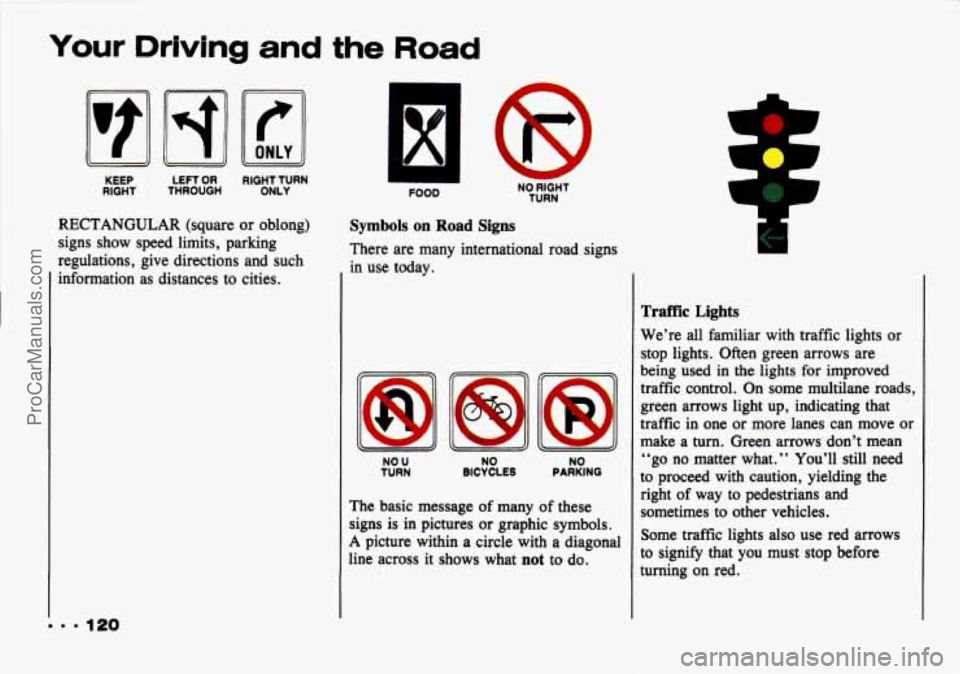
KEEP
RIGHT THROUGH LEFT OR RIGHT TURN
ONLY
RECTANGULAR (square or oblong)
signs show speed limits, parking
regulations, give directions and such
information as distances to cities.
. 120
FOOD NO RIGHT TURN
Symbols on Road Signs
There are many international road signs
in use today.
NO U NO
TURN BICYCLES PARKING NO
The basic message of many of these
signs is
in pictures or graphic symbols.
A picture within a circle with a diagonal
line across it shows what
not to do.
Traffic Lights
We’re all familiar with traffic lights or
stop lights. Often green arrows are
being used
in the lights for improved
traffic control. On some multilane roads,
green arrows light up, indicating that
traffic in one or more lanes can move
or
make a turn. Green arrows don’t mean
“go no matter what.
” You’ll still need
to proceed with caution, yielding the
right of way to pedestrians and
sometimes to other vehicles.
Some traffic lights
also use red arrows
to signify that you must stop before
turning on red.
ProCarManuals.com