1993 CHEVROLET CAMARO engine
[x] Cancel search: enginePage 8 of 358

How to Use This Manual
How to Use This
Manual
Many people read their owner’s manual
from beginning to end when they first
receive their new vehicle. This will help
you learn about the features and controls
for your vehicle. In this manual, you’ll
find that pictures and words work
together to explain things quickly.
Index: A good place to look for what
you need is
the Index in back of the
manual. It’s an alphabetical list of all
that’s
in the manual, and the page
number where you’ll find it.
Parts 1-8: Each part of this manual
begins with a brief list of its contents,
so
you can often find at a glance if a part
contains the information you want.
How to Use This Manual
This part tells you how to use your
manual and includes safety and vehicle
damage warnings and symbols.
Part 1: Seats & Safety Belts
This part tells you how to use your seats
and safety belts properly.
Part 2: Features & Controls
This part explains how to start and
operate your Chevrolet.
Part 3: Comfort Controls & Audio
Systems
This part tells you how to adjust the
ventilation and comfort controls and
how to operate your sound system.
Part 4: Your Driving and the Road
Here you’ll find helpful information and
tips about the road and how to drive
under different conditions.
Part 5: Problems on the Road
This part tells you what to do if you
have a problem while driving, such as a
flat tire or engine overheating.
Part 6: Service & Appearance Care
Here the manual tells you how to keep
your Chevrolet running properly and
looking
good.
Part 7: Maintenance Schedule
This part tells when to perform vehicle
maintenance and what fluids and
lubricants to use.
ProCarManuals.com
Page 12 of 358
How to Use This Manual
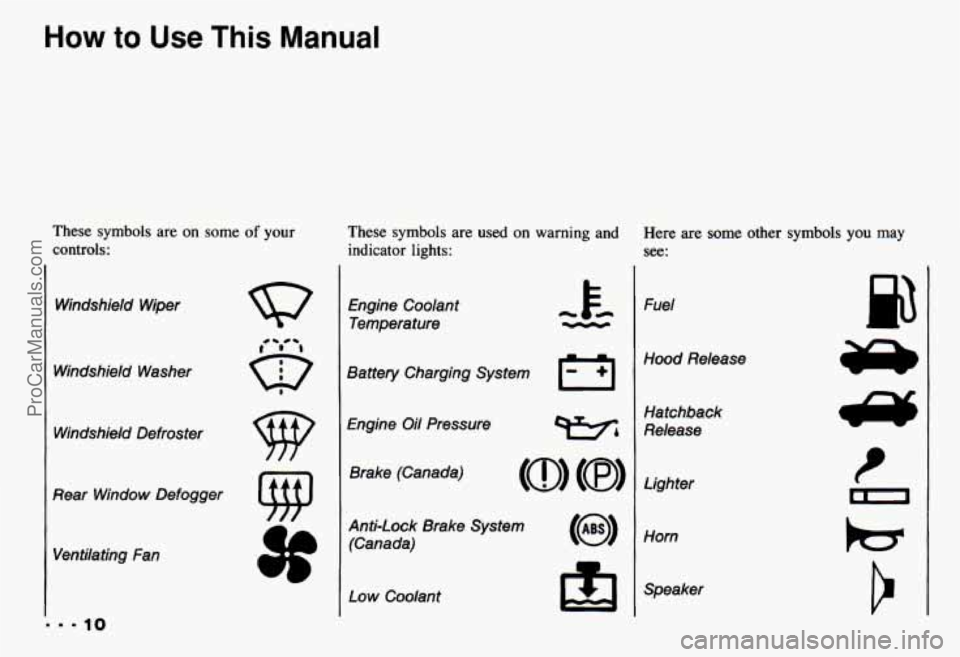
These symbols are on some of your
controls: These symbols are used
on warning and
indicator lights:
Windshield Wiper
Windshield Washer Windshield Defroster
0
9
0-
I
Rear Window Defogger Ventilating Fan Engine Coolant
Temperature
Battery Charging System
El
Engine Oil Pressure Brake (Canada)
Anti-Lock Brake System (Canada)
Low Coolant h
Here are some other symbols you may
See:
Fuel
Hood Release
Hatchback
Release
Lighter
Horn
Speaker
p3
ProCarManuals.com
Page 14 of 358
How to Use This Manual
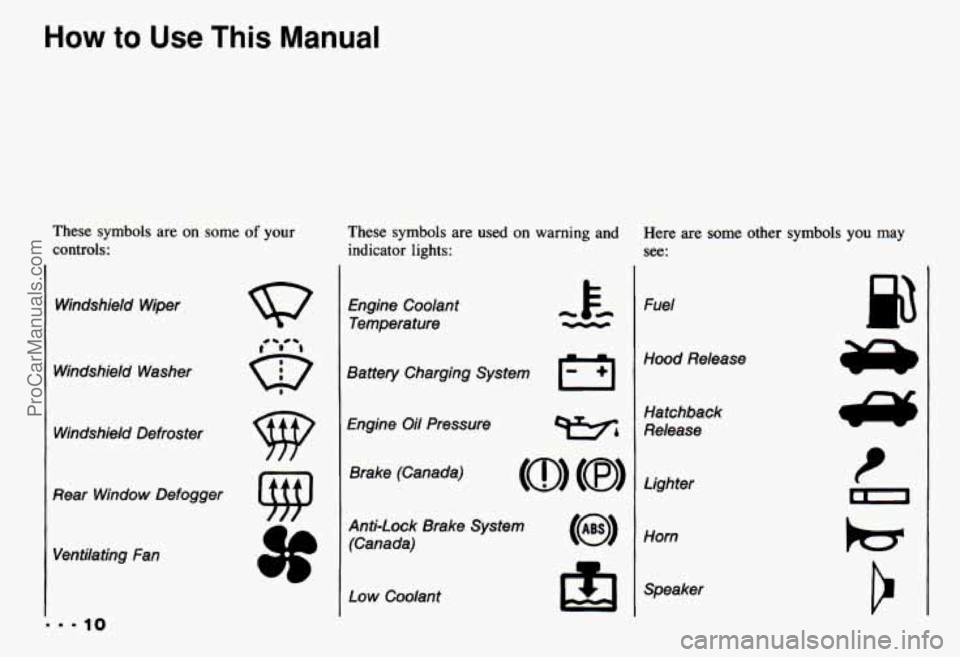
These symbols are on some of your
controls: These symbols are used
on warning and
indicator lights:
Windshield Wiper
Windshield Washer Windshield Defroster
0
9
0-
I
Rear Window Defogger Ventilating Fan Engine Coolant
Temperature
Battery Charging System
El
Engine Oil Pressure Brake (Canada)
Anti-Lock Brake System (Canada)
Low Coolant h
Here are some other symbols you may
See:
Fuel
Hood Release
Hatchback
Release
Lighter
Horn
Speaker
p3
ProCarManuals.com
Page 51 of 358

Part 2
Features & Controls
Keys .............................................................. 48
.... DoorLocks ......................................................... 50
Theft .............................................................. 52
Here you can learn about the
many standard and optional
features on your Chevrolet. and
information
on starting. shifting
and braking
. Also explained are
the instrument panel and the
warning systems that tell you if
everything is working properly
-
and what to do if you have a
problem .
PASS-Key II@ ...................................................... 53
New Vehicle "Break-In" .............................................. 55
Ignitionswitch ...................................................... 55
Starting Your Engine ................................................. 57
Driving through Deep Standing Water
.................................... 61
Engine Block Heater
................................................. 61
Automatic Transmission .............................................. 62
ManualTransmission ................................................. 66
Limited-Slip Rear Axle
............................................... 70
Parking
............................................................ 70
EngineExhaust
..................................................... 74
Windows
.......................................................... 75
Horn
.............................................................. 76
Tiltwheel
.......................................................... 76
Operation of Lights
.................................................. 84
Interior Lights ...................................................... 86
Mirrors ............................................................ 87
Twin Lift-off Roof Panels
............................................. 88
Storage and Compartments ............................................ 92
Sunvisors
......................................................... 94
Ashtray and Lighter .................................................. 94
FloorMats ......................................................... 95
Instrument Panel and Cluster ........................................... 98
Warning Lights
. Gages and Indicators .................................... 99
47
The Turn Signal/Headlight Beam Lever .................................. 77
ProCarManuals.com
Page 58 of 358

Features & Controls
the engine. If someone tries to start your
vehicle again or uses another key during
this time, the vehicle
will not start. This
discourages someone from randomly
trying different keys
with different
resistor pellets
in an attempt to make a
match.
The ignition key must be clean and dry
before it’s inserted
in the ignition or the
engine may not start. If the engine does
not start and the
SECURITY light stays
on when you try to start the vehicle, the
key may be dirty or wet. Turn the
ignition off.
Zlean and dry the key. Wait about three
ninutes and try again. The
SECURITY
ight will remain on during this time. If the
starter still won’t work, and the key
appears to be clean and dry, wait about three minutes and
try the other ignition
key.
At this time, you may also want to
check the fuses (see “Fuses and Circuit
Breakers”
in the Index). If the starter
won’t work with the other key, your
vehicle needs service. If your vehicle
does start, the first ignition key may
be faulty. See your Chevrolet dealer
or a locksmith who can service the
PASS-Key
II@.
[f you accidentally use a key that has a
lamaged or missing resistor pellet, the
;tarter won’t work and the security light
will flash. But you don’t have to wait
hree minutes before trying one of the
Ither ignition keys. See your Chevrolet
dealer or a locksmith
who can service the PASS-Key II@ to
have a new key made.
If you’re ever driving and the
SECURITY light comes on and stays on,
you
will be able to restart your en ine if
you turn it off. Your PASS-Key I1 %
;ystem, however, is not working properly
md must be serviced by your Chevrolet lealer. Your vehicle
is not protected by
:he PASS-Key 11’ system.
:f you lose or damage a PASS-Key 11’
gnition key, see your Chevrolet
lealer or a locksmith who can service
’ASS-Key 11’ to have a new key made.
ProCarManuals.com
Page 59 of 358

Off (C): Unlocks the steering wheel,
ignition and automatic transmission, but
does not send electrical power to any
accessories. Use this position
if your
vehicle must be pushed or towed.
A
warning tone will sound if you open the
driver’s door when the ignition is
in Off
and the key is in the ignition.
Run (D): Position to which the switch
returns after you start your engine and
release the switch. The switch stays
in the
Run position when the engine is running.
But even when the engine is not running,
you can use
Run to operate your
electrical power accessories and to
display some instrument panel warning
and indicator lights.
ProCarManuals.com
Page 60 of 358
Features & Controls
Start (E): Starts the engine. When the
engine starts, release the key. The ignition
switch will return
to Run for normal
driving.
Note that even if the engine is not
running, Acc and Run allow you to
operate your electrical accessories. such
as the radio and ventilation fan.
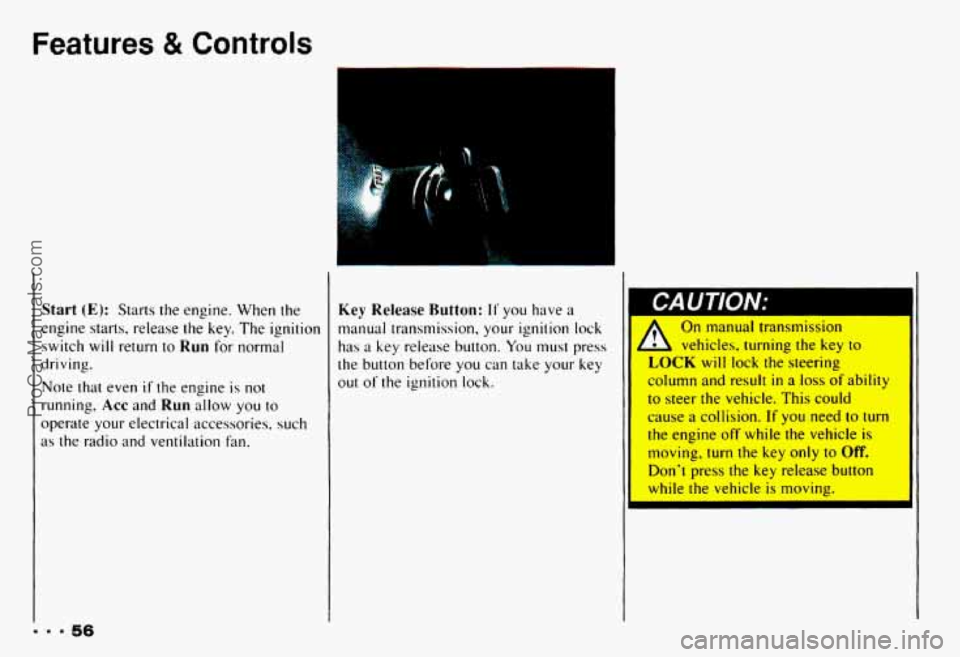
Key Release Button: I1 you have a
manual transmission, your ignition lock
has a key release button. You must press
the button before you can take
your key
out of the ignition lock.
On manual transmission
1 vehicles, turning the key to
LOCK will lock the steering
column and result
in a loss of ability
to steer the vehicle. This could
cause a collision.
If you need to turn
the engine
off while the vehicle is
moving,
turn the key only to Off.
Don't press the key release button
while
the vehicle is moving.
... 56
ProCarManuals.com
Page 61 of 358

I
rn
1
I
I
NOTICE:
I. If your key seems stuck in LOCK 1
and you can’t turn it, be sure it is all 5
the way in. If it is, then turn the
steering wheel left and right whil
you turn the key hard. But turn
tt
key only with your hand. Usir
tool
to force it could break the key
or
the ignition switch. If none of thi:
works,
then your vehicle nvAr
service.
T
i
ietained Accessory Power (RAP)
f you have power door locks, your
lehicle
has a feature called Retained
kcessory Power (RAP). With RAP your power
door locks, electric mirrors, power
windows, audio system and remote hatch
release will continue
to work up to 10
minutes after the ignition key is turned to
Off and neither door is opened.
If a door is opened, the audio system and
power windows will shut off. The power
door locks, electric mirrors and remote
hatch release will work
until you shut the
door. Once you have shut the
door, these
accessories
will continue to work for
approximately
35 seconds. After this
time you
will not be able to use these
accessories
until the next time you open
a
door or turn on the ignilion.
Starting Your Engine
Automatic Transmission: Move your
shift lever to P (Park) or N (Neutral).
Your engine won’t start
in any other
position
- that’s a safety feature. To
restart when you’re already moving,
use
N (Neutral) only.
NOTICE: I
Don‘t try to shilt to P (Park) if your
Chevrolet is moving.
If you do, vou
could damage the transmission,
Shift
to P (Park) o
V
ProCarManuals.com