Page 171 of 407
Downloaded from www.Manualslib.com manuals search engine li
L
It lets you see what station you nave. (When the radio is on, push the
knob to display the station).
It tells you the time. (When the ignition is off, push the upper knob to
display the time.)
0 Push the knob to change direction of tape play.
Behind the upper knob
is a balance control. It moves the sound between
the left and right speakers.
If you have the Delco Bose System you do not
have this balance control.
The Lower Knob
Turn the lower knob to choose radio stations. Push the knob to switch
from
Ah4 or FM.
If you have the Delco Bose Gold Series Music System, it lets you switch
from CD (Compact Disc) to TP (Tape player).
The control behind the lower knob moves the sound between your front
and rear speakers.
SCAN
When you push this button either up or down, the SCAN indicator in the
display will light and the radio
will find the next station and stay there
about
5 seconds. Then it will go to the next station and pause, and keep
doing that until
you push either the SCAN or upper knob.
SEEK
This button selects stations, but it doesn’t keep moving as SCAN does.
When you push
SEEK up or down, the radio will automatically go to the
next strongest station and stay there.
Export Radio Only
The SCAN and SEEK function selects station only in one direction.
157
Page 172 of 407
Downloaded from www.Manualslib.com manuals search engine Push Buttons
You can set the push buttons to get up to ten favorite stations (Five on
AM and five more on FM). Just:
Choose either AM or FM
Tune in the station.
Push the SET button.
Within 5 seconds, push one of the five push buttons.
Repeat these steps for each of the five push buttons.
BASS
The slide control increases or decreases the bass response tone. Moving
the control to the right increases bass
while moving it to the left decreases
it.
TREBLE
The slide control increases or decreases the treble response tone. Moving
the control to the
right increases the treble while moving it to the left
decreases it.
Your Cassette Tape Phyer
Your cassette tape player works best with tapes that are 30 to 45 minutes
long on each side. Tapes longer than that are
so thin that they may not
work well
in this player.
If you look at the tape, or on its label or box, it should say whether its
bias, (“equalization” is
70 microseconds (70 p ) or 120 microseconds (120
p ). Chrome and metal tapes are 70 p sec and standard iron tapes are 120
p sec. Your tape player will adjust automatically for either type of
cassette tape.
158
Y
CI
Y
Y
Page 173 of 407
Downloaded from www.Manualslib.com manuals search engine To Play A Cassette Tape
0 Turn the radio on.
0 Insert the cassette through the tape door. (The “TAPE” indicator in
the display will light.)
If
you hear nothing or hear just a garbled sound, the cassette may not be
in squarely. Push the
EJCT button to remove the tape and start over. The
tape equalization is automatically sensed and set. Inserting the cassette
also automatically disables
DNR@* and activates DOLBY@ noise
reduction.
DNR@ is the Dynamic
Noise Reduction. It helps remove background hiss
noise from the radio.
Once the tape is playing, use the upper and lower knobs to adjust the
volume and balance, just as
you do for the radio. Push the upper knob
to change tape direction.
The arrow in the display show which
direction the tape is being played.
FWD (Forward)
Push the FWD button to move forward rapidly to another part of the
tape. The radio will play during fast forward.
To stop the tape push the
same button and the tape will start to play again.
REV (Reverse)
Push the REV button to move the tape rapidly backward. To stop the
tape, push
the same button lightly or any of the other buttons. The radio
will play during this reverse function.
To go
from one side of the tape to the other, push in the upper knob on
your radio. To remove the tape, push
EJCT. The tape can be ejected when
the ignition is turned off.
*DNR@ is a registered trademark of National Semiconductor
Corporation.
159
Page 175 of 407
Downloaded from www.Manualslib.com manuals search engine To Play the Disc Player
Before you begin, please note: don’t use the mini-discs that are called
“singles”
(even with an adapter). They won’t eject. Use full-size compact
discs
only.
Turn the radio on.
Insert a disc (label side up) partway into the slot. The player will pull
it in. Wait a
few seconds and the disc will play. Then only the time of
day and “CD” will display.
If the disc comes back out, check to see if
The disc is upside down.
The disc is dirty, scratched, or wet.
There’s too much moisture in the air. (If there is, wait about one hour
and try again).
“Err” (Error Detection)
If this message is displayed, you have a condition of either extreme
temperature, moisture,
or an incorrect disc. The disc will automatically be
ejected. When conditions are back to normal, the disc should play again.
RCLIPROG (RecalllProgram)
Press once to see what track is being played.
Within 5 seconds press it a second time to see how long the disc has
Press it a third time to see the time of day.
been playing.
Rev (Reverse)
Push and hold REV to return rapidly within a track. Release it to play the
passage. The elapsed time
will be displayed to show the reverse progress
of the
CD.
FWD (Fast Forward)
Press and hold FWD to advance quickly within a track. Release it to
resume playing. Elapsed time
will be displayed to show the forward
progress
of the CD.
161
Page 221 of 407
Downloaded from www.Manualslib.com manuals search engine F
P
r
I 1
P
c
c
c
c
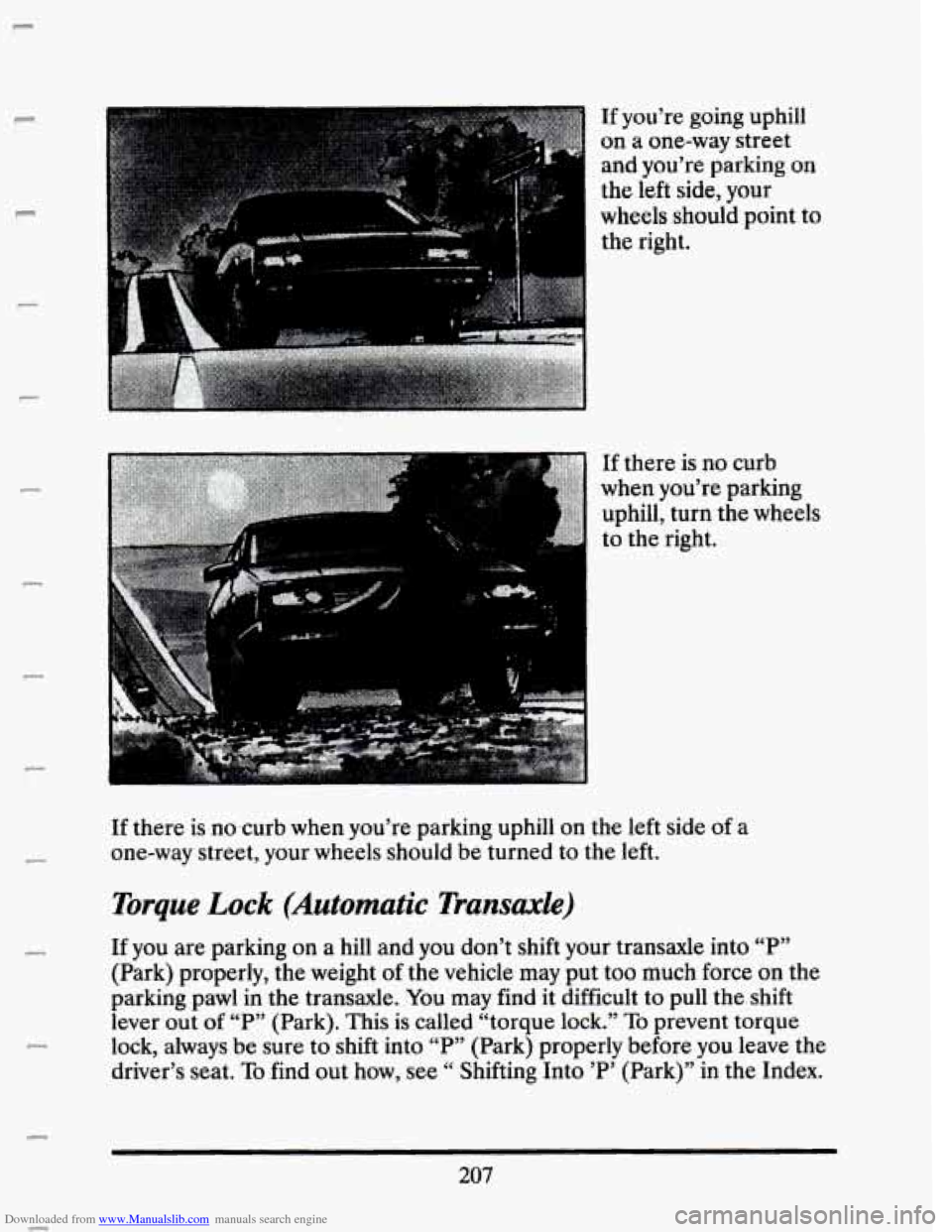
If you’re going uphill
on a one-way street
and you’re parking on
the left side, your
wheels should point to
the right.
.. , . -.
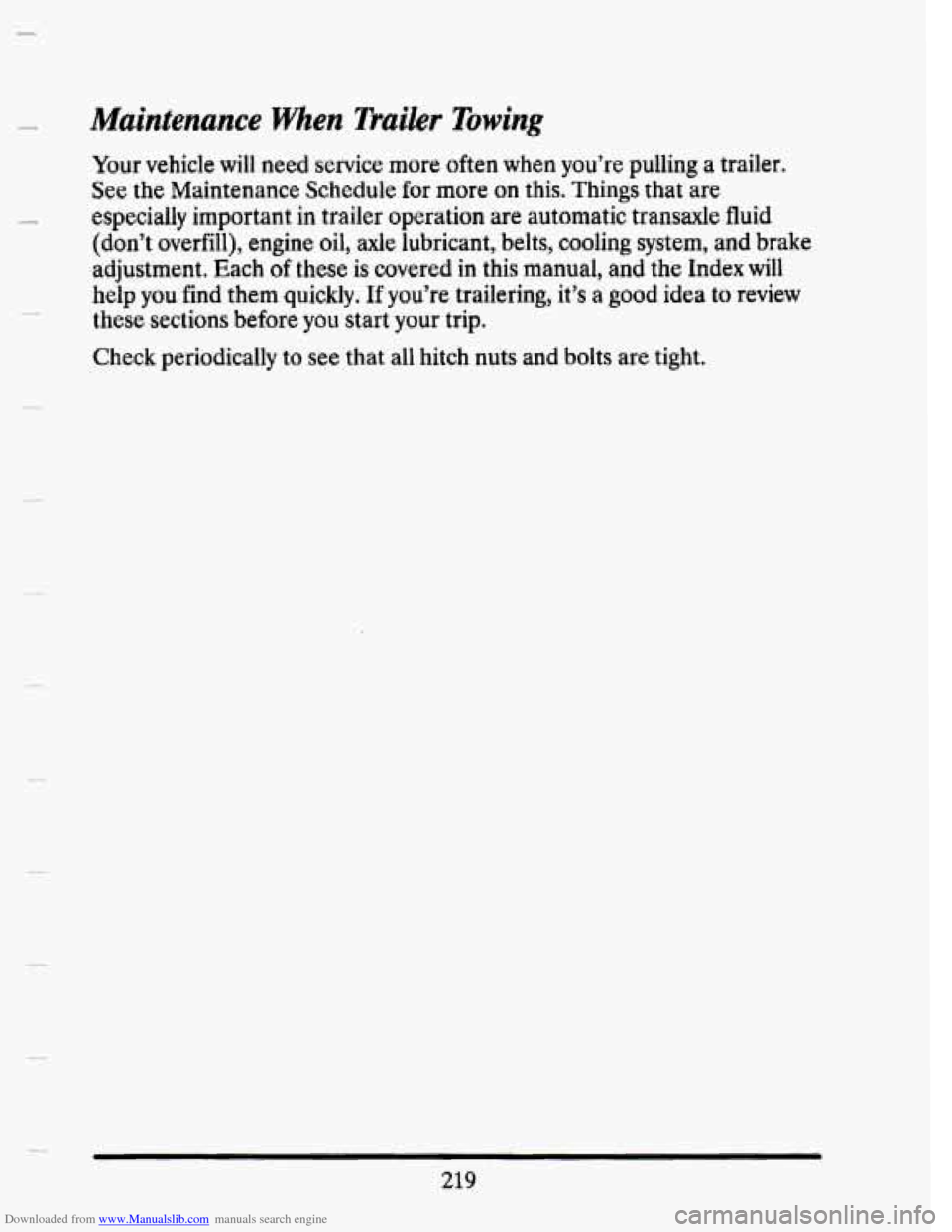
If there is no curb
when you’re parking
uphill, turn the wheels
to the right.
If there is no,curb when you’re parking uphill on the left side
of a
one-way street, your wheels should
be turned to the left.
Torque Lock (Automatic Transaxle)
If you are parking on a hill and you don’t shift your transaxle into “P”
(Park) properly, the weight
of the vehicle may put too much force on the
parking pawl in the transaxle. You may find it difficult to
pull the shift
lever out
of “P” (Park). This is called “torque lock.” To prevent torque
lock, always
be sure to shift into “P” (Park) properly before you leave the
driver’s seat.
To find out how, see “ Shifting Into ’P’ (Park)” in the Index.
c
207
P
Page 232 of 407
Downloaded from www.Manualslib.com manuals search engine Driving On Grades
Reduce speed and shift to a lower gear before you start down a long or
steep downgrade. If you don’t shift down,
you might have to use your
brakes
so much that they would get hot and no longer work well.
On a long uphill grade, shift down and reduce your speed to around
45
mph (70 km/h) or less to reduce the possibility of engine and transaxle
overheating.
If your trailer weighs more than 1,000 pounds (450 Kg) and you have an
automatic transaxle with Overdrive, you may want to drive
in “3” instead
of Overdrive
Parking on Hills
You really should not park your vehicle, with a trailer attached, on a hill.
If something goes wrong, your rig could start to move. People can be
injured, and both your vehicle and the trailer can be damaged.
But if
you ever have to park your rig on a hill, here’s bow to do it:
1. Apply your regular brakes, but don’t shift into “P” (Park) yet.
2. Have someone place chocks under the trailer wheels.
3. When the wheel chocks are in place, release the regular brakes until
the chocks absorb the load.
4. Reapply the regular brakes. Then shift into “P” (Park) firmly and
apply your parking brake.
5. Release the regular brakes.
When You Are Ready to Leave Afler Parking on a Hill
1. Apply your regular brakes and hold the pedal down while you:
Start your engine;
Shift into a gear; and
Be sure the parking brake has released.
2. Let up on the brake pedal.
3. Drive slowly until the trailer is clear of the chocks.
c
4. Stop and have someone pick up and store the chocks.
218
Page 233 of 407
Downloaded from www.Manualslib.com manuals search engine Maintenance when Trailer Towing
Your vehicle will need service more often when you’re pulling a trailer.
See the Maintenance Schedule for more on this. Things that are
especially important
in trailer operation are automatic transaxle fluid
(don’t overfill), engine oil, axle lubricant, belts, cooling system, and brake
adjustment. Each
of these is covered in this manual, and the Index will
help you find them quickly. If you’re trailering, it’s a good idea to review
these sections before you start your trip.
Check periodically to see that all hitch nuts and bolts are tight.
219
Page 238 of 407
Downloaded from www.Manualslib.com manuals search engine 2. Get the vehicles close enough so the jumper cables can reach, but be
sure the vehicles aren’t touching each other. If they are, it could cause
a ground connection you don’t want.
You wouldn’t be able to start
your Cadillac, and the bad grounding could damage the electrical
systems.
A CAUTION:
You could be injured if the vehicles roll. Set the parking brake
firmly
on each vehicle. Put an automatic transaxle in “P”
(Park).
3. Turn off the ignition on both vehicles. lbrn off all lights that aren’t
needed, and radios. This will avoid sparks and help
save both
batteries. And it could
save your radio!
4. Open the hoods and locate the batteries:
A CAUTION:
An electric fan can start up even when the engine is not running
and can injure you. Keep hands, clothing and tools away
from
any underhood electric fan.
Find the positive (+) and negative (-) terminals on each battery.
224
I
I
I
I
I
I