1991 FORD FESTIVA Ignition switch
[x] Cancel search: Ignition switchPage 387 of 454
Back To Article
ST EERING COLUMN
1991 ST EERING Ford Motor Co. - Steering Colum ns
DESCRIPTION
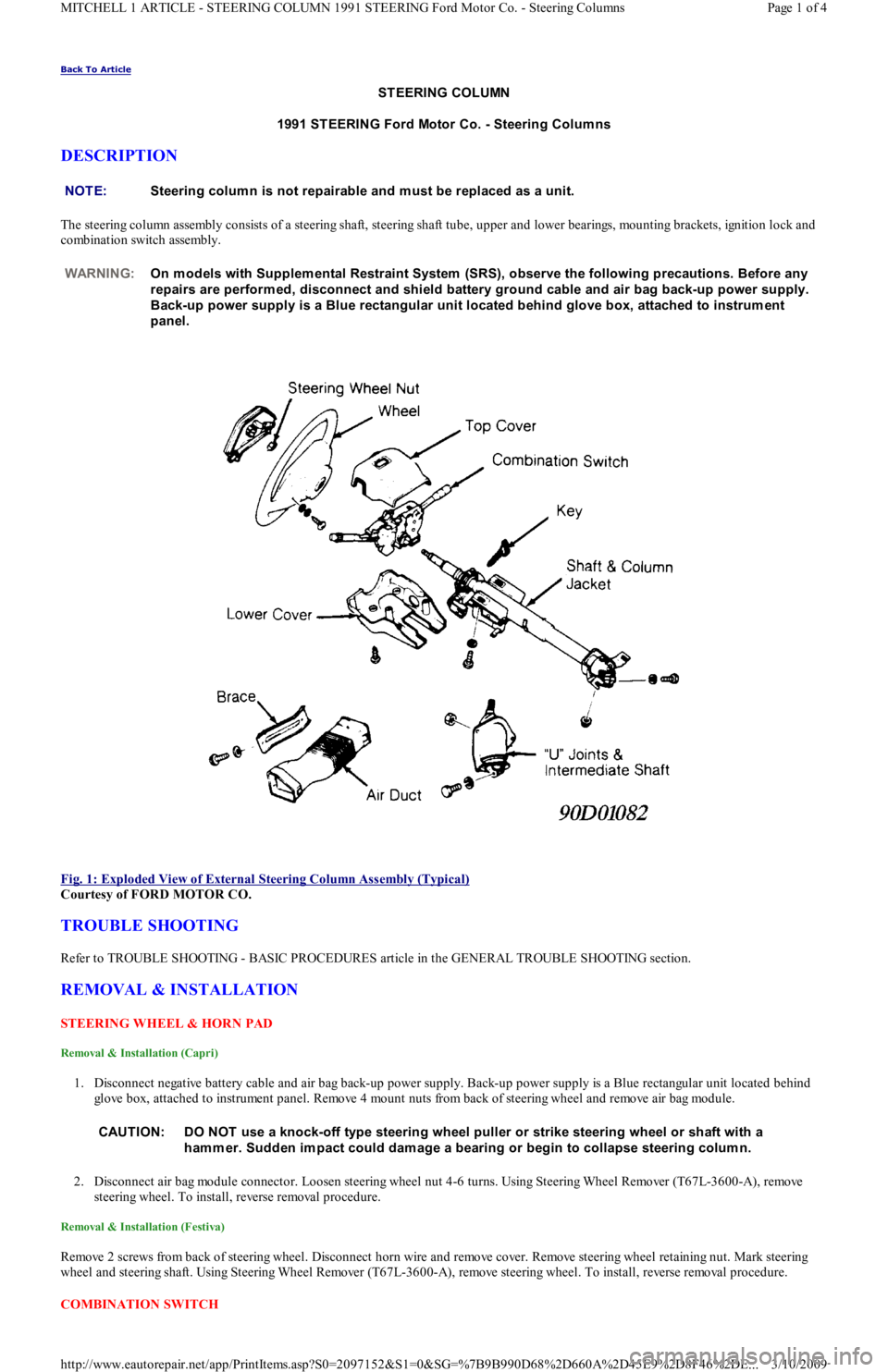
The steering column assembly consists of a steering shaft, steering shaft tube, upper and lower bearings, mounting brackets, ignition lock and
combination switch assembly.
Fig. 1: Exploded View of External Steering Column Assembly (Typical)
Courtesy of FORD MOTOR CO.
TROUBLE SHOOTING
Refer to TROUBLE SHOOTING - BASIC PROCEDURES article in the GENERAL TROUBLE SHOOTING section.
REMOVAL & INSTALLATION
STEERING WHEEL & HORN PAD
Removal & Installation (Capri)
1. Disconnect negative battery cable and air bag back-up power supply. Back-up power supply is a Blue rectangular unit located behind
glove box, attached to instrument panel. Remove 4 mount nuts from back of steering wheel and remove air bag module.
2. Disconnect air bag module connector. Loosen steering wheel nut 4-6 turns. Using Steering Wheel Remover (T67L-3600-A), remove
steering wheel. To install, reverse removal procedure.
Removal & Installation (Festiva)
Remove 2 screws from back of steering wheel. Disconnect horn wire and remove cover. Remove steering wheel retaining nut. Mark steering
wheel and steering shaft. Using Steering Wheel Remover (T67L-3600-A), remove steering wheel. To install, reverse removal procedure.
COMBINATION SW ITCH NOTE:Steering colum n is not repairable and m ust be replaced as a unit.
WARNING:On m odels with Supplem ental Restraint System (SRS), observe the following precautions. Before any
repairs are perform ed, disconnect and shield battery ground cable and air bag back-up power supply.
Back-up power supply is a Blue rectangular unit located behind glove box, attached to instrum ent
panel.
CAUT ION: DO NOT use a knock-off type steering wheel puller or strike steering wheel or shaft with a
ham m er. Sudden im pact could dam age a bearing or begin to collapse steering colum n.
Page 1 of 4 MITCHELL 1 ARTICLE - STEERING COLUMN 1991 STEERING Ford Motor Co. - Steering Columns
3/10/2009 http://www.eautorepair.net/app/PrintItems.asp?S0=2097152&S1=0&SG=%7B9B990D68%2D660A%2D45E9%2D8F46%2DE
...
Page 388 of 454
Removal & Installation (Capri)
Disconnect negative battery cable. With steering wheel removed, remove screws from lower column cover and remove lower cover. Remove
steering column upper retaining bolts. Steering column will rest on instrument panel bracket. Release wiring harness clip and unplug
connectors. Remove 2 switch retaining screws and remove switch from steering column. To install, reverse removal procedure.
Removal & Installation (Festiva)
Disconnect negative battery cable. With steering wheel removed, remove screws from lower column cover and remove both upper and lower
cover. Release wiring harness clip and unplug connectors. Loosen band clamp securing switch hub to steering column jacket. Remove swit c h
from steering column. To install, reverse removal procedure.
IGNITION SWITCH & LOCK
Removal & Installation (Capri Ignition Switch)
1. Disconnect negative battery cable. With steering wheel removed, remove upper and lower column covers. Remove center access panel
and trim panel under steering wheel. Remove left side defroster connector tube.
2. Remove steering column upper attaching bolts. Lower steering column onto instrument panel brace. Remove ignition tumbler. With
ignition key inserted, rotate tumbler while pushing release pin with .125" (3.17 mm) drift. Pull tumbler out of ignition lock housing.
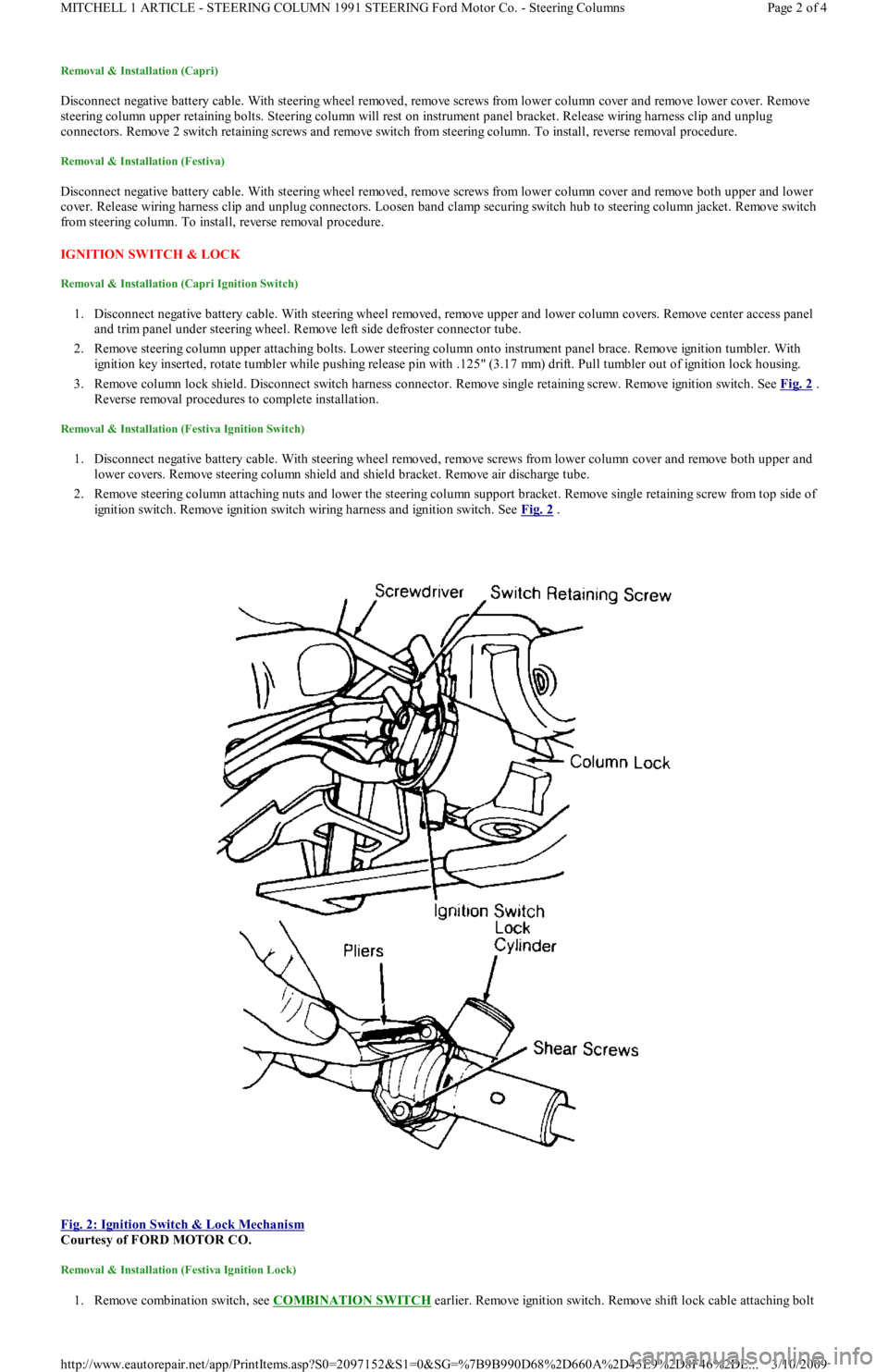
3. Remove column lock shield. Disconnect switch harness connector. Remove single retaining screw. Remove ignition switch. See Fig. 2
.
Reverse removal procedures to complete installation.
Removal & Installation (Festiva Ignition Switch)
1. Disconnect negative battery cable. With steering wheel removed, remove screws from lower column cover and remove both upper and
lower covers. Remove steering column shield and shield bracket. Remove air discharge tube.
2. Remove steering column attaching nuts and lower the steering column support bracket. Remove single retaining screw from top side of
ignition switch. Remove ignition switch wiring harness and ignition switch. See Fig. 2
.
Fig. 2: Ignition Switch & Lock Mechanism
Courtesy of FORD MOTOR CO.
Removal & Installation (Festiva Ignition Lock)
1. Remove combination switch, see COMBINATION SW ITCH earlier. Remove ignition switch. Remove shift lock cable attaching bolt
Page 2 of 4 MITCHELL 1 ARTICLE - STEERING COLUMN 1991 STEERING Ford Motor Co. - Steering Columns
3/10/2009 http://www.eautorepair.net/app/PrintItems.asp?S0=2097152&S1=0&SG=%7B9B990D68%2D660A%2D45E9%2D8F46%2DE
...
Page 389 of 454
and disconnect cable from lock housing. Using slim-nose locking pliers, grip and remove round headed shear screws securing column
lock housing and cap to column jacket. See Fig. 2
.
2. Remove lock housing. To install lock housing, position lock cylinder and cap on column jacket. Using new screws, tighten only enough
to hold lock housing in position. Use ignition key to ensure lock works correctly without binding. Adjust switch if necessary. Tighten
shear screws until heads break off. Install ignition switch in cylinder. Reverse removal procedures to complete installation.
STEERING COLUMN
Removal & Installation (Capri)
1. Place wheels in a straight-ahead position. Remove ignition key and lock steering wheel. Disconnect negative battery cable and air bag
back-up power supply. Back-up power supply is a Blue rectangular unit located behind glove box, attached to instrument panel.
2. Remove air bag module from steering wheel. Remove steering column access cover and trim panel. Remove defroster duct connecting
hose. Remove steering column lower shroud. Loosen lower steering c o l u mn r e t a in in g n u t s. R e mo ve st e e r in g c o l u mn u p p e r r e t a in in g
nuts.
3. Remove ignition lock shield and ignition switch mount screw. Disconnect all necessary electrical connectors. Mark and remove steering
shaft universal joint bolt. Remove steering column from instrument panel. To install, reverse removal procedure. Once steering column
is completely installed, check all switches and functions for proper operation.
Removal (Festiva)
1. Disconnect battery ground cable. Place wheels in a straight-ahead position. Remove steering wheel, upper and lower column covers,
combination switch, ignition switch and harness connectors.
2. Remove steering column shield and air duct from below steering column. Remove 2 steering column upper mounting bracket-to-
instrument panel crossmember nuts.
3. Lower upper end of column as necessary to gain access to intermediate shaft upper "U" joint. Mark steering shaft and upper "U" jo in t fo r
reassembly reference.
4. Remove "U" joint attaching bolt. Loosen 2 steering column hinge bracket-to-clutch/brake pedal support nuts. Remove steering column
with upper "U" joint by pulling toward passenger compartment.
Installation (Festiva)
1. Align marks made during removal and install column with intermediate shaft upper "U" joint over intermediate shaft. Install, but do not
tighten, "U" joint clamp bolt.
2. Install and tighten hinge bracket nuts. Install shim clips on column upper bracket flanges (if removed). Position upper end of steering
column to instrument panel mounting studs.
3. Install upper bracket retaining nuts. Turn steering wheel lock-to-lock several times to align "U" joint splines. Tighten "U" joint clamp
bolt.
4. Install air duct and instrument panel brace. Install harness connectors, ignition switch, combination switch, upper and lower column
covers and steering wheel.
OVERHAUL
STEERING COLUMN
Disassembly & Reassembly (Capri)
1. Remove steering column. See STEERING COLUMN under REMOVAL & INSTALLATION. Position steering column in soft-jawed
vise. Using Steering Wheel Remover (T67L-3600-A), remove steering wheel. Put 2 strips of tape on air bag clockspring, to avoid
rotation.
2. Remove 3 clockspring retaining screws and remove clockspring. With ignition key installed, rotate tumbler to Run position while
pushing tumbler release pin with .125" (3.17 mm) drift. Remove tumbler and upper column shroud. Remove key warning switch.
3. Remove bearing plate. Remove and discard snap ring located at front end of steering column. Remove multifunction switch. Remove
column lock and upper bearing using a suitable bearing puller. To reassemble, reverse disassembly procedure.
Disassembly (Festiva)
Disassembly of steering column assembly is not recommended by manufacturer. If any components are found defective, replace steering
column assembly.
Inspection (Festiva)
1. Measure steering shaft for signs of collapse. Steering shaft length should be between 23.86-23.94" (606-608 mm). If measurement is not
within specification, replace steering column assembly.
2. Check for steering shaft side play. Any detectable side play can adversely affect steering control. If side play in excess of .03" (.75 mm)
is present, bearings are badly worn. Replace steering column assembly.
Reassembly (Festiva)
NOTE:If steering rack and interm ediate shaft are also rem oved, "U" joints and interm ediate shaft m ust be
m arked for reassem bly reference. Both ends of shaft are identical.
CAUT ION: If steering shaft shear pins break during housing or bearing rem oval, the com plete shaft and colum n
m ust be replaced. T o determ ine if pins have sheared, m easure steering shaft from top end of shaft to
center of U-
joint bearing. If length is less than 24.23" (615.7 m m ) or greater than 24.66" (617.7 m m ), pins
have sheared.
Page 3 of 4 MITCHELL 1 ARTICLE - STEERING COLUMN 1991 STEERING Ford Motor Co. - Steering Columns
3/10/2009 http://www.eautorepair.net/app/PrintItems.asp?S0=2097152&S1=0&SG=%7B9B990D68%2D660A%2D45E9%2D8F46%2DE
...
Page 390 of 454
To reassemble, reverse disassembly procedure.
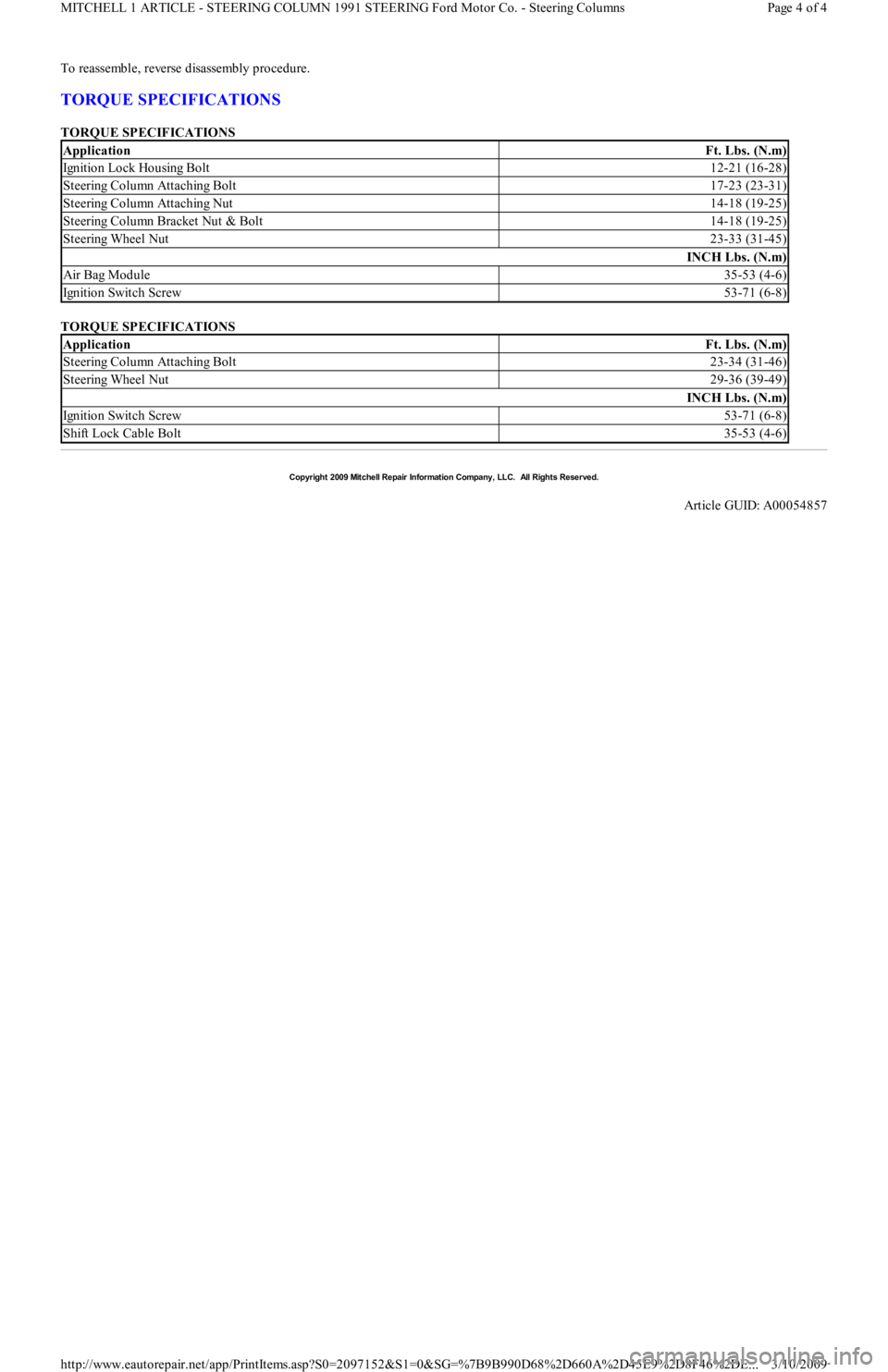
TORQUE SPECIFICATIONS
TORQUE SPECIFICATIONS
TORQUE SPECIFICATIONS
ApplicationFt. Lbs. (N.m)
Ignition Lock Housing Bolt12-21 (16-28)
Steering Column Attaching Bolt17-23 (23-31)
Steering Column Attaching Nut14-18 (19-25)
Steering Column Bracket Nut & Bolt14-18 (19-25)
Steering Wheel Nut23-33 (31-45)
INCH Lbs. (N.m)
Air Bag Module35-53 (4-6)
Ignition Switch Screw53-71 (6-8)
ApplicationFt. Lbs. (N.m)
Steering Column Attaching Bolt23-34 (31-46)
Steering Wheel Nut29-36 (39-49)
INCH Lbs. (N.m)
Ignition Switch Screw53-71 (6-8)
Shift Lock Cable Bolt35-53 (4-6)
Copyr ight 2009 Mitchell Repair Information Company, LLC. All Rights Reserved.
Article GUID: A00054857
Page 4 of 4 MITCHELL 1 ARTICLE - STEERING COLUMN 1991 STEERING Ford Motor Co. - Steering Columns
3/10/2009 http://www.eautorepair.net/app/PrintItems.asp?S0=2097152&S1=0&SG=%7B9B990D68%2D660A%2D45E9%2D8F46%2DE
...
Page 411 of 454
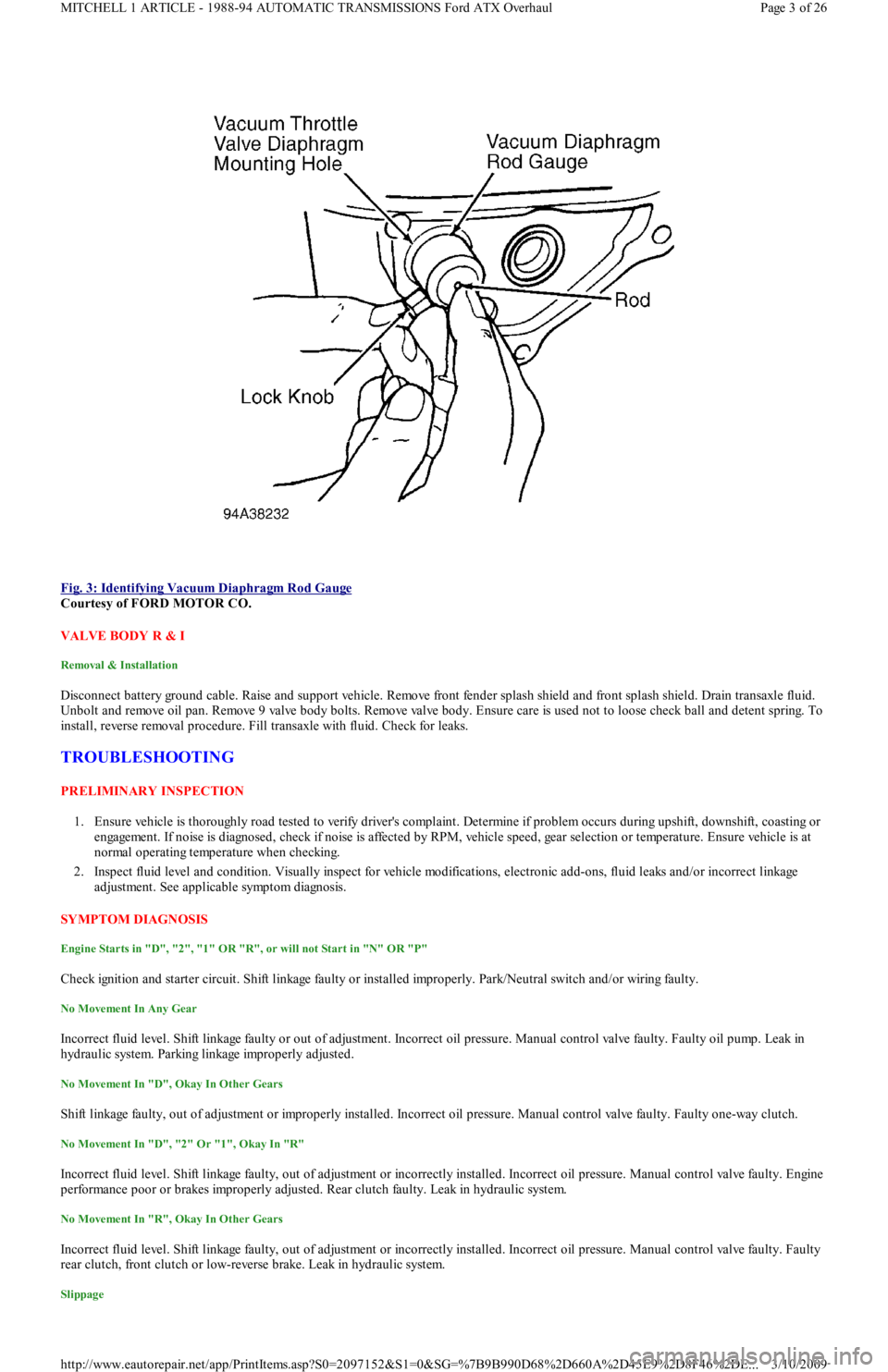
Fig. 3: Identifying Vacuum Diaphragm Rod Gauge
Courtesy of FORD MOTOR CO.
VALVE BODY R & I
Removal & Installation
Disconnect battery ground cable. Raise and support vehicle. Remove front fender splash shield and front splash shield. Drain transaxle fluid.
Unbolt and remove oil pan. Remove 9 valve body bolts. Remove valve body. Ensure care is used not to loose check ball and detent spring. To
install, reverse removal procedure. Fill transaxle with fluid. Check for leaks.
TROUBLESHOOTING
PRELIMINARY INSPECTION
1. Ensure vehicle is thoroughly road tested to verify driver's complaint. Determine if problem occurs during upshift, downshift, coasting or
engagement. If noise is diagnosed, check if noise is affected by RPM, vehicle speed, gear selection or temperature. Ensure vehicle is at
normal operating temperature when checking.
2. Inspect fluid level and condition. Visually inspect for vehicle modifications, electronic add-ons, fluid leaks and/or incorrect linkage
adjustment. See applicable symptom diagnosis.
SYMPTOM DIAGNOSIS
Engine Starts in "D", "2", "1" OR "R", or will not Start in "N" OR "P"
Check ignition and starter circuit. Shift linkage faulty or installed improperly. Park/Neutral switch and/or wiring faulty.
No Movement In Any Gear
Incorrect fluid level. Shift linkage faulty or out of adjustment. Incorrect oil pressure. Manual control valve faulty. Faulty oil pump. Leak in
hydraulic system. Parking linkage improperly adjusted.
No Movement In "D", Okay In Other Gears
Shift linkage faulty, out of adjustment or improperly installed. Incorrect oil pressure. Manual control valve faulty. Faulty one-way clutch.
No Movement In "D", "2" Or "1", Okay In "R"
Incorrect fluid level. Shift linkage faulty, out of adjustment or incorrectly installed. Incorrect oil pressure. Manual control valve faulty. Engine
performance poor or brakes improperly adjusted. Rear clutch faulty. Leak in hydraulic system.
No Movement In "R", Okay In Other Gears
Incorrect fluid level. Shift linkage faulty, out of adjustment or incorrectly installed. Incorrect oil pressure. Manual control valve faulty. Faulty
rear clutch, front clutch or low-reverse brake. Leak in hydraulic system.
Slippage
Page 3 of 26 MITCHELL 1 ARTICLE - 1988-94 AUTOMATIC TRANSMISSIONS Ford ATX Overhaul
3/10/2009 http://www.eautorepair.net/app/PrintItems.asp?S0=2097152&S1=0&SG=%7B9B990D68%2D660A%2D45E9%2D8F46%2DE
...
Page 414 of 454
Differential Noise
ATF contaminated or level incorrect. Bearings worn or has excessive preload. Teeth on gears worn or damaged or has excessive backlash.
TESTING
PARK/NEUTRAL SWITCH TEST
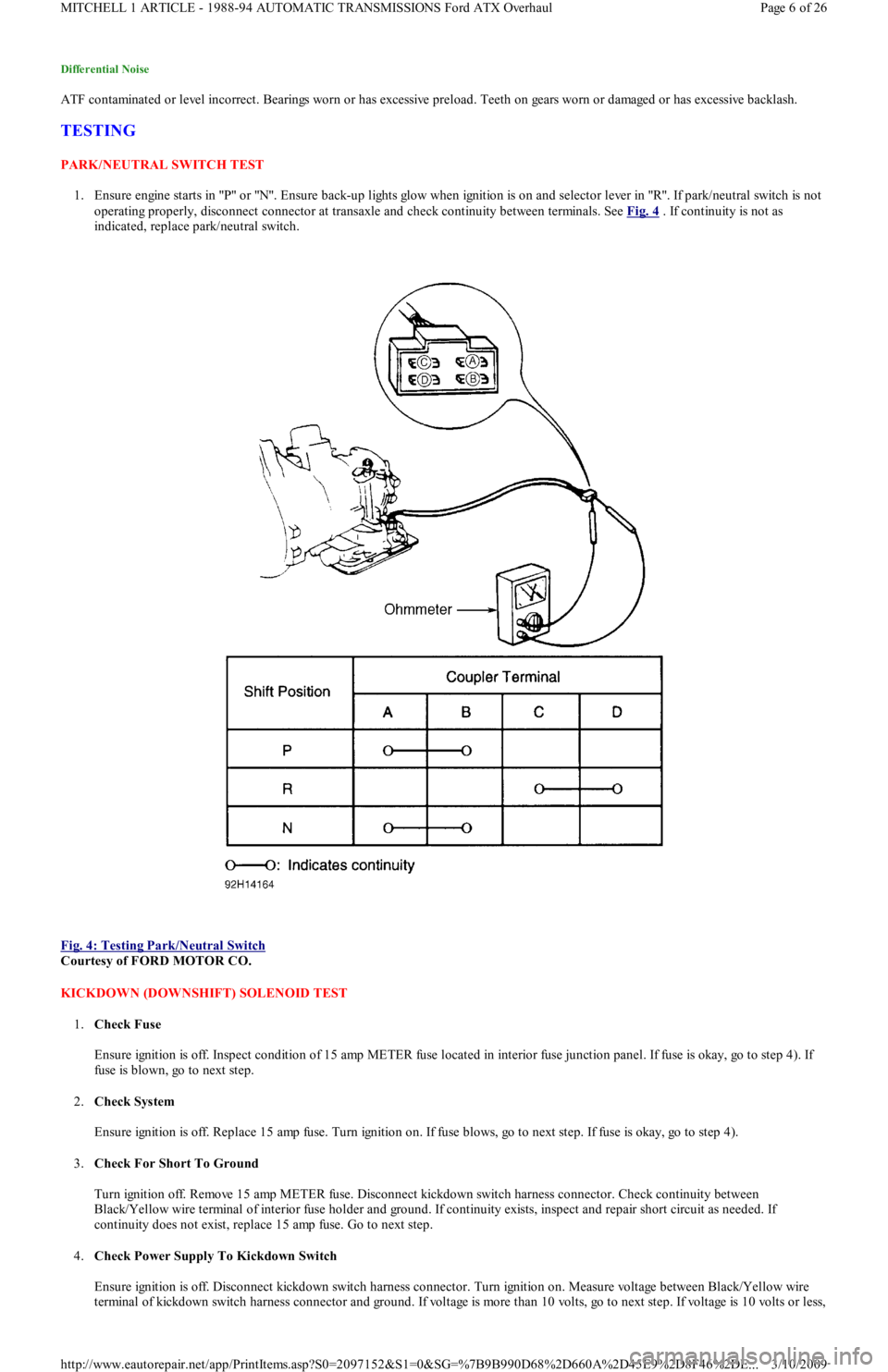
1. Ensure engine starts in "P" or "N". Ensure back-up lights glow when ignition is on and selector lever in "R". If park/neutral switch is not
operating properly, disconnect connector at transaxle and check continuity between terminals. See Fig. 4
. If continuity is not as
indicated, replace park/neutral switch.
Fig. 4: Testing Park/Neutral Switch
Courtesy of FORD MOTOR CO.
KICKDOWN (DOWNSHIFT) SOLENOID TEST
1.Check Fuse
Ensure ignition is off. Inspect condition of 15 amp METER fuse located in interior fuse junction panel. If fuse is okay, go to step 4). If
fuse is blown, go to next step.
2.Check System
Ensure ignition is off. Replace 15 amp fuse. Turn ignition on. If fuse blows, go to next step. If fuse is okay, go to step 4).
3.Check For Short To Ground
Turn ignition off. Remove 15 amp METER fuse. Disconnect kickdown switch harness connector. Check continuity between
Black/Yellow wire terminal of interior fuse holder and ground. If continuity exists, inspect and repair short circuit as needed. If
continuity does not exist, replace 15 amp fuse. Go to next step.
4.Check Power Supply To Kickdown Switch
Ensure ignition is off. Disconnect kickdown switch harness connector. Turn ignition on. Measure voltage between Black/Yellow wire
terminal of kickdown switch harness connector and ground. If voltage is more than 10 volts, go to next step. If voltage is 10 volts or less,
Page 6 of 26 MITCHELL 1 ARTICLE - 1988-94 AUTOMATIC TRANSMISSIONS Ford ATX Overhaul
3/10/2009 http://www.eautorepair.net/app/PrintItems.asp?S0=2097152&S1=0&SG=%7B9B990D68%2D660A%2D45E9%2D8F46%2DE
...
Page 415 of 454
inspect and repair circuit between switch harness connector and fuse panel.
5.Check Kickdown Switch
Turn ignition off. Check continuity between kickdown switch terminals. Continuity should only exist with accelerator fully depressed. I
f
switch is functioning correctly, go to next step. Replace switch if it failed testing. Road test vehicle to verify repair.
6.Check Circuit Between Kickdown Switch & Kickdown Solenoid
Ensure ignition is off. Disconnect kickdown switch harness connector. Disconnect kickdown solenoid harness connector. Check
continuity of White/Black wire between switch harness connector and solenoid harness connector. If continuity does not exist, inspect
and repair open circuit as needed. If continuity exists, check continuity between White/Black wire terminal at solenoid harness
connector and ground. If continuity exists, inspect and repair short circuit as needed. If continuity does not exist, replace kickdown
solenoid.
VACUUM THROTTLE VALVE DIAPHRAGM (MODULATOR) TEST
1.Check System Integrity
Inspect all vacuum hoses and connections for leaks or damage. Disconnect vacuum hose at diaphragm connection and inspect for
leaking ATF. Repair as needed. Go to next step.
2.Check Vacuum At Modulator
Ensure ignition is off. Disconnect vacuum hose at modulator valve and connect vacuum gauge to hose. Start and run engine at idle.
Vacuum should be 15-22 In. Hg. If vacuum is not within specification, inspect and repair vacuum hose. If vacuum is within specification,
go to next step.
3.Check Modulator Valve Function
Turn ignition off. Remove modulator valve from transaxle. Connect hand-held vacuum pump to valve. Apply 16-20 In. Hg of vacuum.
Ensure vacuum is held by valve. Release vacuum and verify that valve moves freely. If valve is functioning correctly, go to next step.
Replace valve if it fails testing.
4.Check Vacuum Diaphragm Rod
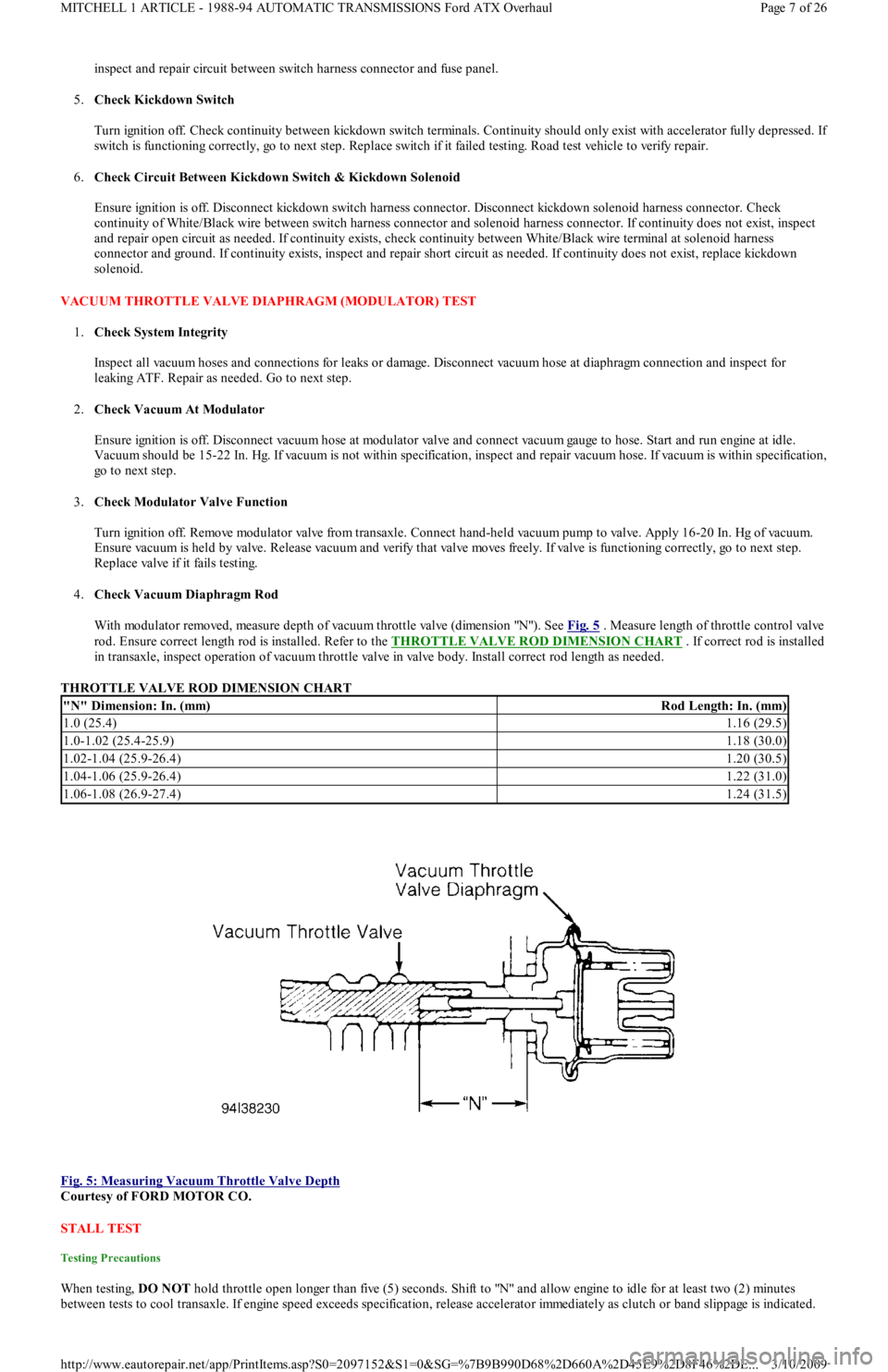
With modulator removed, measure depth of vacuum throttle valve (dimension "N"). See Fig. 5
. Measure length of throttle control valve
rod. Ensure correct length rod is installed. Refer to the THROTTLE VALVE ROD DIMENSION CHART
. If correct rod is installed
in transaxle, inspect operation of vacuum throttle valve in valve body. Install correct rod length as needed.
THROTTLE VALVE ROD DIMENSION CHART
Fig. 5: Measuring Vacuum Throttle Valve Depth
Courtesy of FORD MOTOR CO.
STALL TEST
Testing Precautions
When testing, DO NOT hold throttle open longer than five (5) seconds. Shift to "N" and allow engine to idle for at least two (2) minutes
between tests to cool transaxle. If engine speed exceeds specification, release accelerator immediately as clutch or band slippage is indicated.
"N" Dimension: In. (mm)Rod Length: In. (mm)
1.0 (25.4)1.16 (29.5)
1.0-1.02 (25.4-25.9)1.18 (30.0)
1.02-1.04 (25.9-26.4)1.20 (30.5)
1.04-1.06 (25.9-26.4)1.22 (31.0)
1.06-1.08 (26.9-27.4)1.24 (31.5)
Page 7 of 26 MITCHELL 1 ARTICLE - 1988-94 AUTOMATIC TRANSMISSIONS Ford ATX Overhaul
3/10/2009 http://www.eautorepair.net/app/PrintItems.asp?S0=2097152&S1=0&SG=%7B9B990D68%2D660A%2D45E9%2D8F46%2DE
...