1990 HONDA PRELUDE ESP
[x] Cancel search: ESPPage 18 of 143

ALB (Anti Lock Brakes) help to maintain the road holding and
tractability of your car during severe braking, and under slippery road conditions. The ALB system prevents the wheels from locking(thus reducing the chance of skidding) to ensure controllable
deceleration. When sudden braking might otherwise lock one or more wheels, the ALB system temporarily reduces the braking
pressure to the wheel or wheels about to lock to ensure continued
braking efficiency.
When the ALB is regulating the braking pressure, the brake pedal pulsates slightly to make the driver aware that the system is
compensating for critical braking conditions. The pulsating brake pedal can be an indication of hazardous road condition, and to
remind you to take extra care.
Don't mix different diameter tires; it will confuse the ALB
computer which monitors the road speed of each wheel. For
example, if one or more tires are larger than the others, the computer will think they are rolling more slowly (as if they are
about to lock up) and reduce brake pressure to those wheels.On loose or uneven surfaces (gravel, ruts etc.) where all four
wheels loss traction intermittently, the ALB system may require
a longer stopping distance than an equivalent car with a conventional braking system.
The ALB system cannot make up for extreme road conditions or driver misjudgement, It is still the driver's responsibility to drive
at a suitable speed and provide a margin of safety for the road,
weather and traffic conditions at hand.
CAUTION:
Be careful not to damage the wiring or the speed sensors at the
back of each wheel when removing mud or snow from the wheel
housings.
NOTE:
You may hear a sound like a small motor running, coming from the engine while driving or after the ALB is applied. This indicates theALB pump is in service and the system is working properly.
Ant
i
Lock Brake (Si with ALB)
ProCarManuals.comMain Menu t s
Page 20 of 143

Speedometer
The speed is indicated in miles per hour (outside scale) and
kilometers per hour (inside).
Odometer
The numbers on the odometer indicate miles.
The odometer registers total distance traveled, and serves as your
guide for determining when periodic maintenance is due. Federal law makes it illegal to alter the odometer of any motor vehicle with the
intent to change the number of miles indicated.
Trip Meter
The numbers on the trip meter indicate miles.
The trip meter can be returned to zero by pushing in the resetbutton. Use it for checking fuel consumption or distance traveled per trip.
Tachometer
The tachometer indicates engine speed in revolutions per minute.The beginning of the RED ZONE indicates the maximum allowable
engine R.P.M. Do not run the engine with the tachometer indicator
needle in the RED ZONE.
Fuel Gauge
FUEL TANK CAPACITY: 60 l (15.9 US gal, 13.2 Imp gal)
As a convenience, the gauge continues to show the same fuel level as when the ignition was last on. After refueling, the gauge will
slowly change to the new fuel level when the ignition is switched on.
When the needle first indicates E (empty), you have a usable reserve left in the tank of about:
4 l
(1.1
US gal, 0,9 Imp gal)
Coolant Temperature GaugeCAUTION:
The needle should stay within the white range. If the needle reaches the red line at "H" (Hot), pull safely off the road, stop the
engine and check the coolant level in the reserve tank on the passenger side of the radiator under the hood.
Do not remove the radiator cap when the engine is hot. The
coolant is under pressure and may blow out and scald you.
GaugesProCarManuals.comMain Menu t s
Page 27 of 143
Windshield Wipers/Washer/Defogger
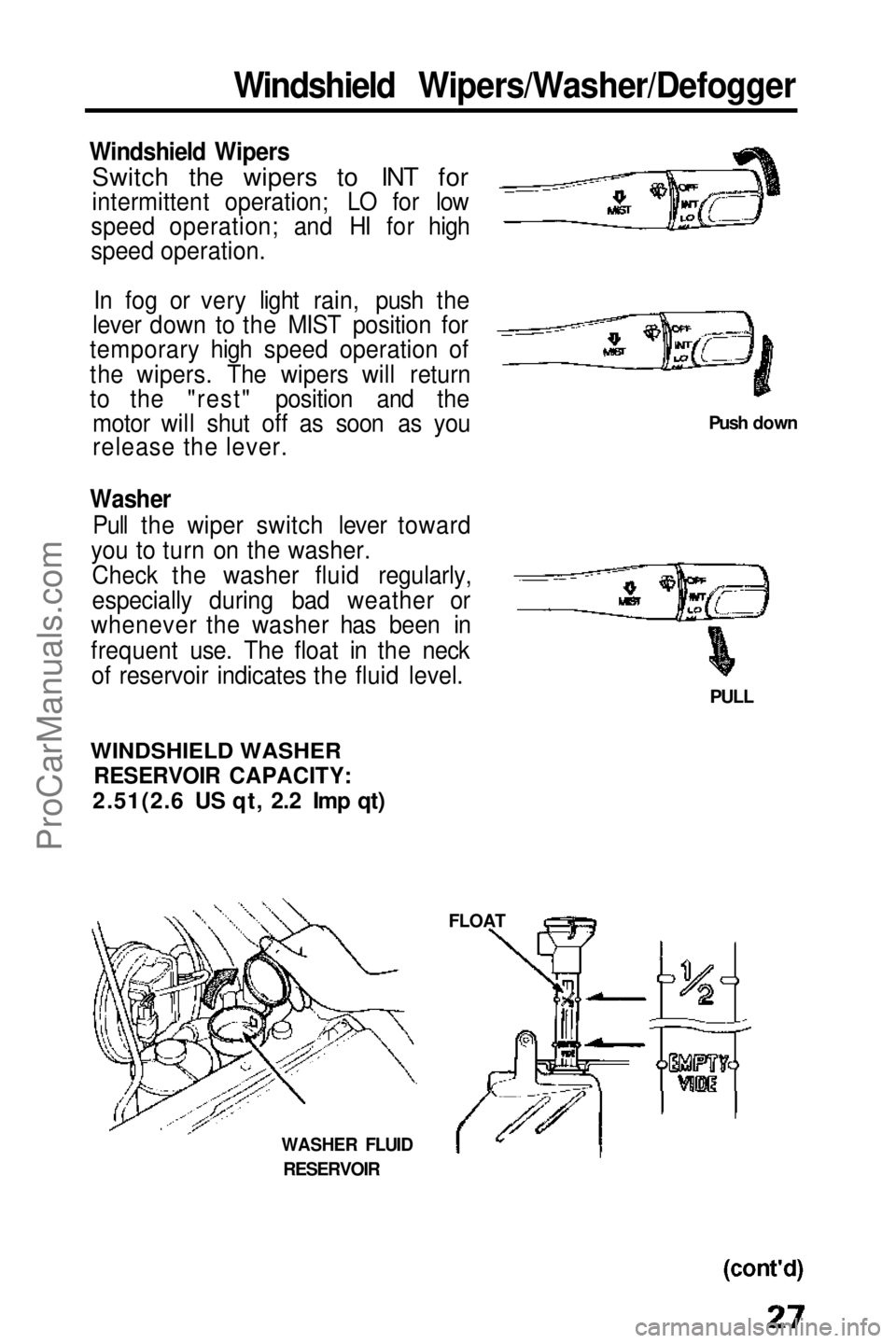
Windshield Wipers
Switch the wipers to INT for
intermittent operation; LO for low
speed operation; and HI for high
speed operation.
In fog or very light rain, push the
lever down to the MIST position for
temporary high speed operation of
the wipers. The wipers will return
to the "rest" position and the motor will shut off as soon as you
release the lever.
Washer Pull the wiper switch lever toward
you to turn on the washer.
Check the washer fluid regularly,
especially during bad weather or
whenever the washer has been in
frequent use. The float in the neck of reservoir indicates the fluid level.
Push down
PULL
WINDSHIELD WASHER
RESERVOIR CAPACITY:
2.51(2.6 US qt, 2.2 Imp qt)
FLOAT
WASHER FLUID
RESERVOIRProCarManuals.comMain Menu s t
Page 36 of 143
Cruise Control (cont'd)
To Change the Set Speed: To a faster speed — For gradual acceleration with your foot off the
accelerator, push
and hold the RESUME switch until you reach the
desired speed; release the switch and the system's memory will be re-programmed to the new speed.
For faster acceleration, push the accelerator until you reach the
desired speed, then push and release the SET switch to re-program
the system.
To a slower speed — push and hold the SET switch and the car willcoast; when you reach the desired slower speed, release the switchand the system will be re-programmed.
For temporary acceleration above the set speed, such as for passing,
use the accelerator pedal conventionally. When you want to return
to the set speed, take your foot off the accelerator and coast without applying the brakes.
The Cruise Control automates the function of the accelerator pedal to maintain your car at a constant speed. This can be a
convenience on long trips, but it can also be a danger if there are many other cars on the road or if the road is unfamiliar. Pay strict
attention to the responsibility of driving whenever using the Cruise Control.
CAUTION:
Because the Cruise Control directly activates the accelerator pedal, don't rest your foot under the pedal when the Cruise
Control is on; it may pull the pedal down onto your foot.
NOTE:
With Cruise Control on, your speed will still vary slightly,particularly when going up or down hills.
Do not drive with your foot on the brake or clutch pedal (manual
transmission), as this will cause the Cruise Control to disengage.ProCarManuals.comMain Menu t s
Page 48 of 143

Stereo Sound System (cont'd)
(2.0 S/2.0 Si)
(Si)
NOTE:
When the headlights are on, the radio panel illumination is on, even if
the radio is turned off.
The panel lighting can be turned off by first pushing the BalanceControl button to its out position and then pulling it out slightly
further.
Fader Control
Balances sound between front and rear speakers.
Radio Operation AM/FM Band Selector
Push to select AM or FM band. The corresponding band indicator
will light. Manual Tuning
Push the button to tune to a lower frequency station.
Push the button to tune to a higher frequency station.
NOTE:
If you
hold either button in for more than half a second, the tuning
frequency will count up or down rapidly. Balance Control
Balances sound between left and right speakers.
Frequency
Display
Frequency
DisplayProCarManuals.comMain Menu t s
Page 49 of 143
Seek Tuning
Each time you push this button up or down, the tuner will
automatically seek the next higher or lower frequency station. Preset Station Selection
1 .Select AM or FM band by depressing the Band Selector. Find the station you want by Manual Tuning or Seek Tuning.
Press and hold one of the Preset Buttons.
2. In a few seconds, a beep will sound and the light in the button will
3. come on. The station is now preset in the memory. You may preset 1 AM and 1 FM station per button.
(total, 6 of each on the 2.0 S and 2.0 Si models and 8 of each on
the Si model).
4. You can tune to a preset station by pushing its corresponding preset button.
NOTE: On the Si model
The Auto Preset button must be off before the Preset Station Selection can be used. Auto Select Button (Si only)
If you are visiting a new broadcast area, you can quickly enter into
memory the stronger stations in that area by simply pushing the
Auto Select Button. The radio will then automatically scan the AM
and FM bands and temporarily memorize up to eight stations in each.
With the Auto Select Button on, these stations can then be tuned by pushing the preset buttons. Manually-preset stations remainmemorized for use when you return to your normal broadcast area,
but are only selectable with the Auto Select Button off. Stereo indicator
This lights up when an FM broadcast in stereo is being received. It will flash when the signal strength diminishes. If it flashes, good
stereo reception cannot be expected. Stereo reception is available
only for FM stereo broadcasts, not for AM stereo broadcasts.
(cont'd)ProCarManuals.comMain Menu t s
Page 51 of 143

Repeat Button (REPEAT)
Push the REPEAT button (indicator on) to return to the beginning of
a song or section of programming and repeat its play. Push the
button again (indicator off) to cancel the repeat function and resume
normal play. DOLBY
®
Noise Reduction ( )
Push in when playing tapes recorded in Dolby (the Dolby NR Indicator will light). Push again (out) when playing tapes not recorded
in Dolby. Use of the wrong setting will affect high frequency
response.
NOTE:
The Dolby NR circuit will not operate during radio reception.Dolby noise reduction system is manufactured under license from
Dolby Laboratories Licensing Corporation. "Dolby" and the
double-D symbol are trademarks of Dolby Laboratories Licensing Corporation. Skip Button
The circuit senses silent passages between songs or programs on a
tape. Push upward to automatically advance to the beginning of the next song, or downward return to the beginning of the song just
played.
NOTE:
Tapes that contain short silent passages between songs, a high level
of noise between songs, or silent passages within a song may not be
suitable for this function.
Metal Indicator (METAL)
Most metal or CrO2 cassettes are coded with slots on their back
edge. If such a cassette is inserted, the player will detect the slots and automatically switch to the proper equalization for full
enjoyment of metal/CrO2 tapes. The indicator light will go on when
coded cassettes are played.
Eject
Push this button to stop and eject the tape.
Ignition Key-OFF Eject: The cassette being played will be
automatically ejected when the ignition or the unit is turned off.
NOTE:
When one side of the tape ends, "Auto-Reverse" will automatically begin playing the other side, therefore, you must push the ejectbutton to stop or remove the tape.
(cont'd)ProCarManuals.comMain Menu t s
Page 54 of 143
Sunroof (cont'd)
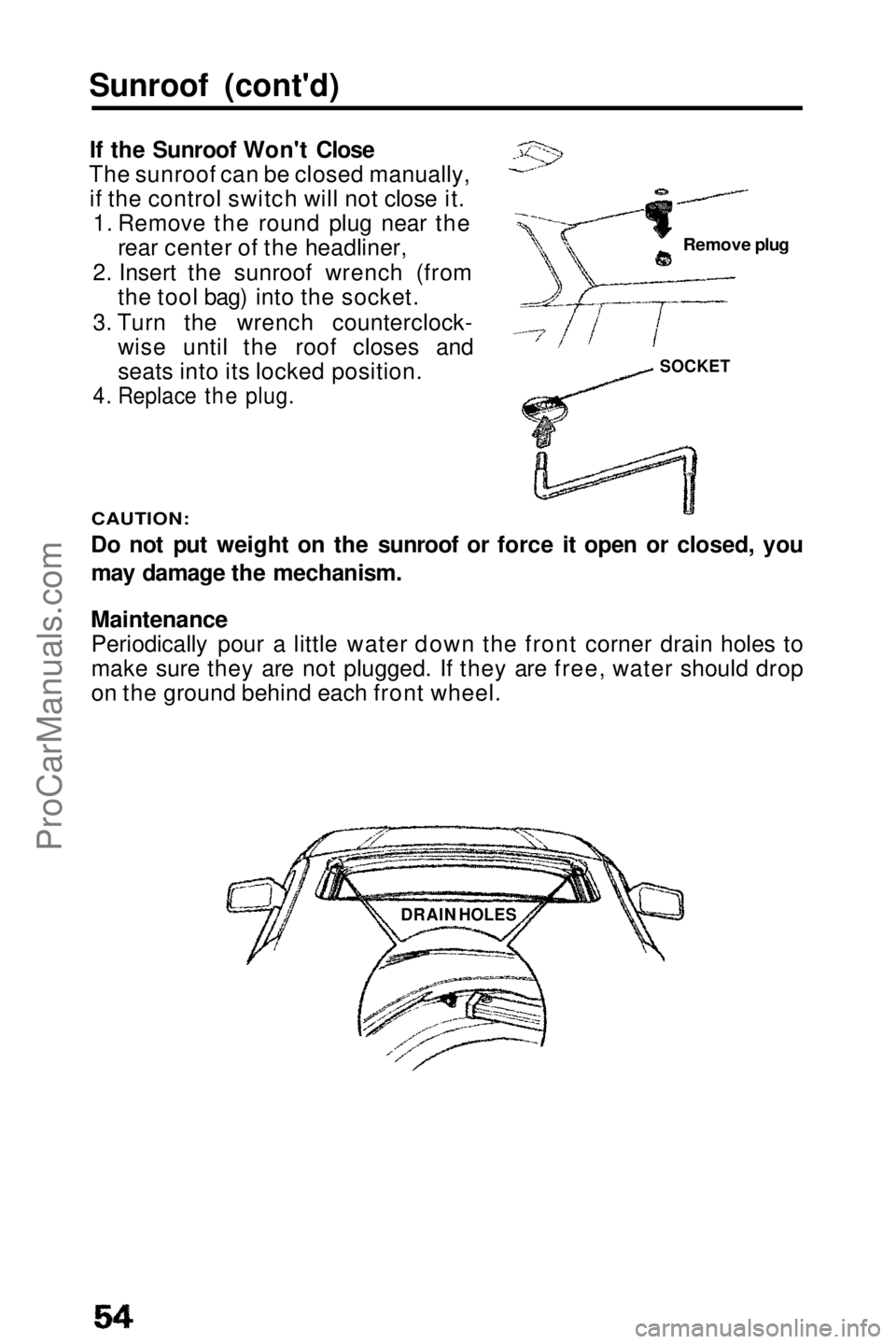
If the Sunroof Won't Close
The sunroof can be closed manually, if the control switch will not close it. 1. Remove the round plug near the rear center of the headliner,
2. Insert the sunroof wrench (from the tool bag) into the socket.
3. Turn the wrench counterclock- wise until the roof closes and
seats into its locked position.
4. Replace the plug.
CAUTION:
Do not put weight on the sunroof or force it open or closed, you
may damage the mechanism.
Maintenance
Periodically pour a little water down the front corner drain holes to
make sure they are not plugged. If they are free, water should drop
on the ground behind each front wheel.
Remove plug
SOCKET
DRAIN HOLESProCarManuals.comMain Menu t s