1953 JEEP CJ lock
[x] Cancel search: lockPage 188 of 376

H
ELECTRICAL
SYSTEM
colder plug may be desirable. However, under- or
over-heating is usually caused by factors other than the type of
spark
plugs and the cause should be determined before changing plugs. The design of the
engine
calls for plugs equivalent to Champion
J-8
for F4
engines
and
A.C.
44S or
UJ12Y
Champ
ion for the V6 engines, (as installed in production)
though any factor that consistently affects
engine
operating temperature may cause this requirement
to change. Overheating may be caused by in sufficient tightening of the plug in the head, which interferes with the flow of heat away from the firing
tip.
If this is the case, the plug gasket
will
show very
little flattening. Over-tightening, in
turn,
will
pro duce too easy a heat flow path and result in cold
plug operation.
This
will
be evident by excessive
flattening
and
deformation of the gasket.
Prevailing
temperatures, condition of the cooling system, and
air-fuel
mixture can affect the
engine
operating temperature and should be taken into consideration.
H-34.
GENERATOR
— F4
ENGINE
The
generator is an air-cooled, two-brush unit
which
cannot be adjusted to increase or decrease output. For replacement,
voltage
regulator and generator must be matched for
voltage
and capa
city,
polarity, and common source of manufacture.
Otherwise,
either a
loss
of ampere capacity or a
burned
out generator
will
result. Generators for
these
vehicles are 12-volt. Par. H-l explains the 12-volt system. Refer to the specifications at the
end of this section for information on correct generator rating for a specific model series.
The
circuit
breaker,
voltage
regulator, and current-
limiting
regulator are built into one combination
unit.
Because the regulator and battery are part
of the generator
circuit,
the output of the generator
depends upon the
state
of charge and temperature
of the battery.
With
a discharged battery, the
output
will
be high, decreasing proportionally as the battery
becomes
charged. For service informa
tion covering current regulator see Par. H-41.
H-36.
Generator
Maintenance
A
periodic inspection should be made of the charg
ing
circuit,
Fig. H-l9. The interval
between
these
checks
will
vary
depending upon type of service.
Dust,
dirt
and high speed operation are factors 10541
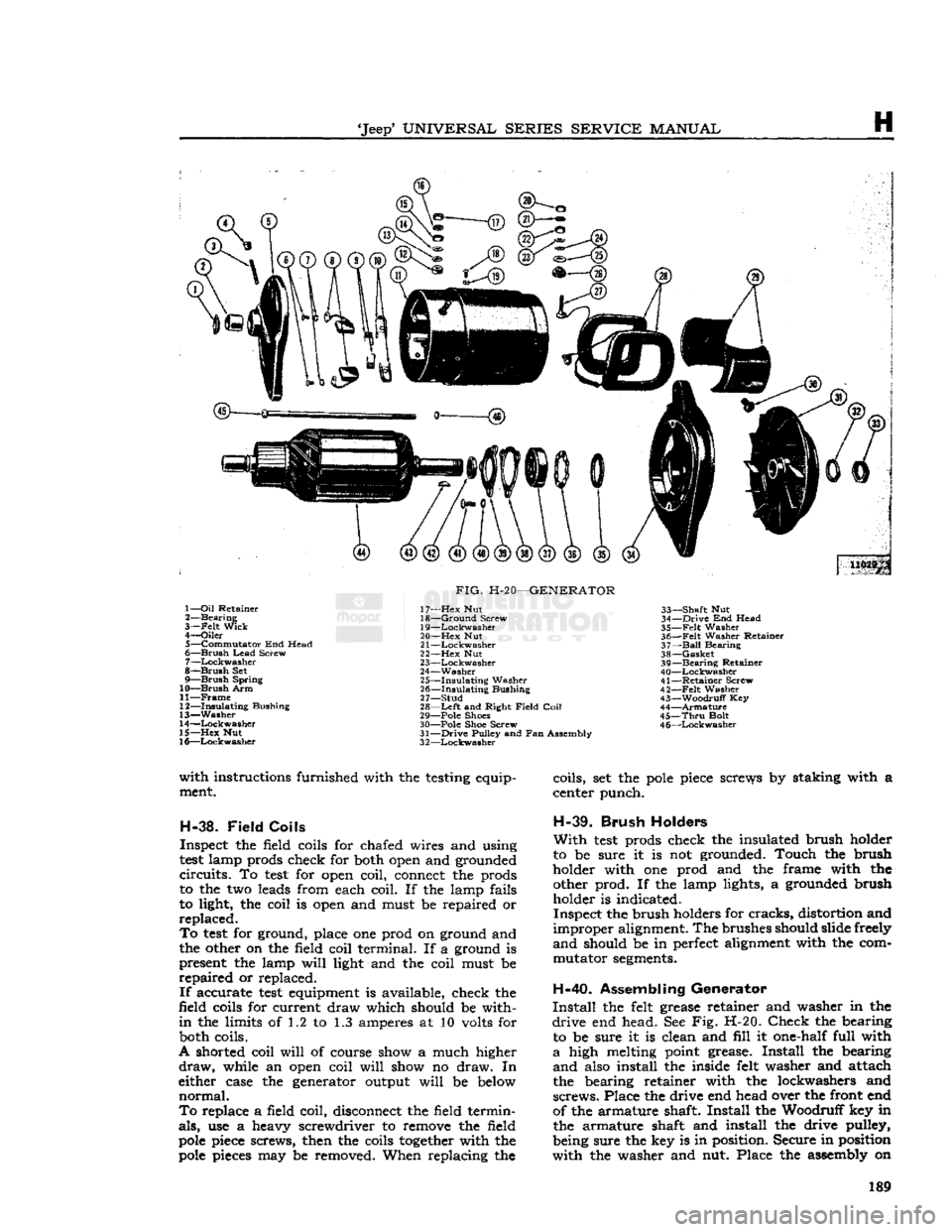
FIG.
H-19—CHARGING
CIRCUIT
1—
Battery
4-—Starter Switch
2—
Voltage
Regulator 5-—Charge Indicator
3—
Generator
which
contribute to increased wear of bearings
and
brushes.
Under
normal conditions a check should be made
each 6000 miles
[9.600
km.].
A
visual inspection should be made of all wiring,
to be sure there are no broken or damaged wires.
Check
all connections to be sure they are tight and
clean.
Should
the commutator be rough or worn the
armature
should be removed and the commutator
turned
and undercut. See Par. H-37.
The
brushes should slide freely in their holders.
Should
they be oil soaked or if they are worn to
less
than one-half their original length they should
be replaced. When new brushes are installed they should be sanded to provide
full
contact with the
commutator. Generators should not be checked for
output until the brushes are seated.
Brush
spring tension is important. High tension causes
rapid
brush and commutator wear while
low tension causes arcing and reduced output.
Test
the tension with a spring scale.
Check
the
specifications section at end of this section for
correct
spring tension for generator in question.
H-36.
Generator Disassembly
•
Refer to Fig. H-20:
Before beginning disassembly of the generator to
correct
electrical system malfunctions proceed with
inspection and
test
procedures as detailed in Par.
H-46
thru
H-62. If it is definitely determined that trouble exists within the generator, which necessitates dismantling, proceed as follows. Remove the two frame screws in the commutator
end plate and remove the end plate assembly. Next
pull
the armature and drive head complete
from
the generator housing. Remove the generator pulley from the armature by removing the nut
and
washer. Do not
lose
the Woodruff key when
the pulley is removed. After this, remove the drive
end head assembly which includes the oil seal and
bearing.
To remove the bearing, remove the three
screws and lockwashers in the grease retainer and remove the retainer and felt washer, after which,
remove the bearing, oil guard and felt washer.
H-37.
Armature
If
the commutator is rough or worn,
turn
it down
in
a lathe. After turning, the mica insulation be tween the
segments
should be undercut to a depth of 34* [0,8 mm.].
To
test
the armature for a ground, connect one
prod
of a
test
lamp to the core or shaft (not on
bearing
surface) and touch each commutator
seg
ment with the other prod. If the lamp lights, the
armature
segment
is grounded and the armature must be replaced.
To
test
for short in armature coils, a growler,
Fig.
H-21, is necessary. Place the armature on the growler and lay a thin steel strip on the armature
core.
The armature is then rotated slowly by hand
and
if a coil is shorted, the steel strip
will
vibrate.
Should
a coil be shorted the armature must be
replaced.
If
precision
test
equipment is available, the cus
tomary
accurate
tests
can be made in accordance 188
Page 189 of 376
'Jeep'
UNIVERSAL
SERIES
SERVICE
MANUAL
H
U029p 1—
Oil
Retainer
2—
Bearing
3—
-Felt
Wick
4—
Oiler
5—
Commutator
End Head
6—
Brush
Lead
Screw
7—
Lockwasher
8—
Brush
Set
9—
Brush
Spring
10—
Brush
Arm
11—
Frame
12—
Insulating
Bushing
13—
Washer
14—
Lockwasher
15—
Hex
Nut
16—
Lockwasher
FIG.
H-20—GENERATOR
17—
Hex
Nut
18—
Ground
Screw
19—
Lockwasher
20—
Hex
Nut
21
—Lockwasher
22—
Hex
Nut
23—
Lockwasher
24—
Washer
25—
Insulating
Washer
26—
Insulating
Bushing
27—
Stud
28—
Left
and Right
Field
Coil
29— Pole Shoes
30— Pole Shoe Screw
31—
Drive
Pulley and Fan Assembly
3
2—Lockwasher
33—
Shaft
Nut
34—
Drive
End Head
35—
Felt
Washer
36—
Felt
Washer Retainer
37—
Ball
Bearing
38—
Gasket
39—
Bearing
Retainer
40—
Lockwasher
41—
Retainer
Screw
42—
-Felt
Washer
43—
Woodruff
Key
44—
Armature
45—
Thru
Bolt
4
6—Lockwasher
with
instructions furnished with the testing equip ment.
H-38.
Field
Coils
Inspect the field coils for chafed wires and using
test
lamp prods check for both open and grounded
circuits.
To
test
for open coil, connect the prods
to the two leads from each coil. If the lamp fails
to light, the coil is open and must be repaired or
replaced.
To
test
for ground, place one prod on ground and
the other on the field coil terminal. If a ground is present the lamp
will
light and the coil must be
repaired
or replaced.
If
accurate
test
equipment is available, check the
field coils for current draw which should be with
in
the limits of 1.2 to 1.3 amperes at 10 volts for both coils.
A shorted coil
will
of course show a much higher
draw,
while an open coil
will
show no draw. In
either case the generator output
will
be below
normal.
To
replace a field coil, disconnect the field termin
als,
use a heavy screwdriver to remove the field
pole
piece screws, then the coils
together
with the
pole
pieces may be removed. When replacing the coils, set the
pole
piece screws by staking with a
center punch.
H-39.
Brush
Holders
With
test
prods check the insulated brush holder
to be sure it is not grounded. Touch the brush
holder with one prod and the frame with the other prod. If the lamp lights, a grounded brush holder is indicated.
Inspect the brush holders for
cracks,
distortion and
improper
alignment. The brushes should slide freely
and
should be in perfect alignment with the com mutator
segments.
H-40.
Assembling Generator
Install
the felt grease retainer and washer in the
drive
end head. See Fig. H-20.
Check
the bearing to be sure it is clean and
fill
it one-half full with
a
high melting point grease.
Install
the bearing
and
also install the inside felt washer and attach
the bearing retainer with the lockwashers and
screws.
Place the drive end head over the front end
of the armature shaft.
Install
the Woodruff key in the armature shaft and install the drive pulley,
being sure the key is in position. Secure in position
with
the washer and nut. Place the assembly on 189
Page 199 of 376
'Jeep'
UNIVERSAL
SERIES SERVICE
MANUAL
H
©
© © ® (a
1—
Bolt
2— Cap
Screw
3—
Brush
Assembly
Cover
4—
Brush
Assembly
5—
Locknut
6—
Isolation
Diode 7— Nut
8—
Insulated
Washer
9—
Rear
Housing
10—Slip
Ring
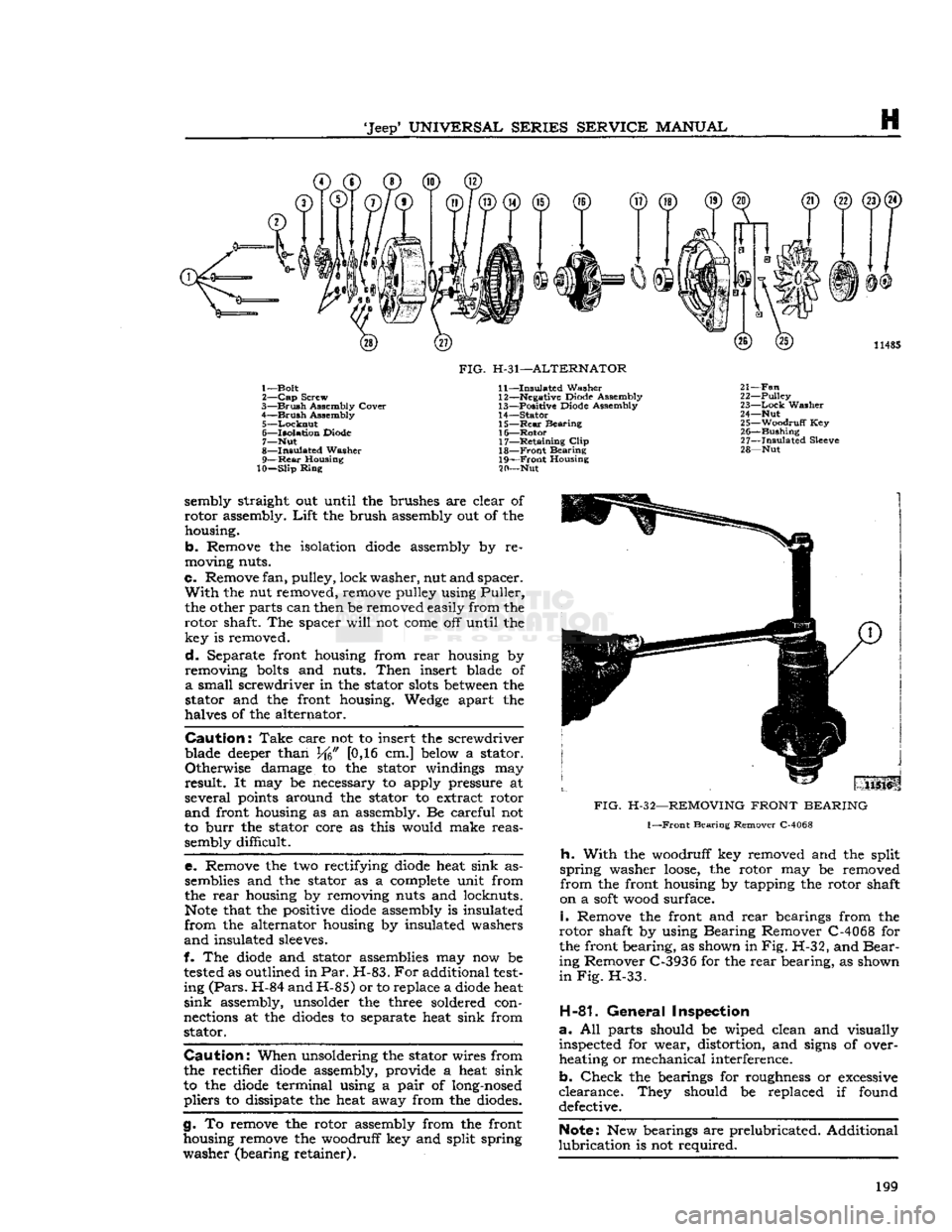
FIG.
H-31—ALTERNATOR
11—
Insulated
Washer 12— Negative Diode Assembly
13—
Positive Diode Assembly
14—
Stator
15—
Rear
Bearing 16—
Rotor
17—
Retaining
Clip
18—
Front
Bearing
19—
Front
Housing
20— Nut 11485
21—
Fan
22—
Pulley
23—
Lock
Washer
24— Nut 25—
Woodruff
Key 26—
Bushing
27—
Insulated
Sleeve
28— Nut sembly straight out until the brushes are clear of
rotor
assembly.
Lift
the brush assembly out of the housing.
b.
Remove the isolation
diode
assembly by re
moving nuts.
c.
Remove fan, pulley, lock
washer,
nut and spacer.
With
the nut removed, remove pulley using
Puller,
the other parts can then be removed easily from the
rotor
shaft. The spacer
will
not
come
off until the key is removed.
d.
Separate front housing from
rear
housing by
removing
bolts
and nuts.
Then
insert blade of
a
small screwdriver in the stator
slots
between
the
stator and the front housing. Wedge apart the
halves of the alternator.
Caution:
Take
care not to insert the screwdriver
blade deeper than J/f6" [0,16 cm.] below a stator.
Otherwise
damage to the stator windings may
result.
It may be necessary to apply pressure at
several
points around the stator to extract rotor
and
front housing as an assembly. Be careful not
to
burr
the stator core as this would make reas sembly difficult.
e.
Remove the two rectifying
diode
heat sink assemblies and the stator as a complete unit from
the
rear
housing by removing nuts and locknuts.
Note
that the positive
diode
assembly is insulated
from
the alternator housing by insulated washers
and
insulated sleeves.
f. The
diode
and stator assemblies may now be
tested
as outlined in
Par.
H-83.
For
additional
test
ing
(Pars.
H-84 and H-85) or to replace a
diode
heat
sink
assembly, unsolder the three soldered con
nections at the
diodes
to separate heat sink from stator.
Caution:
When unsoldering the stator wires from
the rectifier
diode
assembly, provide a heat sink
to the
diode
terminal using a
pair
of long-nosed
pliers
to dissipate the heat away from the diodes.
g.
To remove the rotor assembly from the front
housing remove the woodruff key and split spring
washer
(bearing retainer).
FIG.
H-32—REMOVING
FRONT
BEARING
1—Front
Bearing Remover C-4068
h.
With
the woodruff key removed and the split
spring
washer
loose,
the rotor may be removed
from
the front housing by tapping the rotor shaft
on a
soft
wood surface.
i.
Remove the front and
rear
bearings from the
rotor
shaft by using Bearing Remover C-4068 for
the front bearing, as shown in
Fig.
H-32, and
Bear
ing Remover C-3936 for the
rear
bearing, as shown
in Fig.
H-33.
H-81.
General
Inspection
a.
All parts should be wiped clean and visually inspected for wear, distortion, and signs of over
heating or mechanical interference.
b.
Check
the bearings for roughness or excessive
clearance.
They should be replaced if found defective.
Note:
New bearings are prelubricated. Additional
lubrication
is not required. 199
Page 201 of 376
'Jeep*
UNIVERSAL
SERIES
SERVICE
MANUAL
H
Resistance
should be approximately 0.1 ohm.
An
extremely accurate instrument would be neces
sary
to ascertain shorted turns.
Only
an open condi
tion can be detected with a commercial ohmmeter.
If
the alternator has been disassembled because of
an
electrical malfunction, replace stator only after
all
components have been checked and found to
be satisfactory.
H-85.
Out-Of-Circuit
Rectifier Diode Test
With
the rectifier diode heat sinks disconnected
from
the stator assembly (Par. H-80), the diodes
can
be individually checked with the Diode Tester
C-3829.
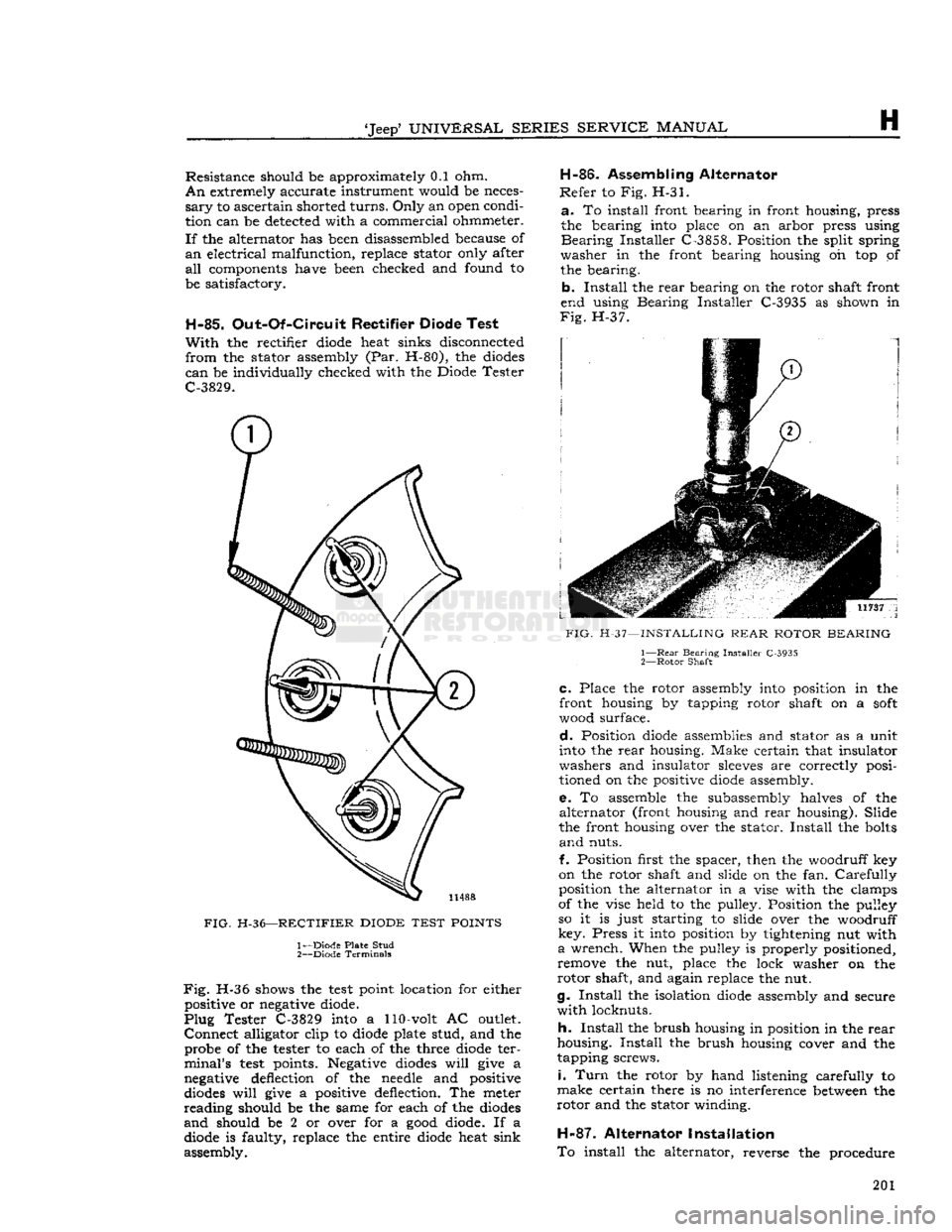
FIG.
H-36—RECTIFIER
DIODE
TEST
POINTS
1— Diode Plate Stud
2—
Diode Terminals
Fig.
H-36 shows the
test
point location for either positive or negative diode.
Plug
Tester C-3829 into a 110-volt AC outlet.
Connect
alligator clip to diode plate stud, and the probe of the tester to each of the three diode ter
minal's
test
points. Negative diodes
will
give a
negative deflection of the needle and positive
diodes
will
give a positive deflection. The meter
reading
should be the same for each of the diodes
and
should be 2 or over for a
good
diode. If a diode is faulty, replace the entire diode heat sink
assembly. H-86.
Assembling Alternator
Refer
to Fig. H-31.
a.
To install front bearing in front housing, press
the bearing into place on an arbor press using
Bearing
Installer C-3858. Position the split spring
washer
in the front bearing housing oh top of the bearing.
b.
Install
the
rear
bearing on the rotor shaft front
end using Bearing Installer C-3935 as shown in
Fig.
H-37.
FIG.
H-37—INSTALLING
REAR
ROTOR
BEARING
1—
Rear
Bearing Installer C-3935
2—
Rotor
Shaft
C.
Place the rotor assembly
into
position in the
front housing by tapping rotor shaft on a
soft
wood surface.
d.
Position diode assemblies and stator as a unit
into the
rear
housing. Make certain that insulator
washers and insulator
sleeves
are correctly posi
tioned on the positive diode assembly.
e.
To assemble the subassembly halves of the
alternator
(front
housing and
rear
housing). Slide
the front housing over the stator.
Install
the bolts
and
nuts.
f. Position first the spacer, then the woodruff key
on the rotor shaft and slide on the fan.
Carefully
position the alternator in a vise with the clamps
of the vise held to the pulley. Position the pulley
so it is just starting to slide over the woodruff
key.
Press it into position by tightening nut with
a
wrench. When the pulley is properly positioned,
remove the nut, place the lock washer on the
rotor
shaft, and again replace the nut.
g.
Install
the isolation diode assembly and secure
with
locknuts.
h.
Install
the brush housing in position in the
rear
housing.
Install
the brush housing cover and the
tapping screws.
i.
Turn
the rotor by hand listening carefully to
make
certain there is no interference between the
rotor
and the stator winding.
H-87.
Alternator Installation
To
install the alternator, reverse the procedure 201
Page 202 of 376

H
ELECTRICAL
SYSTEM
FIG.
H-38—WIRE
COLOR CODE
AND
LOCATIONS
FOR
ALTERNATOR HOOK-UP
1— Regulator (Auxiliary)
Terminal
(Cable —
Grey)
2— Output
Terminal:
(Red)
3—
Regulator
Terminal
(Cable —
Grey)
4—
Ground
Terminal
(Cable — Black-White
Tracer)
5—
Field
Terminal
(Cable — Green-White
Tracer)
6—
Ground
(Optional)
Terminal
(Cable — Black-White
Tracer)
REAR
VIEW
35
AMP.
ALTERNATOR
REAR
VIEW
40
& 55 AMP.
ALTERNATOR
given in Par. H-78, adjusting the fan belt to its
proper tension after the alternator is mounted, as described in Par. C-27. Wires should be connected
as shown in Fig. H-38.
When
the vehicle is equipped with a radio, a .55
mfd. capacitor is required on the alternator. Mount
the capacitor strap to a ground terminal and con
nect the lead to the output terminal.
H-88.
STARTING
SYSTEM
SERVICE
H-89.
Ignition
Switch
The
ignition switch serves both to energize the
ignition system and
engage
the starter switch.
The
ignition switch has four positions: (1) AC
CESSORY,
(2)
LOCK,
(3) ON, and (4)
START. The
key must be in the switch to turn it to any position other than
LOCK,
and the key can be
removed only in the
LOCK
position.
In "ACC",
a connection is made from the battery
terminal
to the accessory terminal of the switch to
allow accessories such as the radio, blower and/or
windshield wiper to be operated with the ignition, fuel
gauge
and indicator light circuits off.
In "LOCK",
no accessory supplied through the
ignition switch can be operated. Also, the ballast
resistor (V-6
engine
only) circuit to the ignition
coil
(IGN) is grounded.
In
"ON", a connection is made from the battery
terminal
to the accessory terminal so that all
ignition switch supplied accessories can be operated. Also the battery is connected to the ballast resistor
(V-6
engine
only) leading to the ignition coil
(IGN).
From
this same terminal, a lead
into
the
instrument cluster energizes the fuel
gauge
and
indicator lights.
In "START",
all ignition switch supplied acces
sories are temporarily disconnected. A connection is made to the starter solenoid lead. The charge
and
oil indicator lamps
will
light until the
engine
is started.
H-90.
Ignition
Switch
Removal
a.
Remove the bezel nut and pull back the main
switch body.
Lower
the switch
body
from under the instrument panel so that the wiring harness plug
can
be removed from the prong connection,
b. If the lock cylinder is to be removed, turn the
ignition key to the right and insert a short
piece
of wire or end of a paper clip
into
the lock release
hole
in the switch body. Pressing on the lock
cyl
inder retainer
will
allow the cylinder to be removed.
H-91.
Ignition
Switch
Installation
Before installing the lock cylinder
into
the main
switch body,
note
the position of the lock cylinder
retainer.
a.
Place the lock cylinder
into
the main switch
body
with the highest part of the lock cylinder
retainer in line with the lock release
hole
in the
main
switch body.
b. Compress the lock cylinder retainer so that the
lock cylinder can be installed all the way
into
the
main
switch
body
or until the retainer can be
seen
through the pin hole.
c.
Install
wiring harness plug
onto
switch
body
prong connection.
d.
Install
this main switch
body
into
the instru
ment panel opening from the
rear.
e. To make sure that the switch is in its correct position, install the ignition key in the off position.
Then
turn the switch
body
until the key is straight
up and down. Remove the key, install the bezel
nut and secure.
H-92.
PRESTOLITE
STARTING
MOTOR
DAUNTLESS
V-6 and
HURRICANE
F4
ENGINE
The
Prestolite starting motor on the V6
engine
is
similar
in construction (with exception of pinion housings) to the starting motor installed on F4
engines.
The
starter solenoid switch is bolted to the starter
frame.
The
starter is equipped with
sealed-type
absorbent
bronze bearings and no lubricant is required. Service procedures for the Prestolite starter are
given in
Pars.
H-93 to H-107. 202
Page 204 of 376

H
ELECTRICAL
SYSTEM
11035
FIG.
H-40—PRESTOLITE STARTING MOTOR—F4 ENGINE 1— End
Plate
2—
Plug
3—
Thrust
Washer
4—
Brush
Plate Assembly 5— Screw
6—
—Lock
Washer
7—
Insulating
Washer
8—
Terminal
9—
Field
Coil
and Pole
Shoe
Set
10—
Frame
11—
Insulating
Washer
12—
Washer
13— Nut 14—
Lock
Washer
15—
Insulating
Bushing
16—
Pole
Shoe
Screw
17— Sleeve Bearing
18—
Drive
End Frame
19—
Intermediate Bearing
20—
Bendix
Drive
21—
Screw
22—
Lock
Washer
23—
Thrust
Washer
24— Key
25—
Armature
26—
Thru
Bolt
27—
Insulator
brush
and
pull
On
a line parallel with the side of
the
brush.
Take
the
reading
just as the spring leaves the
brush.
It is important that the brush spring
tension be kept within the limits specified at the end of this section. If the tension is too low, there
will
be a loss of efficiency from poor brush contact.
Too
great a tension
will
cause excessive brush and
commutator wear. To change the tension, twist the
spring
at the holder with long-nosed pliers,
c.
Worn
brushes should be replaced. Brushes that
are
soldered to the field coil should be unsoldered
and
the
loop
in the field coil lead should be opened.
Insert
the new brush pigtail to its
full
depth in the
loop. The new brush lead should be tightly clinched
in
the terminal and then soldered to make a strong, low-resistance connection.
H-99.
Commutator
Check
the commutator for wear and discoloration.
If
the commutator is rough or worn the armature should be removed and the commutator turned
down in a lathe. A discolored commutator should
be cleaned with carbon tetrachloride. Never use
emery cloth.
H-100.
Armature
Visually
inspect the armature for mechanical
defects
before checking for shorted or grounded
coils. Use a set of
test
probes for testing armature
circuits.
To
test
the armatures for grounds, touch
one point of the
test
probes to a commutator seg
ment and touch the other point to the core or shaft. Do not touch the points to the bearing surface or
to the brush surface as the arc formed
will
burn
the smooth finish. If the lamp lights, the coil con nected to the commutator segment is grounded.
To
test
for shorted armature coils, a growler as
shown-in Fig. H-42 is necessary. The armature is placed against the core and a steel strip is held
on the armature. The growler is then energized 204
Page 205 of 376

SERIES
SERVICE
MANUAL
H
t
^
12956
FIG.
H-41—PRESTOLITE
STARTING
MOTOR—V-6
ENGINE
1—
End
Plate
2—
Oiling
Pad
3—
Thrust
Washer
4—
Brush
Plate Assembly 5—
Screw
6—
Lock
Washer 7—
Insulating
Washer
8—
Terminal
9—
Field
Coil
and Pole Shoe
10—Frame
11—
Insulating
Washer
12—
Washer
13— Nut
14
—Lockwasher
15—
Insulating
Bushing
16— Pole Shoe Screw
17—
Bearing,
Outer
18—
Drive
End
Frame
Pinion Housing
19— Intermediate Bearing Housing
20—
Lock
Washer 21—
Screw
22— Bendix Drive
23—
Thrust
Washer
24—Pin
25—
Armature
2 6—Commutator
27—
Thru
Bolt
28—
Insulator
29—
Bearing,
Intermediate
and
the armature rotated slowly by hand. If a
shorted coil is present, the steel strip
will
become
magnetized and
will
then vibrate.
H-101-
Field
Coils
Using
test
probes, check the field coils for both
ground and
open
circuits.
a.
To
test
for ground, place one probe on the motor frame or
pole
piece
and touch the other probe to the field coil terminals. If a ground is present, the
lamp
will
light.
b.
To
test
for
open
circuits, place the probes on
the field coil terminal and on an insulated brush.
If
the light,
does
not light, the coil is
open
circuited.
H-102.
Brush
Holder Inspection
Using
test
probes, touch the insulated brush holder with one probe and a convenient ground on the commutator end head with the other probe. If the
lamp lights, it indicates a grounded brush holder.
H-103.
Starting Motor Reassembly
Refer
to Fig. H-40 and H-41.
a.
When assembling absorbent bronze bearing
found in the end plate and drive end frame, always
use the proper arbor
designed
to
give
the proper
bearing fit. Soak the bearings in oil
before
assem
bling in the bearing bore. Give the bearing
seats
a
light coating of oil.
Note:
At assembly, the outer pinion housing bear
ing must be flush with the bearing bore on the inside of the housing; the intermediate bearing
must be flush with the bearing bore on the side
toward the armature.
b.
Brushes should be correctly installed and con
nected as outlined in Par. H-98 in order to be sure
of proper starting motor efficiency.
c. Assemble the armature bearing plate and Bendix
Folo-Thru
Drive to the drive end frame.
Install
the two holding cap screws and lock washers. Tighten them securely. 205
Page 206 of 376

H
ELECTRICAL
SYSTEM
FIG.
H-42—GROWLER
d.
Install
the armature in starter motor frame,
using care to align the four brushes and brush
springs on the commutator so that they are free to
move
and are square on the commutator.
e.
Install
the thrust washer on the shaft.
Lubricate
the plug and bearing in the end plate.
Install
the
end plate.
Install
the two through
bolts
and tighten securely.
f.
On Prestolite V6 starting motors, check pinion position by measuring from the centerline of the
pinion housing mounting bolt
holes
to the outside
edge
of the pinion.
Correct
measurement with the
Bendix
drive retracted is [19,05 mm.] to
%"
[22,23 mm.]; with drive extended, 1%"
[34,93
mm.] to 1^" [38,10]. Adjust by installing
thrust
washers just inside the commutator end
head or intermediate bearing as required. The
Bendix
drive retaining pin must not project
beyond the outside diameter of the pinion
sleeve.
H-104.
Bench Test
The
motor should first be checked to see that the
free running
voltage
and current are within specifi cations. To
test,
connect the motor to a battery,
ammeter and voltmeter. If the current is too high
check
the bearing alignment and end play to make
sure
there is no binding or interference. Using a
spring
scale and torque arm check the stall torque to see that the motor is producing its rated
crank
ing power. The stall torque
will
be product of the
spring
scale reading and the length of the arm
in
feet.
If the torque is not up to specifications
check
the seating of the brushes on the commutator
and
the internal connection of the motor for high
resistance. The Bendix
Folo-Thru-Drive
should be checked for correct operation. The Bendix pinion
should be checked to see that it shifts when the motor is operated under no load.
H-105.
Bendix Folo-Thru Drive (Prestolite)
The
Bendix
Folo-Thru
Drive is designed to over
come
premature demeshing of the drive pinion
from
the flywheel ring gear until a predetermined
engine
speed is reached. See Fig. H-43. No repairs or adjustments are possible on this
drive
and a
complete
new unit must be installed
if
trouble develops.
H-106.
Lubrication
of
Folo-Thru Drive
A
periodic cleaning and relubrication of the drive is advisable, the frequency of which
will
depend on
the type of service to which the vehicle is sub
jected and the locale of operation.
a.
Remove the starting motor from the
engine
and take off the outboard housing. The pinion and
barrel
assembly
will
be in the demeshed position
on the screwshaft. Do not
move
it forward
until
after
that portion of the armature shaft ahead
of the pinion has been cleaned. If accidentally ro
tated to the outer end of the screwshaft it
will
lock
in that position and cannot be forced back.
b.
Do not disassemble the drive for any reason.
c.
Do not dip or wash the drive in any cleaning solution.
d.
Do not remove the drive from the armature
shaft. Remove
excess
oil, grease or foreign matter
from
the armature shaft by wiping it with a clean cloth.
3
10859
FIG.
H-43—BENDIX
FOLO-THRU DRIVE
Dampen
the cloth with kerosene if necessary. A
light film of
SAE
10 oil may then be applied to the shaft.
e.
Now rotate the pinion and
barrel
assembly to the
fully
extended position, thereby exposing the screw shaft triple threads. Use a cloth dampened with
kerosene to wipe them clean. Do not use
gaso
line
or any
commercial cleaner.
If the dirt is
thick
and gummy, apply the kerosene with a small
brush.
Tilt
the starting motor so that a small
amount
will
run under the control nut. Relubricate
with
a thin film of
SAE
10 oil. Use SAE 5 at ex tremely low temperatures.
f.
Reassemble the starting motor to the
engine
with the drive in the extended position.
Carefully
mesh the pinion with the flywheel ring gear before
tightening the starter motor mounting bolts. It may 206