2024 PEUGEOT 308 fog light
[x] Cancel search: fog lightPage 71 of 280
69
Lighting and visibility
4Exterior lighting control
stalk
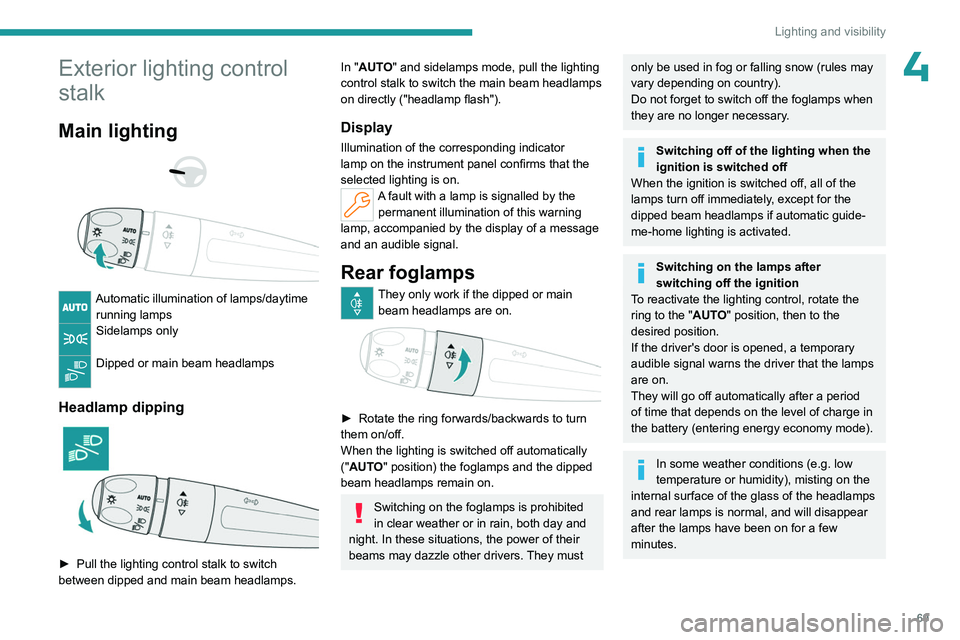
Main lighting
Automatic illumination of lamps/daytime running lamps
Sidelamps only
Dipped or main beam headlamps
Headlamp dipping
► Pull the lighting control stalk to switch
between dipped and main beam headlamps.
In "AUTO" and sidelamps mode, pull the lighting
control stalk to switch the main beam headlamps
on directly ("headlamp flash").
Display
Illumination of the corresponding indicator
lamp on the instrument panel confirms that the
selected lighting is on.
A fault with a lamp is signalled by the permanent illumination of this warning
lamp, accompanied by the display of a message
and an audible signal.
Rear foglamps
They only work if the dipped or main beam headlamps are on.
► Rotate the ring forwards/backwards to turn
them on/off.
When the lighting is switched off automatically
("
AUTO" position) the foglamps and the dipped
beam headlamps remain on.
Switching on the foglamps is prohibited
in clear weather or in rain, both day and
night. In these situations, the power of their
beams may dazzle other drivers. They must
only be used in fog or falling snow (rules may
vary depending on country).
Do not forget to switch off the foglamps when
they are no longer necessary.
Switching off of the lighting when the
ignition is switched off
When the ignition is switched off, all of the
lamps turn off immediately, except for the
dipped beam headlamps if automatic guide-
me-home lighting is activated.
Switching on the lamps after
switching off the ignition
To reactivate the lighting control, rotate the
ring to the "AUTO" position, then to the
desired position.
If the driver's door is opened, a temporary
audible signal warns the driver that the lamps
are on.
They will go off automatically after a period
of time that depends on the level of charge in
the battery (entering energy economy mode).
In some weather conditions (e.g. low
temperature or humidity), misting on the
internal surface of the glass of the headlamps
and rear lamps is normal, and will disappear
after the lamps have been on for a few
minutes.
Page 73 of 280

71
Lighting and visibility
40 (Initial setting)Driver only or driver + front passenger
1 5 people
2 5 people + load in the boot
3 Driver only + load in the boot
4 5 6 Not used
Automatic Peugeot Matrix
LED Technology 2.0
headlamp adjustment
This system automatically adjusts the height
of the headlamp beams according to different
parameters (e.g.
vehicle load).
In the event of a malfunction, this warning
lamp lights up on the instrument panel,
accompanied by the display of a message and
an audible signal.
The system places the headlamp beams in the
lowest position.
Have it checked by a PEUGEOT dealer or a
qualified workshop.
Do not touch the Peugeot Matrix LED
Technology 2.0 headlamps - risk of
electrocution!
Automatic illumination of lamps
With the lighting control stalk in the “ AUTO”
position and if a low level of exterior brightness
is detected by the rain/sunshine sensor, the
sidelamps and dipped beam headlamps are
switched on automatically, without any action on
the part of the driver. They may also come on if
rain is detected, at the same time as automatic
operation of the windscreen wipers.
As soon as the brightness returns to a sufficient
level or after the windscreen wipers are switched
off, the lamps are switched off automatically.
Malfunction
In the event of a malfunction of the rain/
sunshine sensor, the vehicle’s lamps
come on and this warning lamp is displayed on
the instrument panel, accompanied by an
audible signal and/or the display of a message.
Have it checked by a PEUGEOT dealer or a
qualified workshop.
Do not cover the rain/sunshine sensor
located at the top centre of the
windscreen behind the interior rear view
mirror; the associated functions would no
longer be controlled.
In fog or snow, the rain/sunshine sensor
may detect sufficient light. For this
reason, the lighting will not come on
automatically.
The inner surface of the windscreen may become misted up and affect the proper
operation of the rain/sunshine sensor.
In humid and cold weather, demist the
windscreen regularly.
Guide-me-home and
welcome lighting
Guide-me-home lighting
Automatic
With the ring of the lighting control stalk in the
"AUTO” position and when the light is poor, the
dipped beam headlamps come on automatically
when the ignition is switched off.
You can activate/deactivate and adjust the duration of the guide-me-home
lighting in the Settings
> Vehicle touch screen
application.
Manual
Page 75 of 280
73
Lighting and visibility
4
This system is a driving aid.The driver remains responsible for
the vehicle's lighting, its correct use in the
prevailing light, visibility and traffic conditions,
and for compliance with driving and vehicle
regulations.
The system becomes operational when the vehicle exceeds 16 mph (25 km/h).
When the speed falls below 9 mph (15 km/h),
the function is no longer operational.
Activation/Deactivation
It is configured in the Settings > Vehicle
touch screen application.
The state of the system is stored when the
ignition is switched off.
When the system detects thick fog, it
temporarily deactivates the function.
Operation
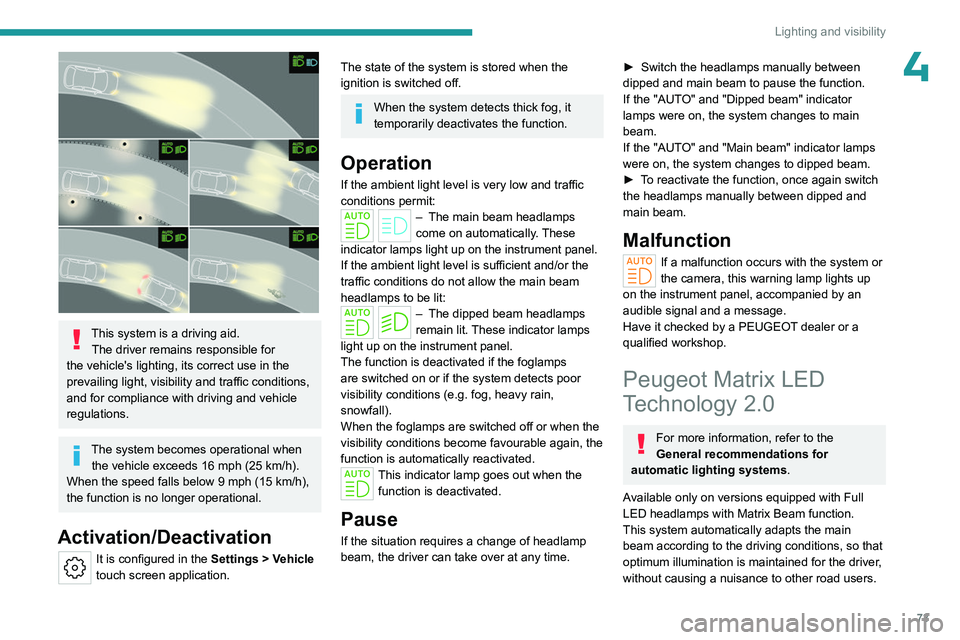
If the ambient light level is very low and traffic
conditions permit:
– The main beam headla mps
come on automatically. These
indicator lamps light up on the instrument panel.
If the ambient light level is sufficient and/or the
traffic conditions do not allow the main beam
headlamps to be lit:
– The dipped beam head lamps
remain lit. These indicator lamps
light up on the instrument panel.
The function is deactivated if the foglamps
are switched on or if the system detects poor
visibility conditions (e.g.
fog, heavy rain,
snowfall).
When the foglamps are switched off or when the
visibility conditions become favourable again, the
function is automatically reactivated.
This indicator lamp goes out when the function is deactivated.
Pause
If the situation requires a change of headlamp
beam, the driver can take over at any time.
► Switch the headlamps manually between
dipped and main beam to pause the function.
If the "AUT
O" and "Dipped beam" indicator
lamps were on, the system changes to main
beam.
If the "AUTO" and "Main beam" indicator
lamps
were on, the system changes to dipped beam.
►
T
o reactivate the function, once again switch
the headlamps manually between dipped and
main beam.
Malfunction
If a malfunction occurs with the system or
the camera, this warning lamp lights up
on the instrument panel, accompanied by an
audible signal and a message.
Have it checked by a PEUGEOT dealer or a
qualified workshop.
Peugeot Matrix LED
Technology 2.0
For more information, refer to the
General recommendations for
automatic lighting systems.
Available only on versions equipped with Full
LED headlamps with Matrix Beam function.
This system automatically adapts the main
beam according to the driving conditions, so that
optimum illumination is maintained for the driver,
without causing a nuisance to other road users.
Page 76 of 280
74
Lighting and visibility
The driver remains responsible for the vehicle's lighting, its correct use in the
prevailing light, visibility and traffic conditions,
and for compliance with driving and vehicle
regulations.
The system is active from 25 mph
(40 km/h) and deactivates below 12 mph
(20
km/h).
Activation/Deactivation
► Place the ring of the lighting control stalk in
the “ AUTO” position.
This indicator lamp comes on in the instrument panel.
It is configured in the Settings > Vehicle
touch screen application.
The state of the system is stored when the
ignition is switched off.
When deactivated, the lighting system changes
to "Automatic illumination of lamps" mode.
It is recommended that you deactivate
the function in foggy or snowy conditions
or in case of heavy mist.
The function temporarily is deactivated when
the system detects thick fog or when the
foglamps are switched on manually. This is
signalled by the indicator lamp going off on
the instrument panel.
Operation
Using a camera, the system detects the driving
conditions (brightness, lights from oncoming or
followed vehicles, road turns) and adapts the
beams of the main headlamps accordingly.
The modules that make up the main beams
switch on and off gradually, segment by
segment, depending on the driving conditions
detected.
Nominal main beam lighting is restored as soon
as the vehicle is no longer detected by the
system.
If the system is selected but the display
on the instrument panel and the alerts are
not available, the indicator lamp comes on in
grey.
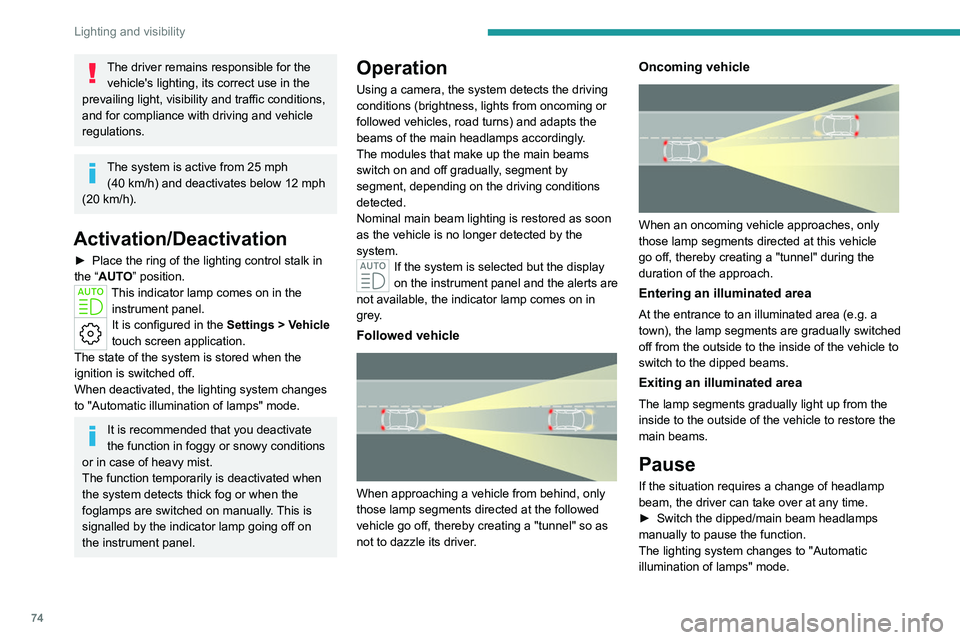
Followed vehicle
When approaching a vehicle from behind, only
those lamp segments directed at the followed
vehicle go off, thereby creating a "tunnel" so as
not to dazzle its driver.
Oncoming vehicle
When an oncoming vehicle approaches, only
those lamp segments directed at this vehicle
go off, thereby creating a "tunnel" during the
duration of the approach.
Entering an illuminated area
At the entrance to an illuminated area (e.g. a
town), the lamp segments are gradually switched
off from the outside to the inside of the vehicle to
switch to the dipped beams.
Exiting an illuminated area
The lamp segments gradually light up from the
inside to the outside of the vehicle to restore the
main beams.
Pause
If the situation requires a change of headlamp
beam, the driver can take over at any time.
►
Switch the dipped/main beam headlamps
manually to pause the function.
The lighting system changes to "Automatic
illumination of lamps" mode.
Page 79 of 280

77
Lighting and visibility
4An additional jet is fitted above the number plate to clean the reversing camera (depending on
version).
With reverse gear engaged, the washing
of the reversing camera is triggered by
clicking on this button in the right side menu of
the touch screen.
Front intermittent wiping
In Intermittent mode, the driver can adjust the
wiping frequency by turning the ring to one of the
5 available positions.
The first (upper) position corresponds to the
longest time interval between 2 wipes for light
rain.
The last (lower) position corresponds to the
shortest time interval between 2 wipes for heavy
rain.
A rotation of the ring from a higher position to a
lower position triggers a confirmation wiping.
After the ignition has been switched off for more than 1 minute with the wiper
control stalk in the INT, 1 or 2
position, when
the ignition is switched on again:
–
the system works as soon as the vehicle
exceeds 6 mph (10 km/h), if the outside
temperature is below +3°C.
– the system works immediately , if the
outside temperature is above +3°C.
Automatic windscreen wipers
In AUTO mode, the front wipers work
automatically and adapt to the intensity of
precipitation depending on the sensitivity of the
sensor selected.
The rainfall detection function uses a rain/
sunshine sensor located at the top centre of the
windscreen, behind the rear view mirror.
In certain weather conditions (e.g. fog,
frost, snow , projections on salty roads),
the driver may have to return to manual
wiping.
Switching on/off
To switch on:
► Put the wiper control stalk in the AUT
O
position.
►
T
urn the ring to adjust the sensitivity of the
sensor.
A wiping cycle, accompanied by the display of
a message, confirms that the request has been
taken into account.
►
T
o switch off, put the wiper control stalk in
another position or in the 0 position.
Adjusting the sensitivity
The first position (upper) corresponds to the
lowest sensitivity of the sensor.
The last position (lower) corresponds to the
highest sensitivity of the sensor.
The higher the sensitivity, the faster the system
reacts and increases the wiping frequency.
A rotation of the ring from a higher position to a
lower position triggers a confirmation wiping.
After the ignition has been switched off
for more than 1 minute with the wiper
control stalk in the AUTO position, when the
ignition is switched on again:
–
the system works, depending on the
volume of rain detected, as soon as the
vehicle exceeds 6 mph (10 km/h), if the
outside temperature is below +3°C.
–
the system works immediately
, depending
on the volume of rain detected, if the outside
temperature is above +3°C.
Do not cover the rain/sunshine sensor.
When using an automatic car wash,
switch off the automatic wipers and the
ignition.
Page 122 of 280

120
Driving
Driving aids camera
This camera and its associated functions
may be impaired or not work if the windscreen
area in front of the camera is dirty, misty,
frosty, covered with snow, damaged or
masked by a sticker.
In humid and cold weather, demist the
windscreen regularly.
Poor visibility (e.g.
inadequate street lighting,
heavy rain, thick fog, snowfall), dazzle
(e.g.
headlamps of an oncoming vehicle, low
sun, reflections on a damp road, leaving a
tunnel, alternating shade and light) can also
impair detection performance.
In the event of a windscreen replacement,
contact a PEUGEOT dealer or a qualified
workshop to recalibrate the camera;
otherwise, the operation of the associated
driving aids may be disrupted.
Other cameras
The images from the camera(s)
displayed on the touch screen or on the
instrument panel may be distorted by the
terrain.
In the presence of areas in shade, or in
conditions of bright sunlight or inadequate
lighting, the image may be darkened and with
lower contrast.
Obstacles may appear further away than they
actually are.
Sensors
The operation of the sensors, as well as
any associated functions, may be disrupted
by noise pollution such as that emitted by
noisy vehicles and machinery (e.g. lorries,
pneumatic drills), by the accumulation of
snow or dead leaves on the road or in the
event of damaged bumpers and mirrors.
When reverse gear is engaged, an audible
signal (long beep) indicates that the sensors
may be dirty.
A front or rear impact to the vehicle can
upset the sensors’ settings, which is not
always detected by the system: distance
measurements may be distorted.
The sensors do not systematically detect
obstacles that are too low (pavements, studs)
or too thin (trees, posts, wire fences).
Certain obstacles located in the sensors’ blind
spots may not be detected or may no longer
be detected during the manoeuvre.
Certain materials (fabrics) absorb sound
waves: pedestrians may not be detected.
Maintenance
Clean the bumpers and door mirrors and
the field of vision of the cameras regularly.
When washing your vehicle at high pressure,
direct the spray from at least 30 cm away
from the radar, sensors and cameras.
Mats/Pedal trims
The use of mats or pedal trims not
approved by PEUGEOT may interfere with
the operation of the speed limiter or cruise
control.
To avoid any risk of jamming the pedals:
–
Ensure that the mat is secured correctly
.
–
Never fit one mat on top of another
.
Units of speed
Ensure that the units of speed displayed
on the instrument panel (mph or km/h) are
those for the country you are driving in.
If this is not the case, when the vehicle is
stationary, set the display to the required
units of speed so that it complies with what is
authorised locally.
In case of doubt, contact a PEUGEOT dealer
or a qualified workshop.
Page 140 of 280
138
Driving
MessagesDriving situations
"Hold steering wheel "
(framed in red) Simultaneous loss of cruise control and lane positioning assist.
Operating limits
The system may issue an alert when the
vehicle is travelling on a long, straight
road with smooth road surface even if the
driver thinks they are holding the steering
wheel correctly.
The system may not operate or may produce
unsuitable corrections to the steering in the
following situations:
–
W
earing thick gloves (with Drive Assist 2.0).
–
Poor visibility (insufficient road lighting,
snowfall, rain, fog).
–
Dazzle (headlamps of an oncoming vehicle,
low sun, reflections on a wet road surface,
leaving a tunnel, alternating light and shade).
–
Windscreen area in front of the camera
dirty
, misted up, frost-covered, snow-covered,
damaged or covered by a sticker.
–
Lane markings eroded, partially hidden (snow
,
mud) or multiple (roadworks, surface joints).
–
T
ravelling in a tight bend.
–
Winding roads.
–
Road surface repairs.
Risk of undesirable operation
The system should be deactivated in the following situations:
–
When changing a wheel or working near a
wheel.
–
T
owing or with a bicycle carrier on a towing
device, especially with trailer not plugged in or
not approved.
–
Adverse weather conditions.
–
Road with low grip (risk of aquaplaning,
snow
, ice).
–
Road works and toll areas.
–
Driving on racing circuits.
–
Driving on a rolling road.
Malfunction
In the event of a malfunction, the
Service warning lamp comes on
and this (orange) symbol appears on the
instrument panel, accompanied by the display of
a message and an audible signal.
Have it checked by a PEUGEOT dealer or a
qualified workshop.
Semi-automatic lane
changing
(with Drive Assist 2.0)
For more information, refer to the
General recommendations on the use
of driving and manoeuvring aids .
This system assists the driver in changing lanes.
To do this, it uses the camera located at the top
of the windscreen, the radar located at the front
and the four angle radars fitted in the bumpers.
The steering wheel is equipped with a hands-on detection system to avoid
distraction on the part of the driver.
For more information on the Hands-on
detection, refer to the corresponding section.
The system cannot in any circumstances replace the need for vigilance on the part
of the driver. The driver remains responsible
for their driving by monitoring their
surroundings and keeping their hands on the
steering wheel.
The driver must act promptly if they believe
that the traffic conditions or the state of the
Page 144 of 280
142
Driving
(orange)
“Lane change interrupted: Stay in the
lane”
The system cannot manage the current driving
situation.
Brake, accelerate or use the steering wheel,
depending on the context.
(blue)
"Lane change canceled"
Continuation of the systems: Lane positioning
assist and Adaptive cruise control.
or
Interruption at the initiative of the driver.
(red)
"Take back control"
The system cannot manage the current driving
situation.
Brake, accelerate or use the steering wheel,
depending on the context.
Operating limits
The system should only be used on driving lane.
The system may not work in the following
situations:
–
W
earing thick gloves.
–
Poor visibility (insufficient road lighting,
snowfall, rain, fog).
–
Dazzle (headlamps of an oncoming vehicle,
low sun, reflections on a wet road surface,
leaving a tunnel, alternating light and shade).
–
Windscreen area in front of the camera
dirty
, misted up, frost-covered, snow-covered,
damaged or covered by a sticker.
– Lane markings eroded, partially hidden (snow ,
mud) or multiple (roadworks, surface joints).
–
T
ravelling in a tight bend.
–
Winding roads.
–
Road surface repairs.
The system must not be activated in the following situations:
–
When changing a wheel or working near a
wheel.
–
T
owing or with a bicycle carrier on a towing
device, especially with trailer not plugged in or
not approved.
–
Adverse weather conditions.
–
Road with low grip (risk of aquaplaning,
snow
, ice).
–
Unusual configuration such as road works
areas, toll areas and emergency lanes.
–
Driving on racing circuits.
–
Driving on a rolling road.
If the system detects that the driver is not
holding the steering wheel firmly enough,
it triggers a series of gradual alerts and then
deactivates itself if there is no response from
the driver.
Malfunction
In the event of a malfunction, this warning
lamp lights up on the instrument panel,
accompanied by the display of a message and
an audible signal.
Have it checked by a PEUGEOT dealer or a
qualified workshop.
Active Safety Brake with Collision Risk Alert and
Intelligent emergency
braking assistance
For more information, refer to the
General recommendations on the use
of driving and manoeuvring aids .
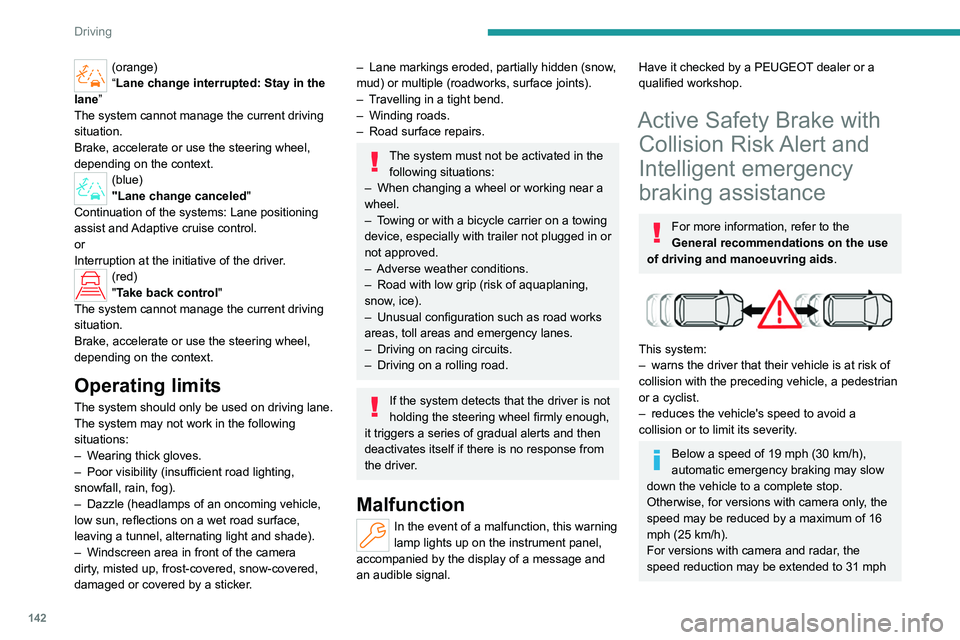
This system:
–
warns the driver that their vehicle is at risk of
collision with the preceding vehicle, a pedestrian
or a cyclist.
–
reduces the vehicle's speed to avoid a
collision or to limit its severity
.
Below a speed of 19 mph (30 km/h),
automatic emergency braking may slow
down the vehicle to a complete stop.
Otherwise, for versions with camera only
, the
speed may be reduced by a maximum of 16
mph (25
km/h).
For versions with camera and radar, the
speed reduction may be extended to 31 mph