2024 MAZDA CX90 Camera
[x] Cancel search: CameraPage 364 of 687
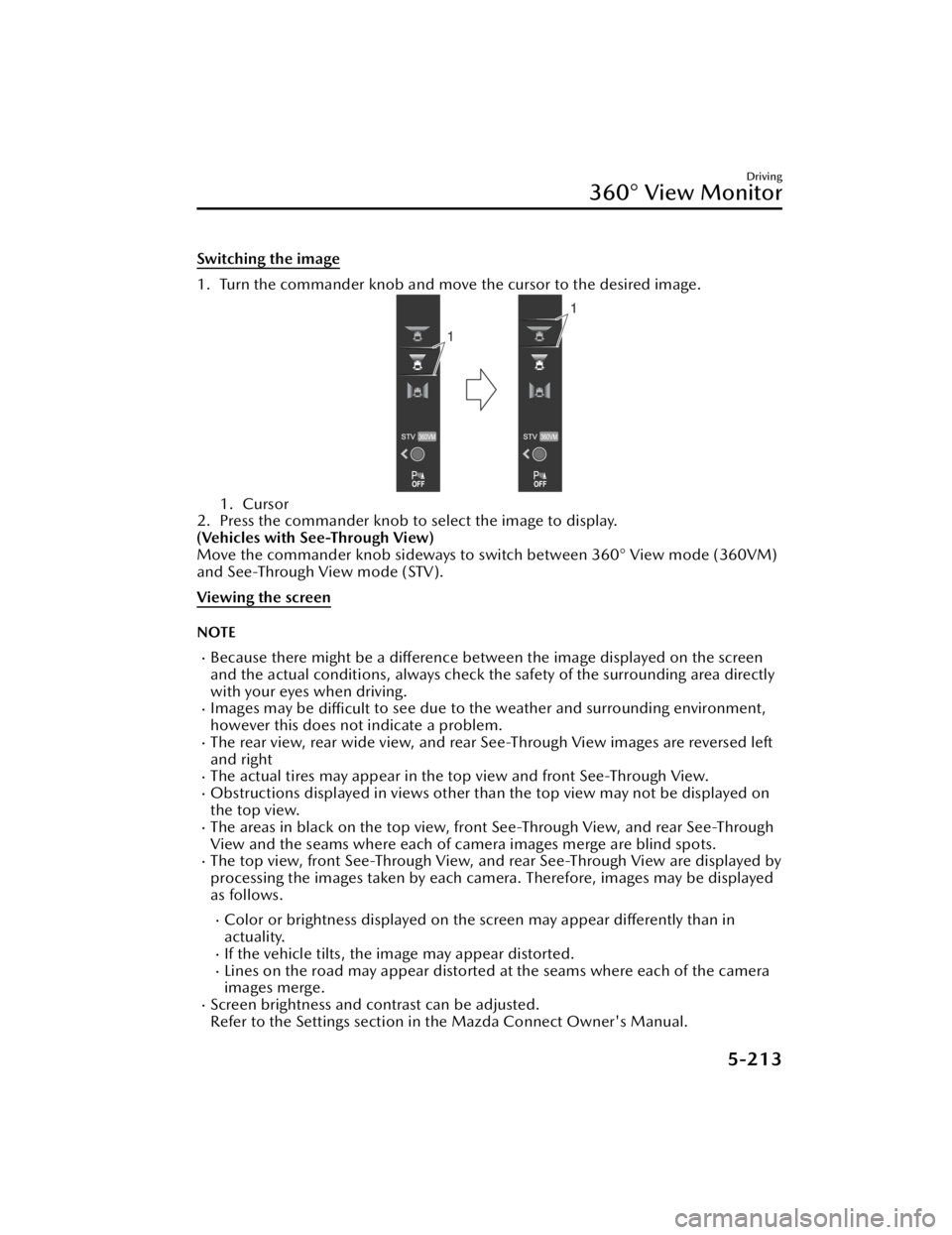
Switching the image
1. Turn the commander knob and move the cursor to the desired image.
1. Cursor
2. Press the commander knob to select the image to display.
(Vehicles with See-Through View)
Move the commander knob sideways to switch between 360° View mode (360VM)
and See-Through View mode (STV).
Viewing the screen
NOTE
Because there might be a difference between the image displayed on the screen
and the actual conditions, always check th e safety of the surrounding area directly
with your eyes when driving.
Images may be difficult to see due to the weather and surrounding environment,
however this does not indicate a problem.
The rear view, rear wide view, and rear See-Through View images are reversed left
and right
The actual tires may appear in the top view and front See-Through View.Obstructions displayed in views other than the top view may not be displayed on
the top view.
The areas in black on the top view, front See-Through View, and rear See-Through
View and the seams where each of camera images merge are blind spots.
The top view, front See-Through View, and rear See-Through View are displayed by
processing the images taken by each camera. Therefore, images may be displayed
as follows.
Color or brightness displayed on the screen may appear differently than in
actuality.
If the vehicle tilts, the image may appear distorted.Lines on the road may appear distorted at the seams where each of the camera
images merge.
Screen brightness and contrast can be adjusted.
Refer to the Settings section in the Mazda Connect Owner's Manual.
Driving
360° View Monitor
5-213
CX-90_8KG7-EA-22L_Edition1_new 2022-11-17 16:05:04
Page 372 of 687

IndicationContent
6 Projected vehicle path distance
guide lines (red/yellow) These guide lines indicate the approximate distance to a
point measured from the rear of the vehicle (from the
end of the bumper).
The red line indicates the point about 50 cm (19 in)
from the rear end of the rear bumper.
The yellow lines indicate the points about 1 m (39 in)
and 2 m (78 in) from the rear end of the rear bumper.
7 View status icon Indicates which image is selected.
8 Mode switching icon Indicates which mode is selected.
9 Parking sensor status icon Indicates that the parking sensor has a problem or it is
switched
off.
NOTE
The rear See-Through View may be displayed as follows.
The ground and three-dimensional objects may appear curved.Expressions such as three-dimensional objects change at the seams of the image,
and the same objects may be displayed in duplicate or may be connected and not
visible.
System problem indication
In the following cases, there might be a problem with the system. Have the vehicle
inspected by an Authorized Mazda Dealer.
"No camera signal." is displayed on the center display.The display on the center display does not switch to the camera image even if the
selector lever is shifted to the R position.
The display on the center display does not switch to the camera image even if the
360° view monitor switch is pressed.
A portion of the display on the center display is black.
Driving
360° View Monitor
5-221
CX-90_8KG7-EA-22L_Edition1_new 2022-11-17 16:05:04
Page 384 of 687

IndicationContent
1 Vehicle width guide lines (yellow) Indicates the approximate width of the vehicle.
2 Projected vehicle path distance
guide lines (red/yellow) These guide lines indicate the approximate distance to a
point measured from the rear of the vehicle (from the
end of the bumper).
The red line indicates the point about 50 cm (19 in)
from the rear end of the rear bumper.
The yellow lines indicate the points about 1 m (39 in)
and 2 m (78 in) from the rear end of the rear bumper.
3 Parking sensor status icon Indicates that the parking sensor has a problem or it is
switched off.
System problem indication
In the following cases, there might be a problem with the system. Have the vehicle
inspected by an Authorized Mazda Dealer.
"No camera signal." is displayed on the center display.The display on the center display does not switch to the camera image even if the
selector lever is shifted to the R position.
A portion of the display on the center display is black.
Driving
Rear View Monitor
5-233
CX-90_8KG7-EA-22L_Edition1_new
2022-11-17 16:05:04
Page 423 of 687
Driver PersonalizationSystem
*
The Driver Personalization System
recognizes the driver using the camera
inside the vehicle and automatically
restores the various driver settings that
have been stored.
The following 2 functions have been
added depending on the grade and
specification.
Ideal Driving Position Assist
*
This function makes an overall
determination of the driver's physique
based on the information from the
camera in the vehicle and the input
height, and automatically adjusts to
the recommended driving position.
Entry/Exit Assist
*
This function automatically moves the
seat and the steering wheel so that the
driver can easily enter and exit the
vehicle.
Warnings and CautionsFor Using the Driver
Personalization System
CAUTION
Do not allow a hand, fingers, or feet to
come close the area under or around
the seat or steering wheel when the
seat or steering wheel is automatically
moving by the driver personalization
system. Otherwise, your hand, fingers,
or feet could be injured.
Equipment to Make Cabin More Comfortable
Driver Personalization System
6-30*Some models.
CX-90_8KG7-EA-22L_Edition1_new 2022-11-17 16:05:04
Page 424 of 687

How to Use the Driver
Personalization System
NOTE
In the following cases, the driver may
not be registered or recognized
correctly.
You are wearing sunglasses, a
mask, or other accessories.
There is an obstruction between
your face and the camera.
Looking forward or at the Mazda
Connect screen will facilitate driver
recognition.
If the vehicle power is switched ON
during recognition, the driver will be
recognized as a guest. If the vehicle
power is switched ON without
opening/closing the door even once,
the information of the previously
recognized driver is taken over.
If the recognition is difficult,
reprogram the data. Two types of
faces can be programmed, such as
when wearing glasses or contact
lenses.
If people with similar faces are
programmed, they may be
recognized incorrectly.
Refer to Driver Monitoring Camera
on page 5-139
Programming
1. Switch the vehicle power ON.
2. Select “Settings” from the Mazda Connect home screen.
3. Select “Driver Personalization System”.
4. Select “Add New Driver”. Operate according to the Mazda
Connect screen.
NOTE
When the door is closed and “Add
New Driver” is displayed on the
Mazda Connect home screen,
follow the instructions on the
screen.
5. (Vehicles with Ideal Driving
Position Assist)
Program the driver’s height
according to the Mazda Connect
screen.
The following items are
automatically adjusted.
Driver's seat position (Angle,
forward and back positions,
entire height, front end height)
Active driving display (Display
height)
Outer mirror angleSteering wheel position (forward
and back positions, height)
NOTE
Under the following conditions,
the Ideal Driving Position Assist is
canceled.
The switch is operated due to
the position adjustment of the
driver's seat, the steering
wheel, the outer mirrors, or the
active driving display.
The key lock button or unlock
button is operated.
The vehicle moves.
The selector lever is shifted to a
position other than P.
6. Follow the Mazda Connect screen to complete the programming.
Equipment to Make Cabin More Comfortable
Driver Personalization System
6-31
CX-90_8KG7-EA-22L_Edition1_new 2022-11-17 16:05:04
Page 685 of 687

Index
AC power outlet (120 V/1,500
W)....................................... 7-50
AC power outlet (120 V/150
W)....................................... 7-47
Ambient lights...................... 7-45
Armrest Box......................... 7-35
Bottle holder........................ 7-32
Center console..................... 7-34
Cup holders......................... 7-30
Door courtesy lights..............7-44
Glove compartment..............7-33
How to use the assist grips.... 7-58
Illuminated entry system........7-41
Luggage compartment.......... 7-38
Luggage compartment lghts... 7-44
Map lights............................7-43
Overhead console................ 7-36
Overhead lights.................... 7-42
Rear coat hooks................... 7-37
Sunvisor............................... 7-39
USB power outlet................. 7-52
Vanity mirrors....................... 7-40
Wireless charger (Qi)............ 7-54
i-ACTIVSENSE Blind Spot Monitoring
(BSM)................................ 5-146
Cameras............................ 5-137
Cruising & Tra ffi c Support
(CTS)................................. 5-175
Distance & Speed Alert
(DSA)................................ 5-153
Driver Attention Alert
(DAA)................................ 5-155
Driver monitoring camera....5-139
Driver Monitoring (DM)...... 5-157
Emergency Lane Keeping
(ELK).................................. 5-191
Forward Sensing Camera
(FSC)................................. 5-127
Front Cross Tra ffi c Alert
(FCTA)............................... 5-160High Beam Control System
(HBC)................................ 5-140
i-ACTIVSENSE OFF switch.... 5-126
i-ACTIVSENSE status symbol
(Warning/risk avoidance support
system).............................. 5-124
Lane Departure Warning System
(LDWS).............................. 5-144
Lane-keep Assist System
(LAS)..................................5-188
Mazda Radar Cruise Control
(MRCC)............................. 5-165
Radar sensors..................... 5-131
Rear Cross Tra ffi c Alert
(RCTA)............................... 5-163
Secondary Collision
Reduction.......................... 5-223
Smart Brake Support (SBS)...5-197
Tra ffi c Sign Recognition
System (TSR)...................... 5-150
360° View Monitor............. 5-206
K
Key.............................................4-5 Canceling the key temporary
suspension function................ 8-8
Replacing the key battery...... 9-33
Starting the Engine with a dead
battery key............................. 8-9
Unlocking using the auxiliary
key........................................ 8-8
L
Liftgate..................................... 4-18Liftgate cannot open............. 8-30
Power liftgate....................... 4-21
Light Washer fluid does not spray... 8-35
Lights Hazard warning lights........... 5-82
11-4
CX-90_8KG7-EA-22L_Edition1_new 2022-11-17 16:05:04